cursor-feedback-extension
Health Pass
- License — License: MIT
- Description — Repository has a description
- Active repo — Last push 0 days ago
- Community trust — 28 GitHub stars
Code Fail
- exec() — Shell command execution in resources/vendor/marked.min.js
- fs module — File system access in scripts/check-changelog.js
- network request — Outbound network request in src/extension.ts
- process.env — Environment variable access in src/mcp-server.ts
- network request — Outbound network request in src/mcp-server.ts
Permissions Pass
- Permissions — No dangerous permissions requested
No AI report is available for this listing yet.
Save your Cursor monthly quota! Unlimited AI interactions in one conversation via MCP feedback loop.
Cursor Feedback



One Cursor conversation, unlimited AI interactions - Save your monthly request quota! An interactive feedback tool for Cursor that enables unlimited interactions within a single conversation through MCP (Model Context Protocol).
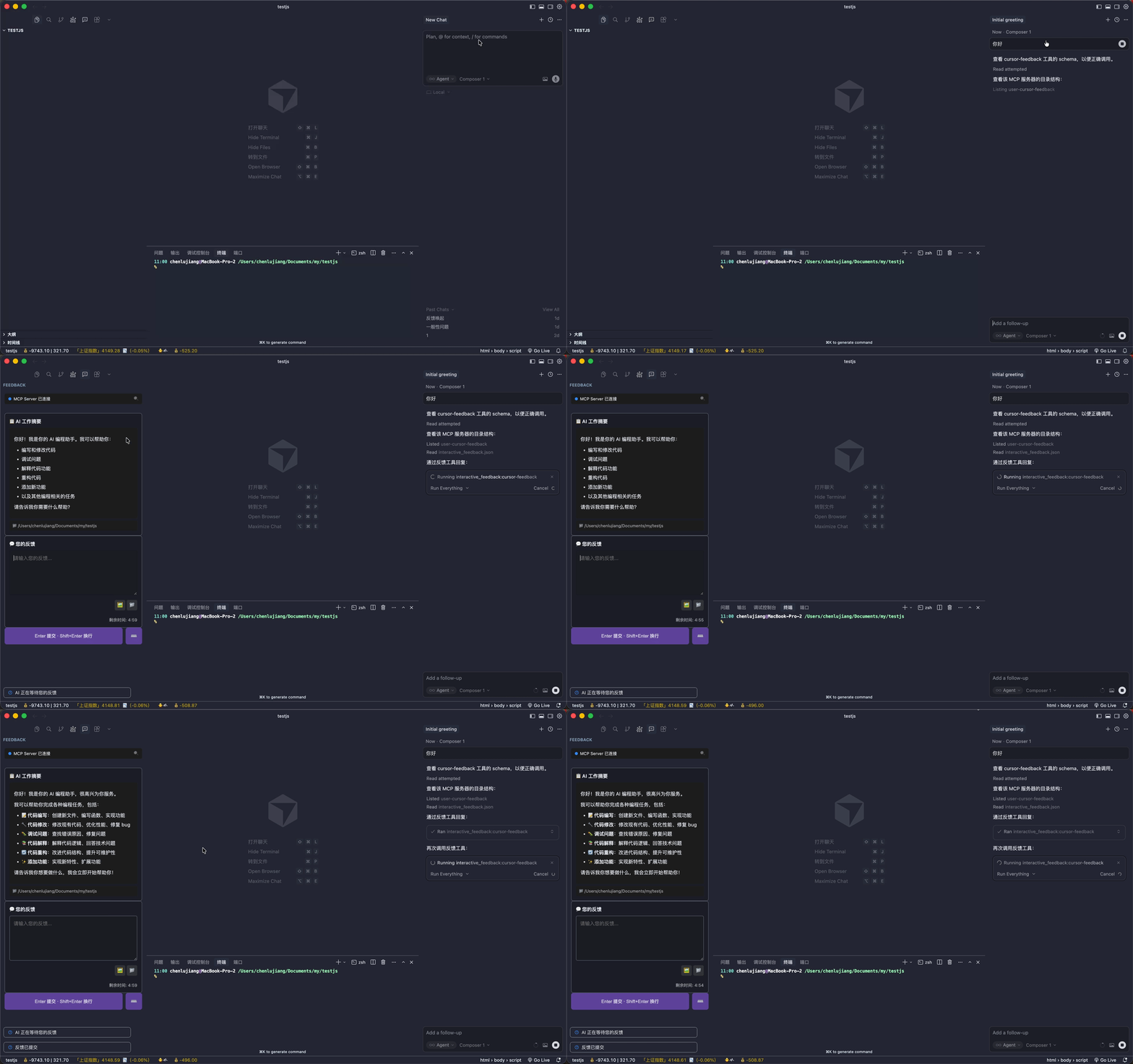
💡 Why Cursor Feedback?
If you're on Cursor's 500 requests/month plan, every conversation counts. With Cursor Feedback:
- One conversation, unlimited interactions - Keep chatting without consuming extra quota
- Human-in-the-loop workflow - AI waits for your feedback before proceeding
- Sidebar integration - No external browser needed, everything stays in your IDE
✨ Features
- 🎯 Sidebar Integration - Feedback UI embedded directly in the IDE sidebar
- 💬 Interactive Feedback - AI Agent requests feedback via MCP tool
- 🖼️ Image Support - Upload images or paste directly (Ctrl+V / Cmd+V)
- 📁 File Support - Select files/folders to share paths with AI
- 📝 Markdown Rendering - Full Markdown support for AI summaries
- ⏱️ Auto-retry on Timeout - 5-minute default timeout, AI automatically re-requests
- 🌍 Multi-language - Supports English, Simplified Chinese, Traditional Chinese
- 🔒 Project Isolation - Multiple windows work independently
🚀 Quick Start
1. Install the Cursor Extension
Search for "Cursor Feedback" in the Cursor extension marketplace.
Can't find it? Install via command line:
cursor --install-extension jianger666.cursor-feedback
2. Configure MCP Server
Option A: One-click Install (Recommended)
Click the button below to automatically configure the MCP Server:

Option B: Manual Configuration
Add to your Cursor MCP config file (~/.cursor/mcp.json):
{
  "mcpServers": {
    "cursor-feedback": {
      "command": "npx",
      "args": ["-y", "cursor-feedback@latest"]
    }
  }
}
Option C: Global Installation
npm install -g cursor-feedback
Then configure:
{
  "mcpServers": {
    "cursor-feedback": {
      "command": "cursor-feedback-mcp"
    }
  }
}
3. Usage
- Restart Cursor
- The Cursor Feedback icon appears in the sidebar
- Ask AI to call the
interactive_feedbacktool in chat - AI displays work summary in sidebar, waiting for your feedback
4. Configure User Rules (Recommended)
Add these User Rules in Cursor settings for best experience:
# Cursor Feedback Rules

1. Always call MCP cursor-feedback during any workflow, task, or conversation.
2. After receiving user feedback, call MCP cursor-feedback again and adjust behavior accordingly.
3. Before completing a task, use MCP cursor-feedback to ask for user feedback.
4. All content to show users must be passed through cursor-feedback's summary parameter.
This enables continuous interactive dialogue where AI automatically uses Cursor Feedback throughout the conversation.
📖 MCP Tool
interactive_feedback
Interactive feedback collection tool.
Parameters:
| Parameter | Type | Default | Description |
|---|---|---|---|
project_directory |
string | . |
Absolute path of project directory (for multi-window isolation) |
summary |
string | I have completed the task you requested. |
AI work summary (supports Markdown) |
timeout |
number | 300 |
Timeout in seconds (default 5 minutes) |
Timeout Mechanism:
- Default wait time: 5 minutes (300 seconds)
- On timeout, AI receives notification
- AI automatically re-calls the tool based on instructions
- Even if you step away, AI will still be waiting when you return
Returns:
User feedback content including text, images, and attached file paths.
⚙️ Configuration
Language Settings
Method 1: Click the 🌐 button in the sidebar (Recommended)
Click the globe icon in the Cursor Feedback sidebar to switch languages.
Method 2: Through VS Code Settings
Search "Cursor Feedback" in settings:
| Setting | Type | Default | Description |
|---|---|---|---|
cursorFeedback.language |
string | zh-CN |
UI language |
Available languages:
zh-CN- Simplified Chinese (简体中文)en- English
MCP Server Configuration
Basic config:
{
  "mcpServers": {
    "cursor-feedback": {
      "command": "npx",
      "args": ["-y", "cursor-feedback@latest"]
    }
  }
}
Custom timeout (optional, default 5 minutes):
{
  "mcpServers": {
    "cursor-feedback": {
      "command": "npx",
      "args": ["-y", "cursor-feedback@latest"],
      "env": {
        "MCP_FEEDBACK_TIMEOUT": "600"
      }
    }
  }
}
| Environment Variable | Default | Description |
|---|---|---|
MCP_FEEDBACK_TIMEOUT |
300 |
Timeout in seconds (default 5 minutes) |
MCP_AUTO_RETRY |
true |
Whether AI should auto-retry on timeout. Set to false to disable |
🏗️ Architecture
┌─────────────────┐     stdio      ┌──────────────────┐
│   AI Agent      │ ◄──────────► │   MCP Server     │
│   (Cursor)      │               │  (mcp-server.js) │
└─────────────────┘               └────────┬─────────┘
                                           │ HTTP API
                                           ▼
                                  ┌──────────────────┐
                                  │  Cursor Extension│
                                  │  (extension.js)  │
                                  └────────┬─────────┘
                                           │ WebView
                                           ▼
                                  ┌──────────────────┐
                                  │   User Interface │
                                  │   (Sidebar)      │
                                  └──────────────────┘
Workflow:
- AI Agent calls MCP Server's
interactive_feedbacktool via stdio - MCP Server creates feedback request, exposes via HTTP API
- Cursor extension polls for requests, displays in sidebar WebView
- User inputs feedback (text/images/files), submits via HTTP
- MCP Server returns feedback result to AI Agent
📊 Comparison with mcp-feedback-enhanced
| Feature | mcp-feedback-enhanced | cursor-feedback |
|---|---|---|
| MCP Tool | ✅ | ✅ |
| Text Feedback | ✅ | ✅ |
| Image Upload | ✅ | ✅ |
| Image Paste | ✅ | ✅ |
| File/Folder Selection | ❌ | ✅ |
| Markdown Rendering | ✅ | ✅ |
| Multi-language | ✅ | ✅ |
| Auto-retry on Timeout | ✅ | ✅ |
| IDE Sidebar Integration | ❌ | ✅ |
| Multi-window Project Isolation | ❌ | ✅ |
| Command Execution | ✅ | ⏳ |
🛠️ Development
# Clone the project
git clone https://github.com/jianger666/cursor-feedback-extension.git
cd cursor-feedback-extension

# Install dependencies
npm install

# Compile
npm run compile

# Watch mode
npm run watch

# Run lint
npm run lint

# Package extension
npx vsce package
📄 License
MIT
🙏 Acknowledgments
- mcp-feedback-enhanced - Original Python implementation
- Model Context Protocol - MCP Protocol
Reviews (0)
Sign in to leave a review.
Leave a reviewNo results found