report-helper
Health Pass
- License — License: MIT
- Description — Repository has a description
- Active repo — Last push 8 days ago
- Community trust — 30 GitHub stars
Code Pass
- Code scan — Scanned 6 files during light audit, no dangerous patterns found
Permissions Pass
- Permissions — No dangerous permissions requested
No AI report is available for this listing yet.
长篇深度研究报告的调研/写作助手,一句话自动跑完完整报告输出高质量 PDF 报告
report-helper|深度研究报告生成助手
report-helper 是一个面向深度研究报告写作的 AI Skill。它适合用来研究一个产品、公司、人物、概念、产业链、政策或趋势,并产出一份有资料来源、有判断、排版美观的正式报告。
核心特点
- 一句话启动,自动跑完整报告:给出研究对象后,自动完成资料搜集、写作、审核和 PDF 生成。
- 信息来源分级,来源可追溯:正文关键事实对应信源编号,文末按等级列出来源,方便核查。
- PDF 排版精心设计:配色、字号、行距等格式都做过适配,适合直接分享。
示例
示例由 Codex GPT-5.5 标准速度生成,耗时约 15 分钟。报告生成质量和所需时间依赖于模型能力、资料可得性、联网检索质量和研究对象复杂度。
运行示例:
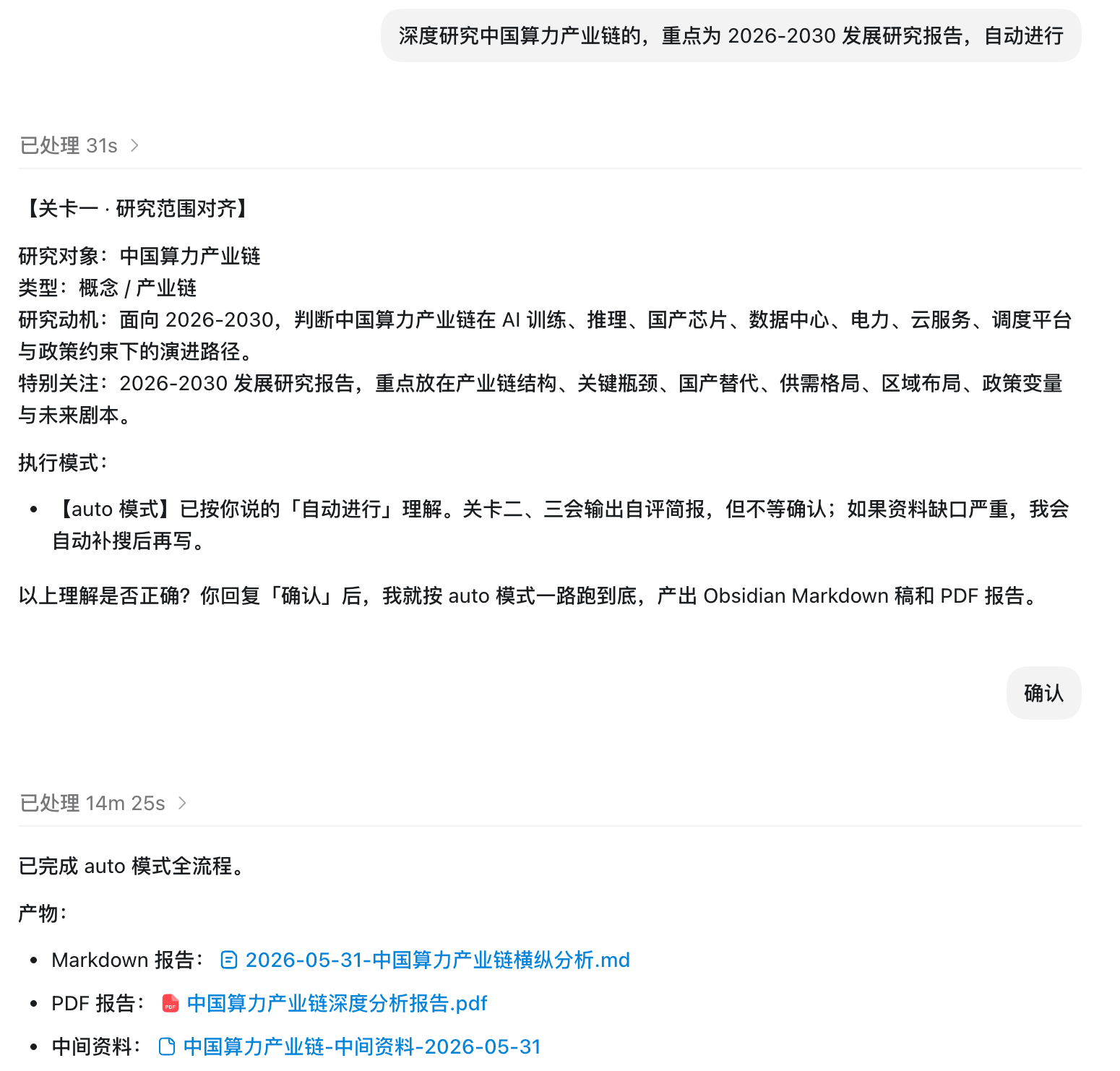
PDF 预览:
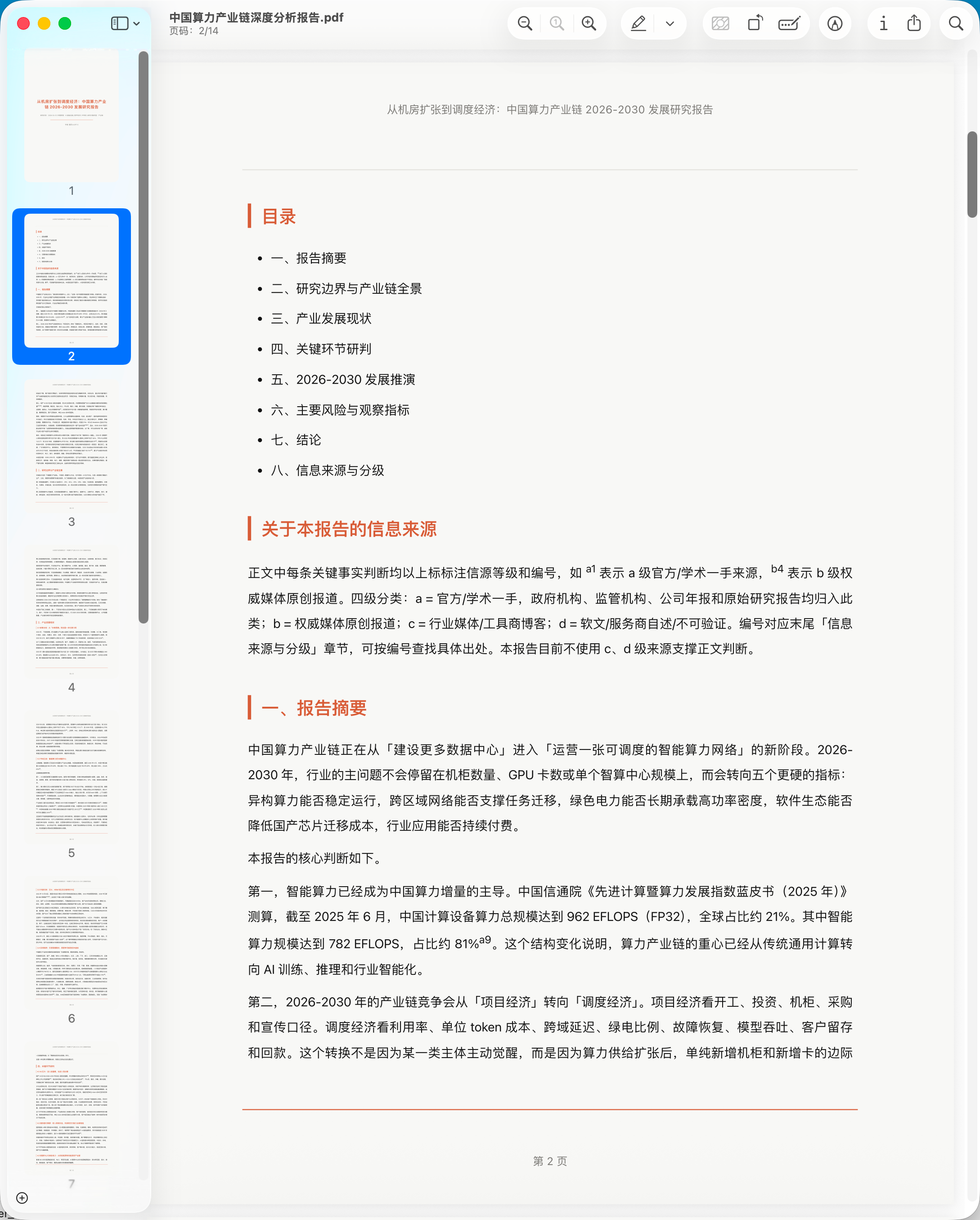
示例报告:中国算力产业链深度分析报告.pdf
安装
你可以在 Codex、Claude Code、OpenClaw 或其他支持 Skill 的 agent 中使用。把下面这句话直接复制给 agent:
请从 GitHub 安装 report-helper skill:https://github.com/Jiaranbb/report-helper。安装完成后提醒我按当前工具要求重启或刷新 agent;重启后帮我运行 python3 scripts/check_environment.py 检查环境。
如果你使用 Codex,也可以手动运行:
python3 ~/.codex/skills/.system/skill-installer/scripts/install-skill-from-github.py \
  --repo Jiaranbb/report-helper \
  --path . \
  --name report-helper
安装完成后按当前工具要求重启或刷新 agent,让新 skill 生效。
如何使用
在支持 Skills 的 AI 工具里,说出类似下面的需求即可:
深度研究 DeepSeek写一份 AI 算力产业发展研究报告深入研究某个产品的发展历程和竞争格局生成一份 2026-2030 趋势研究报告
默认情况下,report-helper 会先让你确认研究范围和执行模式。你可以选择交互模式,分阶段审核研究范围、资料充分性和写作准备;也可以选择 auto 模式,让它在中间自检后一路完成。
首次使用
第一次使用前,建议先完成三件事。
1. 检查环境
先运行环境检查:
python3 scripts/check_environment.py
它会检查 Python 版本、config.local.json、报告署名、PDF 渲染依赖,以及 Chrome fallback 是否可用。不通过时,按脚本输出补配置或安装依赖。
2. 安装 PDF 渲染依赖
如果环境检查提示缺依赖,安装:
python3 -m pip install markdown weasyprint
如果 WeasyPrint 在你的系统上安装或渲染失败,可以安装 Chrome,并在配置里填写 chrome_path,使用 Chrome 生成 PDF。
3. 指定存放目录和报告署名
复制 config.example.json 为 config.local.json,然后按自己的需要修改目录:
{
  "output_dir": "./output",
  "work_dir": "./output/work",
  "intermediate_dir": "./output/intermediate",
  "author": "你的名字或组织名"
}
output_dir:最终 PDF 存放目录work_dir:内部构建稿目录intermediate_dir:中间研究资料目录author:报告署名,会显示在 PDF 封面;首次安装时由你填写
使用提醒
- 报告生成质量高度依赖模型能力。推荐使用 Codex GPT-5.5 以获得最佳效果。
- 研究型输出依赖公开资料质量。找不到或无法确认的信息,会被标注为「未搜到 / 存疑」。
- AI 生成报告可能会出错,包括从正确事实中推出错误结论。报告只能作为学习参考,不适合作为投资、法律、医疗等专业决策的唯一依据。
- 建议对重要报告做「同行评审」(Peer Review):这里的「同行评审」指多个 AI agent 之间互相评审、挑刺、提问,交叉验证事实与推理链。
- 如果你有指定目录、重点问题、字数或读者对象,请在一开始说明。
作者
嘉然 Jiaran
- 公众号:嘉然学习笔记
- 微信:
evadebot - GitHub:https://github.com/Jiaranbb/report-helper
开源授权
本项目采用 MIT License。
更新记录
版本更新见 CHANGELOG.md。
report-helper
report-helper is a portable research-report skill. It helps an agent run web research, audit source quality, write a long-form report, review it, and render a polished PDF deliverable.
What It Produces
- PDF report
- Optional intermediate research notes and internal build logs
Installation
You can use this skill in Codex, Claude Code, OpenClaw, or another agent that supports skills. Ask the agent:
Install the report-helper skill from https://github.com/Jiaranbb/report-helper. After installation, remind me to restart or refresh the current agent as required; after restart, run python3 scripts/check_environment.py to check the environment.
Codex users can also run:
python3 ~/.codex/skills/.system/skill-installer/scripts/install-skill-from-github.py \
  --repo Jiaranbb/report-helper \
  --path . \
  --name report-helper
Restart or refresh the current agent as required after installation to load the new skill.
Quality And Review
Report quality depends heavily on model capability. Codex GPT-5.5 is recommended for best results.
AI-generated reports can still be wrong, including drawing incorrect conclusions from correct facts. Treat outputs as learning references, and use "peer review" between multiple AI agents to challenge assumptions, ask hard questions, and verify reasoning.
Typical Trigger
Use this skill when the user asks for:
deep research on X深度研究 Xindustry research reportdevelopment research report- a long-form report about a product, company, person, policy, trend, concept, or value chain
Configuration
Copy config.example.json to config.local.json for your own defaults. Do not commit config.local.json.
Resolution order:
- built-in script defaults
config.local.json, or the JSON file pointed to byREPORT_HELPER_CONFIGREPORT_HELPER_*environment variables
The scripts also support environment variables:
REPORT_HELPER_OUTPUT_DIRREPORT_HELPER_WORK_DIRREPORT_HELPER_INTERMEDIATE_DIRREPORT_HELPER_AUTHORREPORT_HELPER_LOG_PATHREPORT_HELPER_LOG_INSERT_AFTER_HEADINGREPORT_HELPER_LOG_INSERT_AFTER_MARKERREPORT_HELPER_SOURCEREPORT_HELPER_CHROMEREPORT_HELPER_DYLD_FALLBACK
Dependencies
Run the environment check first:
python3 scripts/check_environment.py
Install PDF rendering dependencies:
python3 -m pip install markdown weasyprint
If WeasyPrint is unavailable, install Chrome and set chrome_path in config.local.json or REPORT_HELPER_CHROME for PDF rendering.
Set the report byline in config.local.json:
{
  "author": "Your Name or Organization"
}
author is the report byline shown on the PDF cover.
Scripts
python scripts/check_environment.py
python scripts/render_pdf_with_fallback.py output/work/example.md output/Example深度研究报告.pdf --title "Example Report"
python scripts/append_report_log.py --date 2026-01-01 --title "Example report completed" --body "Short summary"
Public Sharing Notes
Before publishing your fork, scan shared files for absolute local paths, account names, personal workflow notes, private log headings, and account-specific URLs. Keep local override files such as .env, config.local.json, and generated output out of Git.
关于作者
嘉然 Jiaran
- 公众号:嘉然学习笔记
- 微信:
evadebot - GitHub:https://github.com/Jiaranbb/report-helper
License
MIT License. See LICENSE.
Changelog
See CHANGELOG.md.
Reviews (0)
Sign in to leave a review.
Leave a reviewNo results found