gitlab-mcp-server
Health Warn
- License — License: MIT
- Description — Repository has a description
- Active repo — Last push 0 days ago
- Low visibility — Only 5 GitHub stars
Code Pass
- Code scan — Scanned 12 files during light audit, no dangerous patterns found
Permissions Pass
- Permissions — No dangerous permissions requested
No AI report is available for this listing yet.
GitLab MCP Server in Go for AI assistants: stdio/HTTP/OAuth access to GitLab REST/GraphQL, default 2-tool dynamic find/execute surface over a canonical action catalog, optional meta/individual surfaces, 46 resources and 38 prompts.
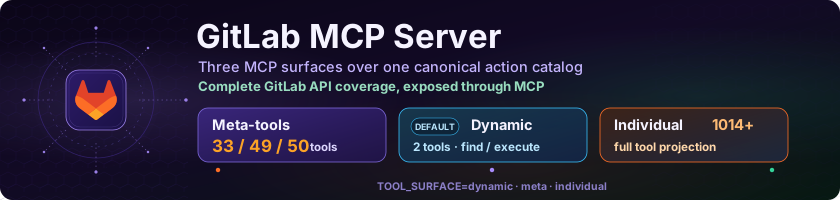
GitLab MCP Server





A Model Context Protocol (MCP) server that exposes the entire GitLab API as MCP tools, resources, and prompts for AI assistants. Single static binary — zero dependencies.
Security first: Continuously monitored on SonarCloud with quality gates, coverage, and security scanning. Supports read-only mode, safe mode (dry-run preview), and self-hosted GitLab with TLS verification.
Repository mirror: GitHub is the canonical repository. A read-only mirror of the code and releases is available on GitLab.com for discoverability; please open code contributions on GitHub.
Token Footprint
Measured with go run ./cmd/gen_readme/ against the current base catalog. Totals estimate startup context visible to an MCP client: visible tool schemas plus shared resources and prompts, using the same byte/4 token heuristic as cmd/audit_tokens.
Default configuration: with TOOL_SURFACE unset or TOOL_SURFACE=dynamic, CAPABILITY_SURFACE=full, META_TOOLS unset, META_PARAM_SCHEMA=opaque, and GITLAB_ENTERPRISE unset or false, the server uses the dynamic find/execute surface. Use TOOL_SURFACE=meta only when you explicitly want domain meta-tools; use TOOL_SURFACE=individual only when your client can handle the full tool catalog.
Configuration (TOOL_SURFACE / CAPABILITY_SURFACE) |
Visible tools | Reachable actions | META_PARAM_SCHEMA |
Tool schema tokens | Shared tokens | Total tokens |
|---|---|---|---|---|---|---|
dynamic / full (default) |
2 | 870 | n/a | 2,193 | 18,305 | 20,498 |
dynamic / minimal |
2 | 870 | n/a | 2,193 | 184 | 2,377 |
meta / full |
34 | 870 | opaque |
66,109 | 18,305 | 84,414 |
meta / minimal |
34 | 870 | opaque |
66,109 | 760 | 66,869 |
individual / full |
866 | 866 | n/a | 473,192 | 17,729 | 490,921 |
Rows use the base Community Edition catalog (GITLAB_ENTERPRISE=false). META_PARAM_SCHEMA=opaque affects only visible meta-tool input schemas; dynamic mode gets exact action schemas from gitlab_find_action, and individual mode already exposes one schema per tool. In meta + minimal, shared tokens still include meta-schema resources so opaque meta-tools can look up exact action parameter schemas.
Highlights
- 1017 MCP tools on self-managed Enterprise/Premium, or 1022 on GitLab.com Enterprise/Premium with experimental Orbit Knowledge Graph support — broad GitLab REST API v4 + GraphQL coverage across 165 domain sub-packages: projects, branches, tags, releases, merge requests, issues, pipelines, jobs, groups, users, wikis, environments, deployments, packages, container registry, runners, feature flags, CI/CD variables, security attributes, security categories, templates, admin settings, access tokens, deploy keys, Orbit, and more
- Default dynamic toolset — exposes only
gitlab_find_actionandgitlab_execute_toolwhile keeping the same canonical GitLab action catalog. Optional domain meta-tools remain available withTOOL_SURFACE=meta: 33 base, 49 on self-managed Enterprise/Premium, or 50 on GitLab.com Enterprise/Premium - AI model tool-use evaluation — automated schema-only and Docker-backed runs against a populated GitLab CE instance measure tool/action selection, parameter shaping, recovery from GitLab errors, and destructive-action safety across Anthropic, Google, OpenAI, and Qwen. Published summaries appear in the managed evaluation block below; see AI Model Evaluation Results
- 11 sampling actions — LLM-assisted code review, issue analysis, pipeline failure diagnosis, security review, release notes, milestone reports, and more via
gitlab_analyzemeta-tool (MCP sampling capability) - 4 elicitation tools — interactive creation wizards (issue, MR, release, project) with step-by-step user prompts
- 46 MCP resources — read-only data: user, groups, group members, group projects, projects, issues, pipelines, members, labels, milestones, branches, MRs, releases, tags, commits, file blobs, wiki pages, MR notes, MR discussions, meta-tool JSON Schemas, single-entity templates (issue, MR, branch, tag, release, label, milestone, commit, wiki page, deployment, environment, job, board, snippet, deploy key, feature flag, group label, group milestone), workspace roots, and 5 workflow best-practice guides
- 37 MCP prompts — AI-optimized: code review, pipeline status, risk assessment, release notes, standup, workload, user stats, team management, cross-project dashboards, analytics, milestones, Git workflow quality, audit
- 6 MCP capabilities — logging, completions, roots, progress, sampling, elicitation
- 50 tool icons — base64-encoded SVG icons (
Sizes: ["any"]) on all tools, resources, and prompts for visual identification in MCP clients - Pagination on all list endpoints with metadata (total items, pages, next/prev)
- Transports: stdio (default for desktop AI) and HTTP (Streamable HTTP for remote clients)
- Cross-platform: Windows, Linux & macOS, amd64 & arm64
- Self-hosted GitLab with self-signed TLS certificate support
Example Prompts
Once connected, just talk to your AI assistant in natural language:
"List my GitLab projects"
"Show me open merge requests in my-app"
"Create a merge request from feature-login to main"
"Review merge request !15 — is it safe to merge?"
"List open issues assigned to me"
"What's the pipeline status for project 42?"
"Why did the last pipeline fail?"
"Generate release notes from v1.0 to v2.0"
The server handles the translation from natural language to GitLab API calls. You do not need to know project IDs, API endpoints, or JSON syntax — the AI assistant figures that out for you. See Usage Examples for more scenarios.
Quick Start
1. Get the server
Download the latest binary for your platform from GitHub Releases and make it executable:
chmod +x gitlab-mcp-server-* # Linux/macOS only
Or pull the published container image:
docker pull ghcr.io/jmrplens/gitlab-mcp-server:latest
2. Configure GitLab access
Recommended: Run the built-in setup wizard — it configures your GitLab connection and MCP client in one step:
./gitlab-mcp-server --setup
Tip: The wizard supports Web UI, Terminal UI, and plain CLI modes. On Windows, double-click the
.exeto launch the wizard automatically.
Manual setup only needs a GitLab Personal Access Token with api scope:
GITLAB_TOKEN=glpat-xxxxxxxxxxxxxxxxxxxx
GITLAB_URL defaults to https://gitlab.com; add it only when you connect to a self-managed GitLab instance.
GITLAB_URL=https://gitlab.example.com
3. Connect your MCP client
Most desktop clients use stdio: the client starts one local MCP server process and talks to it over stdin/stdout. Choose one of these runtime patterns.
Native binary (stdio)
VS Code and Cursor-style MCP configuration:
Add to .vscode/mcp.json in your workspace:
{
  "servers": {
    "gitlab": {
      "type": "stdio",
      "command": "/path/to/gitlab-mcp-server",
      "env": {
        "GITLAB_TOKEN": "glpat-xxxxxxxxxxxxxxxxxxxx"
      }
    }
  }
}
Claude Desktop uses the same server command under mcpServers:
{
  "mcpServers": {
    "gitlab": {
      "command": "/path/to/gitlab-mcp-server",
      "env": {
        "GITLAB_TOKEN": "glpat-xxxxxxxxxxxxxxxxxxxx"
      }
    }
  }
}
For client-specific paths, secure token prompts, HTTP OAuth, and extra IDEs, see IDE Configuration.
Docker launched by an IDE (stdio)
If an IDE starts Docker as the MCP server process, keep docker run -i and pass --http=false after the image name. Do not publish port 8080 in this mode.
{
  "servers": {
    "gitlab": {
      "type": "stdio",
      "command": "docker",
      "args": [
        "run",
        "-i",
        "--rm",
        "-e",
        "GITLAB_TOKEN",
        "-e",
        "GITLAB_URL",
        "-e",
        "GITLAB_SKIP_TLS_VERIFY",
        "ghcr.io/jmrplens/gitlab-mcp-server:latest",
        "--http=false"
      ],
      "env": {
        "GITLAB_TOKEN": "glpat-xxxxxxxxxxxxxxxxxxxx",
        "GITLAB_URL": "https://gitlab.com",
        "GITLAB_SKIP_TLS_VERIFY": "false"
      }
    }
  }
}
Docker or binary as an HTTP MCP server
Use HTTP mode for shared, remote, or multi-user deployments. The Docker image
starts in HTTP mode by default, but the flags are shown explicitly here for
clarity. These examples publish the container port on host loopback only;--http-addr=0.0.0.0:8080 binds inside the container.
# Fixed GitLab instance for all clients
docker run -d --name gitlab-mcp-server -p 127.0.0.1:8080:8080 \
  ghcr.io/jmrplens/gitlab-mcp-server:latest \
  --http \
  --http-addr=0.0.0.0:8080 \
  --gitlab-url=https://gitlab.com

# Multi-instance mode: clients send GITLAB-URL per request
docker run -d --name gitlab-mcp-server -p 127.0.0.1:8080:8080 \
  ghcr.io/jmrplens/gitlab-mcp-server:latest \
  --http \
  --http-addr=0.0.0.0:8080
HTTP clients authenticate each request with PRIVATE-TOKEN or Authorization: Bearer:
{
  "servers": {
    "gitlab": {
      "type": "http",
      "url": "http://localhost:8080/mcp",
      "headers": {
        "PRIVATE-TOKEN": "glpat-xxxxxxxxxxxxxxxxxxxx"
      }
    }
  }
}
In multi-instance mode, clients must also send GITLAB-URL. See HTTP Server Mode for OAuth, reverse proxy, rate limit, and server-pool details.
4. Verify
Open your AI client and try:
"List my GitLab projects"
See the Getting Started guide for detailed setup instructions.
Tool Modes
Three registration modes, controlled by TOOL_SURFACE:
| Mode | Tools | Description |
|---|---|---|
| Dynamic Toolset (default) | 2 visible tools | Low-token find/execute surface over the canonical action catalog. |
| Meta-Tools | 33 base domain meta-tools plus the gitlab_server helper |
Domain-grouped dispatchers with action parameter. Enable with TOOL_SURFACE=meta; see the full 33/49/50 catalog in Meta-Tools Reference. |
| Individual | 866 CE / 1017 self-managed enterprise / 1022 GitLab.com Enterprise | Every GitLab operation as a separate MCP tool. |
For dynamic experiments where resources and prompts dominate initial context, set CAPABILITY_SURFACE=minimal (stdio) or --capability-surface=minimal (HTTP). Dynamic minimal keeps only gitlab://workspace/roots; meta minimal keeps workspace roots plus meta-schema resources so opaque meta-tools can still read exact action schemas. The default remains full.
Dynamic mode is now the default low-token find/execute surface; see Dynamic Toolset for the field-aware ranking model, fuzzy fallback, response shapes, workflow diagrams, and migration guidance. Set TOOL_SURFACE=meta to use the consolidated domain meta-tool catalog.
The detailed meta-tool catalog now lives in Meta-Tools Reference, including action counts, Enterprise/Premium markers, and examples.
Compatibility
| MCP Capability | Support |
|---|---|
| Tools | Up to 1022 individual / 33–50 meta |
| Resources | 46 (static + templates) |
| Prompts | 37 templates |
| Completions | Project, user, group, branch, tag |
| Logging | Structured (text/JSON) + MCP notifications |
| Progress | Tool execution progress reporting |
| Sampling | 11 LLM-powered analysis actions via gitlab_analyze |
| Elicitation | 4 interactive creation wizards |
| Roots | Workspace root tracking |
Tested with: VS Code + GitHub Copilot, Claude Desktop, Claude Code, Cursor, Windsurf, JetBrains IDEs, Zed, Kiro, Cline, Roo Code.
See the full Compatibility Matrix for detailed client support.
AI Model Tool-Use Evaluation
The project includes an automated evaluator for model-facing MCP quality. It can
run schema-only checks against the tool catalog or execute validated model tool
calls through MCP against a Docker GitLab CE instance populated with fixtures.
The evaluator measures whether each model chooses the correct meta-tool and
action, sends valid parameters, recovers from actionable GitLab errors, and
respects destructive-action safeguards.
Current published result: 2026-05-18 Meta and Dynamic Docker full run.
| Provider | Model | Compatibility | Tool accuracy | Recovery | Docker live status |
|---|---|---|---|---|---|
| Anthropic | claude-haiku-4-5-20251001 |
Review | 100.0% | No repairs | 98.5% final across 264 ops |
gemini-3.1-flash-lite-preview |
Review | 91.2% | 76.9% (10/13) | 97.8% final across 264 ops | |
| OpenAI | gpt-5.4-nano |
OK | 100.0% | 100.0% (2/2) | 100.0% final across 264 ops |
| Qwen | qwen3.6-flash |
Review | 97.0% | 100.0% (2/2) | 97.0% final across 264 ops |
The published model-evaluation set covers 544 task attempts and 1056 expected MCP operations. Across the selected reports, models emitted 1043 tool calls over 1064 model requests, with 98.3% aggregate final success. See AI Model Evaluation Results for the detailed current matrix.
Current published result: 2026-05-18 Meta and Dynamic Docker full run.
| Provider | Model | Compatibility | Tool accuracy | Recovery | Docker live status |
|---|---|---|---|---|---|
| Anthropic | claude-haiku-4-5-20251001 |
Review | 100.0% | 100.0% (1/1) | 100.0% final across 256 ops |
gemini-3.1-flash-lite-preview |
Review | 99.3% | 100.0% (1/1) | 100.0% final across 256 ops | |
| OpenAI | gpt-5.4-nano |
OK | 100.0% | No repairs | 100.0% final across 256 ops |
| Qwen | qwen3.6-flash |
OK | 100.0% | No repairs | 100.0% final across 256 ops |
The published model-evaluation set covers 536 task attempts and 1024 expected MCP operations. Across the selected reports, models emitted 1072 tool calls over 1073 model requests, with 100.0% aggregate final success. See AI Model Evaluation Results for the detailed current matrix.
Documentation
Full documentation is available at jmrplens.github.io/gitlab-mcp-server.
| Document | Description |
|---|---|
| Getting Started | Download, setup wizard, per-client configuration |
| IDE Configuration | Per-client stdio, HTTP legacy, and HTTP OAuth examples |
| Configuration | Environment variables, transport modes, TLS |
| HTTP Server Mode | Shared HTTP deployments, authentication, server pool isolation |
| Tools Reference | All individual tools with input/output schemas, including GitLab.com-only Orbit |
| Meta-Tools | 33/49/50 domain meta-tools with action dispatching |
| Dynamic Toolset | 2-tool low-token mode with canonical action catalog, safety model, and examples |
| Resources | All 46 resources with URI templates |
| Prompts | All 37 prompts with arguments and output format |
| Auto-Update | Self-update mechanism, modes, and release format |
| Testing | Unit, E2E, schema model evaluation, Docker model evaluation, and curated model results |
| Security | Security model, token scopes, input validation |
| Architecture | System architecture, component design, data flow |
| Development Guide | Building, testing, CI/CD, contributing |
Tech Stack
| Component | Technology |
|---|---|
| Language | Go 1.26+ |
| MCP SDK | github.com/modelcontextprotocol/go-sdk v1.6.0 |
| GitLab Client | gitlab.com/gitlab-org/api/client-go/v2 v2.27.0 |
| Transport | stdio (default), HTTP (Streamable HTTP) |
Building from Source
git clone https://github.com/jmrplens/gitlab-mcp-server.git
cd gitlab-mcp-server
make build
See the Development Guide for cross-compilation and contributing guidelines.
Container Image
The published image is ghcr.io/jmrplens/gitlab-mcp-server:latest. Runtime examples live in Quick Start next to MCP client configuration, and Docker Compose/source-build details live in the Development Guide.
FAQ
Does it work with self-hosted GitLab?Yes. Set GITLAB_URL to your instance URL. When GITLAB_URL is omitted, stdio mode uses https://gitlab.com. Self-signed TLS certificates are supported via GITLAB_SKIP_TLS_VERIFY=true.
The server runs locally on your machine (stdio mode) or on your own infrastructure (HTTP mode). No data is sent to third parties — all API calls go directly to your GitLab instance. See SECURITY.md for details.
Can I use it in read-only mode?Yes. Set GITLAB_READ_ONLY=true to disable all mutating tools (create, update, delete). Only read operations will be available.
Alternatively, set GITLAB_SAFE_MODE=true for a dry-run mode: mutating tools remain visible but return a structured JSON preview instead of executing. Useful for auditing, training, or reviewing what an AI assistant would do.
Both Community Edition (CE) and Enterprise Edition (EE). Set GITLAB_ENTERPRISE=true in stdio mode to enable additional tools for Premium/Ultimate features (DORA metrics, vulnerabilities, compliance, etc.). In HTTP mode, --enterprise can force the Enterprise/Premium catalog, otherwise CE/EE is detected per token+URL pool entry when GitLab reports edition.
The server includes retry logic with backoff for GitLab API rate limits. Errors are classified as transient (retryable) or permanent, with actionable hints in error messages.
Which AI clients are supported?Any MCP-compatible client: VS Code + GitHub Copilot, Claude Desktop, Cursor, Claude Code, Windsurf, JetBrains IDEs, Zed, Kiro, and others. The built-in setup wizard can auto-configure most clients.
Contributing
See CONTRIBUTING.md for development guidelines, branch naming, commit conventions, and pull request process.
Security
See SECURITY.md for the security policy and vulnerability reporting.
Code of Conduct
See CODE_OF_CONDUCT.md. This project follows the Contributor Covenant v2.1.
Unnecessary Statistics
Numbers nobody asked for, but here they are anyway.
File counts
| Category | Files | Lines |
|---|---|---|
Source (.go, non-test) |
849 | 142,704 |
Unit tests (_test.go) |
444 | 243,703 |
| End-to-end tests | 111 | 24,416 |
| Total | 1,404 | 410,823 |
Functions
| Category | Count |
|---|---|
| Source functions | 5,634 |
| — exported (public) | 2,392 |
| — unexported (private) | 3,242 |
Unit test functions (TestXxx) |
9,955 |
Subtests (t.Run(...)) |
2,191 |
| End-to-end test functions | 252 |
Ratios worth noting
| Observation | Value |
|---|---|
| Test lines vs source lines | 1.71× more tests than code |
| Average source file length | ~168 lines |
| Average test file length | ~548 lines |
| Comment lines in source | 11,765 (~8.2% of source) |
| Test functions per source function | 1.8× |
Code patterns
| Pattern | Count |
|---|---|
if err != nil checks |
5,929 |
defer statements |
757 |
struct types defined |
2,210 |
//nolint suppressions |
48 |
TODO / FIXME / HACK comments |
1 |
Project
| Metric | Value |
|---|---|
| Go packages | 207 |
Direct dependencies (go.mod) |
11 |
| Indirect dependencies | 49 |
| Git commits | 149 |
| Unique contributors | 2 |
Hall of fame
| Record | File |
|---|---|
| Longest source file | cmd/eval_mcp_surfaces/main.go — 8,841 lines |
| Longest test file | internal/tools/projects/projects_test.go — 6,903 lines |
Because why not
| Fact | Value |
|---|---|
| Source code printed at 55 lines/page | ~2,594 pages of A4 |
Source lines mentioning "gitlab" |
8,327 (impossible to avoid) |
| Longest function name in source | assertDynamicCompatibilityPolicyOwnedByActionCompat (51 chars) |
| Longest test function name | TestRequiredMissingAndUnknownParamNames_SchemaValidation_ReturnsSortedMissingAndUnknown (87 chars) |
Reviews (0)
Sign in to leave a review.
Leave a reviewNo results found