usage-band-mod
Health Warn
- License — License: NOASSERTION
- Description — Repository has a description
- Active repo — Last push 0 days ago
- Low visibility — Only 5 GitHub stars
Code Pass
- Code scan — Scanned 12 files during light audit, no dangerous patterns found
Permissions Pass
- Permissions — No dangerous permissions requested
No AI report is available for this listing yet.
Claude Code mod: a live usage band above the prompt with context window, 5-hour, weekly and per-model limits and session cost. Native macOS settings window.

Usage Band
A Claude Code mod that keeps your limits in sight: context window, 5-hour session, week and per-model usage, in one line above the prompt.



-black)
Install · What it shows · Meet the mascot · What leaves your machine · Settings window
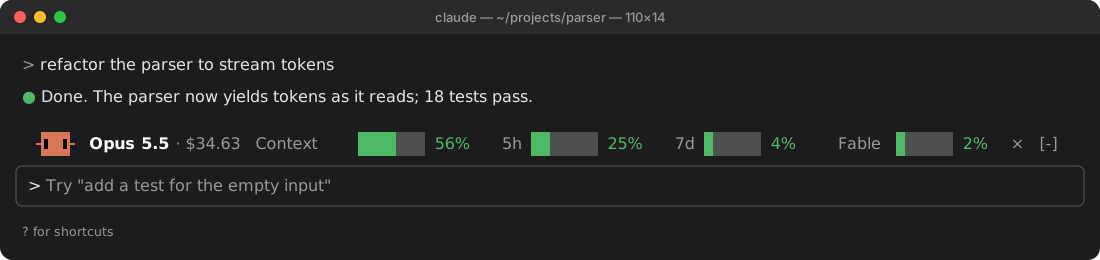
In the terminal: the band line is the mod's real output at 110 columns with sample numbers, drawn cell by cell in Claude Code's dark theme colors; the window around it is an illustration.

In the Claude desktop app.
Status: early release (0.4.1), maintained by one person. Tested on macOS 26.6 with Claude Code 2.1.302, in the terminal and in the desktop app; the mod also loads on engine 2.1.295, which some desktop app installs still bundle (CI checks it). The Windows settings window is a preview: on GitHub Actions runners (Windows Server 2022 and 2025 on x64, Windows 11 25H2 on ARM64) it was built, opened, driven by UI Automation and the keyboard, and checked by screenshot, but no person has used it yet. On Windows, the first user saw the mod load in the claude CLI on Windows 11; the band on screen and opening the window from a Claude Code session have not been confirmed there yet (CI has no login). The settings window needs macOS 26 or Windows 10/11 with .NET Framework 4.8.
What it shows
- Model and session cost. The cost is what the session would cost at API prices. On a Pro or Max subscription it is an equivalent, not a charge. Show it in US dollars, Brazilian reais or euros Converted values use market rates, not what your card charges.
- Context window used by the current session.
- 5-hour session and weekly limits of your subscription. These two bars only appear in subscription sessions; with an API key, Bedrock or Vertex they stay hidden instead of sitting empty.
- Per-model weekly limit, such as Fable, when your account has one.
- Colors follow the level: green below 60%, yellow from 60%, red from 85%.
- Narrow terminals keep the line on one row. Space runs out in this order: the reset times, then the bars, then the cost, the mascot and the model, and only then the last bars.
- Reset times next to the 5-hour, weekly and per-model bars (
↻ 2h 10m), and the tokens used next to the context bar (112k/200k), when the line has room.
Meet the mascot
A pixel crab sits at the start of the band and runs through 13 gestures in a 56-second loop. Pick animated, still or hidden; it stays still when your system asks for reduced motion. In the terminal, which has no pictures, it is a one-line face: arms, an orange body and two black eyes.
 Laptop |
 Coffee |
 Dance |
 Shades |
 Party |
 Nap |
 Crab walk |
 Heart |
 Idea |
 Peekaboo |
 Wave |
 Hop |
 Look around |
Install
In Claude Code, in a terminal:
/plugin install usage-band-mod --marketplace jonathanlocks/usage-band-mod
In the Claude desktop app, where /plugin is not available: click + next to the prompt box, then Plugins, Add marketplace with jonathanlocks/usage-band-mod, then Add plugin.
From a shell:
claude plugin install usage-band-mod --marketplace jonathanlocks/usage-band-mod
The install screen asks for the options below. Change them later in /config, under usage-band-mod, or in the settings window on macOS and Windows.
Step-by-step guides, written so an agent can follow them: INSTALL-MACOS.md · INSTALL-WINDOWS.md.
Commands
| Command | What it does |
|---|---|
/usage-band |
Shows or hides the band. The × on the band hides it too. |
/usage-settings |
Opens the settings window (macOS 26; Windows 10/11 as a preview, see Status). In the desktop app, the ⚙ on the band does the same. |
With the language set to Portuguese, the commands are /uso-barra and /uso-ajustes.
Options
| Option | Values | Default |
|---|---|---|
| Language | en, pt |
en |
| Currency | USD, BRL, EUR |
USD |
| Mascot | animado (animated), parado (still), oculto (hidden) |
animado |
| Per-model weekly limit | on, off | on |
What leaves your machine
| Where | When | What |
|---|---|---|
api.anthropic.com/api/oauth/usage |
At most every 10 minutes, only with the per-model limit on | A GET with your subscription login. Claude Code attaches the token; the mod never sees it. |
api.coinbase.com/v2/exchange-rates |
At most every 6 hours, only when the currency is not USD | A GET with no login. After a failure it waits 5 minutes, then 30 minutes, then 2 hours. A rate older than 3 days is not used. |
Nothing about your conversations, projects or files is sent. With CLAUDE_CODE_DISABLE_NONESSENTIAL_TRAFFIC set, the mod makes no requests at all.
[!NOTE]
The per-model limit reads an internal Anthropic endpoint with no public documentation. It can change or stop working without notice; if it does, that bar disappears. Turn the option off if you would rather not use it.
When to use something else
- For a one-off look at your limits, Claude Code's own
/usageis enough. - For reports across past sessions and days, use a log analyzer such as ccusage. This mod only shows the current session and your live limits; it keeps no history.
Settings window (macOS and Windows)
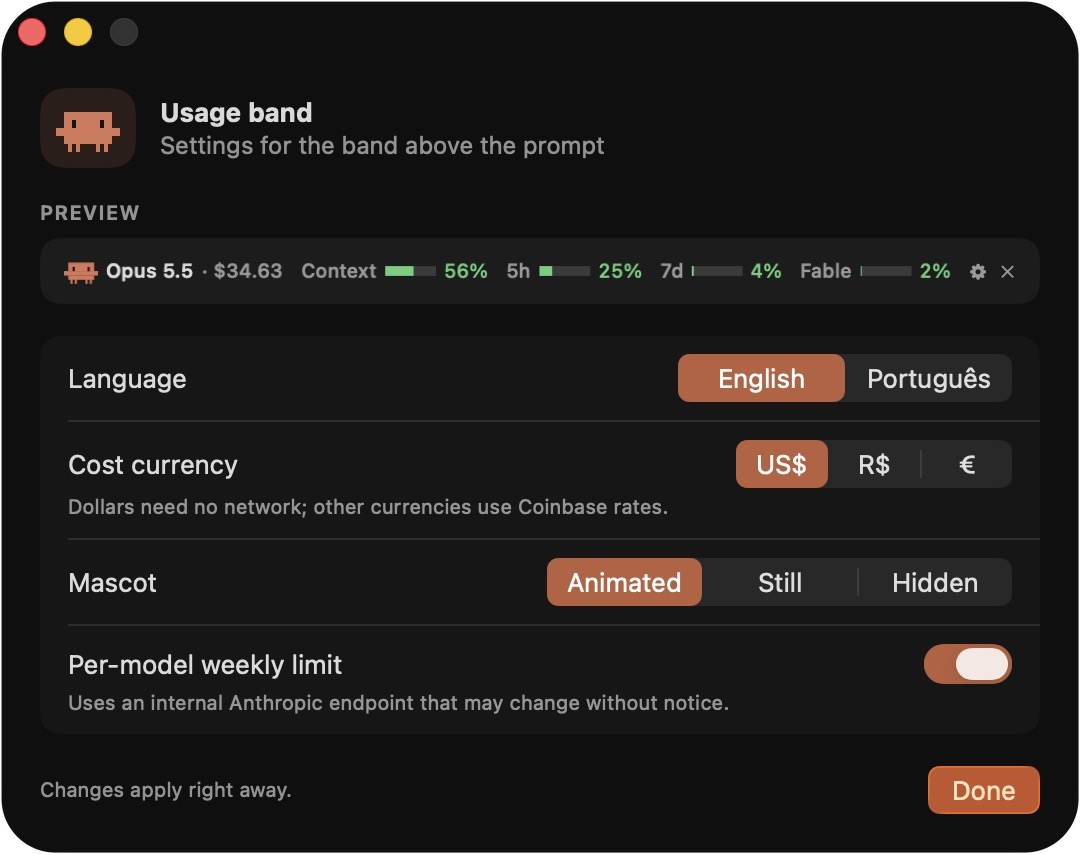 |
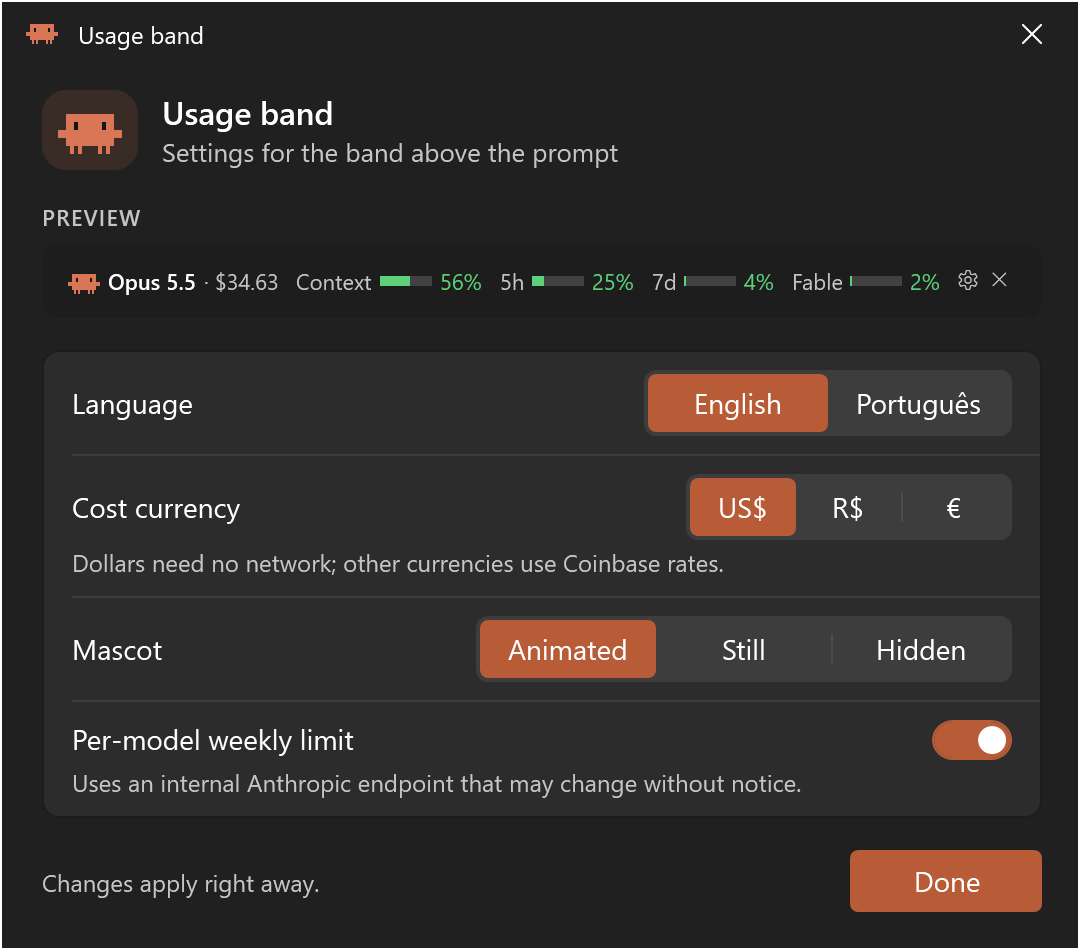 |
| macOS 26, Liquid Glass | Windows, dark theme: the window's content rendered at 2× by the app's --print on a CI runner (Windows Server 2025). The title bar strip is drawn by the app; the real one belongs to Windows. |
macOS
macos/PainelDeUso.app is a small SwiftUI app built from macos/Sources/PainelDeUso.swift. It does not use the network. It talks to the mod only through standard output, one JSON line per change, and changes apply to the band right away. Its only file output is a PNG, and only when you run it by hand with the developer flag --print.
The repository ships the app already built (universal, ad-hoc signed), so you do not need Xcode. To check that the shipped app matches this source, build it yourself; the script ends by comparing your build with the published SHA-256 in macos/PainelDeUso.sha256 and prints OK or FAILED:
./macos/build.sh
The published hash comes from Swift 6.4 (Xcode command line tools with the macOS 26 SDK). Another Swift version can produce a different binary, and then the check fails even though the source is the same.
Windows
windows/PainelDeUso.exe is a small WPF app built from windows/Sources on .NET Framework 4.8, which Windows 10 (1903 and later) and Windows 11 already include; nothing to install. It follows the system theme, high contrast and reduced motion, works with the keyboard, and gives every control a name for screen readers such as Narrator; all of that was checked on CI runners, not on a person's PC. On Windows 11 it asks the system for the Mica background: the runners accepted the request but drew a solid color, so Mica has not been seen on screen yet. Windows 10 gets a solid background (rendered sample). It does not use the network and talks to the mod only through standard output, the same JSON lines as on the Mac. Its only file output is a PNG with the developer flag --print.
Not code-signed. The executable has no digital signature and has not been tested against SmartScreen, Smart App Control or antivirus software. On Windows 11 with Smart App Control on, Windows may refuse to run it, and Smart App Control has no per-app exception. If the window does not open, /usage-settings says so and points to /config, which has the same options; INSTALL-WINDOWS.md shows how to tell whether Smart App Control is the cause.
To check the shipped executable against the source, install the .NET SDK pinned in windows/global.json and run, in PowerShell 7 or in the Windows PowerShell 5.1 that comes with Windows:
pwsh windows/build.ps1
powershell -ExecutionPolicy Bypass -File windows\build.ps1
The build is deterministic: CI compiles it on two Windows images and compares both with windows/PainelDeUso.sha256. In WSL the session runs on Linux: the band works and the options live in /config.
On Linux, in WSL, or on macOS before 26, use /config. The options are the same.
Development
claude plugin validate .
claude plugin test .
claude --plugin-dir .
pwsh windows/build.ps1   # on Windows, with the .NET SDK from windows/global.json (or powershell -File, see above)
The mascot is drawn frame by frame in arte/gerar_mascote.py:
python3 arte/gerar_mascote.py            # writes hooks/mascote.ts
python3 arte/gerar_mascote.py --previa   # also writes arte/previa.html with every gesture
python3 arte/gerar_mascote.py --check    # fails if hooks/mascote.ts is out of date
tsconfig.json extends .claude-plugin/types/tsconfig.json, which Claude Code writes when it loads the mod from a watched plugin folder. On a fresh clone, write the types once and then run tsc (the first command may answer Not logged in; the types are written anyway):
CLAUDE_CODE_PLUGIN_DIR_WATCH=1 claude --plugin-dir . -p ok
npx -y -p [email protected] tsc -p .
GitHub Actions runs ci.yml on every push: validate, test and type-check on Linux, macOS and Windows, check both published hashes and that no file has CRLF line endings, rebuild PainelDeUso.exe on two Windows images and compare it with the published hash, talk to the app the way the mod does, and install the mod from PowerShell. capturas.yml runs by hand and produces PNGs of the Windows window in light and dark, English and Portuguese, with the Windows 11 and the Windows 10 path, real screenshots (light, dark, high contrast, keyboard focus), a glyph check of the band's characters in the legacy console and in Windows Terminal (a script prints them; it is not a Claude Code session), and an accessibility scan. The scripts in windows/ci/ that change system settings refuse to run outside GitHub Actions. In a fork: gh workflow run capturas.yml, then download the artifacts with gh run download.
Changes are listed in CHANGELOG.md.
Star history
License
The code is MIT. The mascot drawings are fan art of Clawd, the Claude Code mascot, and are not covered by the MIT License.
This is an independent project, not made, endorsed or supported by Anthropic. Claude, Claude Code and Clawd are trademarks of Anthropic.
Reviews (0)
Sign in to leave a review.
Leave a reviewNo results found