optio
Health Pass
- License — License: MIT
- Description — Repository has a description
- Active repo — Last push 0 days ago
- Community trust — 905 GitHub stars
Code Warn
- process.env — Environment variable access in apps/api/drizzle.config.ts
- process.env — Environment variable access in apps/api/scripts/dump-openapi.ts
- process.env — Environment variable access in apps/api/src/db/client.ts
Permissions Pass
- Permissions — No dangerous permissions requested
No AI report is available for this listing yet.
Workflow orchestration for AI coding agents, from task to merged PR.
Optio
Workflow orchestration for AI coding agents — from ticket to merged PR, and beyond.


Optio has one user-facing concept — a Task — with one attribute that flips the pipeline behind it: does the task have a repo?
- Repo Tasks — turn tickets into merged pull requests. Submit a task (manually, from a GitHub Issue, Linear, Jira, or Notion), and Optio provisions an isolated environment, runs an AI agent, opens a PR, monitors CI, triggers code review, auto-fixes failures, and merges when everything passes.
- Standalone Tasks — run reusable, parameterized agent work with no repo checkout. Generate reports, triage alerts, audit dependencies, query a database, post to Slack — anything that doesn't need to land as a PR.
- Connections — give your agents access to external services. Connect Notion, Slack, Linear, GitHub, PostgreSQL, Sentry, or any MCP-compatible server, and Optio injects them into agent pods at runtime.
Both flavors share the same trigger types (manual, schedule, webhook, ticket), the same prompt-template engine, the same real-time log streaming, and the same /api/tasks HTTP surface. The difference is whether the agent runs against a worktree or in an empty pod. See docs/tasks.md for the full breakdown.
The feedback loop is what makes Repo Tasks different. When CI fails, the agent is automatically resumed with the failure context. When a reviewer requests changes, the agent picks up the review comments and pushes a fix. When everything passes, the PR is squash-merged and the issue is closed. You describe the work; Optio drives it to completion.
Under the hood, all task and pod state changes flow through a Kubernetes-style reconciliation control plane — a pure-decision-plus-CAS-executor loop with periodic resync that keeps runs from getting stuck on lost events.
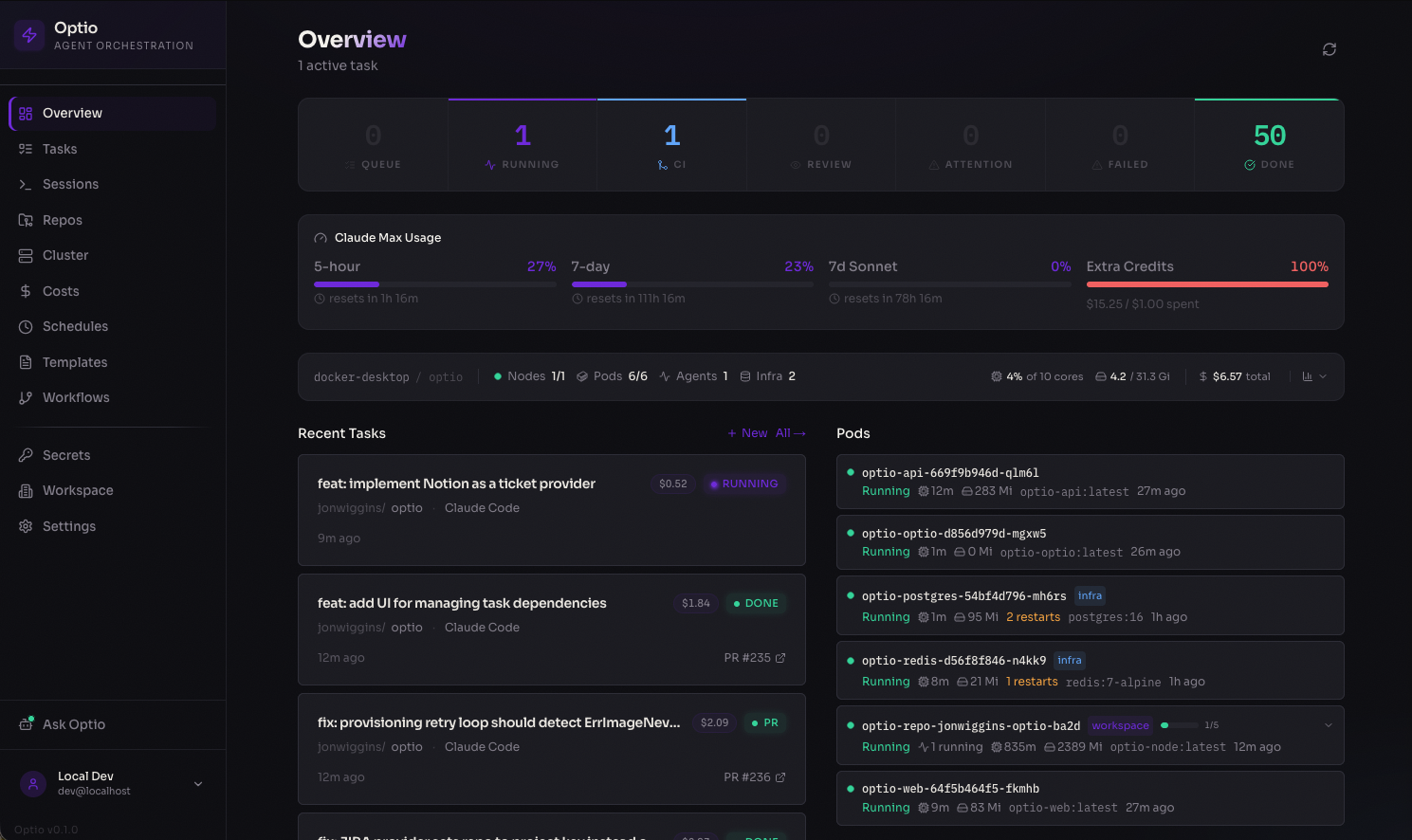
Dashboard — real-time overview of running agents, pod status, costs, and recent activity
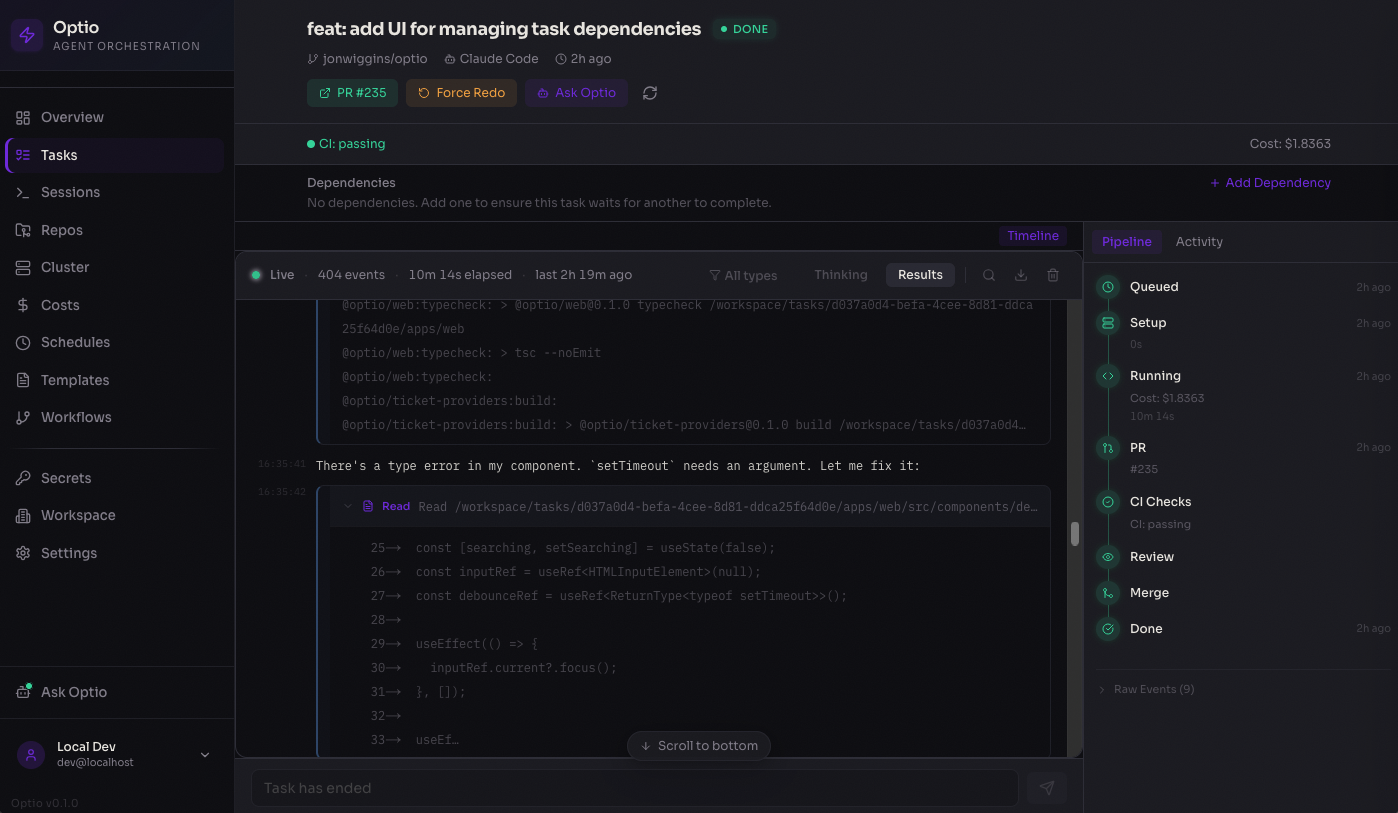
Task detail — live-streamed agent output with pipeline progress, PR tracking, and cost breakdown
How It Works
Repo Tasks — ticket to merged PR
You create a task          Optio runs the agent           Optio closes the loop
─────────────────          ──────────────────────         ──────────────────────

  GitHub Issue              Provision repo pod             CI fails?
  Manual task       ──→     Create git worktree    ──→       → Resume agent with failure context
  Linear / Jira / Notion    Run Claude / Codex / Copilot   Review requests changes?
                            Open a PR                        → Resume agent with feedback
                                                           CI passes + approved?
                                                             → Squash-merge + close issue
- Intake — tasks come from the web UI, GitHub Issues (one-click assign), Linear, Jira, or Notion
- Provisioning — Optio finds or creates a Kubernetes pod for the repo, creates a git worktree for isolation
- Execution — the AI agent (Claude Code, OpenAI Codex, or GitHub Copilot) runs with your configured prompt, model, and settings
- PR lifecycle — Optio polls the PR every 30s for CI status, review state, and merge readiness
- Feedback loop — CI failures, merge conflicts, and review feedback automatically resume the agent with context
- Completion — PR is squash-merged, linked issues are closed, costs are recorded
Standalone Tasks — reusable agent work without a repo
You define a task           Optio triggers it              Optio runs & tracks
────────────────────        ─────────────────              ───────────────────

  Prompt template           Manual (UI / API)              Provision isolated pod
  {{PARAM}} variables  ──→  Cron schedule          ──→     Execute agent with params
  Agent + model config      Webhook from external          Stream logs in real time
  Budget & retry limits     Ticket events                  Track cost & token usage
                                                           Auto-retry on failure
Standalone Tasks run an agent in an isolated pod with no git checkout. Define a prompt template with {{PARAM}} placeholders, configure triggers (manual, cron schedule, webhook, or ticket), and let Optio handle execution, retries, and cost tracking. Repo Tasks can also be saved as blueprints with the same trigger types — see docs/tasks.md.
Connections — extend agent capabilities
Connections give your agents access to external tools and data at runtime. Configure a provider once, assign it to repos or agents, and Optio injects MCP servers into agent pods automatically.
Built-in providers: Notion, GitHub, Slack, Linear, PostgreSQL, Sentry, Filesystem, plus custom MCP servers and HTTP APIs.
Key Features
- Autonomous feedback loop — auto-resumes the agent on CI failures, merge conflicts, and review feedback; auto-merges when everything passes
- Repo Tasks and Standalone Tasks — one Task concept, two pipelines. Repo Tasks land code via PRs; Standalone Tasks run agents in empty pods for reports, triage, and ops. Both share triggers (manual / schedule / webhook / ticket), templates, and the unified
/api/tasksHTTP layer - Connections — plug external services (Notion, Slack, Linear, GitHub, PostgreSQL, Sentry, custom MCP servers) into agent pods with fine-grained access control per repo and agent type
- Pod-per-repo architecture — one long-lived Kubernetes pod per repo with git worktree isolation, multi-pod scaling, and idle cleanup
- Code review agent — automatically launches a review agent as a subtask, with a separate prompt and model
- Multi-agent support — run Claude Code, OpenAI Codex, GitHub Copilot, Google Gemini, or OpenCode with per-repo model and prompt configuration
- GitHub Issues, Linear, Jira, and Notion intake — assign issues to Optio from the UI or via ticket sync
- Reconciliation control plane — K8s-style pure-decision-plus-CAS-executor loop with periodic resync; keeps tasks and pods from getting stuck on lost events. Ships in shadow mode behind a feature flag
- Real-time dashboard — live log streaming, pipeline progress, cost analytics, and cluster health
Architecture
┌──────────────┐     ┌────────────────────┐     ┌───────────────────────────┐
│   Web UI     │────→│    API Server      │────→│      Kubernetes           │
│   Next.js    │     │    Fastify         │     │                           │
│   :3100      │     │                    │     │  ┌── Repo Pod A ───────┐  │
│              │←ws──│  Workers:          │     │  │ clone + sleep       │  │
│  Dashboard   │     │  ├─ Task Queue     │     │  │ ├─ worktree 1  ⚡    │  │
│  Tasks       │     │  ├─ PR Watcher     │     │  │ ├─ worktree 2  ⚡    │  │
│  Repos       │     │  ├─ Workflow Queue │     │  │ └─ worktree N  ⚡    │  │
│  Standalone  │     │  ├─ Reconciler     │     │  └─────────────────────┘  │
│  Connections │     │  ├─ Health Mon     │     │  ┌── Standalone Pod ────┐ │
│  Cluster     │     │  └─ Ticket Sync    │     │  │ isolated agent  ⚡    │ │
│  Costs       │     │                    │     │  └─────────────────────┘  │
│              │     │  Services:         │     │                           │
│              │     │  ├─ Repo Pool      │     │                           │
│              │     │  ├─ Workflow Pool  │     │  MCP servers injected via │
│              │     │  ├─ Connections    │     │  Connections at runtime    │
│              │     │  ├─ Review Agent   │     │                           │
│              │     │  └─ Auth/Secrets   │     │                           │
└──────────────┘     └─────────┬──────────┘     └───────────────────────────┘
                               │                  ⚡ = Claude / Codex / Copilot / Gemini
                        ┌──────┴──────┐
                        │  Postgres   │  Tasks, workflows, connections, logs, secrets
                        │  Redis      │  Job queue, pub/sub, live streaming
                        └─────────────┘
Task lifecycle
  ┌──────────────────────────────────────────────────┐
  │                     INTAKE                       │
  │                                                  │
  │   GitHub Issue ───→ ┌──────────┐                 │
  │   Manual Task ───→  │  QUEUED  │                 │
  │   Ticket Sync ───→  └────┬─────┘                 │
  └───────────────────────────┼──────────────────────┘
                              │
  ┌───────────────────────────┼──────────────────────┐
  │                 EXECUTION ▼                      │
  │                                                  │
  │   ┌──────────────┐    ┌─────────────────┐        │
  │   │ PROVISIONING │───→│     RUNNING     │        │
  │   │ get/create   │    │  agent writes   │        │
  │   │ repo pod     │    │  code in        │        │
  │   └──────────────┘    │  worktree       │        │
  │                       └───────┬─────────┘        │
  └───────────────────────────────┼──────────────────┘
                                  │
                ┌─────────────┐   │   ┌──────────────────┐
                │   FAILED    │←──┴──→│    PR OPENED     │
                │             │       │                  │
                │ (auto-retry │       │  PR watcher      │
                │  if stale)  │       │  polls every 30s │
                └─────────────┘       └─────────┬────────┘
                                                │
  ┌─────────────────────────────────────────────┼─────────┐
  │                 FEEDBACK LOOP               │         │
  │                                             │         │
  │   CI fails?  ────────→  Resume agent  ←─────┤         │
  │                          to fix build       │         │
  │                                             │         │
  │   Merge conflicts? ──→  Resume agent  ←─────┤         │
  │                          to rebase          │         │
  │                                             │         │
  │   Review requests ───→  Resume agent  ←─────┤         │
  │   changes?               with feedback      │         │
  │                                             │         │
  │   CI passes + ───────→  Auto-merge    ──────┤         │
  │   review done?           & close issue      │         │
  │                                             ▼         │
  │                                  ┌──────────────┐     │
  │                                  │ COMPLETED    │     │
  │                                  │ PR merged    │     │
  │                                  │ Issue closed │     │
  │                                  └──────────────┘     │
  └───────────────────────────────────────────────────────┘
Quick Start
Prerequisites
- Kubernetes v1.33+ — required for post-quantum TLS on the control plane. v1.33 is the first release built on Go 1.24, which enables hybrid X25519MLKEM768 key exchange automatically. Earlier versions run but do not negotiate post-quantum TLS between Optio and the Kubernetes API server.
- Docker Desktop with Kubernetes enabled (Settings → Kubernetes → Enable)
- Node.js 22+ and pnpm 10+
- Helm (
brew install helm)
Setup
git clone https://github.com/jonwiggins/optio.git && cd optio
./scripts/setup-local.sh
That's it. The setup script installs dependencies, builds all Docker images (API, web, and agent presets), deploys the full stack to your local Kubernetes cluster via Helm, and installs metrics-server.
Web UI ...... http://localhost:30310
API ......... http://localhost:30400
Open the web UI and the setup wizard will walk you through configuring GitHub access, agent credentials (API key or Max/Pro subscription), and adding your first repository.
Updating
./scripts/update-local.sh
Pulls latest code, rebuilds images, applies Helm changes, and rolling-restarts the deployments.
Teardown
helm uninstall optio -n optio
Project Structure
apps/
  api/          Fastify API server, BullMQ workers (incl. reconciler),
                WebSocket endpoints, standalone-task engine, connection service,
                review service, OAuth
  web/          Next.js dashboard with real-time streaming, cost analytics,
                Repo / Standalone Task management, connection catalog
  site/         Documentation site (GitHub Pages)
  cli/          Terminal client for Optio

packages/
  shared/             Types, task state machine, prompt templates, error classifier
  container-runtime/  Kubernetes pod lifecycle, exec, log streaming
  agent-adapters/     Claude Code + Codex + Copilot + Gemini + OpenCode adapters
  ticket-providers/   GitHub Issues, Linear, Jira, Notion

images/               Container Dockerfiles: base, node, python, go, rust, full
helm/optio/           Helm chart for production Kubernetes deployment
scripts/              Setup, init, and entrypoint scripts
GitHub App Setup
Optio can use a GitHub App instead of a Personal Access Token for GitHub operations. This provides user-scoped access (respecting CODEOWNERS, branch protection, and repository permissions), automatic token refresh, and clear attribution on PRs and commits.
Creating the GitHub App
Register a new GitHub App at https://github.com/organizations/{org}/settings/apps/new with these settings:
Repository permissions:
| Permission | Access | Used for |
|---|---|---|
| Contents | Read & Write | git clone, push, branch management |
| Pull requests | Read & Write | create PRs, post comments, merge |
| Issues | Read & Write | issue sync, label management |
| Checks | Read | CI status polling in PR watcher |
| Metadata | Read | repo listing, auto-detection |
Account permissions:
| Permission | Access | Used for |
|---|---|---|
| Email addresses | Read | user email for login (recommended) |
Organisation permissions:
| Permission | Access | Used for |
|---|---|---|
| Members | Read | repo listing (optional) |
Other settings:
- Callback URL:
{PUBLIC_URL}/api/auth/github/callback - Request user authorization (OAuth) during installation: Yes
- Expire user authorization tokens: Yes (recommended, 8-hour lifetime with refresh)
- Webhook: Can be left disabled (Optio uses polling)
Configuration
After creating the app and installing it on your organisation, configure Optio via Helm values:
github:
  app:
    id: "123456" # App ID (from app settings page)
    clientId: "Iv1.abc123" # Client ID (for user OAuth login)
    clientSecret: "..." # Client secret
    installationId: "789" # Installation ID (from org install URL)
    privateKey: | # PEM private key (for server-side tokens)
      -----BEGIN RSA PRIVATE KEY-----
      ...
      -----END RSA PRIVATE KEY-----
When configured, users who log in via GitHub get a user access token that is used for all their git and API operations. Background workers (PR watcher, ticket sync) use the app's installation token. If the GitHub App is not configured, Optio falls back to the GITHUB_TOKEN PAT.
Using an existing secret
If you manage secrets externally (e.g., with external-secrets-operator, sealed-secrets, or vault-injector), you can reference an existing Kubernetes Secret instead of providing the values inline:
github:
  app:
    existingSecret: "my-github-app-secret"
The secret must contain these keys: GITHUB_APP_ID, GITHUB_APP_CLIENT_ID, GITHUB_APP_CLIENT_SECRET, GITHUB_APP_INSTALLATION_ID, GITHUB_APP_PRIVATE_KEY.
Production Deployment
Optio ships with a Helm chart for production Kubernetes clusters. Three installation methods are available:
Install from Helm repository (recommended)
helm repo add optio https://jonwiggins.github.io/optio
helm repo update
helm install optio optio/optio -n optio --create-namespace \
  --set encryption.key=$(openssl rand -hex 32) \
  --set postgresql.enabled=false \
  --set externalDatabase.url="postgres://..." \
  --set redis.enabled=false \
  --set externalRedis.url="redis://..." \
  --set ingress.enabled=true \
  --set ingress.hosts[0].host=optio.example.com
Install from OCI registry
helm install optio oci://ghcr.io/jonwiggins/optio -n optio --create-namespace \
  --set encryption.key=$(openssl rand -hex 32) \
  --set postgresql.enabled=false \
  --set externalDatabase.url="postgres://..." \
  --set redis.enabled=false \
  --set externalRedis.url="redis://..." \
  --set ingress.enabled=true \
  --set ingress.hosts[0].host=optio.example.com
Install from source
git clone https://github.com/jonwiggins/optio.git && cd optio
helm install optio helm/optio -n optio --create-namespace \
  --set encryption.key=$(openssl rand -hex 32) \
  --set postgresql.enabled=false \
  --set externalDatabase.url="postgres://..." \
  --set redis.enabled=false \
  --set externalRedis.url="redis://..." \
  --set ingress.enabled=true \
  --set ingress.hosts[0].host=optio.example.com
See the Helm chart values for full configuration options including OAuth providers, resource limits, and agent image settings.
Tech Stack
| Layer | Technology |
|---|---|
| Monorepo | Turborepo + pnpm |
| API | Fastify 5, Drizzle ORM, BullMQ |
| Web | Next.js 15, Tailwind CSS 4, Zustand |
| Database | PostgreSQL 16 |
| Queue | Redis 7 + BullMQ |
| Runtime | Kubernetes (Docker Desktop for local dev) |
| Deploy | Helm chart |
| Auth | Multi-provider OAuth (GitHub, Google, GitLab) |
| CI | GitHub Actions (format, typecheck, test, build-web, build-image) |
| Agents | Claude Code, OpenAI Codex, GitHub Copilot, Google Gemini, OpenCode |
Contributing
See CONTRIBUTING.md for development setup, workflow, and conventions.
License
Reviews (0)
Sign in to leave a review.
Leave a reviewNo results found