muster
Health Pass
- License — License: MIT
- Description — Repository has a description
- Active repo — Last push 0 days ago
- Community trust — 85 GitHub stars
Code Fail
- rm -rf — Recursive force deletion command in scripts/changelog.sh
- rm -rf — Recursive force deletion command in scripts/dmg.sh
- rm -rf — Recursive force deletion command in scripts/e2e.sh
Permissions Pass
- Permissions — No dangerous permissions requested
No AI report is available for this listing yet.
Never keep an agent waiting. A free, open-source Mac menu bar app for Claude Code, Codex and Cursor: see which session needs you and answer it with one keystroke.

Muster
Never keep an agent waiting.
A free, open-source Mac menu bar app for your Claude Code, Codex and Cursor sessions.
Download for Mac ·
brew install --cask josefchen/tap/muster ·
agentmuster.app ·
Changelog ·
简体中文
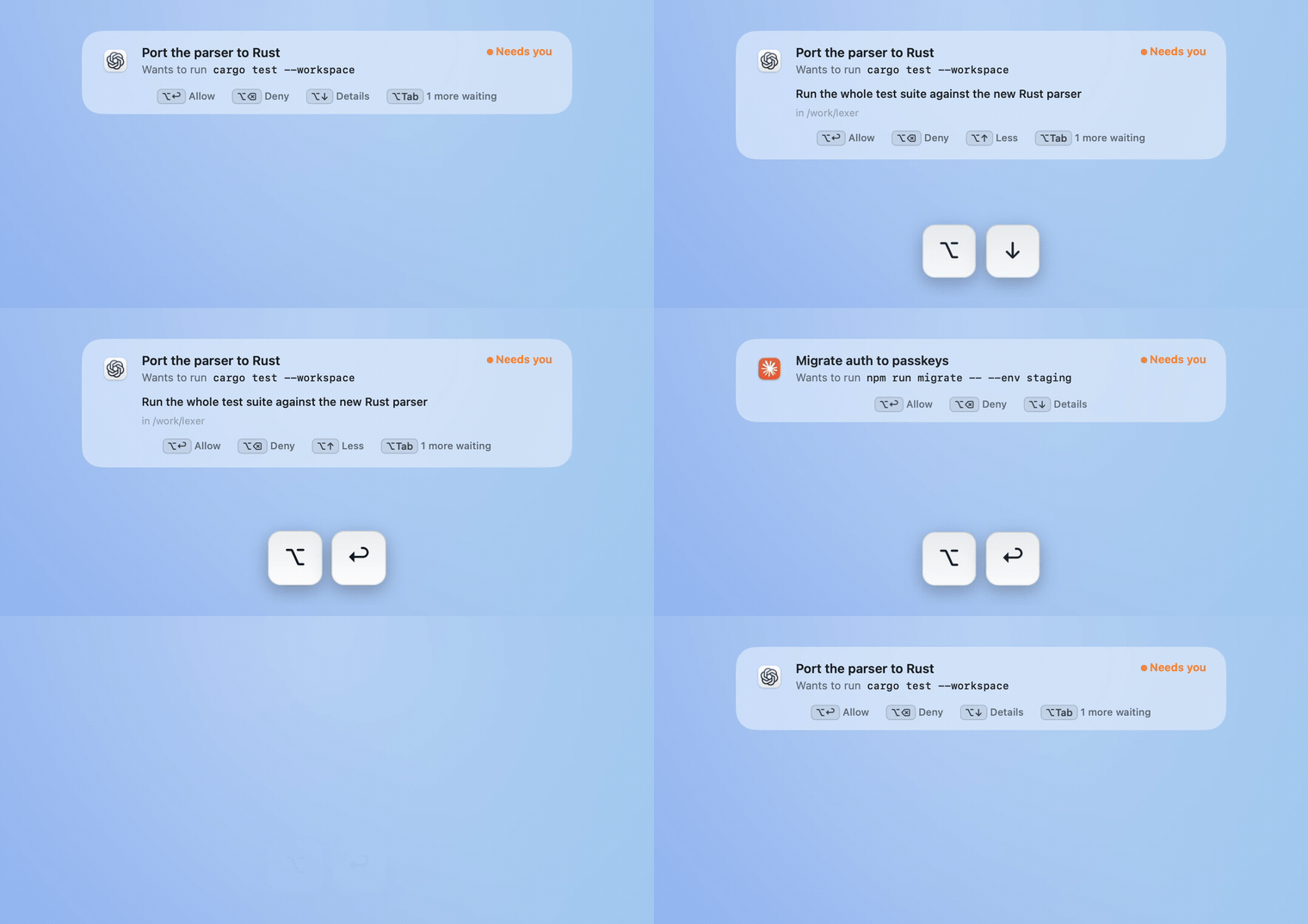
Two agents ask. ⌥↓ shows why, two presses of ⌥↩ answer them, and you never left what you were doing. Recorded from the app.
If you run a few coding agents at once, the slow part isn't the agents. It's noticing which one has been waiting on you for ten minutes. Muster sits in the menu bar, tells you the moment one needs you, and lets you answer without switching apps.
|
See who needs you. |
Answer from anywhere. |
|
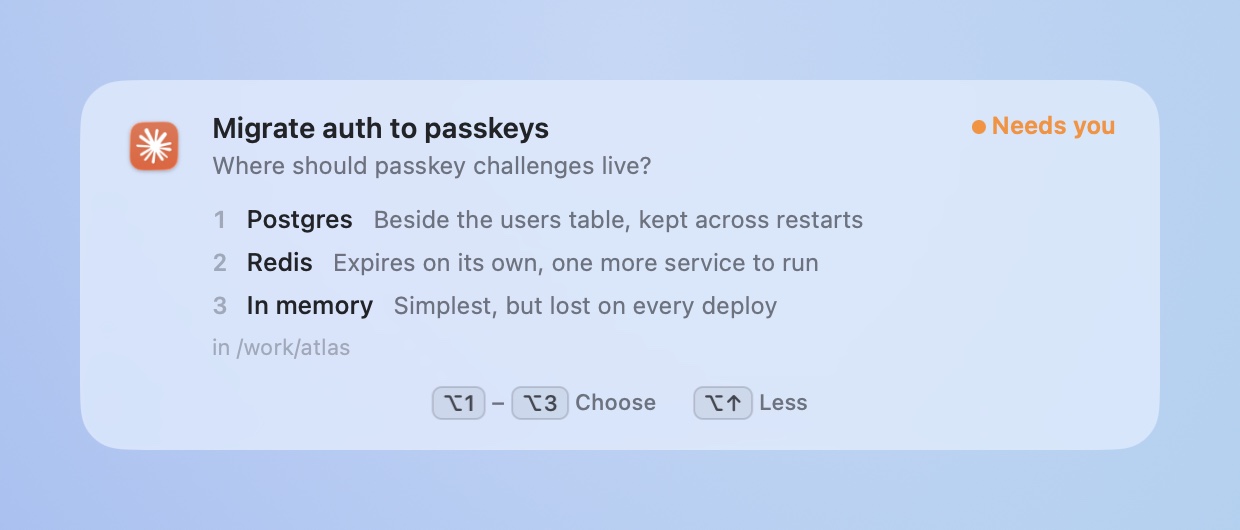
See why before you answer. |
Your keys stay yours. |
|
⌥Tab to any agent. |
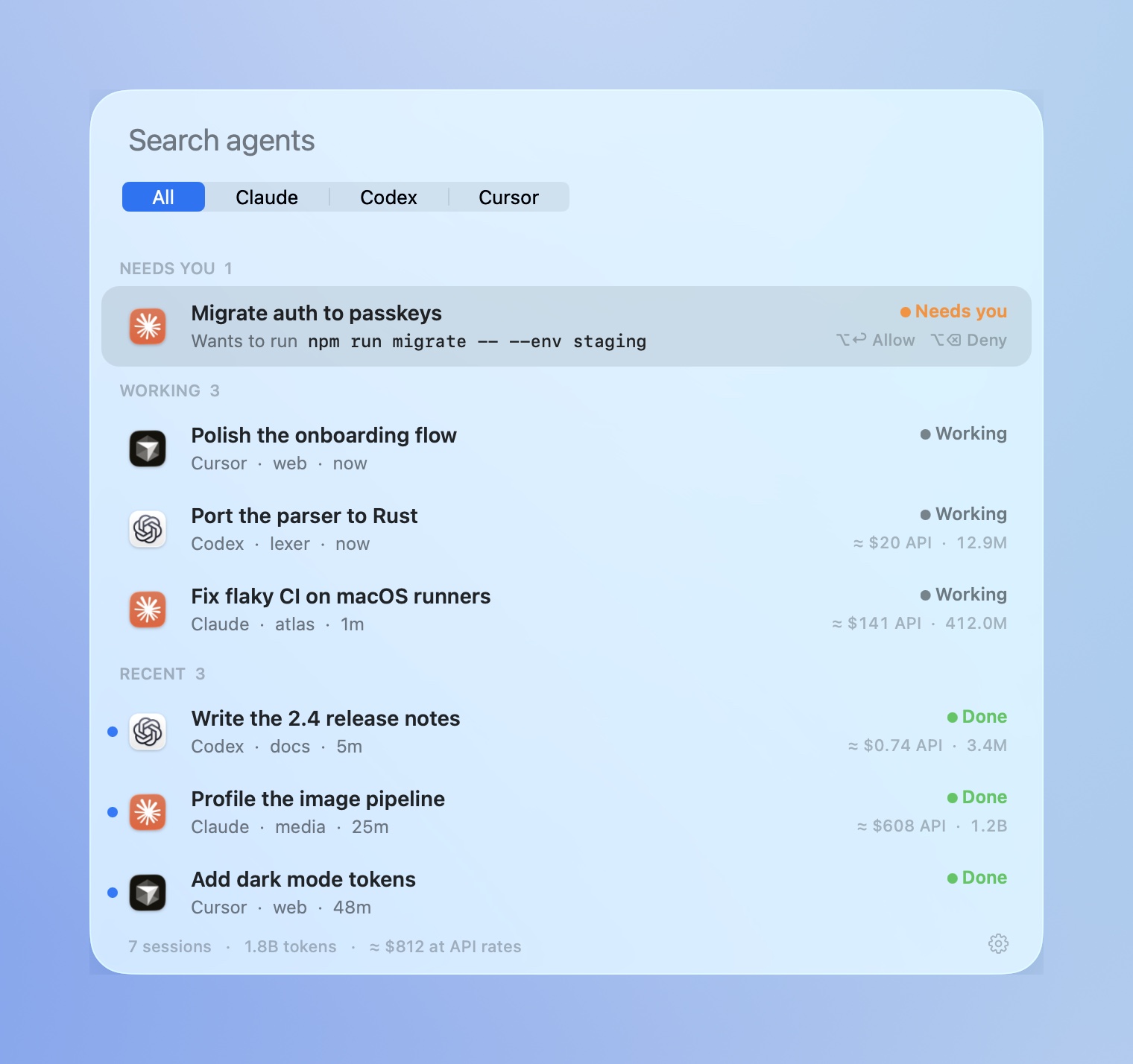
Find any session. |

Native AppKit and Liquid Glass · macOS 14+ · Apple silicon and Intel · no accounts or app analytics · MIT
Install
Download Muster.dmg and drag it to Applications, or:
brew install --cask josefchen/tap/muster
macOS 14 or later, Apple silicon or Intel. Liquid Glass needs macOS 26.
Answer prompts from Muster
Turn it on per agent in Settings → Answer prompts from Muster.
| What you can answer | |
|---|---|
| Claude Code | Permission requests, multiple-choice questions, plan approvals |
| Codex | Approval requests (enable and trust the Muster hook in Codex Settings → Hooks, or /hooks in the CLI) |
| Cursor | Opens the prompt in Cursor |
The tour and Settings show each connection's progress. For Codex, Muster reads the client's hook status when supported, so a disabled, untrusted or changed hook stays pending. It never enables or trusts hooks on your behalf.
Use Copy check prompt, paste it into a local agent session that asks for approval, and answer the request from Muster. The connection is verified only when the request arrives, the answer is delivered, and the same session resumes in its transcript. The sample alert in the tour is practice and does not verify anything. Full access or automatic approval can skip this test because no permission request is made.
You can choose Set up later and use switching and search immediately. Unfinished answering setup remains visible in Settings and the menu. Verification records the last successful check, rather than a continuous connection: changed hooks require another check, and evidence older than a day is no longer marked current.
Muster adds one hook to the agent's own settings and removes exactly that when you turn it off. Beside the file it keeps .muster-original, the file as it was before Muster first changed it, and .muster-backup, the file before the latest change. A symlinked settings file stays a link, and a file Muster can't parse is left alone. Claude's native dialog stays live alongside Muster, and the first answer wins. If Muster isn't running, the agent asks as usual. Hooks talk to Muster on 127.0.0.1 with a per-install token.
Shortcuts
| Keys | |
|---|---|
| ⌥ Tab | Switch. Tap to step, release to open, or click a row |
| ⌥ ↩ · ⌥ ⌫ · ⌥ 1–9 | Allow · deny · answer the prompt on the alert or in the switcher |
| ⌥ ↓ · ⌥ ↑ | Unfold the alert's details · fold them |
| ⌃ ⌥ Space | Search every session |
Muster takes ⌥↩, ⌥⌫, the arrows and the digits only while a prompt or the switcher is on screen, and lets go of them while you type in another app, so they keep working in your editor. Both shortcuts can be changed in Settings. Scripting: muster://search, muster://next, muster://settings, muster://welcome, muster://whats-new.
Claude Code can notify you on its own in some terminals, and a few lines of settings add a sound or a banner anywhere else; this guide compares every option. A notification tells you that something happened. With several sessions running you still have to work out which one, find its window and type the answer. Muster shows which one, answers it from where you are, and does the same for Codex and Cursor.
How it worksMuster reads the session files each app already writes. Nothing to configure.
| App | Read from |
|---|---|
| Claude (desktop, CLI, SSH sessions) | ~/.claude/projects transcripts and Claude's session list |
| Codex (app and CLI) | ~/.codex/state_*.sqlite threads and rollout logs |
| Cursor | The Agents window's chat list and agent transcripts |
Everything is opened read-only. File system events trigger a rescan, at most once a second; transcripts are read incrementally, only the bytes added since the last look.
Cost estimatesPublic list prices for the standard API tier, bundled and dated in Settings. Claude is priced message by message, including subagents, with 5-minute and 1-hour cache writes kept apart. Codex is priced from its running totals; OpenAI's long-context tier isn't applied, so Codex figures are a floor. Cursor records no token counts on disk.
Use your own prices from Settings → Use my own prices…, which writes ~/Library/Application Support/Muster/pricing.json.
No accounts or app analytics. The only network request is the update check, which asks GitHub for the latest release when you click Check for Updates, or once a day if you leave "Updates" on in the welcome tour (or tick it in What's New, or turn it on in Settings). The prompt server listens on 127.0.0.1 only and needs a token that lives in your user defaults and the agents' hook settings.
The website keeps aggregate daily page-load and download-click counts, with no cookies or visitor identifiers. It honors Do Not Track and Global Privacy Control. See the privacy page and measurement guide.
Build from sourcegit clone https://github.com/josefchen/muster.git && cd muster
./build.sh # build, install to ~/Applications, launch
./test.sh # reader tests against fixture files
scripts/e2e.sh # end-to-end: the real app against a fake home folder
scripts/e2e.sh drives the built app the way the agents and you would (transcripts, hook requests, the switcher, deck and alert) without touching your own agents or settings; --soak [minutes] checks CPU and memory under load, and --ui replays real keystrokes and clicks (it takes over the keyboard while it runs).
scripts/release.sh <version> builds a universal, signed and notarized DMG and writes its GitHub release notes from CHANGELOG.md, and scripts/site.sh deploy publishes agentmuster.app and its changelog page to Cloudflare. scripts/capture-stills.sh, scripts/record-scene.sh, scripts/record-answer.sh and scripts/tour.sh regenerate the screenshots, the videos and the welcome tour from demo mode (Muster --demo). Muster opens and plays each scene itself, so they need Screen Recording and nothing else.
See CONTRIBUTING.md.
MIT License. Muster is independent and not affiliated with Anthropic, OpenAI or Anysphere.
Reviews (0)
Sign in to leave a review.
Leave a reviewNo results found