poke-agents
Health Warn
- License — License: MIT
- Description — Repository has a description
- Active repo — Last push 0 days ago
- Low visibility — Only 5 GitHub stars
Code Fail
- exec() — Shell command execution in adapters/vscode/PixelAgentsViewProvider.ts
- os.homedir — User home directory access in adapters/vscode/PixelAgentsViewProvider.ts
Permissions Pass
- Permissions — No dangerous permissions requested
No AI report is available for this listing yet.
Your Conductor sessions as Pokémon in a pixel-art office. Inspired by Pixel Agents.
Poke Agents
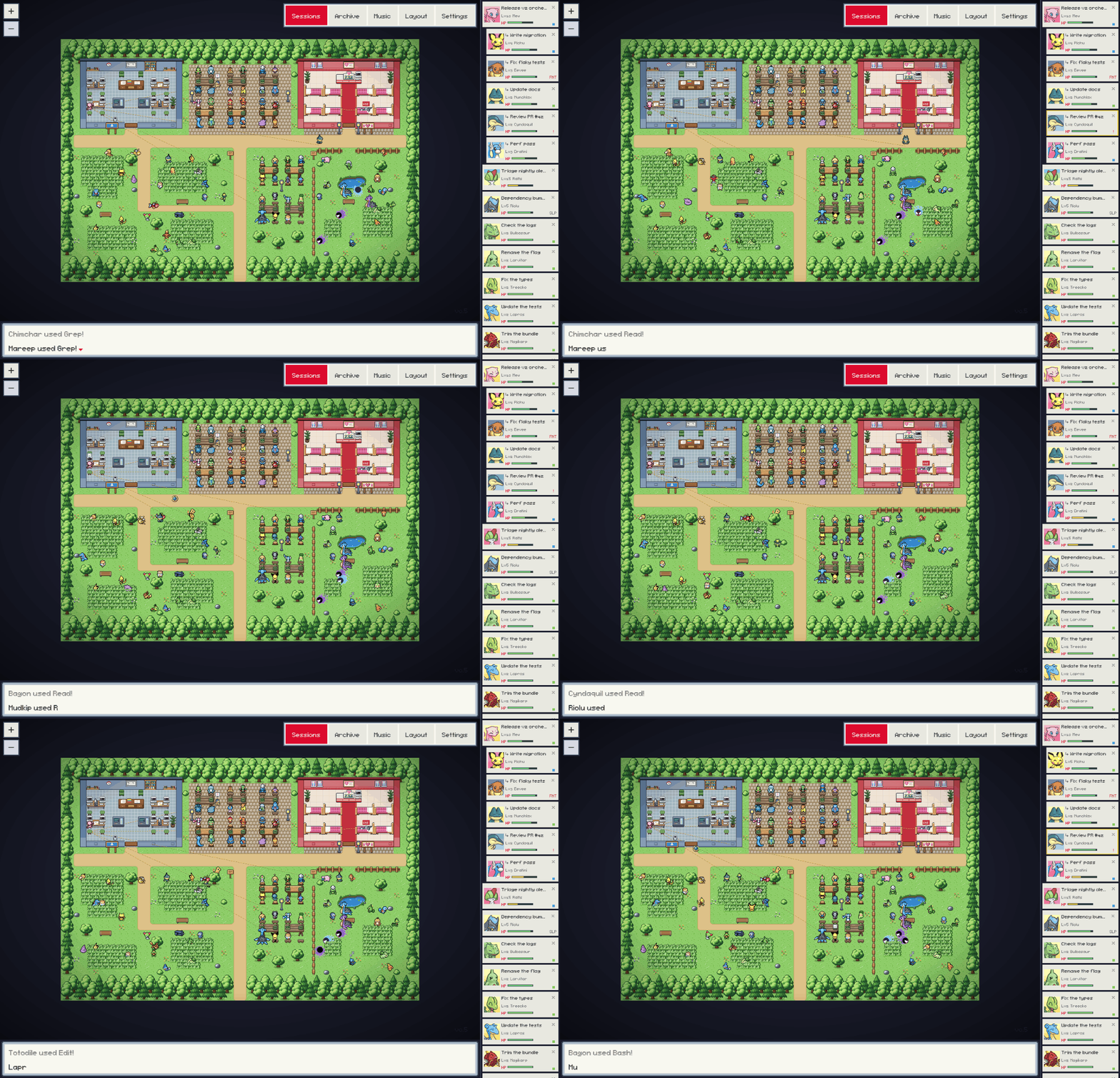
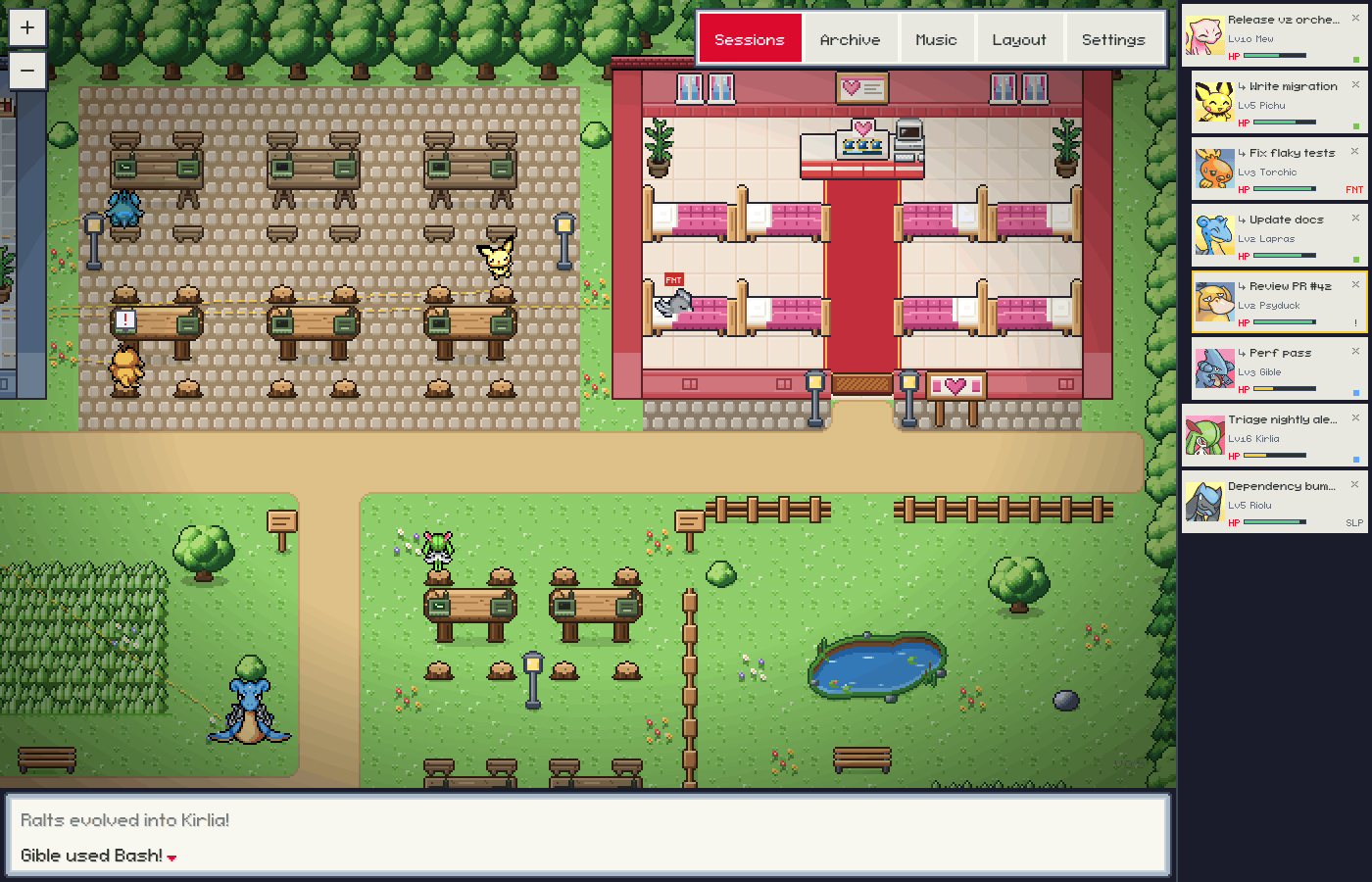
Watch your Conductor cloud sessions as Pokémon in a small pixel-art town.
Inspired by Pixel Agents.
What It Is
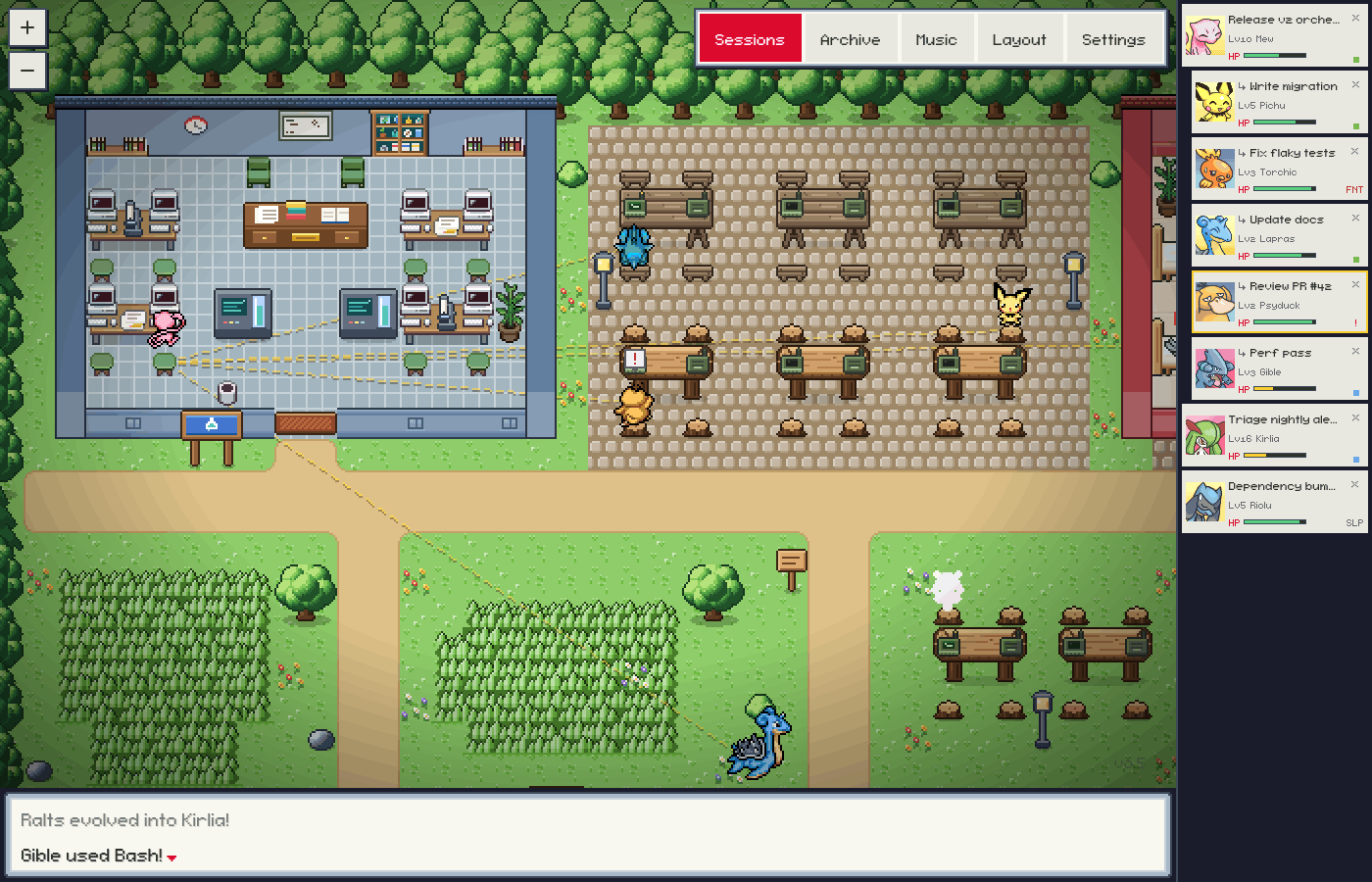
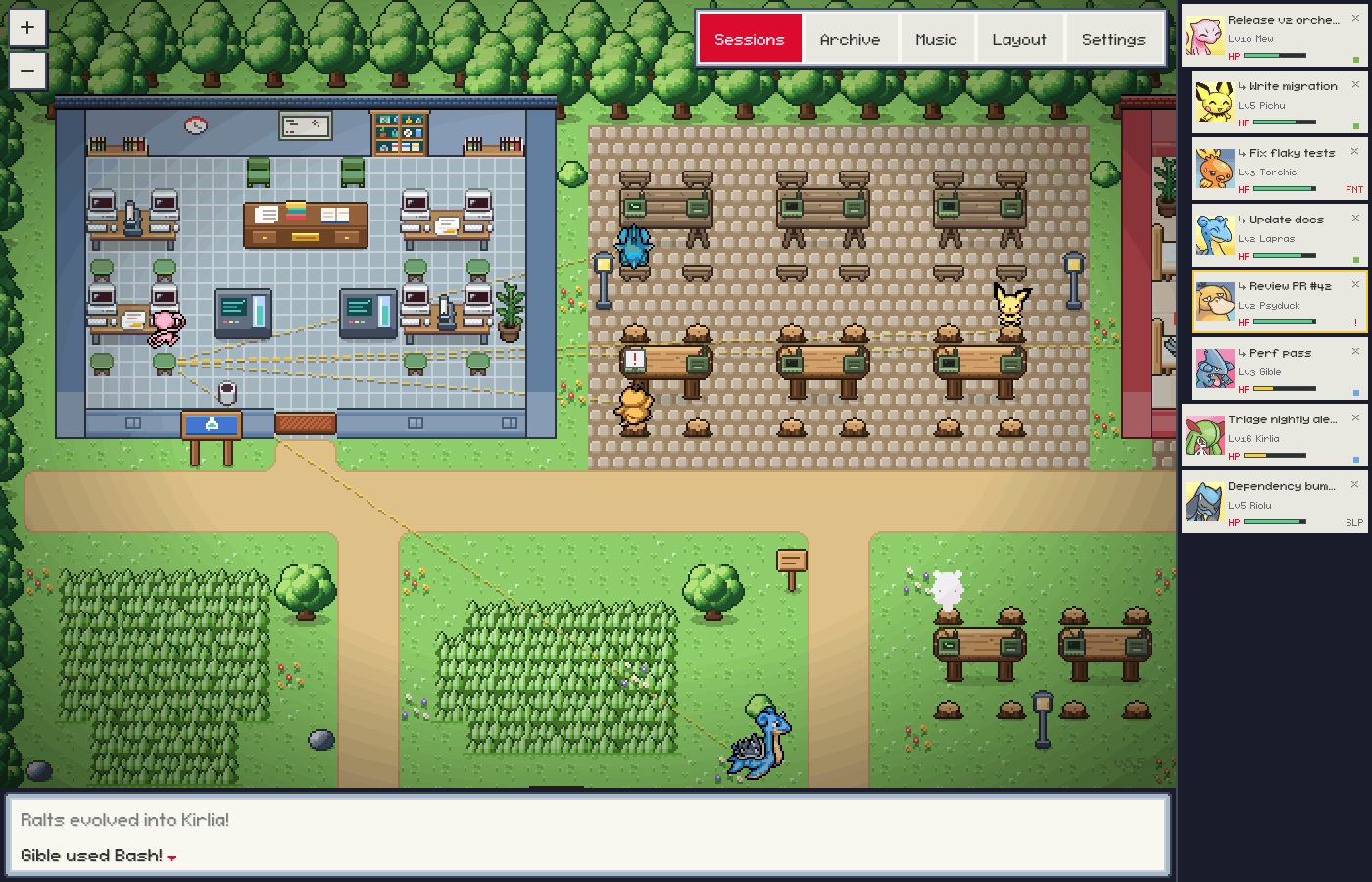
Poke Agents is a visualizer for Conductor. Each cloud session is a Pokémon: it works at a table outdoors (a Lead at a desk in the Lab) while the session runs tools, wanders and naps when the session is idle, faints when it errors, and calls for you when it needs an answer. When one session starts or messages others, the town draws the links between them and the messages they send. It runs as a Mac app or in a browser window next to Conductor.
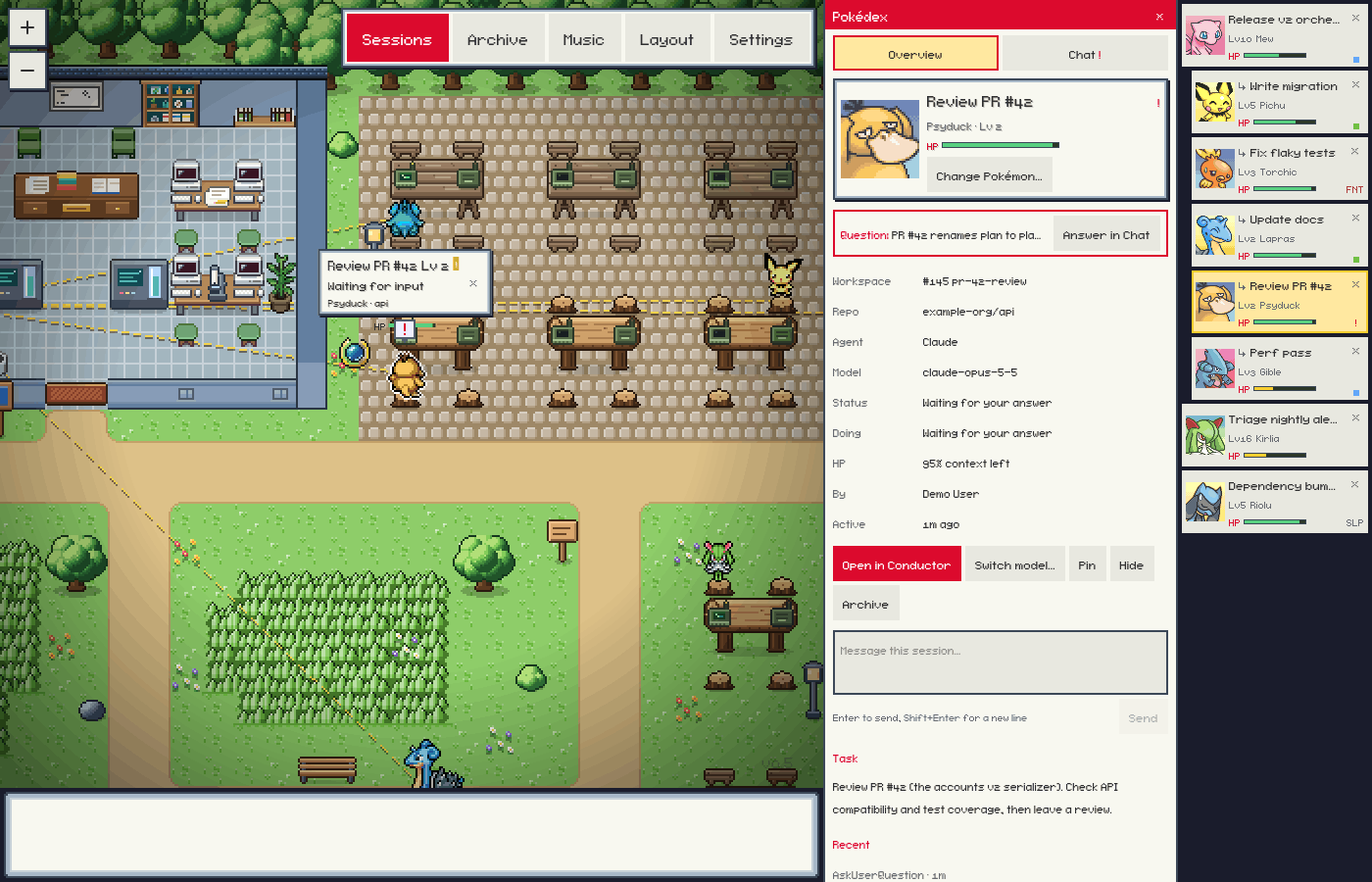
The map is the office. Scroll or drag to look around the town, and pinch or ⌘-scroll to zoom. The party bar on the right is every session in view, with its portrait, level, HP and status. The message bar under the map types the battle log and the result of anything you just clicked, and it never covers the town. Click a Pokémon, or its party slot, for the Pokédex: Overview for the session's facts and actions, Chat for the conversation.
All coding happens in Conductor, with your Conductor settings: models, environment, repositories and agents stay configured there.
- What it reads: your account, your cloud workspaces and their sessions, and each session's status and messages, through Conductor's public API with GET requests.
- What it can ask Conductor to do: send a message to a session (Send, Revive and a pending question's options), stop a session's turn, archive a session (Archive) and unarchive one (Restore), and start a new session in a session's workspace with another model (Switch model…). Each happens only when you click it in an office opened with its token, and Conductor does the work.
- What it never does: start sessions on its own, run agents or code, edit repositories, or store or change your Conductor settings or API key. Hide, Pin and Change Pokémon… only change what Poke Agents shows; Conductor isn't told.
- What it stores: its own view of your sessions under
~/.pixel-agents/(see Configuration): the scope, hidden and pinned sessions, seats and each session's Pokémon.
The exception is --claude, an opt-in mode for local Claude Code sessions. npm start never turns it on, and the Mac app doesn't offer it. It launches Claude Code in a terminal inside the office and, after you agree in the app, installs hooks in ~/.claude/settings.json.
Features
- The town. Leads work at the desks in the Lab. Every other working session sits at a picnic or log table in the Work Yard or the Grove, where the field terminals light up while it works, or works standing nearby when every seat is taken. Idle ones wander and nap in the Meadow's tall grass and around the pond. Fainted ones lie in the Pokémon Center's beds until they are revived. The town is larger than the window: scroll with two fingers or the mouse wheel, or drag the ground, to look around, and pinch or ⌘-scroll to zoom. Layout → Templates switches between the town and the classic office. A town an earlier version saved, unchanged, becomes the new town when the office starts; one you edited stays as it is.
- A Pokémon per session. Each visible session is a Pokémon that keeps its species. It works at its seat while the session runs tools, nods along on read tools, and hops when a turn ends.
- Levels and evolution.
Lvcomes from the session's message count. A Pokémon evolves at Lv 16 and Lv 36 when its line has later stages. - Status conditions.
SLPwhen a session has been idle for a while,FNTwhen it errors, and!when it waits for your answer or a permission. - Leads are legendaries. A session that created other sessions is a Lead and appears as a legendary Pokémon that doesn't evolve. Its new sessions are thrown out of a catch orb from where it stands, and a session that leaves is recalled into one.
- Links and messages. Lines connect sessions that created, messaged or read each other. When one session messages another, an orb flies between them with a short preview.
- Pokédex. Click a Pokémon to open its Pokédex. Overview shows the workspace, repository, agent, model and effort, status, an HP bar for the context left, the task, recent tool steps and messages with other sessions, and the actions Open in Conductor, Switch model…, Send message, Revive, Stop, Archive, Hide and Pin.
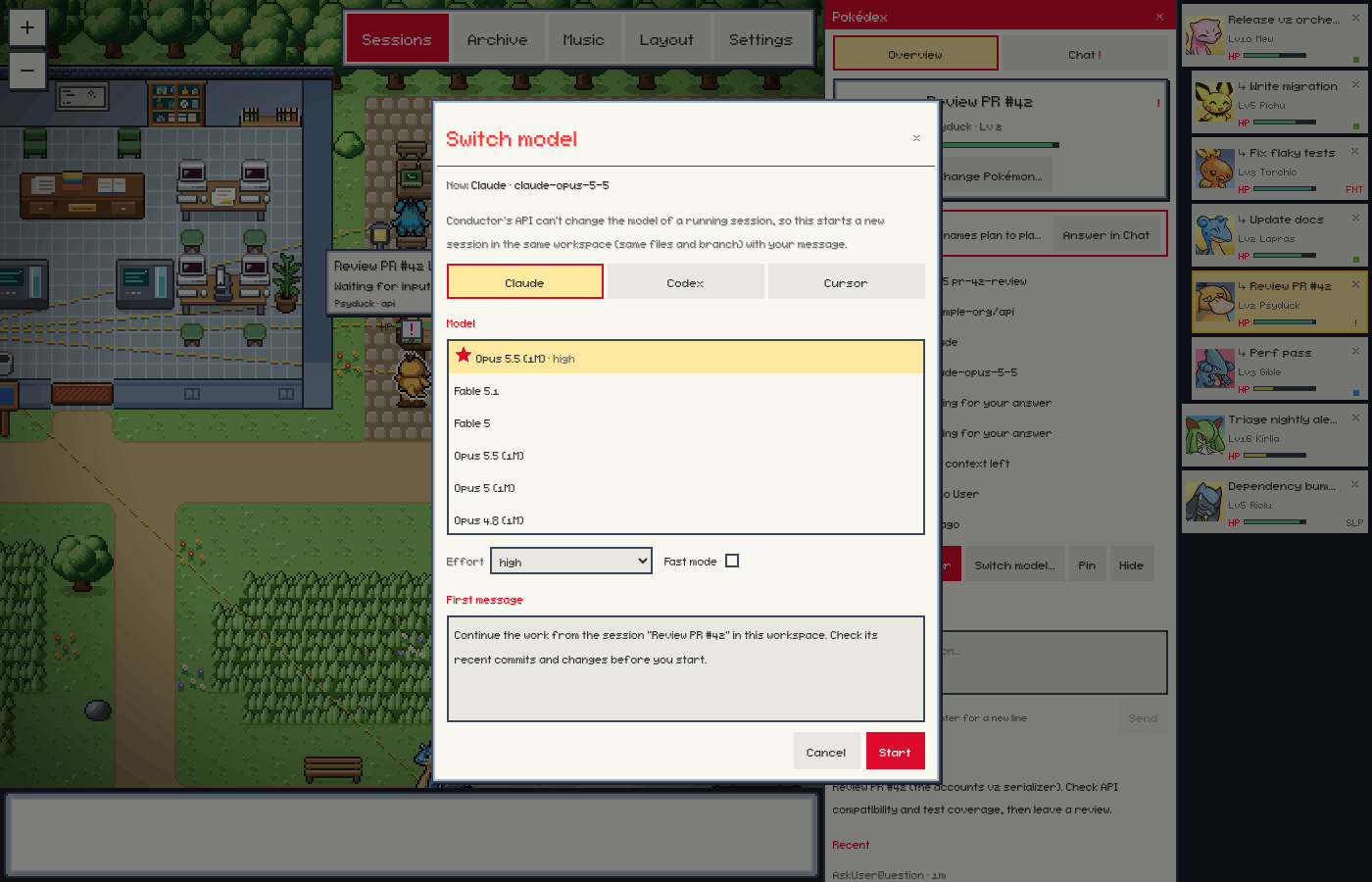
- Switch model… Conductor's API can't change the model of a running session, so the Pokédex offers the closest honest thing: a new session in the same workspace (same files and branch) with the agent (Claude, Codex or Cursor), model, effort and fast mode you pick, and a first message you can edit (it starts as a note to continue the work and check the recent commits and changes). Your favorite models in Conductor come first, with a star; effort levels only some models take say "(some models)". The new session is named after the session and the model ("Fix flaky tests · GPT-5.5"), is thrown out of the original Pokémon and linked to it (the original doesn't become a Lead), and its Pokédex opens when it arrives. The original session isn't changed and keeps running: if it is still working, the picker says so, since both sessions would change the same files, and offers Stop it. If Conductor doesn't answer, starting again with the same choice within 10 minutes repeats the same request, so Conductor doesn't make a second session.
- Change Pokémon… In the Pokédex's header: pick which evolution line a session is (a Lead can also be one of the legendaries), turn Shiny on or off (it applies at once), or Reset to automatic to get back the Pokémon it had before. The level still picks the stage within the line, the change plays the evolution flash, and the choice is kept across restarts. It is Poke Agents' own view; Conductor isn't told.
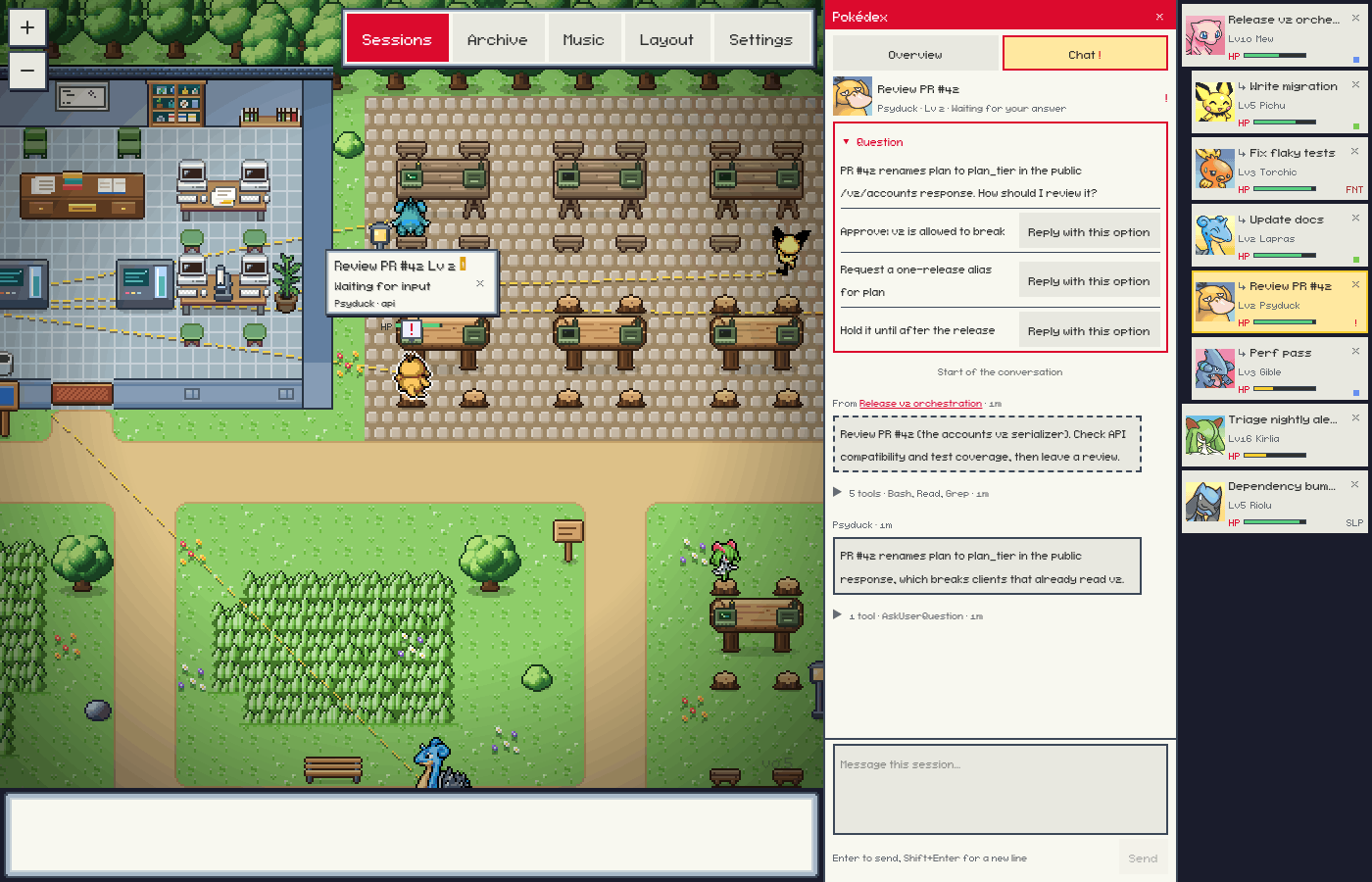
- Chat. The Pokédex's Chat tab shows the conversation: your messages, the agent's replies, each turn's tool steps folded into one line, and messages to and from other sessions. Load earlier fetches older messages from Conductor. The box at the bottom sends a reply.
- Pending questions. When a session waits on a question (Claude's AskUserQuestion, a plan to approve, or a Codex question), the Pokédex shows it with its options. Reply with this option sends the option's text as a normal message.
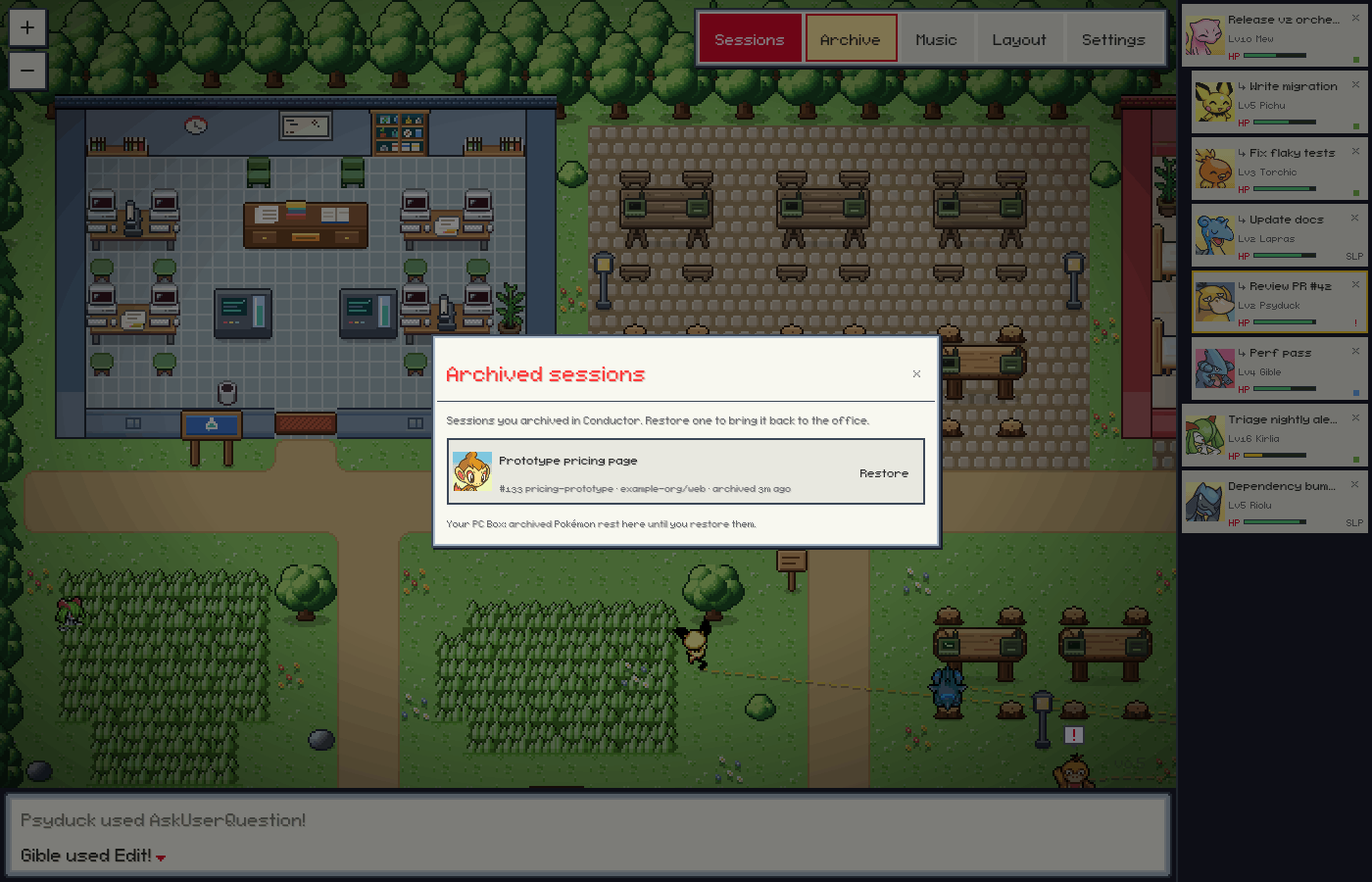
- Archived sessions. Archive in the toolbar lists the sessions you archived in Conductor, with their Pokémon's portraits. Restore brings one back into the town.
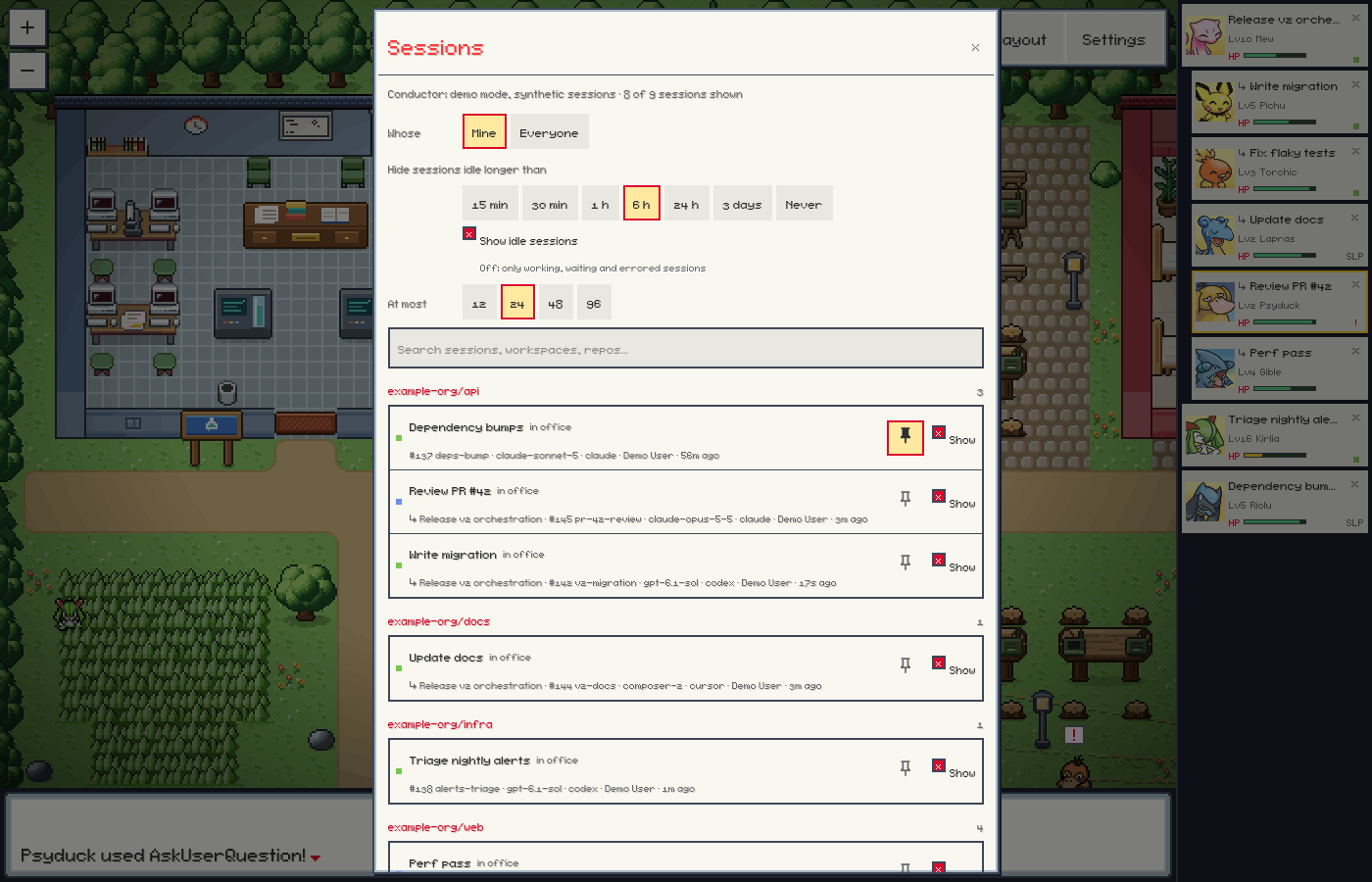
- Sessions. Choose which sessions appear: your workspaces or the whole organization, how long a session may sit idle before it leaves the town, idle sessions on or off, a cap, and per-session hide and pin, with search.
- Party bar. Each visible session as a party slot with portrait, name, level, HP and status. Leads come first with their sessions under them, and a slot blinks while its session needs you.
- Battle log. An optional ticker of events such as "Pichu used Bash!" or "Torchic fainted!", typed into the message bar under the town. The bar never covers the map.
- Sounds. Each Pokémon's cry when its session needs you, faints, arrives or evolves, and original chiptune effects for level-ups, orb throws and messages. See Sounds.
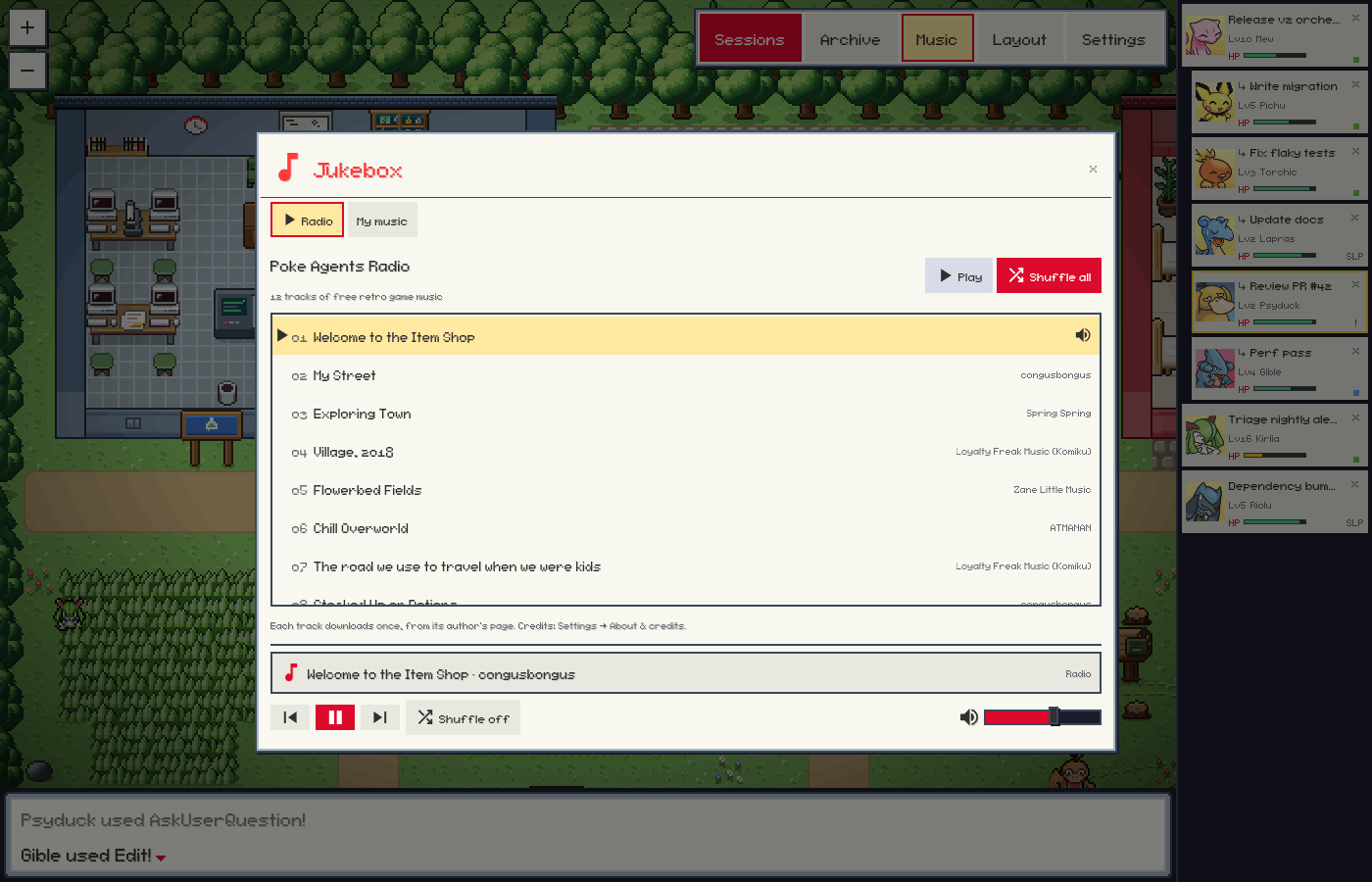
- Jukebox. Background music: Poke Agents Radio, a built-in station of freely licensed retro game tracks, or your own music. See Music.
- Mac app. The same office in its own window, with notifications when a session needs you or faints and a Dock badge counting the sessions waiting on you. See Mac App.
- Demo mode. A scripted office of synthetic sessions, for trying Poke Agents without a Conductor account. See Demo.
Turning the Pokémon theme off in Settings brings back the plain office. Layout opens the layout editor for floors, walls, furniture and Areas (see docs/external-assets.md).
Using the Office
- The office opens on the Lab and the Work Yard. To look around the rest of the town, scroll with two fingers or the mouse wheel, or drag the ground. To zoom, pinch, Ctrl/⌘-scroll or use the + and − buttons at the top left.
- Click a Pokémon or its party slot to open its Pokédex. Cmd-click (Ctrl-click) or double-click opens the session in Conductor.
- In the Chat tab, Enter sends your reply and Shift+Enter starts a new line.
- Sessions in the toolbar opens the Sessions modal, Archive the archived sessions, and Music the Jukebox.
- The × on a Pokémon's card or party slot hides the session. Find it again in Sessions.
- Escape closes the window on top: a confirmation, then a modal, then the Pokédex.
- Settings has the Pokémon theme, Show connections and Battle log switches, the Sound controls, and About & credits: what Poke Agents is, and the artists of the sprites in use.
Session actions are the only writes Poke Agents makes to Conductor, and each happens only when you click it in an office opened with its token:
| Action | What it does in Conductor |
|---|---|
| Send message, Chat replies | Sends your text to the session. |
| Reply with this option | Sends the option's text to the session as a normal message. |
| Revive | Sends "continue" to a fainted (errored) session. |
| Stop | Cancels the session's turn. Asks first, because Conductor drops messages still queued. |
| Archive | Archives the session. Asks first. The session leaves the town and is listed under Archive. |
| Restore | Unarchives a session from Archive. It walks back in, even if it was idle past the limit. |
| Switch model… → Start | Creates a session in the same workspace with the model you picked and your first message. |
Each action's outcome ("Message sent to …", or why Conductor refused it) appears in the message bar under the town, with the battle log on or off. × dismisses it.
How Visibility Works
Poke Agents polls Conductor for the sessions in scope and shows up to a cap of them. Change these in the Sessions modal; the choices are saved.
- Scope: your workspaces (default) or the whole organization.
- Hide sessions idle longer than: 6 hours by default, or 15 min, 30 min, 1 h, 24 h, 3 days or Never. A session with no activity for longer leaves the town by itself and comes back when it works again. Never still stops at 30 days, the furthest back Poke Agents looks.
- Show idle sessions: on by default. Off keeps only working, waiting and errored sessions, however recently the others were active.
- Cap: 24 sessions by default. When more are in scope, they are ranked: pinned, waiting for you, working, errored, Leads with visible active sessions, then most recent activity. A shown session stays until it falls 4 places past the cap, so the town doesn't flicker. At most 12 sessions per Lead are shown; the rest are listed in the Sessions modal.
- Hide removes a session from the town until you show it again. Pin always shows it.
Sessions that never started (no name, no model and no messages) are ignored. A session walks in once its level is known, so the first start on a machine fills the town over a minute or two. The session whose Pokédex is open updates every few seconds, along with up to 4 sessions it worked with in the last 15 minutes. The others are polled less often the longer they are idle.
Leads and Links
A session becomes a Lead when it creates another session with a first message, for example with conductor workspace create --message or conductor session create. Lines between sessions show how they are connected:
- solid dashes: the Lead created that session
- dots: one session messaged the other
- faint: one session read the other's messages
Sounds
Sound is on by default and starts after your first click, tap or key press in the office: browsers keep audio locked until then, and nothing that happened earlier is played late.
| When | You hear |
|---|---|
| A session needs your answer or a permission | An alert, then its Pokémon's cry |
| A session errors (faints) | Its cry, pitched down, and a falling tone |
| A fainted session works again | A rising heal arpeggio |
| A Pokémon levels up | A short level-up arpeggio |
| A Pokémon evolves | A rising shimmer, then the new species' cry |
| A Lead creates a session | An orb throw, the pop, and the new Pokémon's cry |
| Any other session appears | The pop and its cry |
| One session messages another | A whoosh |
| A session leaves (hidden, archived or out of scope) | A recall zap |
| The selected or a pinned session finishes its turn | A soft two-note tone |
| You open a Pokédex | That Pokémon's cry |
At most four sounds play a second, one cry at a time, with a cooldown per session and nothing for five seconds after the office connects. Settings → Sound has the Sounds switch, a volume slider, Cries, Alerts and Effects toggles, and a test button for each sound.
Cries are the official cries from the PokéAPI cries project. After your first click, Poke Agents downloads the cry of each species in the town from raw.githubusercontent.com, once, into ~/.pixel-agents/cache/cries/. With Cries off it downloads none. The other effects are original chiptune sounds synthesized in the app.
Sound pack. Files in ~/.pixel-agents/sounds/ replace the effects. Name each after the effect it replaces, with the extension .ogg, .mp3 or .wav (for example levelUp.ogg): alert, done, faint, heal, levelUp, evolution, ballThrow, ballPop, recall, message, blip. Each file must be an audio file of at most 2 MB. Use only sounds you have the right to use. Cries can't be replaced.
--no-sounds (or POKE_AGENTS_SOUNDS=off) stops cry and radio downloads and the sound pack; the synthesized effects follow the Settings switch.
Music
The Jukebox (Music in the toolbar, or Jukebox… under Settings → Sound) plays background music. It opens on the radio until you pick another source.
- Radio (any platform): Poke Agents Radio, 12 original chiptune and retro RPG tracks for a town, a route, indoors, a calm night and a battle. Their authors released them under CC0 or CC BY (see Radio credits); none is a cover or arrangement of game music. Each track downloads once, the first time it plays or is queued next, from its author's page on
opengameart.orgorincompetech.cominto~/.pixel-agents/cache/music/radio/, and plays only if it matches the size and SHA-256 pinned inserver/src/music/radioCatalog.ts. The repository holds no audio.--no-radio(orPOKE_AGENTS_RADIO=off) turns the radio off. - My music (any platform): audio files you own in
~/.pixel-agents/music/, one folder per game or album. MP3, M4A/AAC, OGG/Opus, WAV and FLAC play; Apple Lossless and copy-protected.m4pfiles don't. Open folder creates the folder and opens it. - Apple Music (macOS): Look in my Music library finds albums whose album or artist name contains "Pokémon" and plays them in the Music app. To queue an album, the Jukebox fills a playlist named "Poke Agents Jukebox" in your library. A pasted
music.apple.comlink opens in Music. - Spotify (macOS, with the Spotify app): paste an
open.spotify.comorspotify:album, playlist or track link, then play or shuffle it in Spotify.
The first time the Jukebox controls Music or Spotify, macOS asks whether your terminal (or the Poke Agents app) may control it. Cries and alerts briefly lower radio and folder music. Poke Agents never downloads, streams or bundles game soundtracks: the official Pokémon soundtracks are commercial albums, and there is no free, legal download.
Requirements
- For your live sessions: a Conductor Pro account with cloud workspaces. Conductor's public API needs Pro and only covers cloud workspaces. The demo needs no Conductor account.
- Node.js 20 or later, npm and git. Building the Mac app needs Node.js 22.12 or later.
- For the Mac app, macOS 13 or later. For the browser window, any browser; on macOS,
npm startopens Chrome, Edge, Brave, Chromium or Vivaldi as an app window when one is installed.
Install
Mac App
The Mac app is the same office in its own window. It only shows Conductor: it never runs coding agents, edits repositories or changes your Conductor settings, and it has no Claude Code tracking, terminal or hooks.

Build it on your Mac, from a clone:
git clone https://github.com/joshle298/poke-agents.git
cd poke-agents
npm ci
npm run app:mac
open "desktop/release/mac-arm64/Poke Agents.app"   # Apple silicon; desktop/release/mac/ on Intel
The first build downloads Electron (about 120 MB) and takes a few minutes. npm run app:mac builds for the Mac you run it on; npm run app:mac:all builds both architectures, and a zip of each app lands in desktop/release/ too. Drag the app to /Applications to keep it.
A build made on your Mac is signed ad hoc, so macOS opens it normally there. The app has no Apple Developer ID signature and isn't notarized, so a copy built elsewhere needs Control-click → Open (on macOS 15 and later: open it once, then System Settings → Privacy & Security → Open Anyway). Apple silicon refuses an app with no signature at all, so build it on a Mac.
On the first launch the office shows Connect to Conductor (see Sign In). If the Conductor CLI is already signed in, macOS asks instead whether security may use the Keychain item com.conductor.cli (the app reading that sign-in). Once Conductor connects, macOS asks whether Poke Agents may send notifications.
- Notifications: when a session starts waiting for your answer or a permission, or faints, Poke Agents posts a notification such as "Pikachu needs your answer". Clicking it opens that session's Pokédex. There are none while the window is in front, none for sessions already waiting when the app starts, and at most one per session and reason every 2 minutes.
- Dock badge: the number of sessions waiting for your answer or a permission. macOS shows it only when Poke Agents may send notifications (System Settings → Notifications → Poke Agents, with Badge app icon on).
- Window: Cmd-W keeps Poke Agents in the Dock and Cmd-Q quits it. Poke Agents → Settings… (Cmd-,) opens Settings. Web links open in your browser and Open in Conductor opens the Conductor app.
- With the command line: the app and
npm startshare one office on port 41510. Ifnpm startis running, the app opens that office, and the other way round. - Demo: quit the app, then run
open -a "Poke Agents" --args --demo. - Update: quit the app, then
git pull && npm ci && npm run app:mac, and replace the copy in/Applications. - Uninstall: sign out in Settings → Conductor (or delete the
com.joshle298.pokeagents.conductoritem in Keychain Access), quit the app, move it to the Trash, and delete~/Library/Application Support/Poke Agents/(its window position). Delete~/.pixel-agents/too if you don't use the command line. Leave thecom.conductor.cliitem: it belongs to the Conductor CLI.
npm run app:dev runs the app unpackaged, with View → Toggle Developer Tools.
Command Line
git clone https://github.com/joshle298/poke-agents.git
cd poke-agents
npm ci       # installs dependencies and builds dist/
npm start    # opens the office in an app window
The first npm ci builds the app, which takes about a minute, and ends with Built dist/ in … s. npm warns about deprecated packages and, from npm 11.16, lists dependency install scripts that no allowScripts entry covers; the build doesn't need them. On a machine with no browser to open, npm start prints the URL instead. To update, run git pull && npm ci && npm start.
Or run it from GitHub without cloning:
npx github:joshle298/poke-agents --open
npm 12 and later refuse git packages by default (EALLOWGIT), so add --allow-git=all:
npx --allow-git=all github:joshle298/poke-agents --open
The first run downloads about 125 MB of build tools and builds the app, which takes about 20 seconds before the office starts. Don't run npx poke-agents: that npm name belongs to an unrelated package.
The command prints a URL with a ?token=. Treat it as a secret: whoever has it can use the session actions (send a message, stop, archive). A browser without the token can only watch.
Demo
npm ci
npm run demo   # the same as: node dist/cli.js --demo --open
The demo plays a scripted story with synthetic sessions instead of connecting to Conductor. It needs no Conductor account. A Lead, "Release v2 orchestration", spawns five sessions in the first 20 seconds. They run tools, message the Lead and level up. "Fix flaky tests" faints and the Lead revives it, "Update docs" finishes early and falls asleep, "Review PR #42" waits on a question for you, and "Triage nightly alerts" evolves. The finished "Prototype pricing page" is under Archive.
Everything in the office works on the demo's sessions, and nothing reaches Conductor: Open in Conductor says there is nothing to open. Sprites, cries and radio tracks download as usual. The first round, about five minutes long, plays the same way every time; then the Lead hands out new tasks. --demo-seed <n> varies the history and later rounds, and --demo-speed <x> plays the story faster or slower. The demo keeps its seats in its own file and never replaces an office that shows your real sessions.
Sign In
Poke Agents needs a Conductor API key (API keys need Pro). Connect in the office:
- Open the office. Without a key it shows Connect to Conductor.
- Click Get an API key. Conductor's API keys page opens in your browser. Create a key and copy it.
- Paste it into the card (or click Paste) and click Connect.
Poke Agents checks the key with Conductor, and your sessions walk in without a restart. On macOS it keeps the key in its own Keychain item (com.joshle298.pokeagents.conductor), so you stay signed in. Poke Agents creates that item with /usr/bin/security, which macOS then trusts to read it, so any app you run can read the key without a prompt (security find-generic-password -s com.joshle298.pokeagents.conductor -w). That is the same exposure as an environment variable: the Keychain keeps the key encrypted on disk and away from other users of the Mac, not from your own apps. Linux and Windows have no Keychain: the key lasts until the office stops, so set CONDUCTOR_API_KEY to stay signed in.
In the Mac app, when you come back from the browser with a Conductor key copied, the card offers Use key from clipboard. It shows the key's prefix and last four characters and fills the field; nothing is sent until you click Connect. The app looks at the clipboard only then and when you click Paste.
Settings → Conductor shows the account, where the key came from and, for a key Poke Agents saved, Sign Out of Conductor…. Signing out forgets only that key. If the Conductor CLI is signed in, the office switches to that sign-in and says so (macOS may ask whether security may use com.conductor.cli).
Poke Agents uses the first key it finds:
CONDUCTOR_API_KEY, thenCONDUCTOR_API_TOKEN. They come first, so the office can't replace them: change the variable and restart Poke Agents.- The key you connected with in the office.
- On macOS, the sign-in that
conductor auth loginsaved in the Keychain (servicecom.conductor.cli). Poke Agents reads it but never changes or deletes it.
To sign in with the Conductor CLI instead: on a Mac the CLI ships inside the Conductor app and usually isn't on your PATH, so run it by its full path:
"$HOME/Library/Application Support/com.conductor.app/bin/conductor" auth login
While the office shows Connect to Conductor it looks for that sign-in every 30 seconds, and the Mac app also looks whenever you switch back to its window, so your sessions walk in on their own. Reconnect in the Mac app (Prefer the CLI? on the card, or Poke Agents → Reconnect to Conductor) looks at once. When macOS asks whether security may use com.conductor.cli, choose Allow. Always Allow stops the prompt, but it adds /usr/bin/security to the item's access list, so any app you run can then read your Conductor token without asking, as it can read the key connected in the office.
Configuration
| Flag | Default | Effect |
|---|---|---|
--open, --app |
off | Open the office in a Chromium app window, through a one-time link so the token never appears on the browser's command line. macOS tries Chrome, Edge, Brave, Chromium, Vivaldi and Chrome Canary in that order, then the default browser. Linux uses xdg-open. |
--browser <id> |
first found | Use this browser for --open. poke-agents --help lists the ids. |
--port, -p <number> |
41510 |
Port to listen on. When 41510 is busy and no --port was given, a free port is used instead. |
--host <address> |
127.0.0.1 |
Address to bind to. 0.0.0.0 exposes the office to your network; other devices can watch it by IP address (a host name needs --allowed-host). |
--allowed-host <name> |
none | Also accept this host name, such as a reverse proxy's (Tailscale Serve) or my-mac.local, for watching and for the tokened URL. Repeatable. Other host names are refused. |
--rotate-token |
off | Replace the office token. Every URL that carried the old one stops working. |
--no-conductor |
Conductor on | Don't connect to Conductor. |
--conductor-budget <n> |
120 |
Most Conductor API requests per minute. |
--no-sprites |
sprites on | Never download sprites. The office shows the built-in characters. |
--no-sounds |
sounds on | Never download cries or radio tracks, or serve the sound pack. Synthesized effects still follow Settings → Sound. |
--no-radio |
radio on | Turn off Poke Agents Radio: the Jukebox lists no radio and downloads no tracks. |
--demo |
off | Play the scripted demo with synthetic sessions instead of connecting to Conductor. Not with --claude. |
--demo-seed <n> |
42 |
Vary the demo's generated history, replies and later rounds. The first round is the same for every seed. Implies --demo. |
--demo-speed <x> |
1 |
Demo speed factor, from 0.25 to 20. Implies --demo. |
--claude |
off | Also track local Claude Code sessions: hooks (after you consent in the app), the embedded terminal and + Agent. |
--no-terminal |
terminal on | With --claude: no embedded terminal, so agents can be watched but not launched from the browser. |
| Environment variable | Effect |
|---|---|
CONDUCTOR_API_KEY |
Conductor API key. Checked first. |
CONDUCTOR_API_TOKEN |
Used when CONDUCTOR_API_KEY is not set. |
CONDUCTOR_API_URL |
Conductor API base URL. Default https://api.conductor.build. |
POKE_AGENTS_SPRITES |
off disables sprite downloads, like --no-sprites. |
POKE_AGENTS_SOUNDS |
off disables cry and radio downloads and the sound pack, like --no-sounds. |
POKE_AGENTS_RADIO |
off turns off Poke Agents Radio, like --no-radio. |
POKE_AGENTS_CONDUCTOR_BUDGET |
Conductor API requests per minute when --conductor-budget is not given. |
POKE_AGENTS_DEMO_SPEED |
The demo's speed factor when --demo-speed is not given. |
POKE_AGENTS_SKIP_BUILD |
1 skips building dist/ during npm install or npm ci. |
Poke Agents keeps its data in ~/.pixel-agents/. None of it is a Conductor setting, and none of it holds the Conductor token:
| File | Contents |
|---|---|
standalone-state.json |
Seats, and each Conductor session's agent id and Pokémon (under streamAgents). With --claude, each agent's tool-call count (its level). |
conductor-state.json |
The Sessions modal's scope, hidden and pinned sessions, restore timestamps, and where Poke Agents last read each session. Entries untouched for 30 days are dropped. |
conductor.lock |
Which office polls Conductor. Only one office per machine does. |
demo-state.json |
The demo office's seats (--demo), apart from the real office's. |
standalone-token |
The office token from the printed URL. --rotate-token replaces it. |
config.json |
Settings such as the Pokémon theme and sounds. |
layout.json |
The office layout. An earlier, unchanged Pokémon Town replaced by the new one is kept next to it as layout.json.town-….bak. |
cache/pmd/ |
Downloaded sprites and portraits. |
cache/cries/ |
Downloaded Pokémon cries. |
cache/music/radio/ |
Downloaded Poke Agents Radio tracks, each checked against its pinned SHA-256. |
sounds/ |
Your sound pack, if you add one. |
music/ |
Your Jukebox albums, if you add some. |
music.json |
The Apple Music and Spotify links you saved in the Jukebox. |
The Mac app also keeps its window position in ~/Library/Application Support/Poke Agents/.
Privacy
- Poke Agents makes outbound requests only to:
- the Conductor API,
api.conductor.build(orCONDUCTOR_API_URL); raw.githubusercontent.comfor sprites, withcdn.jsdelivr.netas a fallback, and for cries;opengameart.organdincompetech.comfor radio tracks, each once, when it first plays;open.spotify.com/oembed, once, when you save a Spotify link in the Jukebox.
- the Conductor API,
- With the Pokémon theme off or
--no-sprites, it fetches no sprites and no cries; with--no-radio, no radio tracks; with--no-sounds, neither cries nor radio tracks. The demo never contacts Conductor. - Your Conductor key is never logged, passed on a command line or written to
~/.pixel-agents/. A key you connect with in the office is kept in Poke Agents' own Keychain item on macOS (handed tosecurityon its standard input) or, elsewhere, in memory until the office stops. That Keychain item trusts/usr/bin/security, so any app you run can read the key without a prompt, as it could readCONDUCTOR_API_KEY. Poke Agents reads the Conductor CLI's Keychain item but never changes it. - Reads use GET requests. Writes to Conductor happen only for the session actions, when you click them.
- The office answers only under
localhost, an IP address, the--hostaddress or an--allowed-hostname, so a web page that points its own domain at your computer (DNS rebinding) can't read your sessions. - There is no telemetry or analytics.
Troubleshooting
- My local Conductor workspaces don't appear. Conductor's public API only covers cloud workspaces. Local workspaces have no API.
- The office shows Connect to Conductor. No key was found. See Sign In.
- "That key was rejected by Conductor." The key was mistyped or revoked. Create a new one with Get an API key. A key pasted twice by mistake is fine: Poke Agents tries one copy.
- The card says Conductor rejected the key in
CONDUCTOR_API_KEY(orCONDUCTOR_API_TOKEN). A key in the environment comes first, so the office can't replace it. Update the variable, then restart Poke Agents. conductor: command not found. On a Mac the Conductor CLI ships inside the Conductor app and isn't on yourPATH. Connect in the office, or run the CLI by its full path (see Sign In).npm cistops with "Can't build dist/". npm left out the build tools because of--omit=devorNODE_ENV=production. Runnpm ci --include=dev.npxstops withEALLOWGIT. npm 12 refuses git packages unless you add--allow-git=all.npm startprints "Could not open a window". No browser could be opened, for example over SSH. Open the printed URL yourself.- The office opens in a normal browser tab. No supported Chromium browser was found. Install Chrome, or pick one with
--browser. - The office says "This address isn't allowed". You opened it under a host name the office doesn't accept, such as
my-mac.local. Restart with--allowed-host my-mac.local, or open it by IP address. - The terminal says Conductor sessions are already tracked by another office. Only one office per machine polls Conductor. Open that office, or stop it and start this one again.
- Sessions update slowly, or the status line reports rate limiting. Conductor limits API requests, and the limit may be shared with your sessions' own
conductorCLI calls. Poke Agents halves its request rate after a rate-limit reply and recovers slowly. Lower the rate with--conductor-budget, or narrow the scope and cap in Sessions. - macOS asks whether
securitymay usecom.conductor.cli. That is Poke Agents reading the sign-inconductor auth loginsaved. Choose Allow, or connect with an API key in the office instead, which doesn't prompt because any app you run can read that key (see Sign In). - macOS says Poke Agents "is damaged and can't be opened". The app has no valid signature, usually because it was built on another computer. Build it on your Mac with
npm run app:mac. For a copy from elsewhere:xattr -dr com.apple.quarantine "/Applications/Poke Agents.app", thencodesign --force --deep --sign - "/Applications/Poke Agents.app". - The Mac app shows no notifications or Dock badge. Check System Settings → Notifications → Poke Agents (allowed, with Badge app icon on). Notifications are skipped while the window is in front.
- An installed web app can't connect after a restart. Port 41510 was busy, so the office started on another port. Stop whatever holds 41510, or always pass the same
--port. - No sound. Click, tap or press a key in the office once: browsers keep audio locked until then. Check that Sounds is on in Settings and the volume is up.
- No cries, but the other sounds play. Cries download after your first click, so a species new to the town can miss its first cry. They are mostly Ogg files, which some Safari versions can't play. They also need the Pokémon theme and sprites on.
- Pokémon stay closed orbs. Sprites download in the background, and a session waits as a closed catch orb until its Pokémon's sprite is ready. If the orb never opens, check that
raw.githubusercontent.comorcdn.jsdelivr.netis reachable.
Development
npm ci
npm run build                      # protocol generation, type check, lint, esbuild and Vite
node dist/cli.js --demo            # run the office with the demo sessions
npm test                           # unit, package-contract, Mac app helper and icon tests
See CONTRIBUTING.md for the full checks, the end-to-end tests and the Mac app checklist. Commits run gitleaks through a husky hook, so install it first. Use Issues for bugs and ideas.
Poke Agents is maintained by Josh Le (@joshle298).
Credits and Disclaimer
Poke Agents is a fan project and is not affiliated with, endorsed, sponsored or approved by Nintendo, The Pokémon Company, Creatures Inc., GAME FREAK inc. or Spike Chunsoft. Pokémon and Pokémon character names are trademarks of Nintendo, Creatures Inc. and GAME FREAK inc.
Original art. The app icon (the catch orb inside a gold C for Conductor), the catch orb sessions are thrown out of, and the town's art (grass, tall grass, paths, trees, the pond, the buildings and the Lab and Pokémon Center furniture) are original to Poke Agents and drawn in code: by scripts/generate-icons.mjs and scripts/generate-world-assets.mjs, and pixel by pixel in webview-ui/src/office/sprites/orb.json.
Sprites. When the Pokémon theme is on, the app downloads sprites and portraits from the PMD Sprite Repository (sprites.pmdcollab.org, PMDCollab/SpriteCollab) to a cache on your computer; the app itself ships none. Sprites credited to CHUNSOFT come from the Pokémon Mystery Dungeon games, © Nintendo, Creatures Inc., GAME FREAK inc. and Spike Chunsoft. Community sprites and portraits are © their credited artists and licensed under CC BY-NC 4.0: use them only for non-commercial purposes. Settings → About & credits lists the artists for each species in use.
Screenshots. The screenshots in docs/screenshots/ show PMD Sprite Repository sprites and portraits as the app draws them (scaled, and animated in the app): Bulbasaur (shiny sprites: ShyStarryRain; shiny portraits: ShyStarryRain), Charmander (shiny sprites: ShyStarryRain; shiny portraits: baronessfaron, Moo), Squirtle (shiny sprites: ShyStarryRain, SilverDeoxys563; shiny portraits: ShyStarryRain), Psyduck (portraits: Morei, Felis-Licht, CHUNSOFT; shiny sprites: ShyStarryRain, anonymous contributor; shiny portraits: silverfox88, Morei), Abra (sprites: Emmuffin, CHUNSOFT; portraits: cosmosully, JFain, CHUNSOFT; shiny sprites: Emmuffin, 3Monika4, Tacocoa; shiny portraits: cosmosully, Noo, Tacocoa), Gastly (portraits: JFain, CHUNSOFT; shiny sprites: ShyStarryRain, El_Pangoro_Parse; shiny portraits: El_Pangoro_Parse, Prismatic), Magikarp (portraits: JemDragons, CHUNSOFT; shiny sprites: Noo, Scizivire; shiny portraits: JemDragons, Tacocoa), Lapras (portraits: silverfox88, C_Pariah, CHUNSOFT; shiny sprites: RaoKurai; shiny portraits: Deeshura, silverfox88, Morei, C_Pariah, RaoKurai), Ditto (sprites: Caitemis, CHUNSOFT; portraits: anonymous contributor, CHUNSOFT; shiny sprites: ShyStarryRain; shiny portraits: ShyStarryRain), Eevee (shiny sprites: baronessfaron; shiny portraits: Morei), Dratini (sprites: JFain, CHUNSOFT; portraits: Gust, CHUNSOFT; shiny sprites: Pencil; shiny portraits: ShyStarryRain, Emmuffin, Lovi), Mew (sprites: JFain, CHUNSOFT; portraits: Mojo, G〜, CHUNSOFT), Chikorita (shiny sprites: lokatts; shiny portraits: Moo), Cyndaquil (shiny sprites: lokatts; shiny portraits: Morei, Moo), Totodile (shiny sprites: Moo; shiny portraits: Moo), Pichu (sprites: Spikey-Valentine, CHUNSOFT; portraits: C_Pariah, CHUNSOFT; shiny sprites: Spikey-Valentine, Lovi; shiny portraits: C_Pariah, Lovi), Togepi (portraits: baronessfaron, JFain, CHUNSOFT; shiny sprites: RaoKurai; shiny portraits: ShyStarryRain, RaoKurai), Mareep (sprites: Emmuffin, CHUNSOFT; portraits: Felis-Licht, CHUNSOFT; shiny sprites: Emmuffin, Anonymous; shiny portraits: silverfox88, Morei, Anonymous), Larvitar (sprites: JFain, CHUNSOFT; portraits: Emmuffin, CHUNSOFT; shiny sprites: JFain, Lovi; shiny portraits: Emmuffin, Lovi), Treecko (shiny sprites: Morei, YoukaiMinori; shiny portraits: RaoKurai), Torchic (shiny sprites: Moo; shiny portraits: Moo), Mudkip (shiny sprites: Anonymous; shiny portraits: Morei, Moo), Ralts (sprites: NeroIntruder, JFain, CHUNSOFT; portraits: baronessfaron, CHUNSOFT; shiny sprites: Morei, Moo; shiny portraits: Morei), Kirlia (sprites: JFain, CHUNSOFT; portraits: PhillipsYoung, CHUNSOFT), Bagon (sprites: JFain, CHUNSOFT; portraits: C_Pariah, CHUNSOFT; shiny sprites: Pokejavi.; shiny portraits: Morei), Beldum (portraits: anonymous contributor, CHUNSOFT; shiny sprites: Audino; shiny portraits: Morei, ShyStarryRain, anonymous contributor, Moo), Turtwig (shiny sprites: Chi; shiny portraits: Chi), Chimchar (shiny sprites: Lovi; shiny portraits: Emmuffin), Piplup (shiny sprites: Lovi; shiny portraits: Lovi), Gible (portraits: G〜, JFain, CHUNSOFT; shiny sprites: Lovi; shiny portraits: Morei, Lovi), Munchlax (shiny sprites: El_Pangoro_Parse; shiny portraits: Lovi) and Riolu (portraits: Fearless-Quit, CHUNSOFT; shiny sprites: Anonymous; shiny portraits: Emboarger, Anonymous); where sprites or portraits are not named, they are CHUNSOFT's. They are used here under CC BY-NC 4.0 in a non-commercial project. Apart from these screenshots, the repository contains no Pokémon artwork.
Cries. When sounds are on, the app downloads Pokémon cries from the PokéAPI cries project (collected from Pokémon Showdown, Veekun and The Sounds Resource). Cries are © Nintendo, Creatures Inc. and GAME FREAK inc., fetched at runtime and not redistributed. The other sound effects are original and synthesized in the app.
Radio credits
Poke Agents Radio plays these original tracks, each credited as title — author — license — source. The app shows the same list under Settings → About & credits, from core/src/radioCredits.ts. CC0 tracks are in the public domain; CC BY tracks are used under their license, unmodified (the station only lowers their playback volume). The files are downloaded from the source pages at runtime and are not in this repository.
- Welcome to the Item Shop — congusbongus — CC0 1.0 — opengameart.org
- My Street — congusbongus — CC0 1.0 — opengameart.org
- Exploring Town — Spring Spring — CC0 1.0 — opengameart.org
- Village, 2018 — Loyalty Freak Music (Komiku) — CC0 1.0 — opengameart.org
- Flowerbed Fields — Zane Little Music — CC0 1.0 — opengameart.org
- Chill Overworld — ATMANAN — CC BY 4.0 — opengameart.org
- The road we use to travel when we were kids — Loyalty Freak Music (Komiku) — CC0 1.0 — opengameart.org
- Stocked Up on Potions — congusbongus — CC BY 4.0 — opengameart.org
- Apple Cider — Zane Little Music — CC0 1.0 — opengameart.org
- Remember the time we use to play — Loyalty Freak Music (Komiku) — CC0 1.0 — opengameart.org
- Airship Serenity — Kevin MacLeod (incompetech.com) — CC BY 4.0 — incompetech.com
- 8-Bit RPG Battle/Encounter Theme — Wolfgang_ — CC0 1.0 — opengameart.org
License
Poke Agents is available under the MIT License. The MIT License covers the source code only, not the downloaded sprites, portraits, cries or music, or the sprites shown in the screenshots.
If Poke Agents makes your agents more fun to watch, star it on GitHub.
Reviews (0)
Sign in to leave a review.
Leave a reviewNo results found