mcp-sqlite
Health Pass
- License — License: MIT
- Description — Repository has a description
- Active repo — Last push 0 days ago
- Community trust — 94 GitHub stars
Code Fail
- fs module — File system access in mcp-sqlite-server.js
- rimraf — Recursive directory removal in package-lock.json
- rimraf — Recursive directory removal in package.json
Permissions Pass
- Permissions — No dangerous permissions requested
This tool is a Model Context Protocol (MCP) server that provides comprehensive SQLite database interaction capabilities. It allows AI models and compatible clients to perform CRUD operations, explore database schemas, and execute custom SQL queries directly on a local SQLite database file.
Security Assessment
The overall risk is rated as Medium. By design, this server requires local file system access to read and write to your SQLite database. It also allows the execution of custom SQL queries, which inherently exposes your data to whatever client is interacting with the server (such as an AI assistant). No hardcoded secrets, dangerous account permissions, or external network requests were detected. However, the automated scan flagged the inclusion of `rimraf` (a package used for deep recursive directory removal) in the project dependencies. While likely just a development or cleanup utility, its presence introduces a theoretical risk of unintended data deletion.
Quality Assessment
The project appears to be in excellent health and is actively maintained, with its most recent push occurring just today. It is backed by a solid foundation of community trust, reflected in its 94 GitHub stars. Additionally, it is fully open-source and distributed under the standard, permissive MIT license, making it highly accessible for integration.
Verdict
Use with caution—while the server is well-maintained and safe for managing database queries, users should restrict the database file path to non-critical data due to the inherent risks of giving an AI client custom SQL execution capabilities and the presence of a recursive file deletion dependency.
🐇 Model Context Protocol (MCP) server that provides comprehensive SQLite database interaction capabilities
🐇 MCP SQLite Server
This is a Model Context Protocol (MCP) server that provides comprehensive SQLite database interaction capabilities.

Maintained by

Features
- Complete CRUD operations (Create, Read, Update, Delete)
- Database exploration and introspection
- Execute custom SQL queries
Setup
Define the command in your IDE's MCP Server settings:
e.g. Cursor:
{
    "mcpServers": {
        "MCP SQLite Server": {
            "command": "npx",
            "args": [
                "-y",
                "mcp-sqlite",
                "<path-to-your-sqlite-database.db>"
            ]
        }
    }
}
e.g. VSCode:
{
    "servers": {
        "MCP SQLite Server": {
            "type": "stdio",
            "command": "npx",
            "args": [
                "-y",
                "mcp-sqlite",
                "<path-to-your-sqlite-database.db>"
            ]
        }
    }
}
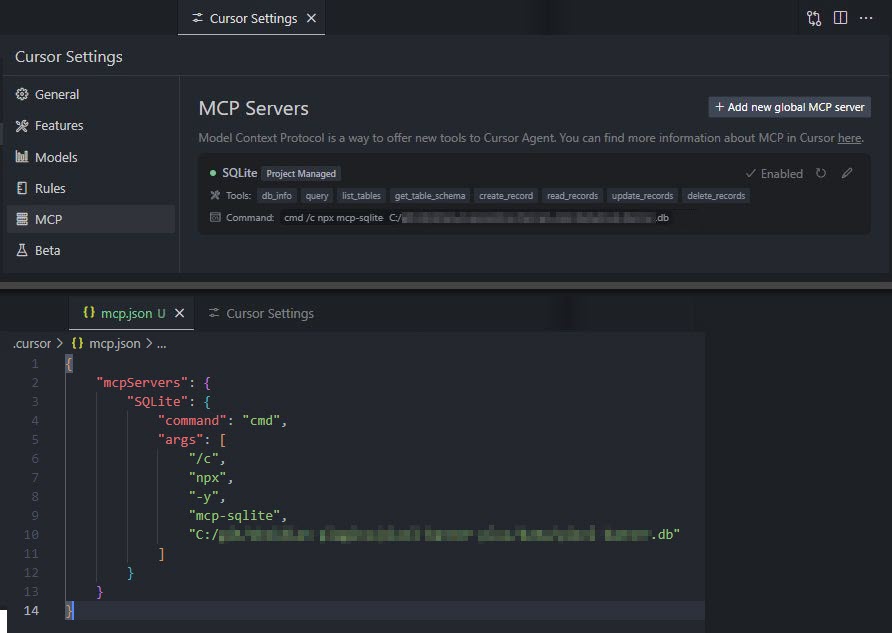
Your database path must be provided as an argument.
Available Tools
Database Information
db_info
Get detailed information about the connected database.
Example:
{
  "method": "tools/call",
  "params": {
    "name": "db_info",
    "arguments": {}
  }
}
list_tables
List all tables in the database.
Example:
{
  "method": "tools/call",
  "params": {
    "name": "list_tables",
    "arguments": {}
  }
}
get_table_schema
Get detailed information about a table's schema.
Parameters:
tableName(string): Name of the table
Example:
{
  "method": "tools/call",
  "params": {
    "name": "get_table_schema",
    "arguments": {
      "tableName": "users"
    }
  }
}
CRUD Operations
create_record
Insert a new record into a table.
Parameters:
table(string): Name of the tabledata(object): Record data as key-value pairs
Example:
{
  "method": "tools/call",
  "params": {
    "name": "create_record",
    "arguments": {
      "table": "users",
      "data": {
        "name": "John Doe",
        "email": "[email protected]",
        "age": 30
      }
    }
  }
}
read_records
Query records from a table with optional filtering.
Parameters:
table(string): Name of the tableconditions(object, optional): Filter conditions as key-value pairslimit(number, optional): Maximum number of records to returnoffset(number, optional): Number of records to skip
Example:
{
  "method": "tools/call",
  "params": {
    "name": "read_records",
    "arguments": {
      "table": "users",
      "conditions": {
        "age": 30
      },
      "limit": 10,
      "offset": 0
    }
  }
}
update_records
Update records in a table that match specified conditions.
Parameters:
table(string): Name of the tabledata(object): New values as key-value pairsconditions(object): Filter conditions as key-value pairs
Example:
{
  "method": "tools/call",
  "params": {
    "name": "update_records",
    "arguments": {
      "table": "users",
      "data": {
        "email": "[email protected]"
      },
      "conditions": {
        "id": 1
      }
    }
  }
}
delete_records
Delete records from a table that match specified conditions.
Parameters:
table(string): Name of the tableconditions(object): Filter conditions as key-value pairs
Example:
{
  "method": "tools/call",
  "params": {
    "name": "delete_records",
    "arguments": {
      "table": "users",
      "conditions": {
        "id": 1
      }
    }
  }
}
Custom Queries
query
Execute a custom SQL query against the connected SQLite database.
Parameters:
sql(string): The SQL query to executevalues(array, optional): Array of parameter values to use in the query
Example:
{
  "method": "tools/call",
  "params": {
    "name": "query",
    "arguments": {
      "sql": "SELECT * FROM users WHERE id = ?",
      "values": [1]
    }
  }
}
Built with
Appreciation
If you enjoy this library please consider sending me a tip to support my work 😀
🍵 tip me here
Reviews (0)
Sign in to leave a review.
Leave a reviewNo results found