Claude-Code-Dashboard
Health Warn
- License — License: AGPL-3.0
- Description — Repository has a description
- Active repo — Last push 0 days ago
- Low visibility — Only 9 GitHub stars
Code Fail
- exec() — Shell command execution in scripts/commit-message-utils.mjs
Permissions Pass
- Permissions — No dangerous permissions requested
This is a VS Code extension that acts as a local dashboard to track your Claude Code usage. It displays token consumption, estimated costs, session history, and usage insights directly within your editor.
Security Assessment
Overall risk: Low. The extension claims that no data leaves your machine and requires no API keys. However, automated scans flagged a failure for shell command execution (`exec()`) located in `scripts/commit-message-utils.mjs`. This is very likely a standard, safe development script used by the author to format git commits, rather than malicious background activity, but developers should be aware it exists. Fortunately, the extension requests no dangerous permissions and reads locally stored Claude data to generate its metrics. No hardcoded secrets were detected.
Quality Assessment
The project is actively maintained, with the last push occurring today. It uses a standard open-source license (AGPL-3.0) and provides clear documentation. The only significant drawback is its low community visibility; it currently has only 9 GitHub stars, meaning it has not been extensively vetted by a large audience. Being available on the official VS Code Marketplace and Open VSX does lend it a baseline level of credibility.
Verdict
Safe to use.
A VS Code extension that shows you exactly what Claude is doing — tokens, costs, sessions, and insights across all your projects, right inside VS Code.
Claude Code Dashboard
A VS Code extension that shows you what Claude is doing on your machine — token usage, estimated costs, sessions, and insights across all your projects, right inside VS Code.
No API key required. No data leaves your machine.




Screenshots
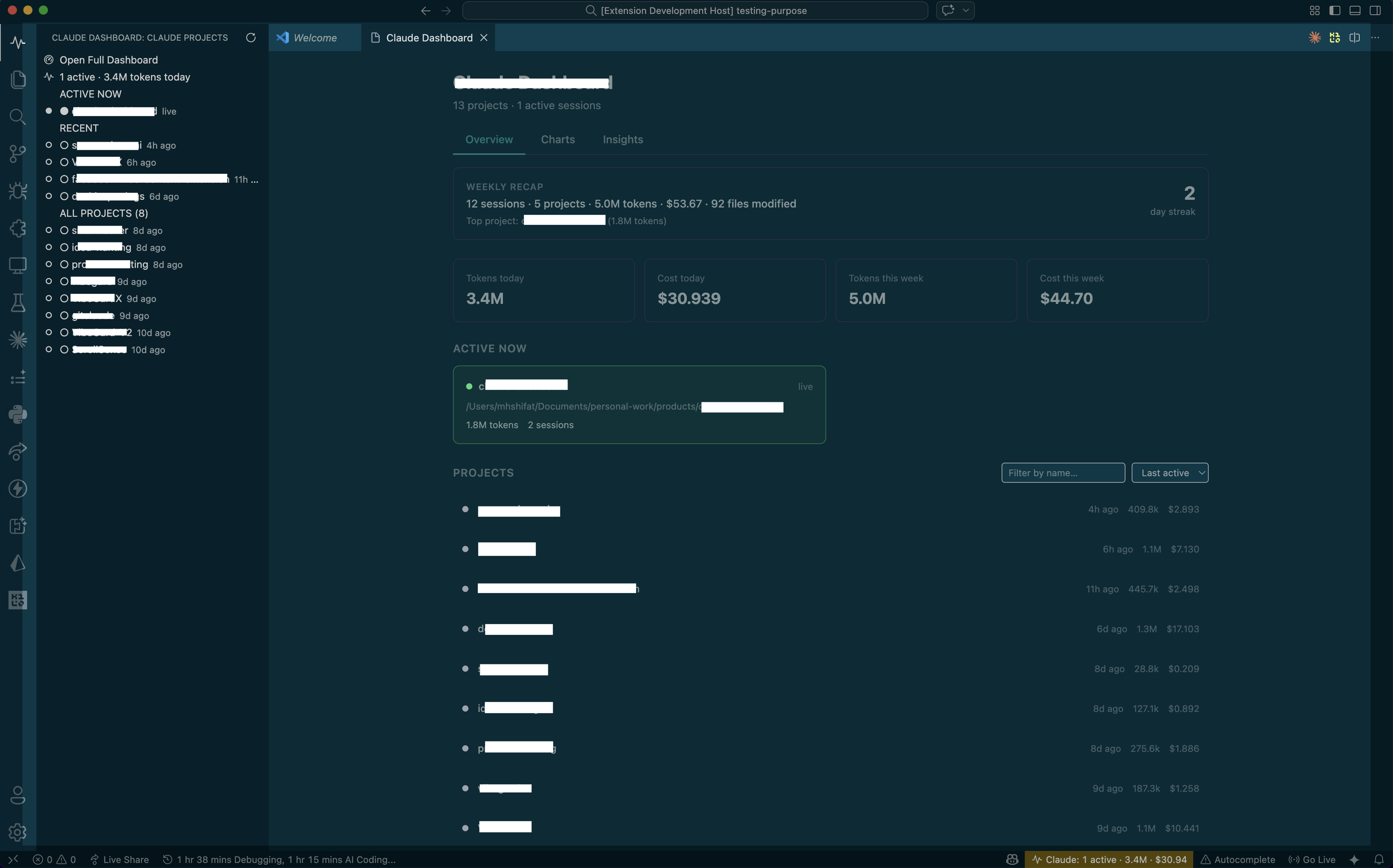
Main dashboard — projects, stats, weekly recap, and estimated cost overview
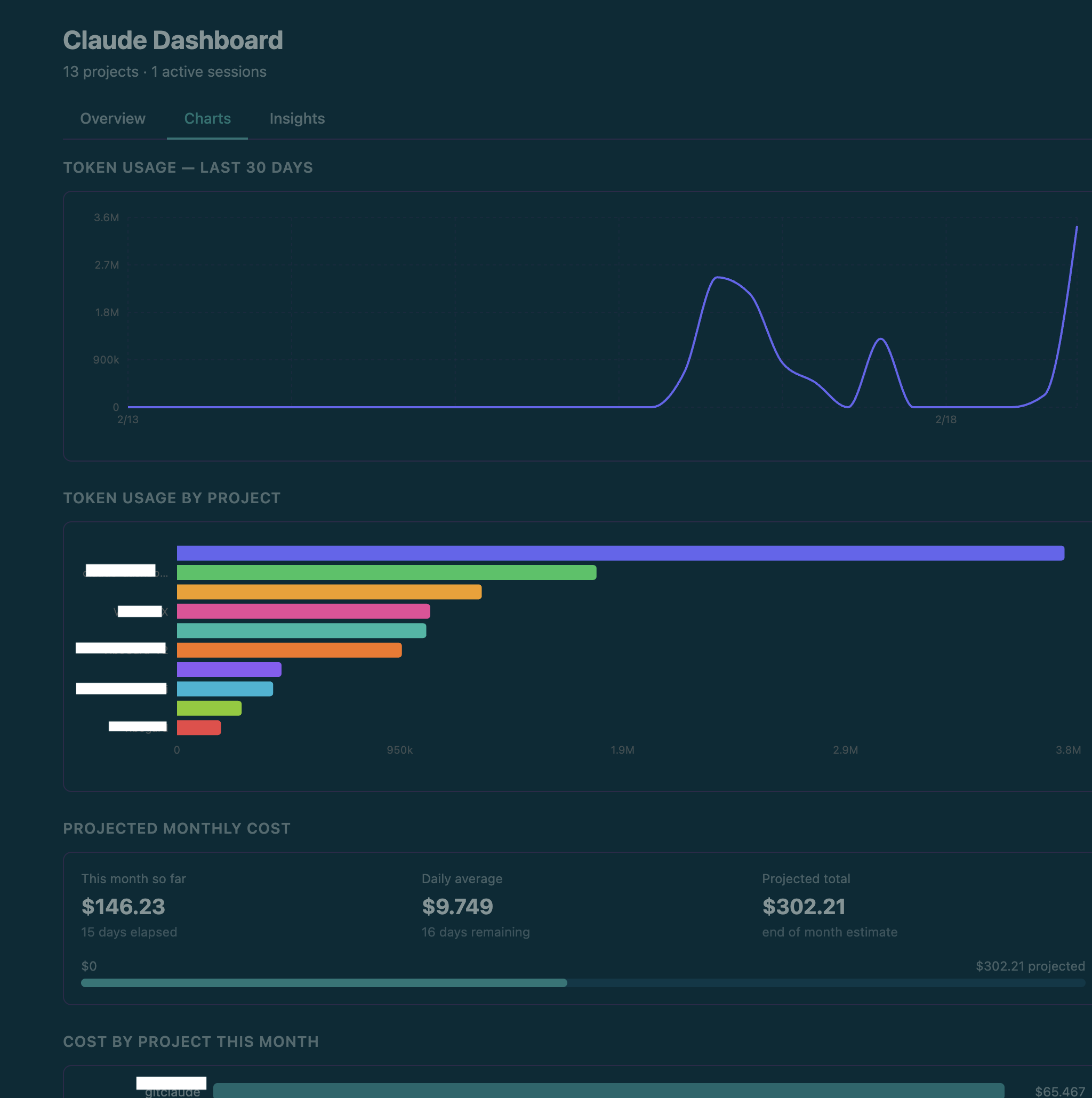
Charts tab — 30-day token trend, usage by project, projected monthly estimated cost
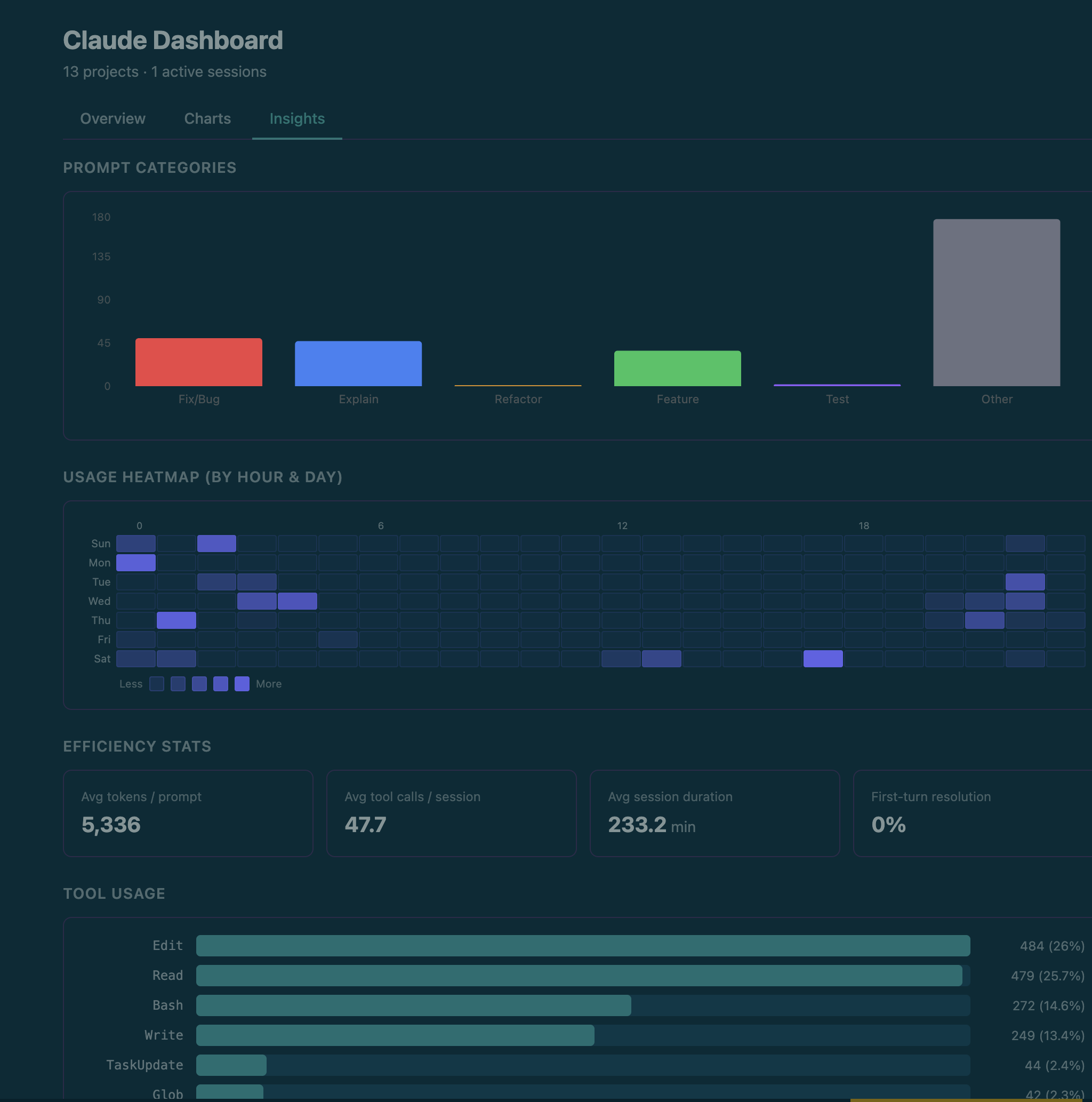
Insights tab — heatmap, tool usage, productivity by hour, hot files
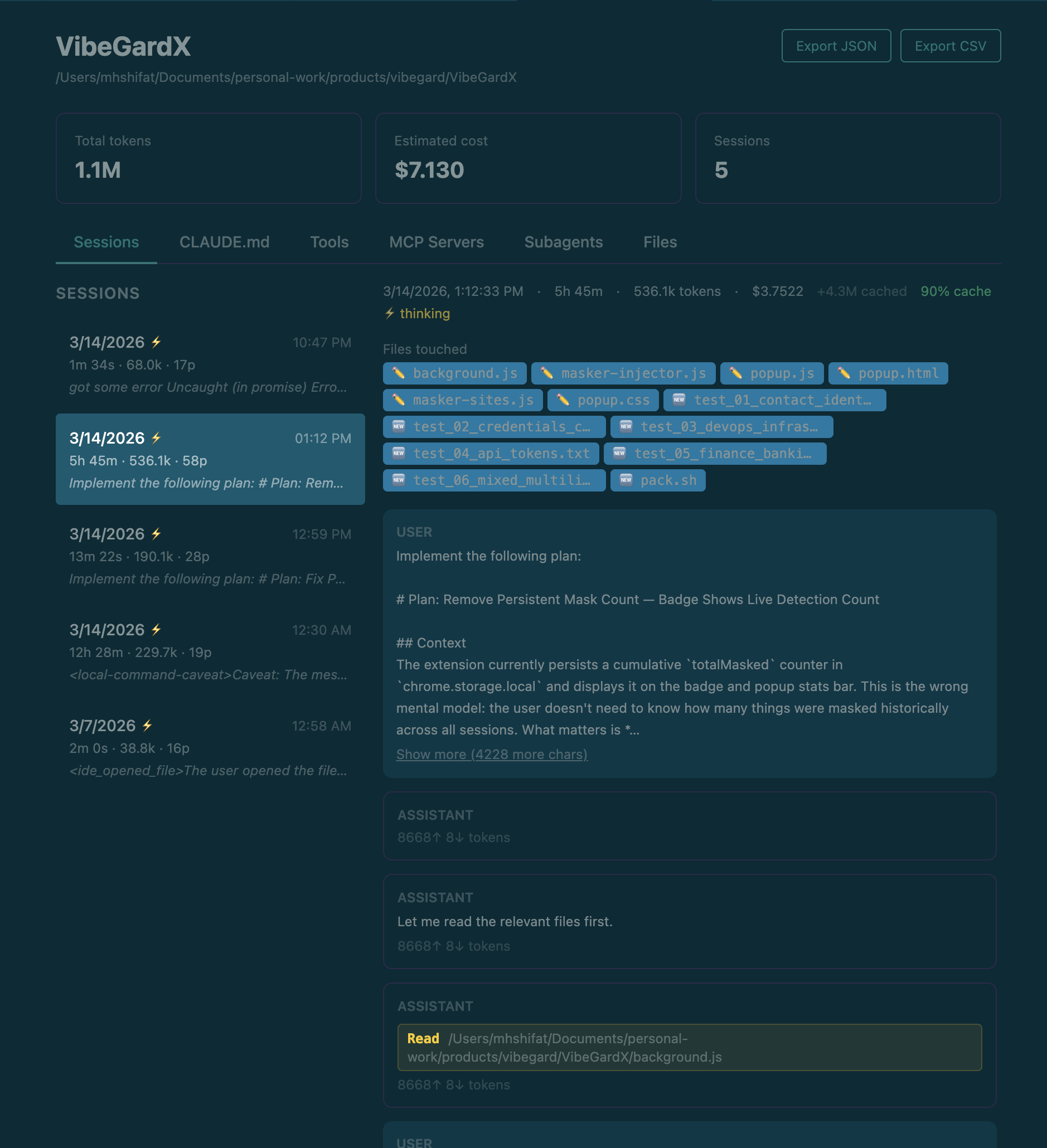
Project detail — session history with prompt previews and token breakdown
Installation
Search for Claude Code Dashboard in the VS Code Extensions panel, or install directly:
- VS Code Marketplace
- Open VSX (for VSCodium / other forks)
Requirements: VS Code 1.85+ and Claude Code installed and used at least once.
Getting started
- Click the pulse icon in the VS Code activity bar to open the Claude Projects sidebar.
- The full dashboard opens automatically to the right.
- On first run you'll be prompted to enable real-time hooks — choose "Yes, configure hooks" for live session tracking. A backup of
~/.claude/settings.jsonis made first.
Skipping hooks is fine — the dashboard still shows all historical data. You only lose the live "Claude is running" indicator.
What's inside
| Tab | What you see |
|---|---|
| Overview | Weekly recap, today's tokens & estimated cost, active sessions, full project list |
| Charts | 30-day token trend, usage by project, projected monthly estimated cost |
| Search | Full-text search across every prompt you've ever sent to Claude |
| Insights | Usage heatmap, tool breakdown, productivity by hour, hot files |
Project detail view — click any project to see its full session history, turn-by-turn conversation, token breakdown, estimated cost, files touched, CLAUDE.md, and MCP servers. Export to JSON or CSV any time.
Token and cost notes
- Token counts come from local Claude session logs in
~/.claude/projects/. - Displayed
totalTokensexclude cache-read tokens, which Claude may reuse heavily across long sessions. - Cost is a local estimate based on detected model family, a static pricing table, and parsed token usage.
- Aggregate cost views include subagent-attributed cost when Claude spawns subagents.
- Estimated cost may differ from Anthropic billing, invoices, or future pricing changes.
Configuration
Search for Claude Code Dashboard in VS Code settings (Cmd+, / Ctrl+,).
| Setting | Default | Description |
|---|---|---|
claudeDashboard.monthlyTokenBudget |
0 |
Monthly token cap. Set to 0 to disable. |
claudeDashboard.monthlyBudgetUsd |
0 |
Monthly estimated cost cap in USD. Alerts at 80% and 100%. Set to 0 to disable. |
Troubleshooting
No projects showing
— Verify ~/.claude/projects/ exists, then run Claude Code Dashboard: Refresh from the command palette. Check the Output panel (select "Claude Code Dashboard") for errors.
Sessions not updating in real time
— Confirm hooks were configured at first run. Check ~/.claude/settings.json for entries referencing .dashboard-events.jsonl. The file watcher fallback still updates within ~300ms.
Cost numbers look off
— Cost is estimated locally from parsed token usage, detected model family, and a static pricing table. Cache read tokens are tracked separately and excluded from totalTokens, but still contribute to estimated cost.
Corrupted settings.json after hook injection
— Restore the backup: cp ~/.claude/settings.json.bak ~/.claude/settings.json
Data privacy
The extension only reads files in ~/.claude/ and your project directories. No network requests. No telemetry. The only files it ever writes are:
~/.claude/settings.json— hook config (with your consent; backup made first)~/.claude/.dashboard-events.jsonl— live events from the injected hooks~/.claude/settings.json.bak— backup before hook injection
Contributing
Contributions are welcome! Please read the Contributing guide before opening a PR.
See SECURITY.md for how to report vulnerabilities privately.
Changelog
See CHANGELOG.md for the full version history.
License
AGPL-3.0 — free to use and modify, but any modified version must also be released under the same license. Commercial reselling is not permitted.
Reviews (0)
Sign in to leave a review.
Leave a reviewNo results found