Docxodus
Health Pass
- License — License: MIT
- Description — Repository has a description
- Active repo — Last push 0 days ago
- Community trust — 115 GitHub stars
Code Fail
- rm -rf — Recursive force deletion command in .github/actions/playwright-browsers/action.yml
Permissions Pass
- Permissions — No dangerous permissions requested
No AI report is available for this listing yet.
Swiss-army toolkit for .docx — faithful DOCX→HTML rendering, an in-browser block editor, Word-grade redlines with native tracked changes, and anchor-addressed markdown for LLM agents. .NET, WASM/TypeScript, Python, CLI.

Free your .docx files.
Render them, edit them, diff them, and hand them to an agent — from .NET, the browser, Python, or the shell.



A .docx is a zip full of XML that only one program really understands. Docxodus is the toolkit that
changes that: a structure-aware OOXML engine that reads Word documents faithfully, writes them
back losslessly, and exposes them through whichever surface your program actually needs — an HTML
render, a stable markdown projection, a stateful edit session, a tracked-changes redline, or a live
in-browser editor.
It runs as a .NET library, a WebAssembly module in the browser, an npm/TypeScript package,
a Python client, and three CLI tools — all over the same engine, so a document behaves the
same everywhere.
                    ┌───────────────────────────────────────────┐
  your .docx  ──▶   │       Docxodus  ·  one OOXML engine       │   ──▶   .docx  (lossless)
                    └────┬─────────┬──────────┬──────────┬──────┘
                         │         │          │          │
                      render     edit      compare    project
Every screenshot below is real output, captured from the
NVCA model financing documents — the venture-financing
forms that every startup lawyer actually redlines.
Compare — a redline Word will open
Docxodus compares two documents structurally and emits native Word tracked-changes markup:w:ins, w:del, w:moveFrom/w:moveTo, and w:pPrChange. Not a text diff with highlighting — a
file you can hand to opposing counsel, who accepts and rejects changes in Word as usual.
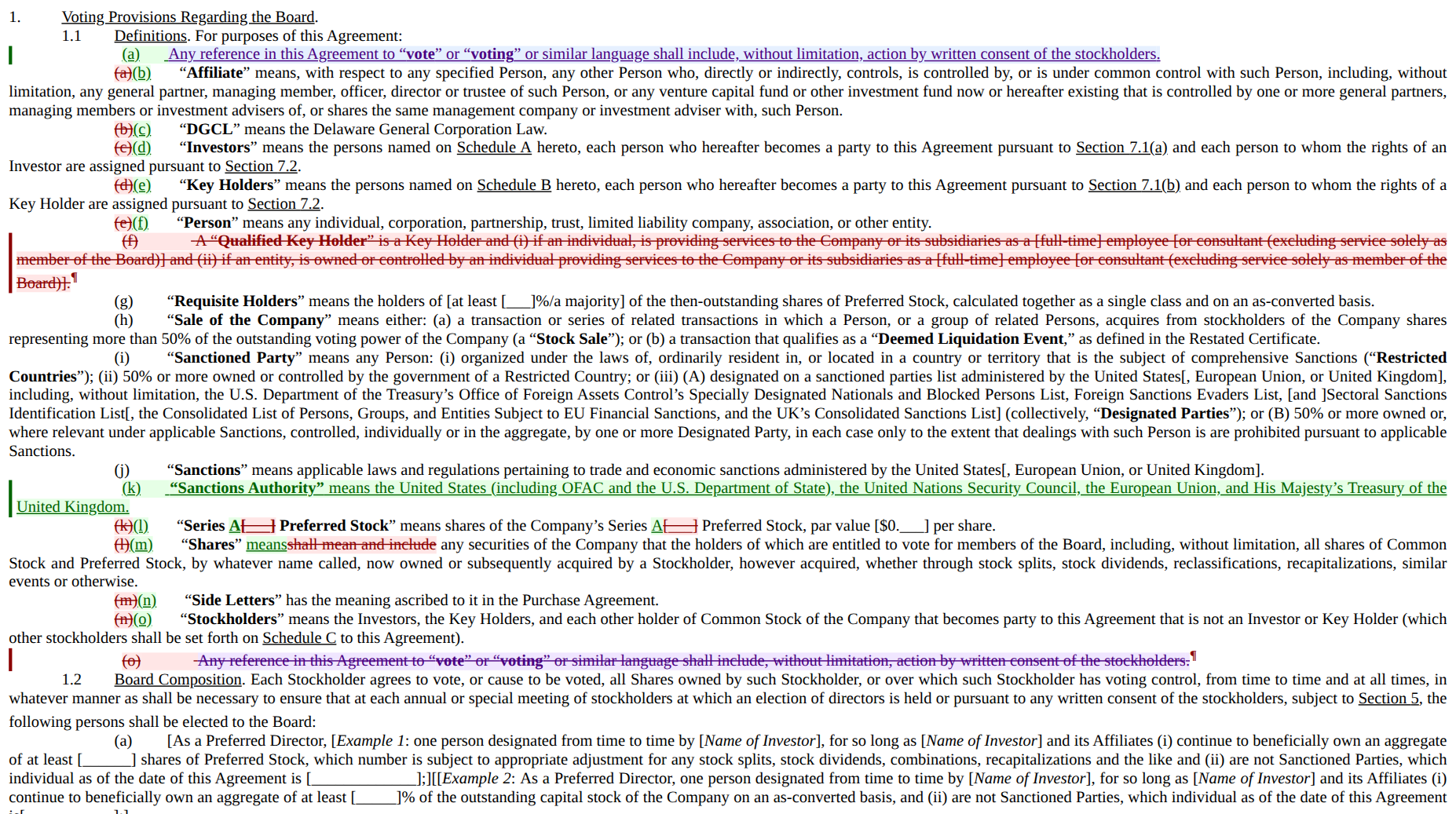
One frame, four kinds of change, all detected automatically: a struck definition (red), an
inserted definition (green), word-level substitutions inside an otherwise untouched sentence
(Series A replacing a blank; means replacing shall mean and include), and a move — the
interpretation clause struck at the bottom in purple and re-inserted at the top, linked as one
operation rather than reported as an unrelated delete and insert. Note the list numbering: it
renumbers as if every change were already accepted — the struck (g) is followed by the live(g), exactly the duplicate-number display Word uses in All Markup view — so the letters a reader
cites are the final document's.
- Round-trip contract:
accept(compare(left, right)) ≡ rightandreject(...) ≡ left, verified
at the block-text level. - The diff is also data.
GetRevisions()returns typed revisions carrying stablekind:scope:unidanchors;GetEditScriptJson()returns the whole edit script as JSON, so you can
drive a review UI or an approval workflow without parsing OOXML. - Semantic verification.
GetSemanticChanges()returns a deterministic, versioned change set
for text, formatting, styles, numbering, tables, sections, stories, review data, relationships,
media, and opaque package changes while suppressing serialization-only noise;GetSemanticChangesJson()emits its JSON representation. - Deliverable gate.
DeliverableVerifier.VerifyDeliverable()combines bounded package/schema
validation, cross-part closure, workflow residue, baseline-aware findings, expected deltas, and
digest-bound renderer artifacts into one canonical pass/failed report. Default report operations
are also available through WASM/npm, Python, and MCP. - Delivery change receipts.
DeliveryChangeReceiptBuilderbinds one delivery into a
canonical, hash-addressed record — source/delivered package identities, every normalized
request and transaction with its undo/redo lineage, requested/derived/unexpected change
attribution, typed semantic evidence, page citations pinned to a render fingerprint, and
the digest of every artifact — andDeliveryChangeReceiptVerifierre-checks all of it
from raw bytes, so a recipient can verify what an automated edit did (and that nothing
else changed) without trusting the system that produced it. Core .NET today; the
cross-surface ripple is tracked in #520. - N-way consolidate. Merge many reviewers' copies against one base into a single multi-author
tracked-changes document, with a structured conflict report. - Headers and footers are compared too — the way Word's own "Headers and footers" option does.
Two entry points share one engine:
DocxCompare.Compare— the front door, and the one to start from. It compares the
accepted view of each input, as Word's Compare does, so documents that already carry tracked
changes still produce a clean redline. TheredlineCLI and the browser package'scompareDocumentsgo through it.DocxDiff— the engine underneath. Call it directly when you want more than a redlined
document: revisions as data, the edit script, semantic changes, N-way consolidation, or the
engine's own defaults. Those defaults compare each input's raw markup, including any tracked
changes it already has, which turns a revision-bearing input into whole-document churn unless you
setPreAcceptInputRevisions(orPreserveInputRevisions).
The older WmlComparer engine was removed in v11.0.0.
See docs/architecture/ir_diff_engine.md.
Render — fidelity, not approximation
DOCX → HTML that keeps the things naive converters drop: justification, style inheritance, legal
numbering, tables, images, comments, headers and footers, and real footnotes with back-references.
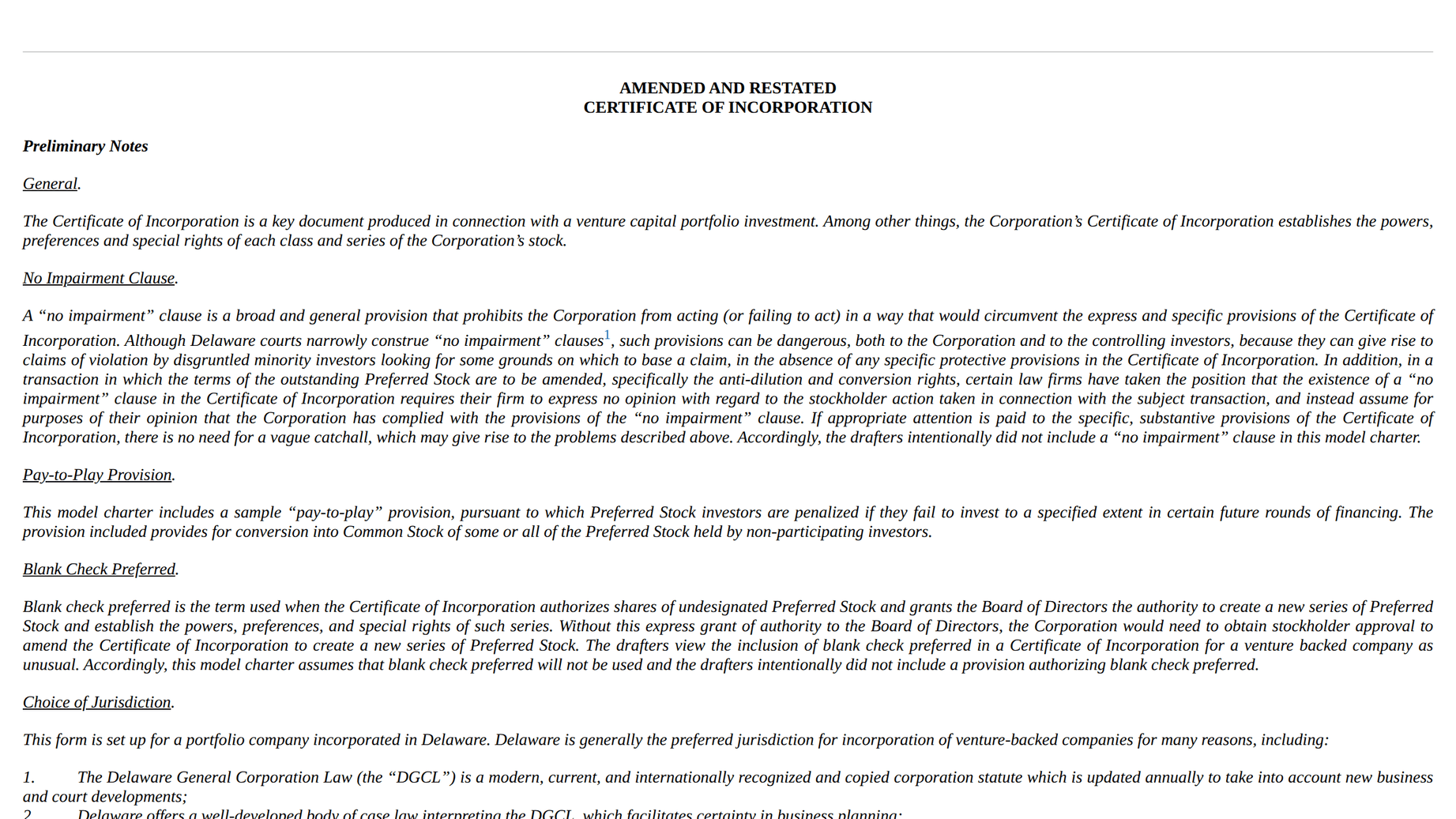
- Paginated mode flows content into real page boxes with per-page numbers, page-anchored
footnotes, and running heads — a print-accurate preview in the browser. - Tracked changes render as
<ins>/<del>with author metadata and move-aware styling (that's
exactly what the redline screenshot above is). - Comments render endnote-style, inline, or in a margin; annotations can be overlaid
incrementally without re-converting the document (~0.3 ms to add one, vs. a full re-conversion). HtmlToWmlConvertergoes the other way.
Project — a text view an LLM can actually address
WmlToMarkdownConverter renders a document as markdown where every block carries a stable id.
The same document, two views, one addressing system:
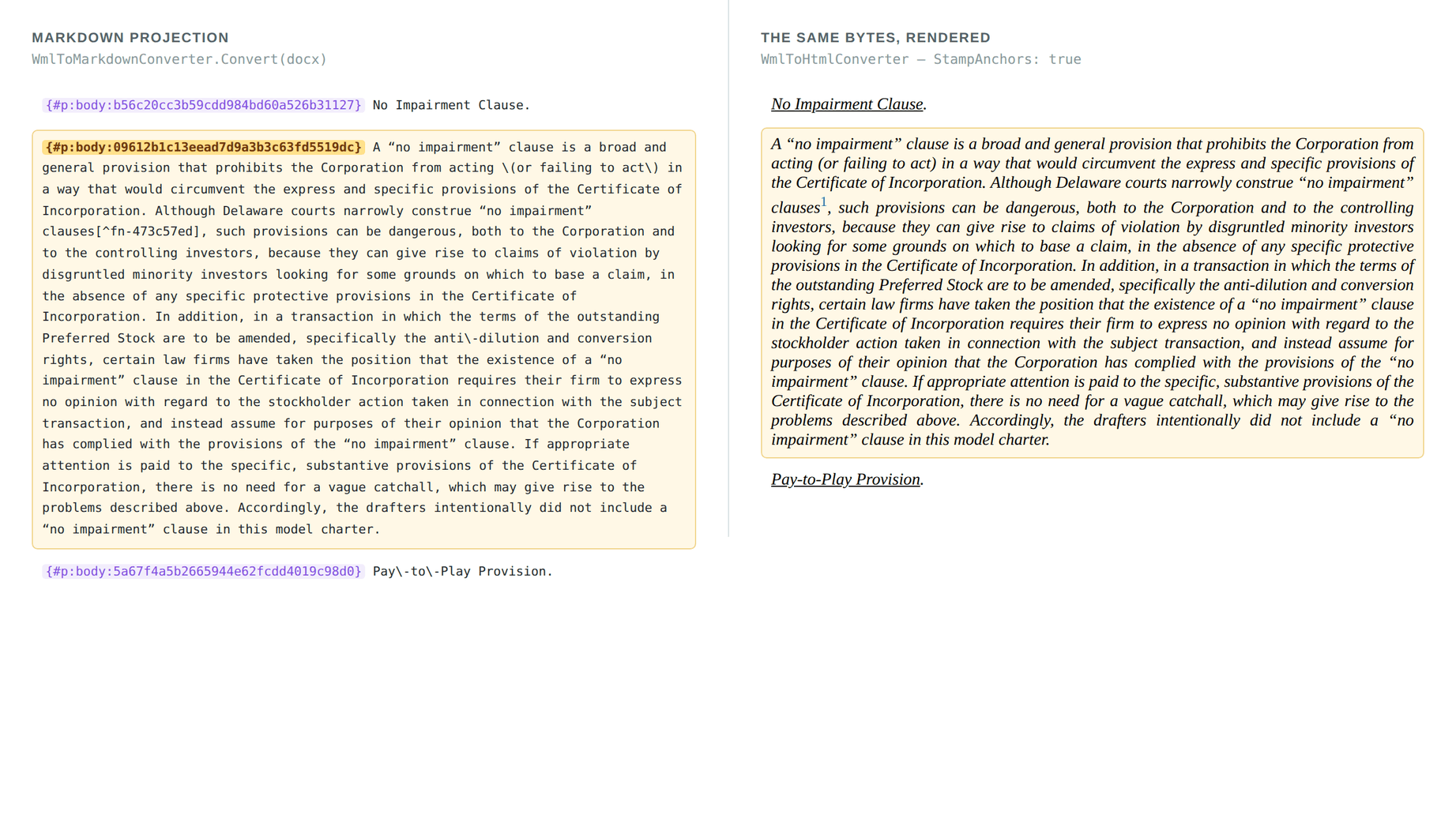
An anchor like {#p:body:09612b1c13…} is content-derived and survives edits elsewhere in the
document. That gives an agent something a raw text dump can't: a way to point.
- Read the markdown, decide "rewrite the indemnification clause", write back to that anchor.
- Anchors are shared across the whole stack — the same id addresses a projection block, a rendered
DOM node (data-anchor), a diff revision, and an edit target. - Resolve intent to anchors by text, regex, kind, bookmark, or annotation id; enumerate and safely
mutate native hyperlinks and multi-paragraph bookmarks — no re-walking the
document. - Also exports to OpenContracts format with PAWLS page
layout and token positions, for NLP and document-analysis pipelines.
Edit — programmatically, or in a browser
DocxSession is a stateful, anchor-addressed editor over the live document. Every mutation returns a
typed result envelope — no exceptions across the API boundary — and the document stays a real,
valid .docx the whole time.
Text and structure (replace, split, merge, insert, delete), tables (insert/delete rows and columns),
formatting (character ranges, paragraph styles, lists, borders), headers and footers, page numbering,
footnotes and endnotes, annotations, bounded undo/redo, and a raw-OOXML escape hatch for anything
the markdown subset can't express. Set TrackedChanges = RenderInline and every edit lands asw:ins/w:del instead of an accepted change.
DocxEditor is the browser editor built on top of it — framework-agnostic TypeScript, WASM engine,
no server:
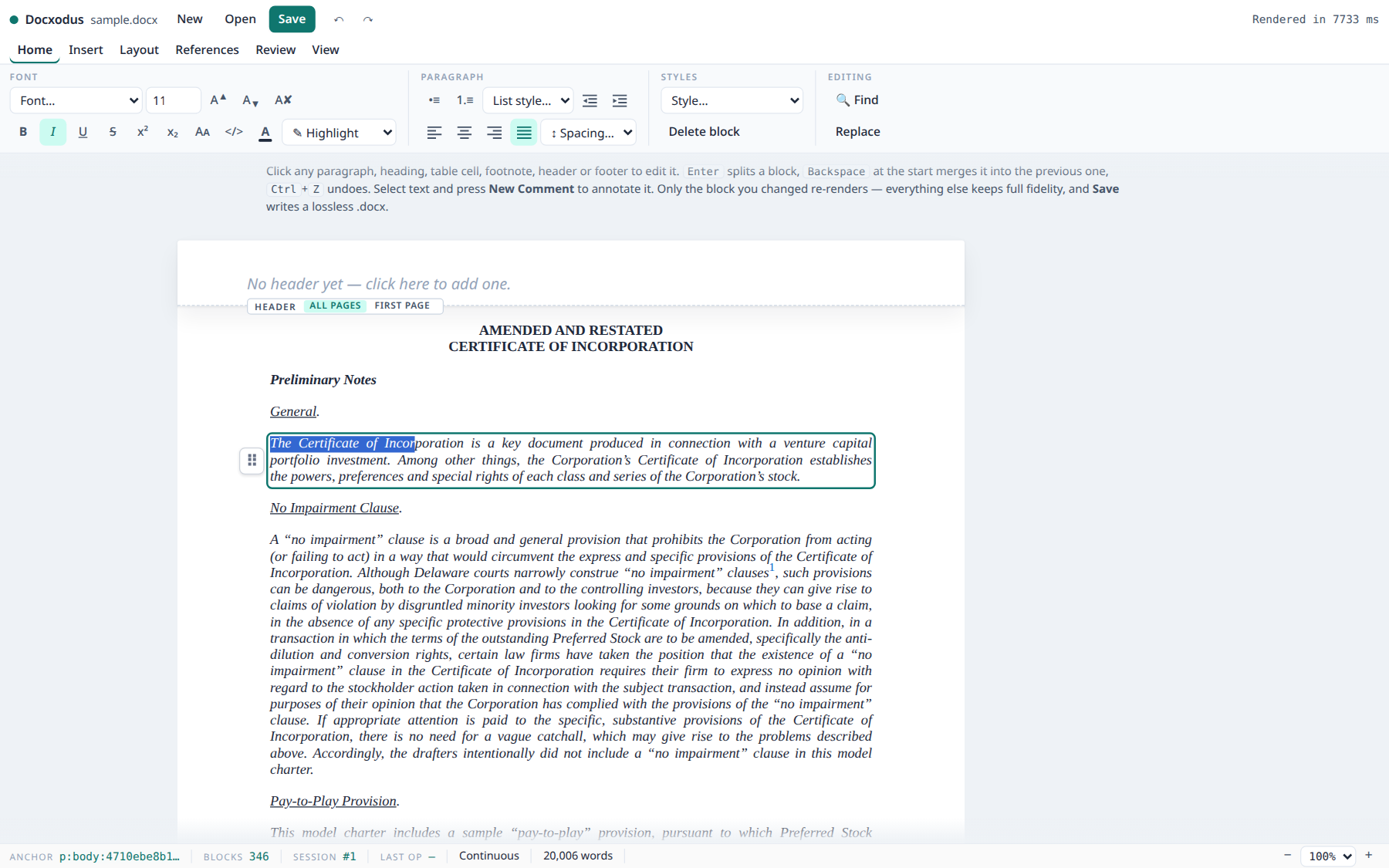
The document you see is the document you get: edits go through the session, and only the changed
block re-renders — so a structural op costs ~90–360 ms on a 346-block, 94-footnote filing
template, not the ~6 s a full remount used to take. save() returns lossless bytes.
The ribbon covers the Word most people use — fonts, colour and highlight, paragraph spacing and
the numbering gallery, styles read from the document, find and replace, links, pictures, tables
with merge and shading, page setup, tracked changes with accept/reject — and comments render the
way Word renders them: the range highlighted inline, the thread as a bubble in the margin.
Headers and footers are edited in place on the page.


More of the surface — ribbon anatomy, the comment gutter, in-page headers and footers, per-operation
costs — is in docs/architecture/editor_ui_surface.md.
Get started
| .NET | Browser / Node |
|---|---|
|
Use |
| Python | CLI |
|
Also |
Opening an editor in a page is a few lines more — see npm/examples/editor.html
for a complete ribbon implementation, and docs/npm-package.md for the
TypeScript API and React hooks.
Where it runs
| Surface | Package | Notes |
|---|---|---|
| .NET 10 library | Docxodus (NuGet) |
The engine. Everything else wraps it. |
| Browser / Node | docxodus (npm) |
.NET WASM + TypeScript. Runs fully client-side; Web Worker and React hooks included. |
| Python | docx-scalpel (PyPI) |
Long-running host process, so an agent can issue dozens of edits against one open session. Beta; wheels for linux-x64/arm64, osx-arm64, win-x64. |
| CLI | Redline, Docx2Html, Docx2OC |
dotnet tool install -g, or download a self-contained binary. |
What else is in the box
| DocumentBuilder | Merge and split DOCX files, with section and style fidelity |
| OpenXmlRegex | Regex search/replace across DOCX |
| RevisionProcessor | Accept and reject tracked revisions, byte-to-byte |
| FormattingAssembler | Resolve and flatten inherited formatting |
| MetricsGetter | Extract document metrics — styles, fonts, languages |
| ExternalAnnotationProjector | Overlay annotations onto rendered HTML without touching the DOCX |
Documentation
Design docs for every subsystem live in docs/architecture/. The ones worth
reading first:
| Doc | What it covers |
|---|---|
ir_diff_engine.md |
DocxDiff — pipeline, edit script, settings, parity with Word |
semantic_diff.md |
Stable semantic-change schema, package coverage, canonicalization, and limits |
docx_mutation_api.md |
DocxSession — full surface, anchor lifecycle, error catalog, markdown subset |
native_content_controls.md |
Native Word content-control registry, fills, binding/lock safety, and transports |
delivery_change_receipt.md |
Deterministic delivery receipts, LIFO lineage, exact semantic/package artifacts, privacy, citations, and verification |
markdown_projection.md |
The projection spec and anchor format |
docx_converter.md |
WmlToHtmlConverter internals |
editor_ui_surface.md |
The browser editor, control by control |
ooxml_corner_cases.md |
Where Word disagrees with the spec — and what we do about it |
Build and test
dotnet build Docxodus.sln            # build
dotnet test Docxodus.Tests/Docxodus.Tests.csproj   # .NET unit tests

cd npm && npm install && npx playwright install chromium
npm run build && npm test           # WASM + Playwright browser tests
npm run build compiles the library to WebAssembly (scripts/build-wasm.sh) and bundles the
TypeScript — re-run it after touching C#, TypeScript, or the test harness, or the browser tests will
run against stale artifacts. Release builds treat warnings as errors. SeeCLAUDE.md for the full development workflow and repository layout.
Requirements
The .NET 10.0 SDK, to build from source. Consumers of the npm and PyPI packages need no .NET
install of their own.
License
MIT — see LICENSE.
Contributors are asked to sign the Contributor License Agreement; the CLA bot prompts
you on your first pull request, and signing is a single comment.
Built on the shoulders of Open-Xml-PowerTools.
Thanks to Eric White, Thomas Barnekow, and all original contributors.
Reviews (0)
Sign in to leave a review.
Leave a reviewNo results found