context-mem
Health Warn
- License — License: MIT
- Description — Repository has a description
- Active repo — Last push 0 days ago
- Low visibility — Only 6 GitHub stars
Code Fail
- child_process — Shell command execution capability in bin/update-check.js
- execSync — Synchronous shell command execution in bin/update-check.js
- fs.rmSync — Destructive file system operation in bin/update-check.js
- os.homedir — User home directory access in bin/update-check.js
- process.env — Environment variable access in bin/update-check.js
- fs module — File system access in bin/update-check.js
Permissions Pass
- Permissions — No dangerous permissions requested
This MCP server optimizes context windows for AI coding assistants by capturing tool outputs, compressing them via specialized summarizers, and storing them locally in an SQLite database for future search and retrieval.
Security Assessment
The tool contains several significant security concerns. It accesses the user's home directory and environment variables, and relies on synchronous shell command execution (`execSync`) and destructive file system operations (`fs.rmSync`) within its update checking script. While the overall project privacy model focuses on remaining completely local and avoiding cloud reliance, the presence of raw shell execution capabilities and local file deletion presents a tangible attack surface. Overall risk is rated as Medium.
Quality Assessment
The project is actively maintained with a recent last push and is backed by an MIT license. It also features a detailed README with clear comparisons and testing claims. However, community visibility and trust are currently very low, highlighted by a minimal footprint of only 6 GitHub stars.
Verdict
Use with caution — the local-only privacy model is a plus, but the underlying shell execution and destructive file system capabilities warrant a thorough code review before deploying.
Context optimization for AI coding assistants — 99% token savings, zero configuration, no LLM dependency
context-mem
Context optimization for AI coding assistants — 99% token savings, deterministic by default, optional LLM enhancement.




AI coding assistants waste 60–80% of their context window on raw tool outputs — full npm logs, verbose test results, uncompressed JSON. This means shorter sessions, lost context, and repeated work.
context-mem captures tool outputs via hooks, compresses them using 14 content-aware summarizers, stores everything in local SQLite with full-text search, and serves compressed context back through the MCP protocol. Fully deterministic and free by default — no cloud, no cost. Optional LLM enhancement (Ollama, OpenRouter, or Claude API) adds query expansion, smarter titles/tags, and contradiction explanations when you want it.
How It Compares
| context-mem | claude-mem | context-mode | Context7 | |
|---|---|---|---|---|
| Approach | 14 specialized summarizers | LLM-based compression | Sandbox + intent filter | External docs injection |
| Token Savings | 99% (benchmarked) | ~95% (claimed) | 98% (claimed) | N/A |
| Search | BM25 + Trigram + Fuzzy + Vector + reranking | Basic recall | BM25 + Trigram + Fuzzy | Doc lookup |
| Semantic Search | Local embeddings (free) + vector contradiction detection | LLM-based ($$$) | No | No |
| Search Tuning | Configurable BM25/Trigram/Levenshtein/Vector weights | No | No | No |
| LLM Calls | Optional (free by default, 3 providers) | Every observation (~$57/mo) | None | None |
| Activity Journal | File edits, commands, reads | No | No | No |
| Cross-Session Memory | Journal + snapshots + DB | LLM summaries | Yes | No |
| Knowledge Base | 5 categories, auto-extraction, 14-day half-life decay, semantic contradiction detection, source tracking | No | No | No |
| Background Agent | Dreamer: auto-validates, marks stale (30d), archives (90d) | No | No | No |
| Quick Profile | Auto-generated project profile on session start | No | No | No |
| Budget Management | Configurable limits + overflow | No | Basic throttling | No |
| Event Tracking | P1–P4, error-fix detection | No | Session events only | No |
| Dashboard | Intelligence dashboard (search pipeline, authority, contradictions) | Basic view | No | No |
| Session Continuity | Snapshot save/restore | Partial | Yes | No |
| Content Types | 14 specialized detectors | Generic LLM | Generic sandbox | Docs only |
| Model Lock-in | None (MCP protocol) | Claude-only | Claude-only | Any |
| Privacy | Fully local, tag stripping, 9 secret detectors, auto-redaction | Local | Local | Cloud |
| Security | CORS localhost-only, input validation, error sanitization | N/A | N/A | N/A |
| License | MIT | AGPL-3.0 | Elastic v2 | Open |
Quick Start
cd your-project
npm i context-mem && npx context-mem init
One command. init auto-detects your editor and creates everything:
| Editor | What gets created | Restart needed? |
|---|---|---|
| Claude Code | .mcp.json + .claude/settings.local.json (6 hooks) + CLAUDE.md rules |
No |
| Cursor | .cursor/mcp.json + .cursor/rules/context-mem.mdc |
No |
| Windsurf | .windsurf/mcp.json + .windsurf/rules/context-mem.md |
No |
| VS Code / Copilot | .vscode/mcp.json + .github/copilot-instructions.md |
No |
| Cline | .cline/mcp_settings.json + .clinerules/context-mem.md |
No |
| Roo Code | .roo-code/mcp_settings.json + .roo/rules/context-mem.md |
No |
What init sets up:
- MCP server config (so your editor can use context-mem's 32 tools)
- AI rules (so the AI knows when to call
observe,search,restore_session) - Claude Code hooks (activity journal, observation capture, proactive injection, session restore, dashboard)
.context-mem.jsonconfig +.context-mem/data directory
Verify it works (in Claude Code):
cat .context-mem/journal.md | tail -5 # Should show recent tool activity
Create .mcp.json in your project root:
{ "mcpServers": { "context-mem": { "command": "npx", "args": ["-y", "context-mem", "serve"] } } }
For VS Code / Copilot, use .vscode/mcp.json:
{ "servers": { "context-mem": { "type": "stdio", "command": "npx", "args": ["-y", "context-mem", "serve"] } } }
For Goose, add to profile extensions:
extensions:
  context-mem:
    type: stdio
    cmd: npx
    args: ["-y", "context-mem", "serve"]
For CrewAI / LangChain — see configs/ for Python integration examples.
Alternative: Claude Code plugin mode (development)claude --plugin-dir /path/to/context-mem
This loads hooks directly from the plugin directory. Useful for development and testing.
Runtime Context Optimization (benchmark-verified)
| Mechanism | How it works | Savings |
|---|---|---|
| Content summarizer | Auto-detects 14 content types, produces statistical summaries | 97–100% per output |
| Index + Search | FTS5 BM25 retrieval returns only relevant chunks, code preserved exactly | 80% per search |
| Smart truncation | 4-tier fallback with 60/40 head/tail split for error preservation | 83–100% per output |
| Session snapshots | Captures full session state in <8 KB | ~50% vs log replay |
| Budget enforcement | Throttling at 80% prevents runaway token consumption | Prevents overflow |
Result: In a full coding session, 99% of tool output tokens are eliminated — leaving 99.6% of your context window free for actual problem solving. See BENCHMARK.md for complete results.
Headline Numbers
| Scenario | Raw | Compressed | Savings |
|---|---|---|---|
| Full coding session (50 tools) | 365.5 KB | 3.2 KB | 99% |
| 14 content types (555.9 KB) | 555.9 KB | 5.6 KB | 99% |
| Index + Search (6 scenarios) | 38.9 KB | 8.0 KB | 80% |
| BM25 search latency | — | 0.3ms avg | 3,342 ops/s |
| Trigram search latency | — | 0.008ms avg | 120,122 ops/s |
Verified on Apple M3 Pro, Node.js v22.22.0, 555.9 KB real-world test data across 21 scenarios.
What Gets Compressed
14 summarizers detect content type automatically and apply the optimal compression:
| Content Type | Example | Strategy |
|---|---|---|
| Shell output | npm install, build logs | Command + exit code + error extraction |
| JSON | API responses, configs | Schema extraction (keys + types, no values) |
| Errors | Stack traces, crashes | Error type + message + top frames |
| Test results | Jest, Vitest | Pass/fail/skip counts + failure details |
| TypeScript errors | error TS2345: |
Error count by file + top error codes |
| Build output | Webpack, Vite, Next.js | Routes + bundle sizes + warnings |
| Git log | Commits, diffs | Commit count + authors + date range |
| CSV/TSV | Data files, analytics | Row/column count + headers + aggregation |
| Markdown | Docs, READMEs | Heading tree + code blocks + links |
| HTML | Web pages | Title + nav + headings + forms |
| Network | HTTP logs, access logs | Method/status distribution |
| Code | Source files | Function/class signatures |
| Log files | App logs, access logs | Level distribution + error extraction |
| Binary | Images, compiled files | SHA256 hash + byte count |
Features
Search — 4-layer hybrid: BM25 full-text → trigram fuzzy → Levenshtein typo-tolerant → optional vector/semantic search. Sub-millisecond latency with intent classification. Semantic search finds "auth problem" when stored as "login token expired" — local embeddings via all-MiniLM-L6-v2, no cloud, no cost. Adaptive Reranking uses intent-specific weight vectors (causal / temporal / lookup / general) so results are prioritized differently depending on query type — general-intent queries apply result-aware weight adjustment for further precision. Block-Level Memory Attention organizes memory into four scope-based blocks (session, project, global, archive) and uses softmax block attention to allocate the result budget optimally across scopes, with per-block score normalization. Observation reranking scores results by 70% relevance + 20% recency + 10% access frequency. Request canonicalization deduplicates similar queries with a 30-second cache. Search weights (BM25/Trigram/Levenshtein/Vector ratios) are fully configurable in .context-mem.json.
Activity Journal — Every file edit, bash command, and file read is logged to .context-mem/journal.md in human-readable format. Cross-session memory injects journal entries on startup — Claude knows exactly what changed in previous sessions without LLM calls.
Plugin Commands — /context-mem:status (stats + dashboard link), /context-mem:search <query> (search observations), /context-mem:journal (show activity log).
Knowledge Base — Save and search patterns, decisions, errors, APIs, components. Knowledge entry decay with 14-day half-life — explicit entries decay slower, access frequency boosts relevance, automatic archival. Auto-extraction — decisions, errors, commits, and frequently-accessed files are automatically saved to the knowledge base without manual intervention. Semantic contradiction detection — vector-based similarity (when @huggingface/transformers available) in addition to keyword overlap, automatically flags conflicting knowledge when saving new entries. Depth-Aware Contradiction Resolution — authority scoring via softmax attention across four signals (source_weight, session_breadth, access_density, recency) determines which entry should win; ContradictionWarning includes a suggested_action field with a concrete recommendation. Source tracking — records where each entry came from (manual, inferred, external).
Quick Profile — Generates a concise project profile from accumulated knowledge. Injected on session start so the AI assistant has immediate project context without searching.
Dreamer Background Agent — Runs automatically to maintain knowledge quality. Auto-validates knowledge entries, marks them stale after 30 days of no access, and archives after 90 days. Keeps the knowledge base fresh without manual intervention.
Knowledge Graph — Entity-relationship model that maps connections between project concepts, files, patterns, and decisions. Graph queries let you traverse relationships — find all entities related to a component, trace decision chains, or discover implicit connections across the codebase.
Multi-Agent Shared Memory — Built-in coordination for multi-agent workflows. Agents register with agent_register, claim files with claim_files to prevent edit conflicts, check who's working on what with agent_status, and broadcast messages to all active agents with agent_broadcast. Shared memory ensures agents don't duplicate work or create merge conflicts.
Time-Travel Debugging — View and compare project state at any point in time using time_travel. Inspect how knowledge, observations, and project context evolved across sessions — useful for understanding when a decision was made or tracking down when a regression was introduced.
Natural Language Query — Ask questions naturally with ask — intent classification routes your question to the right subsystem (search, knowledge, timeline, graph, or stats) without needing to know which tool to call.
Auto-Promote — Knowledge accessed in 3+ sessions is automatically promoted to the global cross-project store. No manual intervention needed — patterns that prove useful rise to the top.
Cross-Project Merge — Duplicate detection and auto-merge across projects. The merge_suggestions tool surfaces candidates for review. Conflict resolution handles contradictions gracefully.
Project Health Score — 0–100 composite metric visible in the dashboard. Color-coded gauge reflects knowledge freshness, contradiction rate, and activity.
Confidence Scoring — Every knowledge entry carries a confidence score based on source type, freshness, access frequency, and session count. Higher-confidence entries rank higher in search results.
Auto-Tagger — Deterministic title and tag generation from content. Reduces manual effort when saving knowledge entries.
Optional LLM Enhancement — An opt-in layer that works alongside the deterministic pipeline. Disabled by default — everything works perfectly without it. When enabled, it adds: query expansion (e.g. "auth" → "authentication, JWT, login, session"), LLM-generated titles and tags (with deterministic fallback), contradiction explanation with merge suggestions, and LLM summarization before the 14 deterministic summarizers. Three providers supported: Ollama (local, free), OpenRouter (free and paid models), and Claude API (auto-detected when ANTHROPIC_API_KEY is set, uses Haiku 4.5). Auto-detection picks the best available provider at startup. context-mem init now includes a setup wizard for choosing Free vs Enhanced mode. All LLM failures fall back gracefully to the deterministic pipeline — invalid responses never reach the database.
Export/Import — Transfer knowledge between machines: context-mem export dumps knowledge, snapshots, and events as JSON; context-mem import restores them in another project. Merge or replace modes.
Budget Management — Session token limits with three overflow strategies: aggressive truncation, warn, hard stop.
Event Tracking — P1–P4 priority events with automatic error→fix detection.
Session Snapshots — Save/restore session state across restarts with progressive trimming.
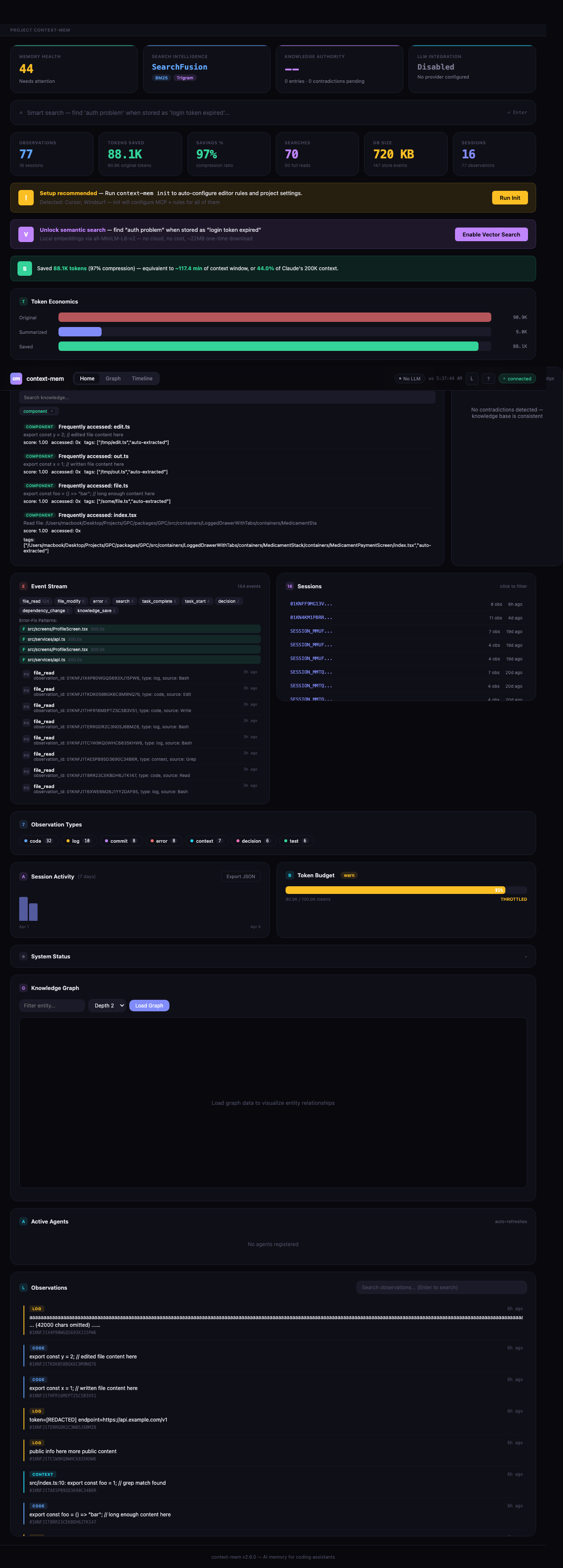
Intelligence Dashboard — Real-time web UI at http://localhost:51893 — auto-starts on session start via hooks. Intelligence strip — 4 hero cards showing health score, SearchFusion pipeline status, knowledge authority metrics, and LLM integration status at a glance. Smart search — full SearchFusion pipeline with intent classification (causal/temporal/lookup/general), adaptive reranking, and pipeline visualization showing how results were found. Knowledge authority — every knowledge entry scored 0–1 using softmax attention over source weight, session breadth, access density, and recency. Contradiction detection — finds conflicting knowledge entries, compares authority scores, and suggests resolution actions (keep/replace/merge). LLM status — header chip showing active provider and availability. Multi-project support with project switcher bar. Knowledge graph — interactive force-directed canvas with pan/zoom/filter, color-coded by entity type. Timeline explorer — visual observation timeline with search, date filtering, and replay. SSE + WebSocket streaming for live updates. Dark/light theme. Responsive down to mobile.
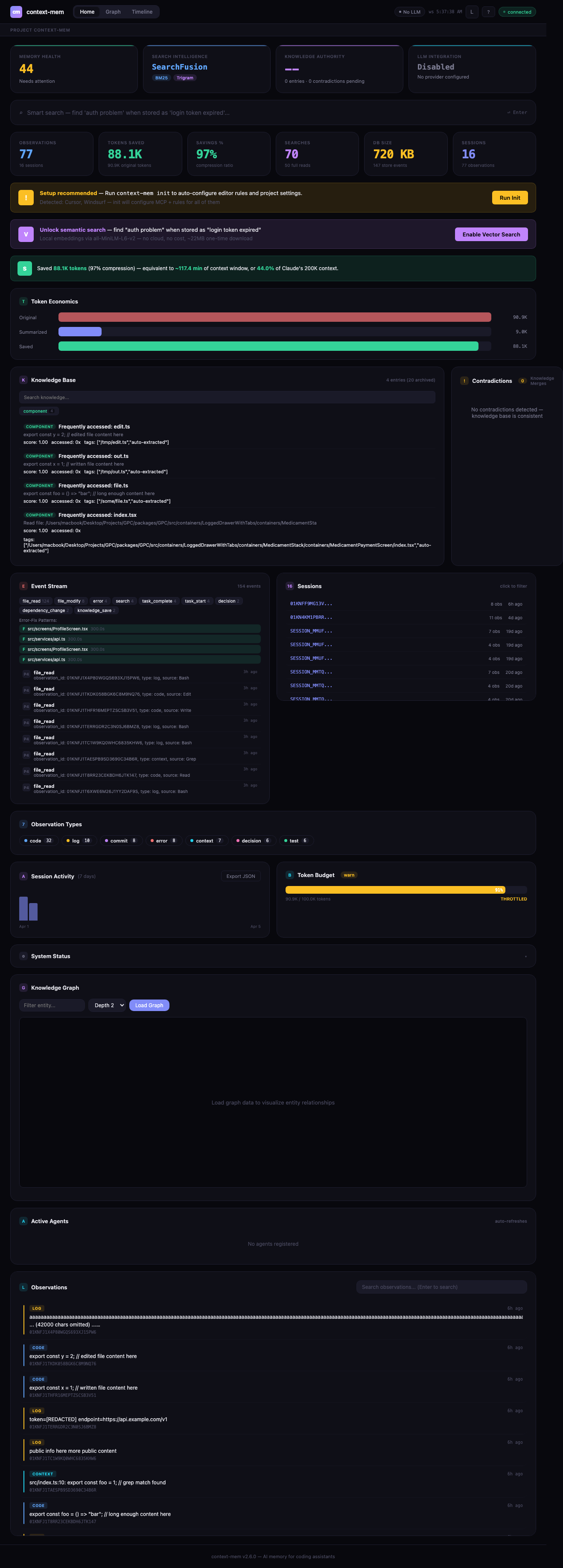
VS Code Extension — Sidebar dashboard, status bar with live savings, command palette (start/stop/search/stats). Install from marketplace: context-mem.
Auto-Detection — context-mem init detects your editor (Cursor, Windsurf, VS Code, Cline, Roo Code) and creates MCP config, AI rules, and Claude Code hooks automatically.
OpenClaw Native Plugin — Full ContextEngine integration with lifecycle hooks (bootstrap, ingest, assemble, compact, afterTurn, dispose). See openclaw-plugin/.
Privacy Engine — Everything local. <private> tag stripping, custom regex redaction, plus 9 built-in secret detectors: AWS keys, GitHub tokens, JWTs, private keys, Slack tokens, emails, IPs, generic API keys, and AWS secrets. Secrets are auto-redacted before storage. No telemetry, no cloud.
Plugin CLI — Manage summarizer plugins: context-mem plugin add <name>, plugin remove <name>, plugin list. Supports short names (e.g., k8s → context-mem-summarizer-k8s).
Auto-Update Check — Checks npm for newer versions on session start (gstack-style). Split TTL caching (1hr fresh / 12hr nagging), escalating snooze (24h → 48h → 7 days), configurable via ~/.context-mem/config.yaml. Never blocks, always graceful.
Security Hardening — CORS restricted to localhost only, input validation on all 32 handlers, error sanitization (file paths + SQL keywords stripped). Windows compatibility for cross-platform deployments.
Smart Truncation — 60/40 head/tail split for better error preservation at end of output. 4-tier fallback: JSON schema → Pattern → Head/Tail → Binary hash.
Architecture
Tool Output → Hook Capture → HTTP Bridge (:51894) → Pipeline → Summarizer (14 types) → SQLite + FTS5
                                    ↓                    ↓           ↑ (LLM optional)          ↓
                              ObserveQueue         SHA256 Dedup   LLM Layer               4-Layer Search + Reranking
                             (burst protection)          ↓        (Ollama / OpenRouter /    (70% relevance + 20% recency
                                              60/40 Truncation     Claude API, disabled     + 10% access frequency)
                                                      ↓            by default, fallback           ↓
                                    Privacy Engine (9 detectors)   to deterministic)  Request Canonicalization (30s cache)
                                                      ↓                                        ↓
                                    Auto-Extract KB + Dreamer Agent         AI Assistant ← MCP Server (32 tools)
                                                                                               ↓
                                                                           Intelligence Dashboard ← SSE + WebSocket
                                                                           (search pipeline, authority, contradictions)
MCP Tools
32 tools available via MCP protocol| Tool | Description |
|---|---|
observe |
Store an observation with auto-summarization |
search |
Hybrid search across all observations |
get |
Retrieve full observation by ID |
timeline |
Reverse-chronological observation list |
stats |
Token economics for current session |
summarize |
Summarize content without storing |
configure |
Update runtime configuration |
execute |
Run code snippets (JS, TS, Python, Shell, Ruby, Go, Rust, PHP, Perl, R, Elixir) |
index_content |
Index content with code-aware chunking |
search_content |
Search indexed content chunks |
save_knowledge |
Save to knowledge base |
search_knowledge |
Search knowledge base |
budget_status |
Current budget usage |
budget_configure |
Set budget limits |
restore_session |
Restore session from snapshot |
emit_event |
Emit a context event |
query_events |
Query events with filters |
update_profile |
Generate or retrieve project profile |
promote_knowledge |
Promote project knowledge to global cross-project store |
global_search |
Search global cross-project knowledge store |
graph_query |
Query the knowledge graph for entities and relationships |
add_relationship |
Add a relationship between entities in the knowledge graph |
graph_neighbors |
Find neighboring entities connected to a given node |
time_travel |
View/compare project state at any point in time |
ask |
Natural language questions with intent classification |
agent_register |
Register as named agent for multi-agent coordination |
agent_status |
List active agents and their tasks |
claim_files |
Claim files to prevent conflicts between agents |
agent_broadcast |
Broadcast messages to all active agents |
handoff_session |
Hand off session context for continuity across sessions |
resolve_contradiction |
Resolve conflicting knowledge entries (supersede, merge, keep both, archive) |
merge_suggestions |
View cross-project duplicate suggestions for manual review and merge |
CLI Commands
context-mem init                    # Initialize in current project
context-mem serve                   # Start MCP server (stdio)
context-mem status                  # Show database stats
context-mem doctor                  # Run health checks
context-mem dashboard               # Open web dashboard
context-mem export                  # Export knowledge, snapshots, events as JSON
context-mem import                  # Import data from JSON export file
context-mem plugin add <name>       # Install a summarizer plugin
context-mem plugin remove <name>    # Uninstall a summarizer plugin
context-mem plugin list             # Show installed plugins
Configuration
.context-mem.json{
"storage": "auto",
"plugins": {
"summarizers": ["shell", "json", "error", "log", "code"],
"search": ["bm25", "trigram", "vector"],
"runtimes": ["javascript", "python"]
},
"search_weights": {
"bm25": 0.5,
"trigram": 0.3,
"levenshtein": 0.15,
"vector": 0.05
},
"privacy": {
"strip_tags": true,
"redact_patterns": [],
"disabled_detectors": []
},
"token_economics": true,
"lifecycle": {
"ttl_days": 30,
"max_db_size_mb": 500,
"max_observations": 50000,
"cleanup_schedule": "on_startup",
"preserve_types": ["decision", "commit"]
},
"port": 51893,
"db_path": ".context-mem/store.db",
"ai_curation": {
"enabled": false,
"provider": "auto"
}
}
Documentation
| Doc | Description |
|---|---|
| Benchmark Results | Full benchmark suite — 21 scenarios, 7 parts |
| Configuration Guide | All config options with defaults |
Platform Support
| Platform | MCP Config | AI Rules | Auto-Setup |
|---|---|---|---|
| Claude Code | CLAUDE.md | Appends to CLAUDE.md | init + serve |
| Cursor | mcp.json | .cursor/rules/context-mem.mdc | init + serve |
| Windsurf | mcp_config.json | .windsurf/rules/context-mem.md | init + serve |
| GitHub Copilot | mcp.json | .github/copilot-instructions.md | init + serve |
| Cline | cline_mcp_settings.json | .clinerules/context-mem.md | init + serve |
| Roo Code | mcp_settings.json | .roo/rules/context-mem.md | init + serve |
| Gemini CLI | GEMINI.md | Appends to GEMINI.md | init + serve |
| Antigravity | GEMINI.md | Appends to GEMINI.md | serve |
| Goose | recipe.yaml | — | Manual |
| OpenClaw | mcp_config.json | — | Manual |
| CrewAI | example.py | — | Manual |
| LangChain | example.py | — | Manual |
AI Rules teach the AI when and how to use context-mem tools automatically — calling observe after large outputs, restore_session on startup, search before re-reading files.
Available On
- npm —
npm install context-mem && npx context-mem init - VS Code Marketplace — Context Mem
- Claude Code Plugin —
claude --plugin-dir /path/to/context-mem
License
MIT — use it however you want.
Author
context-mem — 99% less noise, 100% more context
Star this repo · Fork it · Report an issue
Reviews (0)
Sign in to leave a review.
Leave a reviewNo results found