pager
Health Uyari
- License — License: MIT
- Description — Repository has a description
- Active repo — Last push 0 days ago
- Low visibility — Only 7 GitHub stars
Code Basarisiz
- rm -rf — Recursive force deletion command in scripts/blefake.py
Permissions Gecti
- Permissions — No dangerous permissions requested
Bu listing icin henuz AI raporu yok.
A physical Claude Code remote for your desk — M5Stack CoreS3 SE firmware that pairs with the Claude desktop app over BLE for ambient session awareness and tool-approval takeover.
Pager
A physical Claude Code remote for your desk.
Pager is a small touchscreen companion that gives you ambient awareness of
Claude Code and Claude Cowork sessions, and lets you approve or deny
tool-use prompts with a tap — without context-switching away from your main
work. It pairs with the Claude desktop app over Bluetooth LE using
Anthropic's documented
Hardware Buddy protocol
(Nordic UART Service + newline-delimited JSON), and runs on an M5Stack
CoreS3 SE.
  ┌──────────────────────────────┐
  │  Pager - working       14:23 │
  │  approve: Bash      Sun 26   │
  │     2 running, 1 waiting     │
  │  /\    /\ /\                 │
  │  ▓▓▓▓▓▓▓▓░░░░  31.2k (~480)  │
  │                              │
  │  10:42  git push             │
  │  10:41  yarn test            │
  │  active now                  │
  └──────────────────────────────┘
When a permission prompt blocks a session, the screen takes over with the
tool name and the full call. You approve with a tap or hold-to-deny.
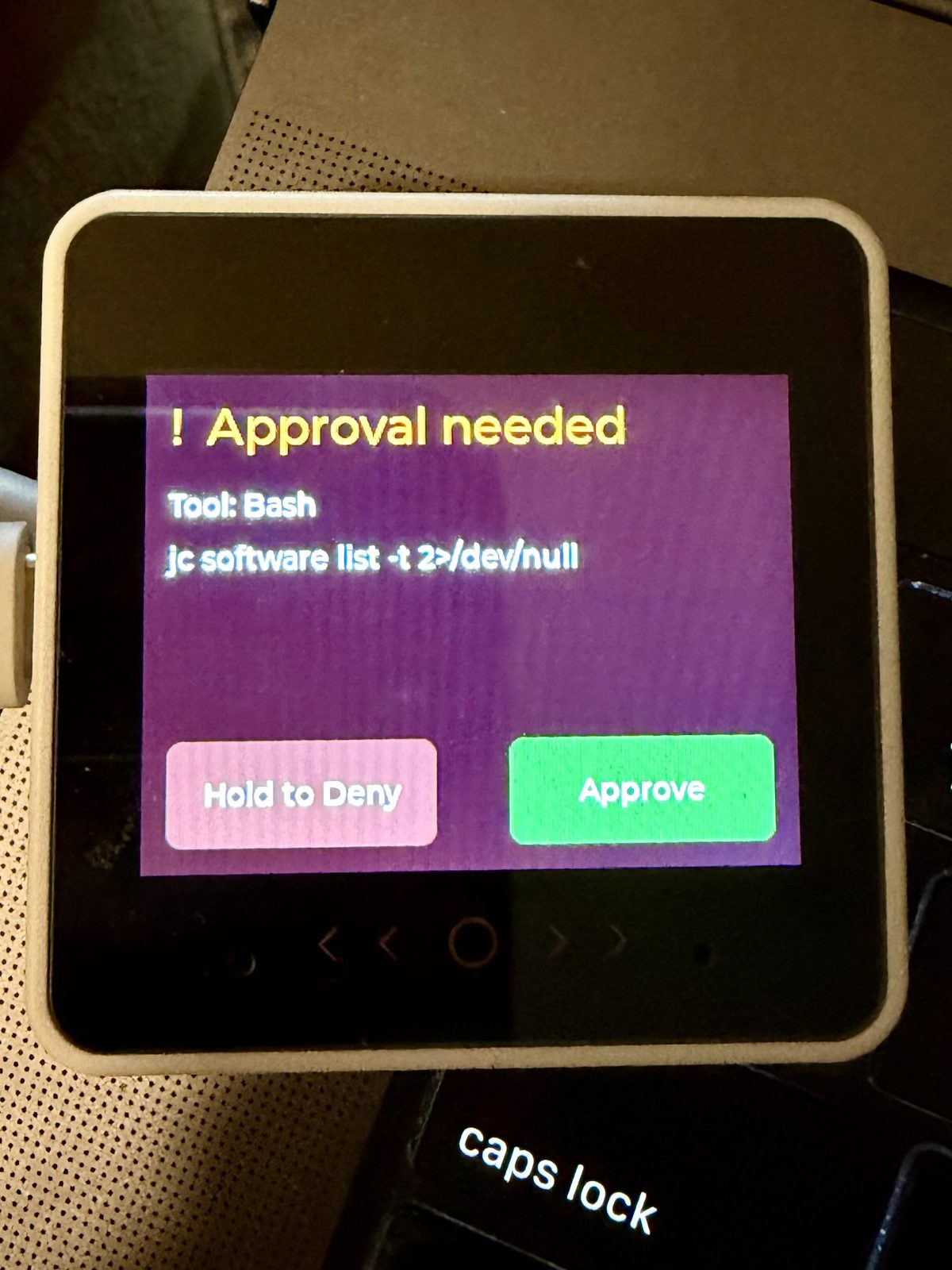
→ See PAGER_SPEC.md for the v1 specification andBACKLOG.md for known limits and follow-ups.
Hardware
- M5Stack CoreS3 SE (SKU K128-SE) — ESP32-S3, 2.0″ IPS touch (320×240), 8 MB PSRAM, 16 MB flash, USB-C powered.
- USB-C cable.
The "SE" matters: it has no battery and no IMU. The firmware is written
to that constraint and won't surface battery / tilt UI even though the
Hardware Buddy protocol allows for it. Anthropic's reference firmware
(claude-desktop-buddy,
MIT) targets the regular CoreS3 with a pet character pack instead — this
is a fresh, independent implementation with a pager-style UI. No code is
shared; only the documented wire protocol.
Experimental: M5Stack Dial
The same codebase also builds for the M5Stack Dial — ESP32-S3, 1.28″ round
240×240 touch panel with a rotary encoder. Flash withpio run -e dial -t upload instead of the default env.
The encoder is the headline difference: approvals use rotate-then-press.
Rotate clockwise to arm Approve, counter-clockwise to arm Deny, watch the
coloured arc fill around the perimeter, then push the encoder to commit. A
"press to Approve/Deny" hint appears once the arc crosses the arm threshold.
Touch fallback is still wired — the on-screen Approve / Deny buttons respond
to taps and long-press — so no-rotation operation works too.
Glance / Recent / Settings are repositioned for the round canvas; the
sparkline, date, token bar, and second transcript entry are dropped to
fit. Upload requires --no-stub (configured in platformio.ini) because
the Dial's USB-CDC stub handoff is even flakier than the CoreS3 SE's — flash
runs ~2 min via the ROM bootloader but is reliable. See BACKLOG.md for
what's still rough.
Build & flash
Install PlatformIO Core
or the VS Code extension.Plug the CoreS3 SE into your machine over USB-C.
From the repo root:
pio run -t upload
pio device monitor
The first build pulls M5Unified, NimBLE-Arduino, and ArduinoJson (~30 MB).
CoreS3 SE download-mode quirk
The CoreS3 SE doesn't have a dedicated BOOT button. If pio run -t upload
hangs on Connecting...... for 10+ seconds, put the board into download
mode manually: long-press the RESET button for ~3 seconds until the green
LED lights up, release, then retry the upload. PlatformIO usually
triggers this automatically, but the manual ritual works when it doesn't.
Pair with Claude
- In Claude for macOS or Windows, enable Help → Troubleshooting → Enable
Developer Mode. - Open Developer → Open Hardware Buddy… and click Connect.
- Pick
Claude-Pager-XXXXfrom the scanner. - The Pager displays a 6-digit passkey. Type it into the OS prompt.
- Verify
sec: truein the Hardware Buddy window's stats panel — that
means the link is encrypted.
If pairing misbehaves after a reflash (old bond data on one side, fresh on
the other), click Forget this device in Claude, then power-cycle the
Pager and try again.
Project layout
pager/
├── include/
│   ├── config.h          BLE UUIDs, firmware version, capacities, NVS keys
│   └── lv_conf.h         LVGL 9 configuration (RGB565, dark theme, fonts)
├── src/
│   ├── main.cpp          composition root, BLE↔queue↔protocol↔UI wiring
│   ├── audio/chime.*     generated double-chirp on approval arrival
│   ├── ble/nus.*         NimBLE NUS peripheral + LE SC bonding
│   ├── persistence/      NVS-backed settings + counters
│   ├── proto/protocol.*  Hardware Buddy JSON parse/build/dispatch
│   ├── state/session.*   in-memory snapshot model + PSRAM ring buffer
│   ├── system/clock.*    RTC + epoch/TZ formatting helpers
│   ├── system/dial_encoder.*  Dial rotary encoder (IRAM ISR, GPIO 41/40)
│   └── ui/               LVGL port, router, view widgets
├── scripts/              diagnostic helpers + LVGL-xtensa pre-build patch
├── PAGER_SPEC.md         v1 specification (read this before redesigning)
├── BACKLOG.md            known limits and follow-ups
├── HANDOFF.md            cross-machine bring-up notes
├── CLAUDE.md             design rules for Claude Code instances
├── platformio.ini
├── LICENSE
└── README.md
The composition root in src/main.cpp is the only place that knows about
every module — modules in ble/, proto/, state/, ui/ never call
each other directly. See CLAUDE.md for the design rules.
What works today
Verified end-to-end against Claude for macOS in Developer Mode, with both
synthetic prompts (via scripts/blefake.py) and a real Claude permission
prompt for an actual pwsh invocation:
- Pairing with the LE Secure Connections passkey flow (DisplayOnly IO
capability, AES-CCM-encrypted link, bond persists across reboots and
host sleep/wake). - Ambient Glance view with everything you want to know in one screen:
- Status pill that colour-codes session state at a glance
(green=idle, amber=working, red=waiting, gray=disconnected,
violet=focus mode). - Heartbeat
msgrendered as a subtitle ("approve: Bash", "1 idle", …). - Counters (running · waiting), today's tokens, last two transcript
entries fromsnapshot.entries. - Token-burn sparkline above the today bar — last ~10 min of
per-tick deltas, so you can see whether you're sprinting or drifting. - Local clock in the top-right (HH:MM, BM8563-backed, synced from
the desktop's{"time":[epoch,tz]}). - Updates within ~1 s of each heartbeat.
- Status pill that colour-codes session state at a glance
- Approval takeover: when a
prompt:-bearing heartbeat arrives, the
screen flips to a full-screen tool-call review with green Approve and
hold-to-Deny. The decision round-trips back to the desktop in well
under 500 ms. - Bezel buttons (the three orange marks below the LCD on the CoreS3
SE): tap right = Approve, hold left ~400 ms = Deny while an approval
is up; tap centre on Glance to toggle focus mode. Mirrors the on-screen
layout, so you can act on a prompt without reaching for the screen. - Focus mode: long-press anywhere on Glance — or tap the centre
bezel button — to silence the chime and pin the backlight dim for
60 min. Re-press to exit early. Useful in calls and meetings. - Recent view (PSRAM-backed ring of the last ~64 turn events).
- Settings view (device name override, owner name, chime toggle,
forget-bonds button). - Local NVS-persisted approval / denial counters.
- Time sync from desktop into the BM8563 RTC.
- Soft chime on prompt arrival (configurable, off by default).
BACKLOG.md tracks what's not yet covered (24 h soak,
font-size tuning, etc.).
Diagnostic scripts
If something on the protocol layer breaks, these are the tools that
earned their keep during initial bring-up. All assume bleak andpyserial are available (PlatformIO's bundled Python has both):
scripts/blecli.py— connects as a generic BLE central, prints the
GATT structure, and round-trips a{"cmd":"status"}.scripts/blefake.py— simulates Claude Desktop. Sends a heartbeat
with a synthetic permission prompt and waits for the device's
decision. Use this to verify the approval UI without depending on
Claude actually emitting one.scripts/pagermon.py— long-running USB-CDC monitor that reconnects
across drops.pio device monitordies on the first drop; this one
keeps logging.scripts/fix_lvgl_xtensa.py— pre-build hook that strips LVGL's
ARM-only.Sfiles (Helium, NEON) from libdeps before compile. Wired
inplatformio.ini, runs automatically.
HANDOFF.md has the longer story of what each one
caught.
License
MIT. See LICENSE.
The Hardware Buddy BLE protocol is specified by Anthropic inclaude-desktop-buddy/REFERENCE.md.
This firmware implements that protocol from the spec; no code is copied
from upstream.
Yorumlar (0)
Yorum birakmak icin giris yap.
Yorum birakSonuc bulunamadi