owngit
Health Warn
- License — License: MIT
- Description — Repository has a description
- Active repo — Last push 0 days ago
- Low visibility — Only 5 GitHub stars
Code Fail
- fs module — File system access in .github/workflows/npm-smoke.yml
- exec() — Shell command execution in internal/webui/assets/owngit.js
- network request — Outbound network request in internal/webui/assets/owngit.js
- new Function() — Dynamic code execution via Function constructor in internal/webui/testdata/langclick.mjs
- exec() — Shell command execution in internal/webui/testdata/langclick.mjs
Permissions Pass
- Permissions — No dangerous permissions requested
No AI report is available for this listing yet.
Self-hosted Git server for home labs and local machines

OwnGit


English | 한국어
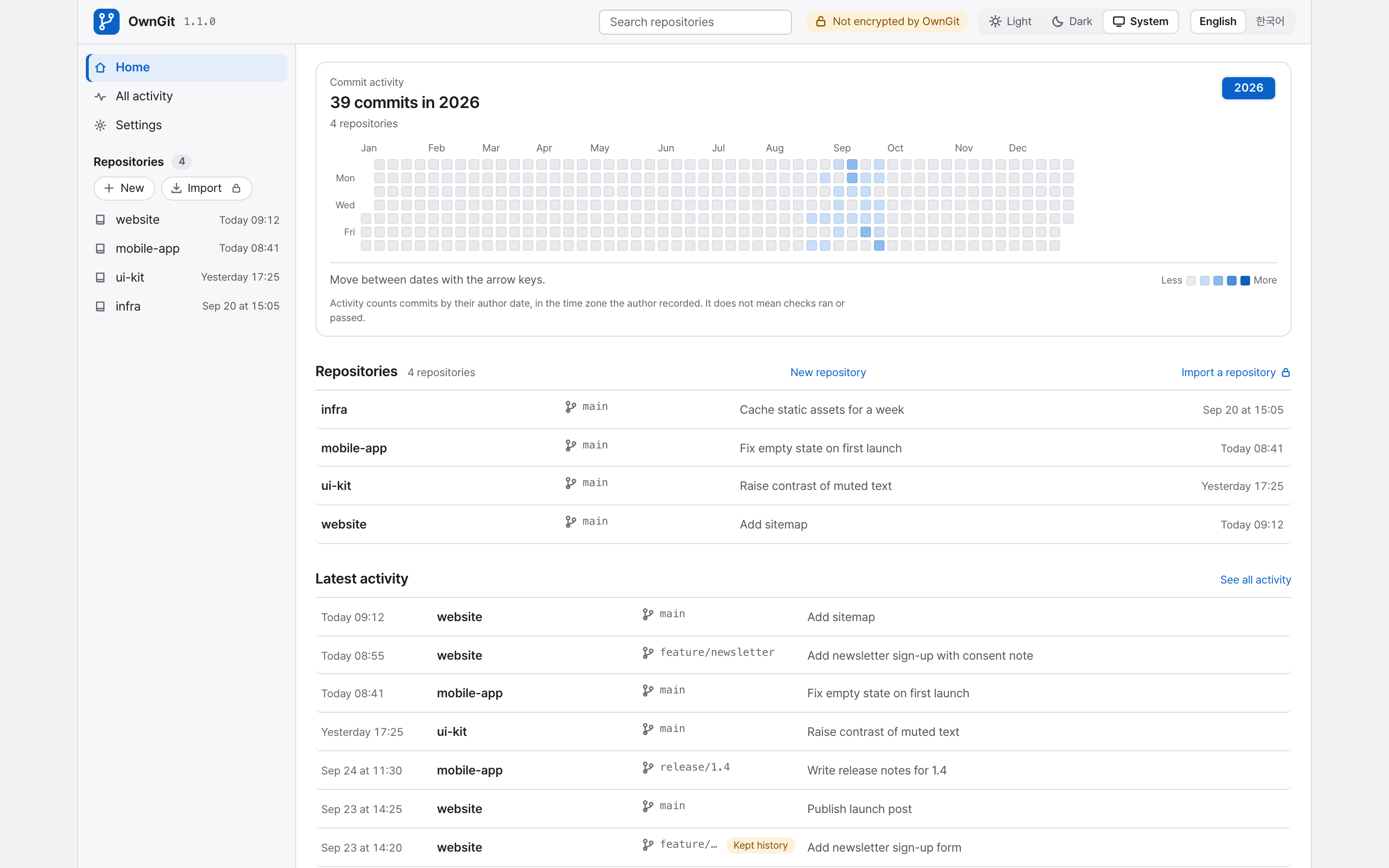
OwnGit is a self-hosted Git server for one person or a small group. It keeps your private repositories on your own computer, NAS or home server, and gives you a browser dashboard for them. You need no cloud account or subscription.
Install it with one command, then open the setup link it prints.
Features
- Clone, fetch and push with any Git client over HTTP. Repositories are ordinary bare Git repositories.
- Browse files, commits, diffs, branches and tags, and download any of them as ZIP or tar.gz.
- Open, review and merge pull requests in the browser or from the command line. A plain
git pushneeds no pull request. - Keep the history that a force-push, an import or a deletion would remove, and restore files from the browser.
- Back up and restore repositories and records, on a schedule or on demand.
- Import a repository from another HTTPS Git host and keep it up to date.
- Share one repository read-only through a link you can revoke.
- Record and run project checks, and connect coding tools through JSON commands or MCP.
- One Go program with a SQLite file. There is no database service to run.
- English or Korean, with Light, Dark and System appearance.
Install
On Linux (x64, ARM64) and macOS (Apple silicon):
/usr/bin/curl --proto '=https' --proto-redir '=https' -fsSL https://owngit.app/install.sh | /bin/sh
On Windows (x64), in PowerShell:
irm -MaximumRedirection 0 https://owngit.app/install.ps1 | iex
The installer checks the download against the release's SHA256SUMS, installs owngit, runs it as a service and prints the setup link.
Other ways to install:
| Route | Command |
|---|---|
| Homebrew (macOS, Linux) | brew install juliankang4/tap/owngit |
| npm (needs Node.js) | npm install -g owngit |
| Arch Linux | makepkg -si with the PKGBUILD from the latest release |
| Docker Compose | docker compose up -d with compose.yaml, then docker compose exec -it owngit owngit setup-link |
| Proxmox VE host, as root | /usr/bin/curl --proto '=https' --proto-redir '=https' -fsSL https://owngit.app/proxmox.sh | /bin/sh |
| Source (Go 1.27 or newer) | go build -o bin/owngit ./cmd/owngit |
Except for the container and Proxmox VE, OwnGit needs Git with git-http-backend on the computer. Homebrew and the Arch package install it. On Windows, use Command Prompt for npm, because PowerShell's default policy blocks the npm scripts.
Operations has the details for each route.
Quickstart
Run OwnGit as a service that starts by itself (the one-line installer already did this):
owngit service installOpen the setup link that the command prints. Choose the repository folder and the passwords there. The link works once, within 15 minutes.
owngit setup-linkprints a new one.Create a repository in the dashboard and clone it, for example from
http://127.0.0.1:7654/git/project.git.
On a computer with a screen, OwnGit accepts connections only from that computer. On a server without a screen, it listens on every address so you can finish setup from another device, and it answers only the setup page until you do.
To run it in a terminal instead, use owngit serve.
When something does not work, run owngit doctor. It reports what it found and the command that fixes it.
The OwnGit icon
On a desktop, the service also adds an OwnGit icon to the menu bar, notification area or panel. It shows the status, the clone address and the latest pushes, and opens the dashboard. On GNOME it needs the AppIndicator extension.
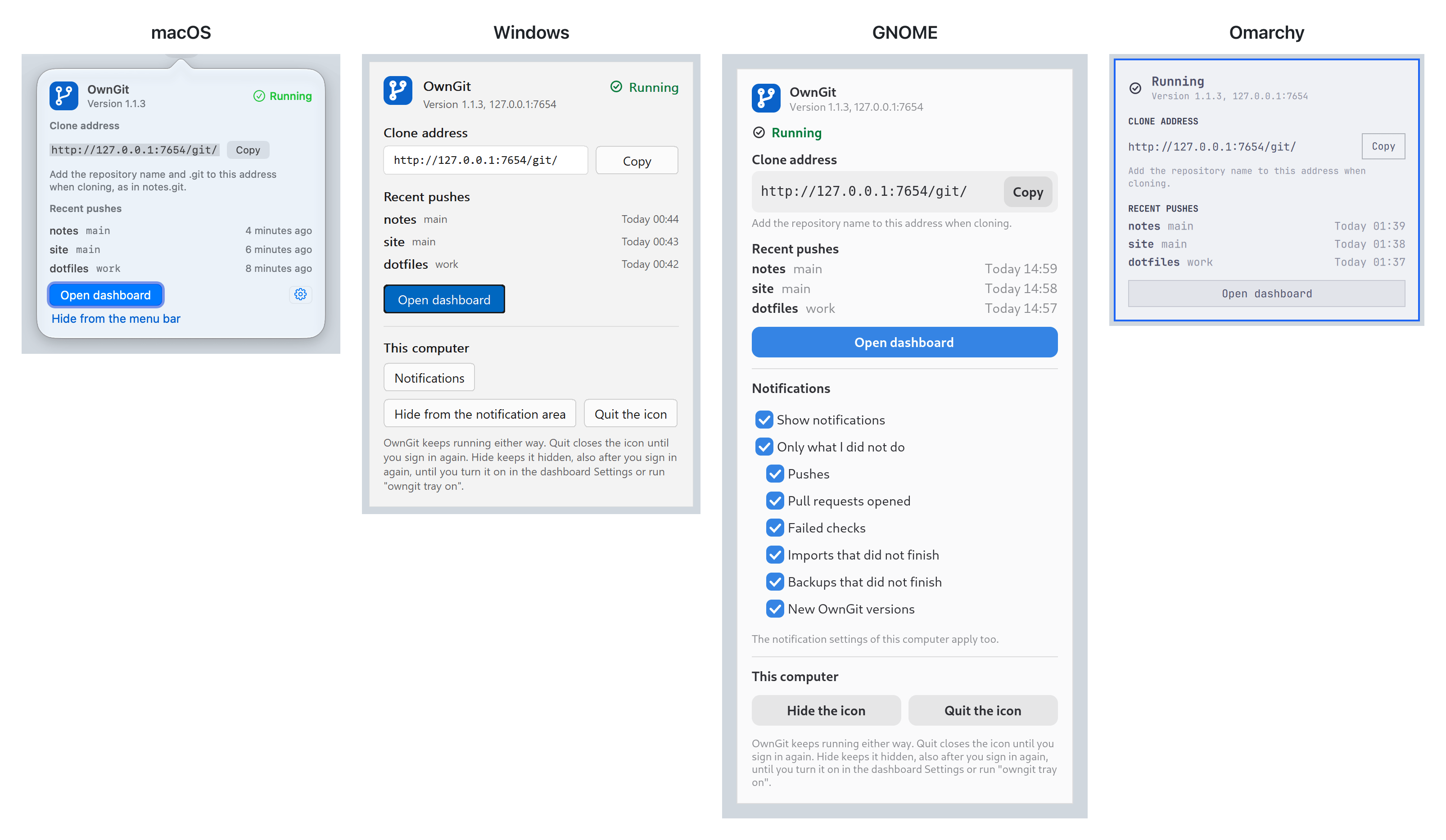
The icon also shows desktop notifications for pushes, new pull requests, failed checks, imports and backups that did not finish successfully, and new releases.

Update and uninstall
OwnGit never updates itself. When a new release exists, the dashboard shows the update command for the way you installed it, and owngit update prints the same command.
owngit uninstall removes the service. Your repositories and settings stay, and the command tells you where they are and how to remove the program.
Access and security
- Repository access is open or protected by one shared password. There are no user accounts.
- A separate administrator password protects settings.
- OwnGit serves plain HTTP. For other devices, use Tailscale (
owngit tailscale on) or a reverse proxy for HTTPS. Plain HTTP on the LAN needs your explicit consent. - Do not put OwnGit on the public Internet. The one exception is an optional public address that answers share links only.
- Once a day, OwnGit asks GitHub whether a newer release exists. It sends no repository data. Turn this off in Settings, or start with
--no-update-check.
Report vulnerabilities as described in SECURITY.md.
Limits
- Kept history and backups retain a secret you pushed by mistake. Rotate the secret.
- Kept history is not a backup. Scheduled backups start only after you choose a backup folder.
- Checks that run on the host or a runner use that account's permissions. They do not run in a sandbox.
- Git LFS objects are not hosted or imported.
- Merging a pull request needs Git 2.38 or newer on the server.
Documentation
- Operations: install, setup, service, network access and settings
- Repositories: renaming, sharing, deleting and importing repositories
- Backups: storage, backups and restore
- Coding tools: pull requests and checks from the command line or MCP
- Automatic checks: checks on the host, in Docker or on a runner
- Contributing and Changelog
License
MIT. Notices for third-party code are in THIRD_PARTY_NOTICES.
Reviews (0)
Sign in to leave a review.
Leave a reviewNo results found