backstage-dev-ai-hub
Health Warn
- License — License: Apache-2.0
- Description — Repository has a description
- Active repo — Last push 0 days ago
- Low visibility — Only 5 GitHub stars
Code Pass
- Code scan — Scanned 12 files during light audit, no dangerous patterns found
Permissions Pass
- Permissions — No dangerous permissions requested
This tool is a Backstage plugin that acts as a centralized hub for managing and syncing AI assets, such as prompts and workflows. It also features an embedded MCP server, allowing AI coding tools to automatically discover and install these assets.
Security Assessment
The overall risk is rated as Medium. The light code scan found no hardcoded secrets, malicious scripts, or dangerous patterns, and the tool does not request unsafe local permissions. However, it does make external network requests. By design, it connects to remote Git repositories (like GitHub or GitLab) to sync assets, which requires you to provide it with sensitive Git access tokens via your configuration file. While normal for its intended purpose, handling these tokens requires careful infrastructure configuration to avoid accidental exposure.
Quality Assessment
The project is actively maintained, with its most recent updates pushed today. It uses the standard, permissive Apache-2.0 license, making it safe for commercial and open-source use. The main concern is its extremely low community visibility. With only 5 GitHub stars, it is essentially an early-stage project. This means it has not undergone widespread peer review or battle-testing by the broader developer community.
Verdict
Use with caution: the code itself appears safe and actively maintained, but its low community adoption and requirement to handle sensitive Git tokens mean you should thoroughly review its sync behavior before deploying to a production environment.
Plugin that provides a centralized hub for developer AI tools, agents, and integrations inside Backstage.
Dev AI Hub — Backstage Plugin
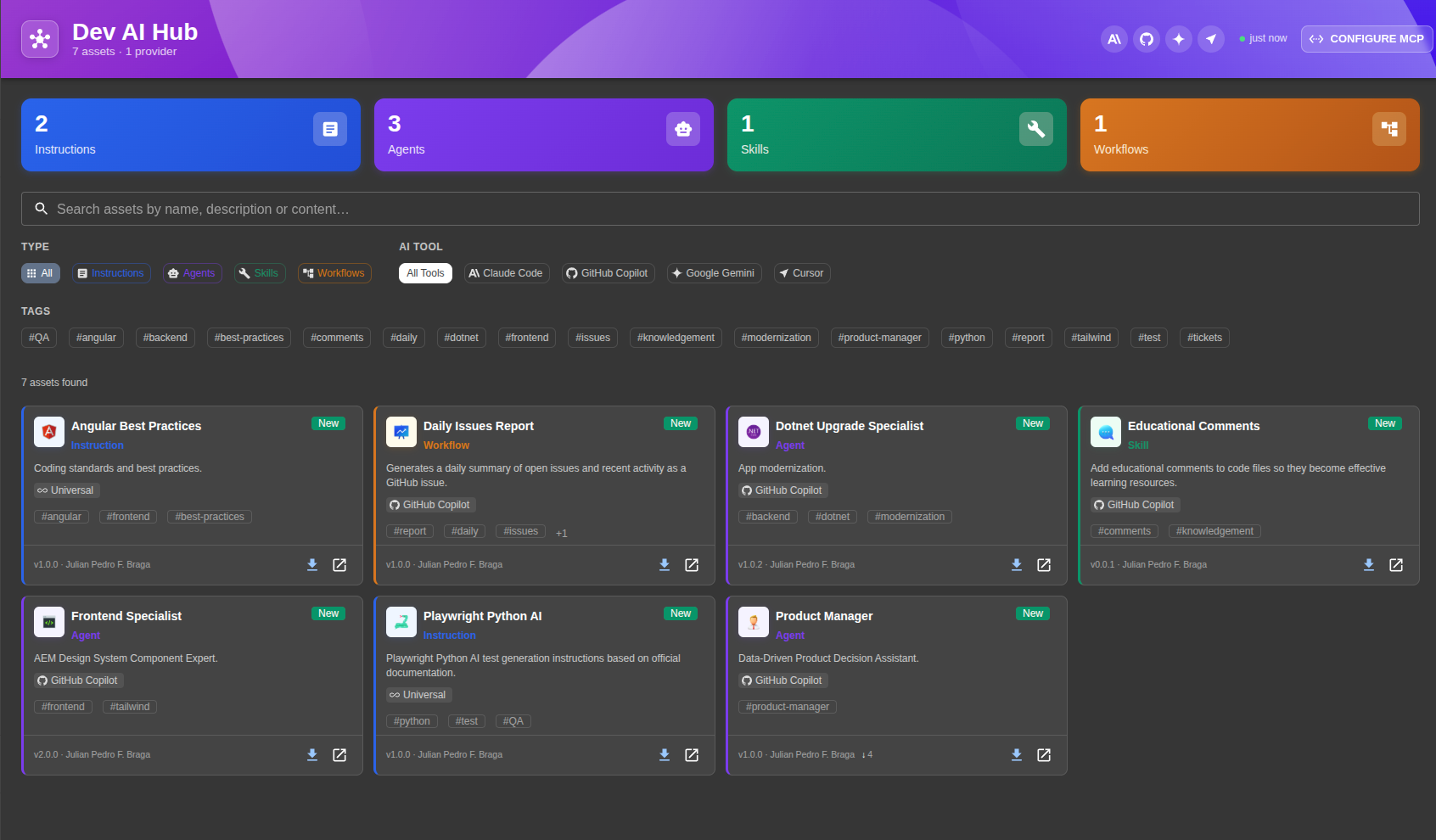
A centralized hub for AI assets — Instructions, Agents, Skills, and Workflows — usable by GitHub Copilot, Claude Code, Google Gemini, Cursor, and other AI coding tools.
The plugin syncs one or more Git repositories as the source of truth, stores assets in your Backstage database, exposes them via a UI, and serves them through an embedded MCP (Model Context Protocol) server so AI tools can discover and install assets automatically.
https://github.com/user-attachments/assets/5728807d-2587-408b-88f2-4c2853606285
Installation
1. Copy plugin packages
Copy the four plugin directories into your Backstage monorepo's plugins/ folder:
plugins/
  dev-ai-hub/
  dev-ai-hub-backend/
  dev-ai-hub-common/
  dev-ai-hub-node/
Then install:
yarn install
2. Register the backend plugin
In packages/backend/src/index.ts:
backend.add(import('@internal/plugin-dev-ai-hub-backend'));
3. Register the frontend plugin
New Frontend System (NFS)
In packages/app/src/App.tsx:
import { devAiHubPlugin } from '@internal/plugin-dev-ai-hub';

const app = createApp({
  features: [
    // ...existing features
    devAiHubPlugin,
  ],
});
The sidebar item is registered automatically — no additional configuration needed.
Legacy frontend system
In packages/app/src/App.tsx, add the route inside <FlatRoutes>:
import { DevAiHubPage } from '@internal/plugin-dev-ai-hub';

// inside <FlatRoutes>:
<Route path="/dev-ai-hub" element={<DevAiHubPage />} />
In packages/app/src/components/Root/Root.tsx, add the sidebar item:
import HubIcon from '@mui/icons-material/Hub';

// inside <SidebarGroup>:
<SidebarItem icon={HubIcon} to="dev-ai-hub" text="AI Hub" />
The API client is registered automatically when DevAiHubPage is used — no extra plugin registration needed.
4. Configure app-config.yaml
devAiHub:
  providers:
    - id: "main-ai-assets"
      type: "github"                                          # github | gitlab | bitbucket | azure-devops | git
      target: "https://github.com/your-org/ai-assets.git"
      branch: "main"
      schedule:
        frequency:
          minutes: 30
        timeout:
          minutes: 5

# Required: Git integration for reading repositories
integrations:
  github:
    - host: github.com
      token: ${GITHUB_TOKEN}
See app-config.example.yaml for more provider examples (GitLab, Bitbucket, filters).
Asset Format
Each AI asset is two files with the same base name in your repository:
agents/
  product-manager.yaml   ← metadata envelope
  product-manager.md     ← pure markdown content (never modified by the plugin)
instructions/
  security-guidelines.yaml
  security-guidelines.md
skills/
  code-review/
    code-review.yaml
    SKILL.md
workflows/
  pr-review.yaml
  pr-review.md
YAML envelope (<name>.yaml)
name: product-manager-agent
label: Product Manager Agent
description: AI agent specialized in product management tasks
type: agent                          # instruction | agent | skill | workflow
tools:
  - github-copilot
tags:
  - product
  - planning
author: Your Name
version: 1.0.0

# Optional: override install path per tool
# installPath: ".claude/agents/product-manager.md"
# installPaths:
#   claude-code: ".claude/agents/product-manager.md"
#   github-copilot: ".github/agents/product-manager.agent.md"
If content is omitted, the parser looks for <same-name>.md in the same directory. For skills, it defaults to SKILL.md.
Use tools: [all] for tool-agnostic assets that should appear for every tool.
For more information about YAML envelope fields, see YAML Envelope Reference.
You can use assets in examples folder to see how to use assets in your project or as a base for your own assets.
Default install paths (auto-resolved per tool)
| Type | Tool | Default path |
|---|---|---|
instruction |
claude-code |
.claude/rules/<name>.md |
instruction |
github-copilot |
.github/instructions/<name>.instructions.md |
instruction |
google-gemini |
GEMINI.md |
instruction |
cursor |
.cursor/rules/<name>.mdc |
agent |
claude-code |
.claude/agents/<name>.md |
agent |
github-copilot |
.github/agents/<name>.agent.md |
skill |
claude-code |
.claude/skills/<name>/SKILL.md |
skill |
cursor |
.cursor/skills/<name>/SKILL.md |
workflow |
claude-code |
.claude/workflows/<name>.md |
workflow |
github-copilot |
.github/workflows/<name>.workflow.md |
MCP Server
The MCP server runs embedded in the Backstage backend — no separate process needed. It uses the StreamableHTTP transport.
URL: http://<backstage-host>:7007/api/dev-ai-hub/mcp
The ?tool= query parameter filters which assets the AI tool receives. Omit it to receive all assets.
The ?provider= query parameter filters which assets the AI tool receives. Omit it to receive all assets.
The ?proactive=true query parameter enable proactive mode. This mode is used to provide assets to the AI tool automatically when it is needed.
Claude Code
In .mcp.json or ~/.claude/mcp.json:
{
  "mcpServers": {
    "dev-ai-hub": {
      "type": "http",
      "url": "http://<backstage-host>:7007/api/dev-ai-hub/mcp?tool=claude-code"
    }
  }
}
GitHub Copilot (VS Code)
In .vscode/settings.json or VS Code user settings:
{
  "github.copilot.chat.mcp.servers": {
    "dev-ai-hub": {
      "type": "http",
      "url": "http://<backstage-host>:7007/api/dev-ai-hub/mcp?tool=github-copilot"
    }
  }
}
Google Gemini CLI
In ~/.gemini/settings.json:
{
  "mcpServers": {
    "dev-ai-hub": {
      "type": "http",
      "url": "http://<backstage-host>:7007/api/dev-ai-hub/mcp?tool=google-gemini"
    }
  }
}
Cursor
In .cursor/mcp.json:
{
  "mcpServers": {
    "dev-ai-hub": {
      "type": "http",
      "url": "http://<backstage-host>:7007/api/dev-ai-hub/mcp?tool=cursor"
    }
  }
}
Available MCP tools
| Tool | Description |
|---|---|
list_assets |
List assets, optionally filtered by type. Supports pagination |
search_assets |
Full-text search across name, description, and content. Supports type and tag filters |
get_asset |
Get full metadata and markdown content by exact ID or partial name match |
install_asset |
Returns content + recommended install path for the active tool; the model writes the file. Increments the install counter |
get_popular |
Returns the most-installed assets, optionally filtered by type |
list_providers |
Lists all configured repositories with their sync status, asset count, and last sync time |
suggest_assets ⚡ |
Proactively suggests assets based on a project context description. Only available when ?proactive=true |
Available MCP prompts
| Prompt | Description |
|---|---|
check_for_assets ⚡ |
Instructs the model to call suggest_assets with the current task context and offer to install relevant assets before starting work. Only available when ?proactive=true |
⚡ Proactive-only — registered only when the MCP URL includes ?proactive=true.
Usage examples in chat:
"List the available agents in Dev AI Hub"
"Search for a code review asset in the hub"
"Install the Product Manager agent in this project"
REST API
GET  /api/dev-ai-hub/assets                   List assets (filters: type, tool, tags, search, provider, page, pageSize)
GET  /api/dev-ai-hub/assets/:id               Asset detail
GET  /api/dev-ai-hub/assets/:id/raw           Pure markdown content
GET  /api/dev-ai-hub/assets/:id/download      Download as .md or .zip (skills)
POST /api/dev-ai-hub/assets/:id/track-install Increment install counter
GET  /api/dev-ai-hub/providers                List configured providers with sync status
POST /api/dev-ai-hub/providers/:id/sync       Trigger manual sync
GET  /api/dev-ai-hub/stats                    Totals by type, tool, and provider

POST   /api/dev-ai-hub/mcp                    Initialize MCP session or handle existing
GET    /api/dev-ai-hub/mcp                    SSE stream for server-to-client notifications
DELETE /api/dev-ai-hub/mcp                    Terminate MCP session
Package Structure
| Package | Role | Description |
|---|---|---|
@internal/plugin-dev-ai-hub |
frontend-plugin |
React UI — page, cards, filters, install dialog |
@internal/plugin-dev-ai-hub-backend |
backend-plugin |
Sync service, REST API, embedded MCP server |
@internal/plugin-dev-ai-hub-common |
common-library |
Shared TypeScript types, Zod schemas, install path conventions |
@internal/plugin-dev-ai-hub-node |
node-library |
Extension points for external provider modules |
License
Apache-2.0
Reviews (0)
Sign in to leave a review.
Leave a reviewNo results found