claude-carousel
Health Warn
- License — License: MIT
- Description — Repository has a description
- Active repo — Last push 0 days ago
- Low visibility — Only 8 GitHub stars
Code Pass
- Code scan — Scanned 1 files during light audit, no dangerous patterns found
Permissions Pass
- Permissions — No dangerous permissions requested
No AI report is available for this listing yet.
🎠 One bash script, zero dependencies — run several Claude Code accounts side by side and auto-rotate to the next one when a usage limit hits.
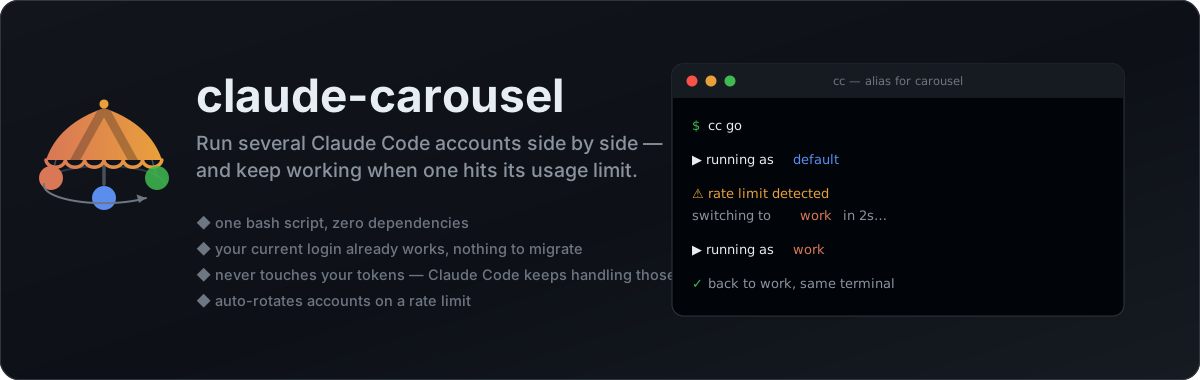




🎠 claude-carousel
One bash script, zero dependencies. Run several Claude Code accounts side by side —
and keep working when one hits its usage limit.
cc go launches Claude Code, watches for a rate-limit message, and automatically
relaunches on your next account when it sees one. Nothing to build, no daemon, no config
file to hand-edit — just bash and the claude CLI you already have.
$ cc ls
   PROFILE        ACCOUNT                        CLAUDE_CONFIG_DIR
   -------------- ------------------------------ ------------------
   default *      [email protected]                /Users/me/.claude
   work           [email protected]                 /Users/me/.claude-carousel/profiles/work
   oss            [email protected]            /Users/me/.claude-carousel/profiles/oss

$ cc go
▶ running as default
⚠ rate limit detected on default — switching to work in 2s (Ctrl-C to stop)
▶ running as work
ccabove is the short alias the installer offers to set up for you. Every example in
this README works the same ascarousel …if you'd rather not use one.
One bash script, zero dependencies
The entire tool is a single ~500-line bash script. There is nothing else to it.
- Nothing to install but the script. It runs on macOS's stock bash 3.2 — no Homebrew bash, no Python runtime, no Rust binary to build, no Electron app, no background daemon. Drop it anywhere on your
PATHand you're done; uninstalling is deleting one file. - Auditable in one sitting. A tool that stands between you and your Claude accounts should be readable, not compiled. It's plain shell you can skim top to bottom in a few minutes — and patch yourself the day Claude Code changes something.
- Nothing to migrate. The account you're logged into right now is the
defaultprofile. It keeps working exactly as before, andclaudeon its own is never shadowed or wrapped. - Credentials stay where the OS wants them. carousel never reads, writes, copies, or stores your tokens. It points
CLAUDE_CONFIG_DIRat a per-profile directory and lets Claude Code's own/loginhandle the rest — Keychain on macOS, a local file on Linux. - No duplicated disk.
plugins/,skills/, andprojects/are symlinked back to your main~/.claude, so a second profile costs kilobytes, not the ~800 MB a full plugin tree does. - Rate-limit rotation built into the same script, rather than a separate mode you have to remember.
Install
curl -fsSL https://raw.githubusercontent.com/jungjoongi/claude-carousel/main/install.sh | bash
Or by hand:
git clone https://github.com/jungjoongi/claude-carousel.git
install -m 755 claude-carousel/bin/carousel ~/.local/bin/carousel   # anywhere on your PATH
Requirements: bash 3.2+, python3 (ships with macOS; used only to read the account email out of Claude Code's JSON), the claude CLI, and script (stock on macOS and virtually every Linux distro) if you want cc go.
Quickstart
cc ls                  # your current login already shows up as "default"
cc add work            # create a second profile
cc login work          # log in to it (normal Claude Code login flow)

cc work                # run Claude Code as "work"
cc                     # run the default profile
cc use work            # make "work" the default

cc order default work  # rotation order for "go"
cc go                  # run, hopping to the next account on a rate limit
Run two accounts at the same time by opening two terminals — each profile has its own
credential slot, so the sessions don't fight over a token.
Commands
| Command | What it does |
|---|---|
cc ls |
List profiles with the account each is logged into |
cc add <name> |
Create a profile |
cc login <name> |
Open Claude Code's login flow for a profile |
cc <name> [args…] |
Run Claude Code as that profile (extra args pass through) |
cc |
Run the default profile |
cc [claude args…] |
Run the default profile — every -flag goes to claude |
cc use <name> |
Set the default profile |
cc whoami |
Which profile is the current shell in? |
cc order [names…] |
View or set the rotation order |
cc go [args…] |
Run with automatic rate-limit rotation |
cc sync [name] |
Re-link shared plugins/settings from ~/.claude |
cc rm <name> |
Delete a profile (symlinks unlinked; originals untouched) |
cc alias [name] |
Register or change a short shell alias (--remove to undo) |
cc doctor |
Environment and troubleshooting info |
cc update |
Update carousel now (it also self-updates once a day) |
cc help |
carousel's own help (cc --help is Claude Code's) |
cc version |
carousel's own version (cc --version is Claude Code's) |
A shorter alias
carousel is a lot to type, so the installer offers to register a short alias — cc by
default, Enter to accept. You can also set or change it whenever you like:
carousel alias cc        # "cc" now runs carousel
carousel alias           # show what's registered
carousel alias --remove  # undo it
Why the alias instead of just naming the binary cc? Because cc is also the C
compiler, and a binary named cc on your PATH gets picked up by make and friends —
that breaks builds. A shell alias only applies to what you type interactively, so cc go
works at your prompt while make keeps using the real /usr/bin/cc. Same short command,
none of the collateral damage.
It writes a marked block to your shell rc (~/.zshrc, ~/.bashrc, or fish'sconfig.fish), so changing or removing the alias later is clean:
# >>> claude-carousel alias >>>
alias cc='carousel'
# <<< claude-carousel alias <<<
If the name you pick is already taken, carousel says so instead of silently clobbering it:
- An alias you already have (say
alias cc='claude …') — it shows you the exact line and
asks before commenting it out. Answer no and nothing is touched. - A real command of the same name — it warns you which binary it is, and reminds you that
the alias only shadows it at your own prompt.
How it works
Claude Code reads CLAUDE_CONFIG_DIR to decide where its state lives. Point it at a
different directory and you get a fully separate installation as far as identity is
concerned: its own .claude.json (which carries oauthAccount), its own session history,
and its own credential slot. On macOS, Claude Code derives the Keychain service name from
that path, so each profile's OAuth tokens land in their own entry automatically.
carousel is essentially a small amount of bookkeeping around that one environment variable:
~/.claude                              ← the "default" profile, untouched
~/.claude-carousel/
├── default                            ← name of the default profile
├── order                              ← rotation order for `go`
├── alias                              ← the shell alias you registered
└── profiles/
    └── work/
        ├── .claude.json               ← this profile's identity + session state
        ├── plugins  -> ~/.claude/plugins    (symlink)
        ├── skills   -> ~/.claude/skills     (symlink)
        ├── projects -> ~/.claude/projects   (symlink)
        └── settings.json              ← copied from ~/.claude on each run
settings.json is copied rather than symlinked because Claude Code rewrites it atomically,
which replaces a symlink with a regular file.
Rate-limit rotation, honestly
cc go runs Claude Code inside a pty (via script), mirrors the output to your
terminal, and greps the captured transcript for phrases like usage limit,rate limit, and limit will reset. If it finds one, it moves to the next profile incc order and relaunches.
Two caveats worth stating plainly:
- It's a heuristic. Claude Code's exact wording can change between releases. If
rotation isn't firing when it should, editRATE_LIMIT_PATTERNnear the top of the
script — it's a plaingrep -Ealternation, deliberately kept in one obvious place.
PRs updating it are very welcome. - It needs a real terminal. Inside CI or anything that doesn't hand the process a pty,
cc goprints a warning and runs normally without rotation rather than failing.
Bypass mode
Every run passes --dangerously-skip-permissions, so Claude Code doesn't stop to ask for
each action — which is usually the point of juggling accounts in the first place. If you'd
rather keep the prompts:
export CAROUSEL_BYPASS=0
Passing --permission-mode … or the skip flag yourself always wins over this setting.
Passing arguments to Claude Code
Anything carousel doesn't recognise goes straight to claude, so the flags you already
use keep working:
cc --resume                 # claude --resume, as the default profile
cc -p "summarise this repo" # claude -p "…"
cc work --model opus        # …as the "work" profile
cc go --resume              # …with rate-limit rotation
There are no exceptions: anything starting with - belongs to Claude Code. Every
carousel command is a plain word instead, so the two sets can never collide.
cc --help        # claude's help
cc help          # carousel's help
cc --version     # claude's version
cc version       # carousel's version
Staying up to date
carousel is one file, so updating is just fetching it again. When you launch Claude Code
through it, carousel checks GitHub for a newer version at most once a day, replaces itself
atomically, and re-runs your command — you'll see a single line when it happens:
$ cc
✓ carousel updated 0.2.0 → 0.3.0
The download is rejected unless it's a real, syntactically valid carousel script, and the
check is skipped entirely when there's no terminal (CI, cc -p … in a script), when
carousel is a symlink, or when it's running from a git clone. cc update forces a check
now; cc doctor shows the current state.
export CAROUSEL_NO_UPDATE=1 # never check
Configuration
| Variable | Default | Purpose |
|---|---|---|
CAROUSEL_BYPASS |
1 |
0 keeps Claude Code's normal permission prompts |
CAROUSEL_HOME |
~/.claude-carousel |
Where profiles and settings live |
CAROUSEL_CLAUDE_BIN |
claude |
Path to the claude binary |
CAROUSEL_NO_UPDATE |
0 |
1 turns off the daily self-update check |
CAROUSEL_UPDATE_INTERVAL |
86400 |
Seconds between update checks |
License
MIT
Reviews (0)
Sign in to leave a review.
Leave a reviewNo results found