pi-app
Health Pass
- License — License: MIT
- Description — Repository has a description
- Active repo — Last push 0 days ago
- Community trust — 360 GitHub stars
Code Fail
- rm -rf — Recursive force deletion command in .github/workflows/release.yml
- process.env — Environment variable access in e2e/composer.spec.ts
- process.env — Environment variable access in e2e/settings.spec.ts
- process.env — Environment variable access in e2e/smoke.spec.ts
- process.env — Environment variable access in e2e/workspace.spec.ts
Permissions Pass
- Permissions — No dangerous permissions requested
No AI report is available for this listing yet.
Desktop app for the pi coding agent: streaming timeline, Git review with hunk staging, session tree, native UI for pi extensions. Windows · macOS · Linux. pi 编程 Agent 桌面客户端

pi Desktop
A desktop app for the pi coding agent.
The same agent and the same ~/.pi/agent you use in the terminal — with a timeline, Git review and a clickable session tree.




English · 简体中文 · Download · Getting started · Adapters
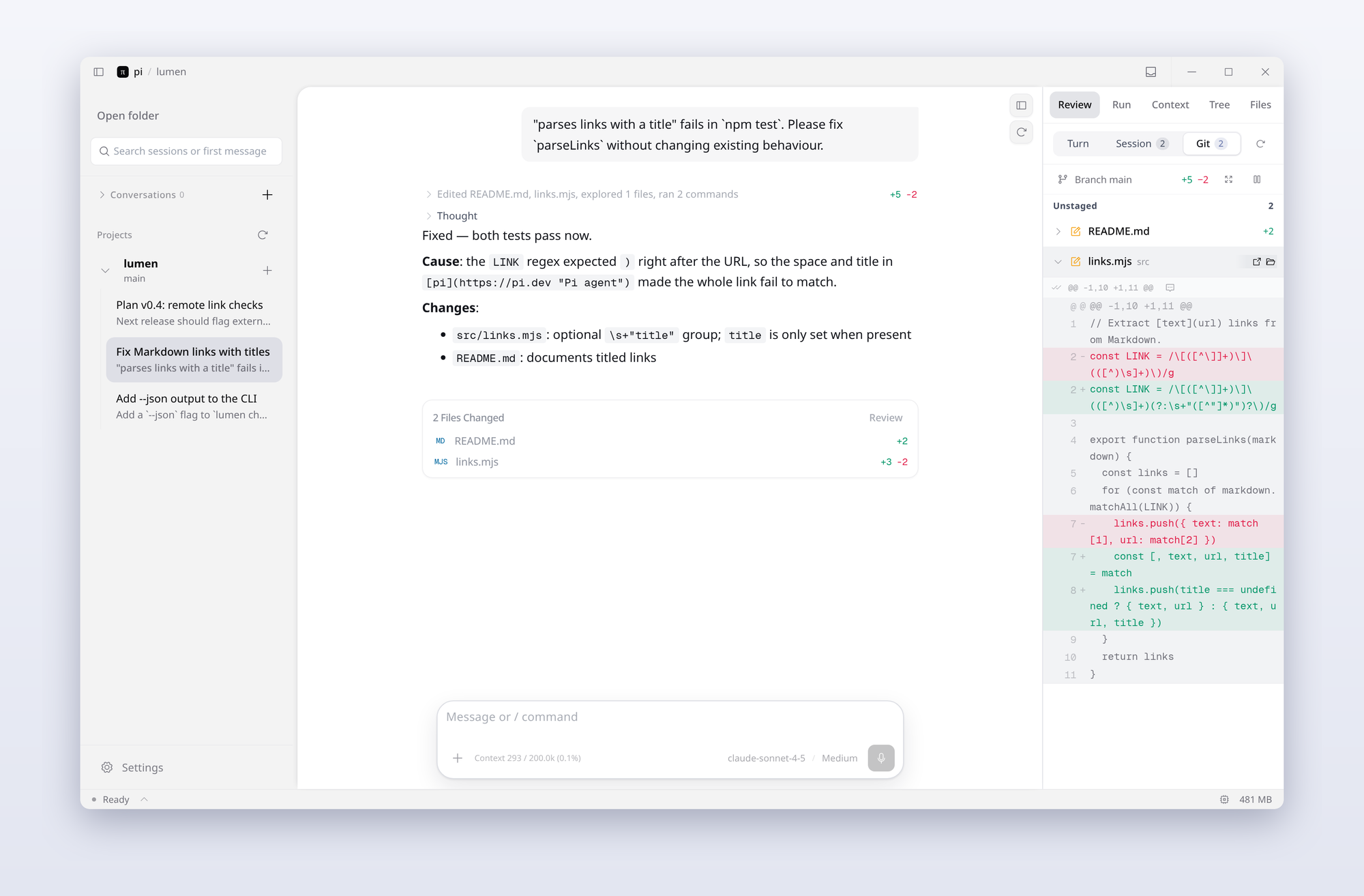
pi Desktop is not another agent. It runs the pi SDK in a background worker and reads the same files as the CLI — sessions, model logins, settings.json, installed extensions. Open a project and the sessions you started in the terminal are already in the sidebar; continue any of them, or start a new one.
One turn, start to finish
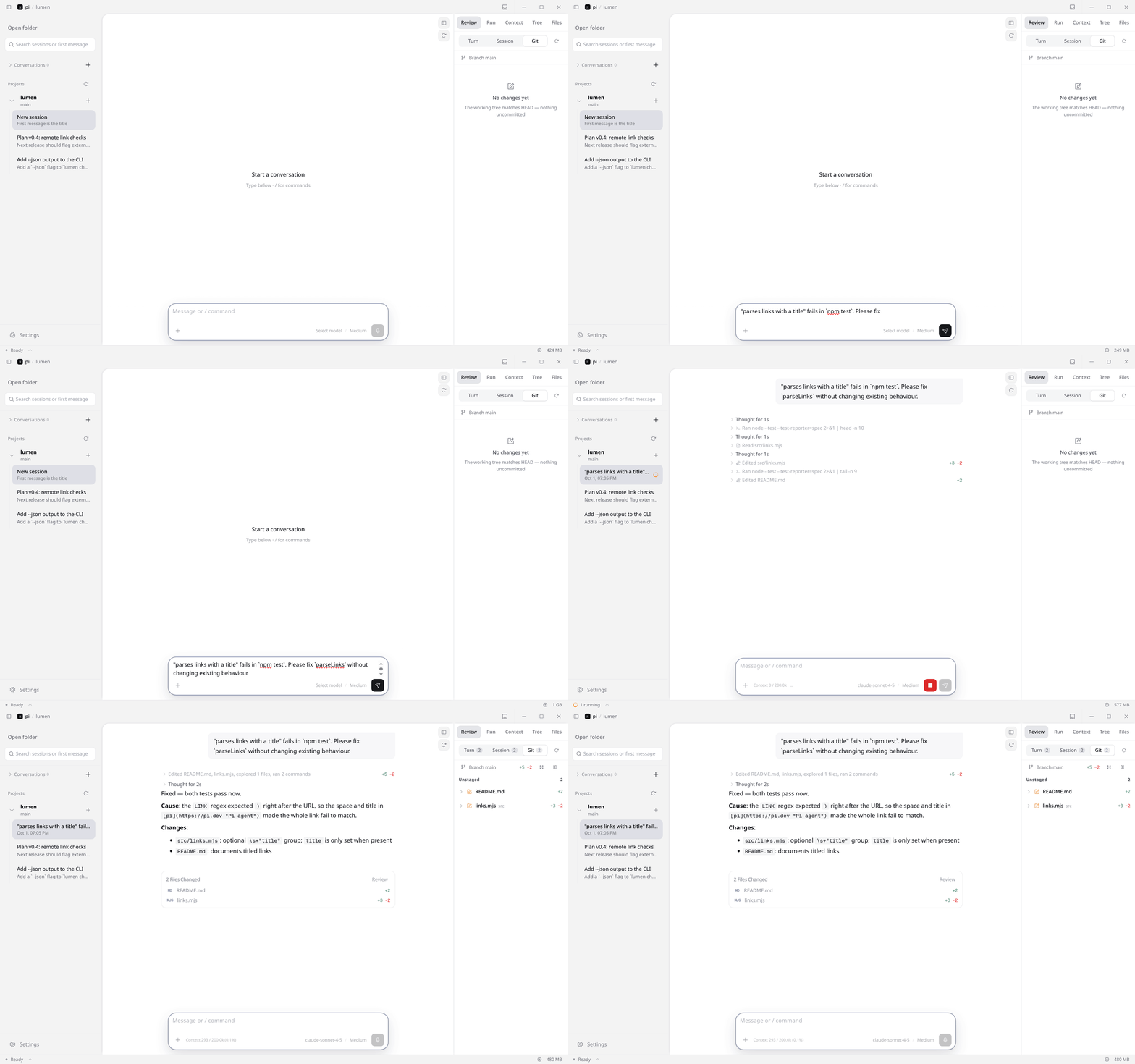
Recorded from the app itself. The model replies come from a scripted local endpoint so the demo is reproducible; the bash, read and edit tools ran for real on the sample repo.
Timeline
Tool calls stream in as flat steps — thinking, commands, reads, edits — and fold into one summary line once the answer starts. Each edit shows +N −M; the turn ends with a Files changed card that opens the file in Files or Review.
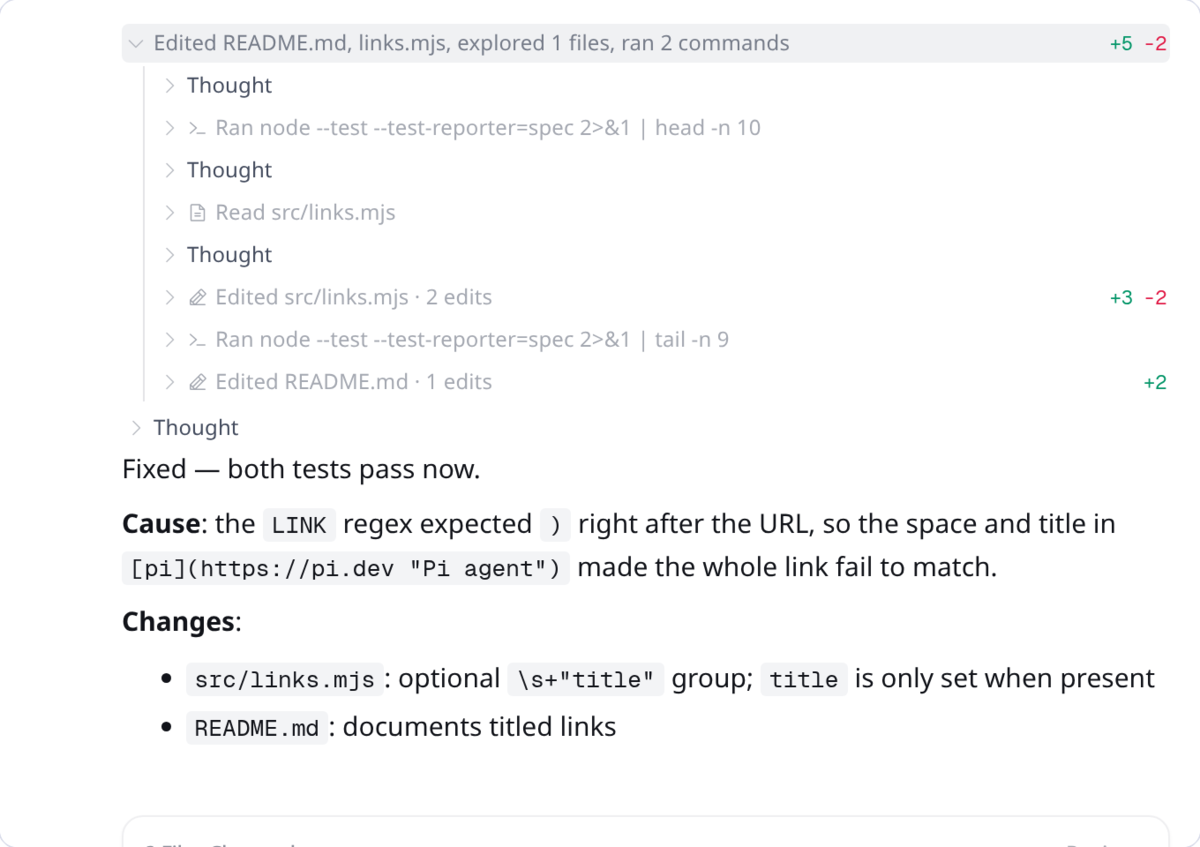
Markdown, code blocks, KaTeX and long outputs render in place. Hover a message to copy it, rewind to it, or fork a new session from it.
Side panels
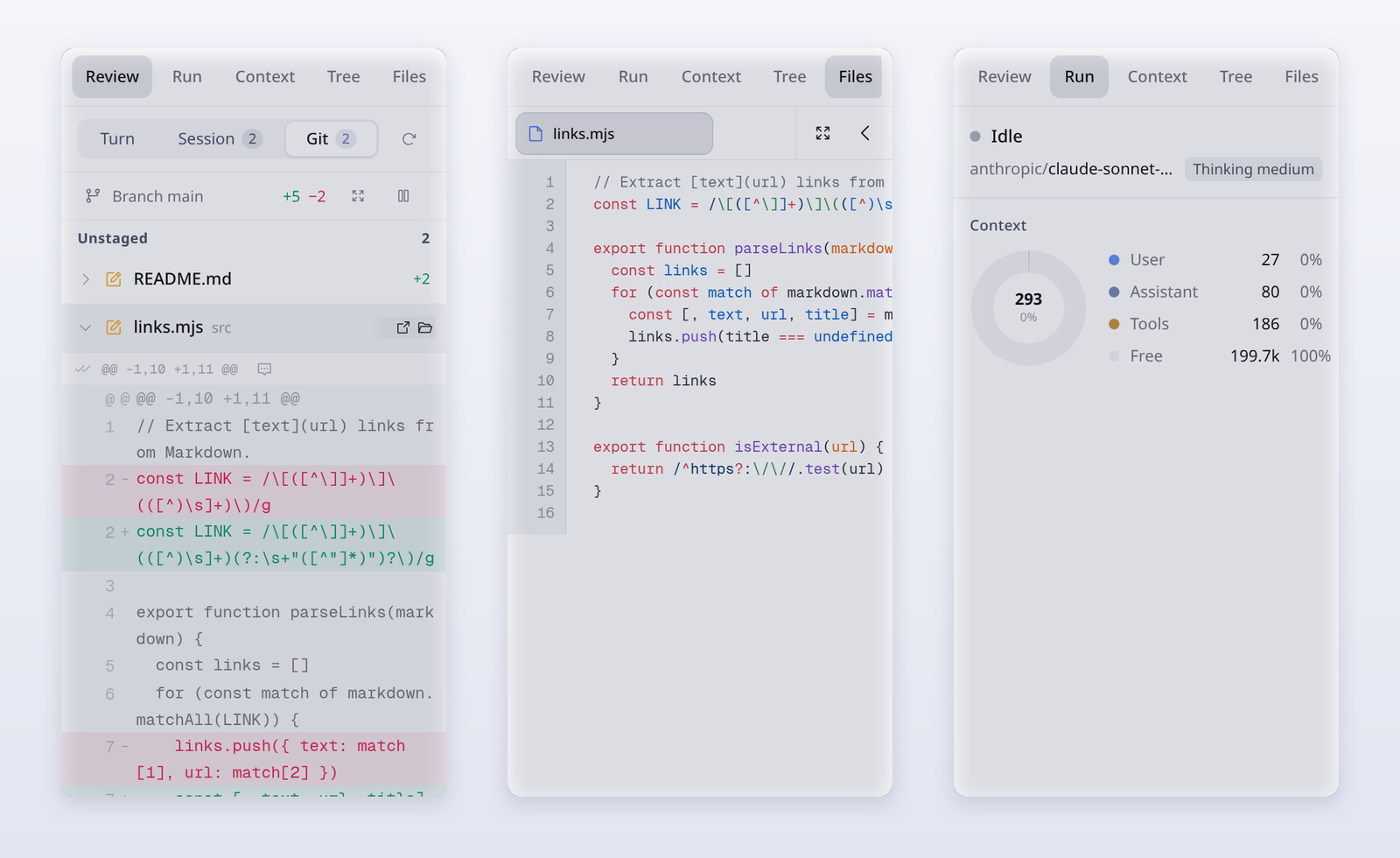
| Panel | What it does |
|---|---|
| Review | Changes of this turn, this session, or the whole Git working tree. Expand a file for an inline diff, stage or unstage single hunks, and send a line comment back to the conversation. |
| Files | Project explorer with multi-tab preview (Ctrl/⌘+click), syntax highlighting, and a wide mode that takes over the chat column. Drag a file onto the composer to attach it. |
| Tree | The session as a tree, like pi /tree: filter to user messages, jump back to any node and continue from there as a new branch. |
| Run | Run state, model and thinking level, and how the context window splits between user, assistant and tool messages. |
| Context | The messages that make up the current context, with token estimates per entry. |
Composer
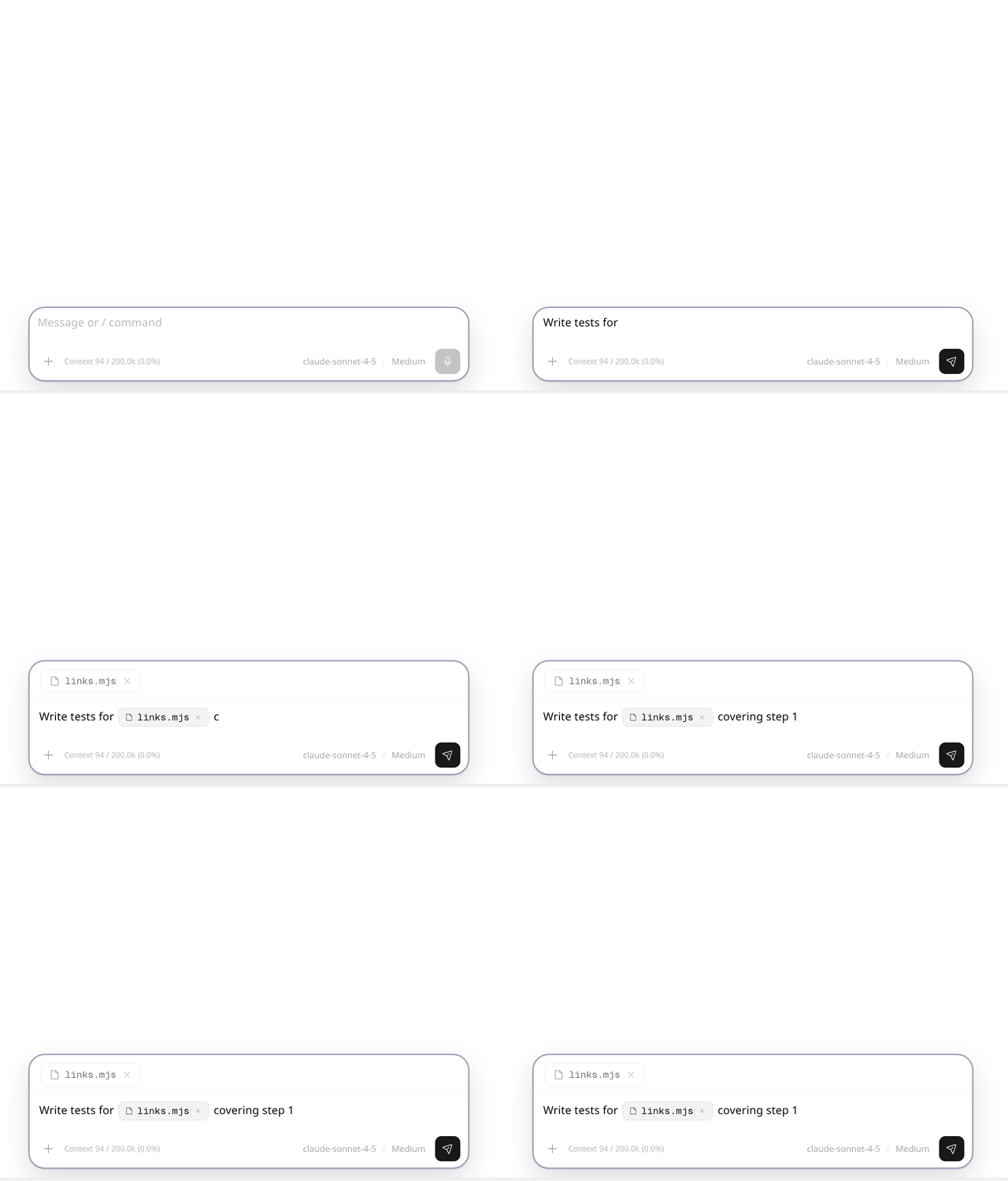
@searches project files (respects.gitignore, usesfd) and inserts them as references./lists pi's built-in commands and the ones your extensions register.- Paste or drop images and files; model and thinking level sit at the right of the input.
- While the agent is working,
Entersteers the current turn andAlt+Enterqueues a follow-up for when it finishes.
Also included
| Extensions, unchanged | Extensions you installed for terminal pi load here. Their dialogs, tool cards, panels and /commands are mapped to native UI by declarative adapters — 36 ship built in. List |
| Parallel sessions | Each session gets its own worker. A running turn keeps going when you switch away; the pool size and idle timeout are configurable. |
| Notifications | A system notification and an in-app inbox when a turn finishes or needs input; the status bar shows what is running. |
| WSL runtime (Windows) | Run the worker inside a chosen WSL distribution, with sessions, Git and previews resolved on the Linux side. |
| Themes | Light and dark themes with presets or your own colors, pi-theme-v1 / codex-theme-v1 import, optional custom CSS, five icon sets, 90–110% density. |
| Chinese / English UI | Switch in Settings. |
| Updates | Checks GitHub Releases in the background and can download and launch the installer. |
Install
| Platform | Package |
|---|---|
| Windows x64 | pi.Desktop-Setup-<version>-x64.exe (installer) or pi.Desktop-Portable-<version>-x64.exe |
| macOS | .dmg / .zip for Apple Silicon (arm64) and Intel (x64) |
| Linux x64 | .AppImage or .deb |
Get them from Releases. The app bundles its own pi SDK; you only need to sign in to a model provider once, the same way you do for terminal pi (the credentials live in ~/.pi/agent). Settings → Runtime can switch to a globally installed pi version.
Requires Node.js ≥ 22.19.
git clone https://github.com/justhil/pi-app.git
cd pi-app
npm install
npm run dev          # development
npm run build        # production bundle in out/
npm run package      # installers via electron-builder
First five minutes
- Open folder — the folder becomes the agent's working directory. For a throwaway chat, use + next to Conversations instead.
- Pick a session — sessions from terminal pi for that folder are listed; + next to the project starts a new one.
- Send —
Entersends,Shift+Enteradds a line. - Look right — Review, Run, Context, Tree and Files share the right sidebar; drag its edge to make it wider.
- Go back — hover a message to rewind or fork, or press
Esctwice in an empty composer to open the session tree.
Shortcuts
| Action | Keys |
|---|---|
| Send / new line | Enter / Shift+Enter |
| Steer the running turn / queue a follow-up | Enter / Alt+Enter while running |
| Pull the last queued message back | Alt+↑ |
| Stop | Esc |
| Session tree | Esc Esc in an empty composer |
| Previous / next sent message | ↑ / ↓ with an empty composer or the caret at the start / end |
| File reference / command | @ / / |
| Open a file in a new tab | Ctrl/⌘+click in Files |
Extensions
Install and enable extensions exactly as for terminal pi:
pi install npm:<package> # or: pi install git:github.com/<owner>/<repo>
then make sure the package is enabled in ~/.pi/agent/settings.json → packages and start a new session. Settings → Extensions shows what the current worker loaded; Settings → Adapters holds each adapter's desktop options. To override or add an adapter, put a .json adapter file in ~/.pi/desktop/adapters/ (or <project>/.pi/desktop/adapters/, which takes precedence) — see the authoring guide.
The mic button in the composer transcribes speech into the input. By default it uses the built-in service, which calls ChatGPT's transcription endpoint with your Codex / ChatGPT sign-in — no OpenAI API key and no local process. In Settings → Voice, paste an access_token or import it from ~/.codex/auth.json (written by codex login), then Verify login.
Under Advanced you can use a local codex-asr CLI or your own codex-asr serve URL instead. Typing always works without voice.
| Problem | Try |
|---|---|
| An extension is listed in Settings but missing in chat | Enable it in packages, then start a new session. |
| The first switch to a long session is slow | Only the latest messages load first; the rest loads on scroll or when you send. |
| Closed an extension dialog by accident | Use Continue on its timeline card. |
| Voice says the login is invalid | The token expired — run codex login again and re-import. |
| Blank window after changing source | Delete node_modules/.vite and rerun npm run dev. |
- Stack: Electron 43 · React 18 · TypeScript · Tailwind · Zustand · i18next ·
@earendil-works/pi-coding-agent - Processes: Electron main (IPC, worker pool, Git, previews) → one utility-process worker per session running the pi SDK → renderer.
- Checks:
npm run test:unit,npm run test:scripts,npm run typecheck,npm run lint - Docs:
doc/· adapter authoring · changelog - Releases: pushing a
v*tag runs.github/workflows/release.ymland builds Windows, macOS and Linux packages.
Support
Questions and feedback: LinuxDo or GitHub Issues. If the app is useful to you, a ⭐ helps other pi users find it, and you can sponsor maintenance with the QR code below.

License
Reviews (0)
Sign in to leave a review.
Leave a reviewNo results found