k-dense-byok
Health Pass
- License — License: MIT
- Description — Repository has a description
- Active repo — Last push 2 days ago
- Community trust — 612 GitHub stars
Code Pass
- Code scan — Scanned 12 files during light audit, no dangerous patterns found
Permissions Pass
- Permissions — No dangerous permissions requested
This open-source application provides a desktop-based AI research assistant named "Kady." It leverages external AI models and a local Python environment to perform complex scientific data analysis, manage research projects, and run automated workflows.
Security Assessment
The tool is designed to process user-provided data, including sensitive scientific and financial documents. As a "Bring Your Own Keys" (BYOK) application, it requires you to input your own API keys for external AI providers (like OpenAI, Anthropic, etc.), meaning it inherently makes external network requests. It also utilizes a Python sandbox environment to execute commands and run specialized skills. However, a light code scan of 12 files found no hardcoded secrets, dangerous code patterns, or requests for elevated system permissions. The overall risk is rated as Medium due to the necessary handling of your personal API keys and local code execution capabilities.
Quality Assessment
The project demonstrates strong health and community trust metrics. It is actively maintained, with the most recent code push occurring just two days ago, and has garnered 612 GitHub stars. It is fully licensed under the permissive MIT license, making it highly accessible for developers. Additionally, the repository includes automated testing, indicating a solid baseline of reliability for a beta-stage tool.
Verdict
Safe to use, provided you follow standard security practices for managing your personal API keys and monitor the local file system access of the Python sandbox.
An AI co-scientist powered by Scientific Agent Skills running on your desktop.
K-Dense BYOK

Your own AI research assistant, running on your computer, powered by your API keys.
K-Dense BYOK (Bring Your Own Keys) is a free, open-source app that gives you an AI research assistant called Kady. Ask Kady a question or give it a task, and it figures out the best way to handle it - sometimes answering directly, sometimes spinning up specialized AI "experts" that work behind the scenes to get you a thorough result.
It is built for scientists, analysts, and curious people who want a powerful AI workspace without being locked into a single provider.
Beta: K-Dense BYOK is currently in beta. Many features and improvements are on the way. Star us on GitHub to stay in the loop, and follow us on X, LinkedIn, and YouTube for release notes and tutorial videos.
What can it do?
- Answer questions and take on tasks. Chat with Kady like any AI assistant. For bigger work, Kady delegates to a specialist "expert" agent that runs with a full Python environment and scientific tools.
- Run up to 10 chats in parallel. Open a new tab for each thread of work — every tab keeps its own message history, model, attached files, and cost meter, but all tabs share the project's sandbox so files written in one tab are immediately available in the others. Tabs keep streaming in the background while you switch between them.
- Pick any AI model, any time. Choose from 30+ models across 10 providers (OpenAI, Anthropic, Google, xAI, Qwen, and more) with a simple dropdown. Switch models message to message. You can also use free local models through Ollama.
- 170+ scientific skills, pre-installed. Covers genomics, proteomics, drug discovery, materials science, and more. Kady passes the right skills to the expert automatically for each task.
- 326 ready-to-run workflow templates. Browse a built-in library across 22 disciplines - genomics, drug discovery, finance, astrophysics, and more. Pick one, fill in the blanks, and launch.
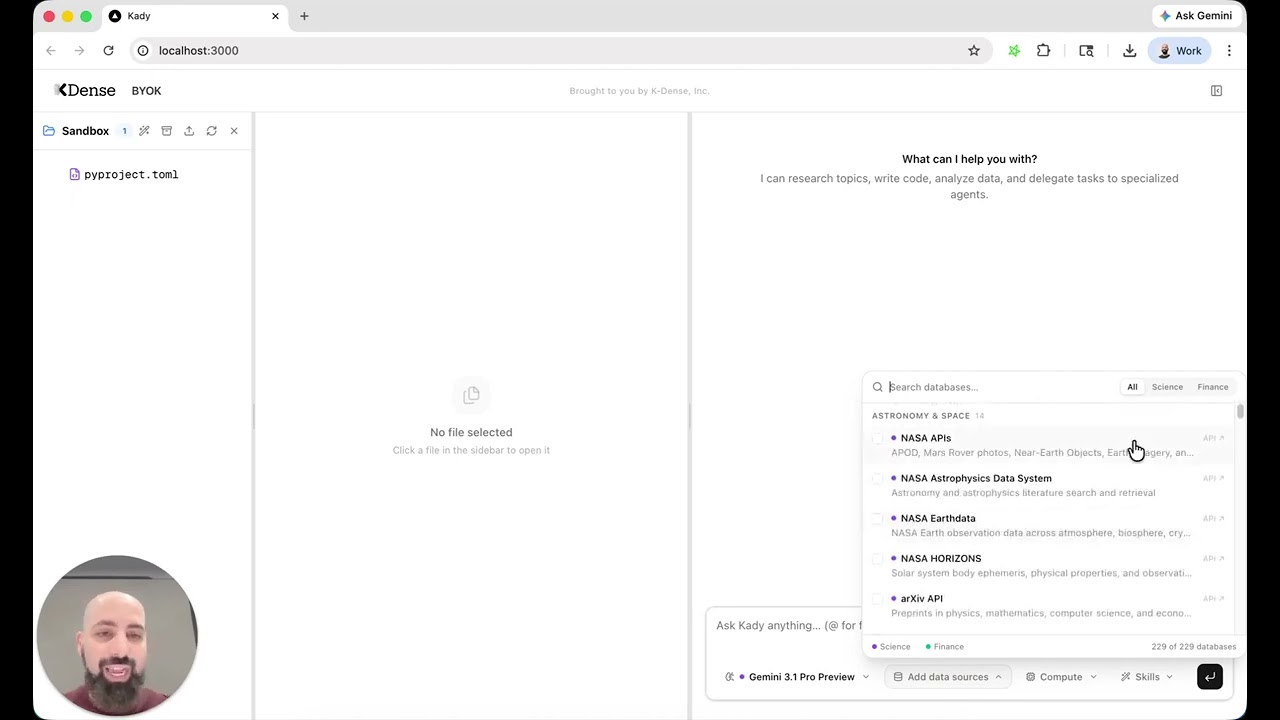
- 229 scientific and financial databases. Connect to databases in 18 categories - Biomedical & Health, Chemistry & Materials, Scholarly Publications, Stock Market, Earth & Climate, Astronomy & Space, and more.
- Organise your work in projects. Each project has its own files, chat history, and settings. Upload files, browse folders, preview documents, and download results - all from inside the app.
- Rich file previews. Built-in viewers for code, Markdown (with math and diagrams), CSVs, PDFs, images, Jupyter notebooks, and bioinformatics formats (FASTA, FASTQ, VCF, BED, GFF, SAM, BCF).
- LaTeX editor. Split-pane editor with live PDF compilation (pdfLaTeX, XeLaTeX, LuaLaTeX).
- Web search and document conversion. Kady can search the web (via Exa or Parallel) and convert documents between formats (PDF, DOCX, HTML, etc.) with no extra setup.
- Voice input, drag-and-drop attachments,
@file mentions, and a message queue for batching up to 5 messages while the agent is working. - Publication-ready provenance. A timeline of every step in your session, plus a one-click "Copy as Methods" button that exports a paragraph ready to paste into a paper.
- Optional remote compute. Plug in Modal to run heavy jobs on cloud GPUs (T4, L4, A10G, A100, H100) or serverless CPUs - selected right from the input bar.
- Extensible. Add your own MCP servers to give experts access to custom tools. Enable browser automation to let Kady drive a real browser.
What you'll need before starting
| What | Why | Where to get it |
|---|---|---|
| A computer running macOS or Linux | The app runs locally on your machine | Windows works too - use WSL |
| An OpenRouter API key | This is how the AI models are accessed | openrouter.ai - sign up and create a key |
| An Exa API key (optional) | Lets Kady search the web with neural (embedding-based) retrieval tuned for scientific content | Get your Exa API key: dashboard.exa.ai/api-keys |
| A Parallel API key (optional) | Alternative web search provider | parallel.ai |
| Modal credentials (optional) | Only needed for remote GPU/CPU compute | modal.com |
You do not need any coding experience. The startup script installs everything else for you.
Install and run
Step 1 - Download the project
Open a terminal and run:
git clone https://github.com/K-Dense-AI/k-dense-byok.git
cd k-dense-byok
Step 2 - Add your API keys
Inside the kady_agent folder you'll find a file called env.example. Make a copy and rename the copy to .env (note the dot at the start). Open .env in any text editor and paste your OpenRouter API key on the first line - that's the only key you need to get started.
The file also has sections for other optional keys (Exa or Parallel for web search, Modal for remote compute, and many scientific and government database keys). Leave blank anything you don't need.
Step 3 - Start the app
./start.sh
The first time you run this, it will automatically install Python packages, Node.js, the Gemini CLI, and the scientific skills. This may take a few minutes. Future starts are much faster.
Once everything is running, your browser will open to http://localhost:3000. That's the app.
Step 4 - Stop the app
Press Ctrl+C in the terminal.
Using the app day to day
- Send a message. Type a question or task and hit enter. Kady will either answer directly or hand off to an expert for bigger work.
- Open multiple chats. Click
+in the chat tab strip to start a new chat in the same project (up to 10). Double-click a tab title or use the pencil icon to rename it. Closing a tab cancels any turn it had running. The cost pill in the header shows both the active tab's session cost (sess) and the project total across every tab (proj). - Switch models. Use the model dropdown in the input bar - any message can use any model. Each tab keeps its own model selection.
- Upload files. Drag files into the file browser or directly onto the input bar. Use
@filenamein your message to reference files. - Launch a workflow. Open the workflows panel, pick one, fill in the blanks, and click Launch. Workflows run in whichever chat tab is currently active.
- Open Settings (the gear icon in the top-right) for API keys, MCP servers, browser automation, and appearance.
- Copy as Methods. When you're done, export a publication-ready Methods paragraph summarising the session.
Learn more
These guides live in the docs/ folder:
- Architecture - how the three local services fit together and what each folder in the project is for.
- Custom MCP servers - add your own tools to Kady's expert agents.
- Browser automation - let Kady drive a real browser.
- Local models with Ollama - run everything with local models, no API keys required.
- Contributing workflows - add new workflow templates to the library.
- Known limitations - rough edges to be aware of, especially around the expert system.
Features in the works
- Better utilization of skills
- Choice between Claude Code or Gemini CLI as the delegation expert
- Better UI experience tailored to scientific workflows
- Faster PDF parsing
- AutoResearch integration
- And much more
Recently completed: tabbed chats (up to 10 parallel sessions per project, sharing the same sandbox), Ollama local model support, MCP server configuration in the UI, and choosing the expert's model from the main dropdown.
Want more?
K-Dense BYOK is great for getting started, but if you want end-to-end research workflows with managed infrastructure, team collaboration, and no setup required, check out K-Dense Web - our full platform built for professional and academic research teams.
Issues, bugs, or feature requests
If you run into a problem or have an idea for something new, please open a GitHub issue. We read every one.
About K-Dense
K-Dense BYOK is open source because K-Dense believes in giving back to the community that makes this kind of work possible.
Star history
Reviews (0)
Sign in to leave a review.
Leave a reviewNo results found