erd-designer
Health Pass
- License — License: Apache-2.0
- Description — Repository has a description
- Active repo — Last push 0 days ago
- Community trust — 16 GitHub stars
Code Warn
- process.env — Environment variable access in .github/workflows/deploy.yml
- fs module — File system access in .github/workflows/deploy.yml
Permissions Pass
- Permissions — No dangerous permissions requested
No AI report is available for this listing yet.
Free, open-source ERD designer for browser, VS Code & Google Drive — with AI agent integration (MCP / Claude Code plugin). DDL export for 7 databases.

Entity Relationship Diagram Designer
ERD Designer is a free, open-source tool for visually designing database schemas.
Design your tables and relationships in the browser, VSCode, or Google Drive
— with AI integration via an agent plugin (CLI + skill) or MCP (Model Context Protocol).
Inspired by ERMaster, built for the modern development workflow.
▶ Try it now — kajitiluna.github.io/erd-designer
No installation, no account. Your diagrams stay in your browser.
Why ERD Designer?
- Design on a canvas, not in a config file — drag-and-drop tables, click-to-connect relationships,
and instant DDL — no YAML or hand-written SQL to start. - Your coding agent can edit it too — the diagram is not a dead-end artifact.
Claude Code and other agents create tables, add columns, wire up relations, and generate DDL through
the same tool catalog the app itself uses. - Output your team actually needs — DDL for 7 databases, plus Excel / Google Spreadsheet
specification documents and PNG / SVG / interactive HTML diagrams. - Reviewable in Git —
.erdis plain JSON, so schema changes show up as a readable diff
in pull requests instead of an opaque binary blob. - Define a column once, reuse it everywhere — Column Share Models and Column Groups keep
created_at, tenant keys, and audit columns consistent across every table that uses them.
Features
Visual Database Design
- Drag-and-drop table design — Create and arrange tables, define columns, and set constraints on an interactive canvas
- Relationship management — Define 1:1 and 1:N relationships visually with automatic foreign key synchronization
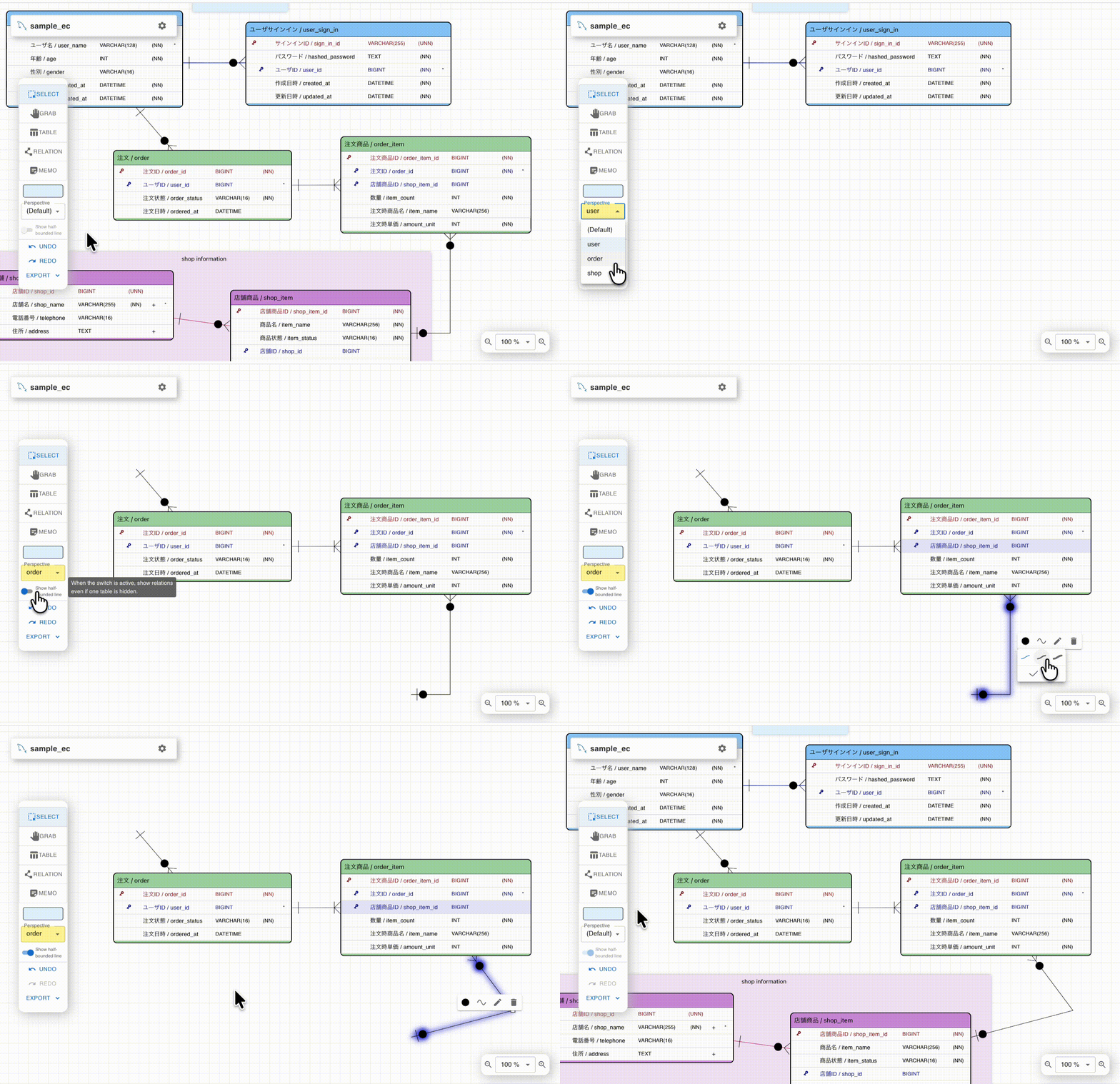
- Perspectives — Organize large schemas into multiple views (e.g., by module or feature) for better manageability
- Memo notes — Add foreground/background memo notes to annotate your design
AI Agent Integration
- Agent plugin (CLI + skill) — A plugin with a bundled CLI lets coding agents edit
.erdfiles directly,
without a running app or MCP server. Works with Claude Code
and GitHub Copilot CLI.
Token-efficient: nothing is loaded into the agent context until the skill is used - MCP Server — The VSCode extension includes a built-in
Model Context Protocol server, enabling AI assistants like Claude
to read and modify your ER diagrams programmatically - One tool catalog, both surfaces — the MCP server and the CLI expose the same set of agent tools
(add tables and columns, create relations, manage indexes and constraints, arrange the canvas, export DDL),
so behavior never diverges between them
The agent plugin and the MCP server are still marked experimental — their tool surface may
change between releases. The visual editing features are stable.
Column Reuse & Sharing
- Column Share Model — Define a column once, reuse it across multiple tables. Type changes propagate automatically
- Column Groups — Bundle commonly used columns (e.g.,
created_at,updated_at) and apply them to tables in bulk
Import & Export
- DDL export — Generate CREATE TABLE scripts for PostgreSQL, MySQL, MariaDB, MS SQL Server, SQLite, BigQuery, and Snowflake
- DDL import — Import existing DDL scripts to auto-generate ER diagrams
- Specification documents — Export table definitions as Excel files or Google Spreadsheets
- Image export — Export as PNG, SVG, or interactive HTML with pan/zoom and perspective switching
Multi-Platform
| Browser | VSCode | Google Drive | |
|---|---|---|---|
| Access | Open online tool | VS Code Marketplace | Google Workspace Marketplace |
| Storage | Local (IndexedDB) | Local file system (.erd) | Google Drive |
| Spec export | Excel | Excel | Google Spreadsheet |
| Team sharing | — | Git version control | Via Drive |
| Agent plugin (CLI) | — | Supported | Supported (with auto-sync) see note |
| MCP / AI | — | Supported | — |
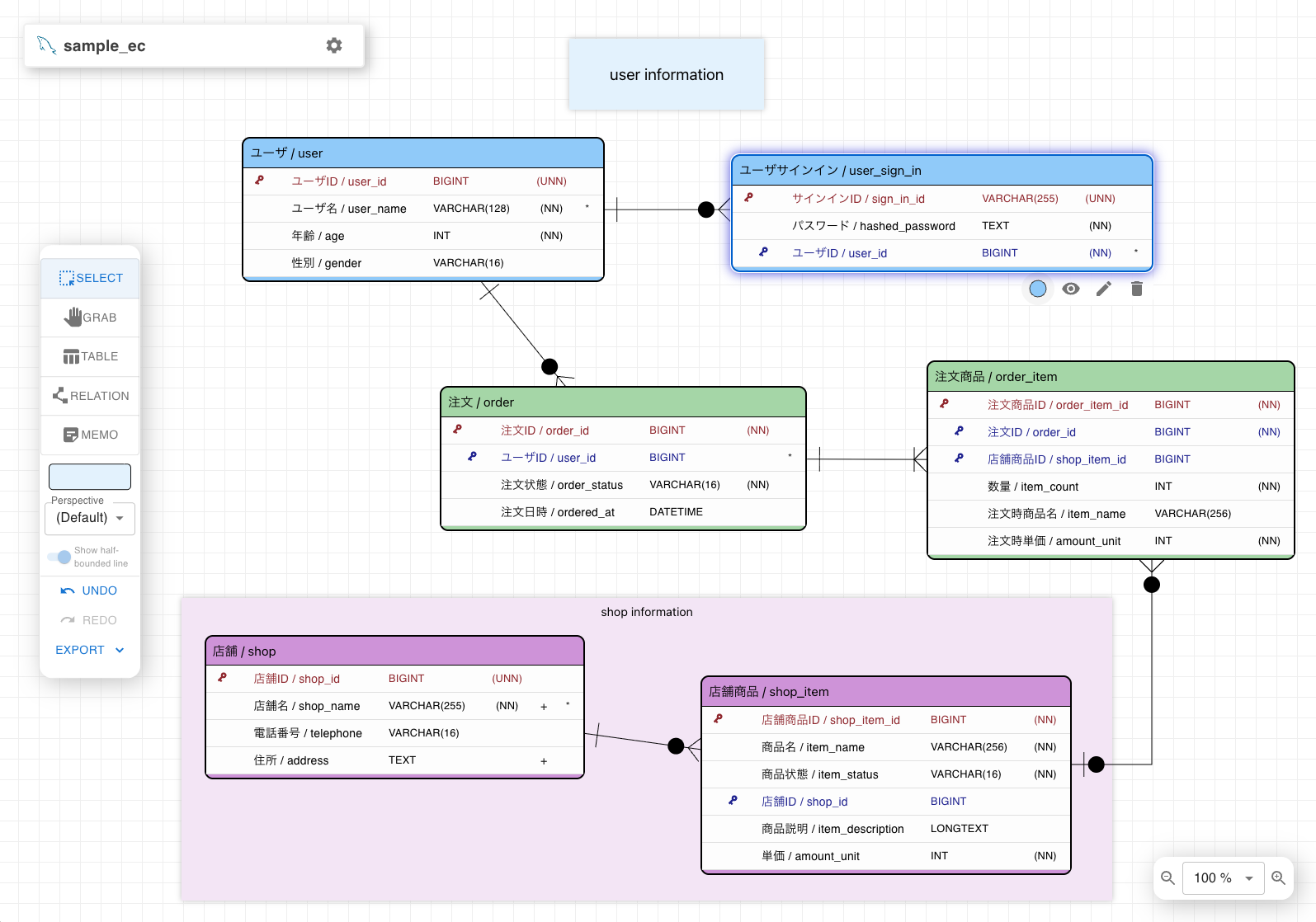
Screenshots
 |
|---|
| Main canvas view with tables and relationships |
 |
 |
|---|---|
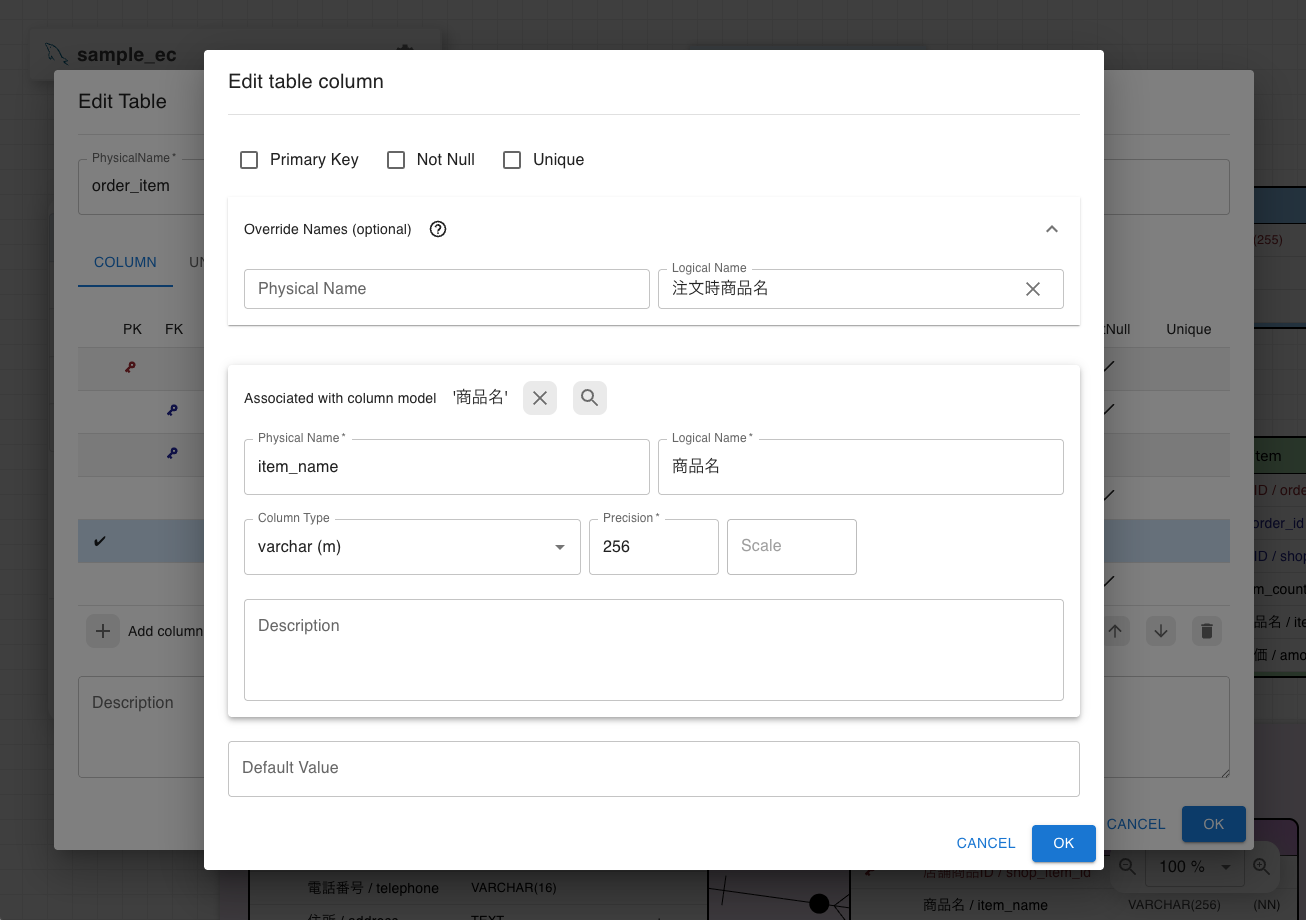
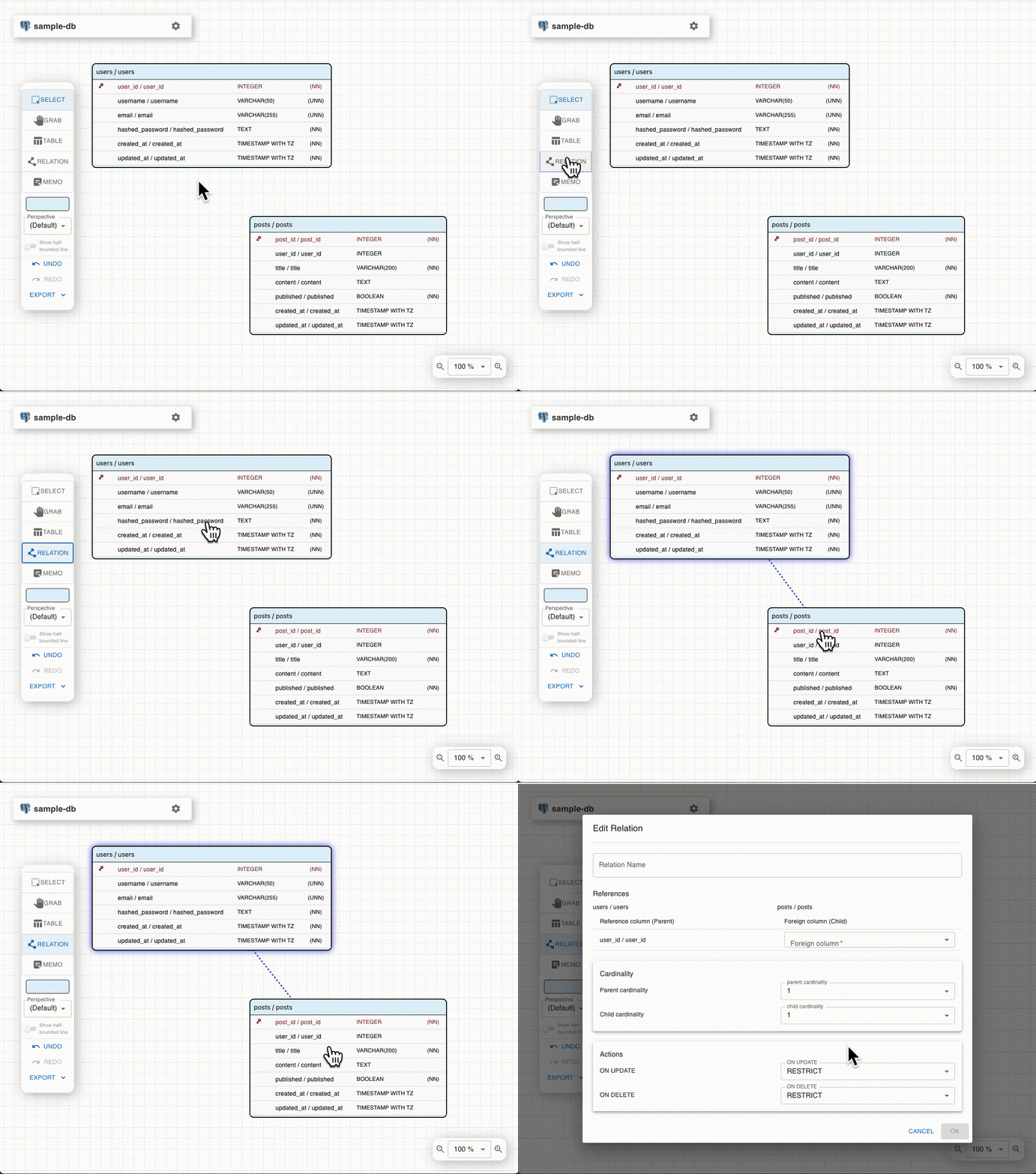
| Editing table columns using shared models | Creating relationships between tables |
 |
 |
|---|---|
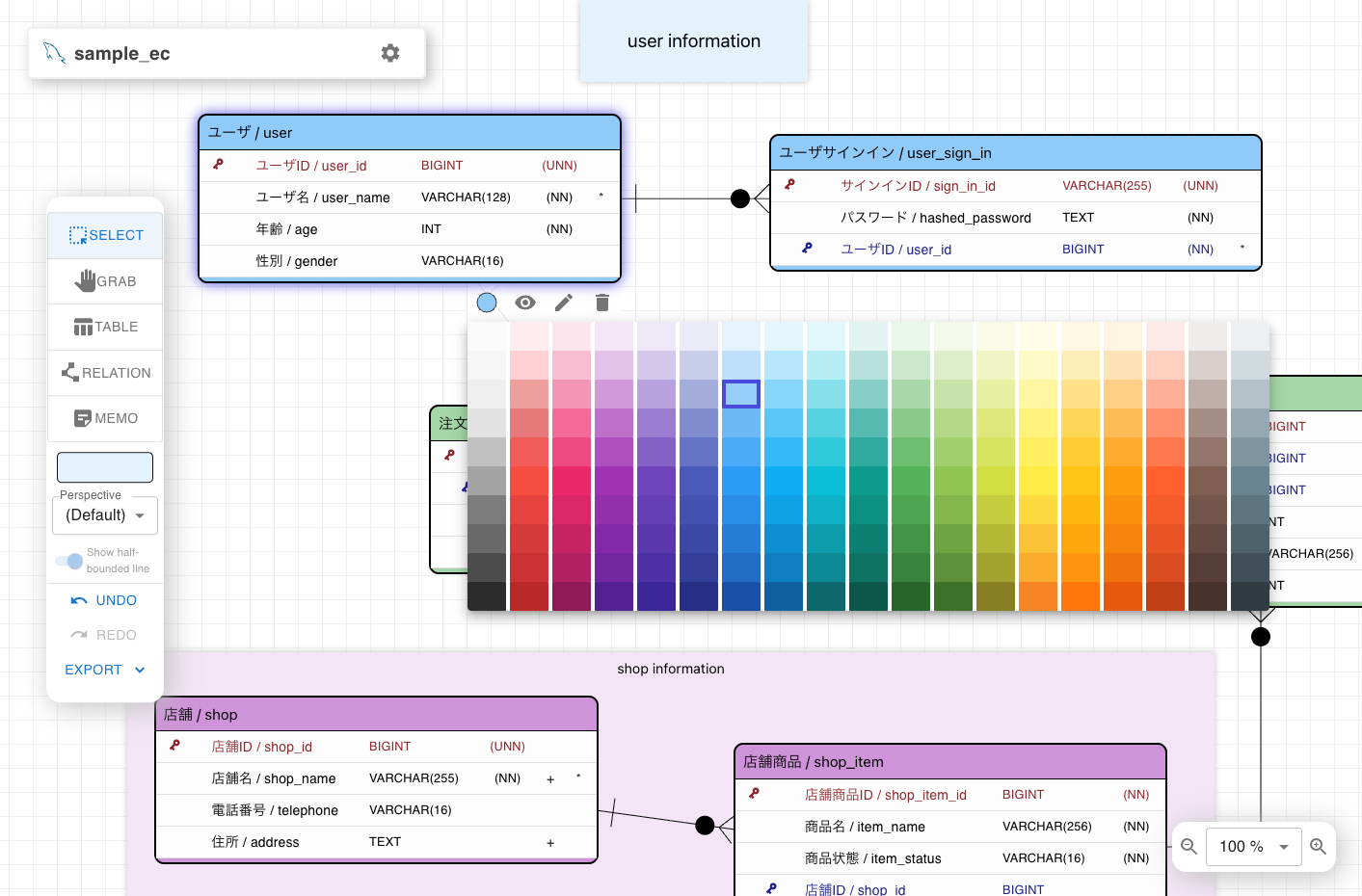
| Customizing table and memo colors | Organizing tables by perspectives |
Supported Databases
- PostgreSQL — Schema support, array types, GIN/GiST/BRIN indexes
- MySQL — CHARACTER SET / COLLATE, FULLTEXT / SPATIAL indexes, Auto Increment
- MariaDB — MySQL-compatible DDL, UUID / INET4 / INET6 types, Auto Increment
- MS SQL Server — Schema support, clustered indexes, Identity columns
- SQLite — Type affinity based column types, rowid-based auto numbering (table-level PRIMARY KEY), comments as
--lines, foreign keys emitted as guidance comments - BigQuery — Dataset (schema) support,
ARRAY<T>/STRUCTtypes,NOT ENFORCEDprimary / foreign keys,OPTIONS(description=...)comments - Snowflake — Schema support, inline
COMMENTsyntax, AUTOINCREMENT, semi-structured types (VARIANT / OBJECT / ARRAY)
PostgreSQL/MySQL-compatible databases such as Amazon Aurora, CockroachDB, and TiDB can generally be modeled using the corresponding dialect.
Getting Started
Online Tool
Try ERD Designer instantly at kajitiluna.github.io/erd-designer
— no installation or account required. Your data is stored locally in your browser (IndexedDB).
Google Drive App
Install from the Google Workspace Marketplace
to save and edit ERD files on Google Drive.
Shared files can be viewed simultaneously, though simultaneous editing is not supported (optimistic concurrency control).
VSCode Extension
Install from the Visual Studio Marketplace
to design ER diagrams within VSCode. Save as .erd files and manage them with Git.
[!NOTE]
The MCP Server feature is currently experimental and under active development.
Functionality and behavior may change in future releases.
AI Agent Integration (agent plugin)
Let a coding agent design tables incrementally by editing .erd files directly — no MCP server or running app required.
With Claude Code:
claude plugin marketplace add kajitiluna/erd-designer
claude plugin install erd-designer@erd-designer
With GitHub Copilot CLI:
copilot plugin marketplace add kajitiluna/erd-designer
copilot plugin install erd-designer@erd-designer
The plugin ships a skill and a self-contained CLI (agent-plugin/skills/erd-designer/scripts/erd-cli.cjs, requires Node.js 20+),
so the agent consumes almost no context until the skill is actually used.
The skill folder follows the open Agent Skills format, so other skill-compatible agents may also use it.
Files stored on Google Drive can be edited through the local path synced by
Google Drive for Desktop,
with the limitation described below.
[!TIP]
(Google Drive app):
Enable "Sync Google Drive" in the gear menu to auto-detect external changes (e.g. CLI edits)
and pull them into the canvas within about 10 seconds, as an undoable edit.
This is off by default — while off, close the tab before editing via CLI, then reopen it afterward to see the result.
[!NOTE]
The agent plugin is experimental, like the MCP Server.
Manual
Please refer to the Wiki for detailed documentation.
Sample file
You can use the sample ERD file as a reference for your designs:
- sample-ec_mysql.erd
(Right-click and select "Save link as...")
How to use:
- Online Tool: Download the file and import it into ERD Designer
- Google Drive App / VSCode Extension: Open the downloaded file directly
Installation and Usage
Local Installation
Clone the repository:
git clone https://github.com/kajitiluna/erd-designer.gitInstall dependencies:
npm ciStart the development server:
npm run dev
Usage
After starting the development server, open your browser and navigate to http://localhost:5173/erd-designer to use the application.
Development
- Node.js Requirement: Ensure you have Node.js (version 22.12 or higher) installed.
- Build the Project:
npm run build - Run Tests:
npm run testrun
Contributing
Contributions are welcome! See CONTRIBUTING.md for how to set up the
project, what the review expects, and how to add a new agent tool.
- Bug reports and feature requests — open an Issue
- Questions and ideas — start a Discussion
- Pull requests — please open an issue first to discuss significant changes
This project follows a Code of Conduct.
To report a security issue, see SECURITY.md.
License
ERD Designer is distributed under the Apache License 2.0.
Reviews (0)
Sign in to leave a review.
Leave a reviewNo results found