secchi
Health Warn
- License — License: Apache-2.0
- Description — Repository has a description
- Active repo — Last push 0 days ago
- Low visibility — Only 9 GitHub stars
Code Pass
- Code scan — Scanned 12 files during light audit, no dangerous patterns found
Permissions Pass
- Permissions — No dangerous permissions requested
No AI report is available for this listing yet.
Opensource Package Intelligence tool
 |
secchiOpen Source Package Intelligence |




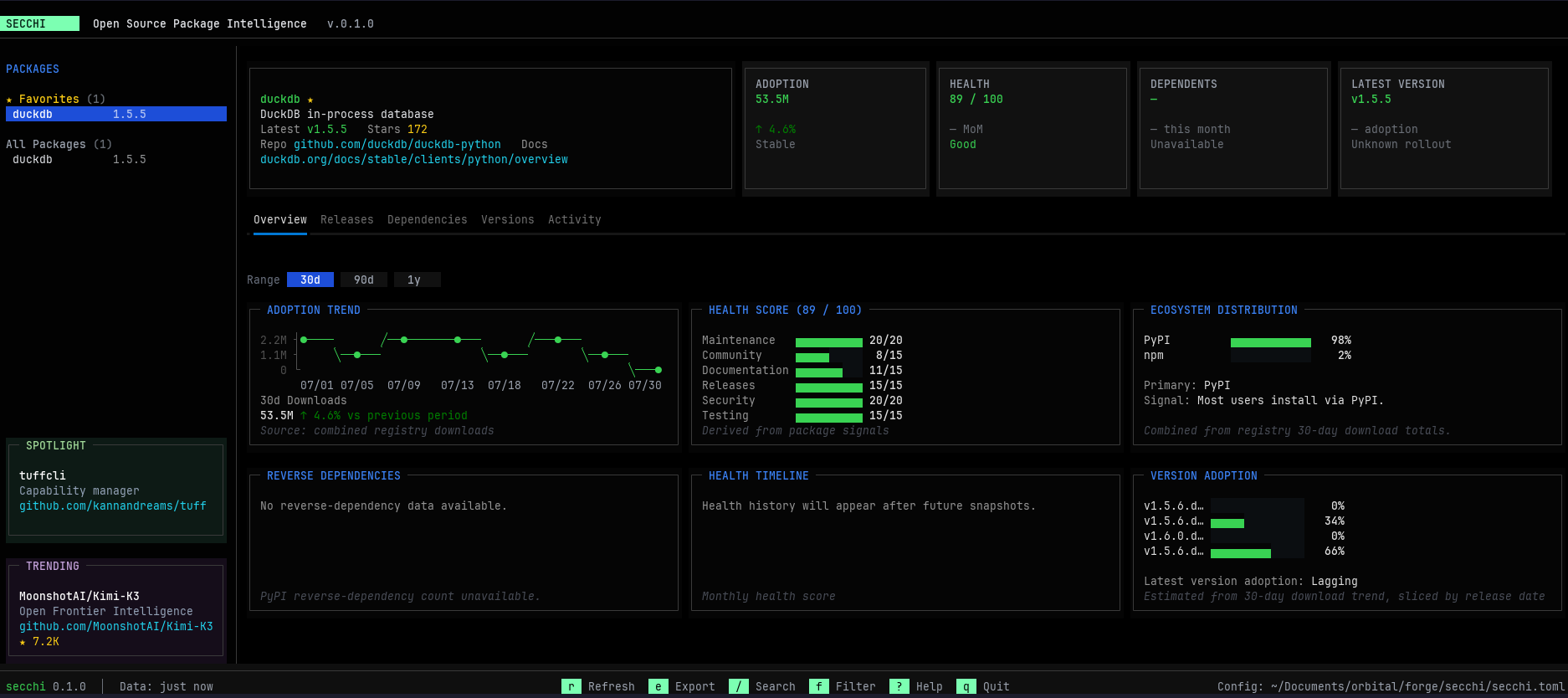
Secchi lets you explore, compare, monitor, and report on package health,
adoption, dependencies, releases, and ecosystem signals from your terminal.
Supported Ecosystems
 PyPI Python |
 npm JavaScript |
 crates.io Rust |
 Homebrew Formulae |
 Go Modules Go |
 CRAN R |
Capabilities
| Type | Capability | What it helps with | Status |
|---|---|---|---|
| Explore | Direct package lookup | Quickly inspect any package from the terminal | ✅ |
| Explore | Interactive dashboard | Explore health, adoption, releases, and dependencies | ✅ |
| Explore | Workspace monitoring | Monitor configured projects and registry sources | ✅ |
| Explore | Cross-registry search | Find packages across supported ecosystems | ✅ |
| Explore | Health and adoption signals | Understand project momentum and maintenance quality | ✅ |
| Explore | Package comparison | Rank package choices with health, adoption, and confidence evidence | ✅ |
| Report | JSON reports | Use package intelligence in scripts and automation | ✅ |
| Report | Markdown reports | Share readable reports in GitHub, Notion, or documentation | ✅ |
| Report | HTML reports | Generate standalone reports for teams and stakeholders | ✅ |
| Report | Project-wide reports | Combine registry sources for one monitored project | ✅ |
| Automate | Package health checks | Fail workflows when package standards are not met | 🚧 |
| Automate | Workspace policy checks | Evaluate every configured project against policies | ⏳ |
| Automate | GitHub Actions integration | Run Secchi automatically in CI | ⏳ |
| Integrate | Python SDK | Use Secchi from Python applications and scripts | ⏳ |
| Integrate | MCP Server | Let AI assistants query package intelligence | ✅ |
| Explore | Ecosystem adapters | Support PyPI, npm, crates.io, Homebrew, Go Modules, and CRAN | ✅ |
Install
Recommended installation methods:
uv tool install secchi
pipx install secchi
pip install secchi
Quick Start
Scaffold a config file interactively:
secchi init
Launch the dashboard for a project:
secchi -p duckdb
secchi --project opencode
Explore a package directly, without a configuration file:
secchi show duckdb
secchi dashboard duckdb
secchi search duckdb
secchi compare pypi:duckdb pypi:polars
secchi compare pypi:duckdb pypi:polars --format json
secchi report duckdb --format html --output duckdb-report.html
secchi report --config secchi.toml --project duckdb --format html
secchi check duckdb --min-health 80 --require-ci
Run the MCP server for local AI-agent integrations:
secchi mcp
# or
secchi-mcp
The server communicates over standard input/output and exposes tools for
package inspection, cross-registry search, configured project reports, and
health policy checks. It reuses the same cached intelligence pipeline as the
CLI, dashboard, and report commands.
Use Secchi with MCP
Secchi can be added to an MCP-compatible coding agent or desktop client as a
local stdio server. If secchi is installed as a tool, use:
{
  "mcpServers": {
    "secchi": {
      "command": "secchi-mcp"
    }
  }
}
When running from a source checkout with uv, point the client at the project:
{
  "mcpServers": {
    "secchi": {
      "command": "uv",
      "args": [
        "run",
        "--project",
        "/path/to/secchi",
        "secchi-mcp"
      ]
    }
  }
}
The exact configuration file location depends on the MCP client. After the
server is added, the agent can use these tools:
| MCP tool | Use it for |
|---|---|
inspect_package |
Inspect health, adoption, releases, dependencies, and repository signals |
search_packages |
Find matching packages across PyPI, npm, crates.io, Homebrew, Go Modules, and CRAN |
inspect_project |
Read a configured project from secchi.toml and summarize all its package sources |
check_package |
Evaluate minimum health and repository CI policies |
compare_packages |
Rank two or more package choices with recommendations, confidence, and evidence |
Package inspection uses Secchi's local cache by default. Ask the agent to
refresh the data when current registry information is required. The MCP server
is read-only: it does not modify packages, repositories, or configuration.
Successful package results may include signal warnings when an optional source
is unavailable; those warnings are preserved instead of turning the package
into a failed result.
Reports are written to the current directory by default. Use --output to
choose a file path, or --output - to print the report to stdout.
See DuckDB report examples for package and
project exports in JSON, Markdown, and HTML.
JSON reports declare a schema and schema_version so automation can reject
or migrate incompatible output deliberately. Secchi's local package cache uses
the same versioned-envelope approach and continues to read legacy unversioned
cache entries while writing the current schema for new data.
The serialized boundaries are validated with Pydantic models while the internal
application remains dataclass-based. This keeps the service and TUI lightweight
while giving cache files, reports, and MCP responses explicit contracts. Future
schema changes can be introduced as migrations instead of relying on every
renderer and consumer to handle new fields independently.
search, show, dashboard, and report use the same data collection and scoring
pipeline. Add --registry with pypi, crates.io, npm, homebrew, go, orcran when a package name needs an explicit ecosystem.
compare is an advisory decision aid for agents and engineers choosing between
dependencies. It reports Recommended, Acceptable, Use with caution, orAvoid, along with the evidence and unknown signals behind the result. Use
explicit registry:name references when comparing packages across ecosystems.
Secchi does not install, upgrade, remove, or approve a dependency automatically.
List available projects:
secchi --list
Config
Secchi looks for config in this order:
--config/-cpath./secchi.toml./.secchi.toml~/.config/secchi/config.toml
Example secchi.toml:
[projects.duckdb]
title = "DuckDB"
description = "DuckDB — embeddable analytical database"
favorite = true
repository = "https://github.com/duckdb/duckdb"
packages = [
    { name = "duckdb", registry = "pypi" },
    { name = "duckdb", registry = "npm" },
]
favorite belongs to the project, which makes workspace navigation clear when
one project contains several registry variants of the same package. Existing
package-level favorite entries remain supported for compatibility.
Optional Spotlight Feed
The dashboard can show a small, curated Spotlight card from Secchi's public
feed. Spotlight is cached locally and can be disabled completely when you do
not want Secchi to request the feed.
SECCHI_DISABLE_SPOTLIGHT=1 secchi dashboard duckdb
When this variable is set to 1, true, yes, or on, Secchi does not read
or fetch Spotlight data and removes the card from the dashboard.
CLI Options
secchi dashboard [package]              Launch the TUI (workspace when omitted)
secchi show <package>                   Print a concise intelligence summary
secchi search <package>                 Search packages across supported registries
secchi report <package> --format <type> Generate json, html, or md output
secchi compare <package> <package>      Rank package choices; add --format json for agents
secchi check <package>                 Evaluate health and CI policies for automation
secchi --project <name>                 Backwards-compatible project dashboard
secchi --list                           List projects in config
secchi init                             Interactively create secchi.toml
Development
Live reload during development:
uv run textual run --dev src/secchi/dev.py -- -p duckdb
Press ctrl+r to manually reload the dashboard without exiting.
Coverage Reports
The latest main coverage report is published atkannandreams.github.io/secchi/coverage/
after GitHub Pages is enabled for the repository.
Project Information
License
Apache 2.0
Reviews (0)
Sign in to leave a review.
Leave a reviewNo results found