cc-harness-studio
Health Warn
- License — License: MIT
- Description — Repository has a description
- Active repo — Last push 0 days ago
- Low visibility — Only 8 GitHub stars
Code Warn
- network request — Outbound network request in docs/stars.js
Permissions Pass
- Permissions — No dangerous permissions requested
No AI report is available for this listing yet.
An integrated design, wiring, simulation, and verification studio for autonomous AI harnesses.
CC Harness Studio
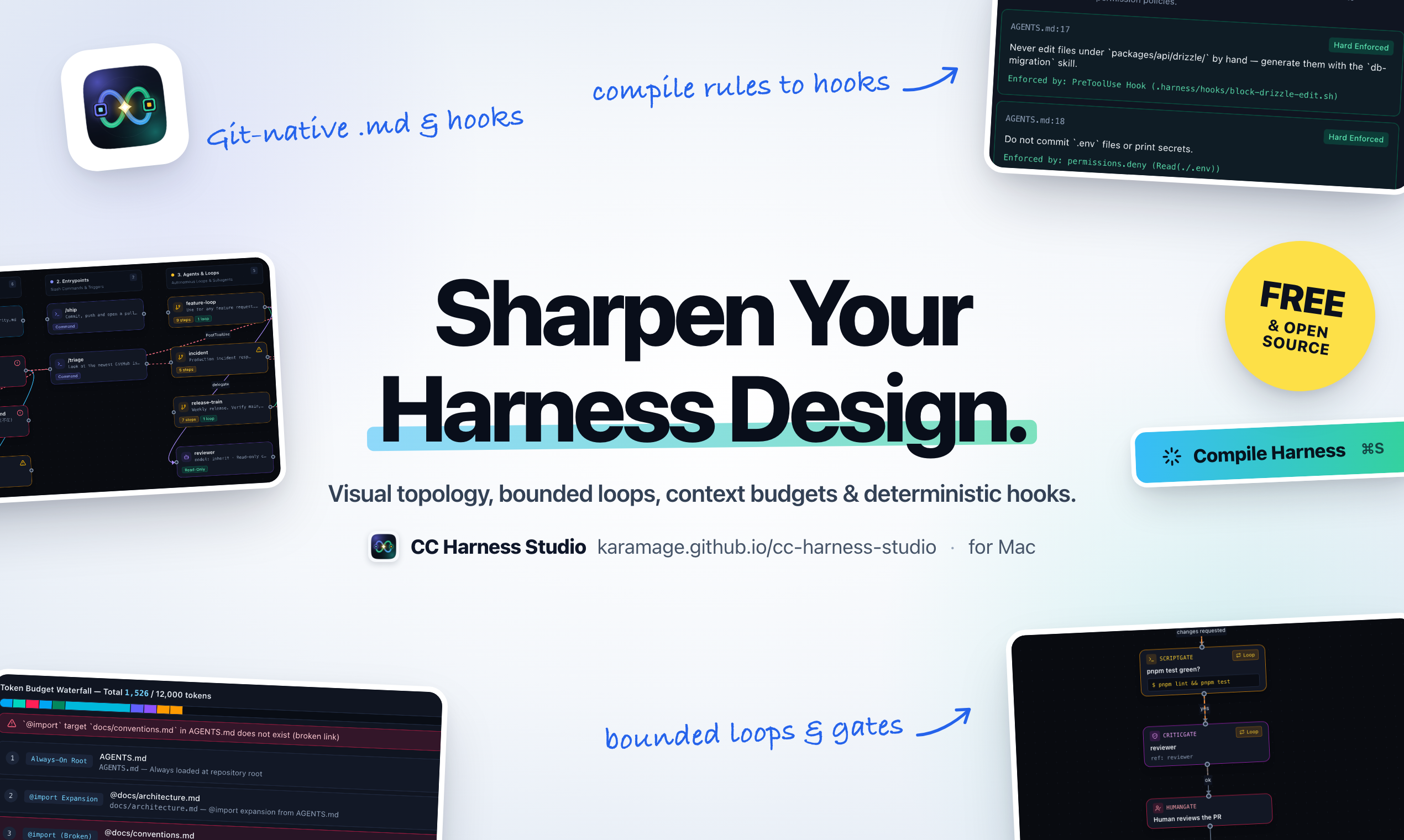
Sharpen Your Harness Design.
Tired of hand-editing scattered AGENTS.md, skills, and fragile hooks?
I built an integrated design, wiring, simulation, and verification studio for autonomous AI harnesses.
It parses your repository's Markdown, JSON, and scripts into a single Unified Harness Graph IR so you can visually wire agents, simulate context token budgets, compile autonomous loops, and test deterministic guardrails — with zero lock-in.










Website · Try Simulator in Browser · 日本語の README はこちら · Architecture Plan (JA)
⭐ If it helps you build more reliable AI harnesses, a star helps other engineers find it.
Follow @kara_mage on X for early access to our products.
[!TIP]
CC Harness Studio stores no proprietary database and no Claude credentials. Every design compiles cleanly back to standard Git-native files (AGENTS.md,CLAUDE.md,.claude/**,.mcp.json,.harness/**). Static diagnostics, context simulation, hook testbench, and workflow compilation work 100% locally offline —claudeCLI is only needed when you run optional AI audit/co-design tasks.
[!NOTE]
This is an independent project, not affiliated with, endorsed by, or sponsored by Anthropic. Claude is a trademark of Anthropic, PBC.
🌟 Overview
Building an autonomous AI coding system is not about writing one big Markdown file. It is about meshing five gears together — Context Hierarchy, Capability Bundles (Skills + Scripts + MCP), Role-Isolated Subagents, Bounded Autonomous Loops, and Deterministic Guardrails (Hooks & Permissions) — so the agent finishes the task without drifting or breaking invariants.
CC Harness Studio reads all of those scattered repository assets into a single Unified Harness Graph IR (hc-core) and gives you a fast, dark-mode studio (as a ~6.7 MB native macOS .app, a local Web Studio server, or a headless CI CLI) to design, wire, simulate, compile, and verify your harness before an AI ever touches production code.
🆚 How it differs
| CC Harness Studio | Hand-editing .md & .json |
Cloud agent builders (Dify / LangGraph Cloud) | |
|---|---|---|---|
| Source of truth | Git-native standard files (AGENTS.md, .claude/**, .harness/**) |
Git-native files, scattered across folders | Vendor database / proprietary YAML |
| Wiring & overview | Interactive 5-lane Topology Canvas with drag-to-wire & live diagnostics | Mental model only; broken @import and orphan skills go unnoticed |
Visual graph, but disconnected from Claude Code / Codex repos |
| Natural-language rules vs Hooks | Soft-to-Hard Compiler + sandboxed Hook Testbench (exit 0 vs exit 2) |
Easy to ship broken hooks (e.g. unset $CLAUDE_FILE_PATHS) |
No Claude Code lifecycle hook simulation |
| Context window visibility | Context Stack Simulator + Token Budget Waterfall per target file | Guessing what loads and how many tokens it costs | Prompt templates only |
| Safe editing | Scoped Harness Sandbox + multi-file Hunk Diff + 1-click snapshot rollback | Direct writes, easy to break JSON/shell syntax | Remote save |
The other columns describe typical workflows; individual setups differ.
📋 Table of Contents
- 🌟 Overview
- 🆚 How it differs
- ✨ Features
- 🚀 Installation
- 📖 Usage
- 🏗 How it works
- 🔒 Security
- 🛠 Development
- 🤝 Contributing
- 📄 License
- 🙏 Acknowledgments
✨ Features
1. System Topology Canvas
- 5 logical swimlanes:
Context Hierarchy→Entrypoints (Commands)→Agents & Loops→Skill Bundles→Guardrails & MCP— auto-aligned on an interactive pan/zoom canvas with MiniMap and problem-only filter. - Direct wiring: drag a wire from
Context → Contextto insert@pathimports,Agent → Skillto attach skill procedures,Agent → MCPto grantmcp__<server>__*tool permissions, orCommand → Workflow/Agent/Skillto connect entrypoints. - Live diagnostic overlays: broken
@importlinks, orphan skills, over-privileged agents, and buggy hooks light up directly on the graph. - Quick create (
Cmd+K): generate new Skill Bundles (withscripts/&references/), Subagents, Loop Graphs, Guardrail Hooks, Context Rules, Commands, or MCP Servers from templates in seconds.
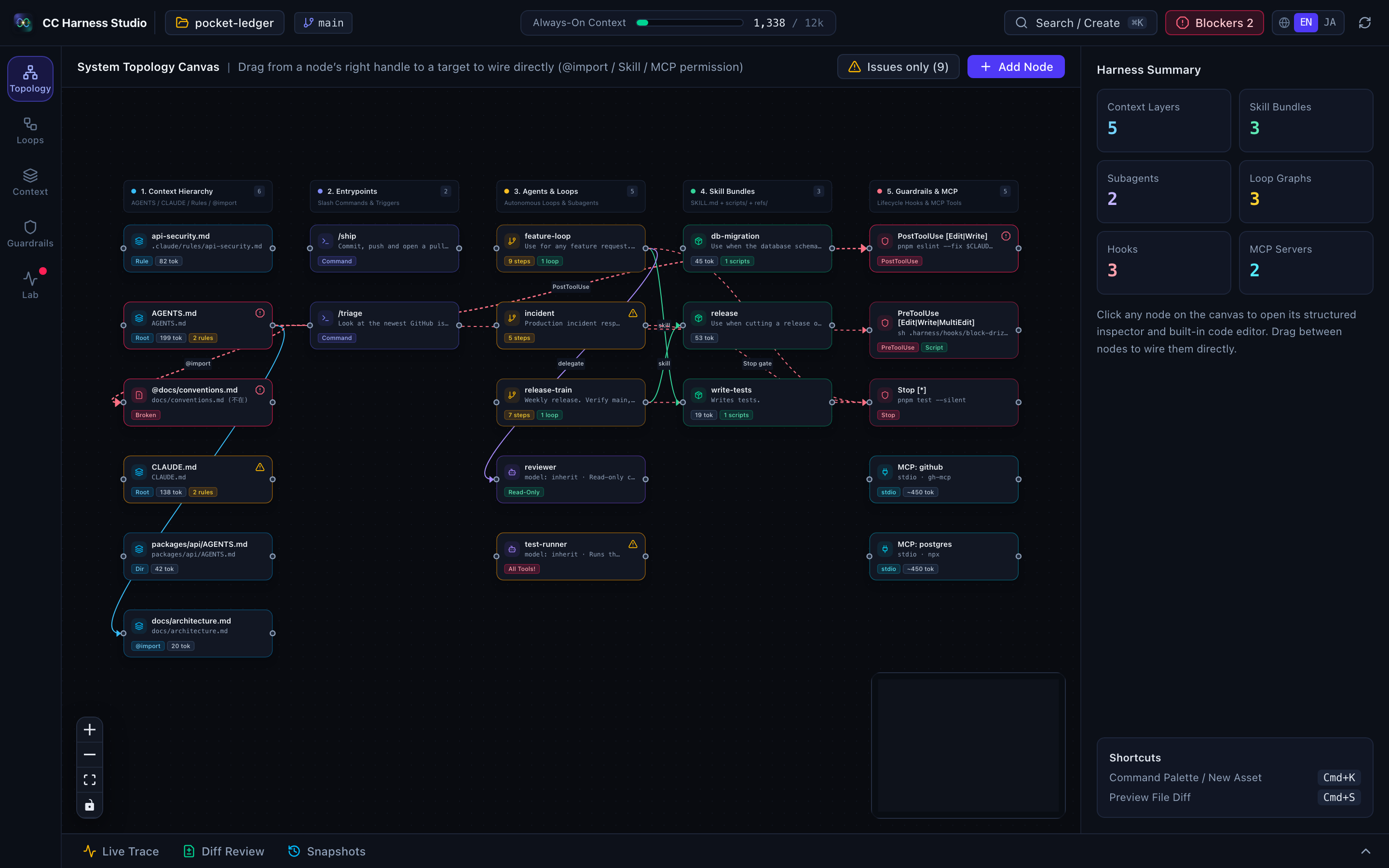
System Topology Canvas — inspect all 5 harness gears, drag to wire dependencies, and spot broken imports or unrestricted agents at a glance. (Sample: examples/pocket-ledger)
2. Autonomous Loop & Workflow Studio
- Executable loop graphs, not dead diagrams: visually compose
Trigger,ContextPrime,ActionStep,SkillInvoke,AgentDelegate,ScriptGate,CriticGate,HumanGate, andEndnodes with animated feedback edges. - First-class
LoopFramesemantics: configuremax_iterations,exit_condition,context_isolation(fresh_subagent/progress_ledger/shared_window),progress_file, andescalation_targetso autonomous loops never spin forever. - Auto-detected project scripts: automatically discovers scripts from
package.jsonandCargo.tomlfor 1-clickScriptGateinsertion. - One-click Harness Compiler: compiles any loop graph into:
- lossless
.harness/workflows/<name>.md(extended Mermaid +loop_framesfrontmatter + step bodies), - an executable Claude Code slash command
.claude/commands/run-<name>.md, - a deterministic verification gate script
.harness/scripts/run-<name>-gate.sh(exit 0/exit 2), - and optional
Stophook wiring in.claude/settings.json.
- lossless
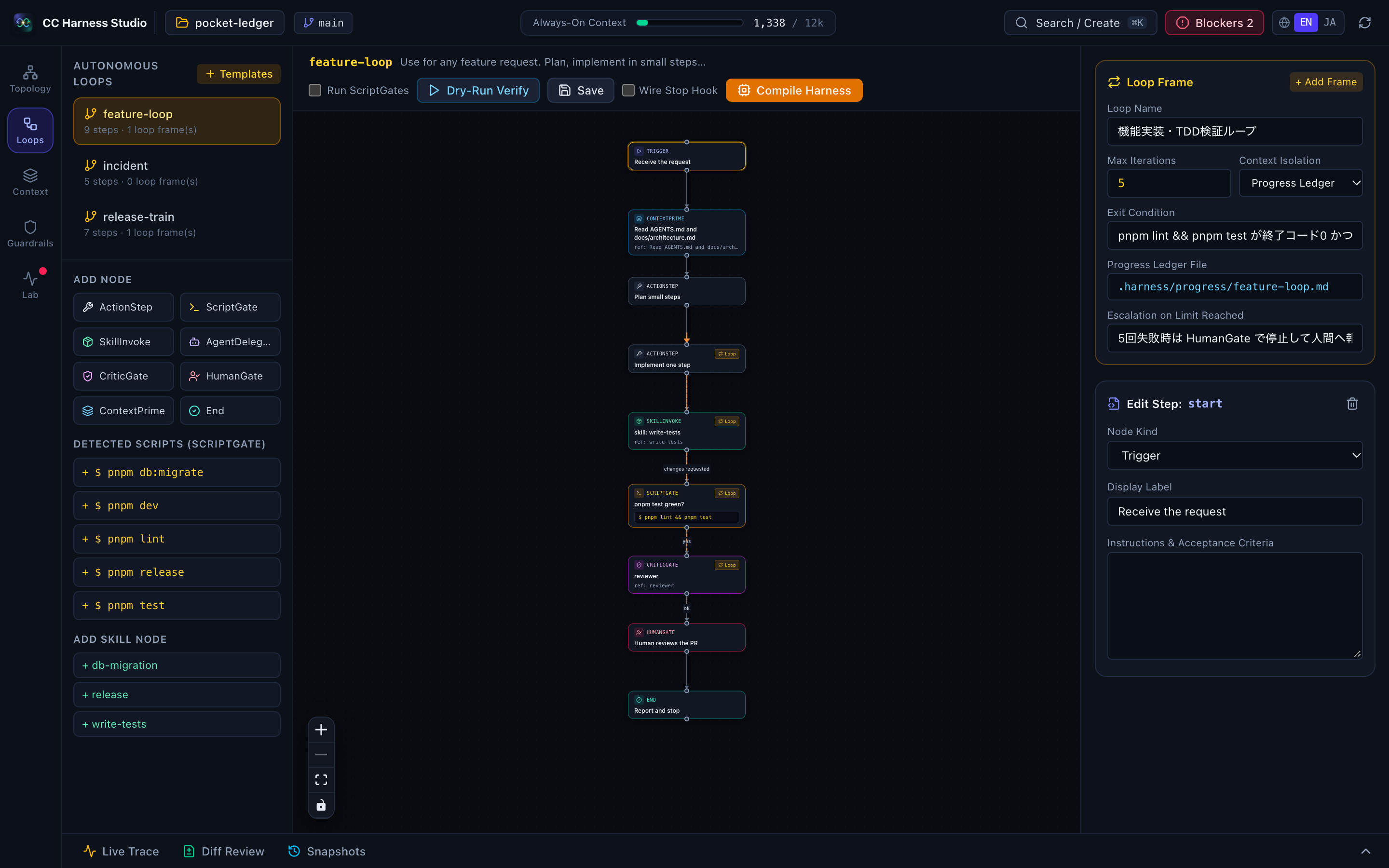
Autonomous Loop Studio — define bounded LoopFrame iterations, ScriptGate / CriticGate / HumanGate nodes, and compile into executable slash commands and gate scripts.
3. Context & Bundle Workbench
- Context Stack Simulator & Token Budget Waterfall: enter any repository file path (e.g.
packages/api/src/index.ts) and a sample task prompt to see the exact load order and token breakdown — RootAGENTS.md/CLAUDE.md, Skill frontmatter index, MCP schema overhead, ancestor directoryAGENTS.md, matching.claude/rules/*.mdglobs, recursive@importexpansions, and triggeredSKILL.mdbodies. - Duplication detector & 1-click consolidation: detects overlap between
AGENTS.mdandCLAUDE.mdand proposes consolidatingCLAUDE.mdinto@AGENTS.mdplus Claude-specific deltas. - Capability Bundle Editor: edit
SKILL.mdtogether with bundledscripts/*.sh,scripts/*.py,references/*, andexamples/*inside a tabbed CodeMirror 6 editor (Markdown / Shell / Python / JSON / YAML + native macOS IME). - Subagent Role Matrix: compare every subagent's model (
inherit/opus/sonnet/haiku) and tool permissions (Read,Grep,Glob,Edit,Write, scopedBash(...), MCP tools) side by side and tighten unrestricted agents with one click.
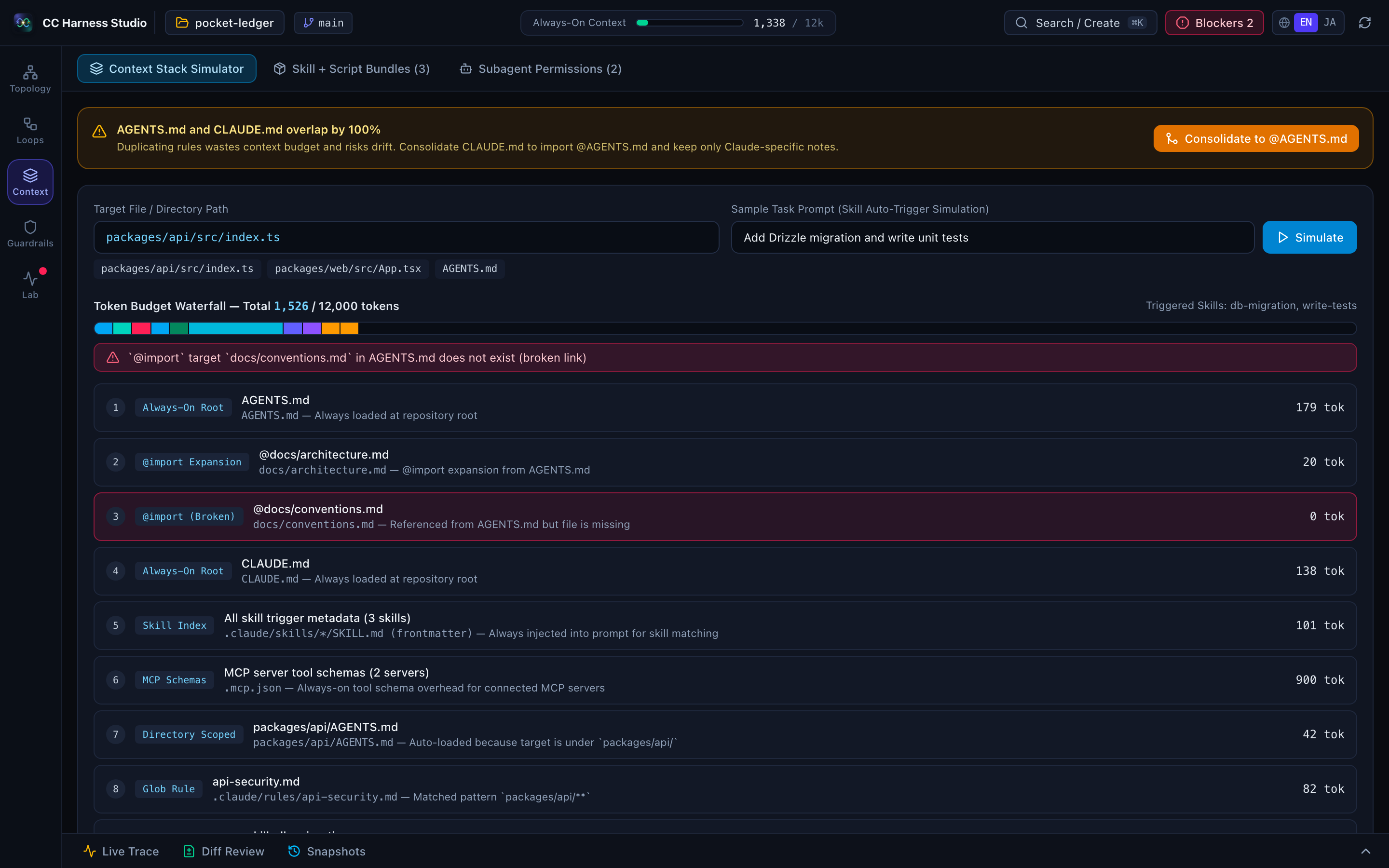
Context Stack Simulator — inspect exact token budgets, glob rules, recursive @import expansions, triggered skills, and 1-click @AGENTS.md deduplication.
4. Guardrails & Hook Pipeline
- 6-stage lifecycle pipeline: visually inspect and edit
SessionStart→UserPromptSubmit→PreToolUse→PostToolUse→SubagentStop→Stophooks alongsidepermissions.allow/permissions.deny. - Sandboxed Hook Testbench: feed simulated Claude Code JSON stdin payloads (e.g.
Edittargetingpackages/api/drizzle/0001.sql) to any hook command or.harness/hooks/*.shscript and immediately inspect the verdict (ALLOWED exit 0,BLOCKED exit 2+ stderr feedback injected to AI, or error hints such as unset$CLAUDE_FILE_PATHS). - Soft-to-Hard Rule Compiler: scans
AGENTS.md/CLAUDE.mdfor natural-language prohibitions and mandatory checks ("Never editpackages/api/drizzle/by hand", "Never commit.env", "Must passpnpm test"), checks actual hook script contents to see whether they are enforced, and compiles unprotected Soft Rules into executable shell hooks +.claude/settings.jsonentries.
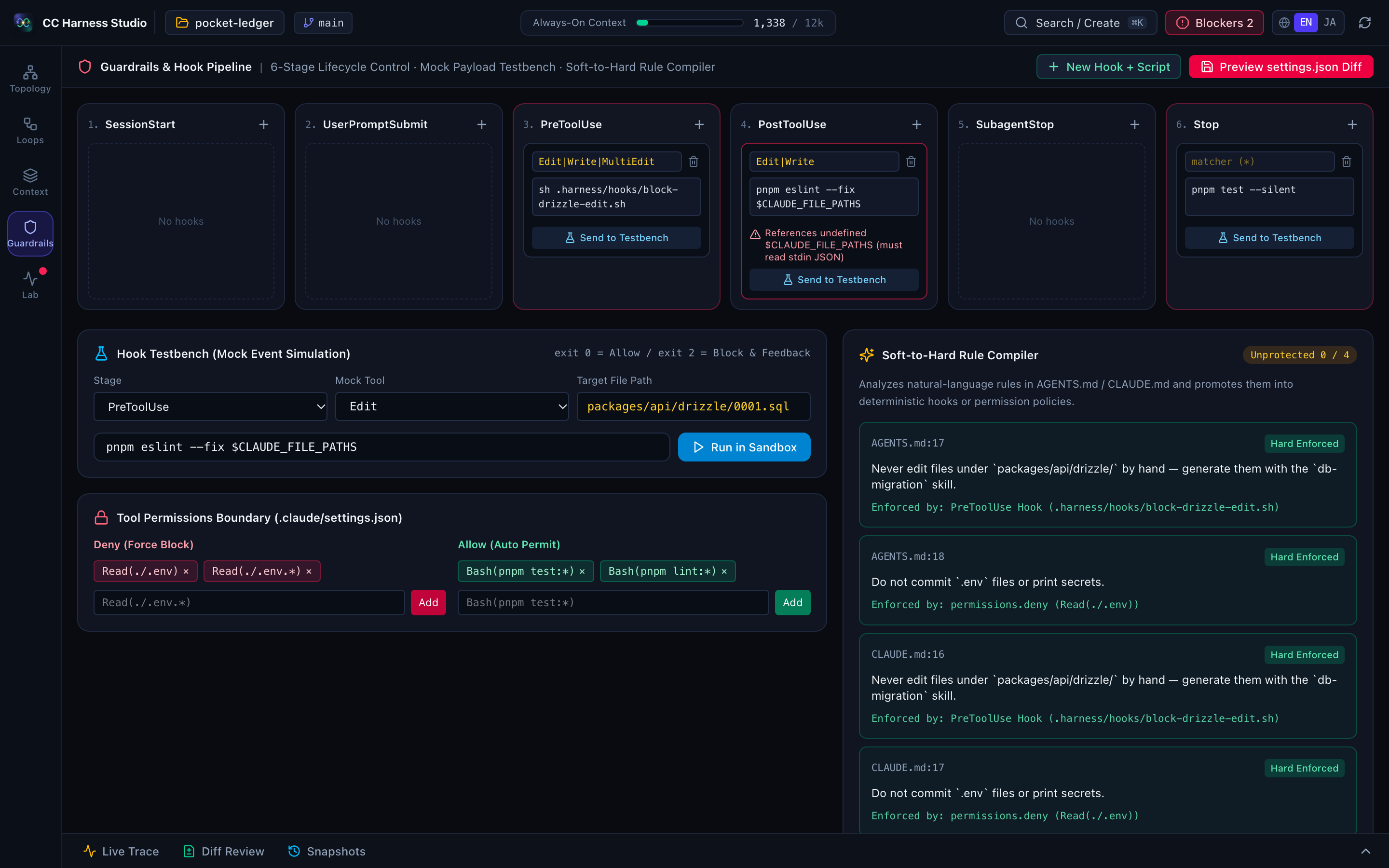
Guardrails & Hook Pipeline — manage all 6 Claude Code hook stages, dry-run hooks against simulated JSON payloads, and compile natural-language rules into deterministic guardrails.
5. Execution Lab & Diagnostics
- Actionable Harness Diagnostics: replaces vague scores with concrete
Blocker/Warning/Optimizationitems, each linked directly to the target view/node and a 1-click Quick Fix transaction when auto-fixable. - Read-Only Isolated AI Co-Design (
claude -p --output-format stream-json): run AI Harness Audit, AI Improvement Proposals, or AI Autonomous Loop Design while observing every read-only tool call in real time in the bottom Live Trace drawer. Proposed edits always route through the Hunk Diff reviewer.
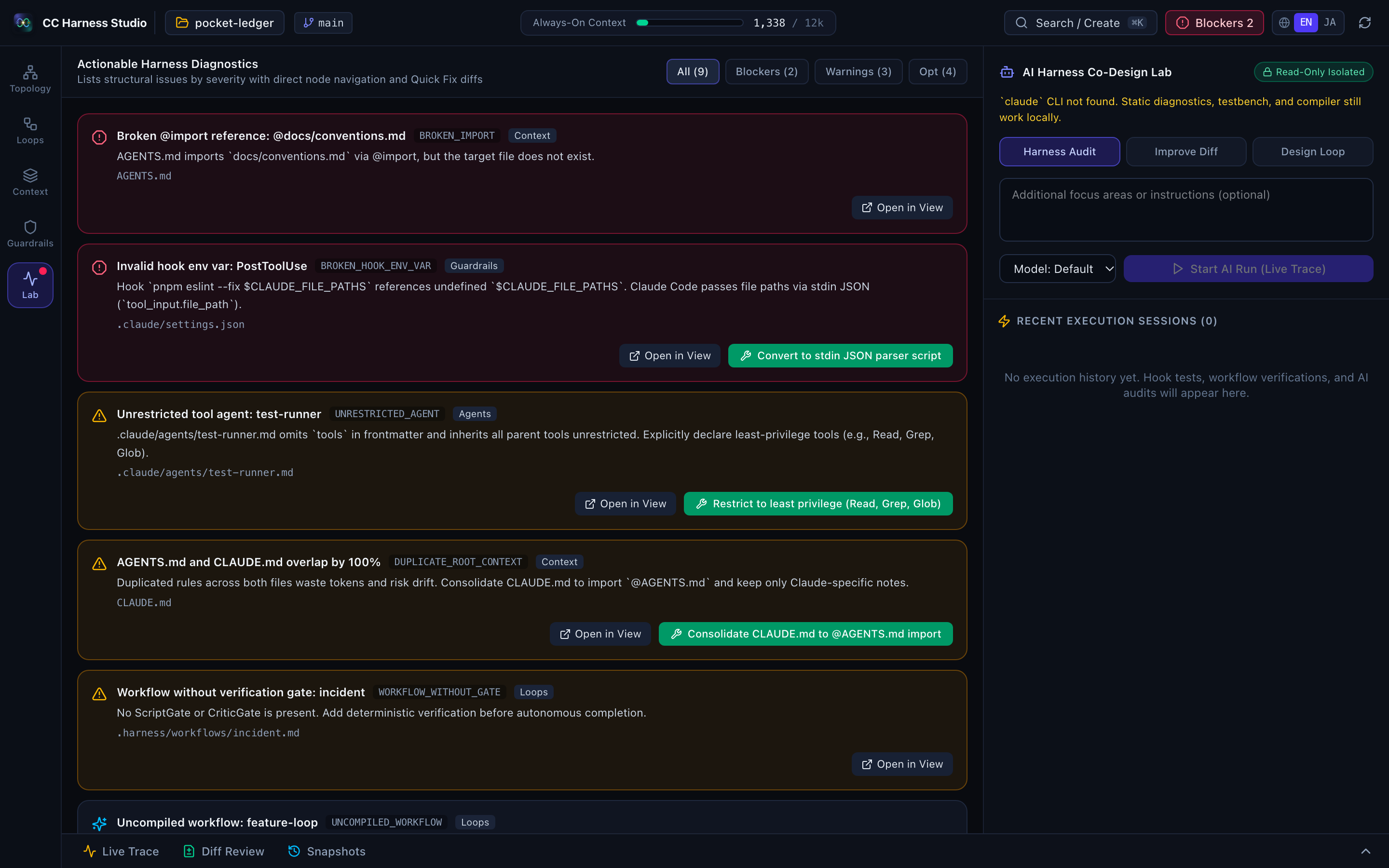
Execution Lab & Diagnostics — jump straight to broken nodes, generate 1-click Quick Fix diffs, or run read-only isolated AI audits with live stream-json tracing.
6. Multi-File Diff, Snapshots & Hybrid Runtime
- Unified Hunk Diff Drawer: every mutation — wiring, compiling, form editing, Quick Fix, or AI proposal — stages a multi-file
TransactionPlanwith per-file checkboxes before touching disk. - Automatic Snapshots & 1-Click Rollback: every apply snapshots the prior state outside your Git tree so you can roll back any generation cleanly.
- 3 Ways to Run: native macOS
.app(~6.7 MB viatao/wryWKWebView), local Web Studio (studio), or headless CI CLI (check/compile/run).
🚀 Installation
Download (macOS, Apple Silicon / Intel)
Grab the latest build from GitHub Releases:
| File | Contents |
|---|---|
CC-Harness-Studio-<ver>-macos-arm64.dmg |
Native .app (drag into Applications) |
CC-Harness-Studio-<ver>-macos-arm64.zip |
Same .app, zipped |
cc-harness-studio-<ver>-macos-arm64.tar.gz |
Standalone CLI binary (studio / check / compile / run) |
For Intel Macs, use the same files with x86_64 in place of arm64.
Release builds are signed with a Developer ID and notarized by Apple, so they open without Gatekeeper warnings.
Prerequisites
- macOS 13+ (Apple Silicon or Intel) for the native
.appbundle - Rust (
stable, pinned via rust-toolchain.toml) and Node.js 20+ - Claude Code (
claude) — optional; only required for the AI Co-Design Lab
Build from source
git clone https://github.com/karamage/cc-harness-studio.git
cd cc-harness-studio

# 1. Install frontend dependencies and build the embedded Studio UI
cd ui && npm install && npm run build && cd ..

# 2. Run Rust core & runtime test suite
cargo test --workspace

# 3. Build self-contained macOS .app bundle (~6.7 MB)
scripts/bundle.sh
Launch the built native app:
open "target/CC Harness Studio.app"
[!IMPORTANT]
Locally built.appbundles are ad-hoc signed. If macOS prompts on first launch, allow it in System Settings → Privacy & Security → Open Anyway, or run directly viacargo run -p cc-harness-studio.
📖 Usage
Studio workflow
Open repo → Inspect Topology Canvas → Wire nodes / Design Loop → Simulate Context → Test Hooks → Review Diff & Apply
- Try the built-in sample first: run
cargo run -p cc-harness-studio(or openexamples/pocket-ledger) to explore a realistic monorepo harness containing hierarchicalAGENTS.md, glob-scoped.claude/rules/, bundled skill scripts, a workingPreToolUseDrizzle blocker hook, and intentional harness issues ready for 1-click Quick Fixes. - Design & wire: switch across the 5 left-rail modes (
Topology,Loops,Context,Guardrails,Lab) or pressCmd+Kto search nodes or scaffold new harness assets. - Verify before applying: inspect all generated files in the bottom Diff Review drawer, toggle individual files if desired, and click Apply with Snapshot.
Headless CLI (CI & scripting)
Every core capability also runs headlessly from the terminal or CI:
# Launch native macOS desktop window (default)
cc-harness-studio [repo-path]

# Launch local Web Studio server (with live file watcher & WebSocket)
cc-harness-studio studio [repo-path] --port 4173 --open

# Run static harness diagnostics (exits with code 2 on Blocker findings)
cc-harness-studio check examples/pocket-ledger
cc-harness-studio check examples/pocket-ledger --json

# Compile loop graphs into /run-<name> commands & gate scripts
cc-harness-studio compile examples/pocket-ledger --workflow feature-loop          # dry-run
cc-harness-studio compile examples/pocket-ledger --workflow feature-loop --write  # apply with snapshot

# Dry-run or execute deterministic ScriptGates in a workflow
cc-harness-studio run examples/pocket-ledger --workflow feature-loop
cc-harness-studio run examples/pocket-ledger --workflow feature-loop --execute-gates
Supported harness assets
| Category | Standard Paths |
|---|---|
| Context & Rules | AGENTS.md, CLAUDE.md, GEMINI.md (any depth), .claude/rules/**/*.md, .cursor/rules/**/*, .github/copilot-instructions.md |
| Skill Bundles | **/SKILL.md + bundled scripts/**, references/**, examples/** |
| Subagents & Commands | .claude/agents/**/*.md, .claude/commands/**/*.md |
| Guardrails & MCP | .claude/settings.json (hooks, permissions), .harness/hooks/**, .mcp.json |
| Autonomous Loops | .harness/workflows/*.md, .harness/scripts/*-gate.sh, .harness/progress/*.md |
Built-in loop templates
| Template | Flow |
|---|---|
feature-tdd-loop |
Plan → Small-step impl → write-tests skill → ScriptGate → Read-only CriticGate → HumanGate |
ci-auto-repair |
CI failure log → Minimal repro test → Root-cause fix → Regression ScriptGate → CriticGate → HumanGate |
safe-db-migration |
Schema edit → db-migration skill & script → Migration & test ScriptGate → Destructive-change HumanGate |
multi-agent-spec-to-pr |
Architect → Worker × test-runner Verifier isolated loop → Security/Code CriticGate → HumanGate |
Diagnostics severity
| Severity | Meaning | Examples |
|---|---|---|
Blocker |
Broken or unsafe harness wiring that fails at runtime | Broken @import, unset $CLAUDE_FILE_PATHS in hook, missing hook script, unbounded feedback loop |
Warning |
High-risk drift or missing deterministic enforcement | Unrestricted subagent tools, unprotected Soft Rule, AGENTS.md/CLAUDE.md duplication, context budget exceeded |
Optimization |
Hygiene and discoverability improvements | Uncompiled workflow, orphan skill, weak skill description trigger, missing Stop hook |
🏗 How it works
CC Harness Studio.app (~6.7 MB single Rust binary + embedded UI)
├── Native Desktop Shell (tao + wry WKWebView)   opens loopback URL with native file dialog (rfd)
├── Local Studio Host (axum + WebSocket + notify)
│   ├── Embedded React 19 UI (rust-embed ← ui/dist)
│   ├── File watcher broadcasts live graph updates over /ws
│   └── REST API + real-time TraceEvent stream over /ws
├── hc-core (pure Rust domain engine)
│   ├── Unified Harness Graph IR & .gitignore-aware scanner
│   ├── Context Stack Simulator & AGENTS/CLAUDE deduplicator
│   ├── Soft-to-Hard Rule Extractor & Guardrail Compiler
│   ├── Lossless LoopGraph parser/serializer & Harness Compiler
│   └── Scoped Harness Sandbox (allowlist, sh -n/JSON validation, Hunk Diff, snapshots)
└── hc-runtime (tokio async execution engine)
    ├── Hook Testbench (simulated JSON stdin → exit 0 / exit 2 verdict)
    ├── Autonomous Loop & ScriptGate Verification Runner
    └── Read-Only Isolated `claude -p --output-format stream-json` Runner
🔒 Security
- Local loopback only: the studio server binds strictly to
127.0.0.1(random ephemeral port in desktop mode). - Scoped Harness Sandbox: all writes pass through
hc_core::sandbox::is_allowed_path. Application source code (src/**,packages/*/src/**),.git/**,.env*,CLAUDE.local.md, private keys (*.pem,*.key,id_rsa*,id_ed25519*), and symlink escapes outside the repository are unconditionally rejected. - Pre-write syntax & schema validation:
.jsonfiles are parsed and schema-checked (.claude/settings.jsonmerges onlyhooksandpermissions, preserving unknown keys);.shscripts are validated withsh -nbefore any byte is written. - Strict Read-Only AI isolation: when invoking
claude -p,hc-runtimeruns in an empty temporary working directory with--restricted --strict-mcp-config --tools Read,Grep,Glob --permission-mode dontAsk --no-session-persistenceandLOCKDOWN_SETTINGSdenying.env*,.ssh,.aws, keys, andCLAUDE.local.md.Write,Edit, andBashare never granted. - No telemetry: zero analytics or background network calls. Everything stays on your machine (and only talks to Anthropic via your local
claudeCLI when you explicitly start an AI lab run).
🛠 Development
Tech stack
- Core & Runtime: Rust (Edition 2024),
tokio,ignore,globset,similar,serde_yaml - Desktop & Server:
axum0.8 (REST + WebSocket),notify8,rust-embed,tao+wry(WKWebView),rfd - Frontend: React 19 + TypeScript + Vite 6 + Tailwind CSS v4 +
@xyflow/reactv12 +@dagrejs/dagre+ CodeMirror 6 +lucide-react
Project structure
cc-harness-studio/
├── crates/
│   ├── hc-core/               # Unified Harness IR, scanner, simulator, Soft-to-Hard rules, compiler, lint, sandbox
│   ├── hc-runtime/            # Hook Testbench, Loop Runner, Read-Only claude -p stream-json runner
│   └── hc-studio/             # Hybrid CLI, Axum REST/WS server, file watcher, tao/wry native desktop host
├── ui/
│   ├── public/                # App icon & favicon
│   └── src/
│       ├── views/             # TopologyView, LoopsView, ContextWorkbenchView, GuardrailsView, ExecutionLabView
│       └── components/        # CodeEditor (CM6), DiffDrawer, NodeInspector, CommandPalette
├── examples/pocket-ledger/    # Realistic monorepo sample harness (rules, bundled scripts, hooks, workflows)
└── scripts/                   # bundle.sh (.app packaging), gen_icon.py (2x supersampled icon generator)
Commands
# Run all Rust unit & integration tests
cargo test --workspace

# Typecheck and build production UI
cd ui && npm run build

# Frontend hot-reload dev mode (run in two terminals)
cargo run -p cc-harness-studio -- studio examples/pocket-ledger --port 4173
cd ui && npm run dev

# Regenerate AppIcon.png / AppIcon.icns / favicon
python3 scripts/gen_icon.py

# Build production macOS .app bundle (ad-hoc signed unless SIGN_IDENTITY is set)
scripts/bundle.sh

# Build signed + notarized release artifacts into target/dist
SIGN_IDENTITY="Developer ID Application: ..." NOTARY_PROFILE=<notarytool profile> scripts/release.sh
🤝 Contributing
Issues and pull requests are welcome. Before opening a PR, please make sure both cargo test --workspace and cd ui && npm run build pass cleanly.
Areas where help is especially welcome:
- 🐛 Bug reports and edge-case harness fixtures
- 🧭 Additional built-in autonomous loop templates and diagnostic rules
- 🌐 Support for additional agent harness formats (Codex, Cursor, Windsurf, Copilot)
- 🐧 Linux & 🪟 Windows desktop packaging
📄 License
This project is licensed under the MIT License. See LICENSE for details.
🙏 Acknowledgments
- Claude Code by Anthropic
- React Flow / XYFlow and CodeMirror 6 for world-class graph & code editing
- wry, tao, and Axum for the lightweight Rust native desktop & server stack
- cc-auto-review and opcode for README structure inspiration
Reviews (0)
Sign in to leave a review.
Leave a reviewNo results found