yunomi
Health Pass
- License — License: MIT
- Description — Repository has a description
- Active repo — Last push 0 days ago
- Community trust — 18 GitHub stars
Code Pass
- Code scan — Scanned 12 files during light audit, no dangerous patterns found
Permissions Pass
- Permissions — No dangerous permissions requested
No AI report is available for this listing yet.
Human-in-the-loop review interface for AI coding workflows
どうぞ 🍵

Reviews, served like tea.
yunomi(湯のみ)— a human-in-the-loop approval gate for AI coding workflows


Installation: none. Just tell your AI — "run
npx yunomi" — and it will know what to do.
A yunomi(湯のみ)is the everyday Japanese teacup: no handle, no saucer, warm in both hands. Tea served in one always arrives the same way — set down gently in front of you, with a slight bow and a single word: douzo — "here you go."
The story
yunomi was not built so humans can demand "show me what you did."
It is the opposite gesture.
When an AI agent finishes a piece of work, it shouldn't just say "done."
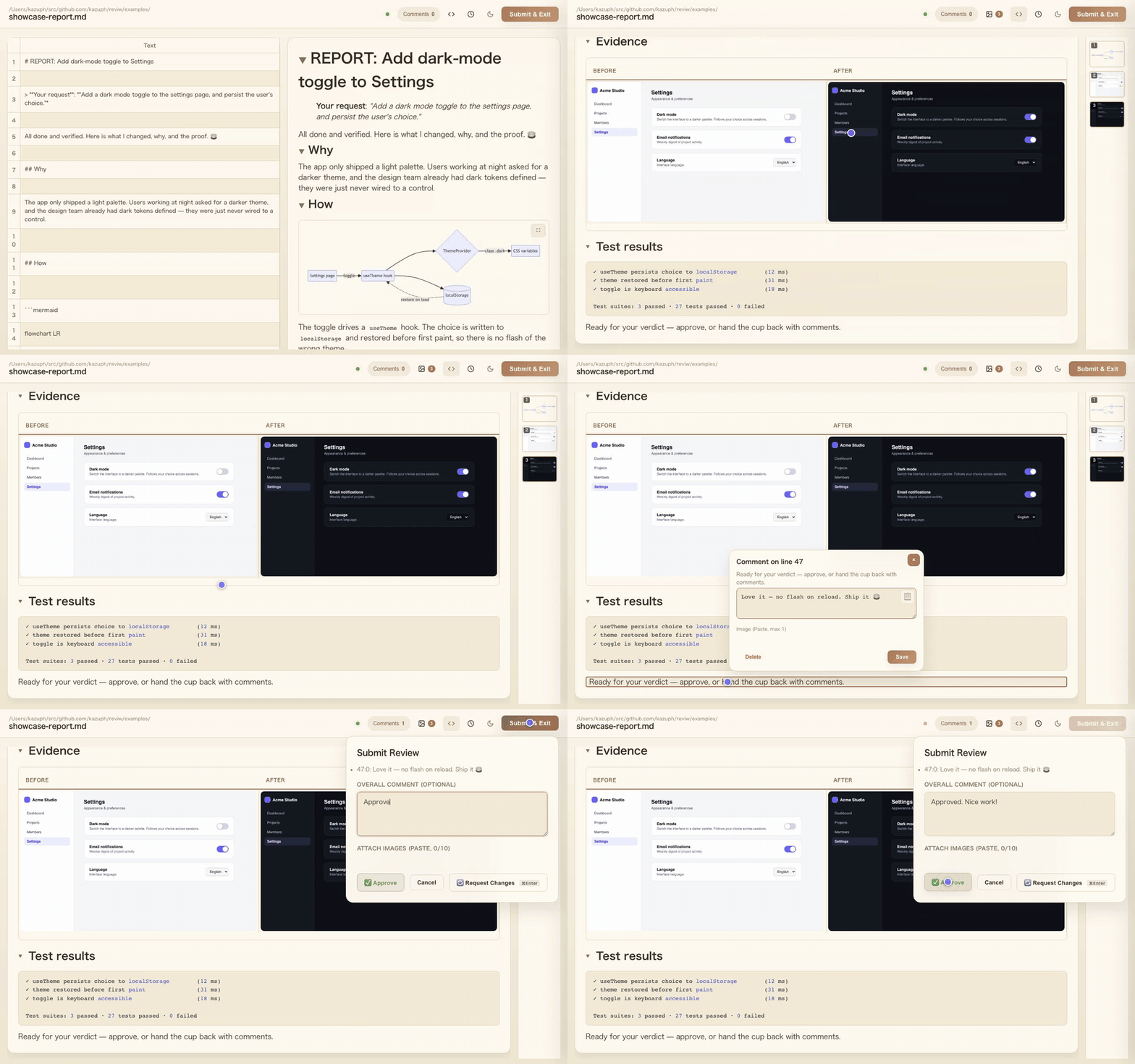
It should brew a report — what changed, why, the evidence, the test results — pour it into a cup, and set it down in front of you:
npx yunomi REPORT.md
Douzo. 🍵
Your browser opens. You read at your own pace. You leave comments; you approve — or you hand the cup back. The agent waits the way good service waits: quietly, until you decide. When you submit, yunomi exits and hands your verdict back to the agent as structured YAML, and the loop continues until you say it's good.
In the vibe coding era, humans no longer read every diff. We review the work itself: intent, changes, and proof. yunomi is the moment of handoff between AI work and human judgment — served politely, every single time.
Getting started (the only step)
Tell your AI agent:
"From now on, run
npx yunomiwhen you finish your work."
That's it. When the agent runs npx yunomi with no arguments, yunomi prints a skill document that teaches the agent everything: how to write a good report, how to serve it, how to read your verdict, and how to loop until you approve. The agent will then offer to install yunomi as a permanent skill — answer yes once, and you never have to mention it again.
No global install. No plugin setup. No config. The tea serves itself.
yunomi (formerly reviw) is a lightweight browser-based tool for reviewing and annotating Markdown reports, tabular data, text, and diff files. Built entirely in MoonBit (zero hand-written JavaScript). Supports CSV, TSV, plain text, Markdown, and unified diff formats. Comments are output as YAML to stdout.
Features
File Format Support
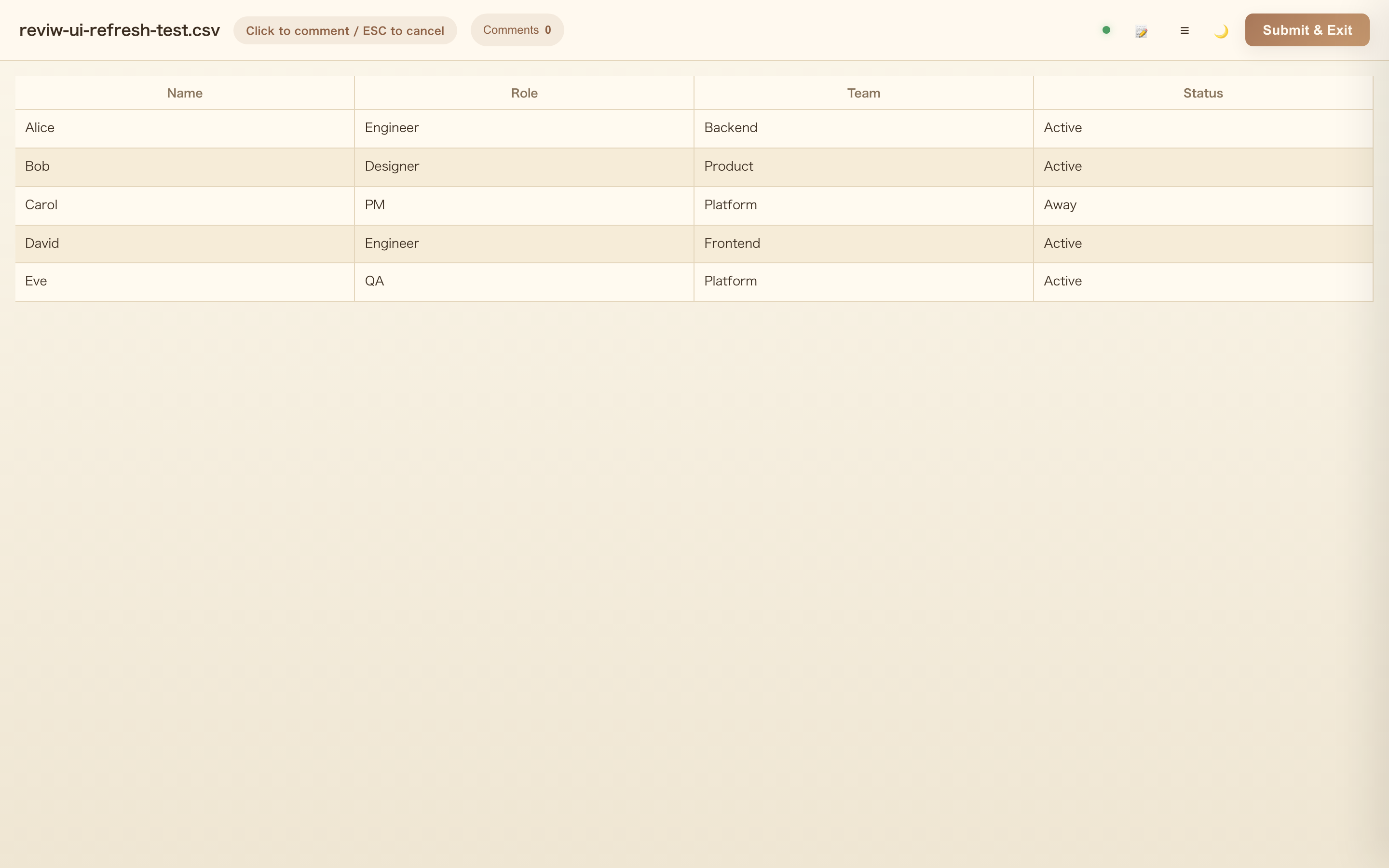
- CSV/TSV: View tabular data with sticky headers, column freezing, filtering, and column resizing
- Markdown: Side-by-side preview with synchronized scrolling, click-to-comment from preview
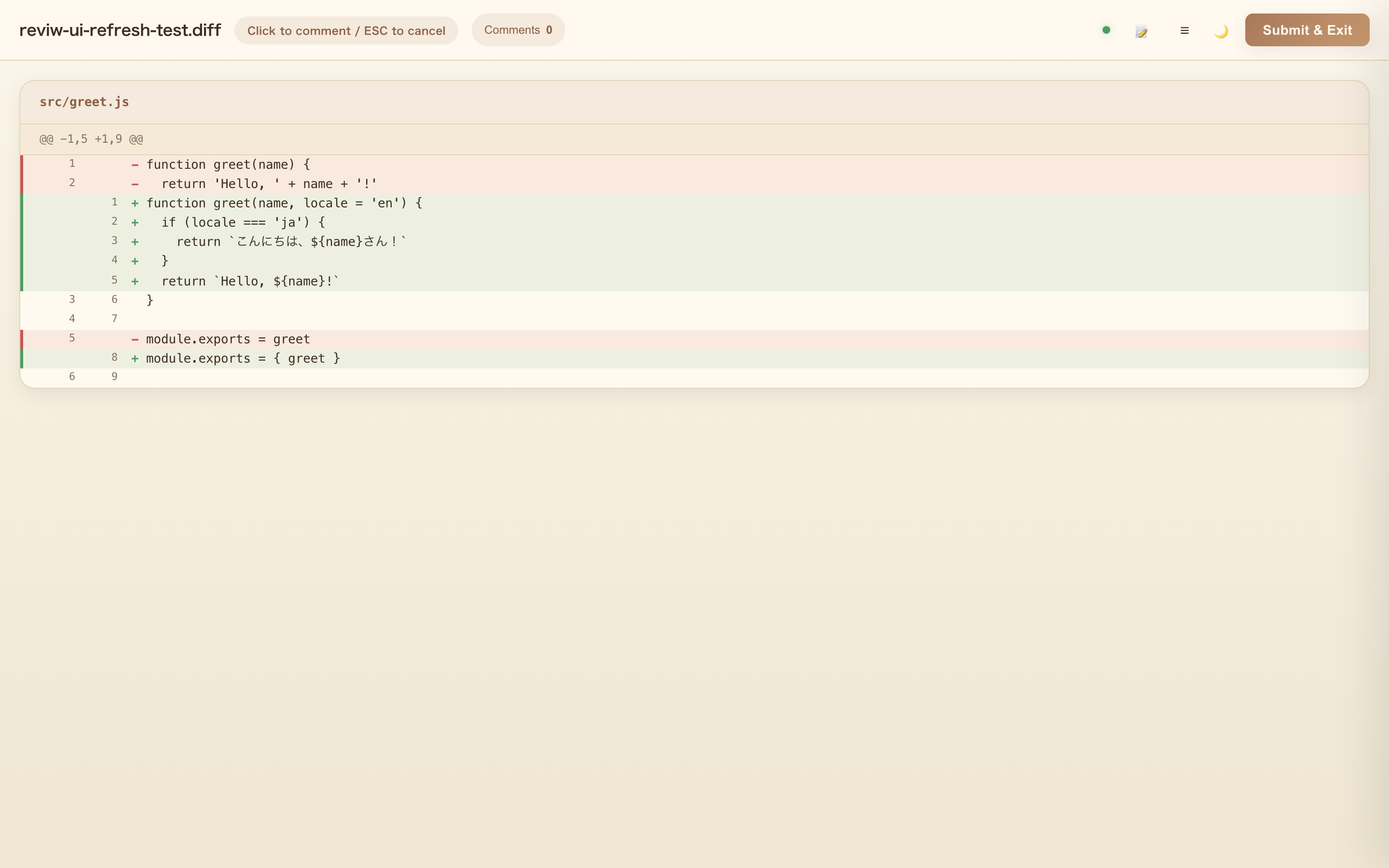
- Diff/Patch: GitHub-style diff view with syntax highlighting, collapsible large files (500+ lines), and binary files sorted to end
- Text: Line-by-line commenting for plain text files
Mermaid.js Diagrams
- Auto-detect and render Mermaid diagrams in Markdown files
- Click any diagram to open fullscreen viewer with minimap
- Zoom with mouse wheel (centered on cursor position, up to 10x)
- Pan with mouse drag
- Trackpad pinch-to-zoom and touch gesture support
- Shift+scroll zoom for Windows users
- Dark mode support for thumbnails
- Highlights corresponding source line after closing fullscreen
- Syntax error display in toast notifications
Media Sidebar
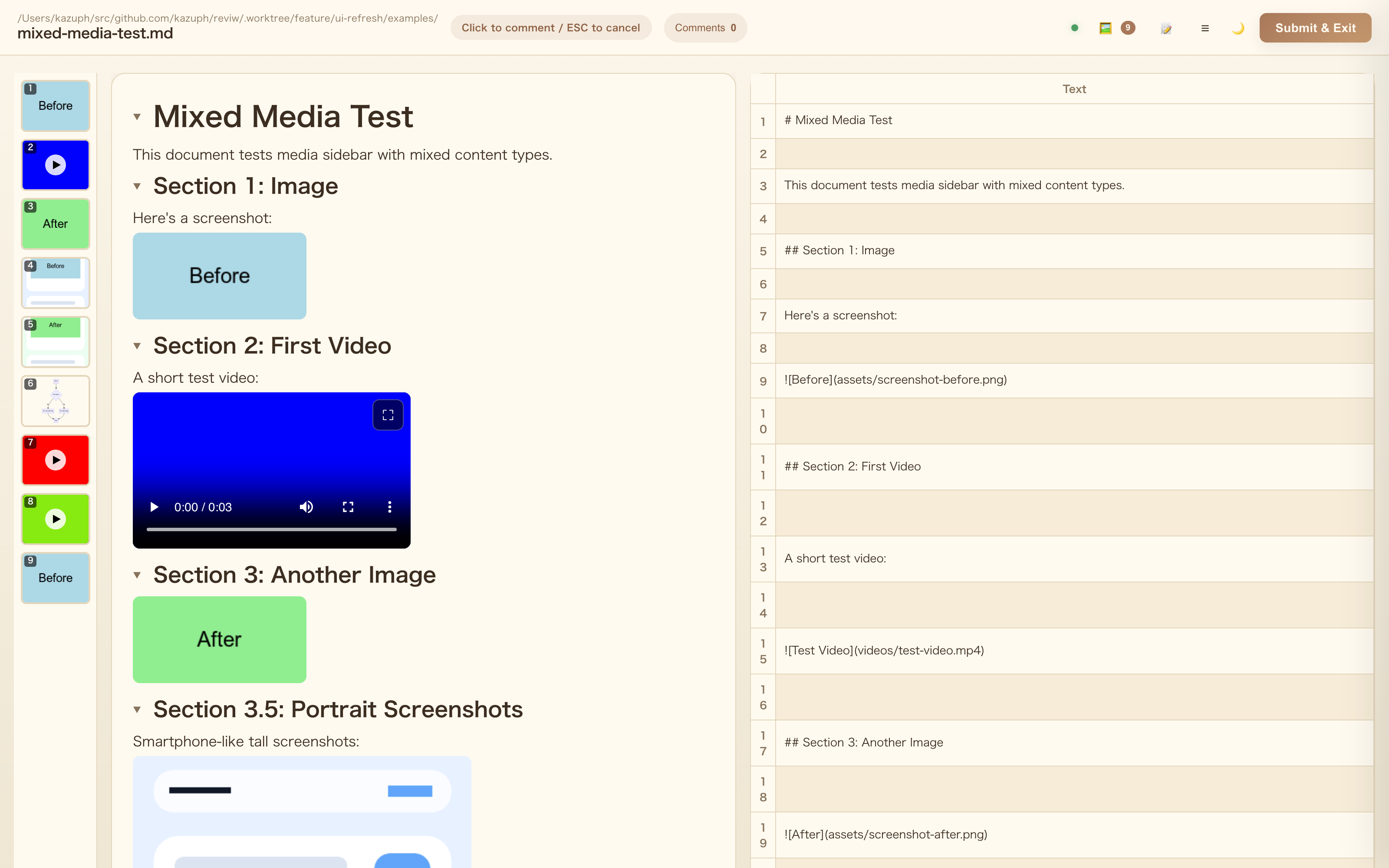
- Thumbnail gallery of all images and videos in the left sidebar
- Click any thumbnail to scroll to the corresponding media and highlight it
- ArrowUp/ArrowDown to jump between media, Escape to clear the selection
- Numbered badges for quick identification
Media Embed Discipline (AI-friendly)
yunomi file.mdrefuses to start (exit 1) when media files are written as[text](path)links instead ofembeds- The error lists every violation with line numbers and ready-to-apply fixes, so AI agents can self-correct and retry
Media Fullscreen
- Click images in Markdown preview to open fullscreen viewer
- Click videos to open fullscreen playback with YouTube-like keyboard shortcuts (Space/K, J/L, arrow keys, 0-9)
- Click anywhere (including the image/video itself) to close the fullscreen overlay
- Clicking media automatically highlights the corresponding source line in the Markdown panel
- Video timeline settings with adjustable scene detection sensitivity
UI Features
- Theme toggle: Switch between light and dark modes
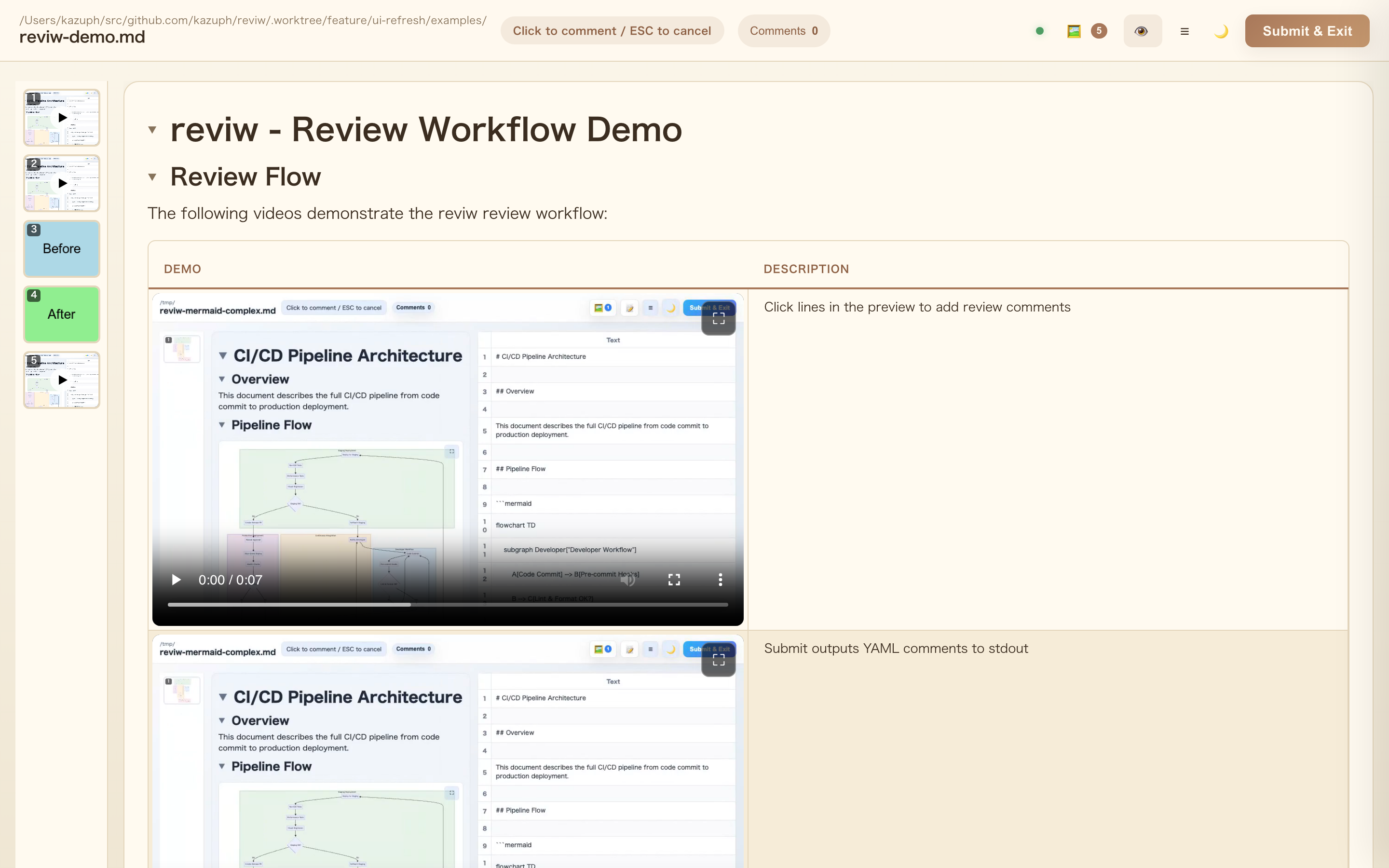
- Preview-only mode: Hide source panel for wide preview reading
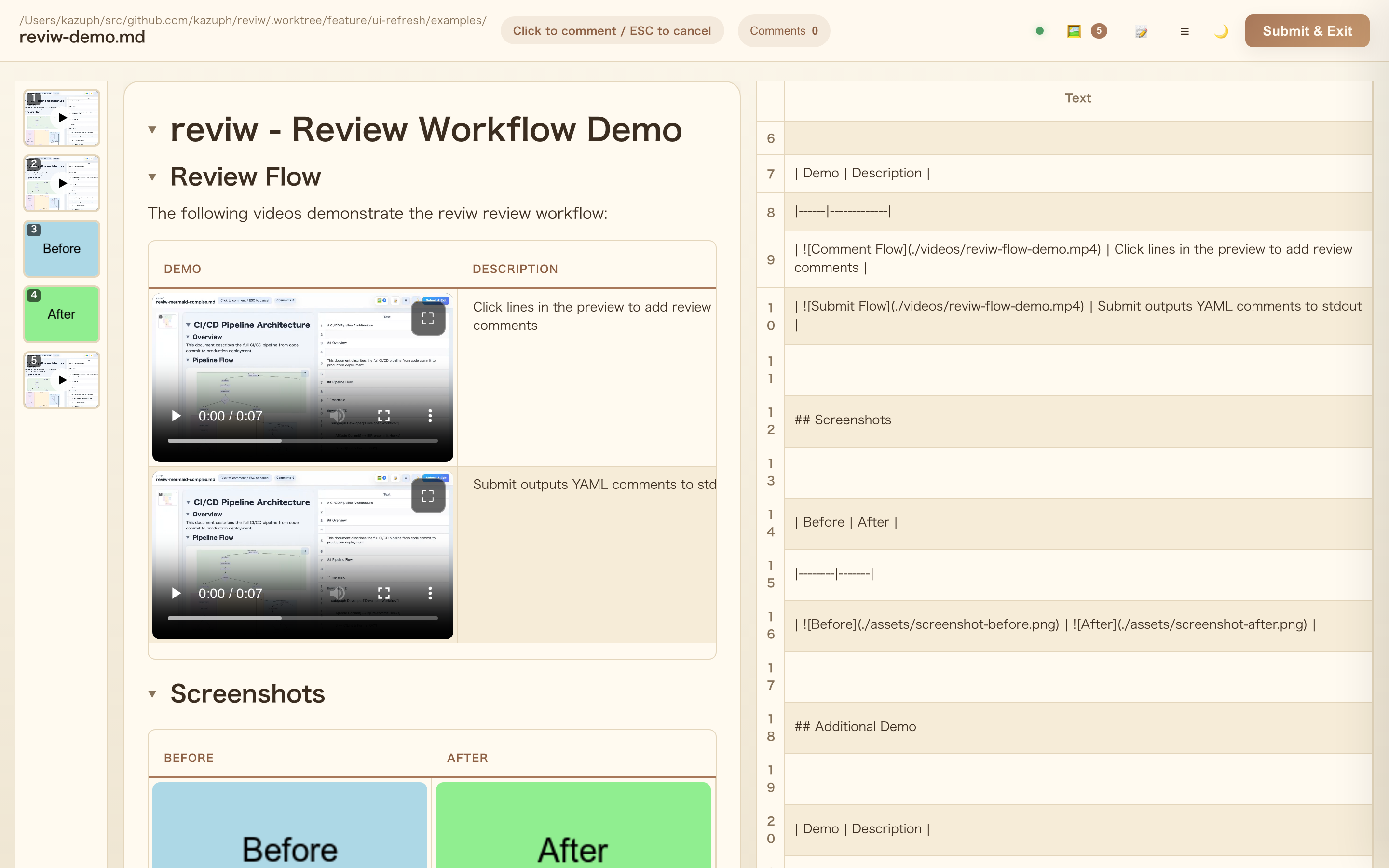
- Heading toggle: Collapse/expand sections by clicking heading arrows
- Multi-file support: Open multiple files simultaneously on separate ports
- Drag selection: Select rectangular regions or multiple rows for batch comments
- Real-time updates: Hot reload on file changes via SSE
- Comment persistence: Auto-save comments to localStorage with recovery modal
- Image attachment: Attach images to comments and submit dialog (paste with Cmd/Ctrl+V)
- Selected-lines copy: Copy button in comment dialog to copy selected line text
- Keyboard shortcuts: Cmd/Ctrl+Enter to open submit modal
- Multi-tab sync: Submit from any tab closes all tabs for the same file
- Server detection: Reuse existing server instead of starting a new one (via lock files)
- Tab activation (macOS): Automatically activates existing browser tab via AppleScript
- Review history: File-based persistent review history
- details/summary support: HTML details/summary tags rendered as collapsible sections
Output
- YAML format with file, mode, row, col, value, and comment text
- Overall summary field for review notes
- Image attachments included as base64 data
Installation
You usually don't need one — see Getting started. If you prefer a global command:
npm install -g yunomi
Or run directly with npx:
npx yunomi <file>
Usage
# No arguments: print the skill document for AI agents
yunomi

# Single file
yunomi <file> [--port 4989] [--encoding utf8|shift_jis|...]

# Multiple files (each opens on consecutive ports)
yunomi file1.csv file2.md file3.tsv --port 4989

# Diff from stdin
git diff HEAD | yunomi

# Diff file
yunomi changes.diff
Options
--port <number>: Specify starting port (default: 4989)--encoding <encoding>: Force specific encoding (auto-detected by default)--no-open: Prevent automatic browser opening--skill: Print the skill document for AI agents--help, -h: Show help message--version, -v: Show version number
Workflow
- Browser opens automatically (macOS:
open/ Linux:xdg-open/ Windows:start) - Click cells/lines to add comments, or drag to select multiple
- Use Cmd/Ctrl+Enter or click "Submit & Exit" to output comments
- Comments are printed as YAML to stdout
Screenshots
Markdown View with Media Sidebar
Preview-only Mode
Heading Toggle
Comment Dialog with Image Attachment
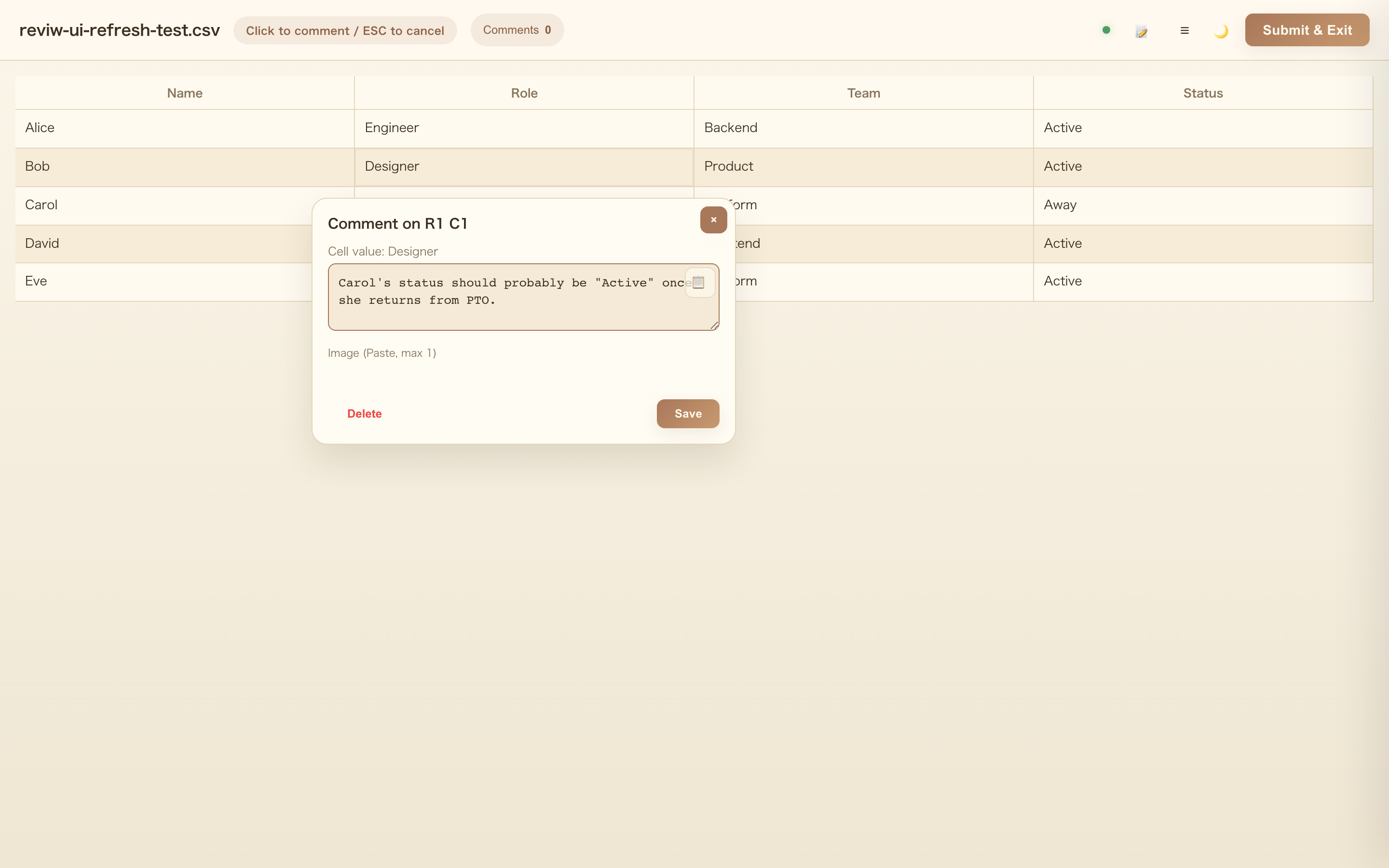
Video Fullscreen with Timeline Thumbnails
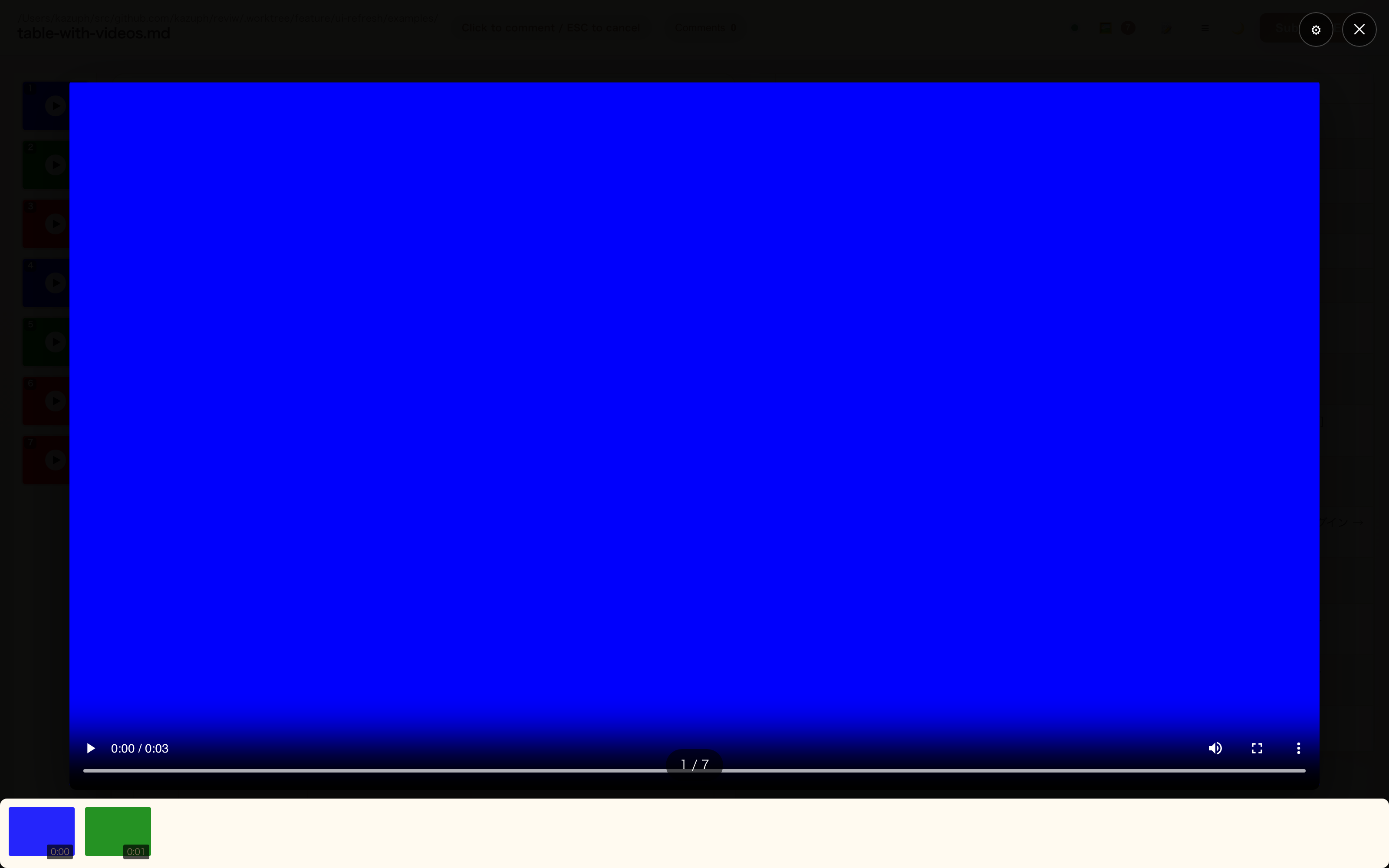
Mermaid Fullscreen with Minimap
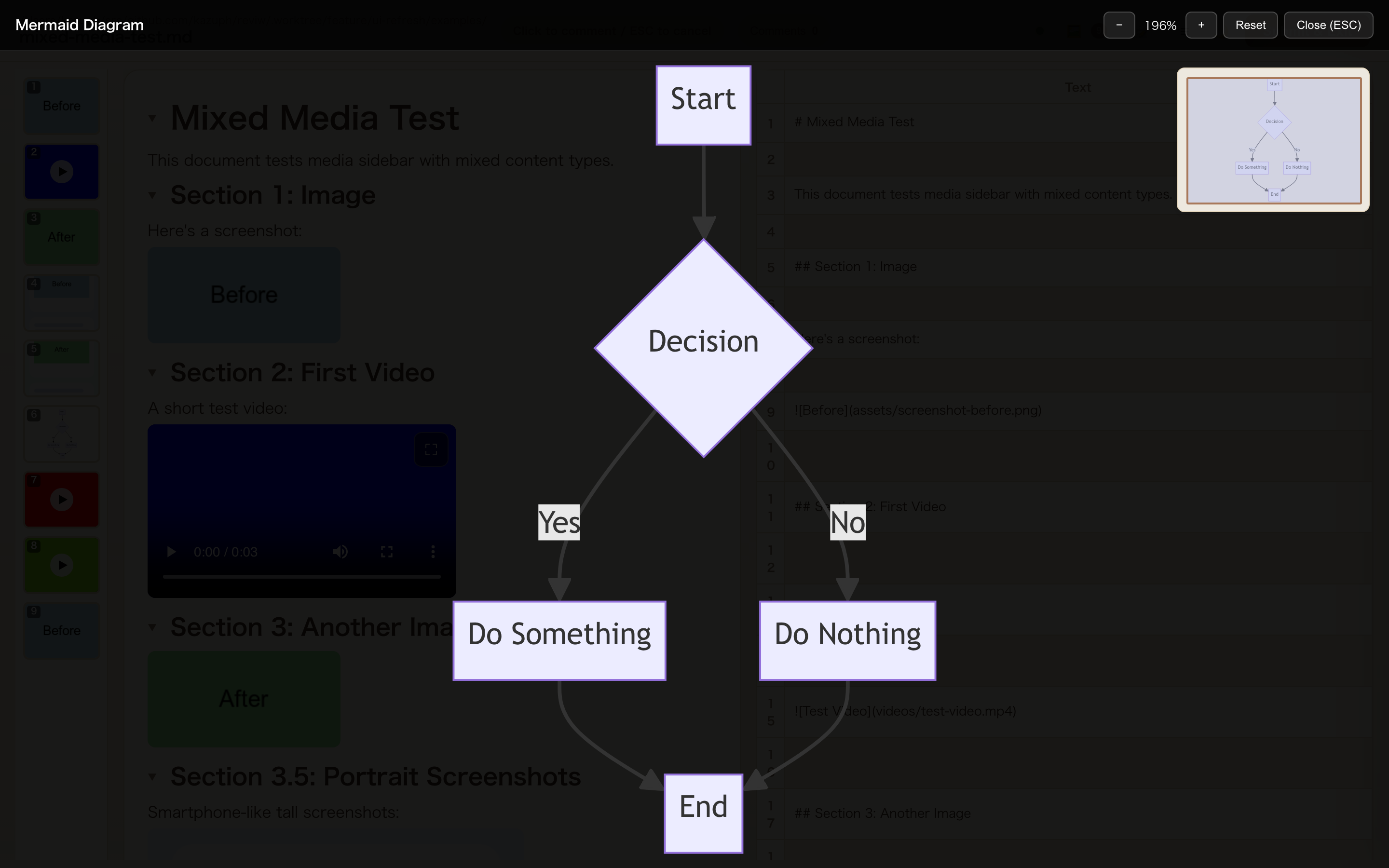
Submit Review Dialog with Image Attachment
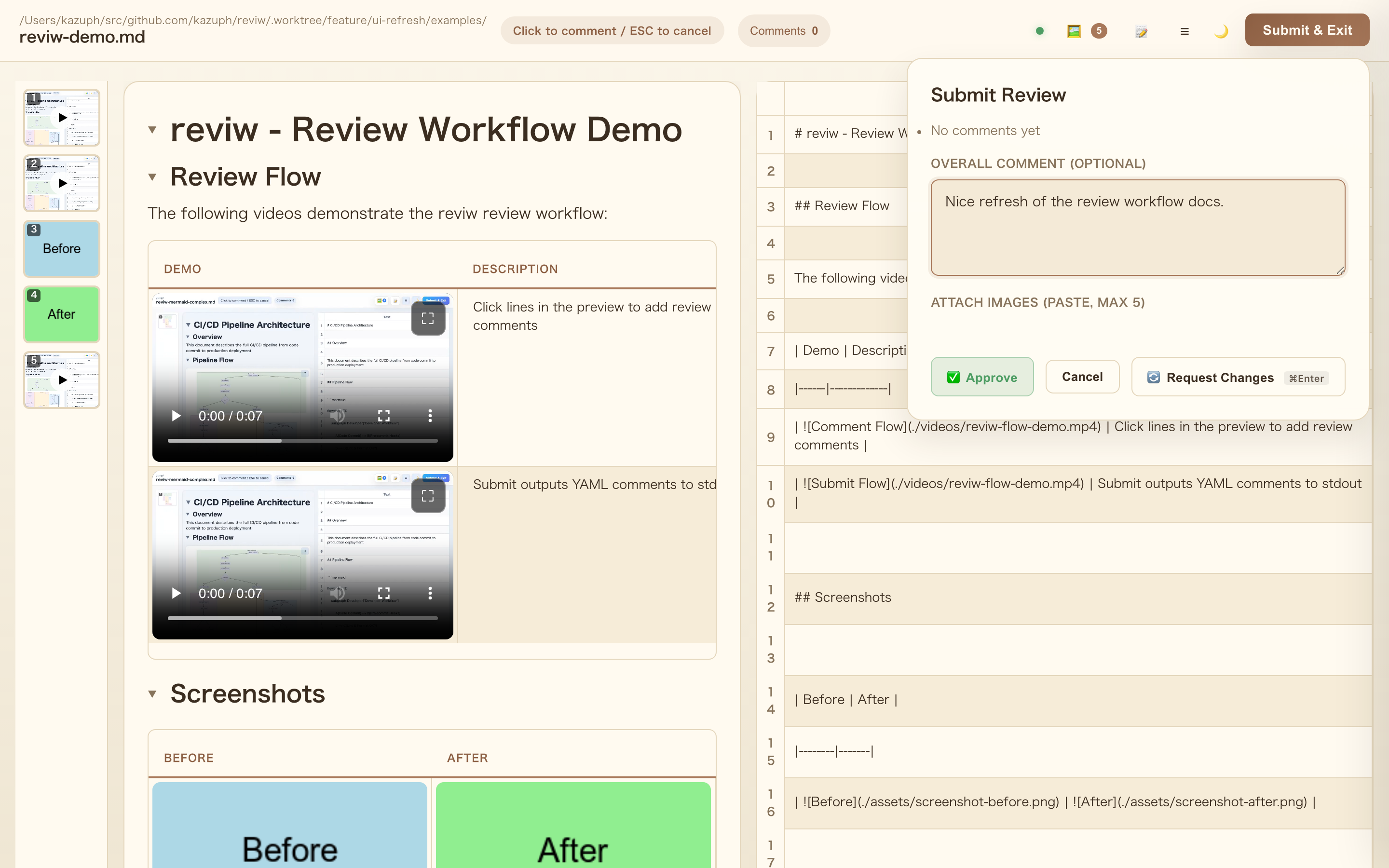
CSV View
Diff View
Output Example
file: data.csv
mode: csv
reason: button
at: '2025-11-26T12:00:00.000Z'
comments:
  - row: 2
    col: 3
    text: This value needs review
    value: '150'
summary: Overall the data looks good, minor issues noted above.
Claude Code Plugin
This repository also serves as a Claude Code plugin marketplace. The plugin integrates yunomi into Claude Code workflows with task management and review automation.
Note: the plugin was renamed from
reviw-plugintoyunomi-pluginin v2.0.0. If you installed the old plugin, remove it and installyunomi-plugin@yunomi-plugins.
Installation
# In Claude Code
/plugin marketplace add kazuph/yunomi
/plugin install yunomi-plugin@yunomi-plugins
Install Skills with npx skills
Use this route when you want the task skills in Codex, OpenCode, Cursor, or other agent environments that support npx skills. For Claude Code, use the plugin installation flow above.
# Preview what will be installed
npx skills add https://github.com/kazuph/yunomi --list

# Install all yunomi skills globally for Codex
npx skills add https://github.com/kazuph/yunomi -g -a codex -s '*' --copy -y

# Install all yunomi skills globally for Codex and OpenCode
npx skills add https://github.com/kazuph/yunomi -g -a codex -a opencode -s '*' --copy -y
npx skills distributes the skill directories under plugin/skills/. With -a codex -g --copy, the skills are copied into Codex's global skills directory at ~/.agents/skills/. If ~/.agents/skills is a symlink, the copied files land in the symlink target.
Claude Code plugin commands and hooks are installed through the Claude Code plugin flow above, not through npx skills.
Plugin Directory Structure
plugin/
├── .claude-plugin/
│   └── plugin.json          # Plugin metadata (name, version, description)
├── agents/
│   ├── report-builder.md     # Report generation agent
│   ├── e2e-health-reviewer.md    # E2E test health check
│   ├── review-code-quality.md    # Code quality review
│   ├── review-security.md        # Security audit
│   ├── review-a11y-ux.md         # Accessibility & UX
│   ├── review-figma-fidelity.md  # Design fidelity
│   ├── review-copy-consistency.md # Text consistency
│   └── review-e2e-integrity.md   # E2E test integrity
├── skills/
│   ├── ask/
│   │   └── SKILL.md          # Requirements elicitation skill
│   ├── bucho/
│   │   └── SKILL.md          # Manager orchestration skill
│   ├── do/
│   │   └── SKILL.md          # Task start skill
│   ├── done/
│   │   └── SKILL.md          # Task completion skill
│   ├── exit-notifier/
│   │   ├── SKILL.md          # Background task exit notification skill
│   │   └── scripts/
│   │       └── watch-exit-notify.sh
│   ├── tiny-do/
│   │   └── SKILL.md          # Lightweight task start skill
│   ├── tiny-done/
│   │   └── SKILL.md          # Lightweight task completion skill
│   ├── validate-report/
│   │   └── SKILL.md          # Internal REPORT.md validation helper
│   ├── artifact-proof/
│   │   └── SKILL.md          # Evidence collection skill
│   └── webapp-testing/
│       ├── SKILL.md          # Web testing skill
│       ├── scripts/          # Helper scripts
│       └── examples/         # Usage examples
├── hooks/
│   └── hooks.json            # Hook definitions
├── hooks-handlers/
│   └── completion-checklist.sh  # UserPromptSubmit handler
└── README.md
Components Overview
| Type | Name | Description |
|---|---|---|
| Task Skill | /yunomi:do |
Start a task - create worktree with git wt, plan, register todos |
| Task Skill | /yunomi:done |
Complete checklist - run 7 review agents, collect evidence, start review |
| Task Skill | /yunomi:tiny-do |
Start a smaller task with the lightweight workflow |
| Task Skill | /yunomi:tiny-done |
Finish a smaller task with lightweight review |
| Task Skill | /yunomi:bucho |
Orchestrate Claude Code and Codex in manager mode |
| Agent | report-builder |
Prepare reports and evidence for user review |
| Agent | review-code-quality |
Code quality: readability, DRY, type safety, error handling |
| Agent | review-security |
Security: XSS, injection, OWASP Top 10, secrets detection |
| Agent | review-a11y-ux |
Accessibility: WCAG 2.2 AA, keyboard nav, UX flow |
| Agent | review-figma-fidelity |
Design: token compliance, visual consistency |
| Agent | review-copy-consistency |
Copy: text consistency, tone & manner, i18n |
| Agent | review-e2e-integrity |
E2E: user flow reproduction, mock contamination |
| Agent | e2e-health-reviewer |
E2E: goto restrictions, record assertions, hardcoding |
| Skill | artifact-proof |
Collect evidence (screenshots, videos, logs) |
| Skill | exit-notifier |
Notify the current tmux / Herdr pane when background tasks exit, including captured stdout/stderr |
| Skill | webapp-testing |
Browser automation and verification with Playwright |
| Hook | PreToolUse | Remind to review before git commit/push |
| Hook | UserPromptSubmit | Inject completion checklist into AI context |
Task Skills
Bundled task skills
| Skill | Purpose |
|---|---|
ask |
Clarify requirements, scope, constraints, and success criteria before implementation |
bucho |
Orchestrate Claude Code and Codex as a managed team through tmux |
check-yourself |
Force real verification instead of assumptions or lightweight spot checks |
commit-and-push |
Generate a commit message, create the commit, push it, and confirm a clean git state |
do |
Start the full task workflow with worktree setup, planning, and review preparation |
done |
Run the full completion workflow with evidence collection and yunomi-based review |
exit-notifier |
Report background task completion and captured stdout/stderr back into the current tmux / Herdr pane |
open |
Open files, artifacts, and URLs with macOS open |
tiny-do |
Start a smaller task with the lightweight workflow |
tiny-done |
Finish a smaller task with the lightweight completion flow |
validate-report |
Internal helper used by done to validate REPORT.md against artifact-proof reporting rules |
/yunomi:do <task description>
Starts a new task with proper environment setup.
What it does:
- Creates a git worktree using git wt for isolated development (
feature/<name>,fix/<name>, etc.) - Sets up
.artifacts/<feature>/directory for evidence - Creates
REPORT.mdwith plan and TODO checklist - Registers todos in TodoWrite for progress tracking
Directory structure created:
<worktree>/                   # e.g., .worktree/feature-auth/
└── .artifacts/
    └── <feature>/            # e.g., auth (from feature/auth)
        ├── REPORT.md         # Plan, progress, evidence links
        ├── images/           # Screenshots
        └── videos/           # Video recordings
Task resumption: When a session starts or after context compaction, the skill checks for existing worktrees (via git wt) and resumes from REPORT.md.
/yunomi:done
Validates completion criteria before allowing task completion.
Checklist enforced:
- Build succeeded (no type/lint errors)
- Development server started and working
- Verified with
webapp-testingskill - Evidence collected in
.artifacts/<feature>/ - Report created with
artifact-proofskill - Reviewed with yunomi (foreground mode)
- User approval received
Prohibited:
- Saying "implementation complete" without verification
- Committing/pushing before yunomi review
- Reports without evidence
Agents
Review Agents (7 agents run in parallel)
When /yunomi:done is executed, 7 review agents run simultaneously and append their findings to REPORT.md:
| Agent | Focus | Output Section |
|---|---|---|
review-code-quality |
Readability, DRY, type safety, error handling | Code Quality Review |
review-security |
XSS, injection, OWASP Top 10, secrets | Security Review |
review-a11y-ux |
WCAG 2.2 AA, keyboard nav, focus management | A11y & UX Review |
review-figma-fidelity |
Design tokens, visual consistency | Figma Fidelity Review |
review-copy-consistency |
Text consistency, i18n, tone & manner | Copy Consistency Review |
review-e2e-integrity |
User flow reproduction, mock contamination | E2E Integrity Review |
e2e-health-reviewer |
goto restrictions, record assertions | E2E Health Review |
Total score: Each agent scores X/5, combined for X/35 total.
Invocation (parallel):
Task tool with 7 parallel calls:
  subagent_type: "review-code-quality"
  subagent_type: "review-security"
  subagent_type: "review-a11y-ux"
  subagent_type: "review-figma-fidelity"
  subagent_type: "review-copy-consistency"
  subagent_type: "review-e2e-integrity"
  subagent_type: "e2e-health-reviewer"
report-builder
Specialized agent for preparing review materials (runs after review agents).
Role:
- Organize implementation into a structured report
- Calculate total review score (X/35)
- Collect and arrange evidence (screenshots, videos)
- Prepare
REPORT.mdfor yunomi review - Parse yunomi feedback and register as todos
Invocation:
Task tool with subagent_type: "report-builder"
Skills auto-loaded: artifact-proof
Skills
artifact-proof
Manages evidence collection for visual regression and PR documentation.
Features:
- Screenshots and videos under
.artifacts/<feature>/ - Playwright integration for automated capture
- Git LFS setup for video files
- PR image URLs with commit hashes (persist after branch deletion)
yunomi integration:
# Open report in yunomi (foreground required)
npx yunomi .artifacts/<feature>/REPORT.md

# With video preview
open .artifacts/<feature>/videos/demo.webm
npx yunomi .artifacts/<feature>/REPORT.md
webapp-testing
Browser automation toolkit using Playwright.
Features:
- TypeScript Playwright Test (
@playwright/test) - Playwright configuration with webServer support
- Screenshot and video capture
- Console log and network request monitoring
- CDP integration for advanced debugging
Quick verification:
node -e "const { chromium } = require('playwright');
(async () => {
  const browser = await chromium.launch();
  const page = await browser.newPage();
  await page.goto('http://localhost:3000', { waitUntil: 'networkidle' });
  await page.screenshot({ path: '/tmp/webapp.png', fullPage: true });
  await browser.close();
})();"
Hooks
PreToolUse (Bash matcher)
Triggers when git commit or git push is detected.
Message: Reminds to run /yunomi:done and review with yunomi before committing.
UserPromptSubmit
Injects completion checklist into every AI response context.
Purpose: Prevents "implementation complete" claims without proper verification. The checklist is always visible to the AI, ensuring consistent enforcement of completion criteria.
Workflow
/yunomi:do <task description>
    ↓
Create worktree + Plan + TodoWrite
    ↓
Implementation (via subagents)
    ↓
Build & Verify (webapp-testing)
    ↓
/yunomi:done
    ↓
┌─────────────────────────────────────────────┐
│  7 Review Agents (parallel execution)       │
│                                             │
│  review-code-quality ──┐                    │
│  review-security ──────┤                    │
│  review-a11y-ux ───────┼──→ REPORT.md      │
│  review-figma-fidelity ┤    (append)        │
│  review-copy-consistency                    │
│  review-e2e-integrity ─┤                    │
│  e2e-health-reviewer ──┘                    │
└─────────────────────────────────────────────┘
    ↓
report-builder (organize + score)
    ↓
Collect evidence (artifact-proof)
    ↓
npx yunomi opens report (foreground)
    ↓
User comments → Submit & Exit
    ↓
Register feedback to Todo
    ↓
Fix → Re-review until approved
    ↓
Commit & PR (only after approval)
Completion Criteria
| Stage | Content | Status |
|---|---|---|
| 1/3 | Implementation complete | Do not report yet |
| 2/3 | Build, start, verification complete | Do not report yet |
| 3/3 | Review with yunomi → User approval | Now complete |
Design Philosophy
The plugin enforces human-in-the-loop development:
- No shortcuts: Mocks, bypasses, and skipped verifications are prohibited
- Evidence required: Every completion claim must have screenshots/videos
- User approval: Only the user can mark a task as complete
- Context preservation: Heavy operations run in subagents to prevent context exhaustion
.artifacts Directory Policy
The .artifacts/ directory stores screenshots, videos, and reports generated during development. By default, this directory should be added to .gitignore to prevent repository bloat from large media files.
# Add to .gitignore (recommended)
echo ".artifacts" >> .gitignore
Why ignore by default:
- Screenshots and videos can be large (especially screen recordings)
- Evidence is primarily for the review process, not permanent documentation
- Keeps repository size manageable
If you need to commit specific evidence:
Use git add --force to explicitly add files you want to preserve:
# Force add specific evidence files
git add --force .artifacts/feature/images/final-screenshot.png
git add --force .artifacts/feature/REPORT.md

# Or force add an entire feature's evidence
git add --force .artifacts/feature/
For video files, use Git LFS to avoid bloating the repository:
git lfs track "*.mp4" "*.webm" "*.mov"
git add .gitattributes
git add --force .artifacts/feature/videos/demo.mp4
This approach gives you full control: ignore by default, commit only what matters.
Development
yunomi is written entirely in MoonBit and compiled to JavaScript.
# Build
cd v2 && moon build --target js --release

# Run tests
cd v2 && moon test --target js

# Package for npm (builds MoonBit + copies to dist/)
npm run prepack
- Source:
v2/src/(MoonBit) - Build output:
dist/server/server.js,dist/ui/ui.js - Plugin:
plugin/directory
License
MIT
Reviews (0)
Sign in to leave a review.
Leave a reviewNo results found