paste-to-tmux
Health Warn
- License — License: MIT
- Description — Repository has a description
- Active repo — Last push 0 days ago
- Low visibility — Only 8 GitHub stars
Code Pass
- Code scan — Scanned 2 files during light audit, no dangerous patterns found
Permissions Pass
- Permissions — No dangerous permissions requested
No AI report is available for this listing yet.
Drop a clipboard screenshot or a local file into a remote tmux pane over SSH — straight into Claude Code, Codex, or aider. macOS and Linux.
paste-to-tmux
A CLI for macOS and Linux · send clipboard screenshots & dragged files to a remote tmux pane over SSH/SCP · drop them straight into Claude Code, Codex, or aider.
Drop a file from your laptop straight into a remote terminal — and into the AI coding agent running inside it.
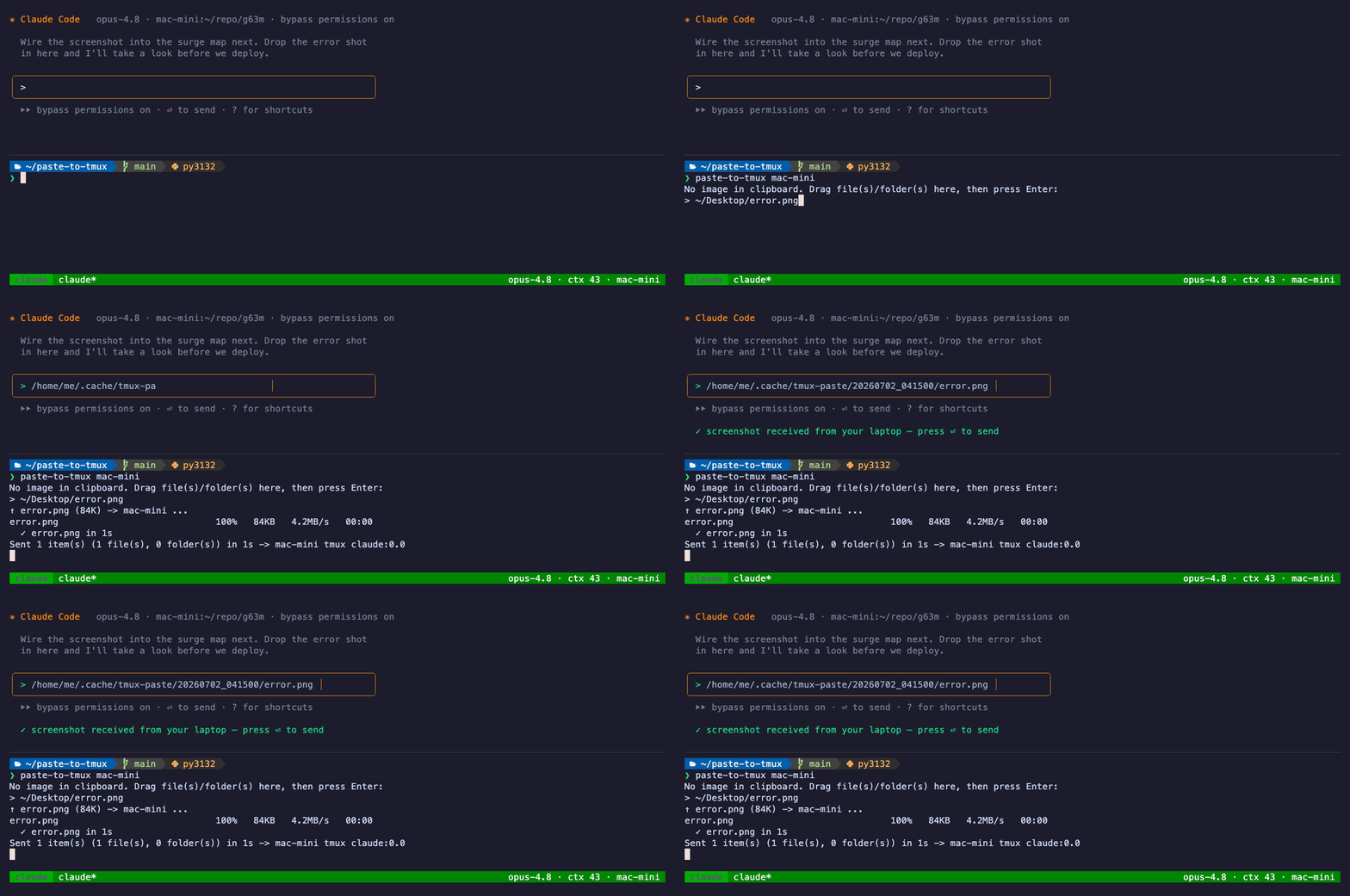
You're SSH'd (or mosh'd) into a box, working in an interactive agent — claude, codex, aider, a REPL. You want to hand it a screenshot. Every option today hurts:
croc/magic-wormhole— you paste a transfer code into the remote shell, which is miserable when that shell is running a full-screen TUI.scp— a second terminal, then hand-type the remote path.- Cloud upload → download → hunt for the path. Slow.
paste-to-tmux does it in one command, fired from a second pane on your laptop:
❯ paste-to-tmux mac-mini
No image in clipboard. Drag file(s)/folder(s) here, then press Enter:
> ~/Desktop/error.png
↑ error.png (84K) -> mac-mini ...
  ✓ error.png in 1s
Sent 1 item(s) (1 file(s), 0 folder(s)) in 1s -> mac-mini tmux claude:0.0

# ↳ and it's now typed into the claude pane on mac-mini, ready to send:
'/home/me/.cache/tmux-paste/20260702_041500/error.png'
It scps the file over and types the absolute remote path straight into the agent's prompt via tmux send-keys — landing in the input line, ready to send, even while a full-screen program owns the pane. No transfer codes. No hand-typed paths. Nothing to install on the remote.
Or just paste an image
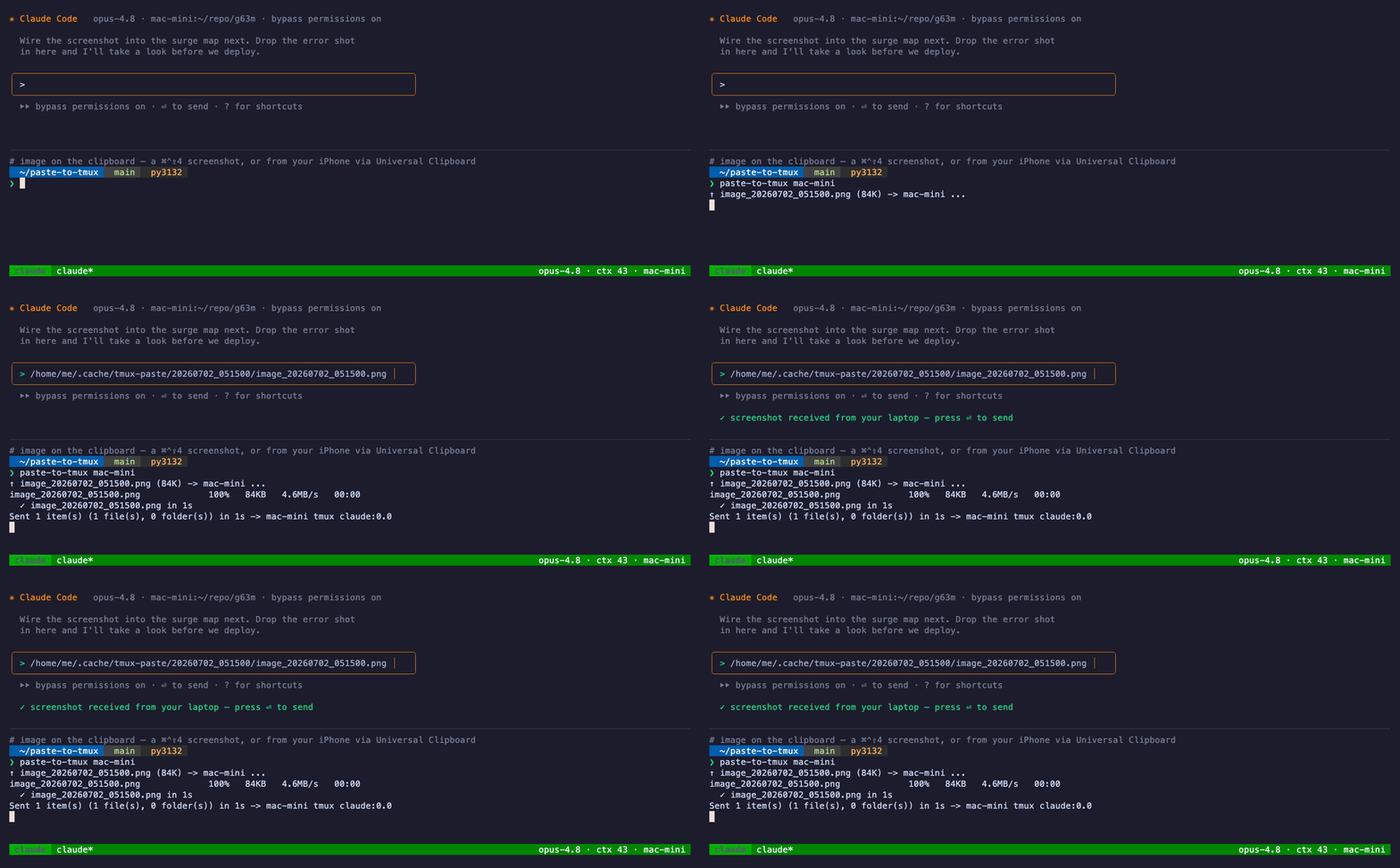
Got an image on your clipboard — a ⌘⌃⇧4 screenshot on a Mac, one from your iPhone via Apple's Universal Clipboard, or anything on your Wayland/X11 clipboard on Linux? Skip the drag. paste-to-tmux <host> grabs the clipboard image and sends it straight to the agent:
Works over mosh, too
paste-to-tmux opens its own ssh/scp connection, so it doesn't care how your interactive session reached the box — plain ssh, mosh, a phone SSH app, whatever. That matters most for mosh: mosh keeps your session alive as you roam café → subway → home, but it has no file transfer at all. This is the missing piece — drop a file into your mosh + tmux session without giving up the roaming.
Pull a file back down
The agent made something on the remote — a rendered PNG, a report, a built artifact — and you want to see it on your laptop. --pull is the reverse direction: it scps a remote file down to your laptop and opens it.
paste-to-tmux mac-mini --pull output/review/site.png
Or give it no path and it reads the most-recent file path off the active pane — the one the agent just printed — resolves it against that pane's working directory, downloads it, and opens it:
❯ paste-to-tmux mac-mini --pull
Detected in pane: output/review/site.png
↓ mac-mini:/home/me/proj/output/review/site.png -> ~/Downloads/ ...
  ✓ ~/Downloads/site.png
Files land in ~/Downloads (override with PASTE_PULL_DIR); add -n to skip auto-opening.
Install
# straight from HEAD, no tap needed
brew install --HEAD https://raw.githubusercontent.com/kentaccn/paste-to-tmux/main/Formula/paste-to-tmux.rb
Or from a clone (the path to use on Linux — brew above is the macOS shortcut): git clone https://github.com/kentaccn/paste-to-tmux && cd paste-to-tmux && ./install.sh
You install one tool, in one place — your laptop. The remote needs only an SSH server and tmux, which you already have if you SSH in and work in tmux. For the clipboard-image path: on macOS, pngpaste is optional (brew install pngpaste) for a faster grab, and without it the built-in osascript handles it; on Linux it uses wl-paste (Wayland) or xclip (X11), so install whichever your session runs. Dragging files works everywhere with no extra tools.
Usage
<host> is anything SSH understands — a Host alias from your ~/.ssh/config, or [email protected]. Passwordless key auth is strongly recommended so transfers don't prompt.
paste-to-tmux <host>                 # clipboard image → active pane; else prompts you to drag file(s)
paste-to-tmux <host> <target>        # explicit tmux target, e.g. main:0.0
paste-to-tmux <host> [target] -f F…  # send specific file(s)/folder(s), no prompt
paste-to-tmux <host> --pull P…       # download remote file(s) → laptop, and open
paste-to-tmux <host> [target] --pull # download the most-recent path shown in the pane
paste-to-tmux <host> -l              # list attached tmux panes on <host>
paste-to-tmux setup [host]           # guided first-time checks (start here)
- Target: with no target, it picks the most-recently-active attached pane on the host.
- Multiple items: drag several at once; folders go recursively (
scp -r); paths with spaces are fine. - Where files land:
~/.cache/tmux-paste/<timestamp>/on the remote, original filenames kept.
New here? Run paste-to-tmux setup <host> — it checks your local tools, your SSH login, and tmux on the remote, and offers to make a one-word shortcut (so paste-to-myhost becomes paste-to-tmux my-host).
setupdoes not create the SSH connection.<host>must already work asssh <host>on its own — i.e. aHostblock in~/.ssh/config, or a literal[email protected]. Setup only checks that host and, optionally, saves you a shorter name for it.
How it works
clipboard image ─┐
                 ├─►  scp to  ~/.cache/tmux-paste/<ts>/  ─►  tmux send-keys '<abs path>'  ─►  agent prompt
dragged file(s) ─┘     (folders via scp -r)                 into the active/target pane
Pure shell + ssh/scp/tmux. No daemon, no receiver, no dependencies beyond those. The path and tmux target are shell-quoted, and send-keys -l sends them literally, so filenames can't inject keystrokes.
The repo ships a formula at Formula/paste-to-tmux.rb.
git push -u origin main && git push origin v0.1.0
curl -sL https://github.com/kentaccn/paste-to-tmux/archive/refs/tags/v0.1.0.tar.gz | shasum -a 256
# paste that hash into the sha256 "..." line in the formula, commit, push
To offer brew install kentaccn/tap/paste-to-tmux, publish a homebrew-tap repo and copy the formula into its Formula/ dir. Until then, the --HEAD URL above works with no tap.
Credits
Idea and direction by Kenta. Code written with Codex and Claude Code — pointed at the problem by a human who knew it was worth solving. Contributions welcome; see CONTRIBUTING.md.
MIT — see LICENSE.
Reviews (0)
Sign in to leave a review.
Leave a reviewNo results found