mcpsnoop
Health Warn
- License — License: MIT
- Description — Repository has a description
- Active repo — Last push 0 days ago
- Low visibility — Only 5 GitHub stars
Code Pass
- Code scan — Scanned 3 files during light audit, no dangerous patterns found
Permissions Pass
- Permissions — No dangerous permissions requested
No AI report is available for this listing yet.
Wireshark for MCP. A transparent proxy that shows every real tool call between your AI client and your MCP servers, live in your terminal.

Wireshark for MCP. A transparent proxy that shows every real tool call
between your AI client and your MCP servers, live in your terminal.


The problem
The official MCP Inspector
connects as its own client. It never sees the traffic between your client
(Claude Desktop, Cursor, Claude Code) and your server. A breakpoint in your own
server only fires once a request arrives. It can't show you the call the real
client never made, or made with arguments you didn't expect. So when a tool
silently isn't called, capabilities don't line up, or a call just hangs, you're
back to tail-ing a log in /tmp and guessing.
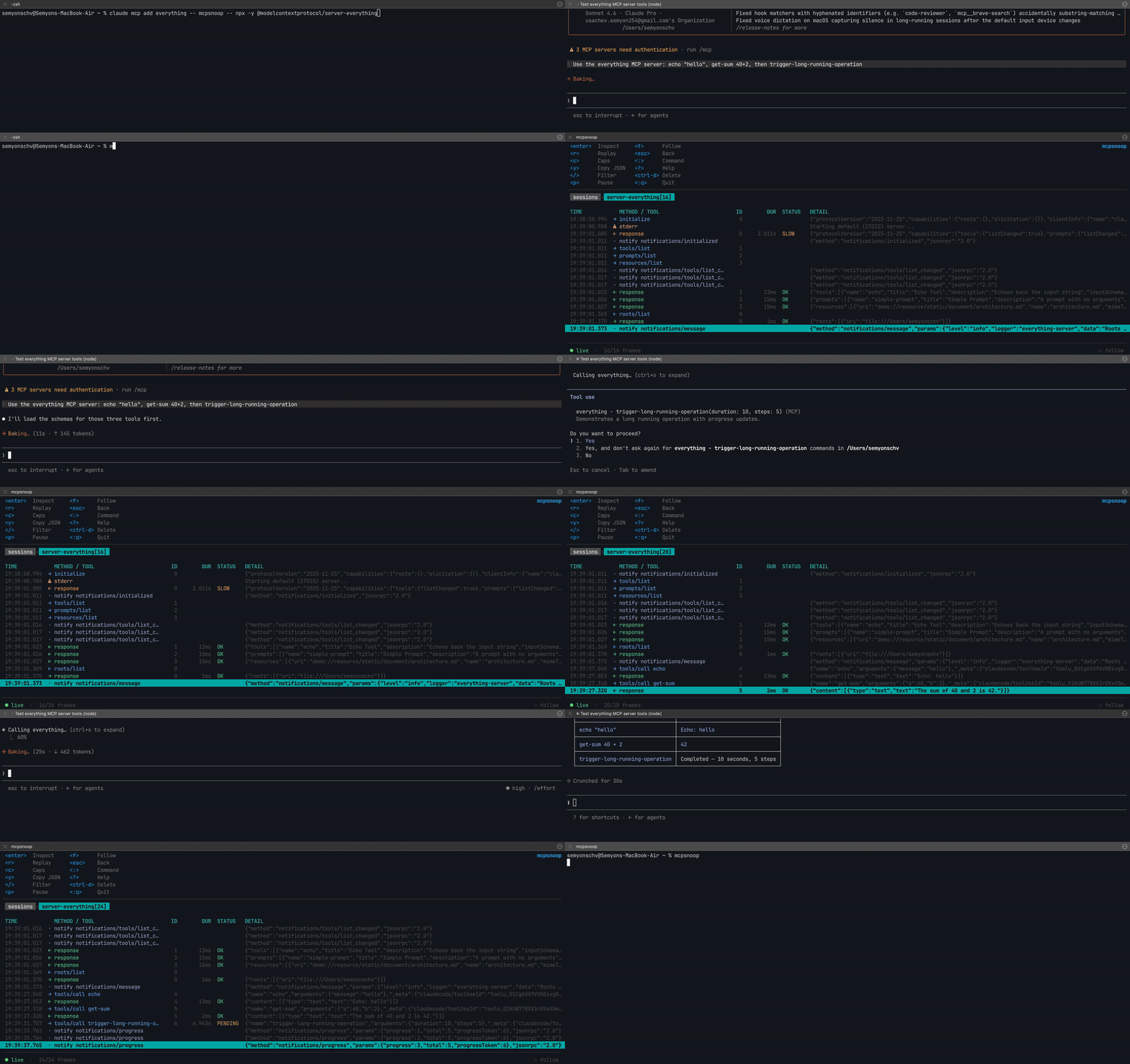
mcpsnoop sits in the real data path instead. Wrap your server command with it
and every JSON-RPC frame shows up in a live terminal UI: tool calls, arguments,
responses, timings, errors, and the capabilities both sides actually negotiated.
You can also replay any captured call against a fresh server, without driving
your whole client again.
Quick start
Wrap your server in your client's MCP config:
{ "mcpServers": {
    "my-server": { "command": "mcpsnoop", "args": ["--", "node", "build/index.js"] }
}}
Everything after -- is the command that normally launches your server (here, a
TypeScript build run with node). Swap in whatever you already use, likepython server.py, npx -y @scope/server, or a compiled binary.
Use your client as usual, then open the UI:
mcpsnoop
No flags, no socket paths, no startup order to remember. The shim and the UI
find each other on their own, and the UI backfills past sessions from disk, so
it doesn't matter whether you open it before or after your client.
For a streamable-HTTP server, run mcpsnoop as a reverse proxy and point your
client at it:
mcpsnoop http --target http://localhost:3000/mcp --listen :7000
No server of your own to test against? docs/DEMO.md walks through
pointing Claude at a published test server through mcpsnoop.
Features
- Live JSON-RPC stream. Requests, responses, notifications and server
stderr, colour-coded, with errors and slow calls called out. - Replay. Re-run any captured tool call against a fresh, isolated copy of
the server. The fastest loop for iterating on a tool. - Capability inspector (
c). See exactly what the client and server agreed
on at the handshake. - Frame inspector (
enter). Full, pretty-printed JSON with in-frame search. - Hung-call detection. In-flight requests show
PENDINGwith a live timer,
so a stuck tool is obvious at a glance. - A real filter query. Narrow the stream with
tool:,status:,dir:,kind:,id:or plain text. - Tool-level errors too. A response with
result.isError: trueis flagged,
not just JSON-RPC errors. - Copy (
y) any frame's JSON straight to the clipboard. - Multiple servers at once, each in its own session.
- stdio and streamable HTTP (JSON and SSE).
- One static binary, no runtime dependencies.
How it compares
| MCP Inspector | mcp-trace | mcpsnoop | |
|---|---|---|---|
| Sees your real client↔server traffic | no | yes | yes |
| Interactive terminal UI | no | yes | yes |
| Zero-config, no flags or ordering | no | no | yes |
| Capability inspector | partial | no | yes |
| Replay a captured call | no | no | yes |
| Single binary, no runtime deps | no | varies | yes |
Install
go install github.com/kerlenton/mcpsnoop/cmd/mcpsnoop@latest
Or grab a prebuilt binary for your platform from the
Releases page.
From source:
git clone https://github.com/kerlenton/mcpsnoop && cd mcpsnoop
go build -o mcpsnoop ./cmd/mcpsnoop
How it works
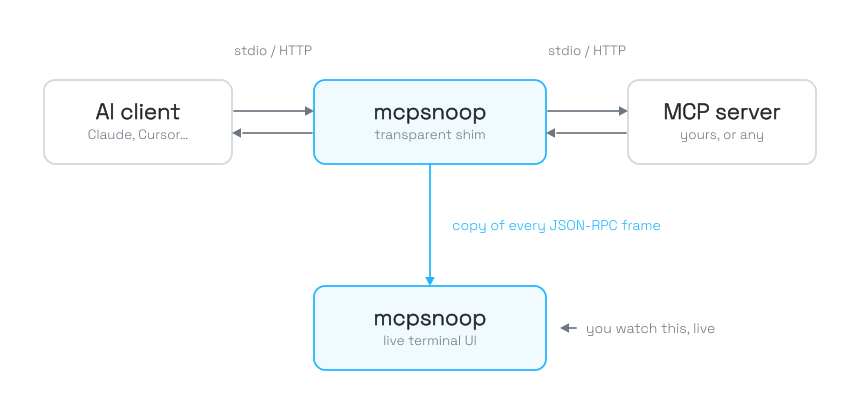
The client is whatever drives the conversation (Claude Desktop, Cursor, Claude
Code, your own agent). The server is any MCP server, in any language, over stdio
or streamable HTTP. The official Inspector connects as a second client, off to
the side; mcpsnoop sits in the actual pipe, so it sees exactly what your real
client and server say to each other.
mcpsnoop is two roles in one binary.
mcpsnoop -- <server> is a transparent stdio shim that your client spawns
instead of the server. It forwards bytes verbatim (it can never corrupt the
pipe) while shipping a copy of each JSON-RPC frame to the hub, and it also writes
a per-session log to disk.
mcpsnoop with no arguments is the hub and TUI. It listens on a well-known
socket, pairs requests with responses to derive timings, parses tool calls and
capabilities, and renders everything live.
Because the log is on disk and the socket is well-known, neither side has to
start first.
Keybindings
Navigate
| Key | Action |
|---|---|
j / k (or ↑ / ↓) |
Move down / up |
ctrl-f / ctrl-b |
Page down / up |
g / G |
Jump to top / bottom |
shift+column |
Sort by that column (press again to reverse) |
Move between views
| Key | Action |
|---|---|
enter |
Drill into the selected session, or open the frame inspector |
esc |
Back out one level |
: |
Command prompt (:sessions, :stream, :q, …) |
? |
Help |
:q |
Quit |
Act on the selection
| Key | Action |
|---|---|
r |
Replay the selected call against a fresh, isolated server |
c |
Capability inspector |
y |
Copy the frame's JSON to the clipboard |
p |
Pause / resume the live stream |
f |
Toggle follow (auto-scroll to the newest frame) |
ctrl-d |
Delete the selected session |
Filter & search
| Key | Action |
|---|---|
/ |
Filter the current table (the stream supports a query language, see below) |
/ in a frame |
Search within the open frame; n / N jump between matches |
Filtering the stream
Inside a session, press / and combine space-separated tokens. They are ANDed,
so each one narrows the stream further.
| Token | Matches | Example |
|---|---|---|
<text> |
substring over method, tool name, id, and the raw JSON payload | searchFiles |
tool:<name> |
the tool of a tools/call |
tool:echo |
method:<name> |
the JSON-RPC method | method:tools/list |
id:<n> |
an exact request id | id:7 |
kind:<type> |
message type: req, resp, notify, stderr |
kind:resp |
dir:<way> |
direction: c2s (client→server) or s2c (server→client) |
dir:s2c |
status:<state> |
outcome: ok, err, slow, pending |
status:err |
For example, tool:search status:slow shows only slow calls to a search tool,
and dir:s2c kind:req surfaces server-initiated requests (sampling, roots).
Security
mcpsnoop runs the server command you wrap, so only wrap servers you trust and
run untrusted ones in a container. It never executes anything you didn't put in
your client config.
Contributing
Issues and pull requests are welcome. See CONTRIBUTING.md for
the dev setup and the make check gate. mcpsnoop is pre-1.0 and follows
SemVer: while on 0.x, minor releases may change
user-facing behaviour, and patch releases are bug fixes.
License
Reviews (0)
Sign in to leave a review.
Leave a reviewNo results found