CommandMate
Health Pass
- License — License: MIT
- Description — Repository has a description
- Active repo — Last push 0 days ago
- Community trust — 43 GitHub stars
Code Pass
- Code scan — Scanned 12 files during light audit, no dangerous patterns found
Permissions Pass
- Permissions — No dangerous permissions requested
No AI report is available for this listing yet.
No long blocks of time? Run an AI team from your phone. Open-source, local: Git worktree sessions, task contracts and verification gates for Claude Code, Codex, Gemini CLI, Copilot, OpenCode, Antigravity and Command Code.
CommandMate
Status: Beta





Run multiple coding agents in parallel — even away from your desk.
CommandMate puts the coding agents you already use in one place on your own machine, so you can run them side by side, hand them work one issue at a time, and let your own checks decide when the work is done.
| Level | What CommandMate does | Your role |
|---|---|---|
| 1 — Parallel | Runs several coding agents side by side, from one place | Operator: you answer each agent |
| 2 — Delegate | Takes work one issue at a time, and decides it is done by your own checks (lint, tests), not by what the agent says | Product / tech lead: you write the task and accept the result |
| 3 — Manage | A PM agent plans, assigns and checks the work; you talk to the PM and approve | Owner: you set the direction and approve |
| Next — Learn | Not built yet. The direction: use the record of past work to improve how the work is done | — |
Anywhere: at every level you can answer and approve from your phone's browser, so the work does not stop when you leave the desk.
Most people need only Level 2. Stop at the level that fits you; nothing here asks you to climb.
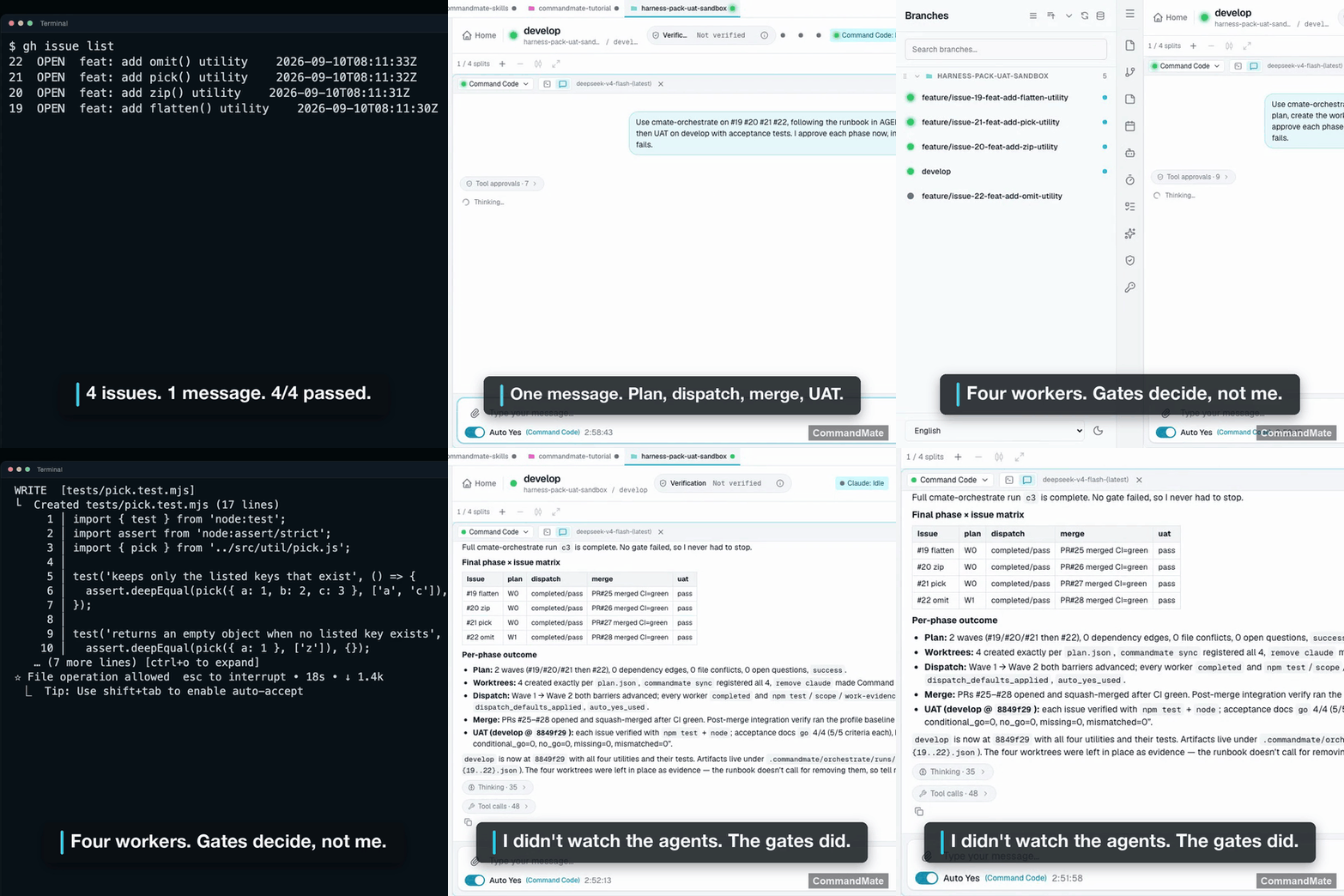
One recorded run (PM → dev lead → workers):
- 4 issues, 4 workers (Command Code), PM and dev lead on Claude Code
- 2 messages and 3 taps from a phone-width web UI
- 4/4 checks passed, PRs merged with CI green, UAT 4/4 GO
- 9 min 48 s from request to report
As observed: one run, recorded on 2026-10-02. Not a benchmark.
Open source (MIT) · runs on your machine · macOS / Linux / Windows (WSL2) · no app to install
The problem
- The agents can work for hours. You can't sit at the desk for hours to answer them.
- From the outside, an idle agent and one waiting on you look the same.
- The agent's summary of what it did is not evidence of what it did.
The levels
Level 1 — Parallel
Run Claude Code, Codex, Gemini CLI, Copilot, OpenCode (1.x and V2), Antigravity, Command Code or local models side by side. Each task gets its own session in its own Git worktree — a separate working copy of your repository — so two agents never edit the same files. CommandMate tells you which agent is waiting on you, as a badge or a push notification, and you answer it like a chat.
Your role: the operator. You read each agent's question and answer it.
Level 2 — Delegate
Hand over an issue, not a chat message. Each issue goes out as a task contract: a short file in your repository that says the goal, which files the agent may change, and which checks must pass. When the agent stops, CommandMate runs your own checks — lint, type check, tests — and their result, not the agent's summary, says whether the work passed.
Issues → Task contracts → Worktrees → Agents × N → Checks → PR
Your role: the product or tech lead. You decide what to build and accept what passed. You can also send a session's work to another agent for review. How a result is reported is in the CLI Operations Guide.
Level 3 — Manage
Talk to one PM agent instead of to every agent. Send it one message: it plans the issues, hands each one to an agent as in Level 2, and only work that passed the checks becomes a PR. Every step that changes something waits for your approval, and the PM can also start at the times you set while you are away.[^author]
Your role: the owner. You set the direction, answer the PM, and approve.
Next — Learn
Not built yet, and only a direction: use the record each piece of work leaves behind to improve how the next one is done.
More on each level on the website, and the long form in How CommandMate works.
[^author]: The author runs a daily round of automatic fixes built from these parts and a scheduled start. That is the author's own setup, not a switch in the product.
Set up with your agent
Paste this into the agent CLI you already use (Claude Code, Codex, …):
Read https://kewton.github.io/CommandMate/setup.md and help me set up CommandMate on this machine. Explain each step before you run it, and ask me before you install anything or open access from the internet.
Or by hand
Requires macOS / Linux / Windows (WSL2), Node.js v22+, npm, git and tmux.
npm install -g commandmate
commandmate init
commandmate start --daemon
- Open http://127.0.0.1:3000 —
127.0.0.1, notlocalhost. The CLI Setup Guide explains why. - To try it without installing, run
npx commandmate@latest(always with@latest). The CLI Setup Guide covers why, plus WSL2, updating and building from source. - Phone notifications are set up by
commandmate init. If they do not arrive, see Web App Guide → Phone Notifications. - To reach it from your phone, run
commandmate remote: it publishes the server through Tailscale or Cloudflare (asking before anything goes on the public internet) and prints a QR code to pair with.
First commands
For you or for your agent, by level.
Level 1 — Parallel
| Command | What it does |
|---|---|
commandmate status |
Is the server up, and is push configured |
commandmate remote |
Pair your phone with a QR code |
commandmate ls |
Every worktree and the state of its session |
commandmate send <id> "Implement Issue #101" --instance codex |
Send a message to one agent's session |
commandmate capture <id> |
Read the session's current output |
commandmate respond <id> "yes" |
Answer the prompt the agent is waiting on |
commandmate update |
Update a global install and restart the server |
Level 2 — Delegate
| Command | What it does |
|---|---|
commandmate send <id> --contract .commandmate/tasks/issue-101.yaml --instance codex |
Hand over a task contract |
commandmate wait <id> --instance codex --verify |
Wait for the agent, then run your checks and report pass or fail |
Level 3 — Manage
| Command | What it does |
|---|---|
commandmate skill list |
The official Catalog Skills you can install per worktree, including the one a PM agent runs on |
commandmate docs --section agent-operations |
The full command guide, for your agent to read |
Every command and flag is in the CLI Operations Guide; commandmate --help lists the options.
What it does not do
- It does not keep running in the background on its own. Each piece of work starts and ends, and nothing in your repository changes until you approve it.
- It does not read the code for you. Your checks catch what your tests and linters catch, and nothing more.
- Review by another agent is a step you add, not something CommandMate does for you.
- Approvals still come to a person. Auto Yes is opt-in, time-boxed, and stops on the patterns you set.
- It does not replace tmux, Git worktrees, your terminal, or your agent CLI. An OS reboot ends the processes; what survives is the record.
Documentation
| Document | Description |
|---|---|
| How CommandMate works | The long form, level by level: Parallel, Delegate (contracts, gates, Skills), Manage, Next; then Anywhere, supported agents, security, measured runs |
| Tutorial | Fork a sample repository and go from a task contract to a result that passed its checks in about fifteen minutes |
| Quick Start | The smallest hand-over-and-check flow on any agent, then a five-minute development flow |
| CLI Setup Guide | Installation, npx, initial setup, updating, building from source |
| CLI Operations Guide | Driving sessions from the CLI: task contracts, checks (verification gates), Skills, agent instances |
| Web App Guide | The web UI, phone access, app install (PWA), push notifications, supported browsers |
| Troubleshooting & FAQ | Stuck sessions, an empty-looking tmux attach, port conflicts, phone and remote access |
| Skills Guide | Installing official Catalog Skills into a worktree |
| OpenCode V2 guide | Running OpenCode V2 next to OpenCode 1.x |
| Agent Event Hooks | Structured agent events instead of terminal scraping |
| Concept | The canonical Vision, Mission and core principle, and how each implementation item maps to a feature |
| Product Highlights | A feature-by-feature tour of the product |
| Security Guide | No telemetry, no account; authentication and remote access |
| Trust & Safety | Security and permissions |
| Architecture | System design |
| Deployment Guide | Production environment setup |
Contributing
Bug reports, feature suggestions, and documentation improvements are welcome. See CONTRIBUTING.md for details.
License
MIT License - Copyright (c) 2026 Kewton
Reviews (0)
Sign in to leave a review.
Leave a reviewNo results found