trace
Health Warn
- License — License: MIT
- Description — Repository has a description
- Active repo — Last push 0 days ago
- Low visibility — Only 6 GitHub stars
Code Warn
- network request — Outbound network request in examples/profile/main.tsx
- process.env — Environment variable access in examples/profile/profile.spec.ts
- network request — Outbound network request in examples/profile/save-broken.ts
Permissions Pass
- Permissions — No dangerous permissions requested
No AI report is available for this listing yet.
Your agent builds it. TRACE checks it. A Claude Code & Codex plugin that exercises your software, collects evidence, and proves fixes work.

TRACE
Your agent builds it. TRACE checks it.





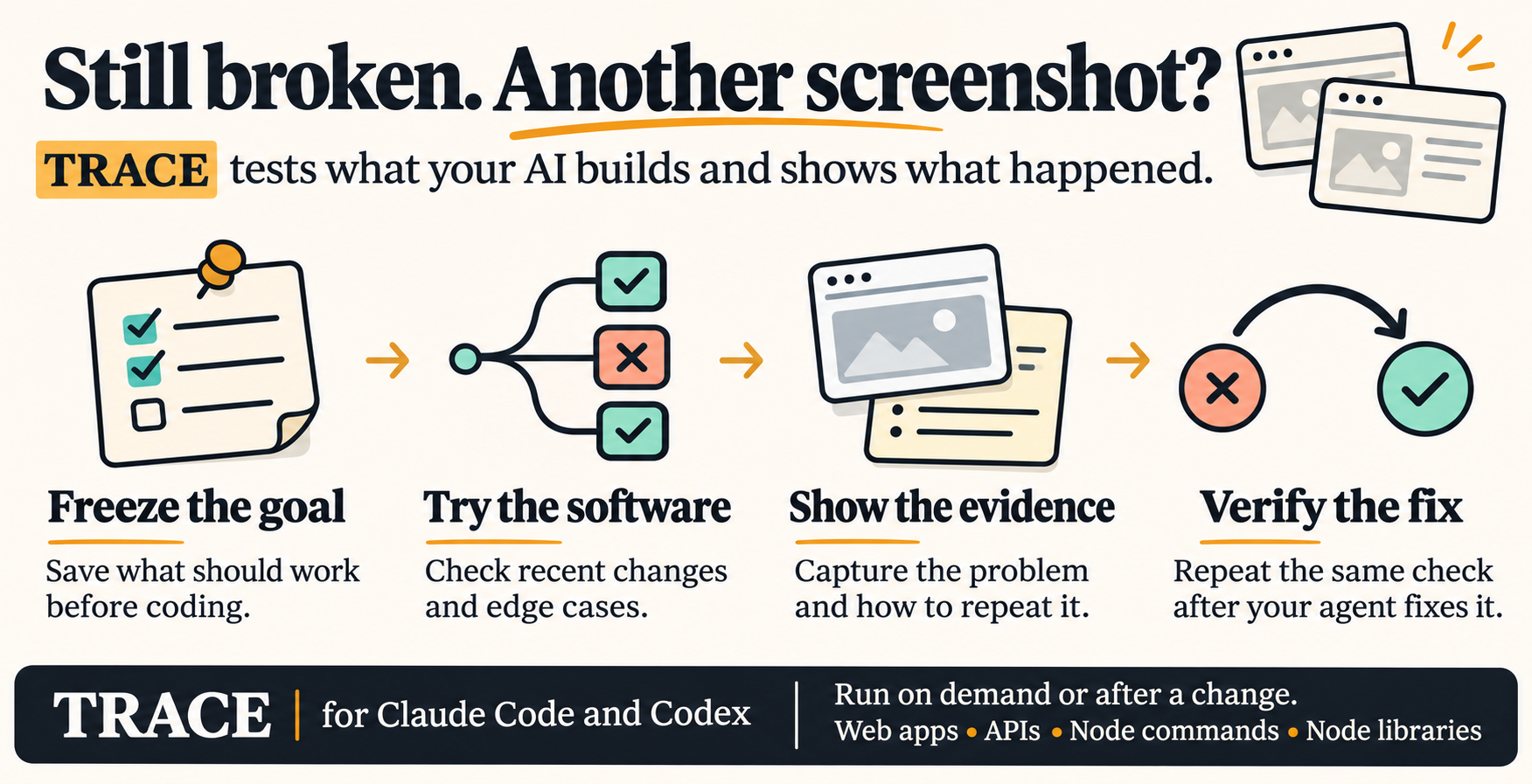
Stop being the tester for code your AI wrote.
TRACE runs the software, shows you the evidence, and proves the fix with the same checks that failed.
A plugin for Claude Code and Codex. No API keys, no telemetry. See the demo with real screenshots.
Install · Features · What it checks · Proving a fix · FAQ · Roadmap
Why
You ask for a feature. The agent says it's done. You open the app, click around, find it broken, take a screenshot, paste the logs, and type "it still doesn't work" for the fifth time.
TRACE does that part. Type /trace and it picks what to check from your request, the diff, the docs and the tests. It runs the software, collects the evidence, and hands your agent a compact finding instead of a wall of logs. When the agent fixes something, TRACE re-runs the same frozen check that failed. A pass that never failed doesn't count.
Install
Claude Code, as two separate prompts:
/plugin marketplace add kg290/trace
/plugin install trace@trace
Codex:
codex plugin marketplace add kg290/trace
codex plugin add trace@trace
Then open /hooks in Codex, review and trust TRACE's prompt and Stop hooks, and start a new thread.
Any other agent, or a single project without a plugin: node install.mjs --project <path> from a clone. Step by step, including the optional local helper: INSTALL.md.
Only install TRACE from kg290/trace on GitHub.
Use it
| You type | What happens |
|---|---|
/trace |
Checks the project, starting with what you just worked on |
/trace check the feature you just built |
The normal path, an edge case, error handling, and the parts the change touches |
/trace verify this fix |
Re-runs the frozen failing scenario, plus regression checks |
/trace check the login page |
Only that area |
The plugin skill lives under its plugin's name: /trace:trace in Claude Code (typing /trace finds it) and $trace:trace in Codex (or pick TRACE under @). A check-only request reports findings and changes no code. If the task includes fixing, your agent fixes and TRACE proves it.
Features
| Feature | What TRACE does |
|---|---|
| Check on demand | Ask it to check the project, a recent change, one feature, or a proposed fix. You can start before you know where a bug is. |
| Choose relevant scenarios | Uses your request, recent edits, docs, examples and tests to choose up to six checks, including ordinary use, edge cases, errors and interactions between changed parts. |
| Freeze what success means | Before an implementation or fix, the agent records one to six expectations tied to your words and how to test each one. A fingerprint lets it check the original criteria at the end. A revised request gets a separate record. |
| Run the software | Uses the agent's browser, terminal and existing tests first. The optional helper can exercise local web apps, HTTP APIs, Node commands and Node libraries. |
| Check what actually happened | Reloads a page, reads back a value, or inspects a generated file to see whether the outcome matches the requirement. |
| Capture evidence automatically | Collects useful screenshots for interfaces and relevant responses, errors, outputs or files for other checks. You can report a problem without recording your screen or gathering logs. |
| Give your agent a reproducible finding | Shows the steps, expected result, observed result and evidence. Groups duplicates, ranks findings by impact and identifies source locations when established. |
| Verify a fix | Repeats the original failing scenario after the edit and checks related behavior for regressions. Only a failure followed by a pass on the same check counts as a verified fix. |
| Check at task boundaries | With the hooks enabled, TRACE can check a completed code change before the agent hands it back. You can turn this off per project. |
| Report coverage and limits | Lists what passed, failed, was blocked or went untested. Unclear expectations are marked for review. The helper also records run counts and elapsed time to a verified fix. |
| Control your evidence | The helper stores evidence locally outside the checked project. You can inspect its timeline, export selected evidence, revoke access or delete an incident. Production changes and destructive actions require separate authorization. |
The prompt hook guides the agent to freeze criteria before editing. If TRACE cannot establish that timing, it reports the uncertainty. See the validation record.
What it checks
| Project | What TRACE does | Evidence |
|---|---|---|
| Web apps | Explores screens, fills forms, clicks, reloads, reads saved state | Screenshots, visible messages, HTTP statuses, console and runtime errors, layout measurements |
| APIs | Calls endpoints, then reads back to confirm the write | Exact status and JSON, request and response |
| CLIs and scripts | Runs representative commands | Exit code, stdout/stderr, generated files (a stale file can't pass) |
| Libraries | Calls public functions with representative inputs | Return values or the expected error, async included |
| Desktop and mobile | Only through a real driver your host provides | Otherwise unsupported, never faked |
The helper runs Node projects directly. Python, Go, Rust and the rest go through your agent's terminal and your own test suite.
A finding
✗ CONFIRMED DEFECT · Profile change is lost after saving

  Checked     Save "Mira Chen" as display name, then reload
  Expected    Name persists after reload       (source: examples/profile/README.md)
  Observed    UI shows "Saved", PATCH /api/profile → 422, reload shows "Alex Rivera"
  Reproduce   fill "Display name" → click "Save profile" → reload
  Evidence    3 screenshots · response status · persisted value
  Cause       (suspected) client sends `display_name` instead of `displayName`
              and ignores the error response

Coverage: 4 checks · 2 failed (UI + API, grouped as 1 defect) · 2 passed (422 + 403 rejections)
Facts stay separate from suspected causes. A visual difference, a 4xx response or exit code 0 is, on its own, neither a pass nor a defect.
Proving a fix
| Result | Meaning |
|---|---|
reproduced |
The baseline shows the bug |
verified fix |
The baseline failed, and the same frozen checks now pass |
could not reproduce |
It passes, but it never failed. Not a fix. |
still failing |
The fix didn't work |
regression |
It passed before and fails now |
blocked · unsupported · needs review |
Couldn't run, no integration, or no clear expectation |
Changed criteria are refused. Every verify run keeps a screenshot for before and after, and failed checks record what was actually seen. Each result also counts the runs and the time from the failing baseline to the verified fix: measured numbers, not promises.
Automatic checks
The prompt hook asks the agent to record expectations when a coding task begins. The Stop hook requests one check of the completed change before handoff and stays silent when nothing changed.
| Claude Code | On with the plugin. Turn it off in /config → TRACE → Automatic checks |
| Codex | Runs once you trust the hook in /hooks |
| One project off | {"autoCheck": false} in that project's .trace.json |
| Everywhere off | TRACE_AUTO_CHECK=0 |
Safe by default
- Asks first. "Check my project" never covers payments, outside messages, destructive commands or production.
- Local only. The helper's browser talks only to your local app. Other sites, WebSockets and service workers are blocked.
- Private stays private. Password, token, email and card fields are masked in screenshots. Secrets are removed from text. Cookies, headers, storage and request bodies are never kept.
- Your files are safe. Evidence lives outside your project. The installer never overwrites anything.
- Nothing leaves your machine because of TRACE: no telemetry, no uploads, no model calls.
FAQ
Does it replace my coding agent?
No. It runs inside the agent you already use. TRACE does the checking, and your agent does the fixing.
Do I need an API key or a browser download?
No. The skill uses your agent's existing tools. Only the optional helper needs Playwright's Chromium, and only for its own browser checks.
Does it save tokens?
We don't claim that. TRACE records runs and time-to-verified-fix per bug, so you can see for yourself. Checking costs tool calls too.
Can it break my data?
Read-only checks are the default. Writing test data takes an explicit permission and should use synthetic data. Project code that TRACE runs is not sandboxed, so only check code you trust.
If TRACE passes, is my app bug-free?
No, and TRACE never says so. It reports exactly what it covered, what passed, and what stayed untested.
Why "experimental"?
The core flows are tested on Windows with Claude Code and Codex, and CI runs Windows and Ubuntu. macOS and desktop/mobile drivers aren't covered yet. See the validation ledger and the roadmap.
Documentation
| INSTALL | Every way to install, the local helper, updating and removing |
| Demo | The save that didn't save, caught and verified |
| Helper CLI | Commands, statuses, exit codes, permission flags |
| Architecture | How the skill, plugins, hook and helper fit together |
| Privacy | What is collected, masked, stored and never touched |
| Validation | What has been tested, and what hasn't |
| Design decisions | Why TRACE is built this way |
| Roadmap | What's next |
Contributing
Bug reports, wrong findings and new integrations are welcome. Read CONTRIBUTING first, and report vulnerabilities privately (SECURITY). Release notes are in the CHANGELOG.
License
MIT. Check it, fork it, ship it.
Reviews (0)
Sign in to leave a review.
Leave a reviewNo results found