comad-world
Health Warn
- License — License: MIT
- Description — Repository has a description
- Active repo — Last push 0 days ago
- Low visibility — Only 8 GitHub stars
Code Warn
- process.env — Environment variable access in brain/packages/core/src/community-detector.ts
- process.env — Environment variable access in brain/packages/core/src/content-fetcher.ts
- network request — Outbound network request in brain/packages/core/src/content-fetcher.ts
- process.env — Environment variable access in brain/packages/core/src/entity-extractor.ts
Permissions Pass
- Permissions — No dangerous permissions requested
This is a config-driven AI agent system designed to build domain-specific knowledge graphs. It uses a pipeline of six specialized modules to crawl, process, and curate data based entirely on user-defined YAML configurations.
Security Assessment
Overall Risk: Medium. The tool reads environment variables in several core modules, likely for API keys or database credentials. It makes outbound network requests to fetch external content, which is expected behavior for a web crawler. It does not request dangerous permissions, and no hardcoded secrets were detected. Because it inherently downloads external data and requires integration with external services (like Neo4j via Docker), users should review exactly what endpoints it accesses and ensure environment files are properly secured.
Quality Assessment
Quality is adequate but indicates an early-stage project. It is actively maintained, with the most recent code pushed today. It benefits from a clear MIT license and comprehensive, well-structured documentation. However, visibility is currently very low at only 8 GitHub stars, meaning the codebase has undergone minimal external community review and should not be considered battle-tested.
Verdict
Use with caution — the code is actively maintained and permissively licensed, but low community adoption means you should audit its network activity before deploying.
Config-driven AI agent system for any domain. 6 modules, 1 YAML file. Swap a preset, get a new knowledge system.
Comad World
Your interests, your agents, your knowledge graph.



6 AI agents that crawl → understand → simulate → curate → remember → automate
for any domain you care about. Change one YAML file, get a whole new knowledge system.
Quickstart · Architecture · Modules · Customization · Presets
🌍 What is Comad World?
Comad World is a modular AI agent system built on Claude Code. It connects six specialized agents into a pipeline that collects information, builds a knowledge graph, runs simulations, curates content, manages memory, and automates workflows — all driven by a single configuration file.
ear (listen) → brain (think) → eye (predict)
                  ↑
photo (edit)    sleep (remember)    voice (automate)
The key idea: every domain-specific setting lives in comad.config.yaml. Swap the config, and the entire system adapts — from what RSS feeds to crawl, to what arXiv categories to watch, to how articles are classified.
Quickstart
Prerequisites
- Claude Code (Claude Max subscription recommended)
- Docker (for Neo4j)
- Bun (for brain module)
- Python 3.13+ (for eye module)
git clone https://github.com/kinkos1234/comad-world.git
cd comad-world
cp presets/ai-ml.yaml comad.config.yaml   # or: web-dev, finance, biotech
./install.sh
Then start collecting knowledge:
cd brain && docker compose up -d && bun install && bun run setup
bun run crawl:hn && bun run crawl:ingest   # crawl & ingest
bun run mcp                                 # start MCP server
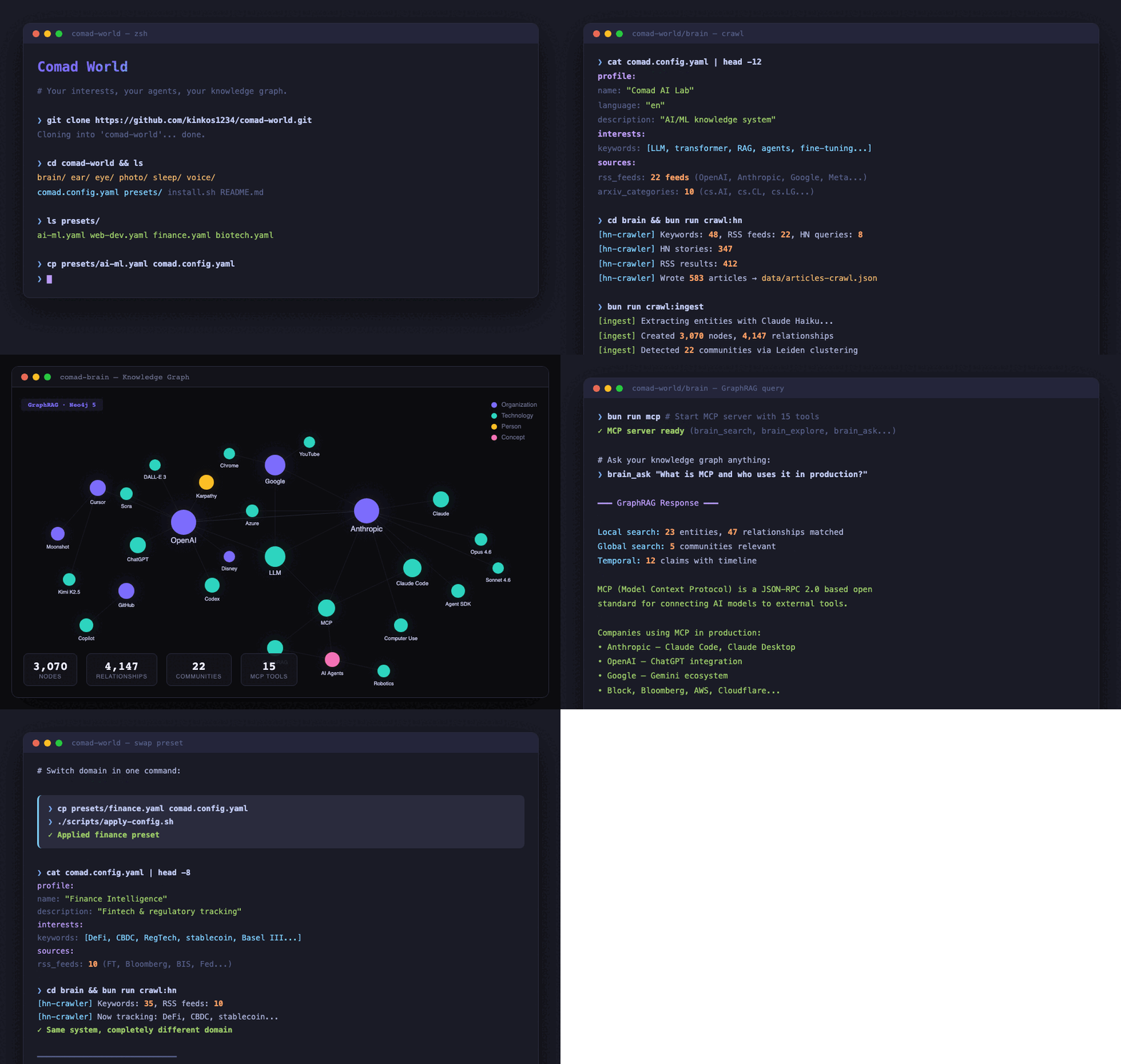
Demo: Swap a Preset, Change Everything
# Start with AI/ML preset
$ head -5 comad.config.yaml
profile:
  name: "Comad AI Lab"
  language: "en"
  description: "AI/ML knowledge system"

# Crawl AI sources (22 RSS feeds, 10 arXiv categories)
$ cd brain && bun run crawl:hn
[hn-crawler] Keywords: 48, RSS feeds: 22, HN queries: 8
[hn-crawler] HN stories: 347
[hn-crawler] RSS results: 412
[hn-crawler] Wrote 583 articles to data/articles-crawl.json

# Now switch to Finance
$ cp presets/finance.yaml comad.config.yaml
$ ./scripts/apply-config.sh
  ✓ ear/interests.md
  ✓ ear/CLAUDE.md

# Same crawl command, completely different sources
$ bun run crawl:hn
[hn-crawler] Keywords: 31, RSS feeds: 10, HN queries: 7
[hn-crawler] HN stories: 89
[hn-crawler] RSS results: 156
[hn-crawler] Wrote 201 articles to data/articles-crawl.json

# ear/interests.md automatically updated:
$ head -6 ear/interests.md
# User Interest Profile
## High Priority (Core Focus)
- Quantitative Finance (QuantConnect, Zipline, Backtrader)
- Market Data / Analysis
- DeFi / Crypto
- Risk Management
One YAML change. Different feeds, different keywords, different categories, different relevance criteria.
Architecture
┌─────────────────────────────────────────────────────┐
│                  comad.config.yaml                   │
│  (interests, sources, keywords, categories, stack)   │
└───────────┬───────────┬───────────┬─────────────────┘
            │           │           │
    ┌───────▼──┐  ┌─────▼────┐  ┌──▼──────┐
    │   ear    │  │  brain   │  │  eye    │
    │ (curate) │→ │ (graph)  │→ │(predict)│
    └──────────┘  └──────────┘  └─────────┘
                       │
    ┌──────────┐  ┌────▼─────┐  ┌─────────┐
    │  photo   │  │  sleep   │  │  voice  │
    │  (edit)  │  │(remember)│  │(automate│
    └──────────┘  └──────────┘  └─────────┘
Data Flow
- Ear detects articles in Discord, classifies relevance using your interests, archives to markdown
- Brain crawls RSS/arXiv/GitHub filtered by your keywords, builds a Neo4j knowledge graph with entities and relationships
- Eye takes any text, converts to ontology, runs multi-round simulations, generates analysis through 10 strategic lenses
- Photo corrects images via Photoshop MCP (domain-agnostic)
- Sleep consolidates Claude Code memory across all projects (domain-agnostic)
- Voice provides workflow automation triggers for Claude Code (domain-agnostic)
What's Config-Driven vs. Domain-Agnostic
| Module | Config-Driven | Domain-Agnostic |
|---|---|---|
| ear | interests, categories, must-read stack, relevance thresholds | archive format, Discord integration, digest generation |
| brain | RSS feeds, HN queries, arXiv categories, GitHub topics, entity extraction prompts | Neo4j schema, GraphRAG, MCP tools, MetaEdge engine |
| eye | — | entire engine: ontology, simulation, 10 analysis lenses, report generation |
| photo | — | everything (works with any photo) |
| sleep | — | everything (manages any Claude Code memory) |
| voice | — | everything (workflow triggers are generic) |
Modules
Brain — Knowledge Graph & GraphRAG
Neo4j-based knowledge graph that crawls, extracts entities, and answers questions via MCP.
- 15 MCP tools for querying, searching, and analyzing the graph
- Dual-retriever GraphRAG — Local + Global + Temporal 3-way search
- MetaEdge engine — 10 rules for automated relationship inference
- Claim tracking — fact/opinion/prediction with confidence scores and timelines
- Community detection — hierarchical clustering for topic discovery
cd brain
bun install && bun run setup
bun run mcp  # Start MCP server
Ear — Content Curator
Discord bot that detects articles, classifies relevance, and archives with structured metadata.
- 3-tier relevance: Must-Read (~15%) → Recommended (~65%) → Reference (~20%)
- Configurable categories from
comad.config.yaml - Daily digest auto-generation in HTML
- YAML frontmatter for every archived article
Eye — Prediction Simulation Engine
Ontology-based simulation that converts text to knowledge graph and runs multi-round impact analysis.
- 6 analytical spaces: hierarchy, temporal, recursive, structural, causal, cross-space
- 10 strategic lenses: Sun Tzu, Machiavelli, Clausewitz, Adam Smith, Taleb, Kahneman, Hegel, Darwin, Meadows, Descartes
- Full pipeline: ingestion → graph → community → simulation → analysis → report
- Web UI: FastAPI backend + Next.js frontend
cd eye
pip install -r requirements.txt
make dev  # API (port 8000) + Frontend (port 3000)
Photo — AI Photo Correction
Claude Code agent for photo editing via Photoshop MCP.
- Non-destructive editing with backup
- PIL → Camera Raw → Advanced priority chain
- Over-correction guard: MAE > 20 triggers parameter reduction
- No domain-specific config needed
Sleep — Memory Consolidation
Agent that cleans up Claude Code auto-memory files across all projects.
- Merge duplicates, prune stale refs, clean transient notes
- Backup first — timestamped backup with verification before any changes
- Dry-run mode — preview without writing
- Trigger: say
dreamin Claude Code
# Install
cp sleep/comad-sleep.md ~/.claude/agents/
Voice — Workflow Automation
Claude Code harness with auto-triggered workflows.
- 6 triggers: onboarding, review, full-cycle, parallel detection, repo polish, session save
- Zero dependencies — pure markdown/bash
- Non-developer friendly — "just say what you want"
# Install
cd voice && ./install.sh
Customization
Quick: Use a Preset
cp presets/ai-ml.yaml comad.config.yaml     # AI / Machine Learning
cp presets/web-dev.yaml comad.config.yaml    # Web Development
cp presets/finance.yaml comad.config.yaml    # Finance / Fintech
cp presets/biotech.yaml comad.config.yaml    # Biotech / Life Sciences
Custom: Edit comad.config.yaml
The config file has 5 main sections:
1. Interests (drives ear relevance + brain filtering)
interests:
  high:
    - name: "Your Core Topic"
      keywords: ["keyword1", "keyword2", "keyword3"]
      examples: ["Tool A, Tool B, Framework C"]
  medium:
    - name: "Secondary Interest"
      keywords: ["keyword4", "keyword5"]
  low:
    - name: "Filter This Out"
      keywords: ["noise1", "noise2"]
2. Sources (drives brain crawlers)
sources:
  rss_feeds:
    - { name: "Blog Name", url: "https://example.com/feed.xml" }
  arxiv:
    - { category: "cs.CL", keywords: ["relevant", "terms"], max_results: 500 }
  github:
    topics: ["your-topic", "another-topic"]
    search_queries: ["your search query"]
3. Categories (drives ear tagging)
categories:
  - "Category A"
  - "Category B"
  - "Category C"
4. Must-Read Stack (drives ear priority)
must_read_stack:
  - "Tool you use daily"
  - "Framework you depend on"
5. Entity Extraction (drives brain knowledge modeling)
brain:
  entity_extraction:
    domain_hint: "describe your domain in one sentence"
    relationship_types:
      - "USES_TECHNOLOGY"
      - "COMPETES_WITH"
      - "YOUR_CUSTOM_RELATION"
Create Your Own Preset
- Copy an existing preset:
cp presets/ai-ml.yaml presets/my-domain.yaml - Edit all sections to match your domain
- Copy to root:
cp presets/my-domain.yaml comad.config.yaml - Run
./scripts/apply-config.shto regenerate module configs
Presets
| Preset | Domain | RSS Feeds | arXiv Categories | GitHub Topics |
|---|---|---|---|---|
ai-ml.yaml |
AI / Machine Learning | 22 | 10 | 20 |
web-dev.yaml |
Web Development | 15 | — | 15 |
finance.yaml |
Finance / Fintech | 10 | 6 | 10 |
biotech.yaml |
Biotech / Life Sciences | 8 | 5 | 10 |
Want to add a preset? PRs welcome.
Project Structure
comad-world/
├── comad.config.yaml        # YOUR config (edit this)
├── presets/                  # Ready-made domain configs
│   ├── ai-ml.yaml
│   ├── web-dev.yaml
│   ├── finance.yaml
│   └── biotech.yaml
├── brain/                   # Knowledge graph (Bun/TypeScript)
│   ├── packages/
│   │   ├── core/            # Neo4j client, entity extraction, MetaEdge
│   │   ├── crawler/         # RSS, arXiv, GitHub crawlers (config-driven)
│   │   ├── graphrag/        # Dual-retriever search engine
│   │   ├── ingester/        # Content importer
│   │   └── mcp-server/      # 15 MCP tools
│   ├── docker-compose.yml
│   └── package.json
├── ear/                     # Content curator (Claude Code agent)
│   ├── archive/             # Archived articles (YAML frontmatter)
│   ├── digests/             # Daily digest HTML
│   └── templates/           # CLAUDE.md + interests.md templates
├── eye/                     # Simulation engine (Python/FastAPI/Next.js)
│   ├── api/                 # FastAPI backend
│   ├── frontend/            # Next.js web UI
│   ├── config/              # Engine settings
│   └── ontology/            # Domain-agnostic ontology schema
├── photo/                   # Photo correction agent
├── sleep/                   # Memory consolidation agent
├── voice/                   # Workflow automation harness
├── scripts/                 # Utility scripts
│   └── apply-config.sh      # Generate module configs from comad.config.yaml
├── install.sh               # One-command setup
└── docker-compose.yml       # Full stack (Neo4j x2 + Ollama)
Requirements
| Component | Required | Optional |
|---|---|---|
| Claude Code | Yes | — |
| Docker | Yes (for Neo4j) | — |
| Bun | Yes (for brain) | — |
| Python 3.13+ | For eye module | — |
| Ollama | For eye (local LLM) | — |
| Adobe Photoshop | For photo module | — |
| Discord bot | For ear module | — |
| Codex CLI + tmux | For voice parallel work | — |
FAQ
Q: Do I need all modules?
No. Each module works independently. Start with brain + ear for knowledge collection, add others as needed.
Q: Can I add my own RSS feeds?
Yes. Edit sources.rss_feeds in comad.config.yaml and re-run ./scripts/apply-config.sh.
Q: Is this only for tech topics?
No. The finance and biotech presets demonstrate non-tech usage. The system adapts to any domain where there are RSS feeds, papers, and GitHub repos to crawl.
Q: How much does it cost to run?
Brain uses Claude API for entity extraction (~$0.50/day with Haiku). Eye uses local Ollama (free). Ear and the others are free.
Q: Can I contribute a preset for my domain?
Yes! See CONTRIBUTING.md.
Credits
Built with Claude Code and the Model Context Protocol.
License
Reviews (0)
Sign in to leave a review.
Leave a reviewNo results found