bigbossbot
Health Warn
- License — License: MIT
- Description — Repository has a description
- Active repo — Last push 0 days ago
- Low visibility — Only 6 GitHub stars
Code Fail
- process.env — Environment variable access in prisma.config.ts
- process.env — Environment variable access in scripts/bootstrap-admin.ts
- spawnSync — Synchronous process spawning in scripts/build.ts
- process.env — Environment variable access in scripts/build.ts
Permissions Pass
- Permissions — No dangerous permissions requested
This project is a self-hosted open-source intelligence (OSINT) dashboard that aggregates real-time conflict tracking, news feeds, financial markets, and military data into a unified interface. It includes multi-user authentication and an MCP server for secure client integration.
Security Assessment
Overall risk: Medium. The application does not request dangerous system permissions and contains no hardcoded secrets, which is good. However, it requires careful configuration as it handles sensitive user data, including passwords, TOTP 2FA, and session management. The code accesses environment variables to manage database and authentication setups. A notable security concern is the use of synchronous process spawning (`spawnSync`) within its build scripts, which can pose a supply-chain or local execution risk if the build environment is compromised. By design, the tool makes extensive external network requests to fetch live RSS feeds, scrape Telegram channels, and pull unauthenticated public APIs for aircraft, satellite, and market tracking.
Quality Assessment
The codebase is written in TypeScript and is very active, with its most recent updates pushed today. It is properly licensed under the permissive MIT license. However, visibility and community trust are currently very low. With only 6 GitHub stars, the project has not yet been widely vetted by the open-source community or subjected to large-scale peer review.
Verdict
Use with caution.
Self-hosted live intelligence dashboard for conflict tracking, alerts, markets, and OSINT feeds, with optional guest access and MCP support for authenticated users.
BIG BOSS BOT
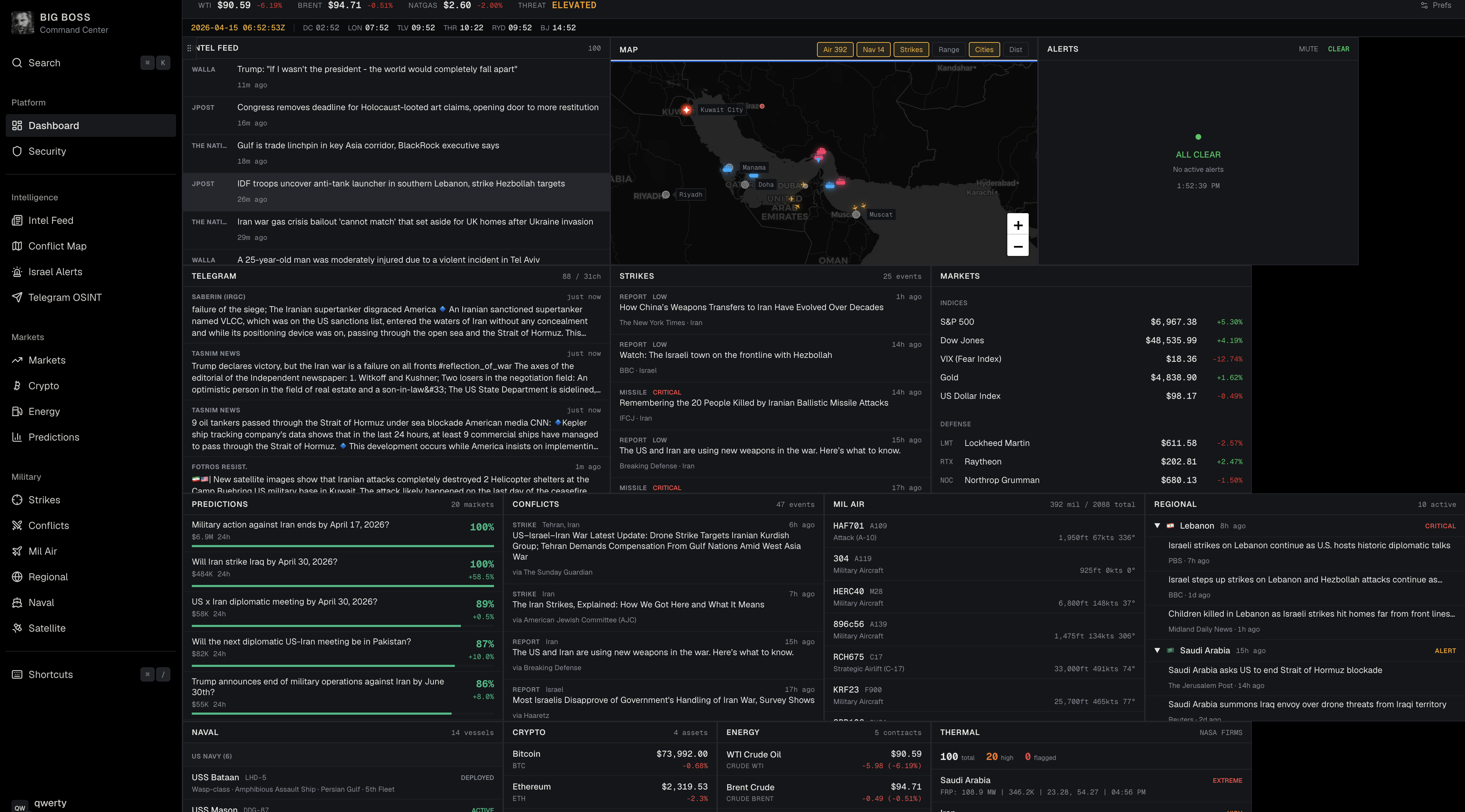
Real-time OSINT command center for monitoring the Middle East conflict. Aggregates open-source intelligence from 50+ sources across news, Telegram, military tracking, financial markets, and more into a single dashboard.
Built with Next.js, TypeScript, Tailwind CSS, Leaflet, Prisma, and Postgres. No API keys required for the upstream intel feeds.
Multiuser Access
This project now runs as a protected multiuser application:
- Username + password authentication
- Authenticator app TOTP setup, optional by default and enforceable globally
- Recovery codes for account recovery
- Admin/member roles
- Per-user dashboard preferences
- Per-user agent access tokens for MCP clients
- Admin tools for user management, password reset, 2FA reset, and session revocation
Features
- Live Intel Feed — 20+ RSS news sources with keyword relevance filtering
- Telegram OSINT — 27 channels scraped in real-time with auto-translation (Hebrew/Arabic/Farsi), including GCC sources
- Theater Map — Interactive Leaflet map with military aircraft, naval vessels, strike markers from news and Telegram, missile trajectory arcs, range rings, and distance measurement
- Israel Alert Status — Live Pikud HaOref / Tzeva Adom missile alerts with audio notifications and looping missile trajectory arcs on the map
- Conflict Monitor — Categorized events (strikes, defense, diplomatic, nuclear)
- Missile / Strike Tracker — Weapon type classification and severity
- Regional Threat Monitor — Per-country threat levels across 10 nations
- Military Airspace — Live military aircraft tracking via adsb.lol
- Naval Tracker — Vessel monitoring in the Persian Gulf and Eastern Mediterranean
- Defense & Markets — Defense contractor stocks, indices, VIX, gold, USD via Yahoo Finance
- Crypto Markets — Bitcoin, Ethereum, Solana, BNB with 24h price changes
- Prediction Markets — Live Polymarket odds on Middle East conflict outcomes
- Energy Markets — WTI, Brent, natural gas, heating oil, gasoline via Yahoo Finance
- Satellite Thermal Detect — NASA FIRMS fire/explosion detection
Data Sources
All data sources are free and require no API keys.
News RSS Feeds
| Source | Region | Feed |
|---|---|---|
| BBC Middle East | International | feeds.bbci.co.uk |
| New York Times ME | US | rss.nytimes.com |
| Al Jazeera | Qatar/GCC | aljazeera.com |
| Reuters World | International | feeds.reuters.com |
| CNN Middle East | US | rss.cnn.com |
| Fox News World | US | moxie.foxnews.com |
| Wall Street Journal | US | feeds.content.dowjones.io |
| Times of Israel | Israel | timesofisrael.com |
| Jerusalem Post | Israel | jpost.com |
| Ynet News | Israel | ynetnews.com |
| N12 (Mako) | Israel | rcs.mako.co.il |
| Walla News | Israel | rss.walla.co.il |
| Haaretz | Israel | haaretz.com |
| PressTV | Iran | presstv.ir |
| The National | UAE/GCC | thenationalnews.com |
| Drop Site News | Independent | dropsitenews.com |
| Google News | Aggregator | news.google.com (3 conflict-specific searches) |
| Breaking Defense | US Defense | breakingdefense.com |
| Long War Journal | US Defense | longwarjournal.org |
| Military Times | US Defense | militarytimes.com |
| War on the Rocks | US Defense/Analysis | warontherocks.com |
| CENTCOM | US Military | centcom.mil |
| DoD | US Military | defense.gov |
Telegram Channels
| Channel | Perspective |
|---|---|
| @IDFofficial | IDF Official |
| @RocketAlert | Israeli Rocket Alerts |
| @Alertisrael | Alert Israel |
| @TimesofIsrael | Times of Israel |
| @AbuAliExpress | Abu Ali Express (Israeli OSINT) |
| @OSINTdefender | OSINT Defender |
| @warfareanalysis | Warfare Analysis |
| @rnintel | RN Intel |
| @GeoPWatch | GeoPol Watch |
| @middle_east_spectator | ME Spectator |
| @Middle_East_Spectator | ME Spectator 2 |
| @HAMASW | Hamas-Israel War Updates |
| @PressTV | PressTV (Iran) |
| @iranintl_en | Iran International |
| @FarsNews_EN | Fars News (Iran) |
| @TasnimNewsEN | Tasnim News (Iran) |
| @SaberinFa | Saberin (IRGC-affiliated) |
| @defapress_ir | DefaPress (Iran MOD) |
| @sepah | IRGC Official |
| @FotrosResistancee | Fotros Resistance |
| @QudsNen | Quds News |
| @Alsaa_plus_EN | Al-Saa EN |
| @thecradlemedia | The Cradle |
| @dropsitenews | Drop Site News |
| @france24_en | France 24 |
| @wamnews_en | WAM - Emirates News Agency (UAE) |
| @gulfnewsUAE | Gulf News (UAE/GCC) |
APIs
| Service | Data | Provider | Cost |
|---|---|---|---|
| Yahoo Finance | Stock prices, indices, commodities, oil futures | Yahoo | Free, no key |
| Tzeva Adom | Israeli missile/rocket alerts | Community mirror of Pikud HaOref | Free, no key |
| NASA FIRMS | Fire/thermal detection satellite data | NASA | Free, no key |
| adsb.lol | Military aircraft ADS-B tracking | Community ADS-B network | Free, no key |
| GDELT | Global event data | GDELT Project | Free, no key |
| CoinGecko | Cryptocurrency prices (BTC, ETH, SOL, BNB) | CoinGecko | Free, no key |
| Polymarket | Prediction market odds (Middle East conflict) | Polymarket | Free, no key |
| Google Translate | Hebrew/Arabic/Farsi auto-translation | Google (unofficial) | Free, no key |
Polling Intervals
| Feed | Interval |
|---|---|
| Israeli Alerts (Pikud HaOref) | 5 seconds |
| Telegram Channels | 60 seconds |
| News RSS | 90 seconds |
| Strikes | 2 minutes |
| Conflicts | 3 minutes |
| Markets, Oil, Crypto & Polymarket | 5 minutes |
| Fires (NASA FIRMS) | 10 minutes |
Getting Started
cp .env.example .env
openssl rand -hex 32
Paste the generated value into AUTH_ENCRYPTION_KEY in .env, then set BOOTSTRAP_ADMIN_USERNAME and BOOTSTRAP_ADMIN_PASSWORD.
npm run db:up
npm install
npm run db:migrate
npm run bootstrap:admin
npm run dev
The bundled Docker Postgres instance listens on 127.0.0.1:${POSTGRES_PORT:-54329}.
Open http://localhost:3000.
Docker Compose
You can run the full stack in Docker:
cp .env.example .env
openssl rand -hex 32
Paste the generated value into AUTH_ENCRYPTION_KEY in .env, then set BOOTSTRAP_ADMIN_USERNAME and BOOTSTRAP_ADMIN_PASSWORD.
docker compose up --build
If 54329 or 3000 is already in use on your machine, set POSTGRES_PORT and/or APP_PORT in .env before starting the stack.
The container now refuses to start if AUTH_ENCRYPTION_KEY or BOOTSTRAP_ADMIN_PASSWORD still use the example placeholder values.
That starts:
postgreson127.0.0.1:${POSTGRES_PORT:-54329}by defaultappon http://localhost:3000 by default
If you also want the bundled MCP sidecar in Docker, use docker compose --profile mcp up --build and pass BIG_BOSS_API_TOKEN in .env.
The app container automatically:
- waits for Postgres to become healthy
- applies Prisma migrations
- bootstraps the first admin when
BOOTSTRAP_ADMIN_USERNAMEandBOOTSTRAP_ADMIN_PASSWORDare set
Useful scripts:
npm run docker:upstarts the full stack in the backgroundnpm run docker:downstops the full stacknpm run docker:logstails the app and database logsnpm run db:upstill starts only Postgres for local non-Docker app development
GHCR Image
GitHub publishes the app image to ghcr.io/kitakitsune0x/bigbossbot.
mainupdates thelatestandmaintags- each published build also gets a
YYYY.MM.DDtag based on the build date - tagged releases publish matching version tags
- if you want anonymous
docker pullfrom a public VM, make the GHCR package public after the first publish - Docker Compose uses
BIG_BOSS_IMAGEand defaults to the GHCR image name above
Build Versions
npm run buildstamps each build with a date version inYYYY.MM.DDformat- the build version is persisted in
.build-versionso the MCP server can report the same version after the build finishes - set
APP_VERSIONbeforenpm run buildordocker compose buildif you need to override the auto-generated date for a deterministic rebuild
Self-Hosting
For a public repository, treat the top-level docker-compose.yml file as local development and single-machine testing.
For an internet-exposed VM, use docs/vps-deploy.md together with docker-compose.vps.yml. That path is designed for a public repo, Docker-based self-hosting, GHCR image updates, Caddy-managed HTTPS, and private runtime secrets that stay only on the server.
- Clone the repo on your server and move into the project directory.
git clone https://github.com/kitakitsune0x/bigbossbot.git
cd bigbossbot
- Copy the production env template and edit it on the server only.
cp .env.production.example .env.production
- Replace every placeholder value in
.env.production. At minimum, set:
APP_DOMAINto the DNS hostname pointing at your VMBIG_BOSS_IMAGE=ghcr.io/kitakitsune0x/bigbossbot:YYYY.MM.DDto pin an exact build, or leave:latestif you want the moving defaultAUTH_ENCRYPTION_KEYto a long random secretAUTH_REQUIRE_2FA=falseif you want authenticator setup to stay optional on signup, ortrueif you want to enforce it globallyBOOTSTRAP_ADMIN_USERNAMEandBOOTSTRAP_ADMIN_PASSWORDto the first admin account you want createdPOSTGRES_PASSWORDandDATABASE_URLfor the bundled Postgres service
- Pull the published containers and start the production stack.
docker compose --env-file .env.production -f docker-compose.vps.yml up -d
Point your DNS
AorAAAArecord at the VM, open ports80and443, and let Caddy obtain the certificate automatically.Follow the full VM deployment guide in docs/vps-deploy.md for automatic updates, rollbacks, and Caddy setup details.
Recommended production setup:
- keep the bundled Postgres volume mounted so data survives container restarts
- update by changing
BIG_BOSS_IMAGEto a newerYYYY.MM.DDtag, then rundocker compose --env-file .env.production -f docker-compose.vps.yml up -d - enable Watchtower later with
docker compose --profile watchtower --env-file .env.production -f docker-compose.vps.yml up -d watchtoweronce your Docker tooling is up to date - if you rebuild locally and want a pinned date tag inside the image metadata, export
APP_VERSION=YYYY.MM.DDbeforedocker compose build
Auth Setup Notes
npm run db:upstarts the Docker Postgres service defined in docker-compose.ymlnpm run db:migrateapplies the checked-in Prisma migration to the running databasenpm run bootstrap:admincreates the first admin usingBOOTSTRAP_ADMIN_USERNAMEandBOOTSTRAP_ADMIN_PASSWORDAUTH_REQUIRE_2FA=trueforces every account through authenticator setup before/dashboard; the shipped default is optional 2FAAUTH_ENCRYPTION_KEYshould be a long random secret anywhere outside disposable local development
MCP Access
BIG BOSS BOT includes a local stdio MCP server for agents that need live read-only intel.
- Create a read-only token in
Account -> Settings -> Agent access tokens - Start the web app with
npm run dev - Start the MCP sidecar with
npm run mcp - Configure your client with
BIG_BOSS_BASE_URLandBIG_BOSS_API_TOKEN - Docker users can run the same sidecar with
docker compose --profile mcp run --rm mcp
Full setup instructions, client config snippets, and the bundled Codex skill are in docs/mcp.md.
Tech Stack
- Framework: Next.js 16 (App Router)
- Language: TypeScript
- Styling: Tailwind CSS
- Maps: Leaflet / React-Leaflet
- XML Parsing: @xmldom/xmldom
Legal Disclaimer
Purpose and Scope
This project is provided strictly for educational and research purposes. It demonstrates techniques for aggregating publicly available open-source intelligence (OSINT) using modern web technologies. It is not intended for commercial use, resale of data, or any activity that violates applicable laws or third-party terms of service.
Data Sources
All data is sourced from publicly accessible endpoints. No paywalls are bypassed, no authentication is circumvented, and no copyrighted content is reproduced in full -- only headlines, links, and publicly available metadata are displayed.
Unofficial Endpoints
Some data sources rely on unofficial or undocumented public endpoints, including but not limited to: Yahoo Finance chart data, Google Translate, Telegram channel embeds, and Google News RSS feeds. These endpoints:
- Are not officially supported APIs and may violate the respective provider's Terms of Service
- May stop working, change, or be blocked without notice
- Are used here solely for non-commercial educational demonstration
- Should be replaced with official APIs if you intend to use this project commercially or in production
Third-Party Content
News content, Telegram posts, financial data, alert data, and all other third-party content belong to their respective publishers, organizations, and data providers. This project does not claim ownership of any third-party content. Market data may be subject to additional redistribution restrictions from upstream data licensors.
User Responsibility
By using this software, you agree that:
- You are solely responsible for ensuring your use complies with all applicable laws and third-party terms of service in your jurisdiction
- The authors and contributors of this project are not liable for any misuse, TOS violations, legal claims, or damages arising from use of this software
- You will not use this software for commercial data redistribution, automated trading, or any purpose that violates the terms of the underlying data providers
- This software is provided "as is" without warranty of any kind
ADS-B Data Attribution
Military aircraft tracking data is provided by adsb.lol under the Open Database License (ODbL 1.0).
No Endorsement
This project is not affiliated with, endorsed by, or sponsored by any of the data providers, news organizations, governments, or military entities whose data it aggregates.
License
Reviews (0)
Sign in to leave a review.
Leave a reviewNo results found