gitwarren-app
Health Pass
- License — License: GPL-3.0
- Description — Repository has a description
- Active repo — Last push 0 days ago
- Community trust — 11 GitHub stars
Code Pass
- Code scan — Scanned 12 files during light audit, no dangerous patterns found
Permissions Pass
- Permissions — No dangerous permissions requested
No AI report is available for this listing yet.
A cross-platform desktop app for doing local code reviews of your own git repositories. Single user, single machine, no server, no account.

GitWarren
gitwarren.com — the official site, with downloads for
macOS, Windows and Linux. On macOS there is also a Homebrew cask:
brew install --cask klarluft/tap/gitwarren
A cross-platform desktop app for doing local code reviews of your own git
repositories. Single user, single machine, no server, no account.
Built for the moment a coding agent — Claude Code, Codex, or anything else that
edits files on your disk — has just finished, and its work is sitting in your
worktree uncommitted. Read that diff here, on your own machine, before it
becomes a commit.
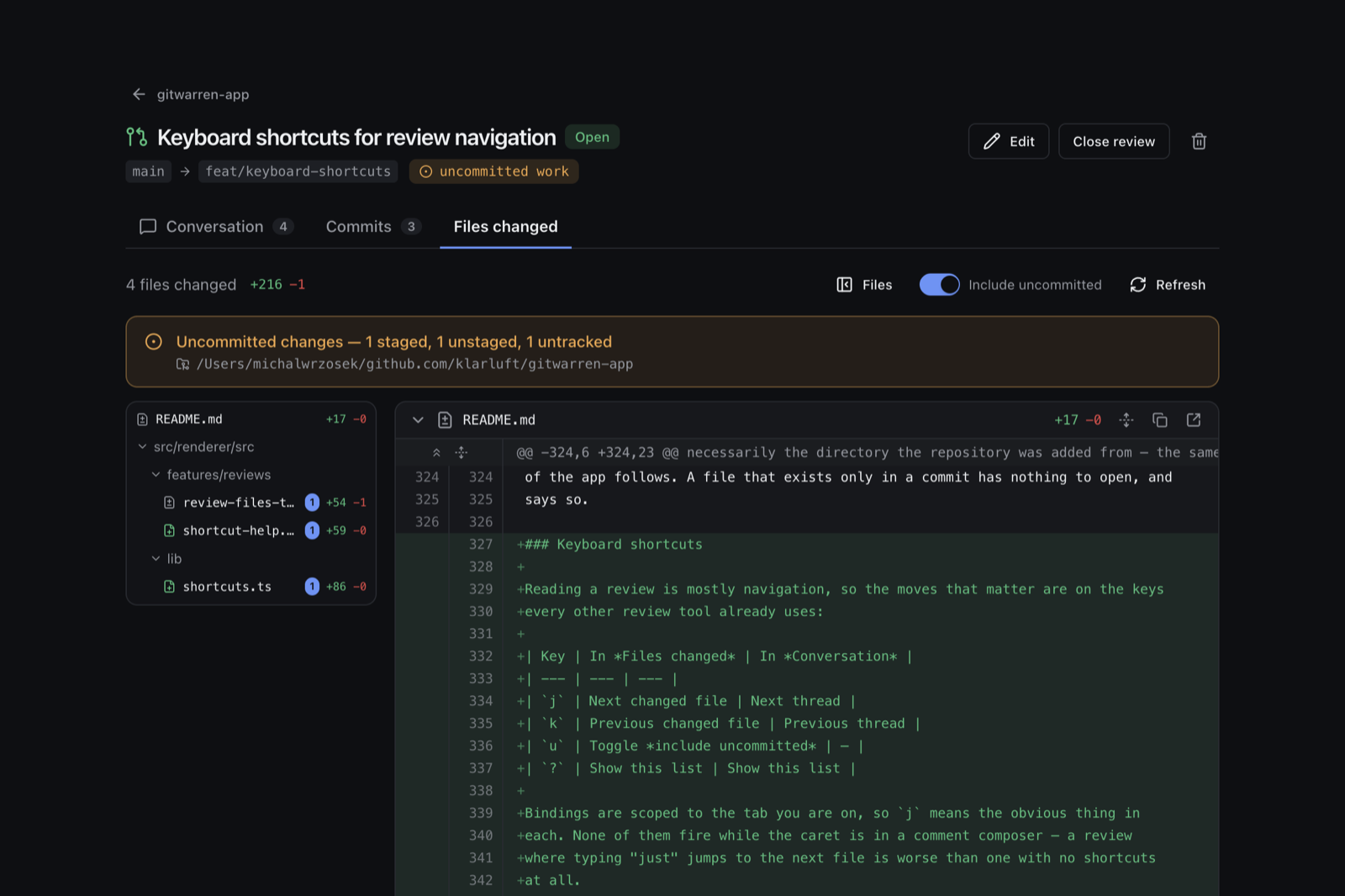
Tell GitWarren which local git repositories you care about, then open reviews
against them — a review is a comparison of two refs, presented the way a pull
request is, with conversation, commits and files changed tabs.
The part that makes it worth having: a review can include work that has not been
committed. If the branch you are reviewing is checked out in a worktree,
GitWarren finds that worktree — wherever it is — and folds its staged, unstaged
and untracked changes into the diff. You can review a change before it is a
commit, which is exactly when review is most useful.
Nothing is cached: every branch name, commit and diff on screen is read from git
at the moment it is shown.
Local AI agents get the same capabilities through an MCP server over stdio.
Contents
- Stack
- Architecture
- Reviews
- Navigating a large diff
- Development setup
- Project layout
- Data storage
- Database migrations
- Agent access (MCP)
- Linking the user back into the app
- Images in comments
- Release process
- Auto-update
- Code signing and notarization
- Social preview
- Known limitations
- Contributing
- License
Stack
| Concern | Choice |
|---|---|
| Shell | Electron 44 + TypeScript |
| UI | React 19, Tailwind CSS v4, shadcn/ui-style components on Base UI (@base-ui/react) |
| Data fetching | SWR (client-side only, no SSR) |
| Storage | SQLite via better-sqlite3, Drizzle ORM, generated migration files |
| Validation | zod, shared between UI forms, IPC and MCP tools |
| Agent interface | @modelcontextprotocol/sdk over stdio |
| Packaging | electron-builder + electron-updater |
Why Electron and not
deno desktop? Silent auto-update has to work on
Windows, and that is the requirementdeno desktopcould not meet. Everything
in the packaging setup below exists to serve it.
Base UI, not Radix. The components in
src/renderer/src/components/ui
follow shadcn/ui conventions (CVA variants,cn()merging, the same prop
shapes) but are built on Base UI primitives. They were written for this
project rather than pulled from the shadcn registry, because the registry's
default output targets Radix.
Architecture
The single most important rule in this codebase:
The UI and the MCP server both call one shared service layer. Neither one
contains any repository or review logic of its own.
   ┌────────────────────────────┐         ┌───────────────────────────────┐
   │  Renderer (Chromium)       │         │  MCP server (its own process) │
   │  React + SWR               │         │  stdio JSON-RPC               │
   │                            │         │                               │
   │  window.gitwarren.*        │         │  repository + review tools    │
   └────────────┬───────────────┘         └───────────────┬───────────────┘
                │ contextBridge                           │
                │ ipcRenderer.invoke                       │ direct import
   ┌────────────▼───────────────┐                         │
   │  Main process              │                         │
   │  src/main/ipc.ts           │                         │
   │  (thin delegation only)    │                         │
   └────────────┬───────────────┘                         │
                │                                          │
                └──────────────┬───────────────────────────┘
                               ▼
              ┌──────────────────────────────────────┐
              │  src/core/services/                  │
              │  repositories.ts · reviews.ts        │
              │  validation · path resolution ·      │
              │  duplicate rules · error semantics   │
              └───────┬───────────────────┬──────────┘
                      ▼                   ▼
            ┌──────────────────┐  ┌──────────────────┐
            │ SQLite (WAL)     │  │ git (subprocess) │
            │ durable facts    │  │ live state only  │
            └──────────────────┘  └──────────────────┘
The two surfaces are not identical in reach: the review service'scommits and diff reads are wired to the UI only, because an agent can read
the repository with git directly. The rule is that neither surface implements
logic of its own, not that every function must be exposed to both.
Three properties fall out of this shape:
No drift between surfaces. src/main/ipc.ts is a set of one-line
delegations, and each MCP tool is a thin wrapper. The service re-parses its own
input with the zod schema from src/shared/schemas.ts rather than trusting the
caller, so a rule added there applies to the UI, the IPC layer and the agent
tools simultaneously. It is not possible for an agent to write something the UI
would have rejected.
Two processes, one database. The GUI and the MCP server are separate OS
processes sharing one SQLite file. Hence WAL journalling and a busy timeout (seesrc/core/db/client.ts). Changes made by an agent show up in the UI on the next
refresh; the window revalidates when it regains focus.
src/core never imports electron. That is what lets the MCP process reuse
it. It also means the application-data directory is computed by the same
platform-aware function in both processes (src/core/paths.ts) rather than one
using Electron's app.getPath('userData') and the other guessing.
Why IPC and not a local HTTP server
The renderer reaches the main process over Electron's context bridge, not overfetch to 127.0.0.1. A local HTTP server would add a port to allocate and
discover, a listening socket other software on the machine could talk to, and a
startup ordering problem — in exchange for nothing this app needs. SWR is used
exactly as it would be with HTTP; only the fetcher differs.
There is no authentication anywhere. This is a local, single-user app; the MCP
transport is a pipe owned by the agent the user launched, and there is no
network surface to authenticate.
Error handling across the boundary
Errors cannot cross ipcRenderer.invoke intact — Electron stringifies them and
the type is lost. Every handler returns an IpcResult<T> envelope instead, and
the preload script rebuilds a real AppError on the renderer side. That is what
lets a form show "This folder is not inside a git repository" underneath the
path input rather than a generic banner. The MCP tools map the same errors toCODE: message tool errors so agents can branch on the code.
Attribution
Comments carry an author; nothing else does. The rule that makes it trustworthy
is that the author is an argument to the service, never a field in the
payload:
commentsService.createThread(input, actor) // actor supplied by the surface
main/ipc.ts passes HUMAN_AUTHOR and nothing else can, because typing into the
app is the only way to reach an IPC channel. mcp/server.ts passes an agent
author built from the connection. No caller can name itself by putting an author
in the request body — there is nowhere in the input schemas to put one. See
Who wrote what.
Reviews
A review is two refs and a title. Everything else on the screen is computed from
git when you look at it.
  reviews table                    read live, never stored
  ┌──────────────────┐             ┌───────────────────────────────┐
  │ repository_id    │             │ merge base of the two refs    │
  │ base_ref  "main" │  ──────►    │ commits in base..head         │
  │ head_ref  "feat" │             │ diff from the merge base      │
  │ title            │             │ which worktree holds head     │
  │ description      │             │ that worktree's dirty state   │
  │ status           │             └───────────────────────────────┘
  └──────────────────┘
Why the refs are stored and the commits are not
Pinning the resolved shas at creation time would be the obvious thing to do, and
it would defeat the feature. A review is meant to follow its branch: you open
one, keep working, and the review shows the work as it stands. That includes work
that is not committed at all, which no sha could ever refer to.
The cost is that a review can stop resolving — someone deletes the branch. That
is treated as a state to render, not an error: the review row survives, the tab
says which ref went missing, and you can repoint it.
Merge-base, like a pull request
The files changed tab shows base...head — what head added since the two
diverged — rather than the literal difference between the endpoints. So commits
that landed on main after you branched do not show up as reversals in your
review. The commits tab lists the same range, base..head.
A ref against itself
The two endpoints may be the same ref. That is not an empty review: the merge
base of a ref with itself is its own tip, so the diff is exactly what the
worktree holds that has not been committed — the review you want when you just
wrote the code and want a second pair of eyes before it becomes a commit. Such a
review has no commits by definition, is titled Uncommitted work on <ref> by
default, and is drawn with one endpoint rather than an arrow between two.
Finding uncommitted work
This is the part that needs care, because the repository row points at one
directory and the work under review is often in another. A branch checked out
in a linked worktree has its uncommitted state there, not in the main checkout.
So every read starts with git worktree list --porcelain, which enumerates the
main checkout and every linked worktree from any of them — it does not matter
which one was added to GitWarren. The worktree whose branch matches the review's
head ref is the one whose git status and working-tree diff get read. If no
worktree has that branch checked out, the review quietly falls back to committed
work only and says so.
Given the head's worktree, the diff is git diff <merge-base> run inside it,
with no second endpoint — which compares the merge base against the working tree,
so committed, staged and unstaged changes all arrive in one patch.
Untracked files are handled separately: they are listed withgit ls-files --others --exclude-standard (so .gitignore still applies) and
rendered as whole-file additions. The tempting alternative — staging them into a
scratch index with GIT_INDEX_FILE — would write blobs into the user's object
database just to draw a screen, and this app only ever reads.
The switch at the top of the tab turns all of that off, leaving the committed
diff. It is view state, not part of the review: whether you want to read the
branch as it sits on disk or as it would arrive if pushed is a per-visit
question.
Reading the diff
git diff output is parsed once, in src/core/diff-parser.ts, into files,
hunks and numbered lines. Two details that a naive line-splitter gets wrong and
this one does not: paths are taken from the ---/+++ and rename from/to
lines rather than the ambiguous diff --git a/x b/x line, and a pure rename
carries no hunks at all yet still has to name both paths. Very large files are
clipped for rendering but still report their true add/delete counts.
Navigating a large diff
Files changed carries three things a long diff needs, all of them optional and
none of them costing anything until used:
- A file tree down the left, folded so a lone directory collapses into its
parent (renderer/srcon one row). Clicking a file scrolls to it, and the row
for whatever is nearest the top of the page stays highlighted as you scroll.
The toggle beside it is remembered across restarts. - Unfolding the lines between the hunks, the way GitHub does.
git diff
prints three lines of context, so most of a file is not on screen; the
expanders in the gutter reveal twenty lines at a time or the whole run, and
Expand all lines in the file header opens every gap at once. Unfolded
lines are ordinary context rows — a comment can be left on one exactly as on
any other line.
A @@ header announces a break in the file, so it is drawn only while there is
still a break to announce. A folded gap carries the header on its own expander
row, the way GitHub puts the unfold controls there; unfold that gap and the
header goes with it, because the code now runs continuously into the hunk and a
divider across continuous code is a false statement about the file. Expand
everything and the file reads top to bottom with no markers in it at all.
The same rule removes the header from the top of a hunk that starts at line 1,
which is every new file and every deleted one: there is nothing above it to be
separated from. What keeps a header is a real break with no expander to mark it
— which happens in the files the diff cannot unfold at all (binary, clipped),
where it is the only thing saying two lines are not adjacent.continuesFromAbove in shared/diff-gaps.ts decides this, using the same
off-by-one convention for empty ranges as the gap arithmetic beside it.
- Copy path and open in your editor, per file.
- Back to top, once you are a screen or so down. It is app-wide rather than
a diff feature, but the diff is where the scrollbar gets small enough to
matter. Two details: the whole app scrolls inside<main>rather than the
window, so the button acts on that element (window.scrollTowould do
nothing at all here); and the trip is animated only when it is short enough
to follow — smooth-scrolling the length of a large diff takes seconds and
reads as the app hanging, so past five thousand pixels it simply jumps.
Every icon-only control carries a real tooltip rather than a title attribute
(components/ui/tooltip.tsx). The browser decides when to show a title —
usually a second or more after the pointer stops — it cannot be styled, and it
never appears for keyboard users at all; a button whose whole meaning is its
label cannot afford any of that. One TooltipProvider at the root groups them,
so the first tooltip waits and moving along a row of buttons then shows each
immediately. title is still used for supplementary text: the full path
behind a truncated one, the meaning of a badge.
The unfolding costs one read of the whole file, taken the first time the
reviewer asks and reused for every later expansion of the same file. It is
deliberately not a line-range API: a range per click would be a git process per
click, and reading the file once is also the only way to know where it ends,
which no hunk header can say. The read follows the "include uncommitted" switch,
because context taken from the other version of the file would not line up with
the hunks it sits between. src/shared/diff-gaps.ts holds the arithmetic that
decides where the hidden runs are and which line number each unfolded line gets;
it is pure, and unit-tested against the shapes that get this wrong — a diff that
does not start at line 1, and git's off-by-one convention for an empty range.
Marking a file reviewed
Each file header carries a Reviewed checkbox, and v ticks off whichever
file you are on. A ticked file folds away, the file tree marks it and dims it,
and the header counts how many of them are done — so a long diff shrinks to what
is still unread as you work through it.
The mark has to stop being true when the file changes, or the list would claim
someone had read code that did not exist when they looked at it. So what is
stored is not a flag but a digest of the diff that was on screen at the time
(shared/diff-digest.ts, a cyrb53 fingerprint of the path, the change status
and every line of every hunk). A mark counts only while the file still hashes to
the same value; when it does not, the tick clears itself and the file is
labelled Changed since reviewed — which is more useful than silently
unticking it, because it points at the one file that moved after being read.
Two consequences fall out of that rather than needing code of their own. Flipping
include uncommitted is a different diff, so a file read in one setting is not
ticked in the other. And reverting a change restores the mark, because the file
hashes the same way it did before.
The comparison runs in the renderer, against the diff being rendered, and the
main process only stores digests: the "include uncommitted" switch means one
review has two diffs at once, and a mark resolved against the one you are not
looking at would be answering a question nobody asked. The rows live inreviewed_files, keyed by review and path, and go with the review when it is
deleted. There is no MCP tool for them — an agent claiming a human has read a
file would make the only honest signal on the screen worthless.
Opening a file in an editor
system.editors() probes for VS Code, Cursor, Windsurf, Zed, Sublime Text and
the JetBrains launcher, once per run: the application bundle in the usual
locations, and the command on PATH. Whatever is found is offered in a picker
next to the diff, and the choice is kept in localStorage — a preference of the
person, not a fact about the review, and this app has no settings screen to put
it on.
Opening prefers the URL scheme the application registered for itself
(vscode://file/…:12), which carries the line number and works whether or not
the user ever installed the shell command; the CLI is the fallback, and the
platform's default handler for the file is the fallback to that.
Set GITWARREN_EDITOR to override, either with an id from the list above or
with a command template:
GITWARREN_EDITOR='emacsclient +{line} {file}'
The file is resolved inside the worktree that holds the head branch, not
necessarily the directory the repository was added from — the same rule the rest
of the app follows. A file that exists only in a commit has nothing to open, and
says so.
Development setup
Requirements: the Node in .nvmrc (24.20.0, which ships npm
11.19) and git on your PATH (GitWarren shells out to your own git rather
than bundling one). With nvm or fnm the version is picked up automatically
on cd; engines in package.json sets the floor at Node 24.20 / npm 11.10
and .npmrc sets engine-strict, so an older toolchain fails loudly instead
of quietly writing a lockfile CI cannot install.
npm install          # also rebuilds native deps for Electron
npm run dev          # start the app with hot reload
Other scripts:
| Command | Does |
|---|---|
npm run dev |
Run the app in development with HMR |
npm run build |
Typecheck, then build main / preload / renderer / MCP |
npm test |
Integration tests against a real SQLite file and real git |
npm run typecheck |
tsc --noEmit for both the Node and web projects |
npm run lint |
ESLint (type-aware) |
npm run db:generate |
Regenerate migrations after editing the Drizzle schema |
npm run mcp:dev |
Run the MCP server from source against your dev database |
npm run package |
Build installers for the current platform, no publish |
npm run release |
Build and publish to GitHub Releases |
The tests create throwaway git repositories in a temp directory and point the
app at a temp data directory via GITWARREN_DATA_DIR, so they never touch your
real database.
Project layout
src/
├── shared/            Imported by every process. No Node-only APIs.
│   ├── schemas.ts       zod schemas — the source of truth for validation
│   ├── git.ts           read-only git shapes (types, not schemas — see below)
│   ├── actors.ts        who wrote a comment; Human vs "<tool> (AI)"
│   ├── comment-anchors.ts  re-finding a comment's lines after the branch moves
│   ├── diff-gaps.ts     where a diff's hidden lines are, for unfolding them
│   ├── validation.ts    one zod-error → AppError conversion, used everywhere
│   ├── errors.ts        AppError + the error-code vocabulary
│   ├── routes.ts        the hash grammar, as data — parsed by three processes
│   ├── deep-link.ts     gitwarren:// URL ⇄ Route, the hostile-input boundary
│   └── api.ts           IPC channel names and the bridge's type
│
├── core/              The shared service layer. Never imports electron.
│   ├── paths.ts         per-platform data directory (+ env override)
│   ├── gui-runtime.ts   the running GUI's loopback port, for other processes
│   ├── git-exec.ts      the one place `git` is spawned
│   ├── git.ts           live repository state; root resolution
│   ├── git-compare.ts   worktrees, refs, commits, diffs, dirty state
│   ├── diff-parser.ts   unified diff → files/hunks/lines
│   ├── attachment-ingest.ts  rewrite a body's local image paths to tokens
│   ├── db/              drizzle schema, client (WAL), migration resolution
│   └── services/        repositories.ts, reviews.ts, comments.ts,
│                        attachments.ts — the one implementation of each
│                        operation
│
├── main/              Electron main process
│   ├── index.ts         window lifecycle
│   ├── ipc.ts           thin delegations to core/services
│   ├── attachment-protocol.ts  serves gitwarren:// attachment images
│   ├── deep-link.ts     receives gitwarren:// URLs from the OS
│   ├── link-server.ts   the loopback page holding the "Open GitWarren" button
│   ├── updater.ts       electron-updater wiring
│   ├── editors.ts       finds the user's code editor and opens a file in it
│   └── mcp-launch.ts    computes this install's MCP launch command
│
├── preload/           The only bridge into the renderer
├── mcp/               stdio MCP server
│   ├── server.ts        tool definitions
│   ├── gui-link.ts      the `guiUrl` on every review and comment payload
│   └── identity.ts      naming an agent from its MCP handshake
└── renderer/          React app (no Node access)
    └── src/
        ├── assets/          logo.png, inlined as a data: URI by the CSP
        ├── components/      markdown.tsx + ui/ (shadcn-style, on Base UI)
        ├── features/        repositories/, reviews/, comments/, agent/
        └── lib/             api access, error helpers, hash router
shared/schemas.ts holds zod schemas; shared/git.ts holds plain types. The
rule dividing them: zod is for values that cross a trust boundary — anything
a caller supplies that the service must not believe. Git output is produced by
reading the disk and flows one way out to the UI, so a runtime schema for it
would be ceremony with no payoff.
Outside src/, gitwarren-logo.png in the repository root is the 1710px master
of the logo. The two files that are actually used are cut from it and should be
recut from it rather than from each other:
| File | Size | Used for |
|---|---|---|
build/icon.png |
1024px, artwork inset to 860px | electron-builder renders the .icns, .ico and Linux icons from it; main/index.ts also hands it to BrowserWindow so Linux windows have an icon at all. The inset is the padding the macOS icon grid expects — without it the Dock icon sits noticeably larger than its neighbours. |
src/renderer/src/assets/logo.png |
128px, no padding | The app header, and the image at the top of this README. |
Data storage
One SQLite file in the OS application-data directory:
| Platform | Location |
|---|---|
| macOS | ~/Library/Application Support/GitWarren/gitwarren.db |
| Windows | %APPDATA%\GitWarren\gitwarren.db |
| Linux | ~/.config/GitWarren/gitwarren.db (or $XDG_CONFIG_HOME) |
Set GITWARREN_DATA_DIR to override it — used by the tests, and handy for
trying things against a scratch database.
Alongside the database, in the same directory, is attachments/ — images
copied in from comments, named by the sha256 of their contents and sharded a
directory deep (attachments/ab/abc….png). It is the only other thing GitWarren
writes.
Connection settings, all in src/core/db/client.ts:
journal_mode = WAL— the GUI can read while the MCP server writesbusy_timeout = 5000— wait out a brief lock instead of failingsynchronous = NORMAL— the recommended durability level under WALforeign_keys = ON
What is and is not stored
Five tables.
repositories — id, path (canonical repository root, UNIQUE), name,createdAt, updatedAt.
reviews — id, repositoryId, title, description, baseRef,headRef, status, createdAt, updatedAt, closedAt. Deleting a repository
cascades to its reviews; they are meaningless without it.
comment_threads — id, reviewId, then the anchor: filePath, side,line, anchorText, anchorSha. All five are null together for a review-level
thread and set together for a line comment. Plus resolvedAt, resolvedBy,createdAt, updatedAt. Cascades from reviews.
comments — id, threadId, authorKind, authorName, authorLabel,authorSession, body, createdAt, updatedAt. Cascades fromcomment_threads.
Authorship is denormalised onto every comment row rather than pointing at a
users table, and there will not be a users table. An author here is not an
account but a description of where a message came from — the person at the
keyboard, or a named agent process that has since exited. Copying the label onto
the row keeps that description true forever, which a foreign key to a mutable
identity would not.
attachments — sha (PRIMARY KEY), ext, mimeType, byteSize, width,height, originalName, createdAt. See Images in
comments. Note what it does not have: a foreign key to
the comment it belongs to. The body text is the only record of which images a
comment uses, and unreferenced rows are collected by a sweep at startup — so
deleting an image from a comment is just deleting it from the text.
Not stored: branch, existence, resolved commits, diffs, or anything else git
owns. Those are read on demand every time they are displayed. Caching them would
mean showing a branch name that stopped being true the moment you switched
branches in a terminal — and for reviews it would break the feature outright,
since a review is supposed to track uncommitted work that no sha can name.
The duplicate rule
When you add a path, the service runs git rev-parse --show-toplevel on it and
stores the repository root, then canonicalises that withfs.realpath.native — which resolves symlinks and reports true on-disk casing
on macOS and Windows. So /work/app, /work/app/src/lib and /WORK/APP all
collapse to one row, backed by a UNIQUE index as the final guard.
Database migrations
Migrations are generated files, committed to the repo, and applied
automatically the first time either process opens the database — so the MCP
server is equally safe to start first.
# after editing src/core/db/schema.ts
npm run db:generate
Making this work in the packaged app is the part that usually breaks.
Drizzle's migrator reads .sql files from a folder at runtime, but the app's
source lives inside app.asar. So drizzle/ is copied to the app's resources
directory via extraResources, and src/core/db/migrations.ts resolves it in
this order:
GITWARREN_MIGRATIONS_DIRif setprocess.resourcesPath/drizzle— the packaged location- walking up from the working directory — the dev location
Each candidate is validated by checking for meta/_journal.json, so the dev
fallback cannot accidentally match in a packaged app. This path is verified: the
packaged MCP server runs migrations correctly when started from a directory with
no source tree anywhere above it.
Agent access (MCP)
The MCP server exposes seventeen tools, all backed by the same services the UI
uses:
| Tool | Notes |
|---|---|
list_repositories |
Includes live git state. Read-only. |
get_repository |
By id. Read-only. |
add_repository |
path may be any directory inside the working tree. name defaults to the folder name. |
update_repository |
Rename, and/or repoint at a moved working copy. |
remove_repository |
Stops tracking only — never touches the working copy. |
list_reviews |
Filterable by repositoryId and status. Read-only. |
get_review |
By id, with its repository attached. Read-only. |
create_review |
Both refs must exist and share history. title defaults to "<head> into <base>". |
update_review |
Title, description, endpoints, or open/closed. |
remove_review |
Deletes the review record only. |
agent_identity |
How this session's comments will be attributed. Optionally sets a session label. |
list_review_comments |
Every thread, with messages, authors, resolved attachments, and where each one lands in the current diff. Read-only. |
add_review_comment |
Opens a thread. Omit filePath/line for a review-level comment. Local image paths in the body are copied in and rewritten. |
reply_to_review_comment |
Adds a message to an existing thread. Same image handling as above. |
resolve_review_comment |
Marks a thread settled, or reopens it. |
update_review_comment |
Edits one message. Own comments only. |
delete_review_comment |
Deletes one message; the thread goes too if it was the last. |
Every result above that carries a review or a comment also carries a guiUrl
that opens it in the app — see
Linking the user back into the app.
There is deliberately no get_review_diff or list_review_commits, even
though the service layer produces both for the UI. An agent pointed at these
repositories can run git log and git diff itself, against the real working
tree, with whatever options the task needs — a tool returning a second-hand copy
would be a lossier version of data the agent already has. What GitWarren
uniquely holds is the discussion around the code, which is what the comment
tools carry.
Failures come back as tool errors prefixed with the code
(NOT_A_GIT_REPOSITORY, DUPLICATE_REPOSITORY, PATH_NOT_FOUND, NOT_FOUND,INVALID_INPUT, FORBIDDEN, GIT_UNAVAILABLE), so an agent can react to the
kind of failure rather than parsing prose.
Linking the user back into the app
Every payload that carries a review or a comment also carries a guiUrl —
an address that opens the app on exactly that review, and on the commented line
where there is one. It is there so an agent can end its turn with a link instead
of "I've left three comments on review 4, have a look". When GitWarren is not
running it is null, and the tool descriptions say what that means, because
an agent acts on a documented null far more reliably than on an absent field.
The link is a chain of three hops, and each one is load-bearing:
http://127.0.0.1:52413/#review/4/files/src%2Fapp.ts/head/42   ← what the agent prints
        │  terminal linkifies it, and clicking opens the browser
        ▼
a one-page server inside the GUI, serving an "Open GitWarren" button
        │  the user clicks it
        ▼
gitwarren://review/4/files/src%2Fapp.ts/head/42                ← OS protocol handler
Why not hand out the gitwarren:// URL directly? Terminals linkify http
and almost none of them linkify a custom scheme, so the agent would be printing
text the user has to copy by hand.
Why a button rather than a redirect? Two reasons. Browsers refuse scripted
navigation to a custom scheme — but more importantly, the click is what makes
the window actually come forward. Windows grants foreground rights only to the
process that is foreground or that launched the one asking, so an Electron app
woken by a background HTTP request cannot raise itself: win.focus() flashes the
taskbar and stops there (electron#2867).
GNOME's Mutter demotes self-requested activation in much the same way. A protocol
launch from the browser the user just clicked in inherits the right on all three
platforms. So the third hop is not an inefficiency to optimise away — it is the
only hop that works.
A consequence worth keeping: the loopback server never takes an action. It
answers every request with the same static page and has no other endpoint. That
is a property to defend rather than an accident of it being small — anything on
loopback is reachable by every process on the machine and by whatever web page
the user has open next, so an endpoint here that mutated state, read a
repository or drove IPC would be a capability handed out to the whole world. It
validates the Host header, and the route it is linking to never even reaches
it: that rides in the URL fragment, which browsers do not send.
The port is chosen by the OS (listen(0) on 127.0.0.1, never 0.0.0.0) and
written to gui-runtime.json in the data directory alongside the GUI's pid, so
the MCP server — a separate process — can find it. Readers treat that file as a
hint and never as a fact: a crash leaves it behind, so the pid is checked withprocess.kill(pid, 0) before the port is believed, and it is re-read on every
call rather than cached. An MCP server routinely outlives several GUI launches.
The incoming URL is parsed to a Route before anything acts on it, never
forwarded as a string, using the same grammar the hash router uses
(shared/routes.ts). Comment bodies are agent-writable, so this parser will
one day receive gitwarren://review/../../../../etc/passwd; anything it does not
recognise degrades to the home screen. It is the same whitelist-not-filter
reasoning as main/attachment-protocol.ts. Note that gitwarren: is registered
twice over, for two unrelated mechanisms — an OS protocol handler and Chromium'sprotocol.handle for attachment images. They coexist because they answer to
different hosts: review and attachment, each ignoring the other's.
Who wrote what
Comments from the UI are Human. Comments over MCP are <tool> (AI). The
question that shapes the design is where <tool> comes from — and the answer is
not "the agent tells us".
Asking an agent to name itself does not survive contact with reality: the same
Claude Code install would introduce itself as Claude, claude-code, Claude
Code and Claude Opus across four sessions, and a thread with four names for
one participant is worse than a thread with none.
So the name is taken from the MCP handshake instead. Every client sendsclientInfo: { name, version } in initialize, before any tool runs, and the
SDK keeps it (Server.getClientVersion()). That value is chosen by the tool
rather than by the model driving it, which is exactly the property needed:
initialize { clientInfo: { name: "claude-code" } }   →   "Claude Code (AI)"
initialize { clientInfo: { name: "codex-cli"   } }   →   "Codex (AI)"
initialize { clientInfo: { name: "opencode"    } }   →   "opencode (AI)"
mcp/identity.ts maps the known clients to names their users would recognise.
An unknown client is not lumped in with the rest — it is title-cased and used as
is (some-new-agent → Some New Agent), which still identifies that tool
consistently across all of its own sessions. A client that sends no clientInfo
at all becomes plain AI, so the one guarantee the UI makes — a machine-written
comment is always marked as one — holds even there.
Telling two sessions of the same tool apart. stdio gives one server process
per client session, so the process is the session: an 8-character id is minted at
startup and stamped on everything that session writes. That keeps two concurrent
Claude Code sessions distinct in the database with no cooperation from either.
A session id is not a name, though, so an agent may also set a short label for
itself — auth-refactor, perf-pass — which is remembered for the rest of the
session and renders as Claude Code · auth-refactor (AI). This is the one
self-reported piece, and it is fine that it is: it is a nickname for a session,
not a claim about identity, and the tool name underneath it is still the
handshake's. It can also be pinned per-project in the server config withGITWARREN_AGENT_LABEL.
Editing. The person at the keyboard may edit or delete anything — it is their
app. An agent is held to its own tool's messages. That asymmetry is not security
(there is no attacker in this model); it is the difference between an agent
fixing its own typo and an agent quietly rewriting someone else's review.
Comments on code that keeps moving
A review follows its refs rather than pinning a sha, so the diff a comment was
written against is not the diff the next visitor sees. GitHub avoids this by
pinning each comment to a commit; GitWarren cannot, because following the branch
is the point of the app.
Instead, each line comment stores the text of the line as well as its number,
and the anchor is re-derived on every read (shared/comment-anchors.ts). The
rule is to trust the text over the number — a line number is a position in a
document that keeps being rewritten:
| State | Meaning | Where it shows |
|---|---|---|
anchored |
The stored line still holds the text it was commented on. | Inline, at that line. |
moved |
The text is now at a different line. | Inline, at its new line, badged moved. |
outdated |
The text is not in this diff at all. | Listed above the file, badged outdated. |
outdated covers both "the code was rewritten under it" and "the comment was
left on a line the diff never showed" — an agent commenting on an unchanged part
of a file, say. Both mean the same thing to a reader, so both are kept and shown
out of line rather than dropped. Where several identical lines match (a lone }),
the nearest to the original position wins; a near miss inside the right file
beats losing the comment.
The same function runs in both surfaces. The renderer anchors against the diff
already on screen — which matters, because the include uncommitted switch
produces a genuinely different diff with different line numbers — andlist_review_comments anchors against a diff it reads itself, so an agent and
the screen never disagree about where a comment sits.
Comments on a block of lines
Press the + in the gutter and drag down it, or shift-click a second line, to
comment on several lines at once. Agents get the same thing by passingstartLine to add_review_comment.
A range is stored as startLine plus line, where line is the last line
— and that asymmetry is the design. Only one end carries an anchor text, and the
rest of the range follows it by keeping the span the same length. Re-finding
both ends independently would let a range quietly grow, shrink or invert when
one of them matched somewhere unhelpful, and a comment that claims to cover code
it was never about is worse than one sitting a line off. A range of one line is
normalised to no range at all, so nothing downstream has to compare the two
numbers to find out whether a comment is about a block.
The diff marks every line a range covers with a bar in the gutter, and the
thread itself renders under the last line — where the eye already is after
dragging down to it.
Getting from the conversation back to the code
Clicking a thread's file header in Conversation opens Files changed
scrolled to that line, with the line marked for a couple of seconds. The target
goes in the hash (#/reviews/3/files/src%2Fapp.ts/head/42), so it is a location
like any other: it survives a reload and the back button works.
The line in the URL is the resolved one, not the stored one — the
conversation tab has already anchored the thread against the diff it is
displaying, so a comment that has moved still lands on the code it is about. A
thread whose line is gone from the diff falls back to scrolling to the file's
card, which is where such a thread is listed.
Images in comments
Comment bodies and review descriptions are markdown — GitHub-flavoured, so
tables, task lists, strikethrough and autolinks all work. The composer has the
usual Write/Preview tabs and a formatting toolbar, and the preview renders
through the same component the posted comment does, so it cannot drift.
Two things are deliberately not rendered. Raw HTML is not, which is why
there is no sanitiser anywhere in this app — react-markdown does not render
embedded HTML unless asked, so there is nothing to misconfigure. And remote
images are not: an https:// image renders as a link, and the renderer's CSP
has no remote img-src. Both exist because a comment here may have been written
by an agent that just read untrusted content out of the repository under review,
and it is stored and replayed into the window every time someone opens it.
Images that are rendered come from the app's own store:
body 
└──────────────┬──────────────┘
disk <dataDir>/attachments/ab/abc….png │ opaque token
renderer <img src="gitwarren://…"> ─────────────┘ custom protocol
agent attachments[].path → /Users/…/attachments/ab/abc….png
Humans paste, drop or pick an image; it is copied in and the markdown is
inserted at the cursor. Agents write a file to disk and reference it as an
ordinary markdown image — the path is rewritten to a token when the comment is
saved. They cannot upload: base64 in a tool call means emitting over half a
million characters for a 400KB screenshot, so a path is the only workable
currency. In the other direction, every comment carries a resolved attachments
array whose path is a real file, which an agent reads with the tools it
already has. That is why there is no get_attachment tool — a path is strictly
more reliable than an MCP ImageContent block, whose delivery varies by client.
The bytes are copied rather than referenced because a discussion has to
outlive the file it is about: /tmp gets purged, test-results/ is wiped at
the start of every Playwright run, and a pasted screenshot has no path at all.
It is the same reason anchorSnapshot exists. Files are content-addressed by
sha256, which makes ingest idempotent — necessary, since the GUI and the MCP
server are separate processes that can ingest the same image at once.
Two details are load-bearing and easy to get wrong. The rewrite parses the
markdown rather than pattern-matching it, so an agent's example image inside a
fenced code block is not silently ingested. And it splices the original
string by node offset rather than re-serialising the parsed tree, so a body
comes back byte-identical apart from its URLs — a round trip through mdast would
quietly renormalise an author's bullet markers and fenced code.
A path that does not resolve is left in the text as written and the comment
saves anyway, on the same principle the composer already applies to humans: the
comment is worth more than the link.
Pointing an agent at it
The app shows you the exact configuration for your install — open the
Agent access panel at the bottom of the window and copy it. The paths depend
on where the app was installed, so prefer the panel over the templates below.
The server is launched using the app's own Electron binary in Node mode. That is
deliberate: better-sqlite3 is a native addon that must be loaded by a runtime
whose ABI it matches, and it has to resolve out of the app's unpackednode_modules. Using the bundled binary satisfies both, and means no Node
installation is required.
macOS:
{
  "mcpServers": {
    "gitwarren": {
      "command": "/Applications/GitWarren.app/Contents/MacOS/GitWarren",
      "args": [
        "/Applications/GitWarren.app/Contents/Resources/app.asar.unpacked/out/mcp/server.cjs"
      ],
      "env": { "ELECTRON_RUN_AS_NODE": "1" }
    }
  }
}
Windows (per-user install):
{
  "mcpServers": {
    "gitwarren": {
      "command": "%LOCALAPPDATA%\\Programs\\GitWarren\\GitWarren.exe",
      "args": [
        "%LOCALAPPDATA%\\Programs\\GitWarren\\resources\\app.asar.unpacked\\out\\mcp\\server.cjs"
      ],
      "env": { "ELECTRON_RUN_AS_NODE": "1" }
    }
  }
}
Linux — see Known limitations; an AppImage needs to be
extracted once first.
From a source checkout, npm run mcp:dev runs the same server against your dev
database.
The app does not need to be running for the MCP server to work — both open the
same database independently.
Release process
Artifacts and the update manifest are published to GitHub Releases
(klarluft/gitwarren-app, configured in electron-builder.yml).
# 1. Bump the version. electron-builder reads it from package.json,
#    and it becomes the version electron-updater compares against.
npm version patch          # or minor / major — creates a commit and a tag

# 2. Verify before shipping.
npm run lint && npm test

# 3. Build and publish.
export GH_TOKEN=<a token with `repo` scope>
npm run release            # electron-builder --publish always

# 4. Push the tag.
git push --follow-tags
npm run release runs the typecheck, builds all four bundles, packages the
installers, and uploads them plus the manifests to a GitHub release for the
current tag. The release is created as a draft — publish it in the GitHub UI
when you are ready, and that is the moment clients begin to see the update.
Publishing also fans out to two other places, both on the release: published
event: deploy-site.yml rebuilds gitwarren.com so its download buttons point at
the new assets, and homebrew-tap.yml asks
klarluft/homebrew-tap to move its
cask to the new version and checksums. The tap needs a HOMEBREW_TAP_TOKEN
secret for that nudge to be immediate; without one it still catches the
release on its own schedule within a few hours.
To build without publishing (for local testing):
npm run package        # installers into release/<version>/
npm run package:dir    # unpacked app only, much faster
What gets produced
| Platform | Artifacts |
|---|---|
| Windows | GitWarren-<v>-x64.exe, -arm64.exe (NSIS), .blockmap each, latest.yml |
| macOS | -arm64.dmg, -x64.dmg, -arm64.zip, -x64.zip, .blockmap each, latest-mac.yml |
| Linux | -x64.AppImage, -arm64.AppImage, latest-linux.yml |
The .blockmap files are what make updates differential: electron-updater
compares block hashes with the installed version and downloads only the changed
ranges.
The macOS zip is required — electron-updater reads the zip, not the dmg.
Dropping that target still produces a working installer but silently breaks
auto-update.
Cross-building for every platform from one machine is not reliable (Windows
code signing and macOS notarization both need their own host). Run the release
on each platform, or in a CI matrix, and publish to the same tag.
Auto-update
Behaviour: check on launch and every 6 hours, download in the background without
asking, apply on the next restart. The only UI is a quiet banner once a version
is staged, offering an immediate restart. Doing nothing is also fine — it
applies on the next quit either way. A failed check never interrupts the
session; the app keeps running on the current version and retries later.
src/main/updater.ts sets autoDownload and autoInstallOnAppQuit explicitly.
Both are library defaults, but they are the requirement, so they should not be
silently inherited.
Auto-update is inert when app.isPackaged is false, so development builds don't
try to reach GitHub on every launch.
Why these targets
| Platform | Target | Silent update |
|---|---|---|
| Windows | NSIS, per-user (perMachine: false, oneClick: true) |
✅ |
| macOS | zip (feed) + dmg (distribution) | ✅ |
| Linux | AppImage | ✅ |
| Linux | deb / rpm | ❌ — needs apt/dnf and a sudo prompt |
The Windows install is per-user, which is what keeps updates free of UAC
prompts. A per-machine install writes to Program Files and every update would
raise an elevation dialog — which would defeat "silent" entirely.
deleteAppDataOnUninstall is off, so uninstalling does not throw away the
user's repository list.
Code signing and notarization
Not required for local development builds. Unsigned builds run fine on your
own machine; electron-builder logs skipped macOS application code signing and
carries on.
They are required before distributing to anyone else — and specifically,
auto-update on macOS will not work unsigned, because Squirrel.Mac validates
the code signature of the downloaded build before swapping it in.
The hardened runtime is already enabled, with entitlements inbuild/entitlements.mac.plist covering what this app actually needs: JIT for
V8, library validation disabled (the app spawns git, and agents spawn the
bundled MCP server), and user-selected file access for repositories on any
volume. notarize: true is set in electron-builder.yml, which stays inert
until both a signature and Apple credentials exist — see How the switches
interact below.
macOS: one-time setup
Everything here happens once per developer account, not once per release. It
needs a paid Apple Developer Program membership ($99/year).
1. Create the Developer ID Application certificate.
This is the certificate for apps distributed outside the Mac App Store. Note
that only the Account Holder can create one under an organization
membership — a plain Admin cannot, and the certificate type simply will not
appear in the list for them.
Do this through the developer portal rather than through Xcode. Xcode's
Settings → Accounts → Manage Certificates is fewer clicks, but it never asks
which sub-CA to issue under and has been observed picking the legacy one — see
Check which sub-CA issued it below, which is worth reading before you start
rather than after.
- Open Keychain Access → Certificate Assistant → Request a Certificate From
a Certificate Authority. (This works with only the Command Line Tools
installed; Xcode is not needed for any of it.) - Enter your Apple ID email and a common name, leave CA Email Address empty,
choose Saved to disk and tick Let me specify key pair information. - Key size 2048 bits, algorithm RSA. Save the
.certSigningRequest. - Go to developer.apple.com/account/resources/certificates,
press +, choose Developer ID Application, and upload the request.
Pick the G2 Sub-CA profile type when asked. - Download the resulting
.cerand double-click it to install into the login
keychain.
The private key never leaves your Mac — Apple only ever sees the request. That
also means Apple cannot re-issue this key if you lose it, so export the.p12 described under CI secrets below and keep a copy somewhere durable. An
account is limited to five Developer ID Application certificates, and each is
valid for five years when issued under the current sub-CA.
Confirm the result:
security find-identity -v -p codesigning
# 1) ABC123... "Developer ID Application: Klarluft B.V. (XXXXXXXXXX)"
#    1 valid identities found
The parenthesised code is the Team ID. It is also on
developer.apple.com/account under
Membership details.
Check which sub-CA issued it. Apple's original Developer ID Certification
Authority intermediate expires on 1 February 2027, and a leaf certificate
cannot outlive its issuer — so a certificate issued under it is silently
truncated to whatever remains of that date instead of running the full five
years. The G2 Sub-CA exists to replace it:
security find-certificate -c "Developer ID Application" -p |
  openssl x509 -noout -issuer -dates
An expiry of exactly Feb 1 22:12:15 2027 GMT means the legacy sub-CA issued
it, whatever the portal appeared to offer. Create a fresh one under G2
Sub-CA and retire the short one as described below. Note that an account is
limited to five Developer ID Application certificates and a retired one still
occupies a slot until it expires, so it is worth getting this right rather than
iterating.
If the new certificate shows up as invalid, the intermediate is missing.
macOS ships the original Developer ID intermediate but not necessarily the G2
one, and a certificate whose chain cannot be completed is not counted as a
valid identity — so security find-identity -v stays silent about it whilesecurity find-identity (no -v) lists it happily. That difference is the
diagnosis:
security find-identity -p codesigning        # lists it
security find-identity -v -p codesigning     # does not
Install the missing link from Apple's certificate authority
page:
curl -O https://www.apple.com/certificateauthority/DeveloperIDG2CA.cer
security add-certificates -k ~/Library/Keychains/login.keychain-db DeveloperIDG2CA.cer
It grants no new trust — the intermediate is itself issued by Apple Root CA,
which macOS already trusts. It only supplies the link needed to build the chain.
Do not leave both certificates in the keychain. Their common names are
identical, so codesign cannot tell them apart and refuses to guess:
Developer ID Application: ... : ambiguous (matches "Developer ID Application: ..."
and "Developer ID Application: ..." in .../login.keychain-db)
That is a build failure, not a silent wrong choice — and pinningmac.identity to a SHA-1 hash does not avoid it, because electron-builder
resolves the hash and then passes codesign the name. Once the replacement
is confirmed working, delete the old certificate and its private key:
security delete-identity -Z <sha-1 of the old certificate> ~/Library/Keychains/login.keychain-db
Retiring is all you can do — a Developer ID certificate cannot be revoked
from the portal. App Store certificates have a Revoke button; Developer ID
certificates deliberately do not, because revocation invalidates every app ever
signed with that certificate, timestamps included. It is reserved for a
compromised private key and has to be arranged with Apple Product Security by
email. Deleting the key you no longer want is not that situation: with the key
gone the certificate cannot sign anything, and it simply expires on schedule.
2. Create an app-specific password for notarization.
Notarization uploads the build to Apple and cannot use your ordinary password
under two-factor auth. At appleid.apple.com →
Sign-In and Security → App-Specific Passwords, generate one and keep thexxxx-xxxx-xxxx-xxxx string.
An App Store Connect API key works instead, via APPLE_API_KEY,APPLE_API_KEY_ID and APPLE_API_ISSUER. It is the better choice for a shared
CI account, because it is scoped and revocable without touching a person's
Apple ID; the app-specific password is fewer steps for a single developer.
Building a signed release locally
electron-builder finds the certificate in the login keychain on its own.
Notarization needs the credentials in the environment:
export APPLE_ID="[email protected]"
export APPLE_APP_SPECIFIC_PASSWORD="xxxx-xxxx-xxxx-xxxx"
export APPLE_TEAM_ID="XXXXXXXXXX"

npm run package
Storing the password in the keychain instead keeps it out of the shell history
and out of a dotfile:
xcrun notarytool store-credentials gitwarren \
  --apple-id "[email protected]" \
  --team-id "XXXXXXXXXX" \
  --password "xxxx-xxxx-xxxx-xxxx"

export APPLE_KEYCHAIN_PROFILE=gitwarren
npm run package
Expect the run to take noticeably longer than an unsigned one. Apple's
notarization service usually answers within a few minutes, but it queues, and
each architecture is submitted separately. The log lines to look for aresigning file=release/.../GitWarren.app identityName=Developer ID Application: ..., then notarization successful. Stapling happens
automatically after that, so the finished app validates on the user's machine
without a network round-trip.
Verifying a signed build
Worth doing once, on the first signed release, rather than discovering a
problem from a user:
APP="release/0.1.0/mac-arm64/GitWarren.app"

# The signature is intact and covers every nested binary.
codesign --verify --deep --strict --verbose=2 "$APP"

# Signed by the right authority, with the hardened runtime on.
codesign -dv --verbose=4 "$APP" 2>&1 | grep -E 'Authority|TeamIdentifier|flags'
# Authority=Developer ID Application: Klarluft B.V. (XXXXXXXXXX)
# TeamIdentifier=XXXXXXXXXX
# flags=0x10000(runtime)

# The notarization ticket is stapled to the bundle.
xcrun stapler validate "$APP"

# What Gatekeeper will decide on the user's machine.
spctl -a -vvv -t install "$APP"
# source=Notarized Developer ID
source=Notarized Developer ID is the line that matters. Anything else — most
often source=Unnotarized Developer ID — means the signature landed but the
notarization did not, and the download will still be refused.
CI secrets
The release workflow reads five optional secrets. Setting them switches the
GitHub Actions build from ad-hoc to properly signed and notarized; leaving them
unset keeps the existing unsigned behaviour.
Export the certificate with its private key from Keychain Access — select the
Developer ID Application entry under My Certificates, right-click →
Export, choose Personal Information Exchange (.p12), and set a password.
Then:
Pipe the values in; do not paste them. A base64 .p12 runs to several
thousand characters, and many terminals silently truncate a paste of that size
into an interactive prompt. The result is a secret that looks set and fails
much later as MAC verification failed during PKCS12 import (wrong password?)
— which reads as a password problem when the certificate is what got cut short.
The certificate pair has to be stored as one verified unit, soscripts/set-signing-secrets.sh does it:
./scripts/set-signing-secrets.sh ~/Documents/certificate.p12
It prompts for the password without echoing it, refuses to store anything
unless that password actually opens the .p12 and a private key is inside,
and then sets both secrets from exactly those bytes. The remaining three are
short enough to paste at a prompt, which also keeps them out of shell history:
gh secret set APPLE_ID                    # [email protected]
gh secret set APPLE_APP_SPECIFIC_PASSWORD # xxxx-xxxx-xxxx-xxxx
gh secret set APPLE_TEAM_ID               # XXXXXXXXXX
Setting the pair by hand is where this goes wrong, in two ways that produce an
identical error. A base64 .p12 runs to several thousand characters and many
terminals silently truncate a paste that long, and echo "$pw" | gh secret set
stores the trailing newline as part of the password. Both surface much later asMAC verification failed during PKCS12 import (wrong password?), which reads
as a bad certificate rather than a badly stored one. If you do set them by
hand, pipe the base64 from the file and use printf '%s' rather than echo.
The release workflow checks that CSC_LINK and CSC_KEY_PASSWORD agree before
it builds anything, so a mistake here surfaces in seconds with a message naming
the cause rather than several minutes in. The secret names are unchanged, andscripts/set-signing-secrets.sh still sets them.
The Apple certificate never reaches a Windows runner. electron-builder's
Windows packager reads CSC_LINK and CSC_KEY_PASSWORD too, and handed the
Apple pair it tries to Authenticode-sign an .exe with a Developer ID
certificate, failing with Cannot extract publisher name from code signing certificate. A Windows certificate, when there is one, goes in separateWINDOWS_CSC_LINK and WINDOWS_CSC_KEY_PASSWORD secrets, which the workflow
already reads.
On macOS the workflow builds the keychain itself and never exportsCSC_LINK. Setting it would send electron-builder down its owncreateKeychain path, which imports the certificate and then runs
security set-key-partition-list -S apple-tool:,apple: -s -k <password>
passing the certificate password to a flag that means the keychain
password — the keychain's own password is a random value generated a few lines
earlier in app-builder-lib/out/codeSign/macCodeSign.js and never reused
there. macOS rejects it and the build dies several minutes in with
security: SecKeychainUnlock: The user name or passphrase you entered is not correct.
which reads as a bad certificate even when the certificate is perfectly good.
It is unchanged as of electron-builder 26.16.0, so upgrading is not the fix.
The Import the Apple certificate into a keychain step therefore creates,
unlocks and populates a temporary keychain itself — passing the keychain
password where it belongs — verifies a Developer ID Application identity
actually landed in it, and hands electron-builder CSC_KEYCHAIN, whichmacPackager consults only when CSC_LINK is absent. That step also does theCSC_LINK/CSC_KEY_PASSWORD agreement check, so a badly stored secret still
surfaces in seconds rather than several minutes in.
The Windows secrets go through $GITHUB_ENV rather than a step-level env:
block. An absent secret is not an unset variable in GitHub Actions — it is an
empty string, which electron-builder resolves as a path relative to the project
directory, failing with ⨯ /Users/runner/work/<repo>/<repo> not a file. The
loop in Export the signing secrets that exist skips empty values so the unset
case stays unset.
How the switches interact
Three independent things decide what a macOS build comes out as, which is why
none of them has to be toggled per build:
| Certificate | Apple credentials | Result |
|---|---|---|
| absent | either way | ad-hoc signed by scripts/adhoc-sign.mjs, not notarized |
| present | absent | signed, skipped macOS notarization warning, not notarized |
| present | present | signed, notarized, stapled |
Notarization is only attempted after a real signature succeeds, so notarize: true is harmless on a machine with no certificate — the code path is never
reached. scripts/adhoc-sign.mjs stands down as soon as CSC_KEYCHAIN orCSC_LINK is set, or a Developer ID identity is in the keychain, so it never
fights with the real signature.
Windows
Needs a code-signing certificate — since June 2023 an OV certificate must live
on a hardware token or an HSM, so the practical options are a cloud signing
service or an EV certificate. Configure it throughwin.certificateFile/certificatePassword, or a signing hook for a cloud
provider. Without signing, SmartScreen warns users on first run; updates still
work, since electron-updater verifies the sha512 from the manifest rather than
a signature.
Linux
AppImage needs no signing.
Releasing before the certificates exist
The release pipeline is complete without any of the above. Every signing secret
is optional, so tagging a version today produces installers for all three
platforms; adding the certificates later changes no workflow and no config.
What each platform costs while unsigned:
| Platform | Installs? | Auto-updates? |
|---|---|---|
| Linux | Yes, unchanged | Yes, unchanged |
| Windows | Yes, past a SmartScreen warning | Yes |
| macOS | Yes, past a manual Gatekeeper override | No |
Linux is unaffected — an AppImage is never signed. Windows shows "Windows
protected your PC" until the certificate exists and SmartScreen has built
reputation against it, but installs and updates work throughout.
macOS is the one that is genuinely degraded, in two ways. Gatekeeper refuses a
downloaded build that is not notarized, and the user has to allow it explicitly
in System Settings → Privacy & Security, where a GitWarren was blocked
row appears after the first launch attempt. Right-click → Open no longer works
as a bypass; Apple removed that in macOS Sequoia. Stripping the quarantine
attribute by hand does the same thing:
xattr -d com.apple.quarantine /Applications/GitWarren.app
Both are fine for a developer trying the app deliberately, and both are far too
much to ask of anyone else.
The second cost is the one to plan around: auto-update does not work at all on
an unsigned macOS build, so anyone who installs one is on a dead-end version.
They will not be moved forward by the updater and will have to download the
first signed release by hand. Publishing unsigned macOS artifacts as a
pre-release, rather than as a headline version, keeps that population small.
A local build runs with none of this friction, because a bundle you produced
yourself carries no com.apple.quarantine attribute and Gatekeeper is never
consulted. That is why npm run package output opens by double-clicking while
the same file downloaded from a release does not.
afterPack runs scripts/adhoc-sign.mjs, which
ad-hoc signs macOS builds whenever no Developer ID is present. This is not a
substitute for signing — Gatekeeper still refuses the download — but it changes
how it refuses. Packaging invalidates the seal on the linker signature
Electron ships with, and macOS reports a bundle whose seal does not match as
damaged, which reads as malware rather than as the ordinary unidentified
developer users know how to allow. Re-signing ad-hoc makes the signature
self-consistent again, so the refusal is the honest one and the Privacy &
Security override works.
Social preview
The card GitHub shows when this repository is unfurled — in Slack, on X, on
LinkedIn, in iMessage — is docs/social-preview.png.
It is not picked up from the repository automatically. GitHub has no API
for it, so it is uploaded by hand, once, and then stays put:
Settings → General → Social preview → Edit → Upload an image.
GitHub asks for 1280×640 and rejects anything over 1 MB.
To change it, edit the design in scripts/build-social-preview.mjs and
re-render:
node scripts/build-social-preview.mjs
That writes every variant to screenshots-out/ (gitignored) and copies the one
named by CHOSEN to docs/social-preview.png. The upload is still manual.
The script renders HTML in headless Chrome at 2× and downsamples, so the type
is supersampled rather than aliased. The palette and the five vendored fonts inscripts/social-preview/fonts/ are the site's, so the card and
gitwarren.com stay the same brand. Note that the site
builds its own Open Graph image separately, by cropping the hero screenshot —
these two are unrelated and both need updating if the branding moves.
Known limitations
- Linux AppImage + MCP. An AppImage is re-mounted at a new
/tmp/.mount_*directory on every launch, so the paths inside it are not
stable and cannot be pasted into an agent config that will be reused. The
Agent access panel detects this and says so. Extract the AppImage once and
point the agent at the result:./GitWarren-0.1.0-x64.AppImage --appimage-extract # then use squashfs-root/gitwarren and # squashfs-root/resources/app.asar.unpacked/out/mcp/server.cjs - git must be installed and on the PATH. GitWarren shells out to it rather
than bundling an implementation. If it is missing, the app says so explicitly
(GIT_UNAVAILABLE) instead of showing an empty list. - Repository state is read serially per refresh. Each repository costs a few
gitsubprocess calls. They run in parallel across repositories, but a list of
many hundreds on a slow or networked filesystem will feel it. - No file watching. Git state refreshes when the window regains focus or you
press refresh, not the instant you switch branches elsewhere. The commit and
diff reads go further and do not refresh on focus — re-running a diff every
time you alt-tab would spawn git processes behind your back — so those tabs
have an explicit refresh button. - Comment threads have no unread state. The tab shows how many are
unresolved, not how many are new since you last looked, so a reply an agent
left overnight is not distinguishable from one you have already read. - Comment anchors are matched on exact line text. Reindenting a line or
changing its whitespace moves it out ofanchoredeven though the code is
unchanged. A trimmed comparison would handle that, at the cost of matching
lines that differ only in indentation — which in a diff is a real difference. - Agent names are only as consistent as the client's
clientInfo. A client
that changes the name it sends between versions will appear as two
participants, and there is no way to merge them after the fact. - Nothing is pushed to the UI. An agent's comment appears when the window
polls (every 15s) or regains focus, not the moment it is written. - Repo-relative images are not rendered.
in a comment
stays as written rather than resolving against the repository — it needs a
second protocol host and repository context threaded into the renderer. Such a
URL is left alone rather than copied into the attachment store, since a
committed file is git's and reading it live is the rule everywhere else here. - Remote images are shown as links, never inlined, and raw HTML in markdown
is not rendered at all. Both are deliberate; see
Images in comments. - Fenced code in comments is not syntax highlighted, and neither Mermaid nor
any other diagram syntax is rendered. - SVG cannot be attached. It is a script-bearing document rather than a
raster image, so only PNG, JPEG, GIF and WebP are accepted, up to 10 MB. - Orphaned attachments are collected at startup, not immediately. An image
pasted into a composer that is then abandoned sits on disk until the next
launch of the GUI. The sweep runs only there, never in the MCP server, which
may be one of several concurrent processes. - Diffs are unified, not side-by-side, and have no syntax highlighting or
word-level intra-line highlighting. - Large diffs are clipped. A file's patch stops rendering past 4,000 lines
and untracked files over 512 KB are listed without content, though the
add/delete counts stay honest. Commit lists stop at 500. - Uncommitted work is read from one worktree — the one whose branch matches
the review's head ref. If the same branch is somehow checked out in two places,
the first onegit worktree listreports wins. - Submodules are not descended into. A dirty submodule shows as a changed
entry, not as the changes inside it. - macOS auto-update requires signing (see above). Unsigned builds install
and run, but will not self-update. - The renderer bundle is ~1 MB unminified-by-dependency-count (React, Base
UI, zod). It loads from disk, so this costs startup milliseconds rather than
bandwidth, and has not been optimised. - Editing a repository's path is allowed and re-validated, but there is no
detection of a repository having moved — you have to notice the Folder
missing badge and repoint it yourself.
Contributing
Contributions are welcome. Open an issue first for anything larger than a bug
fix — see CONTRIBUTING.md for the development workflow, the
two design constraints that changes need to respect, and what a good pull
request looks like here.
Before a first contribution can be merged you will be asked to sign the
Contributor License Agreement. A bot handles it on your pull request;
it takes about ten seconds and only happens once. The CLA keeps copyright in the
codebase in one place, which is what makes it possible to offer GitWarren under
a commercial licence alongside the GPL, or to change licence later, without
having to track down every past contributor. You keep full ownership of your
work and can use it elsewhere however you like.
License
GitWarren is free software, licensed under the GNU General Public License,
version 3 or (at your option) any later version. The full text is in
LICENSE.
In short: you may use, study, modify and redistribute it, including
commercially. If you distribute a modified version, or a program that
incorporates this one, you must release that under the GPL as well and make the
source available. That reciprocity is the point — it keeps GitWarren and
anything built on it open.
The copyright is held by Klarluft B.V. (Rotterdam, The Netherlands · KVK
86875590), and every contribution is covered by the CLA. Because the
copyright sits in one place rather than being spread across contributors, a
licence other than the GPL — for embedding GitWarren in a closed-source product,
for instance — can be granted on request: email [email protected].
Michal Wrzosek ([email protected]) is the
creator of GitWarren and currently its main maintainer.
Copyright © 2026 Klarluft B.V.

This program is free software: you can redistribute it and/or modify it under
the terms of the GNU General Public License as published by the Free Software
Foundation, either version 3 of the License, or (at your option) any later
version.

This program is distributed in the hope that it will be useful, but WITHOUT ANY
WARRANTY; without even the implied warranty of MERCHANTABILITY or FITNESS FOR A
PARTICULAR PURPOSE. See the GNU General Public License for more details.

You should have received a copy of the GNU General Public License along with
this program. If not, see <https://www.gnu.org/licenses/>.
Reviews (0)
Sign in to leave a review.
Leave a reviewNo results found