m2b
Health Warn
- License — License: MIT
- Description — Repository has a description
- Active repo — Last push 0 days ago
- Low visibility — Only 5 GitHub stars
Code Pass
- Code scan — Scanned 12 files during light audit, no dangerous patterns found
Permissions Pass
- Permissions — No dangerous permissions requested
No AI report is available for this listing yet.
Your second brain for Claude Code. It turns Claude Code into a personal assistant that knows your people, agreements and tasks, across all your projects and machines. Plain Markdown files you own.


Your second brain for Claude Code. People, agreements and tasks, across all your projects and machines.







Quick start · What you can say · How it works · The band · What runs on your machine · Install · Limits · Docs · Security · Changelog
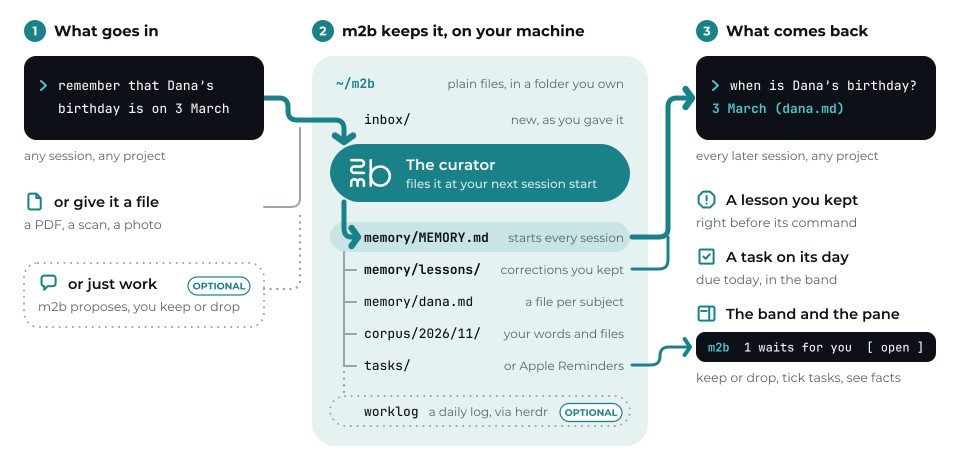
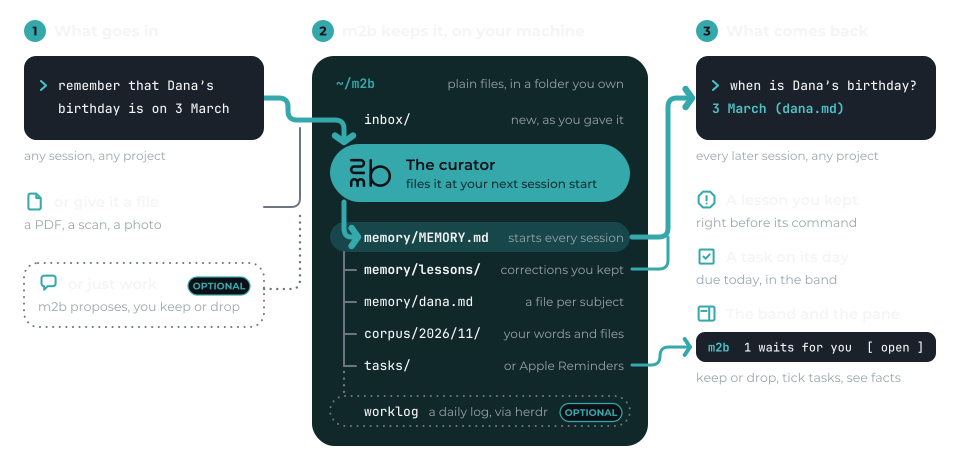
Three stories, one after the other: a sentence you say once, which a session in another
project knows; a correction you make while you work, which m2b proposes as a lesson (reading your
sessions is off until you say yes in setup) and which then stops the command it is about; and a
sentence that becomes a task due on its day. The curator is a run in the background, a model
through your Claude Code login, that files what is new at your next session start. Below: the first
story in three real sessions.
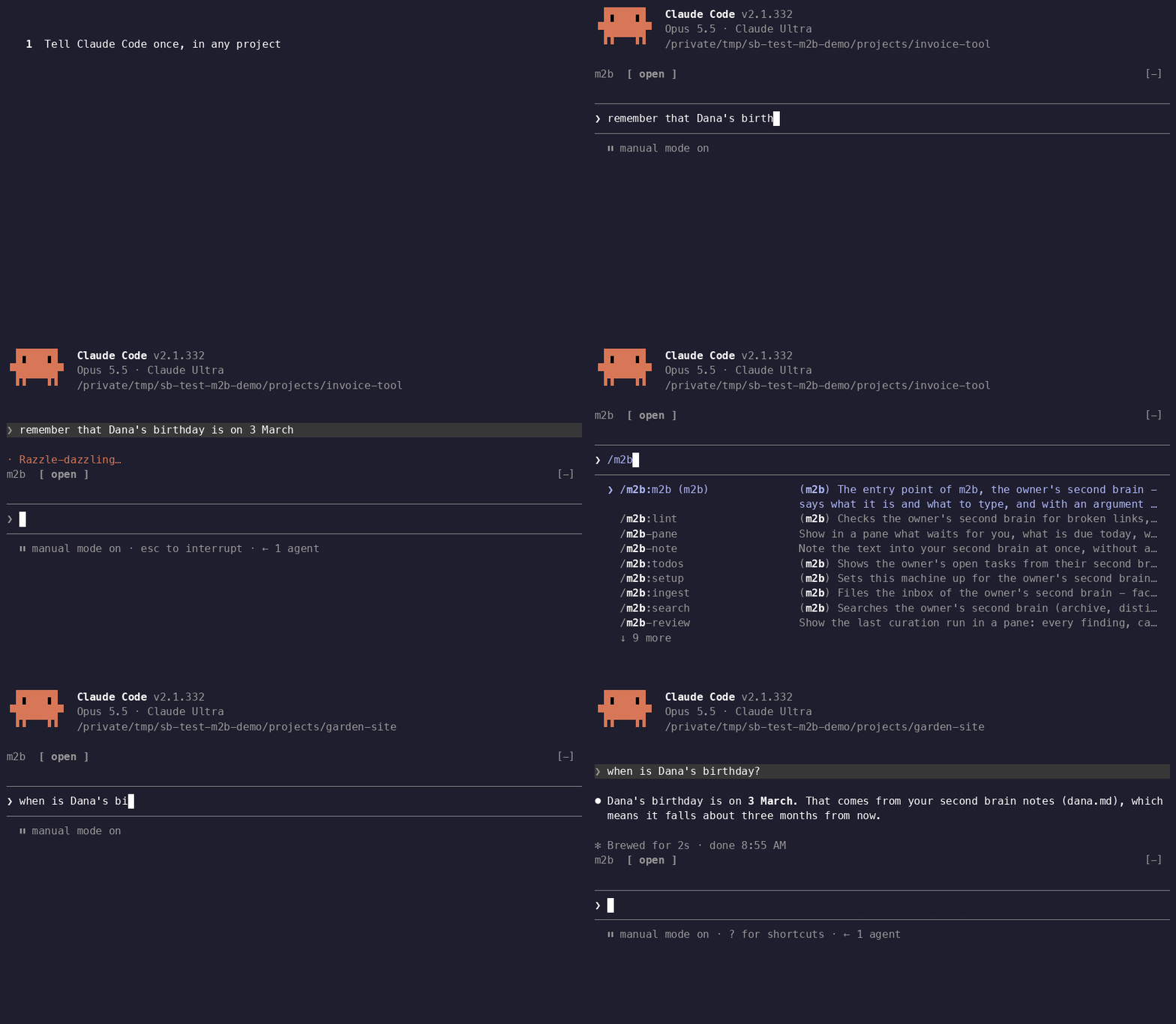
One sentence from a prompt into a later session: three real Claude Code sessions on a demo machine with invented notes, recorded by scripts/readme-demo. The start of the second begins the real background run that files the note; the one command typed there only shows that run. The waits are shortened.
Tell Claude Code "remember that Dana's birthday is on 3 March" in one project. A run in the
background files the note, and from then on every session, in any project, starts knowing it. You
type no command for it: you say what to keep and ask for what you need. Your notes stay plain
Markdown files in a folder you own.
What m2b adds to Claude Code's own memory, the notes Claude keeps for itself for each project:
- one memory for all your projects and machines, in a folder you choose and sync as you like;
- your own words kept in an archive, and every fact pointing back to them;
- tasks from the same sentence: "remind me to call the plumber on Friday" lands in your task list;
- facts that end on a known day, rewritten once the day has passed.
m2b keeps what you know about people, agreements and your own life. It is no linked knowledge
base: the only links lead from a fact to the notes and documents it rests on, and from a note to
an older one about the same thing; nothing is synthesized from them, and search is full text
(Limits).
What it costs. Setup is three slash commands in Claude Code and a few questions; setup itself,
started as /m2b:setup with every answer given at once, took 15 seconds (2026-11-12). A session
starts with a summary of your notes, at most 8 KB, and about 11,000 characters of tool and skill
descriptions, without a model call. Filing uses your Claude Code login: five notes cost US$0.013 at
API prices (2026-11-08).
No server, no account, no telemetry. What runs on your machine
says what m2b starts, when, and what leaves the machine.
Quick start
On macOS 14 or newer or Linux, in a Claude Code session, three slash commands:
/plugin marketplace add Kolibee-GmbH/m2b
/plugin install m2b@m2b
/m2b:m2b setup
Setup's first offer is a new folder ~/m2b with tasks as Markdown files; nothing else is
installed. Then say "remember that the spare key is under the blue pot", start a new session, and
in the one after it ask where the spare key is. Getting started shows
what you should see at each step, and Install what m2b needs. Before you install:
what runs on your machine and uninstalling.
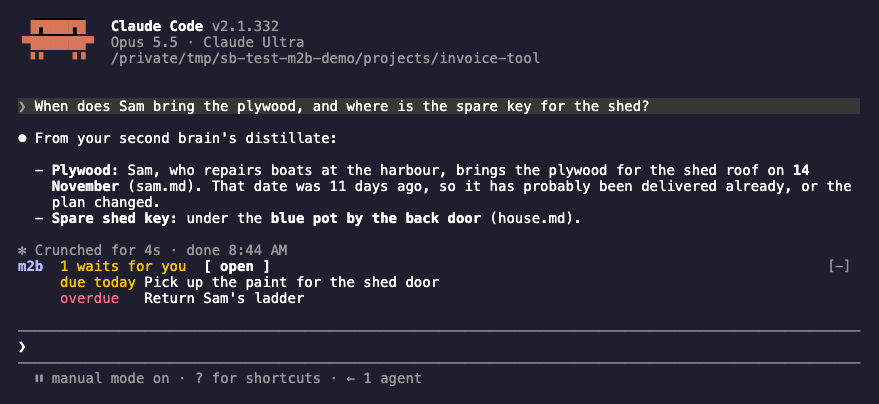
A new session in an unrelated repository answers from your notes. The band, here set to stand
above the prompt, counts what waits for you and names what is due; in a terminal it stands below the
prompt unless you set it. All names and notes are invented.
What you can say
| You say | What happens |
|---|---|
| "remember that Dana's birthday is on 3 March" | a note in your own words goes into the inbox, and the next run files it as a fact |
| "remind me to call the plumber on Friday" | the same, and a task due that day in your task list: Apple Reminders or Markdown files |
| "keep this contract, ~/Documents/lease.pdf, it runs until March" | after your yes to Claude Code's question, a copy of the file goes into the inbox with your words beside it; the next run reads it, a PDF up to its 60th page, and files its facts |
| "what's open?" | your open tasks by due date, and today's events where a calendar is set up |
| "I returned Sam's ladder, tick it off" | that task is ticked; m2b asks when more than one fits |
| "what did I note about the shed?" | the lines that match, each with its file, from a full-text search over everything you noted |
| "what exactly does the rowing club's handbook say about lockers?" | an answer from the fact's file and the note of the document behind it, which says what stands on which page; the session never reads the document itself |
| "show me something old" | one or a few old notes, each with the reason it was picked |
| "put the dentist in my calendar, Thursday at 10" | an event in the calendar you name (macOS, experimental) |
Say that you want it kept: a sentence on its own, such as "Dana's birthday is on 3 March", stays
part of the conversation and is not captured. Sessions capture what you learn about people and
verbal agreements, at work too, and what else goes in is yours to decide: a file you name goes in
on your yes to Claude Code's question, unless a rule of yours lets the call through.
Using m2b has each of these in detail. From a terminal or a script the same goes
through commands, such as m2b capture "<text>"; Commands lists every one.
How it works
One sentence, followed from your prompt into a later session. The name and the note are invented;
the files are what m2b wrote in a run on 2026-11-12.
1. You say it. In any session: "remember that Dana's birthday is on 3 March". Claude writes
one file into inbox/, the folder for new notes, in your own words, without the
"remember that" around them. Nothing is filed while you work, and your words in the file are never
changed. source says who wrote it:claude from a session, as here, cli from a terminal with m2b capture.
---
created: 2026-11-12T21:58:13+01:00
source: claude
---
Dana's birthday is on 3 March.
2. A run files it. At the next session start m2b sees a note waiting and starts a curation
run in the background, the curator of the picture at the top: a claude -p of its own, apart from
your session, in which a model reads the inbox and may call only the commands its step needs.
Here it took 11 seconds. It wrote one line into memory/MEMORY.md, the distillate:
## Facts

- Dana's birthday is on 3 March (dana.md)
memory/dana.md holds the fact and a link to the note it came from. The note moved to the
archive, corpus/2026/11/, with your words as you said them. m2b marked it curated: true in its
frontmatter and added two lines below your words: a marker and filed: fact dana.md.
3. Every later session starts with it. A hook prints the distillate, at most 8 KB, at each
session start, in any project, without a model call. Asked when Dana's birthday is, Claude has
the line in front of it. The picture above shows such a session.
A run can also put the facts about one subject, such as a customer or a club, under a topic. A
session then starts with the topic's name only, and its facts come in when your prompt or the
project folder's path names one of the topic's words, or through a search
(The distillate at session start).
A topic can be a project. Say "remember this project" in a clone, and the run makes a topic that
names the repository by its git remote. A session whose prompt or folder path names the project
gets the topic together with the folder where the clone is on this machine. Its lines can
point into the repository, as a sentence and the file it stands in, so the content itself stays in
the repository (A project):
### Acme portal (Acme, portal)
- Repository: github.com/acme/portal (acme-portal.md)
  on this machine: /Users/alex/code/acme-portal; the paths after → lie in it
- Login moves to the customer's identity provider in March → docs/records/014-login.md (acme-portal.md)
A correction you keep is a lesson. Lessons for every project come in a block of their own, in
m2b's second output beside the distillate. A lesson about a command stops the first call of it in a
session, so Claude reads it before anything runs: "run the whole proof only when the change gives a
reason" at the first scripts/check without --quick. m2b status counts how often you corrected
Claude on each lesson again since you kept it (Lessons).
What a note becomes is the model's reading of it, by these rules:
| The note says | It becomes | For example |
|---|---|---|
| something that stays true | a fact: a line in the distillate and a fact file | "Dana's birthday is on 3 March" |
| something true until a known day | a fact with that day, rewritten once the day has passed | "Sam brings the plywood on Saturday" |
| something going on right now | a line under "Current" in the distillate; after a month without a new note about it, m2b asks whether it still holds | "I am planning the trip to Porto" |
| something to do | a task in your task list, due on the day the note names | "remind me to call the plumber on Friday" |
The store is a folder you choose: iCloud Drive, a synced folder, or any local folder. Apart from
the model's step, m2b is plain code: standard library Python, no database.
The band
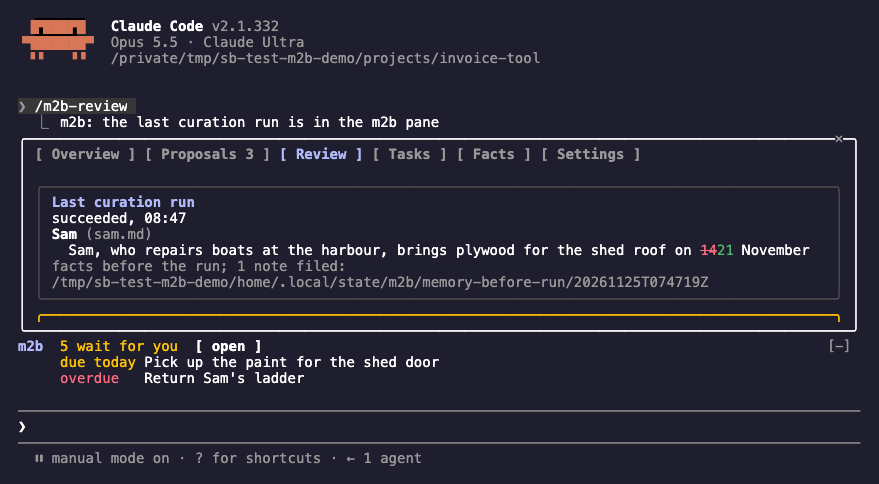
The band says in one row how many things wait for an answer from you, and its one button,open, shows the m2b pane. There you answer them: a "Still current?" question for a
line under Current that no note has touched for a month, a "Remember?" fact that a script of
yours proposed, the proposals from your sessions, and the review of the last run with the facts
it changed. keep, drop and ok are buttons; a press waits 5 seconds with undo before it
writes. The row also names your tasks due today or overdue, as a count or by name, as you set
it. While nothing waits and no task is to show, the row is m2b and open alone. In a terminal
the band is the end of the hint line below the prompt, in the desktop app a row above the
prompt, as in the picture. The setting band.place puts it above the prompt everywhere
(above), below it (below) or above it only while it has something to say (waiting)
(Where it stands). Below the prompt, a status
line appears only while something is wrong with m2b.

The band in a terminal, where it stands unless you set it: at the end of the hint line below the prompt, in a terminal of 130 columns.
/m2b-review opens the pane in the picture with the whole last run, /m2b-proposals the
proposals from your sessions, /m2b-search <text> search hits, and /m2b-note <text> notes a
text at once, without a model turn, with --due tomorrow also a task due that day. The band is a mod, a module Claude Code loads with the plugin,
so it runs only while mods are on in Claude Code; /m2b:m2b doctor says whether the latest
session ran it (The band).
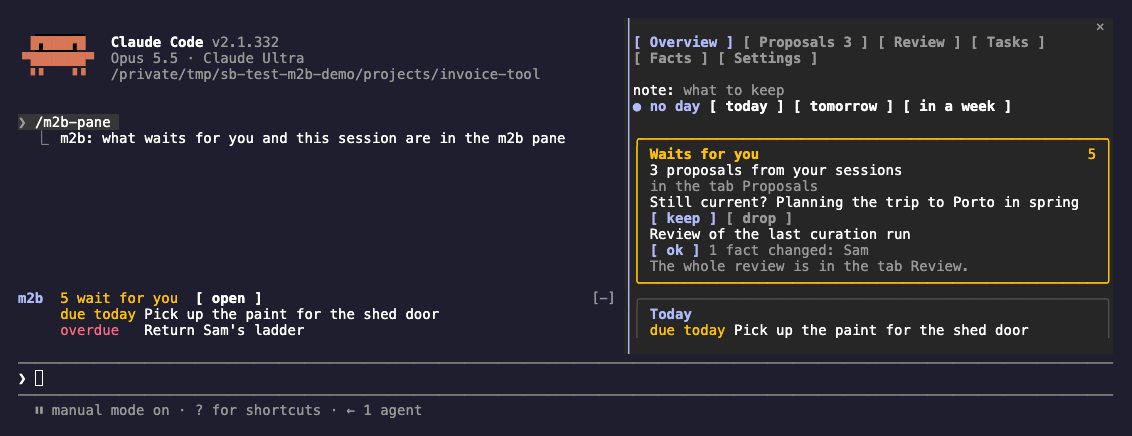
/m2b-pane opens the pane in the view it starts in, its overview: a field note that keeps a
note without a model turn, with the day of its task, then what waits for you, what is
due today, what m2b gave this session and how m2b itself stands, with the button curate now
on the machine that curates, which starts a curation run in the background. A row of tabs above
every view leads to the others: Proposals, Review, Tasks with every open task of yours and
a mark ○ to tick one, Facts with what every session starts with and every topic, andSettings; each tab has its first letter as its key. In Facts, a field search searches the
store, a press on a fact shows its file with the notes and documents it rests on,
a press on one of those shows it, a current item leads to the note it rests on, and open the file a PDF or a picture in the
system's viewer. A fact's file has correct, for how the fact should read, and edit, for a
copy of the file in your text editor, which keep the edit hands on once you saved it; the next
curation run applies either
(What m2b knows). Under Claude Code's fullscreen layout the
pane sits beside the conversation, where it opens by itself in a wide terminal, and/m2b-settings turns it to every setting of m2b, sorted by what you want from m2b, a switch
with its values to press
(This session, what waits and today, in the pane).
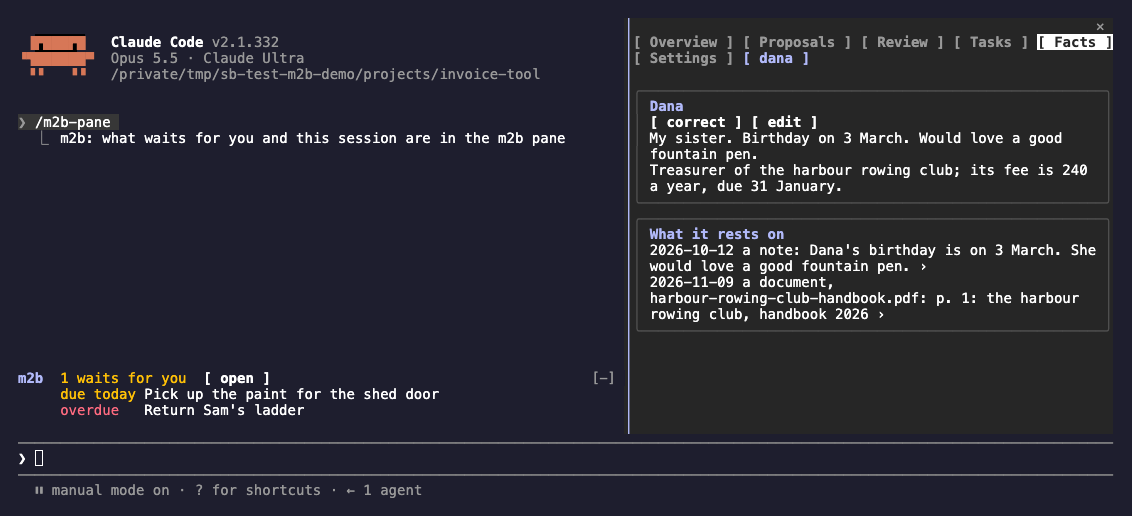
A fact's file, one press below the tab Facts: its lines, and the note and the document it
rests on, each a row you press, and correct and edit under the title. All names and notes
are invented.
Proposals from your sessions. A curation run can also read what you typed and pasted in Claude
Code and propose what you said in passing, without "remember this", each proposal with the words
it stands on beside it; nothing is filed before you keep it, and once you have answered them all
in the pane, a curation run files what you kept
(Reading your sessions).
What runs on your machine
Claude Code starts m2b's programs: the hooks, the band and, from a hook, the curation run. Only the
worklog add-on, off until its own setup, puts something outside Claude Code: a recorder in
herdr, the agent runtime in which it sees which workspace is in use, and a
timer of the operating system. After the install and before /m2b:m2b setup, the hooks print
nothing and no run starts.
| What | When | Model | What leaves the machine | How to turn it off |
|---|---|---|---|---|
| Session-start hooks | at every session start: five commands, each with a limit of 20 or 30 seconds | no | nothing by m2b. They print the distillate (at most 8 KB) into the session, and in a second output m2b's notices, the routing rule and the lessons you kept, start a curation run when one is due, keep the m2b command up to date and, with the worklog on, set its recording switch and keep its recorder, its link in herdr and its timer in place. They note the git remotes of the session's folder in a file on the machine |
m2b distillate off in a folder keeps the distillate out of the sessions there and below; the second output goes with it; the other three commands have no switch of their own. With the plugin turned off in /plugin, none of the five runs |
| Prompt hook | before every prompt: one command, with a limit of 5 seconds | no | nothing by m2b. When the prompt names a topic, it adds that topic's facts to the session, at most 4 KB; it reads the prompt and stores nothing of it | it has no switch of its own; where the distillate is off, it adds nothing |
| Tool hook | before every Bash call Claude makes: one command, with a limit of 5 seconds | no | nothing by m2b. When the command holds the words of a lesson you kept about a command, it stops the first such call of a session with the lesson as the reason and lets the next one through with it, or has Claude Code ask you first. While you keep such lessons, it counts the Bash calls of each day and each time a lesson fired, and notes per session which lessons stopped a call, in files on the machine, never the command itself | it has no switch of its own; without a lesson about a command, and where the distillate is off, it adds nothing |
| Curation run | in the background, on the one machine that curates: at a session start when a capture waits or the last successful run is more than 20 hours old, on a schedule if you set one up, once you have answered every proposal in the m2b pane and kept at least one, or when you start one with m2b curate --force or curate now in the m2b pane |
yes, in the steps with something to read: claude -p with haiku by default. A run with nothing to read starts no model |
the captures in the inbox, a PDF among them up to its 60th page, your memory files, and what a step reads or searches in the archive, to the model | m2b config set curation.paused true on the curating machine: no session start, no schedule and no answer to a proposal starts one there until you set it back to false, while m2b curate --force and curate now in the pane still run one (Pausing). m2b config set curation.run_after_answers false turns off only the run after your answers to proposals. m2b curate take-over on another machine moves curation there; with the plugin turned off in /plugin, no session starts one, while a schedule you set up goes on until you delete it |
| Reading your sessions | once in a curation run, only after you said yes in setup | yes, one call that can use no tool, a second one where it found a lesson, and a third where your lessons or the files every session loads changed since the last check | the distillate, your latest answers to its proposals, the lessons you kept and, for each session since the last reading, its folder, its day and the prompts you typed, with what you pasted into them, beside each the last 500 characters of Claude's answer before it and the shell commands of that turn, and in a project's repository the paths of the files the session wrote there, all with credentials redacted, to the model. The second call gets the lessons it found and the lines of the files a session in their folder starts with (your CLAUDE.md and CLAUDE.local.md files and the rules under .claude/rules/, in ~/.claude/ and up to your home folder, Claude Code's memory, the output style), redacted the same way. The third gets the lessons every session starts with and ~/.claude/CLAUDE.md, its rules without paths and the output style chosen there; a lesson one of them states leaves the block |
m2b config set curation.read_sessions false |
| Handing in by a session | only after you turned sessions.propose on, in a terminal outside Claude Code or with a press on its on in the pane's settings: the agent of a session hands in a proposal for your memory by itself, checked against that session's transcript, and the next curation run takes it into the list you answer |
no | nothing. A quote of up to 500 characters from what the agent read for you, a mail or a document, lies in the store's state with the session's id and the tool's name, and syncs with the store. The tool's description, about 3,200 characters, is part of every session that has it, and a call runs without a permission prompt (Security) | m2b config set sessions.propose false |
| Worklog add-on | only after /m2b:worklog-setup, on the machine that curates: herdr starts its recorder on each event, a timer starts it every five minutes, and one step of a curation run writes the day's worklog |
yes, once a day with sessions | the day's prompts, the end of each session's last answer, your commit subjects and, for each session, its folder, herdr workspace, repository and time spans, with the spheres of work and customers you named in its setup, the inbox, memory and what the step searches in the archive, to the model. The recordings stay on the machine | m2b addons off worklog stops its model step and, from the next session start, the recording; /m2b:worklog-setup remove also takes the recorder out of herdr and the timer out of the operating system |
| The band | while a session is open and mods are on in Claude Code: it asks m2b about once a minute and after each of your turns, and about the session itself also at its start and three seconds after a prompt |
no | nothing by m2b. The descriptions of its note and search tools, about 5,500 characters, are part of every session it runs in. A call of either tool runs without Claude Code's permission prompt, the note tool only for a note in your own words; your own permissions.ask and permissions.deny rules for mcp__m2b__note and mcp__m2b__search come first (Security) |
it has no switch of its own; with mods off in Claude Code it does not run |
m2b opens no network connection of its own and sends no telemetry. Your notes reach a model only
through your Claude Code, under your login. In a session: the distillate, the facts of a topic a
prompt names, and what you ask the session to look up, such as search hits from the inbox, the
archive and memory, a fact's file or a note read whole, rediscovered notes, your open tasks and
today's events. In a curation run:
what the table says. Whoever provides the model behind your Claude Code receives them as it
receives your sessions.
A store in a synced folder also goes where that service takes it; m2b has no sync of its own.
Tasks in Apple Reminders and events in a calendar go wherever that list or calendar syncs. In a
store that is a git repository a run commits and never pushes.
The band runs inside Claude Code as a mod. An independent community scan of public mods,
Awesome Claude Code Mods, records what a
mod's calls can touch, on a scale from L0 to L3, where L3 reaches the network. It puts the band
at L2: it writes files, runs processes and drives Claude. The scan is static and covers the mod's
own calls; what they and the m2b commands behind them read and write is in
What it reads and writes. The badges show the latest
result of the scan and of its run of claude plugin validate:


Cost and privacy says what each step hands the model.
SECURITY.md says what a hostile note can do and how the model's step is fenced.
Install
The three commands of the quick start. Install the plugin for your user, the
default; installed for one project only, nothing outside Claude Code finds it. setup walks
through the core and then offers each add-on, saying before each step what it does. It never
overwrites a store that exists: pointed at a folder another machine already uses, it joins it.
Getting started walks through it, including a first run without Claude
Code.
Requirements: macOS 14 or newer, or Linux; not Windows. Claude Code 2.1.319 or newer, logged
in, and Python 3.9 or newer as python3. On a fresh Mac, python3 comes with the Command Line
Tools: xcode-select --install. Apple Reminders, Calendar and iCloud Drive are optional; without
them the store is a plain folder and tasks are Markdown files. For Apple Reminders:reminders-cli
(brew install keith/formulae/reminders-cli).
Setup also writes the command ~/.local/bin/m2b. Daily use does not need it in a terminal; to
type m2b yourself, put ~/.local/bin on your PATH.
Updating
/plugin marketplace update m2b
/plugin update m2b@m2b
Then restart Claude Code. An update arrives only with a new version number: while the
installed version matches the marketplace's, /plugin update reports it as the latest, even if
the repository has newer commits. What each version changed is in the changelog.
Your store, config and setup stay as they are. When a version changes a rule for what the store
holds, the curating machine's next run migrates the store by itself; update that machine first
(Several machines).
Uninstalling
Turn the add-ons off that left something outside Claude Code: with the worklog on, run
/m2b:worklog-setup removein a session, which turns it off and unlinks its herdr recorder;
and delete any schedule you set up form2b curate(a Shortcuts automation or a cron line).Uninstall the plugin in
/plugin. That stops every hook, the band and the recorder. Then take
the marketplace out as well, or Claude Code keeps its copy of this repository:/plugin marketplace remove m2bDelete what m2b keeps on the machine, if you want it gone:
rm -rf ~/.local/bin/m2b ~/.config/m2b ~/.local/state/m2b ~/.local/share/m2bIf you added
~/.local/binto yourPATHfor m2b alone, take that line out of~/.zshrc
again.
Your store stays as it is: plain files, yours to keep or delete. So do the tasks m2b created in
your list, such as a review task or a "Remember? ..." candidate.
Add-ons
One add-on comes with the plugin and is off until you set it up:
| Add-on | What it adds | Needs | Setup |
|---|---|---|---|
worklog |
A daily worklog of your sessions in herdr: topics, time spans per sphere of work, booking proposals for billable spheres, a ledger with CSV and XLSX exports | herdr 0.9 or later, running; the curating machine, which alone records; your spheres of work and customers, which its setup asks for | /m2b:worklog-setup |
m2b addons list shows whether it is on, and m2b addons off worklog turns it off again and
keeps its settings. Its page says what it reads and writes; Add-ons is the
overview.
Cost and privacy
A run over five captures took 48 seconds with haiku, and Claude Code put it at US$0.013 at API
prices (2026-11-08, Claude Code 2.1.319). curation.max_turns and curation.max_budget_usd cap a
model step; m2b does not record what a run used. Cost and privacy
lists what each step hands the model.
Limits
Status. m2b is young: its first version is from 2026-11-09, and its author has used it every
day since 2026-11-08, on macOS with iCloud Drive and Apple Reminders. Linux is covered by the
tests, not by daily use. The store format is versioned, and the curating machine migrates the
store by itself when a version changes it (Store format); commands
and settings can still change before 1.0, and the changelog says when one does.
- One owner per store. No sharing, no multi-user store.
- Full text search only, no semantic search: a note is found by the words it holds, or their
translation. - macOS and Linux. Windows is not supported: m2b relies on
fcntllocks, process groups andshscripts. - The task titles, notes and worklog m2b writes are in English or German; everything else it
prints is in English. Your notes can be in any language. - On Linux there is no calendar backend, and a schedule is a cron line instead of a Shortcut.
- An event goes into your own calendar only: no attendees, invitations, place or meeting link. A
task is due on a day, not at a time. - The worklog needs herdr 0.9 or later and records only the curating machine.
It never books anything: its bookings are proposals for you to enter. - Sync is whatever moves the folder. m2b has no sync and no server of its own. It knows a
conflict copy by the name iCloud Drive gives it (backendicloud) or Dropbox and Syncthing
give it (backendfolder); the copies of another service are files like any other to it. - Nothing captured is deleted automatically. What does get deleted: conflict copies identical
to their original, the product's own leftover temp files and settled candidate tasks.
Docs
| Page | What it has |
|---|---|
| Getting started | the first steps, with what you should see at each |
| Using m2b | everything you can say, the distillate, what a run asks you, who it is for and how it differs from Claude Code's memory, the words used here |
| The curation run | its steps, taking a run back, pausing, a schedule, reading your sessions |
| The band | its row, the pane, its commands and the tools of the model: note, search and, where you turn it on, handing in a proposal |
| Commands | every command, and what to say instead of typing most |
| Configuration | the three files m2b keeps its settings in, and every key |
| Store format | the folder, the file names and the frontmatter |
| Several machines | joining a store from a second machine, moving curation |
| Troubleshooting | m2b doctor, m2b status and the causes met so far |
| Cost and privacy | what a run costs and what each step hands the model |
| Add-ons | the worklog |
| Evals | what m2b does to Claude's answers, measured with it and without |
| Promises | what this README promises, the cases that prove each and when a promise holds |
| SECURITY.md | what a hostile note can do, how a model step is fenced, how to report |
Develop
scripts/check --quick m2b   # unit tests of the core (or worklog, band)
scripts/check               # everything, must end with "check: passed"
scripts/e2e --level stub    # end-to-end scenarios without a model
Architecture is the short tour of the code;
CONTRIBUTING.md has the ground rules. To write your own client, read
Integrations; to add a store, task or calendar backend, Writing a
backend. What m2b promises to do, and which defects it must not have, is
listed in Behavior. What it does to Claude's answers is measured:
Evals has seventeen cases, each run with m2b and without, and the scores of the last
run. Whether each promise of this README holds is checked end to end before a release:
Promises.
License
MIT, see LICENSE. Security reports: SECURITY.md.
Reviews (0)
Sign in to leave a review.
Leave a reviewNo results found