annotaitr
Health Warn
- License — License: MIT
- Description — Repository has a description
- Active repo — Last push 0 days ago
- Low visibility — Only 6 GitHub stars
Code Warn
- network request — Outbound network request in client/image/src/App.jsx
Permissions Pass
- Permissions — No dangerous permissions requested
No AI report is available for this listing yet.
📄 AI coding agent plugin that opens Markdown files in a local browser-based annotator.

An AI coding agent plugin that opens images, captured web pages, or Markdown files in a browser-based annotator.


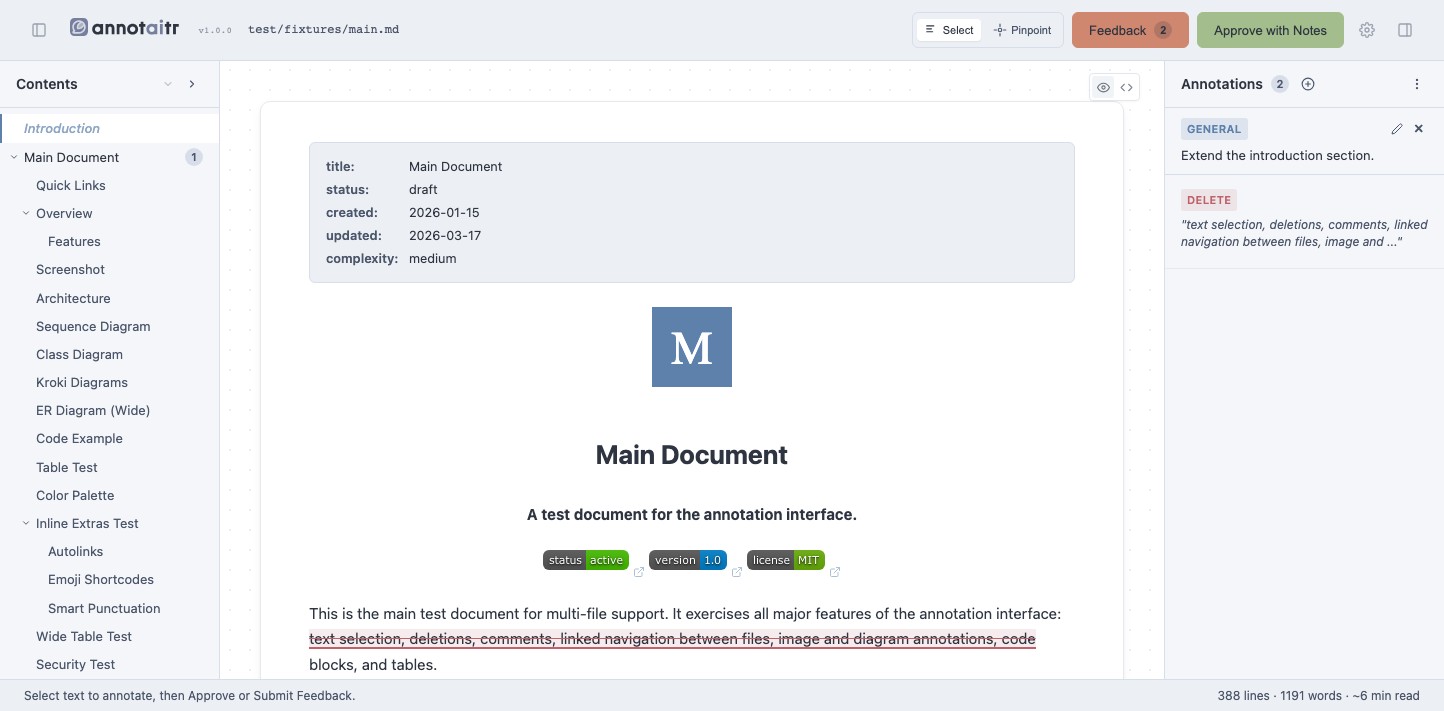
An AI coding agent can read source code but has no way to point at a rendered
page or a prose document and say "this, right here." annotaitr closes that
gap: it captures a web page or opens an image or Markdown file in the
browser, lets a person mark it up with boxes, arrows and comments or with
text selections, and hands the agent back structured feedback it can act on
directly, instead of the person writing out pixel coordinates or line
numbers by hand.
✨ Features
Which mode runs is auto-detected from the target: see Usage below and
How it works for the mechanism behind both.
Image and web page review:
- Web page capture: full-page screenshot of any
http(s)URL via Playwright, at a chosen viewport - Clipboard support: run with no target to annotate whatever screenshot is on the (macOS) clipboard
- Drawing tools: boxes, arrows, freehand marks, and numbered comment pins, each with an optional comment and color
- Coarse position descriptions: feedback names each annotation's plain-language position, and flags annotations positioned close together
- Annotated screenshot export: submitting bakes the markup into a copy of the image and passes its path to the agent
Markdown and plain-text review:
- Multi-file support: review multiple files in one session with a tabbed interface
- Config and data files: annotate YAML, JSON, TOML, CSV, XML and more as raw source with line numbers
- Linked navigation: click relative
.mdlinks to open them as new tabs - LaTeX math, Mermaid, PlantUML, and Kroki diagrams: rendered inline, annotatable as a whole
- File references: type
@in a comment to autocomplete other project files - Quick labels: categorize a selection instantly with a predefined label
- Annotation persistence: annotations auto-save to the server and survive page reloads
Both modes:
- Export and import: annotations as Markdown or JSON, to continue a review later
- Dark mode, undo/redo, and an auto-close timer after submitting
- Iterative review: the agent applies your feedback and re-opens the annotator for another round until you approve
🔥 Installation
[!IMPORTANT]
Requires Node.js 22+ and npm. Image mode additionally needsplaywright
and@napi-rs/canvas, bothoptionalDependenciesinstalled by default. A
markdown-only install can skip them and gets an actionable error if image
mode is ever invoked without them.
Upgrading from md-annotator? See docs/migration.md.
Claude Code plugin
claude plugin marketplace add konradmichalik/annotaitr
claude plugin install annotaitr@annotaitr
Or via the installer script, which also installs the standalone CLI:
curl -fsSL https://konradmichalik.github.io/annotaitr/install.sh | bash
OpenCode plugin
Markdown-only for now. Add to opencode.json:
{
  "plugin": ["annotaitr-opencode@latest"]
}
Mistral Vibe skill
Markdown-only for now, and drives the standalone CLI, so install that too:
curl -fsSL https://konradmichalik.github.io/annotaitr/install.sh | bash
cp -r apps/vibe/skills/annotate ~/.vibe/skills/annotate
Standalone CLI
npm install -g annotaitr
🚀 Quick start
annotaitr README.md
Opens README.md in the browser; approve it or leave annotations, andannotaitr prints the result to stdout once you're done.
⚡ Usage
Claude Code:
/annotaitr:review ./anything # auto-detects image vs. markdown
Or force a mode directly: /annotaitr:md README.md, /annotaitr:image ./mockup.png.
OpenCode:
/annotate:md README.md
or the tool directly: annotate_markdown({ filePath: "/path/to/file.md" }).
Mistral Vibe:
/annotate README.md
Standalone CLI, mode auto-detected from the target:
annotaitr README.md               # markdown
annotaitr ./mockup.png            # image, local file
annotaitr http://localhost:3000   # image, capture
Full flag and environment variable reference: docs/usage.md.
📚 Documentation
| Topic | What's inside |
|---|---|
| Usage | Every flag, environment variable, exit code, and the mode-detection rules |
| How it works | The annotation and review-loop mechanism behind each mode |
| Development | Local setup, build commands, plugin testing |
🧑💻 Contributing
Please have a look at CONTRIBUTING.md.
💎 Credits
Heavily inspired by plannotator, which pioneered
this general browser-markup-and-feedback approach for reviewing planning
documents; annotaitr applies it to images, captured web pages, and
Markdown/plain-text files.
⭐ License
This project is licensed under MIT.
Reviews (0)
Sign in to leave a review.
Leave a reviewNo results found