vi-sql
Health Pass
- License — License: NOASSERTION
- Description — Repository has a description
- Active repo — Last push 0 days ago
- Community trust — 14 GitHub stars
Code Pass
- Code scan — Scanned 12 files during light audit, no dangerous patterns found
Permissions Pass
- Permissions — No dangerous permissions requested
No AI report is available for this listing yet.
Terminal UI for SQL databases
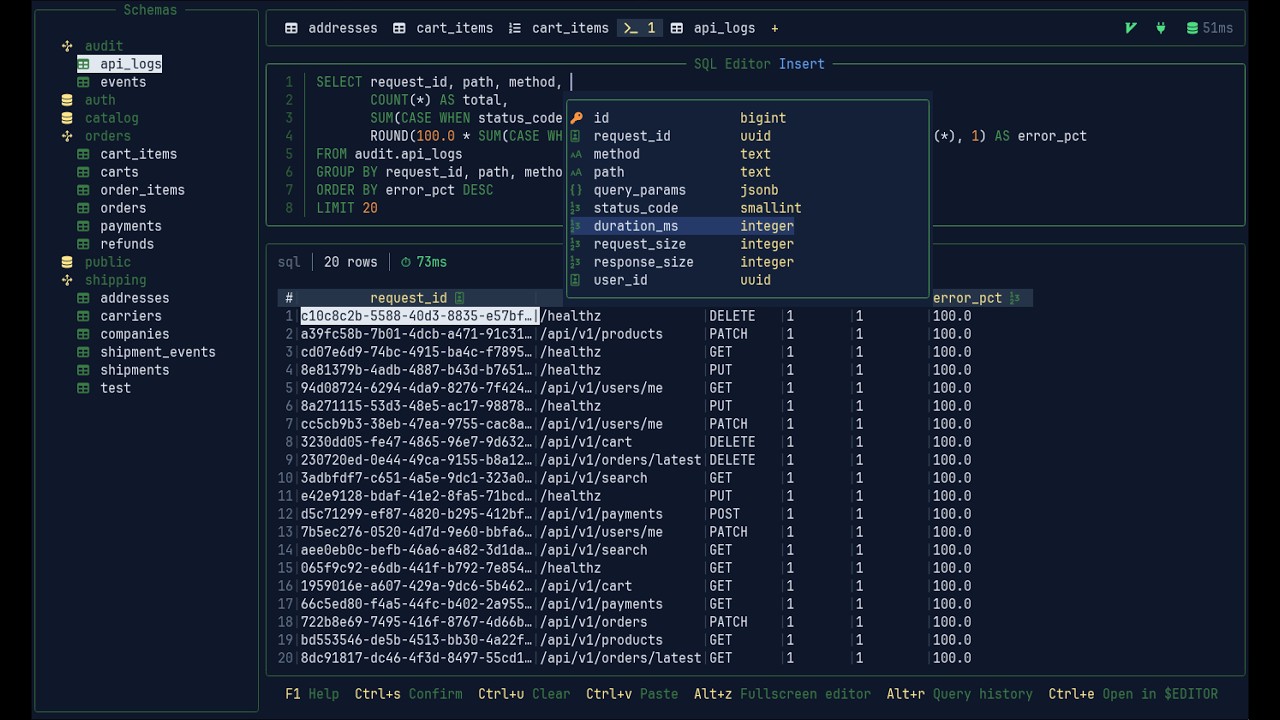
Terminal UI for SQL databases built with passion for the terminal — Browse schemas, run queries, edit rows, inspect query plans, and expose your session to AI tools via a built-in MCP server.

 |
 |
 |
Introductory video
Features
- Multi-tab SQL editor — syntax highlighting, autocomplete, query history, and
$EDITORintegration - Table data view — filter, sort, inline edit, add/delete rows, follow foreign keys, find references
- Vim mode —
hjklnavigation and sequence keys (gg,dd,gd,gr) across the entire UI - Schema browser — tables, structure, indexes, DDL; create, rename, and drop objects via keybindings
- EXPLAIN / EXPLAIN ANALYZE — query plan viewer with cost and timing breakdown
- Import / Export — CSV, JSON, SQL INSERT, and Markdown
- MCP server — AI assistants (Claude, Cursor, etc.) can browse your schema and draft queries in the editor; query
execution is opt-in - Encrypted connections — AES-256-GCM encryption; supports OS keyring, master password, or env var
- Themes — multiple built-in themes, fully customizable via YAML
Install
curl -fsSL https://vi-sql.com/install.sh | sh
Pin a specific version:
VI_SQL_VERSION=v0.0.3 curl -fsSL https://vi-sql.com/install.sh | sh
Or download a binary directly from the releases page.
Build from source
Requires Go 1.25+.
git clone https://github.com/kopecmaciej/vi-sql.git
cd vi-sql
make build
Uninstall
curl -fsSL https://vi-sql.com/uninstall.sh | sh
The script prompts before removing each artifact: the binary, config directory, log file, and any keyring entry.
Quickstart
Run vi-sql and enter your connection details on the welcome screen, or connect directly with a DSN:
vi-sql --connect postgres://user:pass@localhost/mydb
vi-sql --connect mysql://user:pass@localhost/mydb
vi-sql --connect file:/home/user/data.db
Or by saved connection name:
vi-sql --connection-name mydb
Jump straight to a table:
vi-sql --jump public/users
Config and data paths vary by OS. Run vi-sql --paths to see the exact locations on your system (config, keybindings, styles, icons, log).
MCP server
vi-sql ships an HTTP MCP server that AI tools (Claude Code, Cursor, etc.) can connect to while the app is running. Enable it from the options page and point your client at http://localhost:9741/mcp.
See the MCP documentation for setup, available tools, and configuration options.
License
Apache 2.0
Reviews (0)
Sign in to leave a review.
Leave a reviewNo results found