agent-computer-use
Health Warn
- License — License: MIT
- Description — Repository has a description
- Active repo — Last push 0 days ago
- Low visibility — Only 8 GitHub stars
Code Fail
- child_process — Shell command execution capability in bin/agent-cu.js
- process.env — Environment variable access in bin/agent-cu.js
- fs module — File system access in bin/agent-cu.js
Permissions Pass
- Permissions — No dangerous permissions requested
No AI report is available for this listing yet.
Computer use CLI for AI agents
agent-computer-use



One CLI. Any desktop app. Like a human would.
Click buttons, type text, read screens on macOS / Linux / Windows / Electron — no vision tokens, no screenshots, deterministic. For AI agents (Claude, Cursor, Codex, local models) and humans alike.
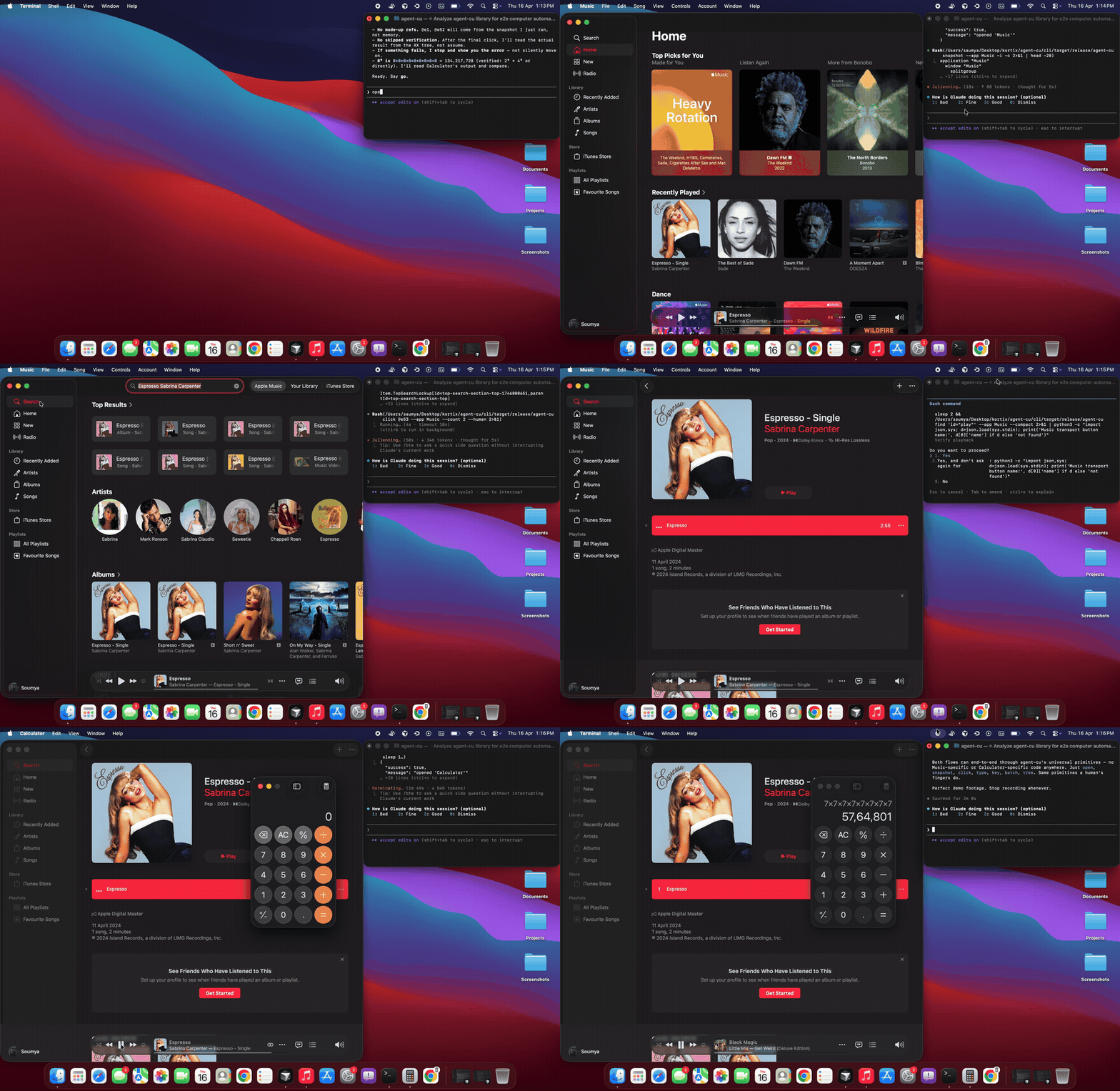
# One prompt: "open Music, play Espresso by Sabrina Carpenter, then open Calculator and compute 7^8"
# Claude drives agent-cu end-to-end — no app-specific code, no vision, just a11y primitives
Why agent-cu
| agent-cu | Anthropic Computer Use | OpenAI CUA | pyautogui | |
|---|---|---|---|---|
| Approach | accessibility | vision | vision | pixels |
| Tokens per click | 0 | ~1500 | ~1200 | 0 |
| Deterministic | ✅ | ❌ | ❌ | ✅ |
| Reads element state | ✅ | limited | limited | ❌ |
| Works on any app | ✅ (a11y) | ✅ | ✅ | ✅ |
| Open source, local | ✅ | ❌ | ❌ | ✅ |
Built in Rust. Runs locally. Zero per-action cost.
Used by
- Kortix — building next-generation AI agents
- Ships as a skill on skills.sh — usable from Claude Code, Cursor, Codex, Copilot, OpenCode, Cline, and 40+ other agents
- Using agent-cu in production? Open a PR to add your logo here
Installation
npm (recommended)
npm install -g agent-cu       # npm
pnpm add -g agent-cu          # pnpm
yarn global add agent-cu      # yarn
bun add -g agent-cu           # bun
Ships with precompiled binaries for macOS (Apple Silicon / Intel), Linux, and Windows. No Rust toolchain required.
After install, grant accessibility permissions:
agent-cu check-permissions
Uninstall
npm uninstall -g agent-cu     # npm
pnpm remove -g agent-cu       # pnpm
yarn global remove agent-cu   # yarn
bun remove -g agent-cu        # bun
From source
git clone https://github.com/kortix-ai/agent-computer-use
cd agent-computer-use
./scripts/setup.sh
The setup script installs Rust (if needed), builds the CLI, installs it to ~/.cargo/bin/agent-cu, and prompts for accessibility permissions.
Cargo
cargo install --git https://github.com/kortix-ai/agent-computer-use --path cli
Use with Claude Code, Cursor, Codex, Copilot, …
agent-cu ships as a skill on skills.sh. Install it and your AI agent will drive agent-cu directly whenever you ask it to operate a desktop app.
npx skills add kortix-ai/agent-computer-use -a claude-code -g
The -a claude-code flag installs for Claude Code; drop it to pick interactively from 40+ supported agents (Cursor, Codex, Copilot, OpenCode, Cline, VS Code, etc.). -g installs globally — available in every project.
First-run setup (optional)
By default, Claude Code asks approval on every agent-cu command. To run without prompts, pick one of:
agent-cu setup # interactive wizard — writes the allow rule for you
Add to ~/.claude/settings.json:
{
  "permissions": {
    "allow": ["Bash(agent-cu *)"]
  }
}
Or, in the first approval prompt, pick "Yes, and don't ask again for: agent-cu *" — covers that specific subcommand.
Quick start
agent-cu apps                              # what's running?
agent-cu snapshot -a Calculator -i -c      # see interactive elements
agent-cu click @e5                         # click by ref
agent-cu type "hello" -s @e3               # type into a field
agent-cu text -a Music                     # read all visible text
The workflow: snapshot → identify refs → act → re-snapshot to verify.
Commands
Discovery
agent-cu apps                              # list all running apps
agent-cu snapshot -a Music -i -c           # interactive elements, compact
agent-cu snapshot -a Safari -d 8           # deeper tree
agent-cu tree -a Finder                    # raw accessibility tree (JSON)
agent-cu find 'role=button' -a Calculator  # find matching elements
agent-cu find 'id="play"' -a Music        # find by id
agent-cu find 'name~="Submit"' -a Safari  # find by partial name
agent-cu get-value @e5                     # read element value/state
agent-cu text -a Calculator                # all visible text
agent-cu focused                           # currently focused element
agent-cu windows -a Finder                 # list windows with positions
Click
agent-cu click @e5                         # click by ref (AXPress, no focus steal)
agent-cu click 'name="Login"' -a Safari   # click by selector
agent-cu click 'id~="track-123"' -a Music # partial id match
agent-cu click @e5 --count 2              # double-click
agent-cu click @e5 --button right         # right-click
agent-cu click --x 500 --y 300 -a Finder  # coordinate click (last resort)
agent-cu click @e5 --expect 'name="Done"' # click then verify element appeared
Type
agent-cu type "hello" -s @e3               # type into element (AXSetValue)
agent-cu type "hello" -a Safari            # type into focused field (keyboard sim)
agent-cu type "hello" -s @e3 --append      # append without clearing
agent-cu type "hello" -s @e3 --submit      # type then press Return
Key
agent-cu key Return -a Calculator          # press a key
agent-cu key cmd+c -a TextEdit             # key combo
agent-cu key cmd+shift+p -a "VS Code"      # complex combo
agent-cu key Escape -a Slack               # escape
agent-cu key space -a Music                # play/pause
Scroll
agent-cu scroll down -a Music              # scroll the main content area
agent-cu scroll down --amount 10 -a Music  # scroll more
agent-cu scroll-to @e42                    # scroll element into view
Drag
agent-cu drag @e5 @e10 -a Finder                           # drag by refs
agent-cu drag 'name="file.txt"' 'name="Desktop"' -a Finder # drag by name
agent-cu drag --from-x 200 --from-y 55 --to-x 900 --to-y 300 -a Finder  # by coordinates
Drag uses smooth 20-step interpolation with easing — mimics natural mouse movement.
Window management
agent-cu move-window -a Notes --x 100 --y 100    # move window (instant)
agent-cu resize-window -a Notes --width 800 --height 600  # resize (instant)
agent-cu open Calculator --wait                   # launch and wait for ready
agent-cu screenshot -a Music --path shot.png      # screenshot an app
agent-cu screenshot --path full.png               # full screen
Wait and verify
agent-cu wait-for 'name="Dashboard"'              # poll until element appears
agent-cu wait-for 'role=button' --timeout 15      # custom timeout
agent-cu ensure-text @e3 "hello"                  # only types if value differs
Batch and workflow
echo '[["click","@e5"],["key","Return","-a","Music"]]' | agent-cu batch
echo '[["click","@e5"]]' | agent-cu batch --bail  # stop on first error
agent-cu run workflow.yaml                         # execute YAML workflow
System
agent-cu check-permissions                 # verify accessibility access
agent-cu observe -a Calculator             # interactive TUI explorer
Selectors
Refs (fastest — from latest snapshot)
@e1, @e2, @e3
Selector DSL
'role=button'                          # by role
'name="Login"'                         # exact name
'name~="Log"'                          # name contains (case-insensitive)
'id="submit-btn"'                      # exact id
'id~="track-123"'                      # id contains
'button "Submit"'                      # shorthand: role name
'"Login"'                              # shorthand: just name
'role=button index=2'                  # 3rd button (0-based)
'css=".my-button"'                     # CSS selector (CDP only)
Chains (parent → child)
'id=sidebar >> role=button index=0'    # first button inside sidebar
'name="Form" >> button "Submit"'       # submit inside form
CDP (Electron apps)
Electron apps (Slack, Cursor, VS Code, Postman, Discord, Notion) get automatic CDP support. agent-cu detects Electron apps, auto-relaunches them with a debug port, and connects via WebSocket.
agent-cu text -a Slack                     # just works — auto-detects Electron
agent-cu snapshot -a Slack -i -c           # DOM tree merged with native shell
agent-cu click @e5                         # JS element.click() via CDP
agent-cu key cmd+k -a Slack                # CDP Input.dispatchKeyEvent
agent-cu type "hello" -a Slack             # CDP Input.insertText
agent-cu scroll down -a Slack              # JS scrollBy()
First run auto-relaunches the Electron app with CDP (~5s). Every subsequent run uses cached connection (~15ms).
Override auto-detection:
agent-cu snapshot -a MyApp --cdp --cdp-port 9222   # force CDP with specific port
agent-cu snapshot -a Slack --no-cdp                 # disable CDP, use native only
Output
All output is JSON by default.
agent-cu click @e5                         # {"success": true, "message": "pressed ..."}
agent-cu click @e5 --human                 # human-readable output
agent-cu click @e5 --compact               # single-line JSON
Architecture
agent-computer-use/
├── cli/                    Rust CLI
│   ├── src/                Binary, handlers, actions, snapshot, wait, DSL parser
│   └── crates/
│       ├── agent-computer-use-core/      Platform trait, AccessibilityNode, Selector, element utils
│       ├── agent-computer-use-macos/     macOS backend (AXUIElement, CGEvent, batch attribute fetch)
│       ├── agent-computer-use-cdp/       CDP bridge (WebSocket, DOM walker, JS interaction)
│       ├── agent-computer-use-linux/     Linux backend (AT-SPI2)
│       └── agent-computer-use-windows/   Windows backend (UIAutomation)
├── docs/                   Next.js docs site
├── benchmark/              E2E benchmarks, stress tests, comparison tools
├── docker/                 Cross-compilation Dockerfiles
└── scripts/                Setup, build, bench
Development
pnpm build          # build CLI (release)
pnpm test           # run tests
pnpm lint           # cargo fmt --check + clippy
pnpm format         # auto-format everything
pnpm bench          # criterion micro-benchmarks
pnpm bench:e2e      # real-world app benchmarks
pnpm bench:stress   # reliability stress test
pnpm bench:diff     # compare benchmark runs
Platform support
| Platform | Status |
|---|---|
| macOS (Apple Silicon) | Preview |
| macOS (Intel) | Preview |
| Electron apps (CDP) | Preview |
| Windows (UIAutomation) | Preview |
| Linux (AT-SPI2) | Preview |
Star history
License
MIT
Reviews (0)
Sign in to leave a review.
Leave a reviewNo results found