turbo-ai
agent
Fail
Health Warn
- License — License: MIT
- Description — Repository has a description
- Active repo — Last push 0 days ago
- Low visibility — Only 5 GitHub stars
Code Fail
- exec() — Shell command execution in src/commands/commands.ts
- os.homedir — User home directory access in src/commands/commands.ts
- process.env — Environment variable access in src/commands/commands.ts
- process.env — Environment variable access in src/rpc/pi-client.ts
- exec() — Shell command execution in src/ui/agent-panel.ts
Permissions Pass
- Permissions — No dangerous permissions requested
No AI report is available for this listing yet.
Retro DOS / Turbo Pascal 7.0 TUI frontend for the Pi coding agent
README.md
TURBO-AI v1.01 Beta



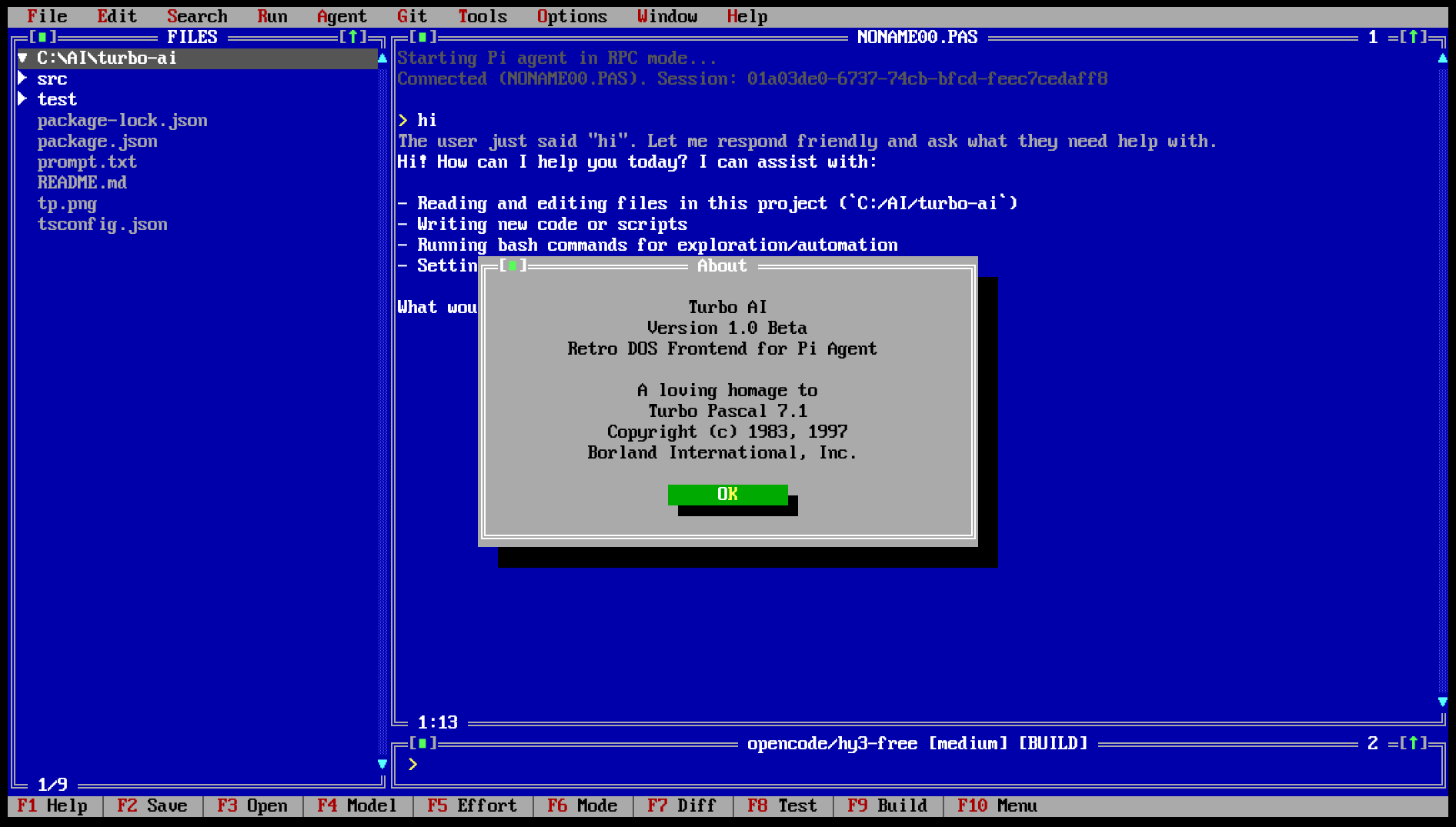
Turbo-AI is an authentic Turbo Pascal 7.0 / Borland DOS inspired Terminal UI (TUI) frontend for the Pi coding agent. It spawns Pi in RPC mode (pi --mode rpc) and drives it over its JSONL protocol, delivering an authentic early-1990s Borland IDE development experience with full mouse, hotkey, and multi-window support.
A loving homage to Turbo Pascal 7.1. Not affiliated with Borland International.
 ≡ File  Edit  Search  Run  Compile  Debug  Tools  Options  Window  Help ≡
╔═[■]══════ FILES ══════[▲]═╦═[■]═════════════════ AGENT.PAS ════════════════ 1 ═[▲]═╗
║ ▼ src                     ║ User: Implement session resume & slash commands        ║
║   commands/               ║                                                        ║
║     commands.ts           ║ Thinking: Analyzing project session storage...         ║
║   ui/                     ║                                                        ║
║     session-selector.ts   ║ [SEARCH ] ~/.pi/agent/sessions/                        ║
║     agent-panel.ts        ║ [EDIT   ] src/commands/commands.ts                     ║
║     menu-bar.ts           ║ [EDIT   ] src/main.ts                                  ║
║   main.ts                 ║ [TEST   ] npm test (59 tests passed)                   ║
║   package.json            ║                                                        ║
║                           ╠═[■]══ opencode/x-preview-f-free [high] [BUILD] ◄ 2 ═[▲]╣
║                           ║ > /resume                                              ║
╚═ 1/24 ══════════════════▲═╩═ 1:1 ════════════════════════════════════════════════▲═╝
 F1 Help  F2 Save  F3 Open  F4 Model  F5 Effort  F6 Mode  F7 Diff  F8 Test  F9 Build  F10 Menu
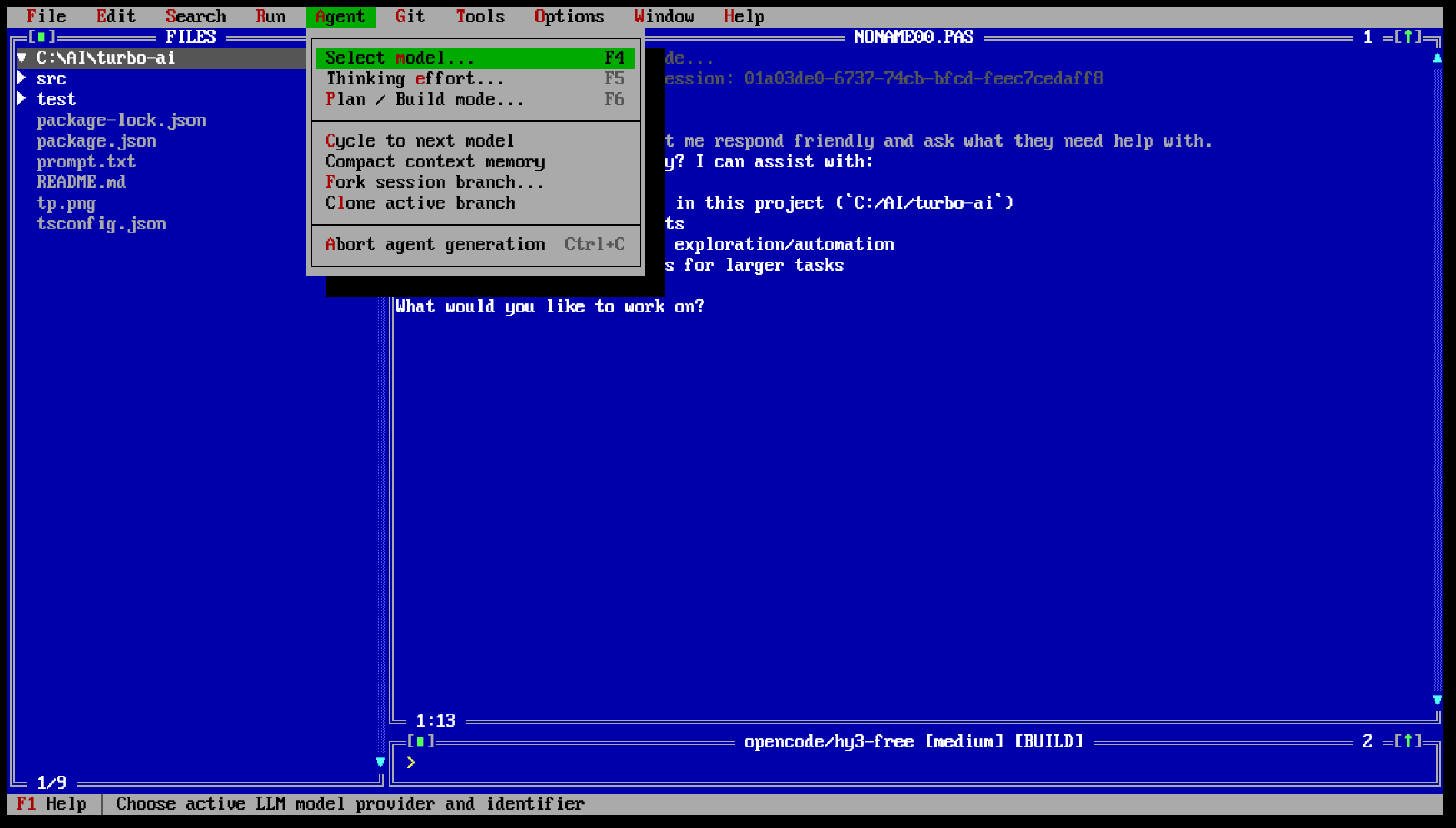
🚀 Key Features
🏛️ Authentic Turbo Pascal 7.0 / Turbo Vision GUI
- 16-Color DOS/VGA Palette: Classic Borland royal blue desktop, double-line frames, and 3D shadow buttons.
- Top Menu Bar (10 Menus):
File,Edit,Search,Run,Compile,Debug,Tools,Options,Window,Helpwith red mnemonic shortcuts (Alt+F..Alt+H). - Interactive Session Selector (
SessionSelector): Browse and resume project sessions with date/time, task previews, and1..9fast shortcuts (F3 Open,/resume,/sessions). - Recent Sessions History: The
Filemenu automatically lists up to 9 recently saved/opened sessions with red numbered shortcuts (1...9.). - Complete Mouse Interaction: Click to focus windows, open menus, select tree files, click window close
[■]and zoom[▲]boxes, scroll lists with mouse wheel, and drag to select & copy text.
🧠 Advanced LLM & Reasoning Workflow
- Model Switching (
F4 Model): Browse all available models from Pi, or use[+] Enter custom model ID...for quick custom models. - Custom Model Management: Add and configure arbitrary models across providers (
openrouter,opencode,deepseek,google,anthropic,openai,groq,mistral,xai,together) directly fromOptions→Add custom model...with automatic%USERPROFILE%\.pi\agent\models.jsonsynchronization. - API Key Configuration (
Options→Configure API keys...): Intuitive dialog to configure and securely save provider API keys to local.env. - Reasoning Effort Control (
F5 Effort): Dedicated hotkey and status toggle cycling through reasoning effort levels (low→medium→high→off), with automatic model reasoning flag enablement. - PLAN / BUILD Modes (
F6 Mode): Switch seamlessly between Architectural Planning mode ([PLAN]) and Autonomous Code Execution mode ([BUILD]). - Visual Thinking Distinction: Model reasoning (
thinking_delta) is rendered in subtle Gray (LIGHTGRAY), while the final response is rendered in crisp Bright White (WHITE) with syntax highlighting. - Built-in Slash Commands: Process
/status,/help,/compact,/clear,/model,/effort,/plan,/build,/diff,/test,/save,/open, and/resumedirectly from the prompt input.
📁 Codebase Navigation & Git Tools
- Project Tree Window: Live filesystem explorer with folder expand/collapse, git-dirty indicators, and instant file preview (
Click/ Enter). - Unified Diff Viewer (
F7 Diff): Color-coded side-by-side / unified diff viewer for git changes. - Test & Build Integration: Direct execution of
npm test(F8 Test) andnpm run build(F9 Build) through Pi RPC.
⌨️ Keyboard & Mouse Shortcuts
| Key | Description |
|---|---|
F1 |
Open Help screen & shortcut reference |
F2 |
Save current session to file (.md) |
F3 |
Open Interactive Session Selector / Browse Sessions |
F4 |
Select AI Model (from Pi or custom) |
F5 |
Cycle Reasoning / Thinking Effort (low → medium → high → off) |
F6 |
Toggle PLAN / BUILD mode |
F7 |
View Unified Git Diff |
F8 |
Run Tests (npm test via Pi) |
F9 |
Run Build (npm run build via Pi) |
F10 |
Toggle Top Menu Bar |
Alt+F..H |
Direct menu hotkeys (Alt+F File, Alt+O Options, etc.) |
Ctrl+F |
Filter project tree |
Ctrl+L |
Clear agent message history |
Ctrl+C |
Copy selected text to system clipboard / abort command |
Alt+X |
Exit Turbo-AI to terminal |
Tab |
Cycle active window focus |
Esc |
Close dialog / dismiss menu / cancel |
📦 Requirements
- Node.js >= 20
- Windows 10/11, Linux, or macOS
- Terminal: Modern terminal with ANSI/VT and 16-color support (e.g. Windows Terminal, VS Code terminal, iTerm2, Alacritty).
- Pi coding agent: Installed and available on PATH (
pi --version). Tested with@earendil-works/pi-coding-agent>= 0.78.0.
🛠️ Installation & Setup
# Clone the repository
git clone https://github.com/kvv256512-ux/turbo-ai.git
cd turbo-ai

# Install dependencies
npm install

# Run in development mode
npm run dev

# Build for production
npm run build

# Start compiled version
npm start
Running in a specific directory:
npm start -- --dir C:/path/to/project
Running unit tests:
npm test
🏗️ Architecture
┌──────────────────────────────────────────────────┐
│                   TURBO-AI                       │
│  10-Menu Bar │ Project Tree │ Agent Panel (DOS)  │
│  Double-buffered ANSI cell screen (DOS Palette)  │
└─────────────────────────┬────────────────────────┘
                          │ JSONL over stdio (pi --mode rpc --no-session)
                          ▼
┌──────────────────────────────────────────────────┐
│                      PI                          │
│  LLM orchestration │ RPC engine │ Git & Context  │
└──────────────────────────────────────────────────┘
- Pure Frontend Architecture: Pi is never modified or forked; Turbo-AI drives Pi strictly via the documented JSONL RPC protocol.
- Zero Runtime Dependencies: The UI engine is a double-buffered character cell grid written directly in TypeScript with ANSI escape codes.
📄 License
MIT © 2026 Turbo-AI Contributors.
Homage to Turbo Pascal © 1983-1997 Borland International, Inc.
Reviews (0)
Sign in to leave a review.
Leave a reviewNo results found