streamsnow
Health Warn
- License — License: MIT
- Description — Repository has a description
- Active repo — Last push 0 days ago
- Low visibility — Only 5 GitHub stars
Code Fail
- rm -rf — Recursive force deletion command in .github/workflows/ci.yml
- process.env — Environment variable access in .github/workflows/claude-triage.yml
- fs module — File system access in .github/workflows/claude-triage.yml
Permissions Pass
- Permissions — No dangerous permissions requested
No AI report is available for this listing yet.
Build, govern, and ship Streamlit-in-Snowflake apps with Claude Code

Build, govern, and ship Streamlit-in-Snowflake apps with AI.
The open-source Claude Code plugin and CLI that turns an idea into a governed,
reviewed dashboard running in Snowflake, without learning the platform's traps
the hard way.
Quickstart · Docs · Skills · CLI reference · Principles · Discussions · Changelog



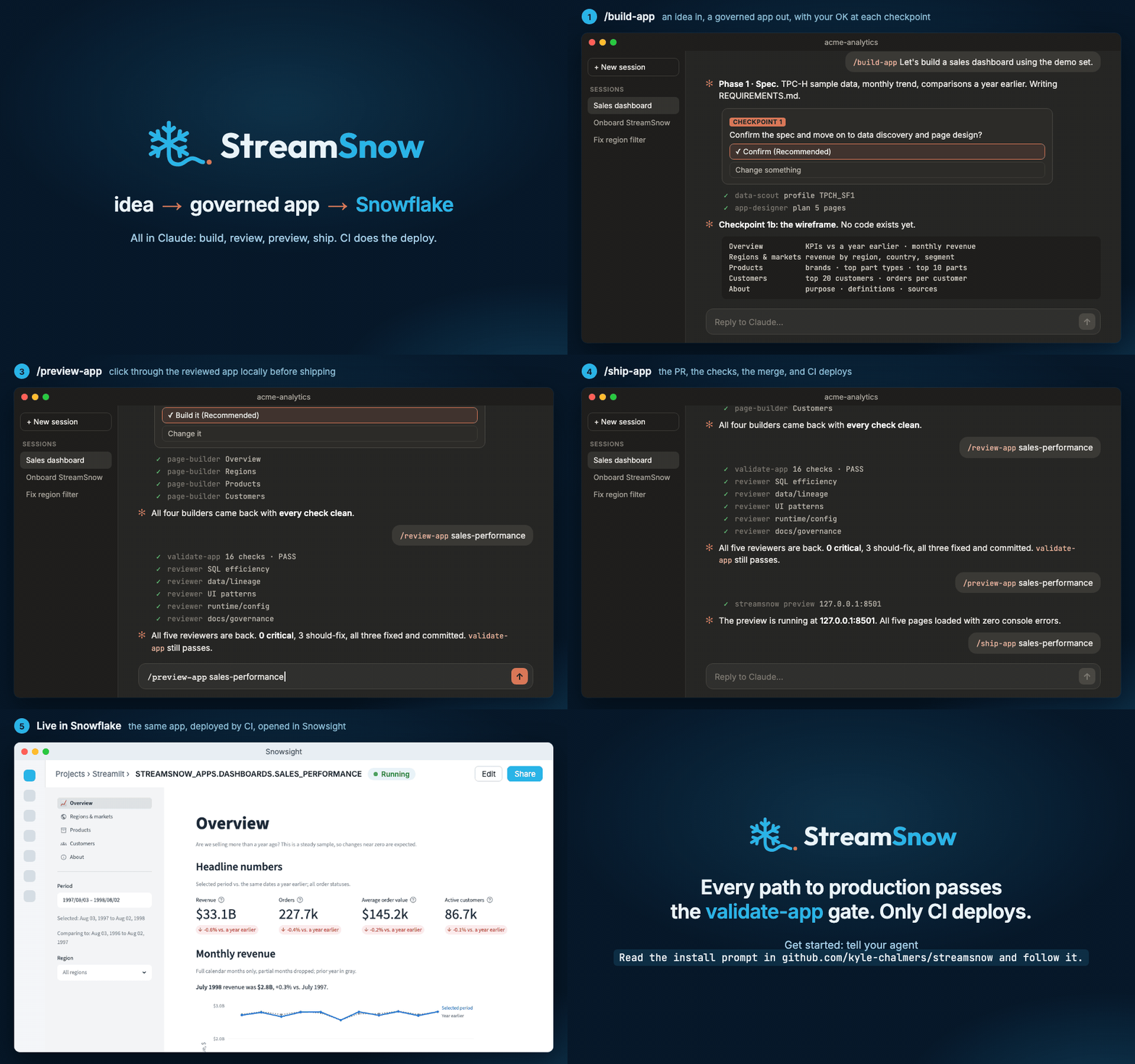
One real run, condensed: /build-app, /review-app, /preview-app and /ship-app in Claude, then CI checks, the merge and the deploy to Snowflake.
Quick start. Check the prerequisites, then open your coding agent
(Claude Code, Codex, Cursor, Gemini CLI and others) in the folder for your Snowflake apps
and say:"Read the install prompt in github.com/kyle-chalmers/streamsnow and follow it."
The agent installs StreamSnow and walks you through setup
(what the prompt does). To type the steps yourself, see
Quickstart.
Status: beta, functional. The CLI and the Claude Code plugin are CI-green for
both runtimes and both deploy sources, and published on PyPI. APIs may still evolve
toward 1.0; Versioning and stability says what is already
promised.
Mission
StreamSnow aims to let a data team build and ship, quickly and safely,
Streamlit-in-Snowflake apps that load fast, can be trusted, and help people make
decisions, by turning production lessons into scaffolding, checks, and guidance
that people and AI sessions can follow without having to remember them.
Vision
A data professional, with or without an AI assistant, can take a dashboard
from idea to a governed, verified deployment in Snowflake without learning the
platform's traps the hard way; a reviewer with Snowsight can re-run the SQL
behind the numbers it shows; and the people it's built for can open it,
understand it, and act on it without a walkthrough.
This is for you if:
- ✅ you want to build the most useful and beautiful dashboards of your life
- ✅ you want to eliminate the time you spend dragging and dropping in
traditional BI tools - ✅ you want analytics to stop being a bottleneck at your company
- ✅ you run, or will run, more than one Streamlit app in Snowflake with more
than one author - ✅ you want Claude Code sessions and humans held to the same governance rules
- ✅ you want a reviewer to re-run a dashboard's SQL in Snowsight without
reading Python - ❌ you host Streamlit outside Snowflake, or you need a scheduler or a data
catalog (StreamSnow does neither) - ❌ your dashboards are for people without Snowflake logins, out of the box
(possible with customization)
Principles: every change is judged against nine principles,
from one implementation, many consumers to design is a default, not a gate.
Prerequisites
| You need | What it's for |
|---|---|
| A Snowflake account | Where the apps run, on the container runtime (default) or the warehouse runtime |
| You or your Snowflake admin, once | Runs the admin script that creates the roles, CI user and grants, as SYSADMIN, USERADMIN, SECURITYADMIN and ACCOUNTADMIN (Deploy setup) |
| A GitHub repository for your apps | GitHub Actions runs the checks on every pull request and deploys on merge |
| Claude Code (recommended) or another coding agent | Runs the skills. Claude Code and Codex are the two tested |
Python 3.11+, uv and git |
The streamsnow CLI and its checks |
The Snowflake CLI (snow) |
Your local connection for setup and preview; sign-in happens in your browser |
The GitHub CLI (gh) |
Sets the deploy secrets and opens pull requests from /ship-app |
pre-commit |
Runs the same checks on every commit |
| Node.js 20+ (optional) | The browser walkthroughs of your app; without it they are skipped |
You don't have to install the command-line tools first: /onboard checks for them and
installs what is missing after one approval, and uvx streamsnow doctor lists what is
missing at any time.
What Claude can and can't see
StreamSnow asks Claude to set up Snowflake access, CI and deploy secrets on your
behalf. Here is exactly what that means for your credentials.
- Claude never sees a password, private key or token. Sign-ins happen in
your browser, and StreamSnow never asks for, stores or handles a Snowflake password. - The CI key goes from a file on your machine to GitHub without passing
through Claude.streamsnow ci-key createmakes the key pair in~/.streamsnow-ciand prints only file names and a fingerprint.streamsnow ci-key pushhands each secret to the GitHub CLI on standard input, never on
the command line, and prints only names. - Save a copy of the private key somewhere safe. Put
~/.streamsnow-ci/streamsnow_ci_rsa_key.p8in a password manager or similar
store yourself; Claude never opens it. If it is ever lost, make a new pair
and re-run the admin script (rotating the key). - Snowflake gets only the public half of the key. It goes into the admin
script, which you or your Snowflake admin run. Claude never runs it and
creates no Snowflake objects itself. - Claude's tools are blocked from the key directory. The plugin's key
guard (hooks/secret_guard.py) denies any read, search, edit or shell
command that points at it, apart from plainstreamsnow ci-keyandstreamsnow deploy-setupcommands. - Setup queries are read-only. The setup flow reads your account with
SHOWandSELECTqueries only, and never prints connection files orSNOWFLAKE_*values.

The limits, stated plainly: Claude runs as your user account, so the key guard
is a backstop, not a sandbox, and it runs only inside Claude Code. The full
detail is in SECURITY.md.
Install with your coding agent
This is the prompt the Quick start line at the top points your agent at. You can also paste
it in yourself:
Install StreamSnow (https://github.com/kyle-chalmers/streamsnow) for me at the
project level: enable the plugin and install the skills for this repo only,
never at the user level. Confirm with me before installing anything, and ask me each
setup question yourself and wait for my answer; never answer one for me.

1. Work in the git repo for my Snowflake apps. Ask me which folder if unsure; if it
   is new, create it and run `git init`. Run every command below from its root.

2. If you are Claude Code: run
   `claude plugin marketplace add --scope project kyle-chalmers/streamsnow` and then
   `claude plugin install --scope project streamsnow@streamsnow`. Both record the
   plugin in this repo's .claude/settings.json, not my user settings. Tell me to
   type `/onboard` (and `/reload-plugins` first, no restart needed, only if `/onboard`
   isn't listed). Stop there; that skill does the rest.

3. Any other agent: make sure `uv` is installed, then run `uv tool install streamsnow`
   and confirm `streamsnow --version` answers (the CLI is a command on my PATH; the
   skills call it by name). Run `streamsnow doctor` and fix each failing required
   check one at a time, re-running doctor after each fix.

4. If the repo already has a `streamsnow.config.yaml`, it is set up: run `streamsnow doctor`,
   and run `streamsnow init --no-starter-app` only if its `repo-files` row lists missing files.
   Otherwise, if the repo already has Streamlit apps, read
   https://github.com/kyle-chalmers/streamsnow/blob/main/skills/onboard/adopt.md and
   follow that instead of scaffolding. Otherwise set up with `streamsnow init --no-starter-app`.
   Its wizard asks a few questions, each with a prefilled answer. Answer what you can first with read-only SHOW queries
   over whatever Snowflake access I already have (my default snow connection, a Snowflake
   MCP server, a dbt profile), explain each setting and ask me each question with what you
   found as the recommended answer, then pass the confirmed answers as flags (see `streamsnow init --help`). If you cannot, hand the
   wizard to me.

5. Run `streamsnow agent-skills install --agent codex` (repo scope, the default; never
   `--scope user`). It copies the skills into this repo's .agents/skills, which Codex
   reads; any other agent can open .agents/skills/onboard/SKILL.md directly. Then
   follow onboard, and then build-app to build my first app.

Rules: never ask me for a Snowflake password or key in chat; if I choose, you may set
up my snow connection with flags, and I approve the sign-in in my browser. Never run
the admin SQL that `streamsnow deploy-setup --admin` prints; prepare it for me or my
Snowflake admin.
Only Claude Code and Codex are tested. Prefer to type the steps yourself? See
Quickstart, and Use with other agents
for what differs outside Claude Code.
How the skills fit together

How the repos fit together

Both diagrams are Excalidraw files in docs/images/; edit the.excalidraw source at excalidraw.com and re-export the
PNG with scripts/readme_media.
What it is
StreamSnow is a hybrid of two things that work together:
- A
streamsnowCLI (PyPI) scaffolds a governed Streamlit-in-Snowflake
monorepo, runs the setup wizard, renders the CI, pre-commit hooks and branding
your repo needs, and runs the governance checks from the installed package, so
your repo carries no copied tool code. - A Claude Code plugin (marketplace) ships the skills and hooks that turn
Claude Code into a domain expert for this stack:/build-app(the front door),/preview-app,/validate-app,/review-app,/ship-app, and more.
Think a Claude Code skill pack fused with an installable system + setup.
The CLI gives you the substrate; the plugin gives Claude the playbook. A singlestreamsnow.config.yaml is the source of truth both read from.
Why
Building Streamlit apps on Snowflake well means getting a hundred small things
right: caching with TTLs, parameterized SQL that survives the deployed Go
driver, runtime selection (container vs. warehouse), schema access guardrails,
a deploy pipeline, branding, and review discipline. StreamSnow encodes those as
executable guardrails (pre-commit and CI gates, scaffolding templates, and
Claude Code skills), so every developer and every Claude session follows the
same rules and ships safely.
Without StreamSnow / with StreamSnow
Every guardrail exists because something went wrong in a real production fleet
(Production lessons has the full story of each).
| ❌ Without | ✅ With StreamSnow |
|---|---|
| A query names a raw or staging schema and ships to production | streamsnow check schema-refs blocks it in pre-commit, validate-app and CI |
A None in params= makes the deployed driver bind every filter to NULL: the page renders, with zero rows |
check bind-predicates blocks the (:1 IS NULL OR col = :1) shape, and the scaffold's render_sql builds optional filters without nullable binds |
A page helper imports fine under streamlit run and dies with ModuleNotFoundError once deployed |
check page-imports fails it before merge |
| Renaming or removing an app or an app-data object leaves the old one live in Snowflake, frozen and forgotten | check tombstones blocks the PR until the old name is tombstoned; the deploy job drops it |
| The "reviewed SQL" stops matching what the app actually runs | sql-review check hashes every input, so drift and hand edits fail CI |
A Claude Code session runs snow streamlit deploy or a DROP from a laptop |
The deploy-safety hook stops and asks first; the sanctioned path is /ship-app, and only CI deploys |
| "Deploy succeeded", but the app is blank or serving old code | streamsnow verify-deploy checks the live version, the commit it serves and the container logs |
Two things you choose
StreamSnow treats two axes as first-class, configurable options:
| Axis | Options |
|---|---|
| Runtime | Container (default; GA since March 2026, full PyPI, local preview matches deploy) or Warehouse (instant start, Anaconda channel, no compute-pool cost). Snowflake's own comparison: runtime environments |
| Deploy source | Stage-copy (default: CI uploads to an internal stage) or Snowflake GIT REPOSITORY (Snowflake pulls from your Git repo; see Switching to Git repository) |
Quickstart
Check the prerequisites first. Then pick a lane: Claude Code, below, or
the CLI on its own (CLI only). Both end at the same governed repo. To have
your agent run these steps for you, use the install prompt.
With Claude Code (recommended)
From the root of your apps repo, install the plugin at project scope (it is
recorded in the repo's .claude/settings.json, not your user settings):
claude plugin marketplace add --scope project kyle-chalmers/streamsnow
claude plugin install --scope project streamsnow@streamsnow
Then, in a Claude Code session in that repo, start setup:
/onboard
The skills are normally available straight away, even in a session that was already open. If/onboard isn't listed, run /reload-plugins (no restart needed) and try again.
StreamSnow's one-line session-start message first appears in your next session.
/onboard gets your machine, repo and Snowflake account ready in four stages, and says
what it is doing at every step:
- Check and prepare. It works out what is already set up, reads your
Snowflake account with read-only queries over whatever access you have (asnowconnection, a Snowflake MCP server, a dbt profile), and installs any
missing tools after one approval. - One round of questions. Clickable choices, each explained first: runtime,
sources, app-data schema, deploy source, the schemas apps may not query, the
defaults the wizard does not ask about, your git name if it is missing, who runs
the Snowflake admin script (described before it asks), and which of your
Snowflake roles can open the apps. - Build. The config and the governed repo files (
AGENTS.md,CLAUDE.md,
pre-commit hooks, CI,.gitignore, README), only after you confirm. - Finish. The CI key, the admin script (copied for you to run in
Snowsight, or written up for your admin), and the deploy secrets.
It ends "ready to build and preview" (next: /build-app) or "ready to deploy".
Your part: approve installs, answer one round of questions, approve sign-ins in your
browser, and run the admin script in Snowsight if you are the admin. In a repo that
already has Streamlit apps it maps onto them and writes a MIGRATION.md instead of
scaffolding over them. Re-run /onboard any time to check.
The skills
One front door plus focused verbs. Each skill's SKILL.md stays under 80 lines, with
depth in per-skill reference files:
| Skill | What it does |
|---|---|
/onboard |
Machine, repo and Snowflake setup in four stages; detects what is done and does only what is missing. Also adopts repos that already have apps (maps onto them, writes MIGRATION.md) |
/build-app |
The front door for apps: spec (incl. backfill from existing source) → data discovery → page design → scaffold → pages built in parallel by subagents → review → ship, with checkpoints. --feedback turns feedback on a live app into classified fixes built the same way. Hands off to /onboard if the machine or repo isn't set up |
/preview-app |
Run an app locally against live Snowflake |
/validate-app |
The pass/fail check that must be clean before shipping |
/review-app |
Senior-reviewer-grade review; --fix applies findings, --auto loops to clean (executable loop primitives + per-change coverage stamping), --sql runs /sql-review |
/sql-review |
Proves an app's numbers against live Snowflake: page files, objects, grants and drift, every section run as aggregates, reviewer agents with a verifier, and a committed review log a person signs |
/ship-app |
Validate-gated stage → commit → push → PR → watch CI. You type it; the agent cannot start it, and it never merges |
/migrate-app |
Port an external Streamlit app in: lift it, then conform it through /build-app's phases |
How it's organized
Show the repository layoutstreamsnow/ the PyPI package: CLI, config, policy, scaffolder, tools
├── cli.py every command (see docs/cli-reference.md)
├── config.py typed + validated streamsnow.config.yaml model
├── policy.py schema allow/deny single source of truth
├── scaffolder.py renders a governed repo from config
├── deploy.py deploy-setup and deploy-sql
├── app_data.py app-data objects: checks, order, objects-sql
├── verify.py verify-deploy
├── ci_key.py ci-key create / push
├── agent_skills.py agent-skills (Codex and other agents)
├── _templates/ the Jinja scaffold templates (repo/ + app/)
└── tools/ governance checks + engines (schema refs, security,
caching, dependency vulns, tombstones, path leaks,
sql_review generator, review gate/loop, migrate, preview)
.claude-plugin/ Claude Code plugin manifest + marketplace
skills/ hooks/ Claude Code plugin surface (8 skills, incl. onboard/; hooks)
docs/ examples/ guides + a runnable no-Snowflake example app
scripts/ maintainer tools (docs link check, README media)
The streamsnow Python package is the single source of truth for tool
logic: the CLI, the Claude Code plugin, pre-commit, and CI all call the same
code: one implementation, many consumers.
Upgrading
The two halves upgrade separately, and the plugin half does not pick up
hook or skill changes on its own: an installed copy stays at the version it
was installed at until you reinstall it.
claude plugin list                                              # installed plugin version
claude plugin uninstall --scope project streamsnow@streamsnow
claude plugin install --scope project streamsnow@streamsnow    # then /reload-plugins in Claude Code if the new skills don't appear
uv tool upgrade streamsnow               # the CLI
streamsnow update                        # dry-run: governance files the new templates would change
streamsnow update --apply                # re-render AGENTS.md, CLAUDE.md, hooks, CI, deploy.yml
Generated CI and deploy workflows pin streamsnow>=0.12.0,<0.13; bump the pin withupdate --apply when you move to a new minor release (before 1.0, minors can break).
update stops at the repo-level governance files. It never rewrites app files
(apps/<slug>/review.py, pages/_glossary.py) and never rewrites an existing .sqlfluff.
Refresh a stale review.py with streamsnow sql-review helper <slug> --apply (a dry run
without --apply; --force as well when it reports modified).
These reach new repos only.
In
apps/<slug>/pages/_glossary.py, change the last line ofhover_definitionfromreturn metric_help(key).replace("%", "%%")toreturn metric_help(key).In
.sqlfluff(optional: a comment only, no rule or setting changes), replace the two
comment lines# rule set below. Run the same lint by hand with:and the one after it
(# sqlfluff lint apps/<slug>/queries --templater placeholder) with the current text:# rule set below. Lint through it, not through a bare sqlfluff run: # streamsnow sql-review check <slug> # The query files hold {TOKEN} placeholders, which sqlfluff's placeholder templater # (param_style colon) cannot parse. sql-review check substitutes the index's sample # tokens first, so the same files lint cleanly there.
A plugin update does not apply to a session that is already running: restart the
session (or run /reload-plugins) before relying on the new skill text.
claude plugin details streamsnow@streamsnow lists the 8 skills above.
Use with other agents
The skills are plain SKILL.md folders in the open
Agent Skills format, so a coding agent
other than Claude Code can follow them. OpenAI Codex CLI 0.157.1 is the only
one tested. The CLI installs them where Codex looks:
streamsnow agent-skills install --agent codex               # <repo>/.agents/skills; commit it
streamsnow agent-skills list --agent codex                  # what is installed, and from which version
Then ask Codex for a skill by name ($build-app) or in plain words ("use the
StreamSnow build-app skill to build..."). In a test with codex exec, Codex
found the skills in .agents/skills, read the SKILL.md files and the recipes
they link, and finished an offline app build that passed validate-app. The
install is a copy: re-run it after uv tool upgrade streamsnow, and put
repo-specific changes in .streamsnow/overlays/, because the command refuses
to overwrite an edited skill without --force.
The same under any agent: the streamsnow CLI and its checks,validate-app, the pre-commit hooks and CI. They run outside the agent.
Different outside Claude Code (each skill points the agent at
skills/_shared/other-agents.md):
- Skill names.
/ship-appis Claude Code's syntax; Codex uses$ship-app.
The install marksship-appandmigrate-appexplicit-only in Codex
(allow_implicit_invocation: false), matching theirdisable-model-invocationin Claude Code. - Checkpoints. A checkpoint is a question the agent stops at.
codex exec
cannot ask you, so a non-interactive run stops at the first checkpoint its
prompt does not answer. In the test it stopped at the spec checkpoint, and a
second run whose prompt gave that answer resumed fromREQUIREMENTS.md. - Reviewers.
/review-appfans out reviewers as Claude Code subagents; the
skill tells an agent without subagents to run the same briefs one after
another. - Browser walkthroughs. They run the Playwright CLI through
npx, so they
work under Codex too, but only when its sandbox allows network access and
writes to~/.npmand~/.cache/ms-playwright; otherwise they are skipped
and every other check still runs. - Claude Code only: the plugin hooks in Hooks, in full
have no Codex equivalent, so StreamSnow cannot pause a destructivesnow
command, nudge for a review, or print its session-start line there. The
skills ask the agent to keep those guards by hand, and in the test Codex ranstreamsnow review-gate classifyitself. Those guards now rest on the agent
following the skill; nothing enforces them.
SQL review
Every page of an app gets SQL a person can run: apps/<slug>/sql_review/NN_<page>.sql,
one section per metric in on-screen order. Each section runs on its own (cursor +
Cmd/Ctrl+Enter in DataGrip, or pasted into Snowsight), with its review window in its ownparams CTE.
- Generated from
sql_review/index.yaml, which lists each page's metrics and the app
query behind each. - Verified by an import-free gate,
streamsnow sql-review check: provenance digests, thereview_value("<key>", value)markers that tie each visual in page code to its section,
sqlfluff lint and comment rules for the app's queries, and a folder of maintained DDL
(app_specific_reporting_objects/) for views built just for the app. - Strict on drift. Drift, hand edits, marker mismatches and lint always fail the gate.
Whether an uncovered page or query fails or warns is your repo's call:sql_review: {coverage: warn | fail}instreamsnow.config.yaml(defaultwarn, so an
adopting fleet backfills on its own schedule).
A person with nothing but a SQL editor can trace a covered visual back to the data and confirm
it; see Auditing a visual. 0.8.0 replaced the 0.6/0.7 manifest
format with no automatic migration (the same page has the upgrade steps).
/sql-review <slug> is the live review. streamsnow sql-review probe and run check every
object, grant and DDL file and run every section against Snowflake as aggregates (row counts,
totals and a hash, never rows), under the app's role with secondary roles off. Reviewer agents
judge the SQL and must cite those results; a verifier drops what the evidence does not support;streamsnow sql-review log writes sql_review/review_log/YYYY-MM-DD_<sha>.md with a sign-off
block for a person. bench proves an optimization returns the same result before proposing it.
Make it yours: repo overlays
The skills are generic procedures; your org's knowledge layers on top without
forking them. Commit .streamsnow/overlays/<skill>.md files and every skill
reads its overlay first: extra steps, local failure signatures, environment
specifics, explicit overrides. Plugin upgrades never touch them; overlays may not
skip mandatory gate invocations, and the coded gates (hooks, CI, pre-commit)
run outside skill prose entirely. See
skills/_shared/overlays.md.
Hooks, in full
Trust demands transparency: this plugin runs hooks, so here is every one of them. All are
stdlib-only, make no network calls, never write outside the repo (plus one best-effort
dedupe state file in $TMPDIR, so the review nudge fires once per state, not every turn),
and fail open, so a hook error never blocks your session. The one exception is the key guard,
which denies rather than asks, and denies even if it hits an error on a call that names the key directory.
| Event | Script | What it does |
|---|---|---|
| PreToolUse (Bash, PowerShell) | hooks/deploy_safety.py |
Pauses before destructive Streamlit/SQL commands (snow streamlit deploy/drop, CREATE OR REPLACE / DROP / ALTER STREAMLIT, stage REMOVE, destructive SQL incl. -f files / stdin); /ship-app is the sanctioned deploy path |
| PreToolUse (shell, file and search tools) | hooks/secret_guard.py |
Denies any tool call that names the CI key directory (~/.streamsnow-ci) or key file, apart from streamsnow ci-key ... and streamsnow deploy-setup .... Covers the shell (Bash, PowerShell), file and search tools. Not repo-gated, because the key is sensitive in any repo. See What Claude can and can't see |
| SessionStart | hooks/session_start.sh |
One line inside a StreamSnow repo (plugin version, skills, which guards are active, and a nudge when this clone has no pre-commit hook); a one-line /onboard nudge in a repo that has Streamlit apps or the plugin enabled but no config; silence everywhere else |
| Stop | hooks/review_gate_stop.py |
Warn-only nudge (a systemMessage, never a turn continuation) when a substantive app change ends with no review covering it, pointing at /review-app <slug> --auto. Off-switches: REVIEW_GATE_OFF=1, apps/<slug>/.review/SKIP, or review_gate: {enabled: false} in config |
All hooks except the key guard are repo-gated on streamsnow.config.yaml (zero cost in unrelated repos; the
SessionStart /onboard nudge above is the one line that also appears in a repo without a config) and
declare explicit timeouts so a hung hook can never stall a session. To turn them off, disable
the plugin (claude plugin disable streamsnow). Hook additions do not reach installed copies
automatically; see Upgrading.
The browser tool
The skills click through each page of your running app and screenshot it with Microsoft's
Playwright CLI, pinned to an exact version and
run through npx only when a skill walks your app, so you see a broken page before it ships.
There is no MCP server to start. Unlike the hooks it does use the network: npx downloads the
pinned package from npm the first time, and the CLI downloads its own browser once. It needs
Node.js 20+; without Node the walkthroughs are skipped and everything else works.streamsnow doctor checks Node, and /onboard downloads the CLI and its browser ahead of time.
Documentation
- Getting started: run the example with no
Snowflake, then scaffold and preview your own governed app. - CLI only: set up and preview from the terminal, without Claude
Code. - CLI reference: every command, flag and check,
with exit codes and JSON output. - Principles: the nine rules every change is judged
against, and where each one shows up. - Data discovery: find tables and wire queries
inside the schema-access guardrails. - Deploying: ship apps to Snowflake on merge, for both
deploy sources. - Deploy setup: the one-time Snowflake objects and
CI secrets the pipeline needs. - Switching to Git repository: when to deploy
from a SnowflakeGIT REPOSITORYinstead of a stage, and how to switch. - Auditing a visual: the five-minute runbook
for confirming any dashboard number against the warehouse, no code required. - Production lessons: the incidents behind
the guardrails, genericized. - Troubleshooting: numbered symptom / cause /
fix entries for the first-run and deploy failures people actually hit. - Official Snowflake docs, by topic: every
external docs link the toolkit relies on, with scope, retrieved date, and
where StreamSnow deliberately differs. - Distribution: how StreamSnow ships (PyPI CLI +
plugin) and why there's no separate copy-paste kit. - Migrating a consumer repo: bring a
repo with home-grown skills onto the plugin (skill map + incremental path). - Versioning and stability: what counts as a breaking
change, the deprecation policy, and the path to 1.0.
Feedback and community
- Questions and ideas: Discussions.
- Bugs and scoped feature requests: open an issue
with one of the forms. Issues are triaged automatically, and the ones the maintainer
approves are often implemented by an AI agent and reviewed before merge
(how issues move). - Contributing: CONTRIBUTING.md, including the AI-assisted
contribution policy. Everyone agrees to the Code of Conduct. - Security: report privately, per SECURITY.md.
If StreamSnow saves you a production incident (or a week of dragging boxes around a
BI tool), ⭐ star the repo so you can find it again when you ship your next app,
and so other data teams can find it too.
License
MIT © Kyle Chalmers
StreamSnow is an independent open-source project and is not affiliated with or
endorsed by Snowflake Inc., Streamlit, or Anthropic.
Reviews (0)
Sign in to leave a review.
Leave a reviewNo results found