AIBattery
Health Pass
- License — License: MIT
- Description — Repository has a description
- Active repo — Last push 0 days ago
- Community trust — 19 GitHub stars
Code Fail
- rm -rf — Recursive force deletion command in .github/workflows/release.yml
- rm -rf — Recursive force deletion command in scripts/build-app.sh
- rm -rf — Recursive force deletion command in scripts/update-homebrew.sh
Permissions Pass
- Permissions — No dangerous permissions requested
No AI report is available for this listing yet.
A battery style usage meter for Claude Code. Rate limits, context health, and token usage in your macOS menu bar.

AI Battery
Get the most out of your Claude subscription.
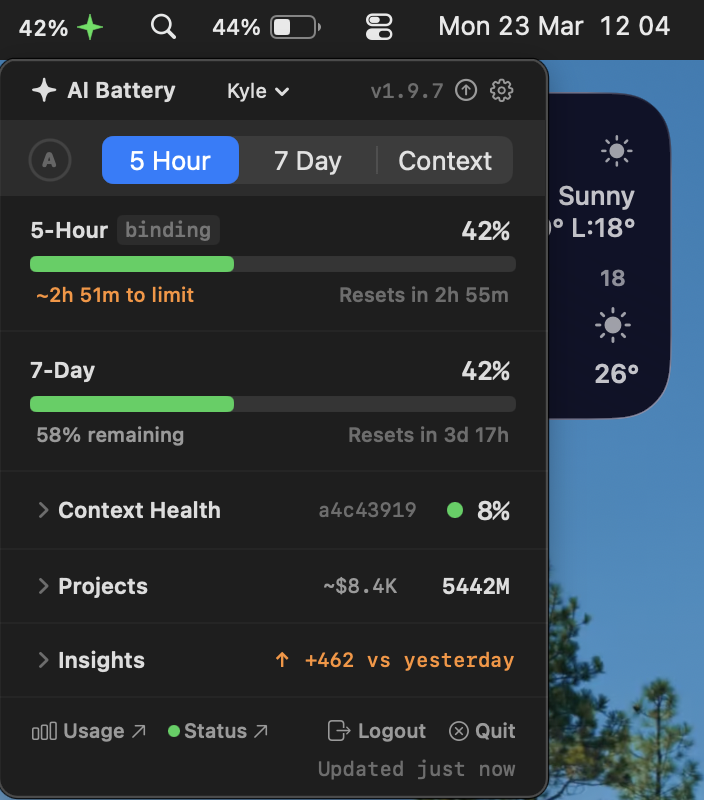
Monitor rate limits, context health, and token usage — always visible in your macOS menu bar.



📦 Install
 |
Homebrew (recommended) |
brew tap KyleNesium/tap
brew install --cask aibattery
curl -sL https://github.com/KyleNesium/AIBattery/releases/latest/download/AIBattery.zip -o /tmp/AIBattery.zip && ditto -x -k /tmp/AIBattery.zip /Applications && xattr -cr /Applications/AIBattery.app && open /Applications/AIBattery.app
Download from Releases:
- Open
AIBattery.dmgand drag AI Battery to Applications - Launch from Applications — macOS will block it on first run
- Open System Settings → Privacy & Security → scroll down → click Open Anyway
🛠 Build from source[!TIP]
If macOS says the app is damaged, runxattr -cr /Applications/AIBattery.appthen relaunch.
git clone https://github.com/KyleNesium/AIBattery.git && cd AIBattery
./scripts/build-app.sh
open .build/AIBattery.app
Requires macOS 13+ and Claude Code. See aibattery.dev for more info.
🔄 Update
AI Battery checks for updates once per day. When available, the header arrow turns yellow and a banner appears.
| Method | How |
|---|---|
| In-app (recommended) | Click Install Update — Sparkle downloads, verifies, replaces, and relaunches |
| Homebrew | brew upgrade --cask aibattery |
| DMG | Download from Releases, drag to Applications |
Settings and OAuth sessions carry over automatically. Updates are user-initiated only — nothing downloads in the background.
🔐 Authentication
OAuth 2.0 with PKCE — same protocol as Claude Code. Supports up to 3 accounts (separate Claude orgs).
| Step | Action |
|---|---|
| 1 | Launch AI Battery — the auth screen appears on first run |
| 2 | Click Sign In → browser opens to Anthropic's sign-in |
| 3 | Sign in → copy the authorization code |
| 4 | Paste into AI Battery → done |
Multiple accounts: Use the header dropdown to switch accounts or add new ones (up to 3). Each account has its own rate limits, tokens, and identity.
🔑 Session details- Sessions auto-refresh with a 5-minute buffer to avoid clock-skew issues
- Temporary server errors retry automatically
- Refresh token stored in macOS Keychain per account (separate from Claude Code credentials); access token held in memory only
- Error messages are specific — expired codes, invalid codes, server errors, and network errors each get a clear description
AI Battery isn't notarized — there's no Apple Developer license behind this project, so macOS treats it as unidentified. Two prompts may appear on first launch:
- Gatekeeper block — macOS prevents the app from opening. Fix: System Settings → Privacy & Security → Open Anyway (see Install)
- Keychain access — the app stores its OAuth refresh token in macOS Keychain (one item per account), Apple's encrypted credential store. Click Always Allow. The prompt may reappear once after an in-app update because the new binary has a different ad-hoc signature.
The Gatekeeper prompt is one-time. The Keychain prompt appears once on first launch and once after each in-app update.
📐 Metrics
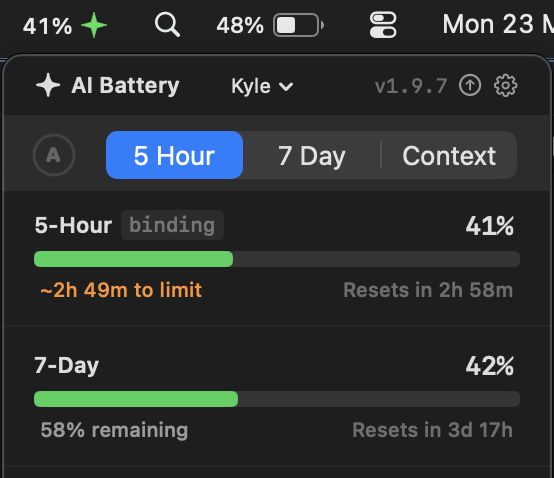
A minimal API call reads your rate limit headers each cycle. Local JSONL session logs provide token counts and context health — never your message content. Click the ✦ icon to open the dashboard.
The tab picker selects which metric drives the ✦ icon color:
| Mode | Tracks | Best for |
|---|---|---|
| ⏱ 5-Hour | Burst rate limit | Knowing when you'll get throttled |
| 📅 7-Day | Sustained rate limit | Pacing usage across the week |
| 🧠 Context | Session context fullness | Knowing when to start fresh |
| (A) Auto | Highest urgency metric | Always seeing the most critical metric |
Selected metric moves to the top. The other two stay visible below.
Auto mode: click the (A) button next to the tabs. It glows blue when active and automatically selects whichever metric has the highest percentage — so the menu bar always shows your most critical limit. To switch back to manual, click any tab — auto mode disables and switches in one action.
🧠 Context Health
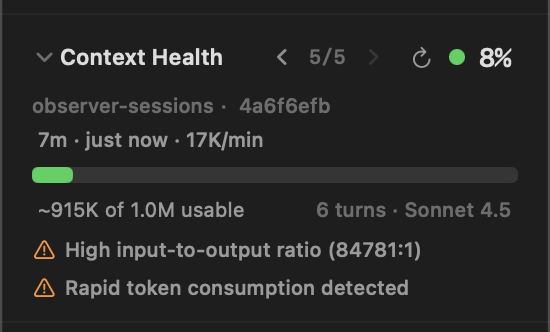
Shows your 5 most recent sessions with context health. Browse with < 1/5 > chevrons or swipe left/right. Stale sessions (idle > 30 min) show an amber "Idle" badge.
Each session displays: project name · git branch · duration · last active time.
Percentages are relative to the usable window — 80% of the model's raw context window. At 100%, Claude Code auto-compacts and quality drops. Keep at least 20-40% free for best results.
| Color | Range | Meaning |
|---|---|---|
| 🟢 Green | < 60% | Plenty of room |
| 🟠 Orange | 60–80% | Quality may degrade |
| 🔴 Red | > 80% | Start a fresh session |
Think of context as Claude's short-term memory. Every message, file read, tool call, and response accumulates in a 200K-token window. Nothing is discarded between turns. When it fills up, Claude Code auto-compacts — summarizing the session into a few paragraphs and clearing the rest. That summary is lossy: file contents, specific instructions, and nuanced decisions get compressed. Claude keeps working, but from a recap instead of the real conversation.
Long conversation (15+ turns) — Nothing is discarded between turns. Your messages, Claude's responses, tool calls, and results all accumulate. After ~15 turns the window is full of old history that Claude still reads every turn — slowing responses, reducing quality, and burning through your token budget on stale context.
High input:output ratio (20:1+) — More tokens are going in (file reads, error logs, tool results) than coming out. For example, reading 5 large files dumps thousands of tokens into context that Claude may only reference once. That data stays in the window for the rest of the session, consuming tokens on every subsequent turn and leaving less room for useful work.
Zero-output session — Session has multiple turns but no output tokens. May indicate an error loop or stalled conversation.
Rapid token consumption — Very short session with high token usage. Large files or long pastes may be filling the context window quickly.
[!TIP]
When you hit orange or red:
- Run
/compactto save a summary to project memory- Keep key decisions in
CLAUDE.md— loaded automatically every session- Start a new terminal in the same directory and pick up where you left off
⚙️ Settings
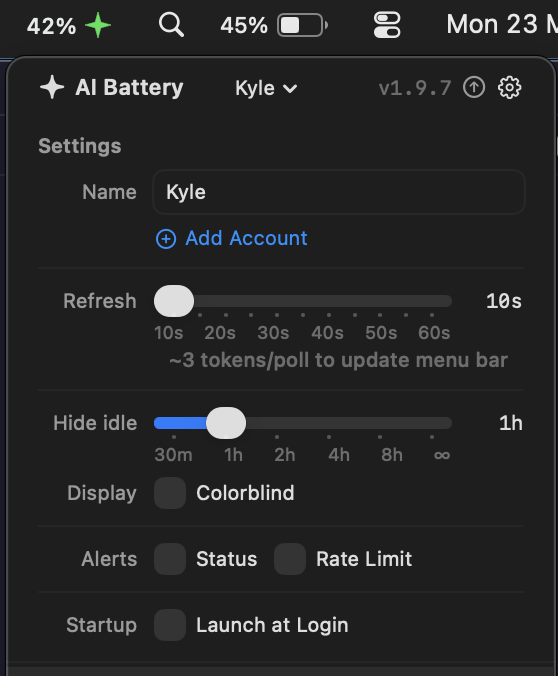
Click ⚙️ in the header to configure:
| Setting | What it does |
|---|---|
| ➕ Add Account | Connect another Claude account (up to 3) |
| ✏️ Account names | Custom label per account (shown in picker + menu bar) |
| 🔁 Auto mode | Always show the highest metric (pulsing blue button on metric toggle) |
| 🔄 Refresh | Poll interval: 10–60s · ~3 tokens per refresh |
| ⏳ Idle | Hide sessions idle longer than cutoff from context health: 30m–8h or Never |
| 🎨 Colorblind | Blue/cyan/amber/purple palette |
| 💲 Cost | Always visible — API-equivalent cost in Insights and Projects |
| 🔔 Alerts | Notify on status page outages (all components) |
| ⚡ Rate Limit | Notify when usage crosses threshold (50–95%) |
| 🚀 Launch at Login | Start automatically when you log in |
[!TIP]
Click any stat value (percentages, token counts, costs) to copy it to the clipboard.
📉 Activity & Insights
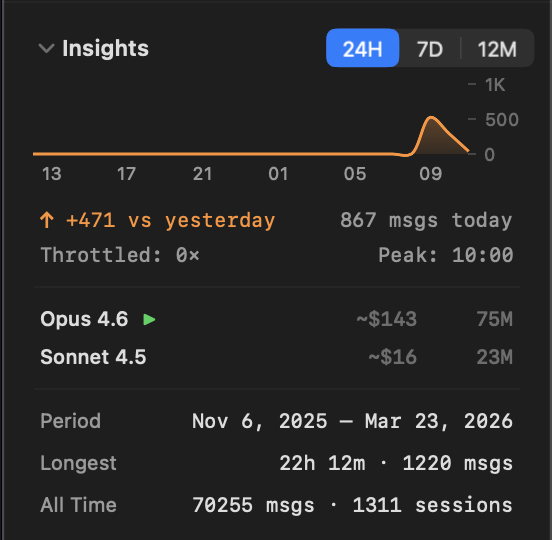
Interactive charts across three time windows:
| Mode | Window | Shows |
|---|---|---|
| 24H | Trailing 24 hours | Hourly activity, vs-yesterday trend, peak hour |
| 7D | Rolling 7 days | Daily activity, weekly trend, busiest day |
| 12M | Rolling 12 months | Monthly activity, month-over-month trend, busiest month |
Below the chart: API-equivalent cost per model, throttle count, and cumulative stats (All Time messages/sessions, Longest session, Period date range).
💰 API Cost Equivalent
Dollar amounts show what your usage would have cost on Anthropic's pay-per-token API — not your actual bill. Pro, Max, and Teams subscribers pay a flat monthly fee. When the API-equivalent exceeds your monthly fee, your subscription is saving you money. The bigger the gap, the better the deal. Pricing uses Anthropic's published per-million-token rates.
How token tracking worksAI Battery reads Claude Code's session logs (~/.claude/projects/) and stats cache (~/.claude/stats-cache.json) — it never writes to Claude Code's files or reads message content, only token counts.
To prevent totals from dropping when Claude Code rebuilds its cache, AI Battery maintains a persistent ledger (~/Library/Application Support/AIBattery/token-ledger.json) that keeps the high-water mark for each model. Token totals never decrease, even across cache rebuilds.
The Projects section groups token usage by the directory you ran Claude Code in. AI Battery scans all .jsonl session logs under ~/.claude/projects/, deduplicates by message ID, groups by working directory, and computes API-equivalent cost per project.
Project data appears after you've run at least one Claude Code session.
🔧 Troubleshooting & FAQ
App appears in the menu bar then disappearsOn first launch: macOS Gatekeeper may silently kill the app because it's not notarized.
xattr -cr /Applications/AIBattery.app
Then relaunch. This removes the quarantine flag that macOS adds to downloaded apps.
After working for a while: If the icon vanishes after the app has been running, update to the latest version — v1.2.3+ fixed concurrency issues that could cause intermittent crashes during background data refresh and sleep/wake cycles.
If it still happens:
- Open Console.app → filter for "AIBattery" → look for crash logs
- Check your macOS version — macOS 13.0–13.2 had
MenuBarExtrabugs fixed in 13.3+ - Open an issue with the crash log
This is the quarantine flag. Run:
xattr -cr /Applications/AIBattery.app
Then relaunch.
Keychain access dialog keeps appearingClick Always Allow when prompted. AI Battery stores its OAuth refresh token in macOS Keychain (one item per account). After a Sparkle in-app update, a single Keychain prompt may appear because the new binary has a different ad-hoc signature. This is a one-time prompt per update.
Only rate limits show — tokens, models, and activity are all empty?Token usage, context health, and activity stats come from Claude Code's local session logs (~/.claude/). These populate after you've used Claude Code for a bit. To kickstart it:
- Run a few Claude Code sessions from the terminal
- Run
/statsinside Claude Code — this generates the stats cache - AI Battery refreshes automatically every polling cycle
Rate limits (5-hour / 7-day) always work immediately since they come from the API.
Green ✦ at 0%?Credits just reset, or no usage yet — this is normal.
What's "binding"?Whichever rate limit window is currently the active constraint. The binding window determines the percentage shown in the menu bar.
What's ⚠️ "throttled"?Anthropic is actively limiting your requests. Wait for the reset timer.
🔒 Privacy
| 📂 Local only | Reads JSONL for token counts — never your message content |
| 🌐 Network | api.anthropic.com (rate limits) · console.anthropic.com (OAuth) · status.claude.com (status) · api.github.com (update check, once/24h) · kylenesium.github.io (Sparkle appcast) |
| 🚫 No tracking | No analytics. No telemetry. No data collection. Period. |
🏗 Architecture
AIBattery/
  Models/       — Data structs (UsageSnapshot, RateLimitUsage, TokenHealthStatus, ...)
  Services/     — OAuthManager, RateLimitFetcher, SessionLogReader, TokenHealthMonitor, ...
  ViewModels/   — Single UsageViewModel (@MainActor, ObservableObject)
  Views/        — SwiftUI views (popover sections, menu bar label, auth screen)
  Utilities/    — TokenFormatter, ModelNameMapper, ThemeColors, AppLogger
One dependency — Sparkle 2 for auto-update. Everything else is Apple frameworks (SwiftUI, Charts, Security, Foundation, AppKit).
📋 Detailed specs| File | Covers |
|---|---|
ARCHITECTURE.md |
Data flow, project tree, build config, network & file access |
DATA_LAYER.md |
Every model, service, and algorithm |
UI_SPEC.md |
View hierarchy, layout rules, section specs |
CONSTANTS.md |
Every hardcoded value — thresholds, URLs, pricing, sizes |
♿ Accessibility
- VoiceOver — all interactive elements include accessibility labels and hints; collapsible sections announce state; copy actions announce confirmation
- Keyboard navigation — fully navigable without a mouse
- Colorblind mode — Settings → Display → Colorblind switches to a blue/cyan/amber/purple palette
- First-launch tutorial — 3-step walkthrough on first use
🗑 Uninstall
Homebrew:
brew uninstall --cask aibattery
- Right-click AI Battery in the menu bar → Quit
- Open Applications in Finder → drag AI Battery to the Trash
To also remove stored settings:
security delete-generic-password -s "AIBattery" 2>/dev/null   # OAuth tokens (all accounts)
defaults delete com.KyleNesium.AIBattery 2>/dev/null           # Preferences
AI Battery doesn't write any other files. Your Claude Code data (~/.claude/) is untouched.
🤝 Contributing & Support
Contributions welcome — read the contributing guide first. See CHANGELOG.md for version history.
AI Battery is free and open source — always will be. If it helps you get more out of Claude, consider sponsoring the project.

🧪 Test Coverage
785 tests across 55 test files.
| Area | Tests | What's covered |
|---|---|---|
| Models | 192 | Token summaries, rate limit parsing, health status, metric modes, API profiles, usage snapshots, model pricing |
| Services | 296 | Token ledger, version checker, Sparkle updates, notifications, health monitor, status checker, session log reader (incl. NSLock/pendingInvalidation concurrency, incremental scanning, entry eviction), account store, stats cache, usage aggregator (incl. side-effects, integration tests), rate limit fetcher, OAuth |
| Views | 96 | Activity chart data transforms, trend computation, session info formatting, GaugeBar clamping, deferred rendering, status bar toggle, insights view formatting, metric toggle ordering |
| ViewModels | 29 | Refresh interval clamping, error messages, adaptive polling, throttle tracking, idle threshold constants |
| Utilities | 175 | Token/duration formatting, model name mapping, theme colors, secure networking, menu bar icon animations, throttle tracker, typography, spacing, idle suspension policy |
📄 License
Reviews (0)
Sign in to leave a review.
Leave a reviewNo results found