agent-desktop
Health Warn
- No license — Repository has no license file
- Description — Repository has a description
- Active repo — Last push 0 days ago
- Community trust — 59 GitHub stars
Code Fail
- fs module — File system access in .github/workflows/release.yml
- child_process — Shell command execution capability in npm/bin/agent-desktop.js
- fs module — File system access in npm/bin/agent-desktop.js
- child_process — Shell command execution capability in npm/scripts/postinstall.js
- execSync — Synchronous shell command execution in npm/scripts/postinstall.js
- process.env — Environment variable access in npm/scripts/postinstall.js
- fs module — File system access in npm/scripts/postinstall.js
Permissions Pass
- Permissions — No dangerous permissions requested
This tool is a native Rust CLI and MCP server that enables AI agents to automate desktop applications by interacting directly with OS accessibility trees. It provides structured JSON output and uses deterministic element references instead of visual parsing like screenshots.
Security Assessment
The overall risk is rated as Medium. The core Rust application requires broad macOS Accessibility permissions to read and interact with your screen and system elements, which is expected for its stated purpose but still involves highly sensitive system access.
However, the automated npm installation wrapper introduces significant security concerns. The package includes postinstall scripts and JavaScript wrappers that utilize `child_process` and synchronous shell command execution (`execSync`). While this is likely designed to automatically download the prebuilt Rust binary, executing shell commands during the installation process is a known attack vector for malware. No hardcoded secrets were detected, and the tool does not explicitly request network access at the OS level, but the installation scripts inherently require it to fetch the binary.
Quality Assessment
The project is actively maintained, with its last code push occurring today. It has garnered nearly 60 GitHub stars, indicating a fair level of community trust and interest for a niche developer tool. On a critical note, the repository completely lacks a license file. This means that technically, all rights are reserved by the creator, and users have no legal protection or clarity regarding usage, modification, or distribution.
Verdict
Use with caution—while the actively maintained Rust core functions as intended, you should bypass the risky automated npm installer (which runs opaque shell scripts) and compile the tool manually from the GitHub source to guarantee safety, keeping in mind the absence of a formal software license.
Native desktop automation CLI for AI agents. Control any application through OS accessibility trees with structured JSON output and deterministic element refs.
agent-desktop
agent-desktop is a native desktop automation CLI designed for AI agents, built with Rust. It gives structured access to any application through OS accessibility trees — no screenshots, no pixel matching, no browser required.
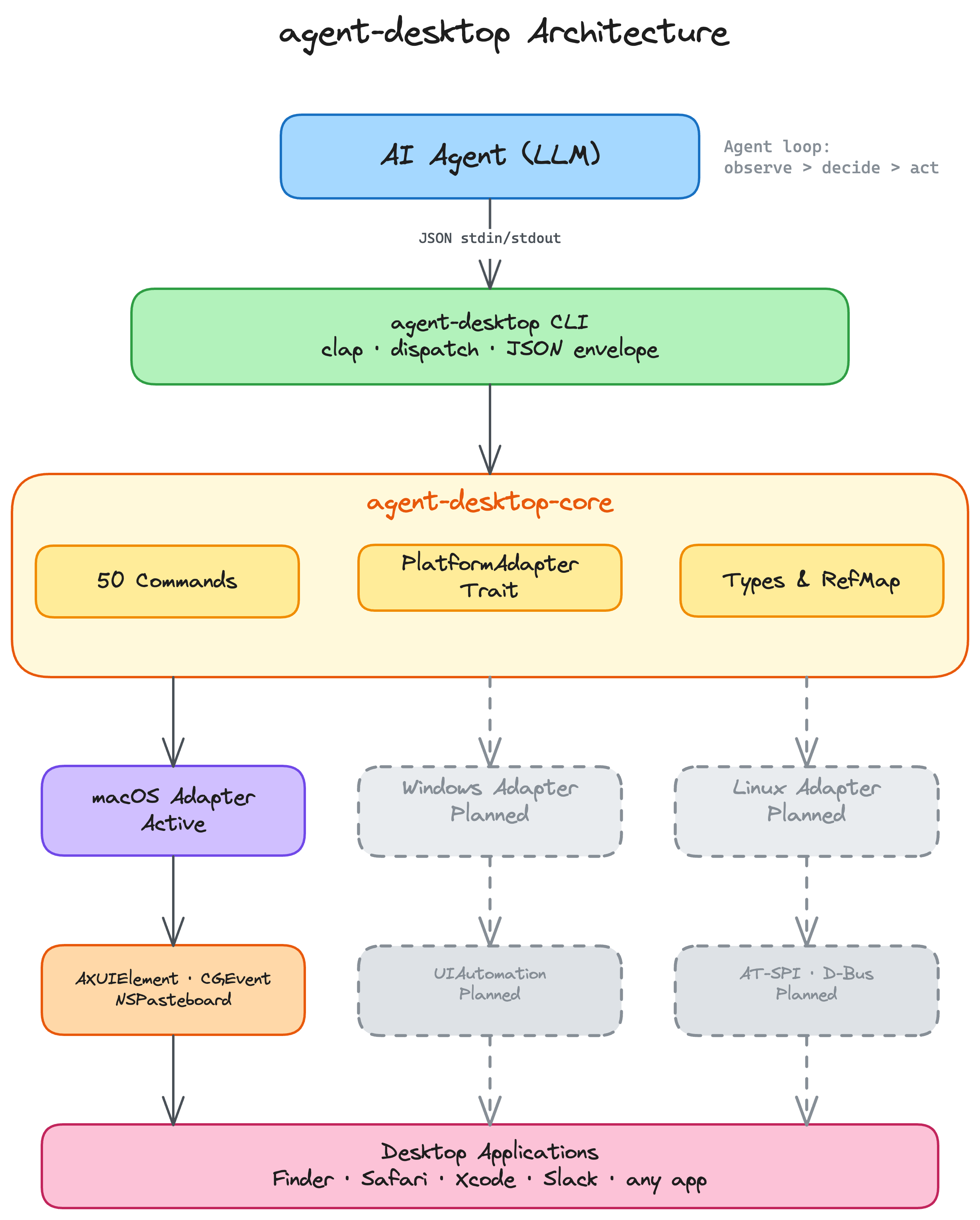
Architecture
Key Features
- Native Rust CLI: Fast, single binary, no runtime dependencies
- 50 commands: Observation, interaction, keyboard, mouse, clipboard, window management
- Snapshot & refs: AI-optimized workflow using deterministic element references (
@e1,@e2) - AX-first interactions: Every action exhausts pure accessibility API strategies before falling back to mouse events
- Structured JSON output: Machine-readable responses with error codes and recovery hints
- Works with any app: Finder, Safari, System Settings, Xcode, Slack — anything with an accessibility tree
Installation
npm (recommended)
npm install -g agent-desktop # downloads prebuilt binary automatically
Or without installing:
npx agent-desktop snapshot --app Finder -i
From source
git clone https://github.com/lahfir/agent-desktop
cd agent-desktop
cargo build --release
cp target/release/agent-desktop /usr/local/bin/
Requires Rust 1.78+ and macOS 13.0+.
Permissions
macOS requires Accessibility permission. Grant it in System Settings > Privacy & Security > Accessibility by adding your terminal app, or:
agent-desktop permissions --request # trigger system dialog
Core Workflow for AI
agent-desktop snapshot --app Finder -i   # get interactive elements with refs
agent-desktop click @e3                  # click a button by ref
agent-desktop type @e5 "quarterly report"  # type into a text field
agent-desktop press cmd+s               # keyboard shortcut
agent-desktop snapshot -i               # re-observe after UI changes
The snapshot + ref pattern is optimal for LLMs: refs provide deterministic element selection without re-querying the accessibility tree.
Agent loop: snapshot → decide → act → snapshot → decide → act → ...
Commands
Observation
agent-desktop snapshot --app Safari -i           # accessibility tree with refs
agent-desktop snapshot --surface menu            # capture open menu
agent-desktop screenshot --app Finder            # PNG screenshot
agent-desktop find --role button --app TextEdit  # search by role, name, value, text
agent-desktop get @e3 value                      # read element property
agent-desktop is @e7 checked                     # check boolean state
agent-desktop list-surfaces --app Notes          # list menus, sheets, popovers, alerts
Interaction
agent-desktop click @e3                  # smart AX-first click (15-step chain)
agent-desktop double-click @e3           # open files, select words
agent-desktop triple-click @e3           # select lines/paragraphs
agent-desktop right-click @e3            # context menu (returns menu tree inline)
agent-desktop type @e5 "hello world"     # type text into element
agent-desktop set-value @e5 "new value"  # set value directly via AX
agent-desktop clear @e5                  # clear element value
agent-desktop focus @e5                  # set keyboard focus
agent-desktop select @e9 "Option B"      # select option in dropdown/list
agent-desktop toggle @e12                # flip checkbox or switch
agent-desktop check @e12                 # idempotent check
agent-desktop uncheck @e12               # idempotent uncheck
agent-desktop expand @e15                # expand disclosure/tree item
agent-desktop collapse @e15              # collapse disclosure/tree item
agent-desktop scroll @e1 down 3          # scroll (AX-first, 10-step chain)
agent-desktop scroll-to @e20             # scroll element into view
Keyboard
agent-desktop press cmd+s               # key combo
agent-desktop press cmd+shift+z          # multi-modifier
agent-desktop press escape               # single key
agent-desktop key-down shift             # hold key
agent-desktop key-up shift               # release key
Mouse
agent-desktop hover @e3                  # move cursor to element
agent-desktop hover --xy 500,300         # move cursor to coordinates
agent-desktop drag @e3 --to @e8          # drag between elements
agent-desktop drag --xy 100,200 --to-xy 400,200  # drag between coordinates
agent-desktop mouse-click --xy 500,300   # click at coordinates
agent-desktop mouse-down --xy 500,300    # press at coordinates
agent-desktop mouse-up --xy 500,300      # release at coordinates
App & Window Management
agent-desktop launch Safari              # launch app by name
agent-desktop launch com.apple.Safari    # launch by bundle ID
agent-desktop close-app Safari           # quit app
agent-desktop close-app Safari --force   # force quit (SIGKILL)
agent-desktop list-apps                  # list running GUI apps
agent-desktop list-windows               # list visible windows
agent-desktop list-windows --app Finder  # windows for specific app
agent-desktop focus-window w-4521        # bring window to front
agent-desktop resize-window w-4521 800 600  # resize
agent-desktop move-window w-4521 100 100    # move
agent-desktop minimize w-4521            # minimize
agent-desktop maximize w-4521            # maximize
agent-desktop restore w-4521             # restore
Clipboard
agent-desktop clipboard-get              # read clipboard text
agent-desktop clipboard-set "copied"     # write to clipboard
agent-desktop clipboard-clear            # clear clipboard
Wait
agent-desktop wait 500                                       # sleep 500ms
agent-desktop wait --element @e3 --timeout 5000              # wait for element
agent-desktop wait --window "Save" --timeout 10000           # wait for window
agent-desktop wait --text "Loading complete" --app Safari    # wait for text
agent-desktop wait --menu --timeout 3000                     # wait for menu
Batch
agent-desktop batch '[
  {"command": "click", "args": {"ref_id": "@e2"}},
  {"command": "type", "args": {"ref_id": "@e5", "text": "hello"}},
  {"command": "press", "args": {"combo": "return"}}
]' --stop-on-error
System
agent-desktop status                     # platform, permission state
agent-desktop permissions                # check accessibility permission
agent-desktop permissions --request      # trigger system dialog
agent-desktop version                    # version string
Snapshot Options
agent-desktop snapshot [OPTIONS]
| Flag | Default | Description |
|---|---|---|
--app <NAME> |
focused app | Filter to a specific application |
--window-id <ID> |
- | Filter to a specific window |
-i / --interactive-only |
off | Only include interactive elements |
--compact |
off | Omit empty structural nodes |
--include-bounds |
off | Include pixel bounds (x, y, width, height) |
--max-depth <N> |
10 | Maximum tree depth |
--surface <TYPE> |
window | window, focused, menu, menubar, sheet, popover, alert |
JSON Output
Every command returns structured JSON:
{
  "version": "1.0",
  "ok": true,
  "command": "click",
  "data": { "action": "click" }
}
Errors include machine-readable codes and recovery hints:
{
  "version": "1.0",
  "ok": false,
  "command": "click",
  "error": {
    "code": "STALE_REF",
    "message": "Element at @e7 no longer matches the last snapshot",
    "suggestion": "Run 'snapshot' to refresh refs, then retry"
  }
}
Error Codes
| Code | Meaning |
|---|---|
PERM_DENIED |
Accessibility permission not granted |
ELEMENT_NOT_FOUND |
No element matched the ref or query |
APP_NOT_FOUND |
Application not running or no windows |
STALE_REF |
Ref is from a previous snapshot |
ACTION_FAILED |
The OS rejected the action |
TIMEOUT |
Wait condition expired |
INVALID_ARGS |
Invalid argument values |
Exit Codes
0 success, 1 structured error (JSON on stdout), 2 argument parse error.
Ref System
snapshot assigns refs to interactive elements in depth-first order: @e1, @e2, @e3, etc. Refs are valid until the next snapshot replaces them.
Interactive roles that receive refs: button, textfield, checkbox, link, menuitem, tab, slider, combobox, treeitem, cell, radiobutton, incrementor, menubutton, switch, colorwell, dockitem.
Static elements (labels, groups, containers) appear in the tree for context but have no ref.
Stale ref recovery:
snapshot → act → STALE_REF? → snapshot again → retry
Platform Support
| macOS | Windows | Linux | |
|---|---|---|---|
| Accessibility tree | Yes | Planned | Planned |
| Click / type / keyboard | Yes | Planned | Planned |
| Mouse input | Yes | Planned | Planned |
| Screenshot | Yes | Planned | Planned |
| Clipboard | Yes | Planned | Planned |
| App & window management | Yes | Planned | Planned |
Development
cargo build                               # debug build
cargo build --release                     # optimized (<15MB)
cargo test --lib --workspace              # run tests
cargo clippy --all-targets -- -D warnings # lint (must pass with zero warnings)
License
Apache-2.0
Reviews (0)
Sign in to leave a review.
Leave a reviewNo results found