lalabase
Health Warn
- License — License: AGPL-3.0
- Description — Repository has a description
- Active repo — Last push 0 days ago
- Low visibility — Only 5 GitHub stars
Code Pass
- Code scan — Scanned 12 files during light audit, no dangerous patterns found
Permissions Pass
- Permissions — No dangerous permissions requested
No AI report is available for this listing yet.
Open-source project management for software agencies with client projects: tickets, time tracking, docs, meetings and an AI assistant on your own data. Self-hosted with Docker or cloud in Germany. AGPL-3.0.
Lalabase
Open-source project management for software agencies and small software companies with
client projects. Tickets, time tracking, docs, meetings and an AI assistant that answers from
your own project data, with its sources. Run it on your own server for free, or use our hosted
cloud in Germany.
Website · Self-hosting ·
Documentation ·
Cloud pricing · Changelog
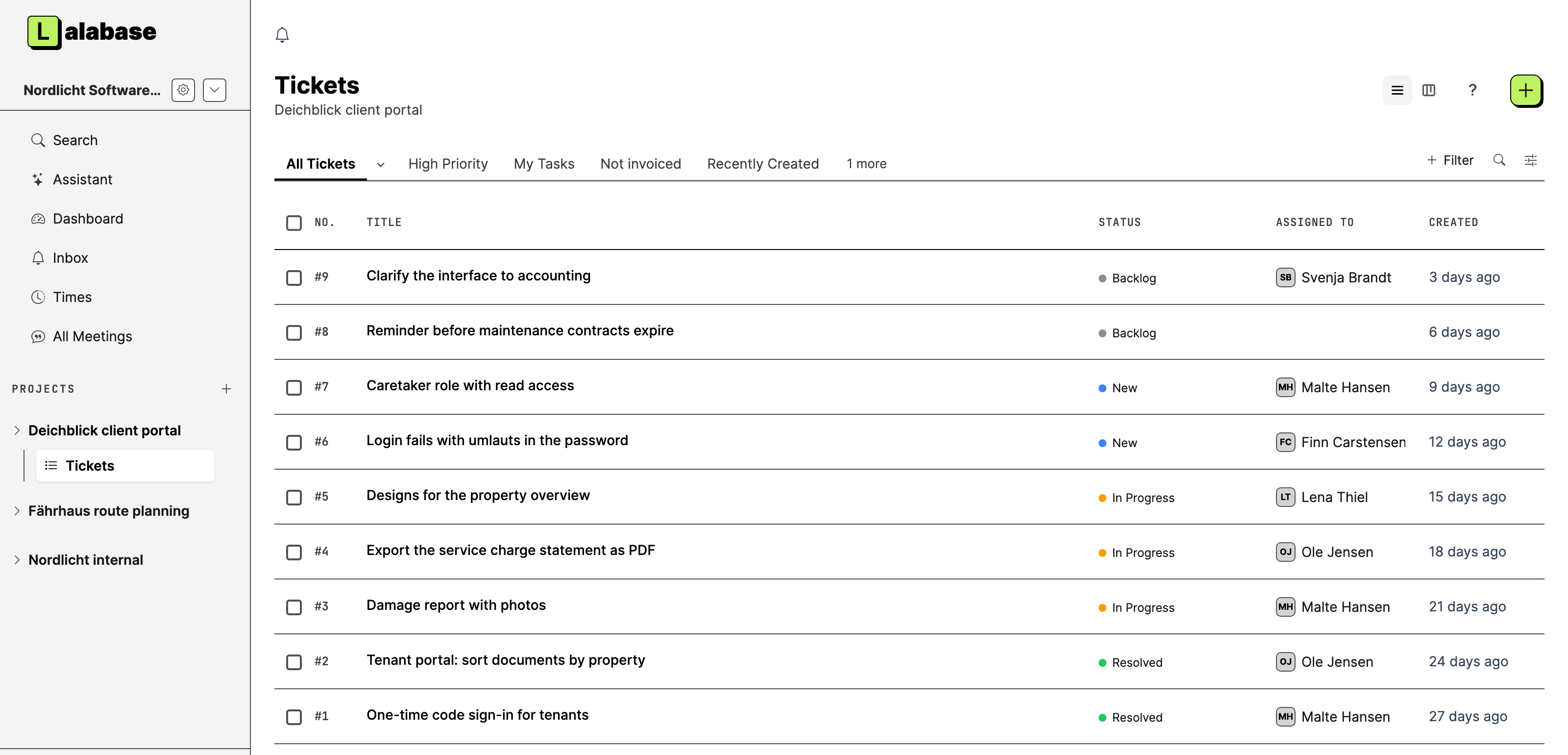
What it does
- Clients and projects. One organisation per client, any number of projects below it.
Clients get their own access, and roles decide what they see. - Tasks. As a list or a board, with the statuses, priorities and fields you define per
project. - Time tracking. Several sessions per ticket, each one billable on its own, with exports
for the invoice. - Documentation. Notes and documents in the project, and a folder in your GitHub or GitLab
repository becomes the project's docs. - Meetings. Transcript, AI summary and the tasks that follow from it.
- AI assistant. One question across tickets, docs, time and meetings, answered with its
sources. Other AI tools reach the same data through an MCP server and a REST API. - Your choice of AI. OpenAI, Anthropic, Google Gemini through Vertex AI in the EU, Mistral,
IONOS, OVHcloud, or any OpenAI-compatible endpoint, including a model in your own network.
The AI stays off until you switch it on.
Who it is for
Software agencies, freelancers and small software companies that work on projects for clients
and want their project data, and the AI that works on it, under their own control. Lalabase
replaces the usual mix of ticket tool, wiki, time tracking, chat and reporting spreadsheets.
Most teams come from Redmine, Jira, OpenProject, Asana or spreadsheets. The website
compares Lalabase with each of them, starting with what
the other tool does well.
Two ways to run it
| Your own server | Our cloud | |
|---|---|---|
| Cost | Free under AGPL-3.0. You pay for the server. | Monthly, see pricing |
| Operation, updates, backups | You | Us, hosted in Germany, with a DPA |
| Features | All of them, with each release | All of them, always current |
| AI | Your own key or your own model | The provider you choose |
Self-host with Docker
You need a server with at least 2 vCPU, 4 GB RAM and 20 GB disk, Docker 24 or later with
Docker Compose v2, and a domain pointing at it.
git clone https://github.com/lalabase/lalabase.git && cd lalabase
git checkout "$(git tag --list '[0-9][0-9][0-9][0-9].[0-9]*.[0-9]*' --sort=-v:refname | head -1)"   # the latest release, not main
cp .env.docker.example .env      # fill in the values it asks for
docker compose up -d --build
docker compose exec web bin/rails lalabase:setup
compose.yml starts the application, a job worker, PostgreSQL with pgvector, Valkey and Caddy,
which fetches a TLS certificate for LALABASE_HOST. If a proxy of your own terminates TLS, drop
the COMPOSE_PROFILES=tls line; to try it on your own computer without a certificate, follow the
comments in .env.docker.example. Build the image on the architecture it runs on.
The guide covers installation, configuration, AI keys, backups and updates, in English and
German: lalabase.com/docs.
We help with the installation on request: [email protected].
Status
Lalabase has been developed since October 2024: more than 2,300 commits and about 970 pull
requests, in production for customers since September 2025. This repository starts with the first
public release, 2026.10.0. The earlier history stays private, because it holds customer data
and details of our servers. Development continues here, in the open.
License and contributing
Lalabase is licensed under the GNU Affero General Public License, version 3 only
(SPDX: AGPL-3.0-only). Later versions of the license do not apply unless a release says so.
The full license text is in LICENSE.
Bug reports and ideas are welcome as issues; pull requests are not accepted. Details in
CONTRIBUTING.md.
Bundled third-party components keep their own licenses, listed in
THIRD_PARTY_NOTICES.txt.
Developing Lalabase
Everything below is for working on the code: stack, setup, releases and where things live.
Stack
| Ruby / Rails | 4.0.7 / 8.1.4 |
| Database | PostgreSQL with pgvector (extension vector; the schema creates HNSW indexes) |
| Frontend | Hotwire (Turbo + Stimulus), ViewComponent, Tailwind |
| Jobs | Solid Queue, the only job backend (Sidekiq has been removed) |
| Cache | Redis (staging and production only) |
| Multi-tenancy | acts_as_tenant, root entity Organisation |
Setup
bin/setup                           # dependencies, create the DB, load the schema, seeds (incl. demo)
npm install && npm run copy:fonts   # Bootstrap Icons into public/fonts (once)
Running it in development: two processes
Procfile.dev has no web server (only the CSS watcher and Solid Queue), so start the
server separately:
bin/dev                      # terminal 1: Tailwind watcher + Solid Queue
bin/rails server -b 0.0.0.0  # terminal 2: the application
Signing in during development: a freshly created development database contains a small demo
(db/seeds/demo.rb): [email protected] (admin), [email protected] (standard role),[email protected] (project manager) and [email protected] (viewer), and /admin with[email protected], each with the password lalabase-demo. On an existing database,bin/rails db:seed creates them, and bin/rails db:reset rebuilds everything.
A fresh instance gets its first admin with bin/rails lalabase:setup.
Your own keys for every installation
The repository ships no encrypted Rails credentials. In development and test, Rails creates
its own key in tmp/local_secret.txt on first start, and the local data encryption keys are
derived from it. Keep that file for later starts. This is also why .env.example has no activeSECRET_KEY_BASE example value.
For a new production installation, copy .env.production.example to .env, fill in the
database and the mail provider, and generate your own keys:
bin/rails secret               # put the output into .env as SECRET_KEY_BASE
bin/rails db:encryption:init   # copy the three values into ACTIVE_RECORD_ENCRYPTION_*
bin/rails db:prepare
bin/rails lalabase:setup
With these environment variables, neither a credentials file nor a RAILS_MASTER_KEY is
needed. If you use Rails credentials instead, create them yourself withbin/rails credentials:edit --environment production and put the matching key on the server.
If secret_key_base lives in the credentials, remove or comment out the SECRET_KEY_BASE line
in .env: even an empty environment value overrides the credentials. The three data encryption
keys must still be set, in the credentials or in the environment. Credentials files and keys
stay outside this public repository.
Existing installations: keep your existing credentials, master keys, SECRET_KEY_BASE and
data encryption keys, and back them up separately from the source code. Existing credentials
must still be provided through your deployment configuration after updates. New keys do not
migrate existing encrypted data.
Running it with Docker
The Docker steps are above. They install a release; for development,
use the two processes described here.
Running an instance
The guide for that is not in this repository: lalabase.com/docs
covers installation, operation, backups and updates, in German and English.
Until 21.09.2026 it lived as Markdown under app/docs/. This application never served it in
production: the /docs routes were wrapped in unless Rails.env.production?, so they were only
reachable in development, and the in-app help read from them. Since then the documentation is a
program of its own (gboyke/lalabase-documentation), because it is not meant to fall under this
repository's license. For a self-hosted instance that changes two things:
/docsand/hilfeserve no pages. Instead of text, the in-app help shows links to the
public documentation online.- If you want it inside your own instance anyway, put a catalogue file at
DOCS_CATALOGUE_PATH. The format contract so far lives in the private documentation archive
(docs/api/katalog_v1.md). The file is generated by the documentation program, which is
not public, so for now it has to be written by hand.
Releases
Versions are dates: YEAR.MONTH.PATCH, the month without a leading zero (2026.11.0,2027.1.0). A release usually comes once a month; a second one in the same month, typically a
security fix, counts up the last number.
main is what our hosted service runs. To run your own instance, install a release (a tag,
see the Docker steps above), not main. Before an update, read the release's Upgrade notes
in CHANGELOG.md: what you have to do (a new environment variable, a changedcompose.yml). Migrations and the data backfills run by themselves when the container starts;
without Docker, run bin/rails db:migrate lalabase:data_backfills after each update.
For maintainers, script/release cuts one:
script/release draft               # next version and draft notes from the merged pull requests
script/release prepare [VERSION]   # writes the draft into CHANGELOG.md: edit, pull request, merge
script/release publish VERSION     # on an up-to-date main: tag, push the tag, GitHub release
publish refuses while a pull request merged after the draft is not named in the notes as(#N), or while a commit on main came without a pull request. Add the line by a pull request
on CHANGELOG.md, or, after reading what it names, pass --anyway.
The rules (version scheme, sections, where a draft goes) are in lib/lalabase/release.rb;spec/architecture/changelog_guard_spec.rb keeps the file in the shape the script reads.
Everyday commands
bundle exec rspec                      # tests (a single one: rspec path/to_spec.rb:42)
npm test                               # JS tests (Node, no browser needed)
bundle exec rubocop                    # Ruby linter, against the frozen .rubocop_todo.yml baseline
bundle exec erblint --lint-all         # ERB linter
bundle exec brakeman                   # security scanner
bin/rails tailwindcss:build            # build the CSS once (needed in a fresh worktree)
CI (.github/workflows/guards.yml) does not run the full suite. It runs five jobs: a curated
list of guard specs, the JavaScript tests, RuboCop, Brakeman and a dependency audit. All of them
are green on main, so a red run means a convention was actually broken, not legacy drift.
Finding your way: what lives where
Core entities
Organisation is the tenant root; everything hangs off it. Account sits above it and groups
organisations for billing. Below it: Project → Ticket → Post / TimeSession, plusDocument, Note, Meeting and Chat.
Feature areas → code
Controllers live under app/controllers/organisations/ (70 feature controllers plusbase_controller.rb); the views mirror that structure.
| Area | Controllers (selection) | Central models |
|---|---|---|
| Tasks | tickets, ticket_attribute_definitions, smart_folders |
Ticket, TicketAttributeDefinition |
| Time & billing | time_sessions, time_session_groups |
TimeSession, TimeSessionGroup |
| Knowledge & files | knowledge, notes, documents |
Note, Document, Fragment |
| AI assistant | chats, chatposts, ai_settings, prompt_personas |
Chat, Chatpost, ContentEmbedding |
| Meetings | meetings, meeting_analyses, meeting_ticket_suggestions |
Meeting, MeetingAnalysis |
| Notifications | notifications, notification_subscriptions, mentions |
Notification, OutboxEvent, Activity |
| Organisation & permissions | memberships, roles, project_permissions, access_matrix |
Membership, Role |
| Documentation | documentation, documentation_sets |
DocumentationPage, DocumentationSet |
Places that are not obvious
- Writes go through command objects in
app/services/actors/(58 actors plusbase_actor.rb), not through the controller. Contract and tier rules:CLAUDE.md, section
"Actor-Pattern". - Every write triggers a side-effect chain (Activity → Outbox → Fanout) that is invisible
where it is called →docs/architektur/seiteneffekt_ketten.mdin the private documentation
archive. - Ticket status and priority are not columns but JSONB values configured per project →
docs/architektur/tickets_lesepfad.mdin the private documentation archive. - List pages (tickets, notes, documents) inherit behaviour from the
ObjectListController
stack, which brings its ownindex/showand fivebefore_actions →app/controllers/concerns/CLAUDE.md.
The documentation landscape
The former doc/ and docs/ folders have moved in full to the private repositorylalabase-private. They hold the internal documentation archive, plans and work logs.
Historical path references in comments point to that archive.
New working and developer documentation is written there by default. The public open-source
developer documentation will be rewritten separately and selected deliberately. The existing
working instructions remain in AGENTS.md and CLAUDE.md.
The handbook and the self-hosting documentation stay available at
lalabase.com/docs and are maintained in the separate repositorylalabase-documentation.
Conventions
Binding rules are in CLAUDE.md. The four that are overlooked most often:
- No
<style>blocks in views: CSS belongs inapp/assets/stylesheets/. - No rails-ujs options: use
data: { turbo_method: … }instead ofmethod:, otherwise it
is silently dead code (rails-ujs is not loaded). - i18n without exception: every user-facing text goes through
t(), with keys in German
and English. - Multi-tenancy: new models need
acts_as_tenant;without_tenantis reserved for the
admin area only.
Several of these rules are enforced automatically by guard specs (spec/**/*guard*).
Reviews (0)
Sign in to leave a review.
Leave a reviewNo results found