claudesync
Health Warn
- License — License: NOASSERTION
- Description — Repository has a description
- Active repo — Last push 0 days ago
- Low visibility — Only 5 GitHub stars
Code Fail
- execSync — Synchronous shell command execution in agent/index.js
- process.env — Environment variable access in agent/index.js
- network request — Outbound network request in agent/index.js
- network request — Outbound network request in agent/lib/api.js
- network request — Outbound network request in agent/lib/applier.js
Permissions Pass
- Permissions — No dangerous permissions requested
No AI report is available for this listing yet.
Keep your Claude Code environment in sync across devices — CLAUDE.md, skills, plugins, settings
ClaudeSync
Your Claude Code config, everywhere you work.
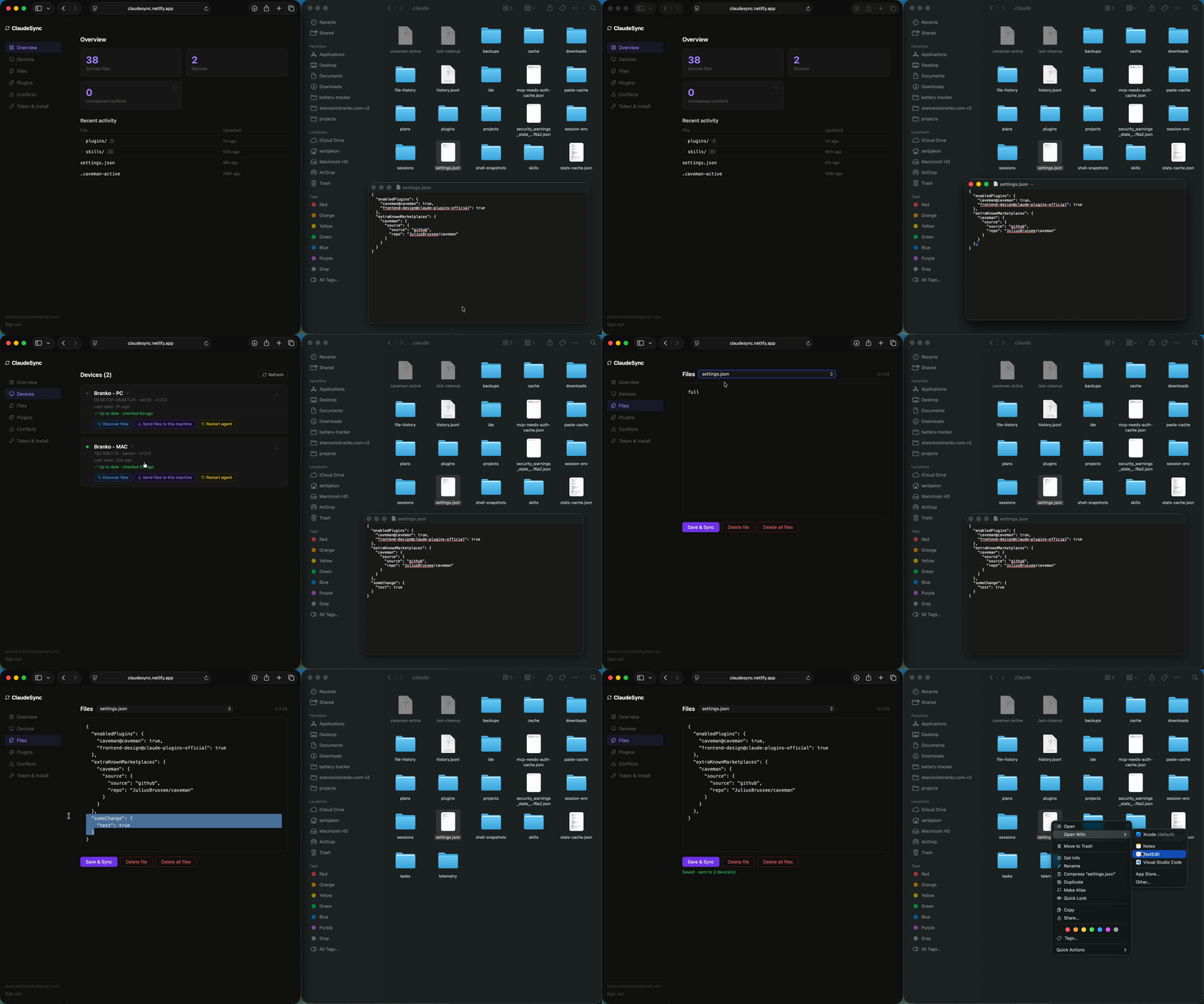
ClaudeSync syncs your ~/.claude directory — CLAUDE.md, skills, plugins, settings — between machines and teammates. A lightweight agent on each machine connects via Supabase Realtime and waits for commands from a web dashboard. Sync is fully manual: you decide what to push and when to pull.
Built for three things:
- 🔄 Stay in sync across your own machines — laptop, desktop, work box. Edit a skill once, pull it everywhere.
- 🚀 Set up a new machine in 60 seconds — install the agent, hit "Send files to this machine," and your entire Claude Code environment is there. No more "wait, where did I put that CLAUDE.md?"
- 👥 Share settings across a team — a single source of truth for skills, prompts, and plugins that everyone on the team pulls from. Onboard new hires by handing them a token.
→ Try it at claudesync.netlify.app — free, no setup.
Use cases
🔄 Personal multi-device sync
You work on a laptop at the coffee shop and a desktop at home. You add a new skill on one — and then forget it exists when you sit down at the other. ClaudeSync gives you one dashboard for both machines: discover what's different, push the skill from your laptop, pull it to your desktop. Same workflow for CLAUDE.md tweaks, custom plugins, settings changes.
🚀 New machine setup in 60 seconds
The fastest way to bootstrap Claude Code on a fresh install. Run the agent install command, open the dashboard, hit Send files to this machine — your entire ~/.claude directory is restored. Plugins auto-install. Skills appear. CLAUDE.md is there. No copying dotfiles, no scp, no "which version was the latest one?"
Useful for: setting up a new work laptop, spinning up a dev VM, recovering after a reformat, or trying out Claude Code on a cloud instance.
👥 Team-shared settings
One ClaudeSync account becomes the source of truth for your team's Claude Code setup. Everyone installs the agent with the team's token; everyone pulls the same approved skills, prompts, and plugin set. When you update the team's CLAUDE.md or publish a new internal skill, teammates pull it on demand.
Practical setups:
- Shared team token — simplest. Everyone reads from the same account. Good for small teams who trust each other; one person curates and the rest pull.
- Per-user tokens + a "team" device — more controlled. Each engineer has their own personal sync, plus pulls from a designated team account. Personal customizations stay personal, team standards stay synced.
- Onboarding — hand a new hire the install command. Five minutes later they have the same Claude Code environment as the rest of the team. Skip the "here's our internal prompts doc, copy-paste these into your CLAUDE.md" ritual.
Note on team use: the hosted instance is fine for evaluation and small teams. For anything sensitive, self-host — it's the same backend, on infrastructure you control.
Quick start (hosted)
The fastest way to get going. Sign up, install the agent on each machine, done.
- Sign up at claudesync.netlify.app
- Open Token & Install, copy the command for your platform
- Run it on every machine you want to sync
macOS / Linux:
curl -fsSL https://claudesync.netlify.app/api/install-script?token=YOUR_TOKEN | bash
Windows (PowerShell, run as Administrator):
$tmp="$env:TEMP\cs-install.ps1"
irm "https://claudesync.netlify.app/api/install-script?token=YOUR_TOKEN&platform=win" -OutFile $tmp
& $tmp
The agent installs itself, auto-starts on login, and registers with the dashboard within a few seconds. Open the dashboard, hit Discover files on one of your devices, pick what to sync, and push it. On your other machine, hit Send files to this machine.
Optional — add the MCP server to Claude Code:
claude mcp add --transport http claudesync \
  https://claudesync.netlify.app/api/mcp \
  --header 'Authorization: Bearer YOUR_TOKEN' \
  --scope user
What ClaudeSync stores (and what it doesn't)
You're trusting the hosted instance with files from your ~/.claude directory. Here's exactly what that means.
What gets synced:
CLAUDE.mdand any project-level markdown configs you explicitly add- Skills (
~/.claude/skills/) - Plugin definitions — the install manifest, not vendored code
- Settings files (
settings.json, etc.)
What never leaves your machine:
- Conversation history and chat transcripts
- API keys, OAuth tokens, or anything in your shell environment
- Files outside
~/.claude - Anything matched by the agent's built-in ignore rules (
.env,*.key,*.pem, credentials directories)
How it's protected:
- All data sits in Supabase Postgres + Storage with Row Level Security. Every query is scoped to your user — there is no path by which one user can read another user's files.
- The agent authenticates with a per-user bearer token that you can rotate or revoke from the dashboard at any time.
- Storage buckets are private; download URLs are short-lived signed URLs.
- Paths are tokenized on push (
{{USER_HOME}},{{CLAUDE_PATH}}) so usernames and install locations don't leak between machines.
If you'd rather not trust us with any of this: the entire backend self-hosts on Supabase's free tier in about 10 minutes. Skip to Self-host.
Caveat — please read your skills before syncing. ClaudeSync doesn't inspect file contents. If you've pasted an API key into a CLAUDE.md as a one-off, it'll get synced. Use the Discover step to review what's about to upload.
How it works
Dashboard                   Supabase                    Agent (each device)
  │                            │                              │
  ├─ Discover Files ──────────►│────── broadcast ────────────►│── scan ~/.claude
  │                            │◄── POST sync-discover ───────│
  │◄── discovery_results ──────│                              │
  │                            │                              │
  ├─ Sync N files ────────────►│────── broadcast ────────────►│── read files
  │                            │◄── POST sync-push (each) ────│
  │                            │◄── POST sync-complete ────────│
  │                            │                              │
  ├─ Send files to machine ───►│────── broadcast ────────────►│── write ~/.claude
  │                            │◄── GET sync-snapshot ─────────│── install plugins
- Discover — agent scans
~/.claude, posts file hashes; server diffs against stored versions, writes results todiscovery_results - Sync to server — dashboard shows pending files as a tree with checkboxes; agent reads selected files and pushes them
- Send to machine — agent pulls all server files to
~/.claude, then auto-installs any missing plugins viaclaude plugin install
Stack
| Layer | Tech |
|---|---|
| Database | Supabase Postgres + RLS |
| Storage | Supabase Storage (private, per-user) |
| Realtime | Supabase Realtime broadcast |
| Edge Functions | Deno (Supabase) |
| Dashboard | React + Vite → Netlify |
| Agent | Node.js (event-driven, no file watcher) |
Dashboard
| Page | What it does |
|---|---|
| Overview | File count, device count, conflict count, recent activity tree |
| Devices | Per-device discover / sync / snapshot / restart controls |
| Files | Browse and edit synced files in-browser |
| Plugins & Skills | Browse registry (162+ entries), install to a device, view installed |
| Conflicts | Review and resolve files written concurrently on two devices |
| Token & Install | Token management, install commands for all platforms |
Device workflow
Each device card has three actions:
- Discover files — compares local
~/.claudeagainst server, shows a file tree of differences with new/modified badges. Select files with checkboxes, then Sync to server. - Send files to this machine — pushes all server files down to the device and installs missing plugins.
- Restart agent — sends a restart signal; launchd/systemd restarts the process automatically.
Path portability
Paths containing your home directory or claude path are tokenized on push ({{USER_HOME}}, {{CLAUDE_PATH}}) and expanded back on pull. Files sync cleanly between machines with different usernames or install locations.
Agent auto-start
| Platform | Method |
|---|---|
| macOS | launchd (~/Library/LaunchAgents/com.claudesync.agent.plist) |
| Linux | systemd user service (~/.config/systemd/user/claudesync.service) |
| Windows | Task Scheduler + VBScript launcher (hidden window, restarts on failure) |
| No systemd | Shell rc file (~/.bashrc / ~/.zshrc) + nohup |
Self-host
Run your own ClaudeSync instance. Everything fits inside Supabase's free tier for personal use.
Prerequisites
- Supabase account (free tier works)
- Netlify account (free tier works)
- Supabase CLI —
brew install supabase/tap/supabase - Node.js 18+
1. Clone and link
git clone https://github.com/LandB/claudesync
cd claudesync
supabase login
supabase link --project-ref YOUR_PROJECT_REF
2. Run migrations
Before pushing, replace YOUR_PROJECT_REF in supabase/migrations/20260505224151_cron_jobs.sql with your actual Supabase project ref:
sed -i '' 's/YOUR_PROJECT_REF/YOUR_ACTUAL_REF/g' supabase/migrations/20260505224151_cron_jobs.sql
supabase db push
3. Deploy Edge Functions
for fn in heartbeat sync-push sync-discover sync-complete sync-snapshot \
          sync-trigger sync-pull bundle device-restart install-script \
          mcp refresh-plugins; do
  supabase functions deploy $fn
done
4. Deploy dashboard
Set env vars (VITE_SUPABASE_URL, VITE_SUPABASE_ANON_KEY), then:
cd dashboard && npm install && npm run build
netlify deploy --prod --dir=dist
# or connect the GitHub repo to Netlify for auto-deploy
5. Install the agent
Get your token from your dashboard, then run the install command for your platform (same as the hosted quick start above, but pointing at your own Supabase project).
Database schema
| Table | Purpose |
|---|---|
profiles |
One row per user, stores agent bearer token |
devices |
Registered machines, heartbeat timestamp, MAC address |
sync_files |
File metadata index (path, hash, storage_path) |
discovery_results |
Diff store — pending files per device after a discover run |
conflict_log |
Records when two devices write the same file concurrently |
plugin_registry |
Community skill/plugin catalog |
device_blocklist |
Prevents removed devices from re-registering |
All tables have Row Level Security — users only access their own rows.
Edge Functions
| Function | Auth | Purpose |
|---|---|---|
heartbeat |
Agent token | Device registration + keepalive |
sync-push |
Agent token | Push one file to storage + DB |
sync-discover |
Agent token | Receive file list, write diffs to discovery_results |
sync-complete |
Agent token | Clear discovery_results after sync |
sync-snapshot |
Agent token | Return download URLs for all server files |
sync-trigger |
Supabase JWT | Dashboard → broadcast discover/sync/snapshot to device |
device-restart |
Supabase JWT | Dashboard → broadcast restart to device |
install-script |
User token | Generate install.sh or install.ps1 |
mcp |
Agent token | Claude Code MCP server |
refresh-plugins |
Supabase JWT | Refresh plugin registry from npm + awesome-mcp |
Project structure
claudesync/
├── agent/
│   ├── index.js                    # Entry — Realtime listener, event handlers
│   └── lib/
│       ├── api.js                  # Edge Function client
│       ├── config.js               # Config loader
│       ├── watcher.js              # Allow/ignore rules (shared with discovery)
│       └── sanitize-plugin-paths.js # Path tokenization
├── dashboard/
│   └── src/
│       └── components/
│           ├── AuthScreen.jsx
│           ├── ConflictLog.jsx
│           ├── Devices.jsx
│           ├── FileEditor.jsx
│           ├── PluginManager.jsx
│           ├── SyncPanel.jsx
│           └── TokenPanel.jsx
├── supabase/
│   ├── functions/                  # Deno Edge Functions (one dir per function)
│   └── migrations/                 # Ordered SQL migrations
└── netlify.toml
Contributing
- Fork + clone
supabase start(requires Docker) or link to your own projectcd dashboard && npm install && npm run devCLAUDESYNC_CONFIG=~/.claudesync/config.json node agent/index.js
PRs welcome. Open an issue first for large changes — see CONTRIBUTING.md.
Security
Found a security issue? Please report it privately — see SECURITY.md rather than opening a public issue.
License
AGPL-3.0 — see LICENSE.
Reviews (0)
Sign in to leave a review.
Leave a reviewNo results found