link
Health Pass
- License — License: Apache-2.0
- Description — Repository has a description
- Active repo — Last push 0 days ago
- Community trust — 10 GitHub stars
Code Pass
- Code scan — Scanned 12 files during light audit, no dangerous patterns found
Permissions Pass
- Permissions — No dangerous permissions requested
No AI report is available for this listing yet.
One secure endpoint between your AI agents and all your connections, memory, skills, and secrets.
Lanes Link



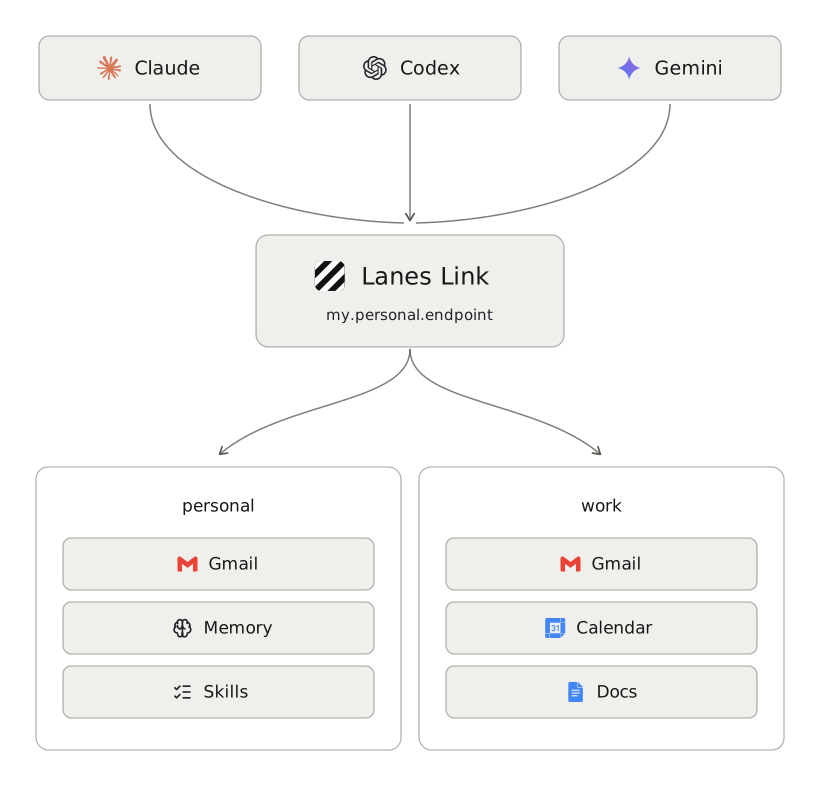
One secure endpoint between your AI agents and all your connections, memory, skills, and secrets.
Connect your mail, calendar, files, and notes once, and add the memory and skills that only you
have. Every agent you use — Claude, ChatGPT, and anything else that speaks MCP — reaches them
through a single MCP endpoint that you own and run. Open source, self-hostable, no vendor sitting in
the middle of your data.
Why
- Connect once, use everywhere. No per-agent integrations, no re-authorising every new tool.
- You decide what agents can touch. Permissions default to deny, and the runtime enforces
them — it does not ask the model to behave. - Work and personal never mix. Separate profiles, separate credentials, separate stores.
- Every call is recorded. An append-only log of what was reached, and what was refused.
What people use it for
- A personal assistant on your phone. A deployment is a URL, so the claude.ai or ChatGPT app
reaches your mail, calendar, and files from anywhere — "what's on tomorrow", "reply to Ana's
thread", "find the invoice from March". This is the case that needs your own
cloud; everything below works on your machine. - Inbox triage you sign off on. An agent searches, reads, labels, and composes — and saves a
draft for you to send rather than sending it, until you decide otherwise. - Coding agents that start from your context. Claude Code and Codex reach the same Linear
issues, Notion pages, and notes you do, so a session begins from what you already know instead
of an empty prompt. - One set of notes behind every agent. What you have Claude Code write down, claude.ai reads
back later — your accumulated context follows you between tools instead of being trapped in
whichever one recorded it. - Your own procedures, followed rather than guessed. How a standup update reads, where an
invoice gets filed, who gets cc'd on a contract — written down once, and every agent you use
follows the same one.
Quickstart
Needs Bun 1.3.11+. Nothing else — no account anywhere.
$ bun install -g @lanes-sh/link                # puts `lanes` on your PATH
$ lanes link profile add personal --target local
$ lanes link start --profile personal --target local
ok    serving http://127.0.0.1:7337/mcp
      profiles: personal
Then, in another shell:
$ lanes link mcp add --profile personal --target local                           # every agent installed; or name one: claude, codex
ok    registered lanes-link with Claude Code (user scope)
ok    registered lanes-link with Codex
Your agents can now use it. Memory, skills, and the vault hold your own material rather than an
account, so switching them on costs nothing — one command each, no credentials, no browser. Mail and
calendar are the next step. Full quickstart →
What your agent gets
| Manage it with | ||
|---|---|---|
| Connections | your external accounts — mail, calendar, files, issues | lanes link connect |
| Memory | what you want remembered between sessions | lanes link memory |
| Skills | your own procedures, handed to an agent as instructions | lanes link skills |
| Vault | passwords and API keys, released only where you allow it | lanes link vault |
Memory and skills are plain Markdown files, so a text editor and an agent reach the same bytes. All
four belong to one profile: what you add under work is invisible under personal.
Keep those two in a private GitHub repository instead of on this machine, and get history, diffs,
and the same notes from anywhere you run this:
$ lanes link knowledge use github --repo <owner/name> --migrate
It moves what you have already stored, in one commit, and lanes link knowledge use local --migrate brings it back. Nothing else moves — your credentials and your vault stay where they
are, and there is no setting that would put them in a repository.
Connect an account
One command per account. Run it again to add a second mailbox, a second calendar, a second anything.
| Connect with | |
|---|---|
| Gmail | lanes link connect gmail |
| Google Drive | lanes link connect drive |
| Google Sheets | lanes link connect sheets |
| Google Docs | lanes link connect docs |
| Google Calendar | lanes link connect calendar |
| Google Tasks | lanes link connect tasks |
| Google Contacts | lanes link connect contacts |
| iCloud Mail | lanes link connect icloud_mail |
| iCloud Calendar | lanes link connect icloud_calendar |
| iCloud Contacts | lanes link connect icloud_contacts |
| iCloud Drive | lanes link connect icloud_drive |
| Notion | lanes link connect notion |
| Linear | lanes link connect linear |
| GitHub | lanes link connect github |
| Slack | lanes link connect slack |
| Gmail (IMAP, app password) | lanes link connect gmail_imap |
| Gmail (Google MCP) | lanes link connect gmail_mcp |
| Drive (Google MCP) | lanes link connect drive_mcp |
Three things worth knowing up front. lanes link connect icloud sets up Mail, Calendar, and
Contacts together, because one app-specific password covers all three. Google and Slack need no
OAuth client of your own: both authorise against the one Lanes operates, so there is no console to
visit — for Google, add --own-client if you would rather register your own, or take a service
account key or an app password over IMAP where you would rather nothing expired. And GitHub takes a
token you paste rather than a browser sign-in, because it will not register a client for us; that
is the one console visit left here.
Full guide — what each one gives your agent, what it needs, and adding your own:
docs/connect.md.
Run it anywhere
The same code, the same config, in all three. Only the storage adapters change.
| Local | Your own cloud | Lanes Cloud | |
|---|---|---|---|
| Runs on | your machine | your GCP project, on Cloud Run | managed for you |
| Needs | Bun, nothing else | a Google Cloud billing account | — |
| Set up with | lanes link start |
lanes link deploy |
join the waitlist |
| Reachable from | that machine | anywhere, including your phone | anywhere |
| Status | ready | ready | coming soon |
Local is the fastest way to start, and where most people stay. Your own cloud is what you
want if you need to reach it from claude.ai, ChatGPT, or a phone — lanes link deploy creates the
project, the bucket, the service account, and the revision on its first run. Lanes Cloud is the
managed version; because it is the same data model, a workspace you build today moves across rather
than being rebuilt.
Join the waitlist to hear when it opens.
Docs
- Quickstart — from nothing to a working endpoint
- Connect your accounts — every provider, and what each one needs
- Add it to your agent — Claude Code, Codex, Claude Desktop, claude.ai, ChatGPT
- Deploy to your own cloud — five commands to a URL
- Every command — arguments and flags, one entry each
- Full reference — architecture, configuration, the CLI, the security model,
writing a provider, and the decision records
Security
Lanes Link holds live credentials to your email and documents. The
security model states its limits plainly rather than implying
guarantees the code does not deliver — read it before you trust it with an account. To report a
vulnerability, see SECURITY.md; please do not open a public issue.
License
Reviews (0)
Sign in to leave a review.
Leave a reviewNo results found