lil-mappo
Health Warn
- License — License: AGPL-3.0
- Description — Repository has a description
- Active repo — Last push 0 days ago
- Low visibility — Only 6 GitHub stars
Code Warn
- process.env — Environment variable access in api/_lib/dodo/planCatalogue.ts
- process.env — Environment variable access in api/_tests/dodo-cancel-subscription.test.ts
- process.env — Environment variable access in api/_tests/dodo-create-session.test.ts
- process.env — Environment variable access in api/_tests/dodo-webhook.test.ts
Permissions Pass
- Permissions — No dangerous permissions requested
No AI report is available for this listing yet.
A cinematic map animation and motion graphics tool
li'l Mappo (Map Animation Studio)
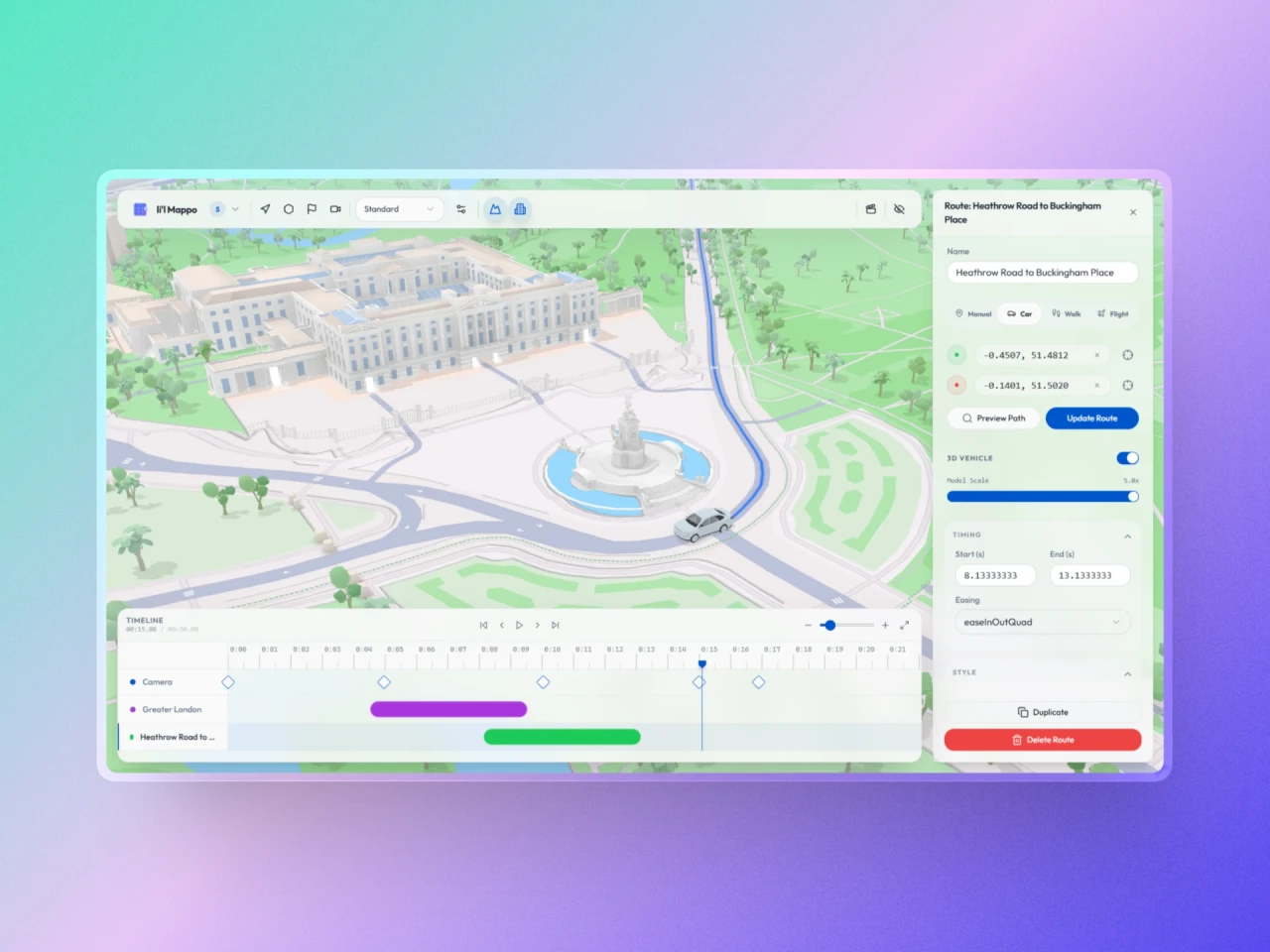
li'l Mappo is a browser-based application for creating cinematic map animations and exporting them as video. Use the timeline to control camera movement, plan automated and freeform routes, place annotations with a custom 2D canvas engine, and render animations locally or in the cloud.
Features
1. Route Planning and Import
- Import GPX and KML: Import, parse, and animate GPS routes.
- Automated Routing: Generate car, walking, or flight paths with Mapbox Directions and Great Circle math.
- Freeform Walking Paths: Multi-point routes with interactive waypoints, drag-to-reorder, and Bezier spline curve smoothing.
- Airport Search: Search 7,697 global airports by IATA or ICAO code with automatic runway snapping.
- 3D Vehicles: Display animated 3D cars and airplanes that follow route paths and orientation.
- Animated Lines: Draw lines progressively over time with customizable width, colors, and glow effects.
2. Annotations and Boundaries
- Canvas 2D Scene Graph: High-performance callout overlay rendered directly in the Mapbox render loop at native pixel scale.
- Multiple Visual Styles: Choose from 8+ styles including Modern, News, Minimal, Badge, Ripple, Pulsing Marker, House, and Retro.
- Screen-Space Altitude: Pixel-based altitude controls that eliminate zoom drift while preserving 3D terrain awareness.
- Boundary Search: Search administrative boundaries with OpenStreetMap Nominatim and animate boundary polygons.
- Manual Pick Mode: Position items with crosshairs and adjust points on 3D terrain.
- Drafting Tools: Search, style, and preview routes and boundaries before adding them to the timeline.
3. Camera and Timeline
- Keyframe Timeline: Control position, zoom, pitch, bearing, and altitude across time.
- AutoCam Engine: Track routes with a precomputed, look-ahead-smoothed camera: navigation and follow views, Chase / Drone / Reveal / Top-down presets, turn- and speed-reactive framing, intro swoop and outro pull-back, and terrain-aware clearance.
- Interpolation: Apply easing functions (Linear, Quad, Cubic, Sine) for smooth transitions.
- Orbit Tool: Generate keyframes to rotate the camera 360 degrees around a central point.
- Undo / Redo History: Multi-step history powered by Zundo with pointer gesture coalescing and source tracking (
uservsai).
4. Map Styles and Views
- Expanded Styles: Mapbox Standard, Nav Day, Nav Night, Black Marble, Vintage, and custom community styles.
- 3D Terrain and Features: Mapbox Terrain RGB, 3D extruded buildings, landmarks, trees, and facades.
- Dynamic Label Controls: Toggle category-level labels (places, roads, transit, POI) persisted per project.
- Projections and Atmosphere: Switch between Globe and Mercator projections with custom fog and light presets.
- Zen Mode: Hide interface panels for focused map viewing.
5. Media Export and Rendering
- Client-Side Export: Render MP4 videos offline using WebCodecs API and Mediabunny up to 4K resolution at 30 or 60 fps.
- Cloud GPU Rendering: Dispatch long or high-resolution render jobs to remote Modal GPU workers.
- Snapshot Export: Capture high-resolution PNG images from any camera position.
6. AI Agent Integration
- WebMCP Support: Native browser agent connectivity through
document.modelContext(e.g. Gemini in Chrome). - Local MCP Bridge: A Go bridge daemon (
bridge/) exposing project tools to desktop coding agents (Claude Code, Antigravity) over Model Context Protocol via WebSocket. - Agent Feed and Visuals: Real-time action feed, timeline row pulses, toolbar notifications, and atomic AI undo steps.
7. Accounts and Cloud Storage
- Authentication: Supabase Auth supporting email, Google OAuth, and GitHub OAuth.
- Cloud Project Sync: Save projects to Supabase PostgreSQL and synchronize across devices alongside local IndexedDB storage.
- Subscriptions and Quotas: Free and Wanderer tiers integrated with Dodo Payments, with support for Bring-Your-Own-Key (BYOK).
Tech Stack
- Frontend: React 18, Vite, Zustand, Zundo, TanStack React Query
- Map Engine: Mapbox GL JS v3,
react-map-gl/mapbox, Turf.js - Annotations: Canvas 2D scene graph renderer
- Video Export: WebCodecs API, Mediabunny, Canvas 2D, and Modal (Python/Chromium headless workers)
- AI & MCP: WebMCP browser protocol and Go WebSocket MCP bridge
- Backend & Auth: Supabase (PostgreSQL, Auth, Storage) and Vercel Serverless Functions
- Payments: Dodo Payments (hosted checkout and webhooks)
- UI & Styling: Radix UI primitives, Tailwind CSS, Lucide React
- Testing: Vitest, Playwright, and fast-check property-based fuzzing
Architecture
The application runs as a state-driven animation engine:
- A central Zustand store manages timeline items (Routes, Boundaries, Callouts, Camera Keyframes), environment settings, and playhead timing.
- Persistent document state is separated from transient UI state and wrapped by an undo/redo temporal layer.
- An off-DOM Canvas 2D scene graph draws map annotations in lockstep with the Mapbox camera.
- Transport-agnostic agent tools allow both in-browser and external AI agents to programmatically create and modify scenes through MCP.
Development & Testing
Prerequisites
- Node.js 18+
- Docker (for local Supabase services)
Quick Start
# Install dependencies
npm install

# Start development server
npm run dev

# Run unit and integration tests
npm test

# Run browser smoke tests
npm run test:ui

# Run property-based smart monkey fuzzing
npm run test:fuzz
Local Supabase
The repository includes a local Supabase configuration in Docker. It applies all database migrations and seeds test accounts without requiring production credentials. The start script binds published ports to 127.0.0.1 to protect local services.
npm run db:local:start
npm run db:local:reset
npm run db:local:status
Copy .env.local.example to .env.local. Replace the keys with values from npm run db:local:status. Vite gives .env.local priority over .env. This isolates local sessions from production Supabase.
Local service endpoints:
- API:
http://127.0.0.1:54321 - Studio:
http://127.0.0.1:54323 - Mailpit:
http://127.0.0.1:54324
Test login credentials (password: local-test-password):
Use only the db:local:* scripts for development and tests. Do not use supabase link, supabase db push, or --linked. Those commands target hosted projects.
Reviews (0)
Sign in to leave a review.
Leave a reviewNo results found