kungfu-kanban
Health Warn
- License — License: MIT
- Description — Repository has a description
- Active repo — Last push 0 days ago
- Low visibility — Only 5 GitHub stars
Code Fail
- process.env — Environment variable access in lib/auth.js
- fs module — File system access in lib/auth.js
- child_process — Shell command execution capability in lib/awake.js
- process.env — Environment variable access in lib/bus.js
- os.homedir — User home directory access in lib/discovery.js
- fs module — File system access in lib/discovery.js
Permissions Pass
- Permissions — No dangerous permissions requested
No AI report is available for this listing yet.
Local-first kanban board where Claude Code agents work your cards — dependency chains with merge gates, an AI manager that reviews real diffs and merges green PRs, group lanes, CI-gated. One runtime dependency.
Kungfu Kanban 🥋





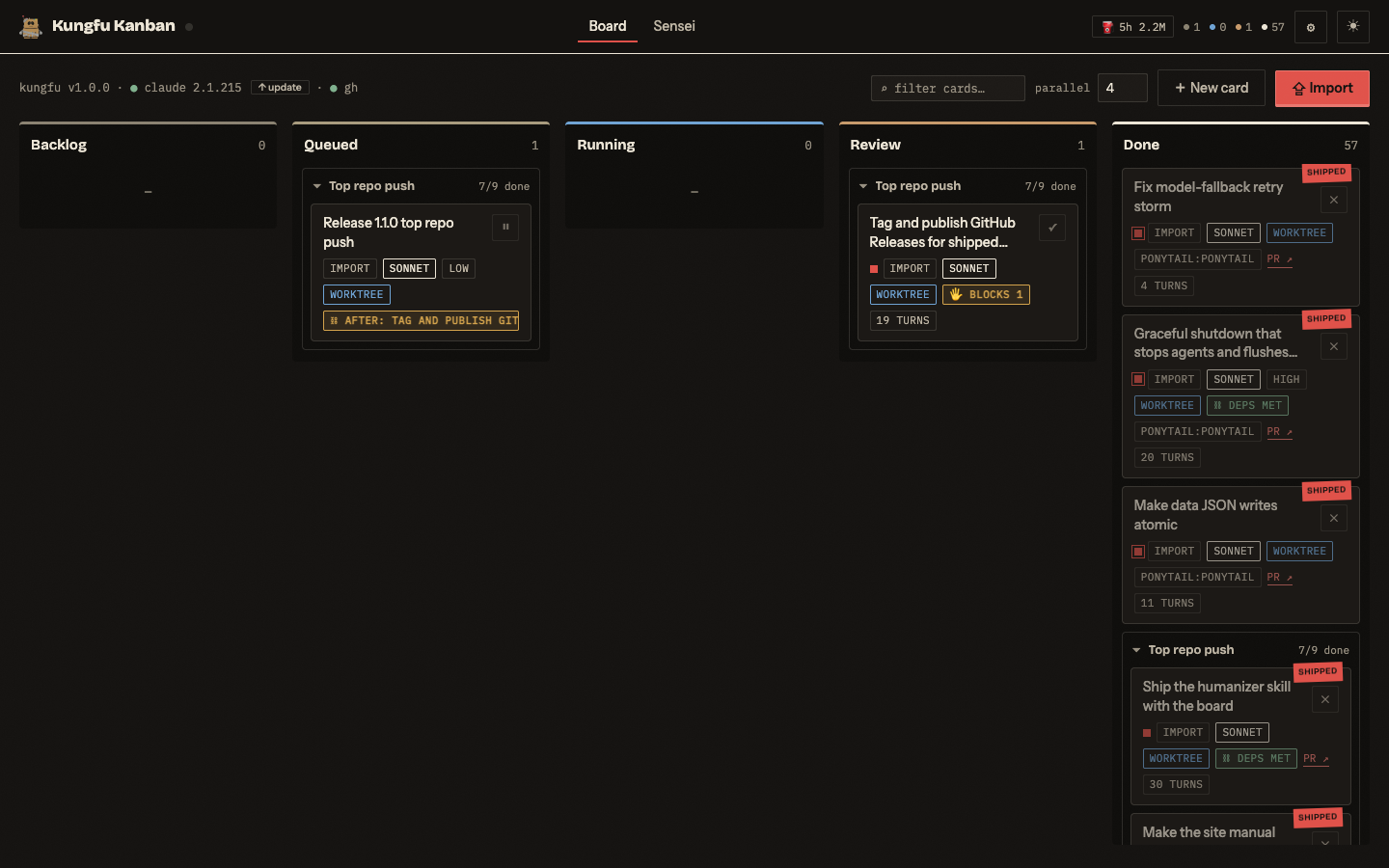
Kungfu Kanban is a local kanban board where Claude Code agents work the cards on your
own subscription login, no API keys, no per-token billing. Cards can chain into
dependencies gated by merge, an AI "Manager" reads the actual diff on every finished
card and merges the green ones itself, and the whole stack leans on a single npm dependency (express) — agents run through
the claude CLI you already have — with CI checking every push. It's for a single developer
who wants a fleet of agents chewing through a backlog without standing up a SaaS or a
database to do it.
kungfu-kanban.com — this README as an illustrated manual.
A tool for one person, by design: single-user, local-first, everything in a folder
of JSON on your own machine. There is no hosted version and there won't be one.
How it works: an Express server (server.js) serves the board UI and spawnsclaude -p <prompt> --output-format stream-json per card. Output streams into the
card's transcript over server-sent events. An LLM "Manager" (also a claude -p call)
triages, dispatches, and reviews cards. Everything persists as JSON files in data/.
Manual · Compare ·
Docs ·
Releases ·
Issues
Contents
- Quick start
- Requirements
- Architecture at a glance
- The board
- Importing cards from Markdown
- Repo cards, real PRs
- Notifications
- Use it from your phone (Tailscale)
- The Manager (the Sensei)
- Run at login (optional)
- Configuration reference
- Troubleshooting
- Security notes
- Status & contributions
- Contributing
- Credits
- License
Quick start
git clone https://github.com/LeahyCC/kungfu-kanban.git && cd kungfu-kanban
npm install
npm start          # → http://localhost:4747
That's it for local use. The server binds 127.0.0.1 only by default. Using it
from your phone over Tailscale needs one more command,openssl rand -hex 16 > data/auth-token, to turn on the token gate — full
walkthrough in Use it from your phone.
Updating: the status line shows your board version and checks origin/main
(every 30 min); when your clone is behind, a ⬆ update available button pulls
fast-forward, runs npm ci if needed, and restarts the server (instant under
launchd; under plain npm start, start it again). Blocked while cards are
running. See CHANGELOG.md for what changed.
Requirements
| Thing | Why | Check |
|---|---|---|
| Node 20+ | server runtime (uses global fetch) |
node -v |
| Claude Code CLI, logged in on your subscription | runs every card | claude --version, then claude → /login if needed |
| git | worktree isolation for repo cards | git -v |
GitHub CLI (gh), authed |
only for "Open PR when done" | gh auth status |
| macOS | desktop notifications (osascript); the rest works anywhere |
— |
| Tailscale (optional) | use the board from your phone | tailscale status |
Architecture at a glance
flowchart LR
    UI[Board UI] <--> Server[Express server]
    Server -->|spawns| CLI[claude CLI per card]
    CLI --> WT[Git worktree]
    WT --> PR[GitHub PR]
    PR --> CI[CI]
    PR --> Watch[PR-watch sweep]
    Watch -->|merged| Merge[Merge]
    Sensei[Sensei] -->|reviews diff| PR
    Sensei -->|merges, within autonomy| Merge
    Merge --> Deps[Gated dependents release]
The Sensei is an LLM manager (its own claude -p call) that reviews a card's
actual diff and merges the ones that pass, up to whatever autonomy level you've
set it — see The Manager.
The board
Columns: Backlog → Queued → Running → Review → Done
- + New card (or drag an existing card to Queued, or ▶ Run in the card
drawer) launches it. - parallel (toolbar, 1–8, default 2) caps concurrent sessions so you don't burn
subscription rate limits; extra launches wait in Queued and start automatically as
slots free up. - Click any card for the drawer: live transcript, token/turn stats, and a
claude -r <session-id>command to resume that session in your terminal. - Finished runs land in Review (with a vermillion error stripe if they failed).
✓ Done ships them — hanko seal included. - If the server restarts mid-run, orphaned "running" cards are recovered into Review.
- ⚙ Settings (toolbar): default working directory, repos directory, ntfy
topic, macOS notification toggle, and Done-column archiving (see below). - ☀ / ☾ toggles the day/night dojo. Night is the default.
- The toolbar shows live system status: green dots when the
claudeCLI andghauth are healthy, red with a plain-English warning when they're not. - The ⛽ usage chip shows output tokens burned in the rolling 5-hour limit
window across ALL Claude Code activity on the machine (board + terminal),
computed from the local session logs. Set a budget in ⚙ Settings to turn it
into a % meter (amber ≥70%, red ≥90%); the full in/out/cache/per-model
breakdown lives in ⚙ Settings. - The drawer shows The work — the card's prompt, editable in place — and
running cards report live output tokens and session context usage (ctx %). - Cards with a PR get ⇉ Merge PR / Close PR buttons in the drawer — merging
happens viaghand stamps the card Done on the spot.
Built-in terminal (⌘J)
▸_ Terminal in the toolbar (or ⌘J, or t in the command palette) opens a real
shell at the bottom of the board — your $SHELL started as a login+interactive
shell, so ~/.zshrc and ~/.zprofile load exactly as they do in your own terminal:
prompt, aliases, plugins, colours. It is a genuine pty, so job control and
full-screen TUIs (vim, lazygit, claude -r <session-id>) work, and resizing the
panel resizes the shell.
Sessions belong to the server, not the tab. Close the panel, reload the board,
or pick it up on your phone over Tailscale — npm test keeps running and the panel
reattaches with its scrollback. The panel bar holds one tab per shell (+ for a new
one), ⏻ kill ends the current shell for good, and ✕ just hides the panel.
Up to 8 sessions; a shell with nobody attached is reaped after 30 idle minutes.
No native module is involved: the pty comes from Python's standard library
(lib/ptyhost.py, spawned by lib/pty.js), so installing the board is stillgit pull && npm i. It needs python3 — stock on macOS with the Xcode command
line tools.
⚠ It is a shell on your Mac behind the same token as the rest of the board. That is
not a new trust boundary (anyone with the token can already run a card atbypassPermissions), but it is a much more direct one — turn it off in
⚙ Settings → System → built-in terminal if you'd rather not have it. Turning it
off also kills any sessions already open.
Archiving old Done cards
The Done column would otherwise grow forever, so a daily sweep moves cards out
once they've sat in Done longer than settings.archiveDays (default 7,
measured from finishedAt, falling back to createdAt). Archived cards are:
- appended as full JSON to
data/archive.jsonl(one line per card), and - removed from
data/tasks.json, with theirdata/transcripts/<id>.jsonlfile deleted.
The sweep runs once at server startup and every 24h after that. Set
Archive "done" cards after (days) to 0 in ⚙ Settings to turn it off;
archived history in data/archive.jsonl is never deleted automatically.
Follow-up prompts
Open any card that has run and type in the follow-up box under the transcript
("fix the bug where…", "also add…"). The run resumes the same CLI session
(claude -r), so the agent keeps its full context — and for worktree cards it
re-enters the original worktree, so a follow-up push updates the existing PR.
Follow-ups respect the parallel cap and queue like any run; the follow-up text is
appended to the card's prompt so Sensei reviews and retries see it.
Subscription limits, automatic cooldown
When a run dies on a usage/rate limit, the board:
- parses the reset time from the CLI's error (falls back to a 1-hour backoff),
- requeues the card (it wasn't a real failure) and pauses all auto flow —
queue pumping, Sensei triggers, PR auto-fix — until the limit resets, - shows a ⏳ countdown chip in the header, and pings your phone.
Manual run clicks during cooldown queue instead of burning against the wall.
When the timer expires everything queued launches automatically and you get a
"training resumes" notification.
Model fallback: a model-specific cap or outage (e.g. an Opus-hours limit
while Sonnet still works, or a 529 overload) doesn't pause anything — the failed
model is blocked temporarily (30 min for caps, 10 for overloads), the card
requeues, and launches step down the ladder fable → opus → sonnet → haiku
until the block expires. Cards keep their configured model and climb back up
automatically; a ⬇ chip in the header shows what's stepped down, and the
transcript notes every substitution. The Sensei's own runs substitute too.
Card fields
| Field | Maps to | Notes |
|---|---|---|
| Title | — | shown on the card, PR title, notification text |
| Prompt | the claude -p prompt |
what the agent should do |
| Working directory | process cwd |
repo dropdown (scans the ⚙ Settings repos directory for git repos) or any path |
| Model | --model |
default / fable / opus / sonnet / haiku |
| Effort | --effort |
default / low / medium / high / xhigh / max |
| Permissions | --permission-mode |
acceptEdits (default), auto, plan, dontAsk, bypassPermissions — see Security |
| Agent | --agent |
your custom agents from ~/.claude/agents/*.md |
| Git worktree | --worktree kanban-<id> |
isolates the run on its own branch |
| Open PR when done | post-run gh pr create |
requires worktree; see below |
| Priority | sort order (0–3) | 2+ shows the vermillion square |
| Acceptance criteria | manager review rubric | the Sensei approves/rejects against this |
| Repeat | schedule (interval or daily) | 6h every 6 hours, 14:30 daily — see Scheduled cards |
| Skills | injected into the prompt | pick from installed skills, or ✦ auto-select to let the agent choose |
Skills & agents discovery
Auto-discovered at load, no config:
- Personal skills:
~/.claude/skills/*/SKILL.md - Plugin skills: every enabled plugin in
~/.claude/plugins/installed_plugins.json
(theirskills/andworkflow-skills/dirs), namespacedplugin:skill - Agents:
~/.claude/agents/*.md
Scheduled cards
Give a card a Repeat value in the editor to run it on a schedule:
6h(or6) — every 6 hours (fractional hours like0.5hare allowed)14:30— daily at 14:30 (24-hour local time)
The server checks once a minute. When a card is due, it's cloned into a fresh
one-shot card (with no schedule of its own) that's launched via the normal
runner — so clones respect the parallel (maxConcurrent) queue and flow
Backlog → Running → Review → Done like any other card. The scheduled card itself
stays in Backlog carrying a ⏱ badge and never moves columns on its own;
drag it elsewhere and it stops firing until it's back in Backlog. Clear the
Repeat field to turn scheduling off.
Dependencies
Give a card a deps list — other card ids it must wait for — and it stays in
Backlog until every dependency is Done (approved or its PR merged); the
runner then launches it automatically. Columns lay chains out in run order and
dependency badges show unmet-prerequisite depth. The Sensei can chain a
multi-card plan itself: create_task/update_task accept exact card titles
and ordinals (including cards created earlier in the same batch), not just
ids, reusing the importer's title resolver — unresolvable entries surface as⛓ unresolved dep instead of silently dropping the chain. Import markdown sets
the same thing with the after key (see Importing cards).
Importing cards from Markdown
Turn a plan into a backlog in one paste. Two entry points:
- ⇪ Import (toolbar): paste markdown or pick a file — works from your phone.
- Watch folder: drop
.mdfiles intodata/inbox/— cards appear
automatically and the file is archived todata/inbox/imported/. Files already
in the inbox when the server starts are imported too.
Two formats, auto-detected:
Sections — every ## Heading becomes a card. The heading is the title,
leading key: value lines set fields, an ### Acceptance subsection becomes the
acceptance criteria, everything else is the prompt. Optional frontmatter sets
file-wide defaults:
---
cwd: /Users/you/project
model: sonnet
worktree: true
openPr: true
---

## Fix the flaky login test
model: opus
priority: 2
The test in auth.spec.ts fails intermittently because…

### Acceptance
- passes 10x in a row

## Update the README badges
Recognized keys (case/space-insensitive): cwd (dir/repo), model, effort,permissions, priority (0–3), worktree, openPr (pr), agent,skills (comma-separated), acceptance, issue (GitHub issue number),base (prBase/baseBranch, the PR's target branch), after (deps/dependsOn/needs, a prerequisite card title — repeat the line for several), sequential
(frontmatter-only: chain every card in the file to the one above it). Unknown or
invalid values are ignored; a card with no body uses its title as the prompt.
Checklist — a file with no ## headings: every unchecked - [ ] item
becomes a card (checked items are skipped).
✨ Drafting: describe the work in plain English in the Draft box and the Sensei
writes the card doc into the textarea for review. Pick a repo and check 🔍
explore repo first to let it read the actual code before writing — slower, but
cards reference real files. ↻ Refine iterates on the draft in the same
session ("split card 2, make the last one opus"). A live preview under the
textarea shows what will be created and warns about titles already on the board.
⇣ From issues: pick a repo and pull its open GitHub issues into cards
(issue: N field). Their PRs include Fixes #N, so merging the PR closes the
issue automatically — issue → card → agent → PR → merged → closed.
From Claude Code: the board ships a skill — generated bylib/skill.js — that teaches every Claude Code session (any
project) to do this on request: say "create a kungfu todo for …" and it drafts
the cards, drops the file in the inbox, and confirms the import. It encodes the
format, frugal model-routing, and the self-contained-prompt rule (card agents
start with zero conversation context).
Installing it is automatic: every server start writes it to~/.claude/skills/kungfu-todo/ with this clone's real paths and port baked in,
and refreshes it whenever the template changes. ⚙ Settings shows its status,
with a manual Install/Update button as a repair hatch.
Imported cards land in Backlog tagged import, and the Sensei gets one
triage ping per batch (if the new-card trigger is on) — so you can paste a plan,
and routing/prioritization happens for you.
The board also ships the ponytail lazy-senior-dev discipline and the humanizer
skill (strips AI writing tells from PR titles, descriptions, and result
summaries) — both auto-install to ~/.claude/skills and pre-select on new
cards. See Credits for attribution.
Repo cards, real PRs
Give a card a working directory that's a git repo with an origin remote, check
Git worktree + Open PR when done, and run it. After the agent succeeds:
- The worktree is located by asking git (
git worktree list) for the branch
namedkanban-<card-id>— wherever the CLI put it. - Anything the agent left uncommitted is committed (
<card title>/ "via Kungfu
Kanban"). - If the branch has no commits beyond the base (the branch your main checkout is
on), the flow stops — no empty PRs. - The branch is pushed to
originandgh pr createopens a PR: title = card
title, body = prompt + acceptance criteria. - The PR link lands on the card, in the drawer, and in your phone notification.
Every step logs to the card transcript (⇡ lines). Failures (no remote, gh not
authed, push rejected…) log an ✕ line and leave the card in Review — the work is
still in the worktree, nothing is lost.
One-time setup: gh auth login (with push scope to the repos you'll use).
PR watch: merged PRs ship, conflicted PRs self-heal
Every N minutes (⚙ Settings, default 10, 0 = off) the board checks each Review
card's PR via gh:
- Merged → the card moves to Done ("PR merged") and you get a notification.
- Closed without merge → noted once on the card transcript.
- Conflicting (main moved under the branch) → with auto-fix on (default), the
board spawns a fix card: a fresh agent run inside the original worktree
that merges the base branch, resolves the conflicts preserving both sides, and
pushes — updating the PR in place. Max 2 attempts per PR, one active fixer at a
time; after that you get a "needs you" notification and it stops. Fix cards
wear anauto-fixbadge and flow through the normal columns, so the Sensei
reviews the resolution like any other run.
Keep local main pushed: agent worktrees branch from the default branch, so an
unpushed main is how you get avoidable conflicts in the first place.
Notifications
When a card lands in Review (or fails), you get notified. User-stopped runs
don't notify.
macOS (on by default)
Fires via osascript. Toggle in ⚙ Settings. If nothing appears, check System
Settings → Notifications → allow notifications for "Script Editor" / your terminal.
Phone (ntfy)
- Install the ntfy app (iOS /
Android) — no
account needed. - Pick a long, unguessable topic name (ntfy topics are a public namespace — anyone
who knows the name can read it): e.g.kk-$(openssl rand -hex 8). - Put it in ⚙ Settings → ntfy topic on the board.
- In the ntfy app: + → Subscribe to topic → same name.
Pushes include the card title, and tapping one opens the PR when there is one.
Because the topic is public-by-obscurity, keep card titles free of secrets.
🔔 Test notification (in ⚙ Settings) fires both channels on demand — use it to
verify the phone hookup. You can also watch the topic live athttps://ntfy.sh/<your-topic> in any browser.
Error tracker
The board keeps a persistent log (data/errors.json) of every operational
error or block as it happens — permission stops, PRs opened against the wrong
base branch, PR-flow commit/push/create failures, PR conflicts past auto-fix,
launch failures, Sensei action errors, and subscription-limit cooldowns.
Repeats bump a counter instead of piling up rows, and entries auto-resolve
when the thing they describe later succeeds. A red ⚠ chip in the header counts
open entries; clicking it opens the tracker with per-entry ✓ resolve, links to
the card/PR, and an "Ask the Sensei to fix these" button. The Sensei sees
open entries every run and can resolve_error (mark one handled) orretarget_pr (move a PR onto the right base branch via gh pr edit --base) —
it only fixes the operation (permissions, bases, re-runs), never the code.
API: GET /api/errors, POST /api/errors/:id/resolve,POST /api/errors/resolve-all; a live errors SSE event keeps the chip honest.
Use it from your phone (Tailscale)
The server refuses to bind beyond loopback without an access token, because the
runner executes code. The safe path is a token + Tailscale (the port stays on
loopback; Tailscale proxies it inside your tailnet only):
# 1. one-time: create the token (this enables the login gate)
openssl rand -hex 16 > data/auth-token

# 2. run the board
npm start                          # logs: "token gate: ON"

# 3. one-time: serve it over your tailnet with HTTPS
tailscale serve --bg 4747
tailscale serve status             # shows your https://<machine>.<tailnet>.ts.net URL
On your phone: install Tailscale, sign in to the same tailnet, open the URL, enter
the token once — it's stored as a cookie for a year. Scripts/API calls can sendAuthorization: Bearer <token> instead.
Install it as an app: the board is a PWA. On iPhone, open the tailnet URL in
Safari → Share → Add to Home Screen — you get a standalone full-screen app
with the robot icon and night-dojo status bar.
- Token can also come from the
KFK_TOKENenv var (overrides the file). - Rotate it by regenerating
data/auth-token(old cookies stop working). tailscale serveis tailnet-only. Never usetailscale funnelor a public
port-forward for this app.- To stop sharing:
tailscale serve --https=443 off(ortailscale serve reset).
The Manager (the Sensei)
An LLM manager — itself a claude -p structured-output call on your subscription —
that triages new cards (model/effort/skills/priority routing), dispatches queued
work, reviews finished cards against their acceptance criteria, and answers you in
chat ("plan the auth refactor into cards", "what's blocking?").
Autonomy ladder (Manager tab):
| Level | Can do without you |
|---|---|
suggest (default) |
nothing — every action waits for your ✓ |
semi |
create / route / run cards; approve-reject verdicts still wait |
auto |
everything, within guardrails |
Deleting cards is never available to the manager, at any level.
Triggers: on task finish (review it), on new card (triage it), every N minutes
(0 = off), and chat. Each trigger is one manager invocation — mind your rate limits
before enabling the interval.
Guardrails: max launches/hour (default 10), max retries/task (default 2 —
rejected cards re-run with the manager's feedback appended to the prompt), and a
permission ceiling (default acceptEdits) the manager can't assign beyond.
Guardrail-blocked actions become suggestions instead of executing.
Management style: freeform standing instructions ("prefer haiku for docs tasks",
"never auto-approve migrations") — no code changes needed.
The manager's own model/effort (default opus/medium) are configurable; it can also
be disabled entirely with the checkbox.
Run at login (optional)
~/Library/LaunchAgents/com.kungfu-kanban.plist:
<?xml version="1.0" encoding="UTF-8"?>
<!DOCTYPE plist PUBLIC "-//Apple//DTD PLIST 1.0//EN" "http://www.apple.com/DTDs/PropertyList-1.0.dtd">
<plist version="1.0"><dict>
  <key>Label</key><string>com.kungfu-kanban</string>
  <key>ProgramArguments</key>
  <array>
    <string>/opt/homebrew/bin/node</string>  <!-- `which node` -->
    <string>server.js</string>
  </array>
  <key>WorkingDirectory</key><string>/Users/YOU/path/to/kungfu-kanban</string>
  <key>EnvironmentVariables</key>
  <dict>
    <!-- launchd's PATH is minimal; claude + gh + git must be findable -->
    <key>PATH</key><string>/opt/homebrew/bin:/usr/local/bin:/usr/bin:/bin</string>
  </dict>
  <key>RunAtLoad</key><true/>
  <key>KeepAlive</key><true/>
  <key>StandardOutPath</key><string>/tmp/kungfu-kanban.log</string>
  <key>StandardErrorPath</key><string>/tmp/kungfu-kanban.log</string>
</dict></plist>
launchctl bootstrap gui/$(id -u) ~/Library/LaunchAgents/com.kungfu-kanban.plist  # load: start now + at login
launchctl kickstart -k gui/$(id -u)/com.kungfu-kanban                            # restart (e.g. after an update)
launchctl bootout   gui/$(id -u)/com.kungfu-kanban                               # unload / stop
Gotcha: loading an agent that's already loaded fails with the crypticLoad failed: 5: Input/output error — that's launchd for "nothing to do".launchctl list | grep kungfu shows whether it's loaded; use kickstart -k
to restart it.
Configuration reference
Environment variables
| Var | Default | Meaning |
|---|---|---|
PORT |
4747 |
listen port |
HOST |
127.0.0.1 |
bind address; anything non-loopback requires a token |
KFK_TOKEN |
— | access token (overrides data/auth-token) |
KFK_SHELL |
$SHELL |
shell the built-in terminal launches |
KFK_PYTHON |
python3 |
interpreter for the terminal's pty helper |
Files (data/, gitignored — this is all app state)
| File | Contents |
|---|---|
tasks.json |
all cards |
settings.json |
parallel cap, default cwd, ntfy topic, notification toggle, archive-after-days, manager config, maxRunMinutes (per-run watchdog, default 120, 0 disables), terminal (built-in terminal, default on) |
manager.json |
pending suggestions, chat history, launch timestamps |
manager-log.jsonl |
manager activity log |
errors.json |
error tracker entries (see Error tracker) |
transcripts/<task-id>.jsonl |
per-card transcript |
archive.jsonl |
Done cards swept out after archiveDays (append-only) |
inbox/ |
watch folder for markdown imports; imported files move to inbox/imported/ |
auth-token |
access token (create to enable the gate) |
Back up data/ to keep your board; delete it to factory-reset. Individual sessions
can always be reopened in the terminal with claude -r <session-id> (shown in each
card's drawer).
Troubleshooting
- Card fails instantly with "Failed to launch claude CLI" —
claudeisn't on
the server's PATH (common under launchd; fix the plist PATH above) or isn't
installed. - Run errors mentioning auth/login — the CLI isn't logged in: run
claudein a
terminal,/login, pick your subscription account. API-key auth can't be used —
the runner deletesANTHROPIC_API_KEYon purpose. - PR flow: "no worktree matching …" — the card ran without the worktree box, or
the cwd isn't a git repo. "gh pr create failed" — checkgh auth statusand
thatoriginpoints at GitHub. - Port already in use —
lsof -nP -iTCP:4747 -sTCP:LISTEN, kill the old server. - No macOS notifications — System Settings → Notifications: allow "Script
Editor"/terminal; check the ⚙ Settings toggle. - Hitting subscription rate limits — lower parallel, prefer haiku/sonnet +
low effort for routine cards, disable the manager interval trigger, or use the
Sensei's frugality bias (it's prompted to route cheap by default). - Server won't start: "Refusing to bind …" — you set
HOSTwithout a token.
Createdata/auth-token(or unsetHOSTand use Tailscale serve, which works
with loopback). - A card keeps asking you to approve a command — cards run headless, which
has no approval prompt, so replying "yes" can't grant a tool permission. A
card whose mode won't allow a command (often a build/test that needs to leave
the Bash sandbox) now lands failed-in-review with the reason. Raise the
card's Permissions (the drawer'spermsselect) tobypassPermissions,
or add an allow-rule in.claude/settings.json, then re-run.
Security notes
This board executes code on your machine with whatever permission mode a card
carries — bypassPermissions means exactly that. Accordingly:
- The server never binds beyond loopback without a token, and you shouldn't either.
Tailscale serve (tailnet-only) + token is the supported remote path. No public
exposure, ever. - The manager's permission ceiling stops it from escalating cards beyond what you
allow; deleting cards is hard-blocked regardless of autonomy. - ntfy topics are public-by-obscurity: unguessable names only, no secrets in card
titles. - The token cookie is
HttpOnly/SameSite=Lax, compared timing-safe, and lives a
year; rotatedata/auth-tokento invalidate. - The built-in terminal is a shell on the host, gated by the
same token. It doesn't widen the blast radius (a card atbypassPermissions
already runs anything), but it is the most direct path to one — switch it off in
⚙ Settings → System if you don't want it, and treat token loss as shell loss.
Status & contributions
This is a personal tool that happens to be public, and it's open to
contributions — bug reports, fixes, focused features (issue-first), docs, and
tests all land. The scope is deliberately narrow and that's the whole point:
single-user, local-first, subscription-auth, one runtime dependency, code that
runs on your own machine. Ideas that keep the board better within that identity
are welcome; ideas that would make it a different tool — multi-tenancy, hosted
deployment, API-key providers, a database, billing — are out of scope. That
version existed and was deleted on purpose; for those, a fork is the honest path.
See CONTRIBUTING.md for what's in and out of scope, the
fork-and-PR workflow, and the security-sensitive surfaces to flag.
Contributing
See CONTRIBUTING.md for the fork-and-PR workflow, and
SECURITY.md if you've found a vulnerability — report it privately
through GitHub, not as a public issue.
Credits
The board auto-installs two third-party Claude Code skills onto new cards:
- ponytail (MIT) — the
lazy-senior-dev discipline that keeps agent diffs minimal. - humanizer (MIT) — strips AI writing
tells from PR titles, descriptions, and result summaries; patterns sourced
from Wikipedia's WikiProject AI Cleanup.
License
Reviews (0)
Sign in to leave a review.
Leave a reviewNo results found