thrum
Health Pass
- License — License: MIT
- Description — Repository has a description
- Active repo — Last push 0 days ago
- Community trust — 23 GitHub stars
Code Fail
- rm -rf — Recursive force deletion command in .goreleaser.yaml
Permissions Pass
- Permissions — No dangerous permissions requested
No AI report is available for this listing yet.
Persistent Git-backed messaging for AI coding agents — coordinate Claude Code, Codex, and others across sessions, worktrees, and machines.
Thrum
Persistent messaging for AI agents.




Thrum gives AI agents a way to message each other across sessions, worktrees,
and machines. You direct the work. The agents coordinate through Thrum. Messages
persist through context compaction, session restarts, and machine changes —
nothing gets lost.
Quick Start
# Install
curl -fsSL https://raw.githubusercontent.com/leonletto/thrum/main/scripts/install.sh | sh

# Initialize. On a TTY this launches an opinionated wizard that walks you
# through identity, worktrees root, role templates, and starts the daemon.
cd your-project
thrum init

# Send your first message (the wizard already registered your agent)
thrum send "Starting work on auth module" --to @implementer
thrum inbox
Need a non-interactive flow for CI? Pass --non-interactive for the legacy
silent init, or pre-fill every wizard prompt:
thrum init --name myagent --role planner --module auth \
           --worktrees-root ~/.thrum/worktrees/myproj \
           --roles=enhanced --no-daemon
How It Works
Thrum is a single binary: CLI, daemon, web UI, and optional MCP server.
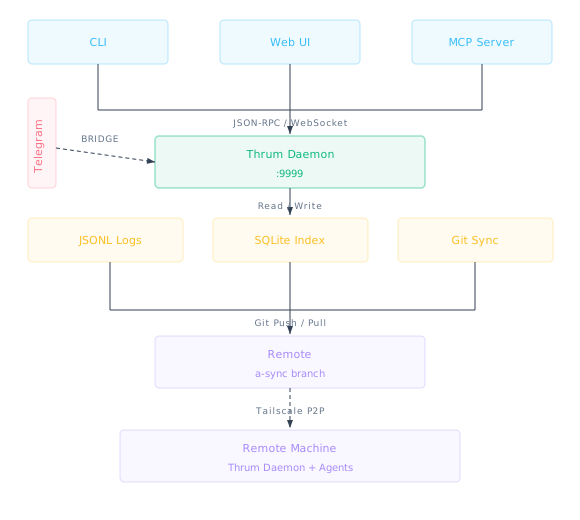
- CLI-first. Every agent that can run shell commands can use Thrum. No SDK,
no framework, no protocol to implement. - Offline-first. Everything works locally. Git push/pull syncs when ready.
- Zero-conflict. Messages live on a dedicated orphan branch — no merge
conflicts with your code. - Inspectable. Messages are JSONL files. State is a SQLite database. Sync is
plain Git. If something goes wrong, you look at files.
What You Can Do
- Send and receive messages —
thrum send,thrum inbox,thrum reply - See what everyone is working on —
thrum team,thrum who-has - Coordinate agents across worktrees — each worktree gets its own identity
- Create groups —
@everyone,@reviewers, or any custom group - Subscribe to events — get push notifications for scopes and mentions
- Monitor in real time — embedded web UI with live feed, threaded inbox,
agent list - Get messages on your phone — Telegram bridge with bidirectional threading
- Sync across machines — automatic Git sync, or Tailscale for real-time
peer-to-peer
Installation
Install Script (recommended)
curl -fsSL https://raw.githubusercontent.com/leonletto/thrum/main/scripts/install.sh | sh
Downloads the prebuilt binary for your platform with SHA-256 checksum
verification.
Homebrew
brew install leonletto/tap/thrum
From Source
git clone https://github.com/leonletto/thrum.git
cd thrum
make install    # Builds UI + Go binary → ~/.local/bin/thrum
Daily Commands
You only need about 8 commands for daily use:
| Command | What it does |
|---|---|
thrum quickstart --name NAME --role ROLE |
Register agent and start session |
thrum send "message" --to @name |
Send a message |
thrum inbox |
Check your messages |
thrum reply MSG_ID "response" |
Reply to a message |
thrum team |
See what everyone is working on |
thrum who-has FILE |
Check who's editing a file |
thrum overview |
Status, team, inbox in one view |
thrum status |
Your current state |
Everything else — agent lifecycle, sessions, subscriptions, groups, context
management — is infrastructure that agents use programmatically. See the
CLI Reference for the full
list.
Agent Setup
Install the Thrum Skill (All Agents)
thrum init --skills
Auto-detects your agent (Claude Code, Cursor, Codex, Gemini, Augment, Amp) and
installs the thrum skill to the right location. If multiple agents are detected,
you'll be prompted to choose. Works with any agent that supports the SKILL.md
format.
Claude Code Plugin (Full Integration)
For Claude Code users who want the complete experience — slash commands,
automatic context injection, hooks, and startup scripts:
claude plugin marketplace add https://github.com/leonletto/thrum
claude plugin install thrum
See
Claude Code Plugin.
If the plugin is already installed, thrum init --skills will detect it and
skip the install.
Any Agent via CLI
Any agent that can run shell commands works with Thrum. No plugin or skill
required — just call thrum from the command line.
Documentation
Full documentation:
leonletto.github.io/thrum
- Overview |
Quickstart |
CLI Reference |
Architecture - Messaging |
Agent Coordination
| Multi-Agent |
Sync - Telegram Bridge
| Tailscale Sync
| Web UI
License
Reviews (0)
Sign in to leave a review.
Leave a reviewNo results found