sable
Health Pass
- License — License: MIT
- Description — Repository has a description
- Active repo — Last push 0 days ago
- Community trust — 18 GitHub stars
Code Fail
- process.env — Environment variable access in electron/main.ts
- process.env — Environment variable access in mobile/capacitor.config.ts
- execSync — Synchronous shell command execution in mobile/scripts/build-apk.mjs
- process.env — Environment variable access in mobile/scripts/build-apk.mjs
- exec() — Shell command execution in mobile/scripts/icons.mjs
- exec() — Shell command execution in mobile/src/lib/conn.ts
Permissions Pass
- Permissions — No dangerous permissions requested
No AI report is available for this listing yet.
A desktop agentic development environment for Claude Code and Codex
Sable
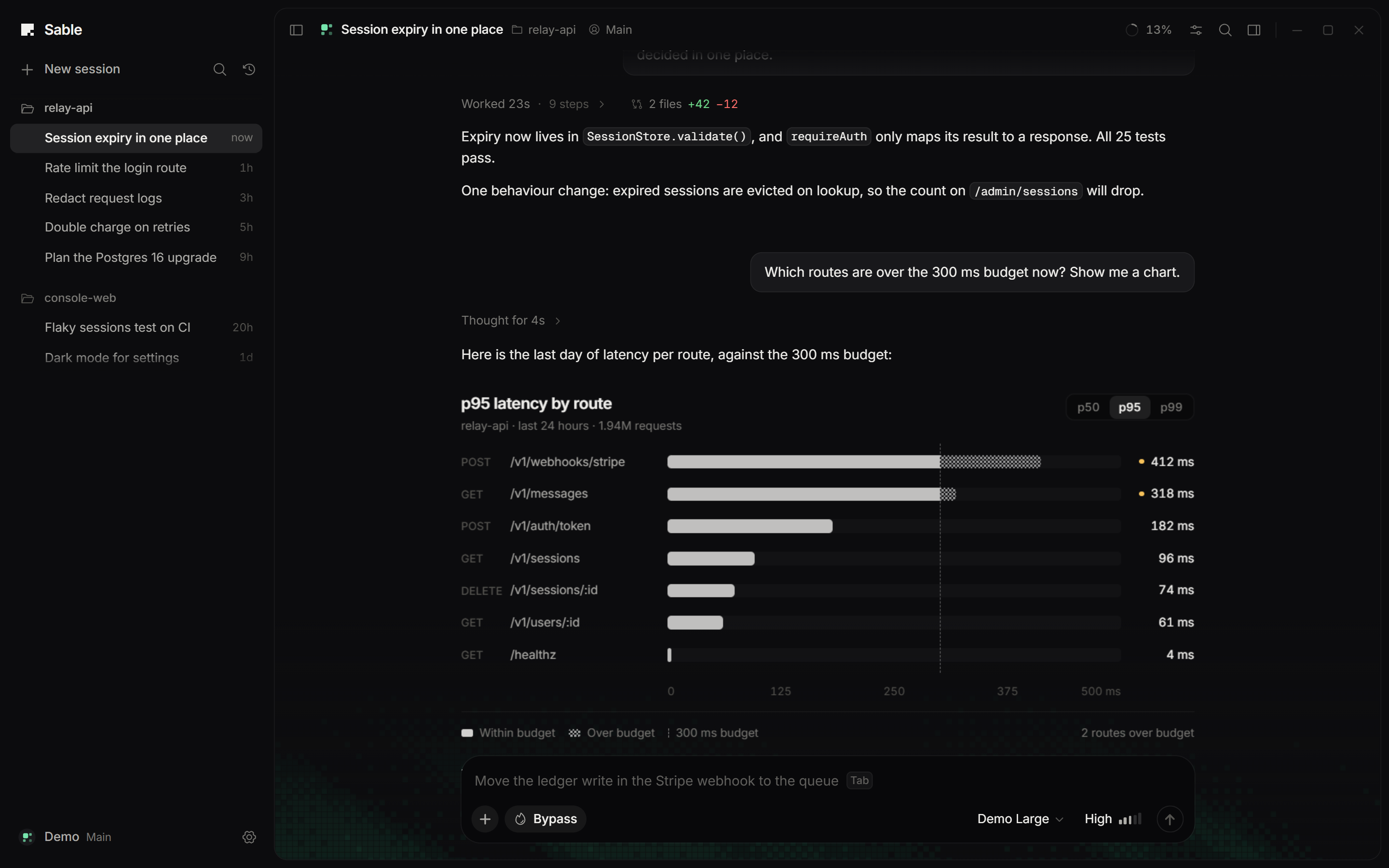
Sable is a desktop app for working with coding agents. It runs the Claude Code and Codex CLIs you already have installed and signed in, and gives both one calm place to work: a conversation that shows what the agent is doing without drowning you in tool calls, answers that can hold charts and small interactive views, a side panel with your changes, files, a browser, a terminal and the agent's sub-agents, and a phone app to follow and steer your chats from anywhere. Sable has no model or account of its own. Your agents do the work; Sable shows it.
What is different
A conversation you can follow. While a turn runs you see one live line (what the agent is doing now, the time, how many steps) and the agent's own short reports as they come in. The steps fold behind that line and open with one click, in their places. A message you send while the agent works is answered right below it, and the work goes on. When the turn ends, the line becomes a summary with the time it took and the files it changed, above the answer.
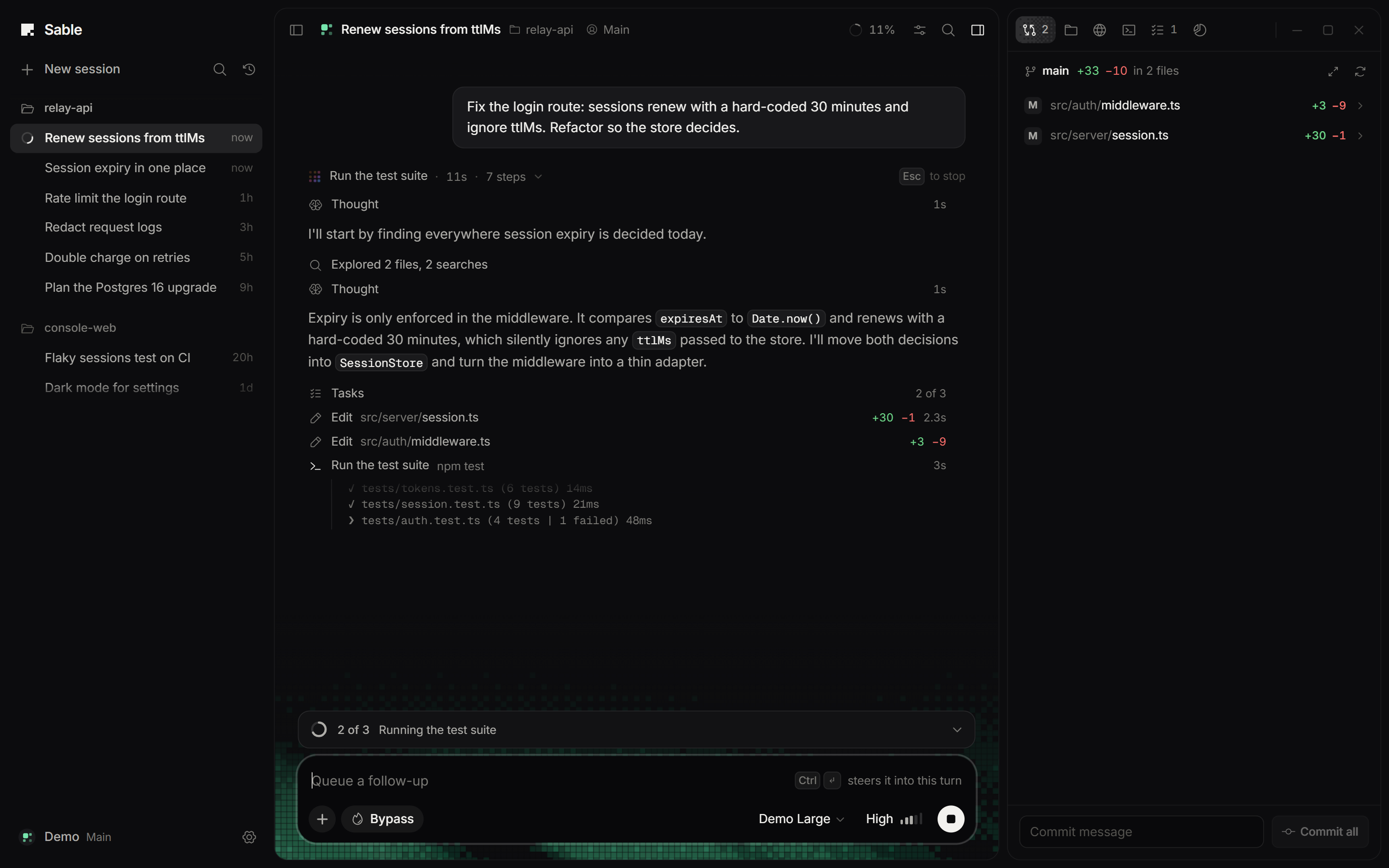
Two agents that work together. Each agent can hand a task to the other as a sub-agent: a Claude Code session can ask Codex, and the other way round, and the sub-agent's steps show under the step that started it. Under a finished turn that changed files, "Check with Codex" (or Claude Code) lets the other agent review the changes read-only and puts its findings in your composer.
The agent can answer with an interface. Both agents get a show_widget tool. When a chart, a diagram, a small form or a simulation explains something better than prose, the agent draws it and it appears inline in the answer. Widgets run in a sandboxed frame with no network access and no access to Sable or your files. Answers also draw mermaid diagrams, preview html and svg code blocks, and lay out wide tables properly. Files the agent hands you show up as cards you can open.
Your phone as a remote. The Android app pairs with Sable by QR code and shows your chats, their live progress and everything that waits on you. Answer permissions and questions, send or steer messages, start new chats, and get a notification when a turn finishes or needs you. It talks to your computer directly over your home network (or Tailscale when you are away); nothing goes through a server of ours.
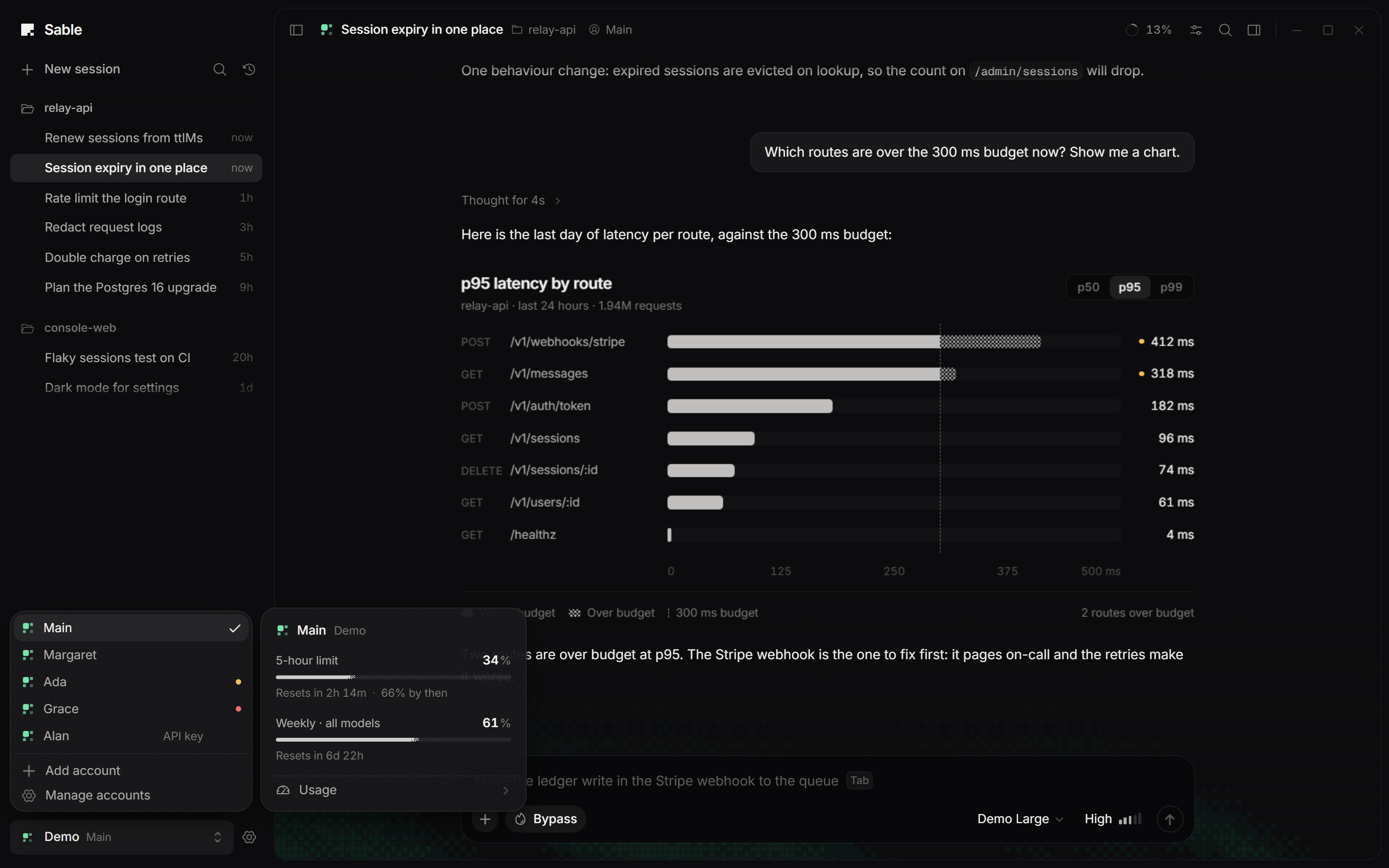
Several accounts per agent, and their limits in view. Add as many Claude Code or Codex accounts as you use and switch between them from the sidebar, which shows how much of each plan window is used. Set a cap per account ("use this one up to 90%"), and when a turn hits a cap or a plan limit, Sable continues the same conversation on the next account in your order. Spare quota that would expire unused can run queued work (/spare), and a chat stopped at a limit can continue by itself when the window resets.
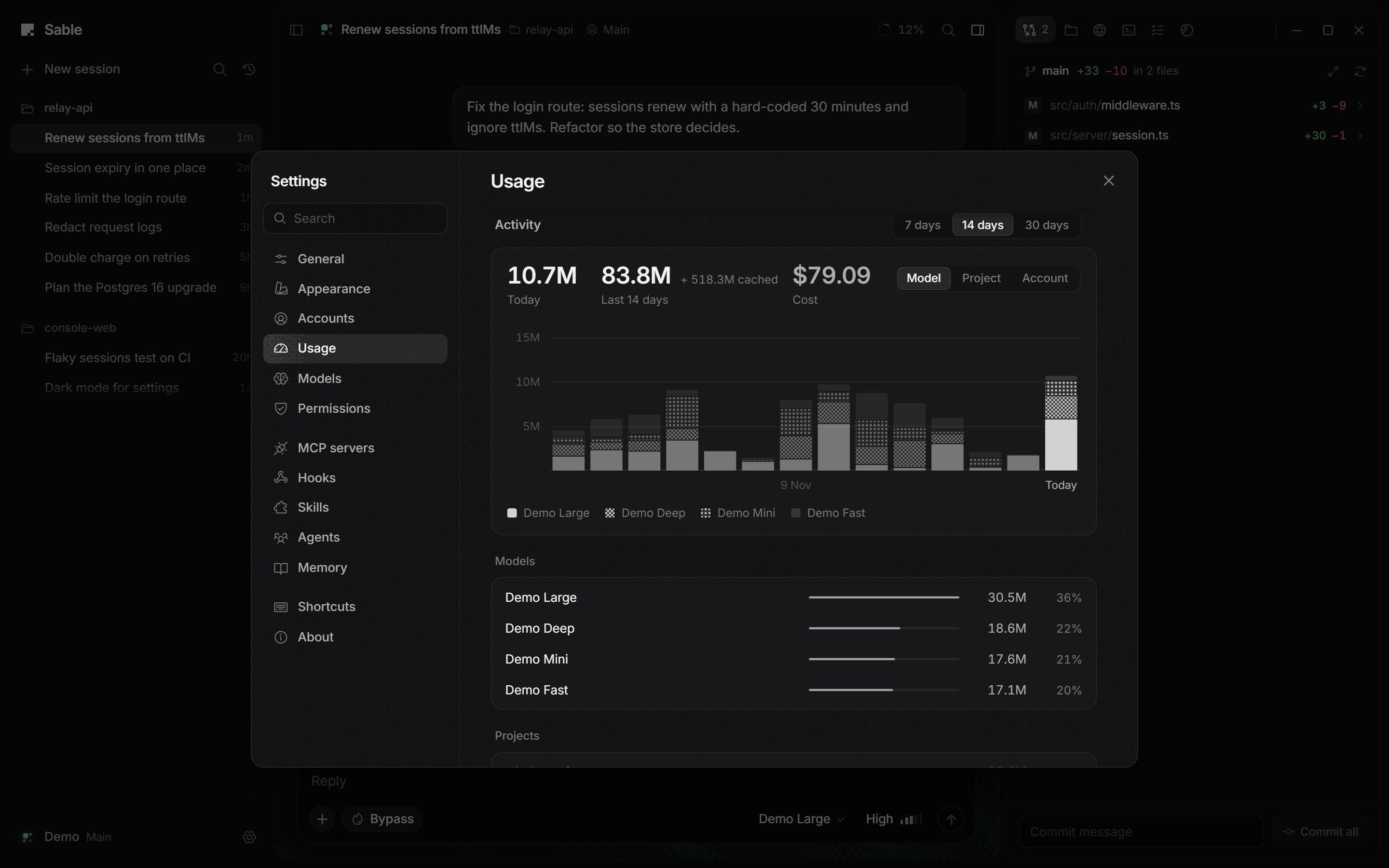
Usage you can read. Settings › Usage shows each account's plan windows with when they reset and whether you are on pace, plus the tokens your agents used by day, model, project and session, read from the transcripts the agents already keep on disk.
Everything else
- Claude Code (through the Claude Agent SDK) and Codex (through
codex app-server) in one timeline: messages, thinking, commands, file edits with diffs, searches, sub-agents and workflows, MCP tools, plans and todos. - A triage deck (Ctrl+I) with every permission and question waiting across all chats, answered by keyboard.
/until <check>: the agent keeps going until your check passes (tests, a build, a linter), within a number of rounds and a usage budget.- Before and after: a local page in the Browser tab is captured before and after a turn that edits files, with the changed regions marked and a compare slider.
- Lanes (optional): a chat that starts in a git folder where another chat is working gets its own worktree and branch, and the Changes tab says whether it lands cleanly before you land it.
- Projects that group folders, chats without a folder, and a sidebar you arrange by drag.
- Permission cards with diff previews, question cards, queueing and steering, slash commands and skills (
/), file mentions (@), shell commands (!), attachments and images. - Model, permission mode, thinking level and speed per session, including Ultracode for Claude and the ultra level for Codex.
- Side panel: git changes, file tree, a browser with tabs next to the conversation, a terminal, tasks, context usage, the agents of the chat, and an Android device or emulator for app work.
- History: browse and resume the conversations your agents keep on disk. Rewind to an earlier message, optionally restoring files.
- A profile of you (
~/.sable/profile.md) that both agents read and can add short facts to. - Long chats stay fast: chats of hundreds of megabytes open in seconds and stream without slowing the app.
- The computer does not go to sleep while an agent works, or while a paired phone may need it and it is plugged in.
- A dithered backdrop that reacts when you send, when a turn ends and when something fails, and goes still when you stop. Presets, your own image and a live editor in Settings › Appearance.
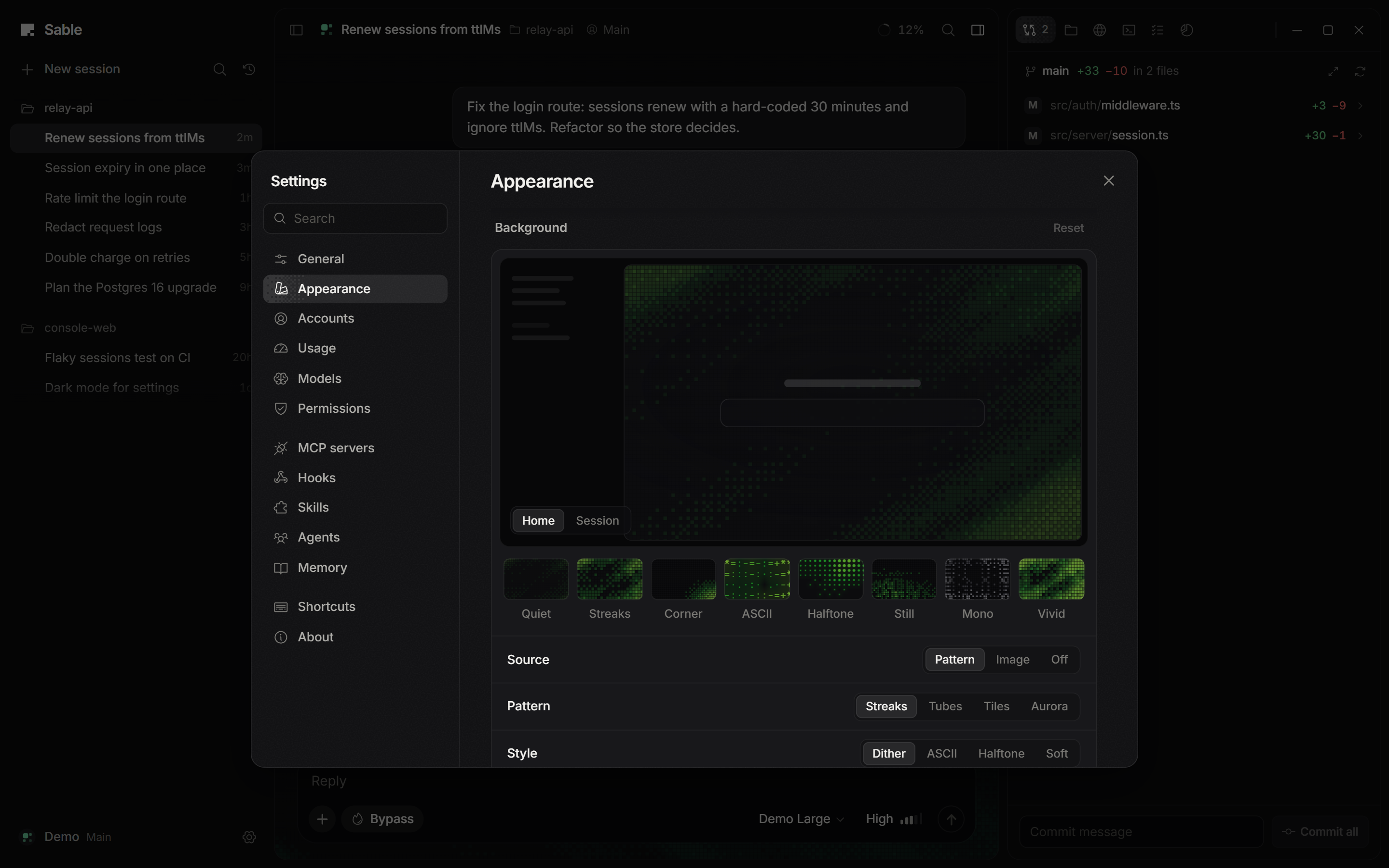
The screenshots use Sable's built-in Demo agent with its made-up project and accounts.
Install
Download Sable-Setup-<version>.exe from the Releases page and run it. It installs for your user only, with no admin prompt, and opens Sable when it finishes.
Sable is Windows only for now. The installer is not code-signed, so Windows SmartScreen warns on first run: choose "More info", then "Run anyway". There are no in-app updates yet; new versions are published on the Releases page.
Sable keeps its data in ~/.sable. The uninstaller leaves that folder alone.
The phone app
- Download
Sable-Android-<version>.apkfrom the same release onto your Android phone and open it. Android asks once to allow installs from that source (the app is not on the Play Store). - In Sable on your computer, open Settings › Phone, turn phone access on and choose "Pair a phone". Scan the code with the app and allow the phone on the computer.
- The phone reaches the computer on the same Wi-Fi. To use it away from home, install Tailscale on both, signed in to the same account, and open the app once at home afterwards: it learns the computer's Tailscale address by itself. Keep the computer on and plugged in (closing a laptop's lid usually puts it to sleep).
A newer APK installs over the old one and keeps the pairing.
Requirements
- Windows 10 or 11.
- Claude Code and/or the Codex CLI, installed and signed in. Sable uses their own sign-in and never sees your password or tokens: plan limits are asked of the agents themselves, and usage is counted from their transcripts.
- For the phone app: Android 7 or newer.
Development
You need Node 22 or newer and pnpm.
pnpm install
pnpm dev                  # http://localhost:5173, with the bridge attached
pnpm test                 # vitest
pnpm typecheck
pnpm desktop:dist         # Windows installer in release/
pnpm dev runs on your real profile (~/.sable). For experiments, node scripts/dev-test.mjs starts the same server on a throwaway folder. pnpm desktop:pack builds release/win-unpacked/Sable.exe without an installer.
In a dev build the scripted Demo agent is available, so you can work on the interface without spending quota. In the browser console, sable.demo('refactor the session module') opens a Demo session and sends a prompt; keywords in the prompt pick what the Demo does, for example chart, form, dashboard, agent, progress, fleet or marathon.
The phone app lives in mobile/ (Capacitor and React). npm install and npm run apk there build a debug APK (needs the Android SDK and a JDK 21); npm run dev serves it in a browser for quick work.
Architecture, conventions and design rules are in CLAUDE.md.
Trademarks
Sable is an independent project and is not affiliated with or endorsed by Anthropic or OpenAI. Claude and Claude Code are trademarks of Anthropic; OpenAI and Codex are trademarks of OpenAI. The Claude and Codex marks shown next to each agent come from @lobehub/icons-static-svg (MIT) and are used only to identify those products.
License
Reviews (0)
Sign in to leave a review.
Leave a reviewNo results found