canicode
Health Warn
- License — License: MIT
- Description — Repository has a description
- Active repo — Last push 0 days ago
- Low visibility — Only 5 GitHub stars
Code Pass
- Code scan — Scanned 12 files during light audit, no dangerous patterns found
Permissions Pass
- Permissions — No dangerous permissions requested
No AI report is available for this listing yet.
Analyze Figma designs for development & AI readiness. 39 rules, density-based scoring (S~F), HTML reports with Figma comment integration. CLI + MCP server for Claude Code, Cursor, Claude Desktop.
CanICode


Analyzes Figma designs to help AI implement them pixel-perfectly — with minimal token cost and responsive-ready output.
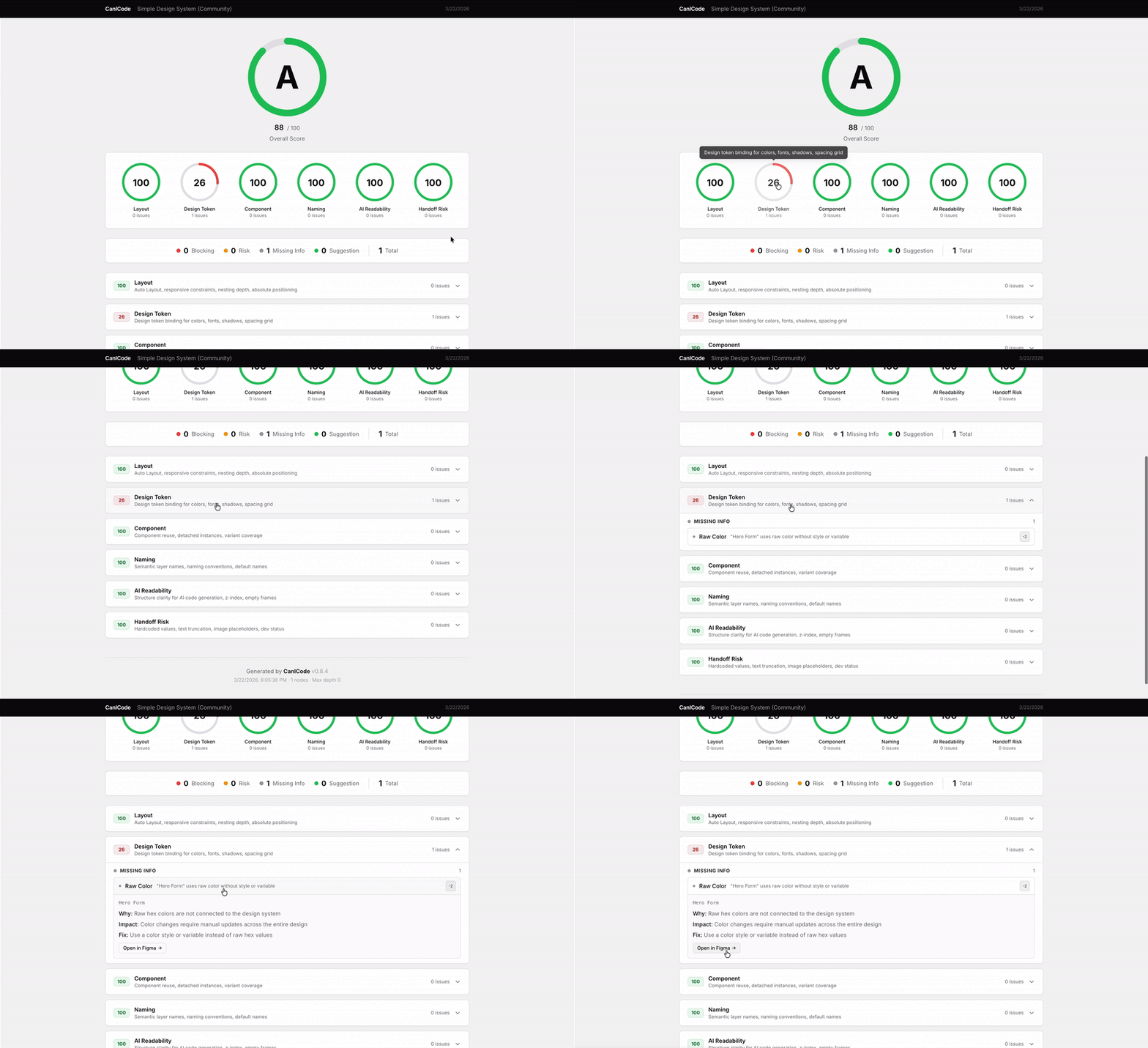
Try it in your browser — no install needed.
Why CanICode
AI can turn Figma designs into code — but the quality depends heavily on how the design is structured. Missing Auto Layout drops pixel accuracy from 95% to 63% at different viewports. Raw JSON input wastes 5× more tokens for 15%p worse results.
CanICode solves this:
- Analyzes your Figma design for patterns that hurt AI implementation quality
- Generates a design-tree — a curated, CSS-ready representation that AI implements more accurately and efficiently than raw Figma data
- Scores responsive readiness, so you fix the design before generating code
- 16 rules across 6 categories: Pixel Critical, Responsive Critical, Code Quality, Token Management, Interaction, Minor
- Deterministic — no AI tokens consumed per analysis, runs in milliseconds
- Validated — ablation experiments confirmed design-tree achieves 94% pixel accuracy with 5× fewer tokens than raw JSON
Scores You Can Trust
Rule scores aren't guesswork. A 6-agent calibration pipeline converts real Figma designs to HTML, measures pixel-level similarity (via visual-compare), and adjusts scores based on actual implementation difficulty.
- Design that's hard to implement accurately → rule score goes up
- Design that's easy despite the flag → rule score goes down
The pipeline runs on community fixtures, not on every analysis. See the Calibration wiki.
Getting Started
Quickest way: Open the web app — paste a Figma URL, get a report.
For your workflow:
# CLI — one command
npx canicode analyze "https://www.figma.com/design/ABC123/MyDesign?node-id=1-234"

# MCP Server — works with Claude Code, Cursor, Claude Desktop
claude mcp add canicode -- npx -y -p canicode canicode-mcp
| Channel | Best for |
|---|---|
| Web App | Quick check, no install |
| Figma Plugin | Analyze inside Figma (under review) |
| MCP Server | Claude Code / Cursor / Claude Desktop integration |
| Claude Code Skill | Lightweight, no MCP install |
| CLI | Full control, CI/CD, offline analysis |
canicode implement |
Generate code-ready package (analysis + assets + prompt) |
| GitHub Action | PR gate with score threshold |
What It Checks
| Category | Rules | What it measures |
|---|---|---|
| Pixel Critical | 3 | Can AI read the layout? (Auto Layout, absolute positioning, groups) |
| Responsive Critical | 2 | Will it work at different viewports? (fixed sizing, size constraints) |
| Code Quality | 4 | Is the design efficient for AI context? (components, variants, nesting) |
| Token Management | 2 | Can AI reproduce exact values? (raw values, spacing grid) |
| Interaction | 2 | Can AI know what happens? (state variants, prototypes) |
| Minor | 3 | Can AI infer meaning? (semantic names, conventions) |
Each issue is classified: Blocking > Risk > Missing Info > Suggestion.
Installation
CLInpx canicode analyze "https://www.figma.com/design/ABC123/MyDesign?node-id=1-234"
Setup: canicode init --token figd_xxxxxxxxxxxxx
Get your token: Figma → Settings → Security → Personal access tokens → Generate new token
Figma API Rate Limits — Rate limits depend on where the file lives, not just your plan.
| Seat | File in Starter plan | File in Pro/Org/Enterprise |
|---|---|---|
| View, Collab | 6 req/month | 6 req/month |
| Dev, Full | 6 req/month | 10–20 req/min |
Hitting 429 errors? Make sure the file is in a paid workspace. Or save-fixture once and analyze locally. Full details
claude mcp add canicode -- npx -y -p canicode canicode-mcp
claude mcp add -s project -t http figma https://mcp.figma.com/mcp
Then ask: "Analyze this Figma design: https://www.figma.com/design/..."
canicode's rule engine analyzes the design data — the AI assistant just orchestrates the calls.
With a Figma API token:
claude mcp add canicode -e FIGMA_TOKEN=figd_xxxxxxxxxxxxx -- npx -y -p canicode canicode-mcp
For Cursor / Claude Desktop config, see docs/CUSTOMIZATION.md.
canicode implement ./fixtures/my-design
canicode implement "https://www.figma.com/design/ABC/File?node-id=1-234" --prompt ./my-react-prompt.md --image-scale 3
Outputs a ready-to-use package for AI code generation:
analysis.json— issues + scoresdesign-tree.txt— DOM-like tree with CSS styles + token estimateimages/— PNG assets with human-readable names ([email protected])vectors/— SVG assetsPROMPT.md— code generation prompt (default: HTML+CSS, or your custom prompt)
| Option | Default | Description |
|---|---|---|
--prompt |
built-in HTML+CSS | Path to your custom prompt file for any stack |
--image-scale |
2 |
Image export scale: 2 for PC, 3 for mobile |
--output |
./canicode-implement/ |
Output directory |
Feed design-tree.txt + PROMPT.md to your AI assistant (Claude, Cursor, etc.) to generate code.
cp -r .claude/skills/canicode /your-project/.claude/skills/
Requires FIGMA_TOKEN. Then use /canicode with a Figma URL.
- uses: let-sunny/[email protected]
  with:
    figma_url: 'https://www.figma.com/design/ABC123/MyDesign?node-id=1-234'
    figma_token: ${{ secrets.FIGMA_TOKEN }}
    min_score: 70
Posts analysis as a PR comment. Fails if score is below threshold. See canicode-action on Marketplace.
Customization
| What | How |
|---|---|
| Presets | --preset relaxed | dev-friendly | ai-ready | strict |
| Config overrides | --config ./config.json — adjust scores, severity, exclude nodes |
See docs/CUSTOMIZATION.md for the full guide, examples, and all available options.
Development
git clone https://github.com/let-sunny/canicode.git && cd canicode
pnpm install && pnpm build
pnpm dev        # watch mode
pnpm test       # run tests
pnpm lint       # type check
For architecture details, see CLAUDE.md. For calibration pipeline, see the Calibration wiki.
Contributing
Share your Figma design to help calibrate scores against real-world designs.
Support
- Bugs and questions: GitHub Issues
- Privacy: See PRIVACY.md for details on data collection and how to opt out
License
MIT
Reviews (0)
Sign in to leave a review.
Leave a reviewNo results found