hud-plugin
Health Warn
- No license — Repository has no license file
- No description — Repository has no description
- Active repo — Last push 0 days ago
- Low visibility — Only 9 GitHub stars
Code Fail
- process.env — Environment variable access in bin/claude-hud.js
- process.env — Environment variable access in bin/start.mjs
- process.env — Environment variable access in scripts/full-hud.mjs
- exec() — Shell command execution in scripts/lib/git-info.mjs
- os.homedir — User home directory access in scripts/lib/token-reader.mjs
- execSync — Synchronous shell command execution in scripts/lib/usage-api.mjs
- network request — Outbound network request in scripts/lib/usage-api.mjs
Permissions Pass
- Permissions — No dangerous permissions requested
No AI report is available for this listing yet.
claude-code-hud
한국어
Claude Code로 작업할 때 토큰 사용량, git 상태, 파일 구조, 세션 히스토리를 IDE나 별도 툴 없이 터미널 하나에서 확인할 수 있는 HUD입니다.

사용법
터미널 두 개를 열고 같은 프로젝트 디렉토리에서 실행하면 됩니다.
터미널 A                         터미널 B
─────────────────────────────    ─────────────────────────────
cd ~/my-project                  cd ~/my-project
claude                           npx claude-code-hud
(Claude Code 작업 중...)          (HUD 실시간 표시)
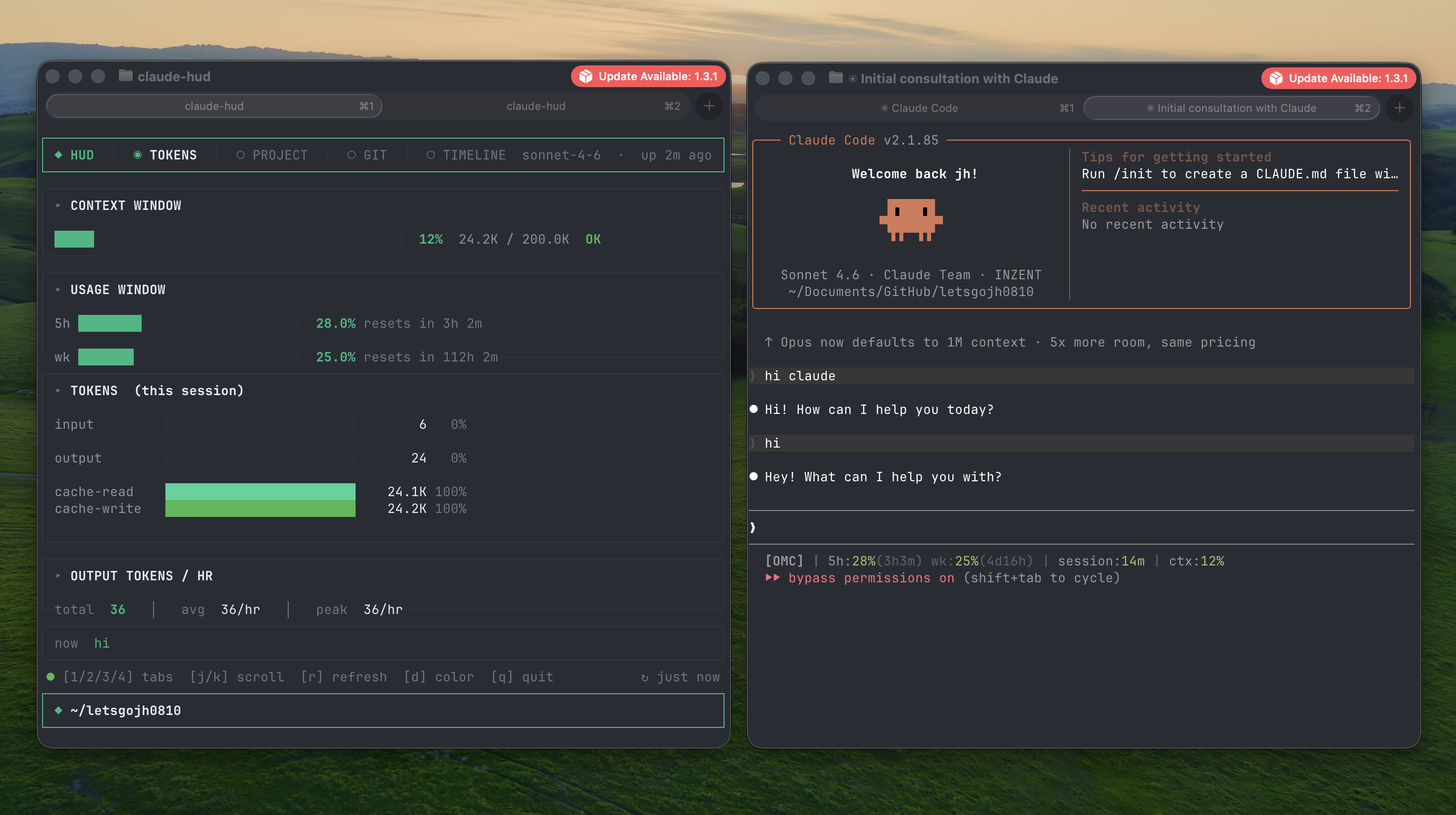
HUD는 현재 디렉토리를 기준으로 토큰, git, 프로젝트 정보를 자동으로 인식합니다.
# tmux로 한 화면에서 split
cd ~/my-project
tmux split-window -h "npx claude-code-hud"
설치
# 방법1. 전역 설치 (권장)
> npm install -g claude-code-hud
> claude-hud

# 방법2. 설치 없이 바로 실행
> npx claude-code-hud
기능
1 TOKENS 탭
- 컨텍스트 윈도우 사용량 게이지 (OK / MID / WARN) — 사용량에 따라 헤더 색상 변경
- Anthropic API 기반 5h / 주간 사용률 —
1h 23m형식으로 리셋까지 남은 시간 표시 - input / output / cache-read / cache-write 토큰 분류
- 세션 output 통계 (total / avg / peak)
- 오늘 사용량 — 자정 기준 input / output / cache / 비용 합산
now— 현재 진행 중인 작업 (직접 입력한 마지막 프롬프트) 한 줄 표시
2 PROJECT 탭 — 인터랙티브 파일 브라우저
- 디렉토리 트리 (펼치기/접기)
- Git 변경 파일 색상 표시 — 수정(노란색 M) / 추가(초록 A) / 삭제(빨강 D)
- 파일 선택 시 소스 코드 뷰어 (split 패널)
- 패키지 의존성 트리
- API 엔드포인트 감지
▸ TREE                          │ ▸ SOURCE  src/index.ts
  ▼ src/            23f         │    1  import React from 'react'
    ▼ components/    8f         │    2  import { render } from 'ink'
      Header.tsx  M             │    3
    ▶ hooks/         4f         │    4  render(<App />)
  ▶ scripts/         6f         │    …  [j/k] scroll  [esc] close
3 GIT 탭
- 현재 브랜치, ahead/behind 카운트
- 변경 파일 목록 (MOD / ADD / DEL) + 실제 +/- 라인 수
- 파일별 diff 시각화
- 최근 커밋 히스토리
- 브랜치 전환 —
b키로 로컬 브랜치 목록 표시, 선택해서 바로 checkout
4 TIMELINE 탭
- 현재 세션에서 사용자가 입력한 메시지 히스토리
- 시간 + 내용 표시, 10개씩 j/k 스크롤
키보드 단축키
| 키 | 동작 |
|---|---|
1 2 3 4 |
탭 전환 |
j / k |
스크롤 / 트리 이동 |
→ / Enter |
디렉토리 펼치기 / 파일 열기 |
← / Esc |
접기 / 소스 뷰어 닫기 |
b |
브랜치 전환 (GIT 탭) |
d |
액센트 색상 변경 (blue → red → amber → green → pink) |
r |
수동 새로고침 |
q |
종료 |
한글 키보드 모드에서도 동작합니다 —
ㅓ/ㅏ(j/k),ㅇ(d),ㄱ(r),ㅂ(q),ㅠ(b)
요구사항
- Node.js 18+
- Claude Code 설치 및 로그인 (토큰 데이터 수집)
- Claude Pro / Max 플랜 권장 (5h / 주간 사용률 표시)
- Git (GIT 탭 사용 시)
플랫폼 지원
| 기능 | macOS | Windows |
|---|---|---|
| 기본 실행 | ✅ | ✅ Node.js 설치 후 npx |
| 토큰 / Git / 파일 브라우저 | ✅ | ✅ |
| 5h / 주간 사용률 | ✅ Keychain 자동 인식 | ⚠️ ~/.claude/.credentials.json 폴백 |
| 터미널 렌더링 | ✅ | ✅ Windows Terminal 권장 (cmd.exe 깨짐) |
| 한글 키보드 | ✅ | ⚠️ IME 방식 차이로 미지원 가능 |
Windows 권장 환경:
- Windows Terminal 사용
- WSL2 환경이면 macOS와 동일하게 동작
Windows에서 5h/wk 사용률이 안 보일 때:
Claude Code를 한 번 실행하면 ~/.claude/.credentials.json에 credentials이 저장됩니다. HUD는 이 파일을 자동으로 읽습니다.
English
A Terminal HUD (Heads-Up Display) for Claude Code — real-time token usage, git status, interactive project file browser, and session history. No IDE, no extra tabs. Just a second terminal window.
Usage
Open two terminals in the same project directory.
Terminal A                       Terminal B
─────────────────────────────    ─────────────────────────────
cd ~/my-project                  cd ~/my-project
claude                           npx claude-code-hud
(working with Claude Code)       (HUD live display)
# tmux split pane
cd ~/my-project
tmux split-window -h "npx claude-code-hud"
Installation
# Option 1. Global install (recommended)
> npm install -g claude-code-hud
> claude-hud

# Option 2. Run directly without install
> npx claude-code-hud
Features
1 TOKENS tab
- Context window gauge (OK / MID / WARN) — header border changes color with usage
- Real 5h / weekly usage from Anthropic OAuth API — not estimates. Reset time shown as
1h 23m - Input / output / cache-read / cache-write breakdown
- Session output stats: total / avg / peak per hour
- Today's usage — input / output / cache / cost totals since midnight
nowline — last prompt you typed (not tool results)
2 PROJECT tab — interactive file browser
- Navigable directory tree with expand/collapse
- Git-changed files highlighted — modified (yellow M) / added (green A) / deleted (red D)
- Source file viewer in a split panel
- Package dependency tree from
package.json - API endpoint detection (GET / POST / PUT / DELETE / PATCH)
▸ TREE                          │ ▸ SOURCE  src/index.ts
  ▼ src/            23f         │    1  import React from 'react'
    ▼ components/    8f         │    2  import { render } from 'ink'
      Header.tsx  M             │    3
    ▶ hooks/         4f         │    4  render(<App />)
  ▶ scripts/         6f         │    …  [j/k] scroll  [esc] close
3 GIT tab
- Branch status, ahead/behind remote
- Changed file list (MOD / ADD / DEL) with real
+N -Ndiff counts - Per-file diff visualization
- Recent commit history
- Branch switcher — press
bto list local branches and checkout instantly
4 TIMELINE tab
- User message history from the current Claude Code session
- Timestamped entries, 10 per page, j/k to scroll
Keyboard Shortcuts
| Key | Action |
|---|---|
1 2 3 4 |
Switch tabs |
j / k |
Scroll / move tree cursor |
→ / Enter |
Expand dir / open file |
← / Esc |
Collapse / close source viewer |
b |
Branch switcher (GIT tab) |
d |
Cycle accent color (blue → red → amber → green → pink) |
r |
Manual refresh |
q |
Quit |
Korean keyboard layout supported —
ㅓ/ㅏ(j/k),ㅇ(d),ㄱ(r),ㅂ(q),ㅠ(b)
Platform Support
| Feature | macOS | Windows |
|---|---|---|
| Basic run | ✅ | ✅ via npx with Node.js |
| Tokens / Git / File browser | ✅ | ✅ |
| 5h / weekly usage % | ✅ Keychain auto-detected | ⚠️ Falls back to ~/.claude/.credentials.json |
| Terminal rendering | ✅ | ✅ Windows Terminal recommended (cmd.exe may break) |
| Korean keyboard | ✅ | ⚠️ May not work depending on IME |
Windows recommendations:
- Use Windows Terminal for proper Unicode rendering
- WSL2 works identically to macOS
5h / weekly usage not showing on Windows?
Run claude once to authenticate — credentials are saved to ~/.claude/.credentials.json which the HUD reads automatically.
How it works
- Token data: Watches
~/.claude/projects/*/sessions/*.jsonlwith chokidar — updates instantly on each Claude response - Timeline: Reads the same JSONL files, filters
type === "user"entries for message history - Usage window: Calls
api.anthropic.com/api/oauth/usageusing local Claude credentials — cached 5 min - Git: Polls every 3 seconds
- Project scan: One-time fast-glob scan on startup,
rto rescan
MIT — letsgojh0810
Reviews (0)
Sign in to leave a review.
Leave a reviewNo results found