ai-session-search
Health Warn
- License — License: MIT
- Description — Repository has a description
- Active repo — Last push 0 days ago
- Low visibility — Only 5 GitHub stars
Code Warn
- network request — Outbound network request in src/client/api.ts
Permissions Pass
- Permissions — No dangerous permissions requested
No AI report is available for this listing yet.
Local-first, read-only full-text search and organization for Claude Code, Codex, Cursor, OpenCode, Copilot CLI, Kimi Code, and more.
AI Session Search
English | 简体中文


A local-first search app for AI coding sessions and reusable AI context. It discovers local
conversations from 7 coding tools and uses SQLite FTS5 trigram indexing to search natural language,
code, paths, errors, Session IDs, and user-owned context notes. Source sessions remain read-only.
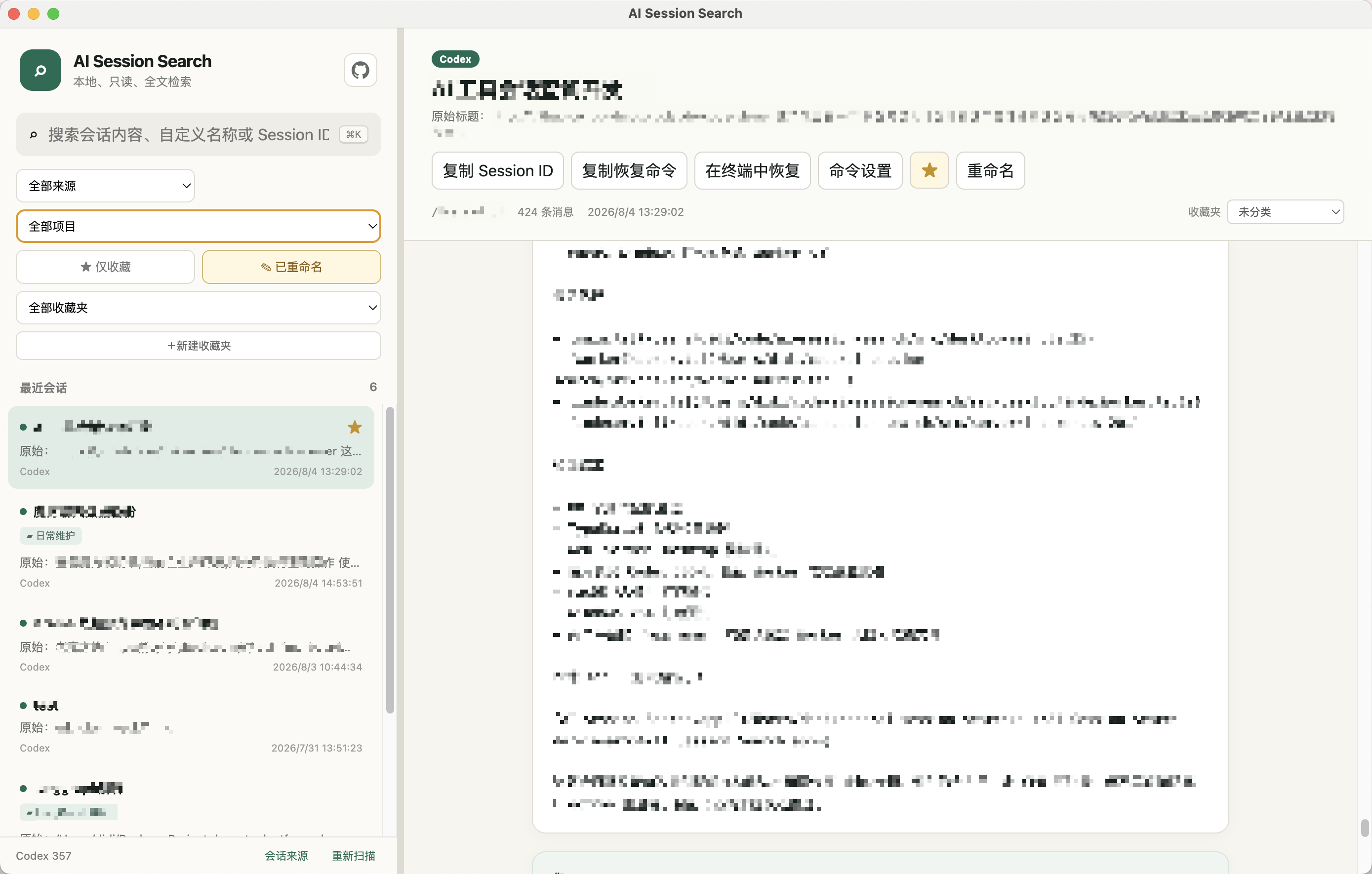
Desktop clients
Download from GitHub Releases:
- macOS Apple Silicon:
darwin-arm64.zip - macOS Intel:
darwin-x64.zip - Windows x64 portable:
AI.Session.Search-win32-x64-<version>.zip
The desktop client requires no Node.js installation. It displays the interface immediately, scans
sessions in the background, and reports indexing progress. Web and desktop use the same database
in the current user's system application-data directory, so indexes, favorites, collections,
renames, reusable contexts, and settings are shared. Existing desktop-only metadata is migrated
automatically and the legacy directory is left intact as a backup.
Current packages are unsigned, so Gatekeeper or SmartScreen may show a first-launch warning.
The Windows build is portable: extract the ZIP and run ai-session-search.exe; no installer is
included.
Open in terminal supports macOS and Windows. Windows Terminal opens a new tab in the most
recent window and falls back to PowerShell when wt.exe is unavailable.
The Windows package requires 64-bit Windows 10 or Windows 11; Windows 7/8/8.1 are not supported.
Highlights
- Searches across providers, projects, message content, custom titles, and full/partial Session IDs
- SQLite FTS5 trigram indexing for Chinese, Japanese, Korean, English, and code substrings
- Context library for saving, editing, searching, organizing, and copying complete AI context blocks
- Smart context ranking combines copy frequency with creation time, with four explicit sort alternatives
- Favorites, custom titles, collections, and matching filters
- Copies Session IDs and customizable resume commands
- macOS integration with Terminal, iTerm2, Warp, and custom terminal/shell paths
- Windows integration with Windows Terminal, PowerShell, Command Prompt, and custom executables
- Resizable sidebar with persisted width
- App-local shortcuts:
Cmd/Ctrl+K,Cmd/Ctrl+F, or/focuses search;Escdismisses the active editor or dialog - Background incremental indexing and filesystem watching
- Desktop indexing runs in a background worker with bounded database batches to keep the window responsive
- Shared web/desktop session-source settings with custom paths, enable/disable controls, and live rescanning
- Automatic English/Simplified Chinese UI; no API key or cloud database required
AI Session Search never modifies source conversations. Context notes, titles, collections, settings,
and indexes are written only to its own SQLite database.
Supported clients
| ID | Client | Default home |
|---|---|---|
claude |
Claude Code | ~/.claude |
codex |
Codex | ~/.codex |
antigravity |
Antigravity | ~/.gemini |
opencode |
OpenCode | ~/.local/share/opencode |
copilot |
GitHub Copilot CLI | ~/.copilot |
cursor |
Cursor | ~/.cursor |
kimi |
Kimi Code | ~/.kimi-code |
Open Session sources in either the web or desktop app to change a client directory, restore its
automatic path, or enable/disable a client. Settings are stored in the app database and trigger a
live rescan without restarting. Paths must be absolute.
Path precedence is: saved UI setting → CLI option → AI_SESSION_* environment variable →
client-native environment variable → platform default. User home paths are never hardcoded.
CLI / Web version
Requires Node.js 24+ and pnpm 11:
corepack pnpm install
corepack pnpm build
corepack pnpm start
The default URL is http://localhost:3411.
| Option | Environment | Default |
|---|---|---|
-p, --port <port> |
PORT |
3411 |
-h, --hostname <hostname> |
HOSTNAME |
localhost |
--claude-dir <path> |
AI_SESSION_CLAUDE_HOME / CLAUDE_CONFIG_DIR |
~/.claude |
--codex-dir <path> |
AI_SESSION_CODEX_HOME / CODEX_HOME |
~/.codex |
--provider-dir <provider=path> |
AI_SESSION_<PROVIDER>_HOME |
Provider default |
--data-dir <path> |
AI_SESSION_DATA_DIR / XDG_DATA_HOME |
Platform app data |
--providers <ids> |
AI_SESSION_PROVIDERS |
auto |
--no-watch |
— | Watching enabled |
The web and desktop clients both honor --data-dir and AI_SESSION_DATA_DIR. Their shared default
is ~/Library/Application Support/ai-session-search on macOS,%LOCALAPPDATA%\\ai-session-search on Windows, and ~/.local/share/ai-session-search on Linux.
Examples:
corepack pnpm start --providers codex --codex-dir /path/to/codex-home
corepack pnpm start --provider-dir kimi=/custom/kimi --provider-dir cursor=/custom/cursor
Resume commands
Built-in templates include:
Claude Code: cd {cwd} && claude --resume {sessionId}
Codex:       cd {cwd} && codex resume {sessionId}
{cwd} and {sessionId} are replaced from the session. A template containing only yolo
automatically receives the Session ID. macOS terminal execution uses a configurable absolute shell
path with -lic, so aliases from files such as ~/.zshrc are available. iTerm2 opens a tab in the
current window when possible. On Windows, commands use PowerShell or Command Prompt syntax;
Windows Terminal targets the most recent window with wt.exe -w 0 new-tab.
Development and releases
corepack pnpm dev             # Web development
corepack pnpm desktop:start   # Run Electron
corepack pnpm desktop:make    # Package the current platform
corepack pnpm test
corepack pnpm typecheck
corepack pnpm build
Privacy and license
- Does not read
auth.json, API keys, or login credentials. - Never executes commands or tool calls found in session content.
- Terminal resume runs only after a user click and requires a loopback listener.
- Add authentication and network controls before exposing the Web service remotely.
The search architecture is inspired by and adapted from
d-kimuson/claude-code-viewer. See
NOTICE.md. Licensed under the MIT License.
Reviews (0)
Sign in to leave a review.
Leave a reviewNo results found