ling-stack
Health Warn
- License — License: MIT
- Description — Repository has a description
- Active repo — Last push 0 days ago
- Low visibility — Only 5 GitHub stars
Code Warn
- process.env — Environment variable access in .github/workflows/ci.yml
Permissions Pass
- Permissions — No dangerous permissions requested
No AI report is available for this listing yet.
Local-first AI teammate workspace. Bring your own models and keep project conversations, tool approvals, and results together.
Ling Stack
A local workspace for working with AI teammates.
Bring conversations, models, tools, approvals, and results together.




Getting started · Troubleshooting · Architecture · Contributing · Changelog
[!NOTE]
Source-first alpha. Start with the Web UI, local daemon, and CLI from source.
Desktop development is available separately; stable signed installers and a supported
production release are not available yet.
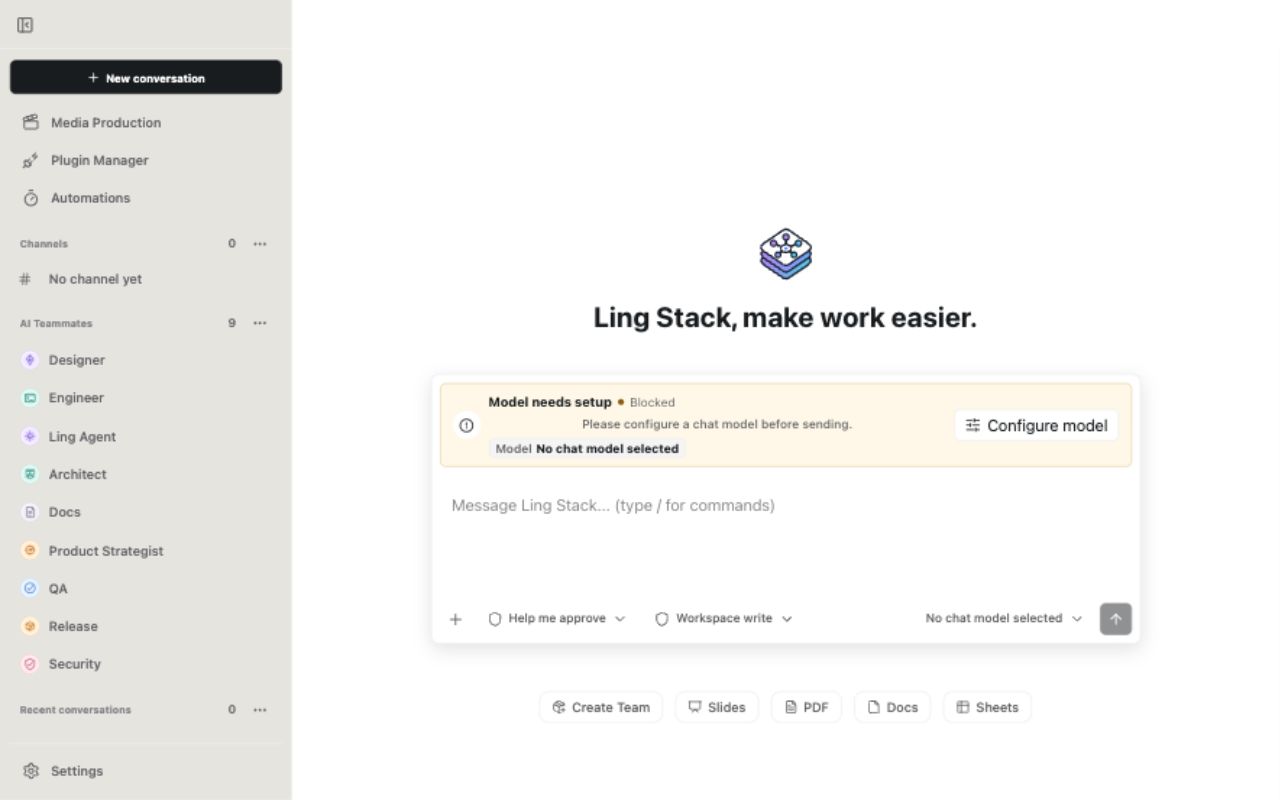
English interface in a fresh local workspace before configuring a model. Model requests
require your own provider configuration and API key.
Who Is It For?
Ling Stack is for developers and people who work with several AI models or teammates
and want to keep their work in one place. It connects OpenAI, Anthropic, Volcengine Ark,
DeepSeek-compatible endpoints, MiniMax, GLM, and OpenAI-compatible relays through a
shared Model Workbench.
Workspace state, conversation history, and run evidence are stored locally. Requests
and their context go to the model or tool providers you choose. The interface supports
Chinese and English.
Three Ways To Use It
| Scenario | What you do | What stays together |
|---|---|---|
| Ask a model | Configure a chat model and start a conversation about a document, idea, or project | Messages, model selection, attachments, and results |
| Work with AI teammates | Give teammates model and tool bindings, then collaborate in a project channel | Participants, tool activity, approvals, artifacts, and the final report |
| Create media | Configure an image or video capability and use Media Production | Projects, scenes, generation jobs, and outputs |
Begin with a simple conversation, then add teammates or tools when the work needs them.
Skills provide instructions; tool access and permission remain explicit. Coding-agent
work uses the Pi runtime adapter, and available execution tools depend on platform setup
and workspace policy.
Quick Start From Source
Requirements: Git, Node.js 22.22.1 or newer, and Corepack with pnpm 10.
The repository pins pnpm 10.0.0; Node 22.22.1 is the CI baseline.
1. Install and build the local Web stack
git clone https://github.com/ling-stack-org/ling-stack.git
cd ling-stack
corepack enable
corepack pnpm install --frozen-lockfile
corepack pnpm --workspace-concurrency=1 --filter '@ling-stack/cli...' -r build
The filtered build includes the CLI, daemon, Web app, and their workspace dependencies.
Desktop and Mobile builds have separate setup requirements.
2. Start the daemon
Keep this command running in the first terminal, from the repository root:
corepack pnpm ling daemon start --foreground
The default daemon address is http://127.0.0.1:17891. Keep it on loopback.
3. Open the Web UI
In a second terminal, from the same repository root:
corepack pnpm ling ui --foreground --open
Open http://127.0.0.1:5173 if the browser does not open automatically. In another
terminal, curl http://127.0.0.1:17891/health should return JSON with "ok": true.
4. Connect a model and try a conversation
Open Settings → Model Workbench, add a chat-capable model with your own API key,
and run Check. The first verified chat model becomes the workspace default. Start
a new conversation and ask a small question, then inspect the response and its details.
After configuring and checking the model, run:
corepack pnpm ling doctor
Doctor reports model readiness as well as local service health. A fresh workspace with
no chat model reports a provider failure even when the daemon and Web UI are running.
Follow Getting started for the first model, conversation,
and project channel. See Troubleshooting for setup errors.
Support And Limits
| Surface or integration | Current scope |
|---|---|
| Web, daemon, and CLI | Source alpha; the default getting-started path |
| Electron Desktop | Development shell; platform setup and clean-machine acceptance remain separate gates |
| Chrome extension and Browser Host | Local development integration; Chrome Web Store publication pending |
| MCP and Plugin Manager | Explicit tool assignment, activation, and approval boundaries |
| Office and Computer Use native features | Platform-dependent development; consult the maintained implementation and release gates |
| Image and video generation | Provider- and capability-dependent; selected live adapters still have open gates |
| Mobile | Experimental work outside the current product acceptance scope |
Platform execution, accessibility, signing, and installer acceptance remain open for
selected native features. The Implementation Status
index records what is implemented and what still needs acceptance. A source build or
focused test result does not establish installer readiness.
For questions and reproducible bugs, read Support and use the
GitHub Issue forms.
Maintenance is best effort. Report vulnerabilities through Security.
Desktop development
Desktop has additional requirements: Xcode Command Line Tools with Swift and codesign
on macOS, or the .NET 8 SDK on Windows for the Office driver. The current Desktop
distribution targets are macOS arm64 and Windows x64. Electron also needs its platform
binary; see Desktop troubleshooting.
corepack pnpm --filter @ling-stack/desktop dev
For platform tools, build commands, and manual checks, follow the
Mac and Windows development-package guide.
Read Desktop release and acceptance before packaging for
distribution. Public source publication and signed binary releases are separate steps.
Data And Permissions
Default workspace state is under .ling-stack/, including ling-stack.sqlite,sessions/, artifacts/, and logs/. Provider keys entered in Model Workbench are
saved in local workspace storage. Environment and supported keychain references are
also available; see Configuration and data.
Keep keys, databases, session logs, and private outputs out of Git and public reports.
Workspace permissions govern file access, shell commands, external mutations, and paid
generation. Review approval requests before accepting them. For storage migration, use
the CLI storage flows.
Explore Or Contribute
The Web app (apps/web), Desktop shell (apps/desktop), and CLI (packages/cli) share
the daemon (packages/daemon). Core domain logic, contracts, provider adapters, and
runner integrations live under packages/.
- Contributing: setup, focused checks, and pull request expectations.
- Architecture and Daemon API: system boundaries.
- Design index and Implementation Status: maintained contracts and acceptance gates.
- Provider adapters and Pi integration: model and runtime integration.
- Release policy, Changelog, and Third-party notices: publication and licensing.
Ling Stack is available under the MIT License. Community participation
follows the Code of Conduct.
Reviews (0)
Sign in to leave a review.
Leave a reviewNo results found