millivolt
Health Warn
- License — License: MIT
- Description — Repository has a description
- Active repo — Last push 0 days ago
- Low visibility — Only 5 GitHub stars
Code Fail
- Hardcoded secret — Potential hardcoded credential in .github/workflows/check.yml
Permissions Pass
- Permissions — No dangerous permissions requested
No AI report is available for this listing yet.
Self-hosted inference proxy for OpenAI-compatible and Anthropic clients. Live dashboard, SQLite history, per-request routing, and operator controls.
millivolt
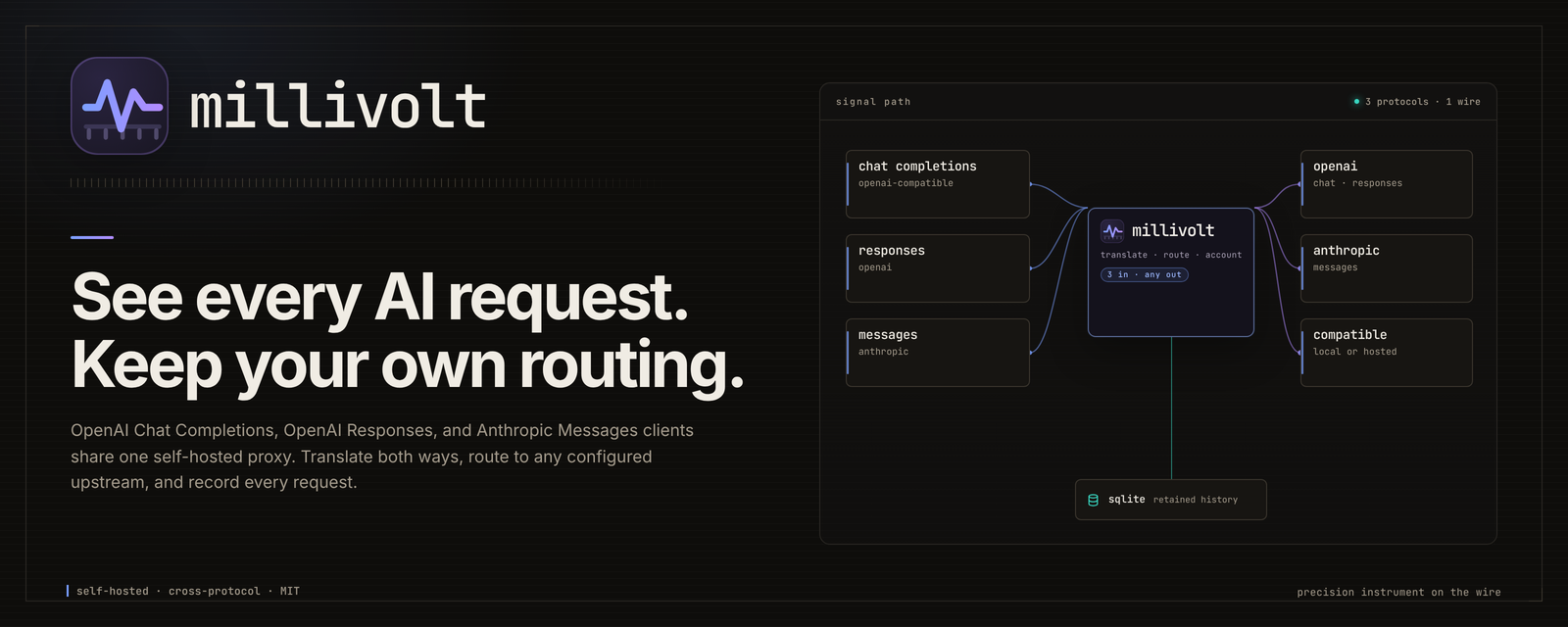
See every AI request. Keep your own routing. millivolt is a patch bay for
model traffic. OpenAI Chat Completions, OpenAI Responses, and Anthropic Messages
clients plug in on one side. The upstream you choose answers on the other. It
can translate when the two ends disagree, pass the request through untouched,
and measure the crossing: timing, tokens, cost, retries, outcome. Body capture
only when you ask.
millivolt stays a relay, not a platform. No separate provider registry, no
API-key vault, no user accounts. One Go binary. One dashboard. One operator or
a small team.

Quickstart · Documentation · Docs site ·
Dashboard guide · Support · Security
Pre-1.0 · Linux · MIT · single operator or small team. The 0.x series can change configuration and API details between releases.
01 / FIRST RUN
Quickstart
Linux with Docker Engine and the Compose plugin. No Go, Node, or source
checkout is needed for the container path. The full path, including every
environment variable and a first request on each client protocol, is in
install and first run.
Docker Compose
curl -fsSL https://raw.githubusercontent.com/LLM-4-People/millivolt/main/compose.yaml -o compose.yaml
export MILLIVOLT_OPERATOR_TOKEN='replace-with-a-long-random-value'
docker compose up -d
Open http://127.0.0.1:8080/ and sign in with that
token. If the container exits, run docker compose logs --tail 50.
[!IMPORTANT]
One shared operator credential protects the dashboard and operator plane only.
Inference is transparent: it forwards your upstream key and does not use the
operator token. There are no user accounts. Keep the listener on loopback, or
put the network or ingress boundary in front. With the token unset, the
dashboard denies every request. Read Security before network
exposure.
The Compose file publishes on loopback only. It keeps history and settings in
named volumes, runs non-root with a read-only root filesystem, and acceptsMILLIVOLT_PORT for an unused host port. For bind mounts, pre-create
directories writable by UID/GID 65532:65532; see
persistent state. For
image selection, backups, updates, shutdown, or protected ingress, see
container operation and the
reverse-proxy guide.
The published image is ghcr.io/llm-4-people/millivolt:main for amd64 and
arm64. Version tags identify releases; pin a digest when exact bytes matter.
See versions and images.
From source
Install the Go toolchain required by go.mod, then:
git clone https://github.com/LLM-4-People/millivolt.git
cd millivolt
test -e proxy.yaml || cp proxy.example.yaml proxy.yaml
export MILLIVOLT_OPERATOR_TOKEN='replace-with-a-long-random-value'
go run ./cmd/proxy -config proxy.yaml -listen 127.0.0.1:8080
For isolated development and checks, see Contributing.
02 / CONNECT
Connect a client
Point an OpenAI Chat Completions, OpenAI Responses, or Anthropic Messages
client at the proxy. The upstream URL and key stay yours; the proxy does not
register providers or keys. The request path selects the client protocol, andX-Proxy-Format selects the upstream protocol.
| Client setting | Value |
|---|---|
| API base URL | http://127.0.0.1:8080/v1 |
| API key | your upstream key. It is forwarded upstream, Authorization by default; it does not authenticate dashboard access. |
X-Proxy-Base-URL |
your upstream API base URL, including its path, such as /v1. |
X-Proxy-Client |
optional label for this client in the dashboard. |
curl -sS http://127.0.0.1:8080/v1/chat/completions \
  -H "X-Proxy-Base-URL: $UPSTREAM_BASE_URL" \
  -H "Authorization: Bearer $UPSTREAM_API_KEY" \
  -H 'Content-Type: application/json' \
  -d "{\"model\":\"$UPSTREAM_MODEL\",\"messages\":[{\"role\":\"user\",\"content\":\"hello\"}]}"
A response means the proxy answered; check the status code for the upstream
outcome. The request should appear in the dashboard. That is the whole
integration.
On a shared Compose network, use http://millivolt:8080/v1 instead of loopback./v1/chat/completions, /v1/responses, and /v1/messages are all available.
Each can reach Chat, Responses, or Anthropic upstreams; only a Chat client can
target the Cursor bridge. Read
upstream compatibility
and cross-protocol translation.
Relay is transparent by default, not byte-identical by contract: buffering,
retries, SSE keepalives, translation, and overrides can change bytes. See
protocol.
03 / OBSERVE
Dashboard overview
Global totals stay global. Explorer cards, timelines, and the request log
share one selected scope. See the visual guide for focused
captures of tokens, speed and latency, cost, providers, models, conversations,
and Settings.
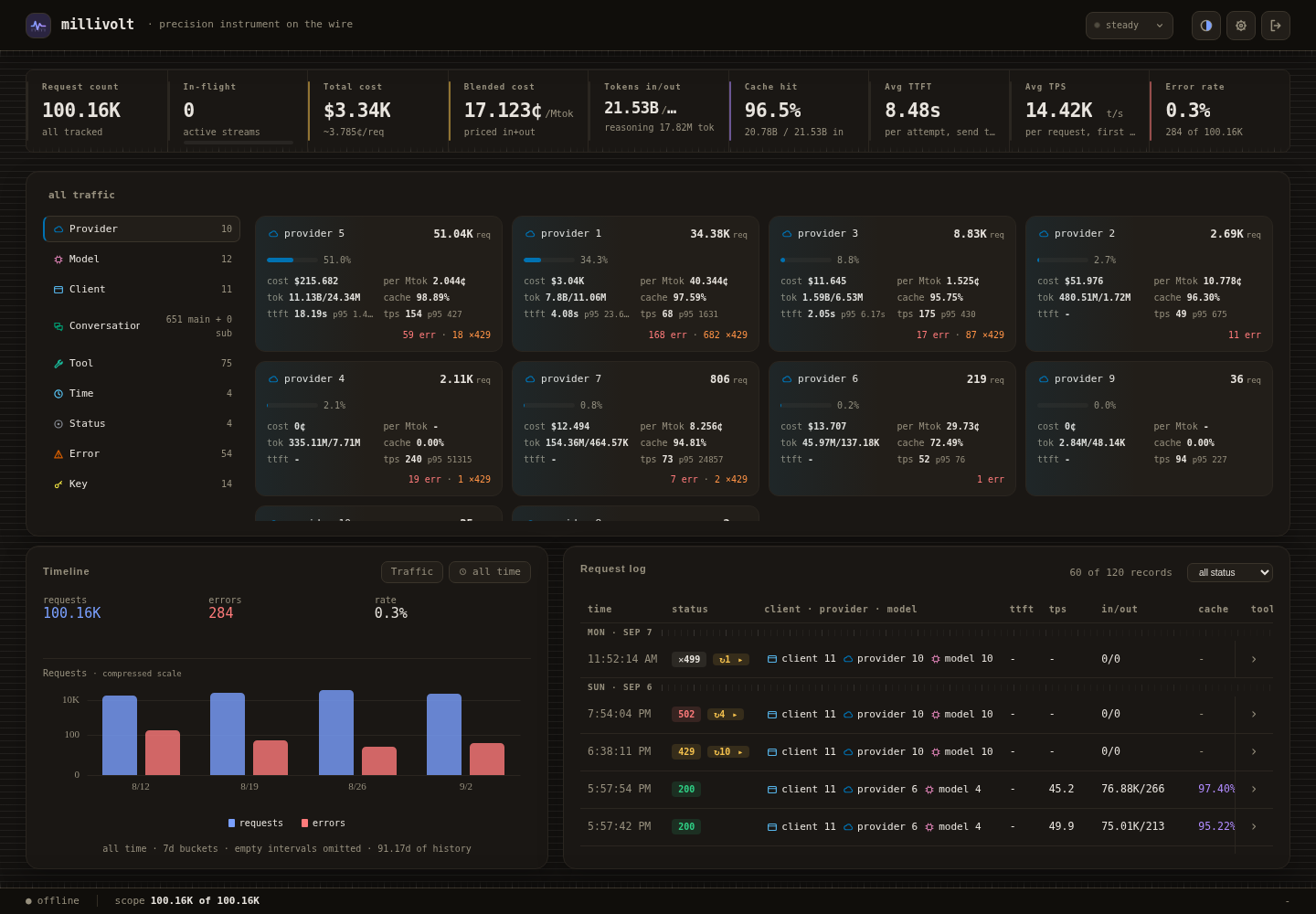
Static capture from an authorized, redacted history snapshot; identifiers are
replaced. The offline indicator reflects the capture session, not service
health; see capture limitations.
04 / CONTROL
What you get
Three moves: route, watch, intervene.
A Route: your URL, your key
Choose the upstream base URL, credentials, authentication header or prefix,
path, and query on each request. Constrain accepted URL prefixes in
configuration. Optional adapters translate between OpenAI Chat Completions,
OpenAI Responses, and Anthropic Messages through one canonical model; the
Cursor Connect bridge is a separate, Chat-only direct path.
B Watch: the request, not just the total
Watch in-flight requests next to global request, token, and cost totals. Open a
row for TTFT, throughput, retries, queue wait, token mix, and provider-reported
cost. History stays in SQLite; an in-memory ring is available when you do not
need retention. Scope by client, provider, model, conversation, tool, status,
error, time, or key without losing the selected filter.
C Intervene: before the retry storm
Pause new sends and retries by client, provider, or all traffic; running sends
finish. Cap concurrency, request rate, or token rate for any combination of
provider, model, client, key and conversation, or the whole proxy, with an
optional recurring server-local schedule and an opt-in anti-burst ramp on a
single-provider rule. A header readout stays steady or names every active
hold, capture and enforcing limit, an off schedule policy that is stored but
admitting everything, and any restart or gated backlog; one operator console
opens the policies, export and restart controls. Capture scoped debug bodies, export exactly the records
you filtered, and turn on error-storm protection with recovery probes. These are
operator actions, not per-user permissions.
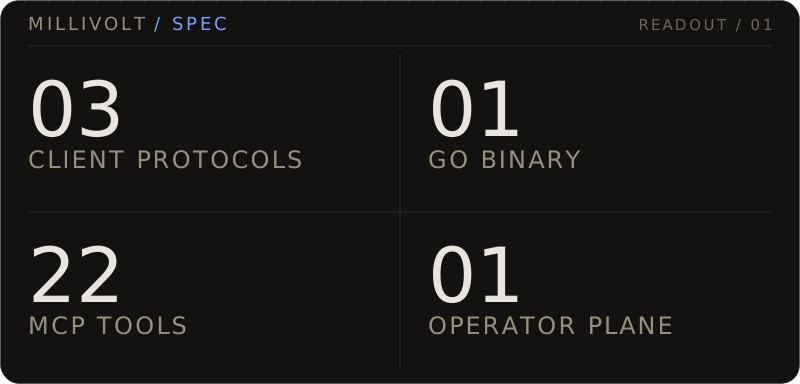
One Go service also carries the dashboard, SQLite, and a 22-tool MCP server at/mcp. An LLM client needs only the endpoint and its Bearer credential. See
the MCP server guide.
05 / BOUNDARIES
What it is not
millivolt is deliberately narrow. It is not a multi-tenant gateway, a billing
system, or a compliance audit log.
| Boundary | What it means |
|---|---|
| Tenancy | Not multi-tenant. One shared operator credential protects the dashboard and operator plane only. Inference is transparent and depends on the network or ingress boundary. There are no per-user accounts. |
| Accounting | Best-effort, not a guarantee. Sustained overload can drop records even when inference succeeds. Backups, capacity, and storage drops are covered in storage and accounting. |
| Relay contract | Transparent by default, not byte-for-byte or exactly-once. Normal paths preserve content, with documented exceptions. See protocol. |
| Billing and compliance | Not an invoice or audit log. Cost is provider-reported; this is not an independent billing system or a complete compliance record. |
| Portability | Linux is the only supported target. See containers. |
06 / REFERENCE
Performance and footprint
Small image, not magic RAM. Performance has the
measurements and caveats.
Configuration
proxy.example.yaml is the generated, documented example.
It includes enabled compatibility profiles without registering provider keys or
upstream URLs. Your local proxy.yaml is ignored; do not commit it.
Defaults, example profiles, and validation are defined in internal/config;
Settings uses that same schema. See configuration for
overrides and reloads, and containers and data for
backups and restart requirements.
VERSION owns the application version; versions and images
covers publication and verification.
Contributing
Work lands on testing first. main is promotion-only and protected: open a
pull request from testing, wait for the required check, and merge with a
merge commit. See the branch workflow for the
full checklist, version rules, and promotion proofs. Use support
for usage questions and the private channel in security for
vulnerabilities.
07 / FIELD GUIDE
Documentation
| Guide | Path | Covers |
|---|---|---|
01 |
Quickstart · container operation | First run, images, volumes, shutdown |
02 |
Protocol · adapters | Client setup, translation, compatibility |
03 |
Operations · operator CLI · performance · reverse proxy | Day-to-day operation and measurements |
04 |
MCP server | The 22-tool operator API |
05 |
Architecture | Ownership and invariants |
06 |
Contributing · support · security | Development, help, reporting |
The application is MIT licensed. Dependency notices are listed in
THIRD_PARTY_NOTICES.md.
Reviews (0)
Sign in to leave a review.
Leave a reviewNo results found