agent-guardrails
Health Warn
- License — License: MIT
- Description — Repository has a description
- Active repo — Last push 0 days ago
- Low visibility — Only 5 GitHub stars
Code Pass
- Code scan — Scanned 12 files during light audit, no dangerous patterns found
Permissions Pass
- Permissions — No dangerous permissions requested
No AI report is available for this listing yet.
Merge gates and safety checks for AI coding agents. Works with Claude Code, Cursor, Windsurf, Codex via MCP. Detect scope violations, missing tests, and risks before merge.
Agent Guardrails
agent-guardrails is a merge gate for AI-generated code. It checks that AI changes match expectations before you merge.
- 🎯 Scope validation — AI only touches allowed files
- ✅ Test verification — tests must pass
- 🔍 Drift detection — catches parallel abstractions, interface changes
- 🛡 Protected paths — critical files stay untouched
- 🔒 Security hygiene — warns on hardcoded secrets, unsafe patterns, sensitive file changes
- 📊 Trust score — 0-100 composite score with graduated verdicts
- 🔧 Auto-fix — Tier-1 issues fixed automatically, zero side effects
- 🧬 Mutation testing — optional lightweight built-in slice catches vacuous tests (config-gated, default-disabled)
Who it is for
agent-guardrails is aimed first at solo developers and small teams already using AI coding tools.
- solo founders shipping real product code with Claude Code, Cursor, Codex, Gemini, or OpenCode
- small product teams that want the same repo guardrails even when each developer uses a different agent
- consultants and agencies that need safer AI-assisted changes across multiple client repos
It is not primarily for one-off toy prompts or teams looking to replace their coding agent entirely.
Prerequisites
- Node.js 18+
- Git — your project must be a git repository (
git init). All change detection relies ongit diff.
Quick Start
# 1. Install
npm install -g agent-guardrails

# 2. Set up in your project (must be a git repo)
cd your-repo
agent-guardrails setup --agent claude-code

# 3. Enforce rules (recommended)
agent-guardrails enforce --all
Supports 5 agents: claude-code, cursor, opencode, codex, gemini.
How It Works
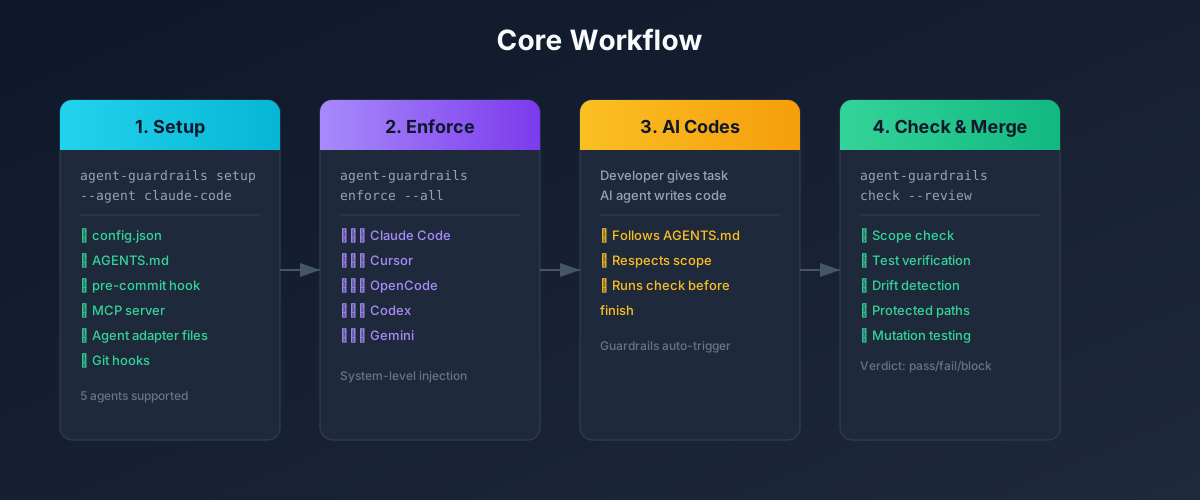
Core Workflow
1. Setup — Initialize your project
agent-guardrails setup --agent <your-agent>
This automatically:
- ✅ Generates
.agent-guardrails/config.json - ✅ Generates/appends
AGENTS.md - ✅ Injects a git pre-commit hook
- ✅ Creates AI tool config files (MCP)
2. Enforce — Make AI follow the rules (recommended)
The AGENTS.md from setup is advisory. AI agents may ignore it. enforce injects guardrail instructions directly into each agent's system-level auto-read files (like CLAUDE.md, GEMINI.md), which take far higher priority.
# Enforce for all supported agents
agent-guardrails enforce --all

# Or a specific agent
agent-guardrails enforce --agent claude-code

# See which agents are supported
agent-guardrails enforce --help
| Agent | Injection file | Auto-read level |
|---|---|---|
| Claude Code | CLAUDE.md |
⭐⭐⭐ System |
| Cursor | .cursor/rules/agent-guardrails-enforce.mdc |
⭐⭐⭐ System |
| OpenCode | .opencode/rules/agent-guardrails-enforce.md |
⭐⭐⭐ System |
| Codex | .codex/instructions.md |
⭐⭐⭐ System |
| Gemini CLI | GEMINI.md |
⭐⭐⭐ System |
Remove enforcement (safely preserves your existing content):
agent-guardrails unenforce --all
agent-guardrails unenforce --agent claude-code
3. Daily workflow
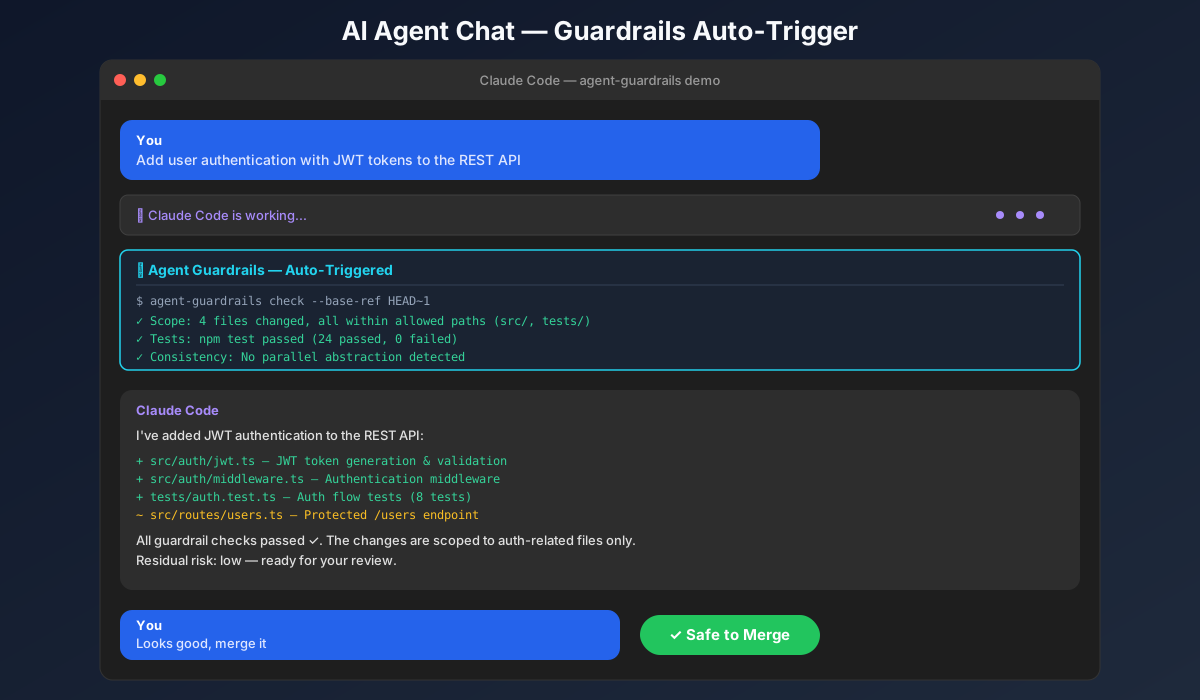
After setup, the AI automatically runs checks before finishing tasks:
agent-guardrails check --base-ref HEAD~1
Results appear directly in the chat. The git pre-commit hook provides a safety net.
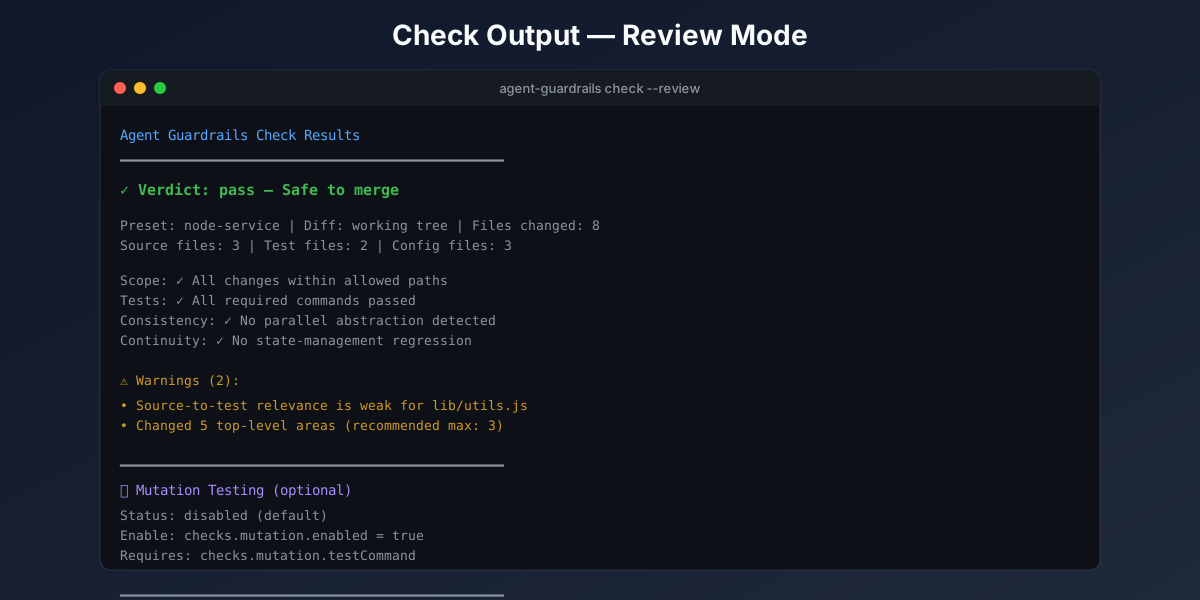
Manual check (optional):
agent-guardrails check --review
4. Plan a task (optional)
Keep the AI focused by creating a task contract first:
agent-guardrails plan --task "Add user authentication"
Before vs After
| Before | After |
|---|---|
| "AI changed 47 files, no idea why" | "AI changed 3 files, all in scope" |
| "Tests probably passed?" | "Tests ran: 12 passed, 0 failed" |
| "That looks like a new pattern" | "⚠️ Parallel abstraction detected" |
| "Hope nothing breaks" | "✓ Safe to merge, residual risk: low" |
Why this beats a DIY plugin stack
Many users already have Claude Code, Cursor, Codex, or Gemini plus custom prompts, hooks, and MCP tools.
The reason to use agent-guardrails is not that those tools cannot generate code.
It is that a DIY stack still leaves a lot of manual work around:
- defining repo-safe boundaries before implementation
- checking whether the diff stayed inside those boundaries
- proving validation actually ran
- summarizing residual risk for a human reviewer
- keeping repeated AI edits from slowly fragmenting the repo
agent-guardrails is strongest when users want to keep their current coding agent and add a repeatable trust layer on top.
Three-layer Enforcement
| Layer | Mechanism | Effect |
|---|---|---|
| L1: enforce | Inject into agent system-level instruction files | ⭐⭐⭐ Strongest — auto-read by AI |
| L2: AGENTS.md | Project-level rule file | ⭐⭐ Medium — AI may ignore |
| L3: pre-commit hook | Git commit interception | ⭐⭐⭐ Safety net — enforced |
Recommended: setup + enforce --all = double protection.
Competitor Comparison
| Feature | CodeRabbit | Sonar | agent-guardrails |
|---|---|---|---|
| Pre-generation constraints | ❌ Post-comment | ❌ Post-check | ✅ |
| Scope control | ❌ | ❌ | ✅ |
| Task context | ❌ | ❌ | ✅ |
| Test relevance checks | ❌ | ❌ | ✅ |
Key difference: define boundaries before code generation, not after discovering problems.
Configuration
All settings live in .agent-guardrails/config.json, created by setup. Key sections:
Scope (checks.scope)
Controls how out-of-scope file changes are handled.
{
  "checks": {
    "scope": {
      "violationSeverity": "error",
      "violationBudget": 5
    }
  }
}
| Field | Default | Values | Description |
|---|---|---|---|
violationSeverity |
"error" |
"error" | "warning" |
Severity for scope violations. "error" blocks merge; "warning" lets acknowledged violations pass. |
violationBudget |
5 |
Number | Minor scope slips within this count are surfaced as soft warnings instead of hard errors. Only applies when explicit scope (allowedPaths, intendedFiles) is not configured. |
Tip: Keep violationSeverity at "error" (default) for safety-first workflows. Lower to "warning" only for exploratory prototyping where scope flexibility is acceptable.
Consistency (checks.consistency)
| Field | Default | Description |
|---|---|---|
maxChangedFilesPerTask |
20 |
Maximum files per task before warning |
maxTopLevelEntries |
3 |
Maximum unique top-level directories |
maxBreadthMultiplier |
2 |
Breadth multiplier for change diffusion |
Correctness (checks.correctness)
| Field | Default | Description |
|---|---|---|
requireTestsWithSourceChanges |
Preset-dependent | Require test file changes when source files change |
requireCommandsReported |
Preset-dependent | Require validation commands to be reported as run |
requireEvidenceFiles |
true |
Require evidence file to exist |
Scoring (scoring)
| Field | Default | Description |
|---|---|---|
weights |
Category defaults | Per-category weights (scope, validation, consistency, continuity, performance, risk), auto-normalized to 100 |
Risk (checks.risk)
| Field | Default | Description |
|---|---|---|
requireReviewNotesForProtectedAreas |
true |
Require review notes when touching protected paths |
warnOnInterfaceChangesWithoutContract |
true |
Warn on interface changes not in task contract |
warnOnConfigOrMigrationChanges |
true |
Warn on config/migration file changes |
Pro (optional)
The OSS package is a complete merge gate. Pro is optional and only activates when the separate Pro package is installed and licensed.
Check local Pro availability:
agent-guardrails pro status
agent-guardrails pro report
agent-guardrails pro workbench --open
pro report prints the optional Pro go-live report when @agent-guardrails/pro is installed. pro workbench --open writes and opens the optional local Pro operator workbench so users can review the ship/no-ship decision without inspecting raw JSON. If Pro is absent or unlicensed, OSS behavior stays unchanged.
CLI Reference
| Command | Purpose |
|---|---|
setup --agent <name> |
Initialize project |
enforce --all |
Enforce rules (recommended) |
unenforce --all |
Remove enforcement |
plan --task "..." |
Create task contract |
check --review |
Run reviewer-facing guardrail check |
generate-agents |
Generate agent-specific config files |
doctor |
Diagnose current installation |
pro status |
Show optional Pro install and license status |
pro report |
Print the optional Pro go-live report |
pro workbench |
Write and optionally open the optional Pro operator workbench |
pro cleanup |
Preview or apply Pro proof memory cleanup |
start |
Start daemon |
stop |
Stop daemon |
status |
Show daemon status |
Install & Update
# Install
npm install -g agent-guardrails

# Update
npm update -g agent-guardrails
Docs
License
MIT
Reviews (0)
Sign in to leave a review.
Leave a reviewNo results found