cc-harness
Health Uyari
- No license — Repository has no license file
- Description — Repository has a description
- Active repo — Last push 0 days ago
- Community trust — 45 GitHub stars
Code Basarisiz
- os.homedir — User home directory access in electron/ipc/hooks.ts
- process.env — Environment variable access in electron/ipc/hooks.ts
Permissions Gecti
- Permissions — No dangerous permissions requested
Bu listing icin henuz AI raporu yok.
Desktop workbench for Claude Code — live subagent topology, token cost breakdown with drill-down, hook sandbox, config audit. Reads your session files locally. Electron, MIT.
CC Harness
See what Claude Code is actually doing
An open-source desktop workbench for Claude Code: configure · debug · observe · orchestrate




Claude Code has grown from a single-session tool into a complex system: multi-session orchestration, background loops, scheduled wakeups, auto-memory. Every new capability adds another layer of opacity. The CLI shows you a counter — Running agent 47/200. CC Harness shows you the topology.
What it does
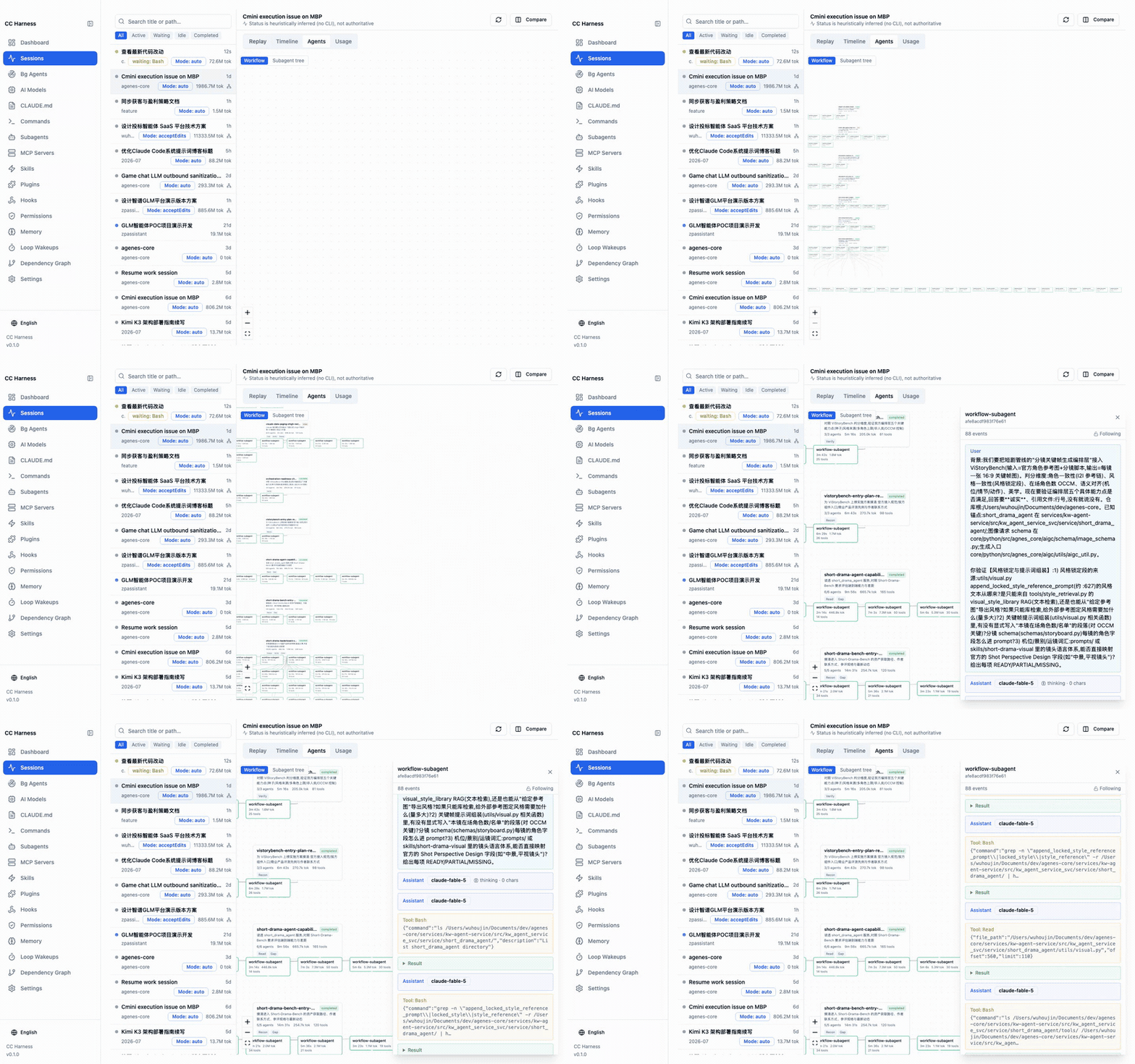
Live subagent call tree — tails session jsonl in real time and renders the 5-level subagent/workflow graph with per-node latency, token cost, and nesting depth. When a workflow stalls, you see which branch is stuck.
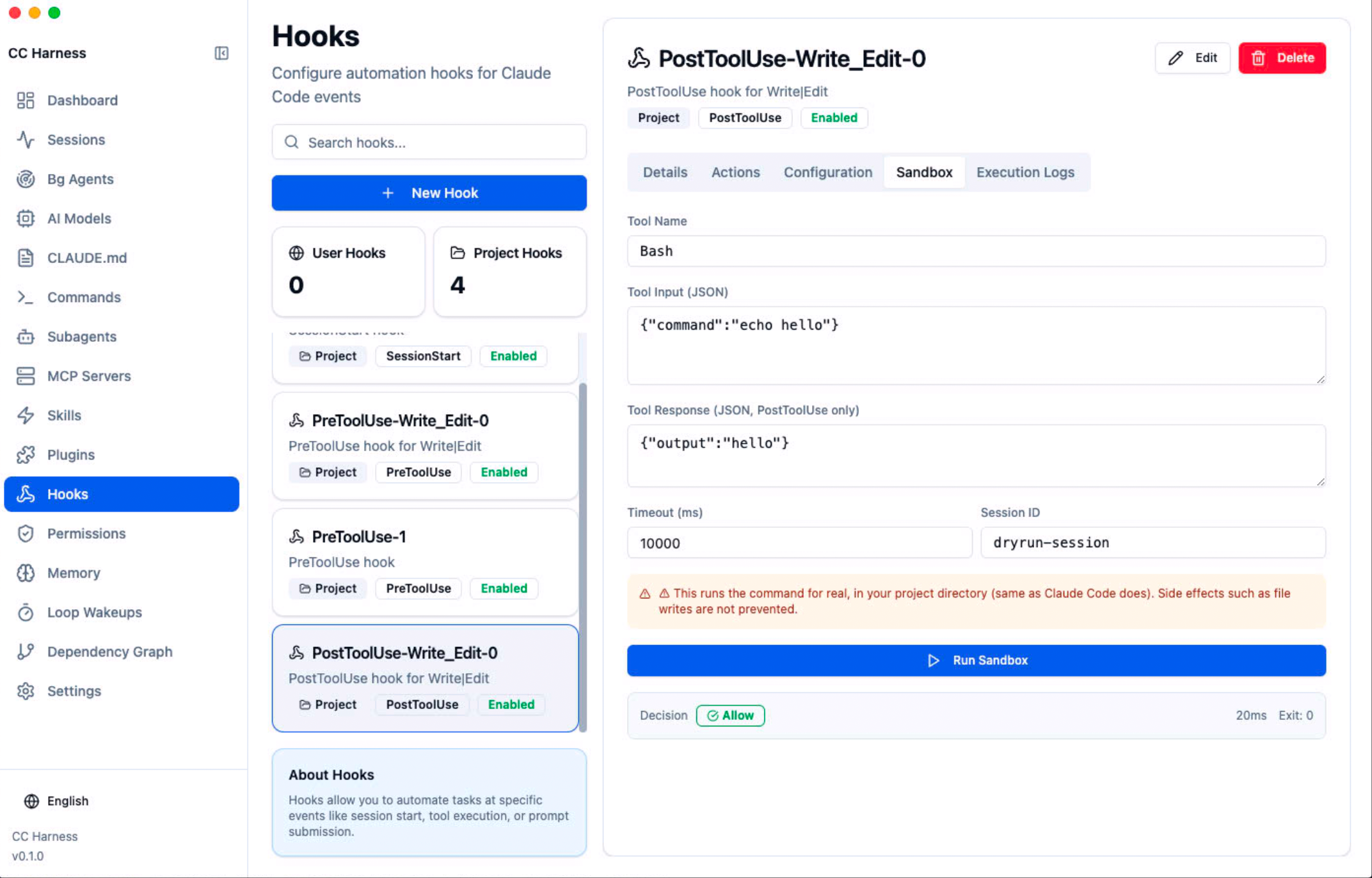
Hook sandbox — dry-run any hook with simulated input: stdout, stderr, exit code, and the transformed result, without opening a real session. Fully isolated environment (
PATH/HOME/TMPDIRonly — no API tokens, no credentials).
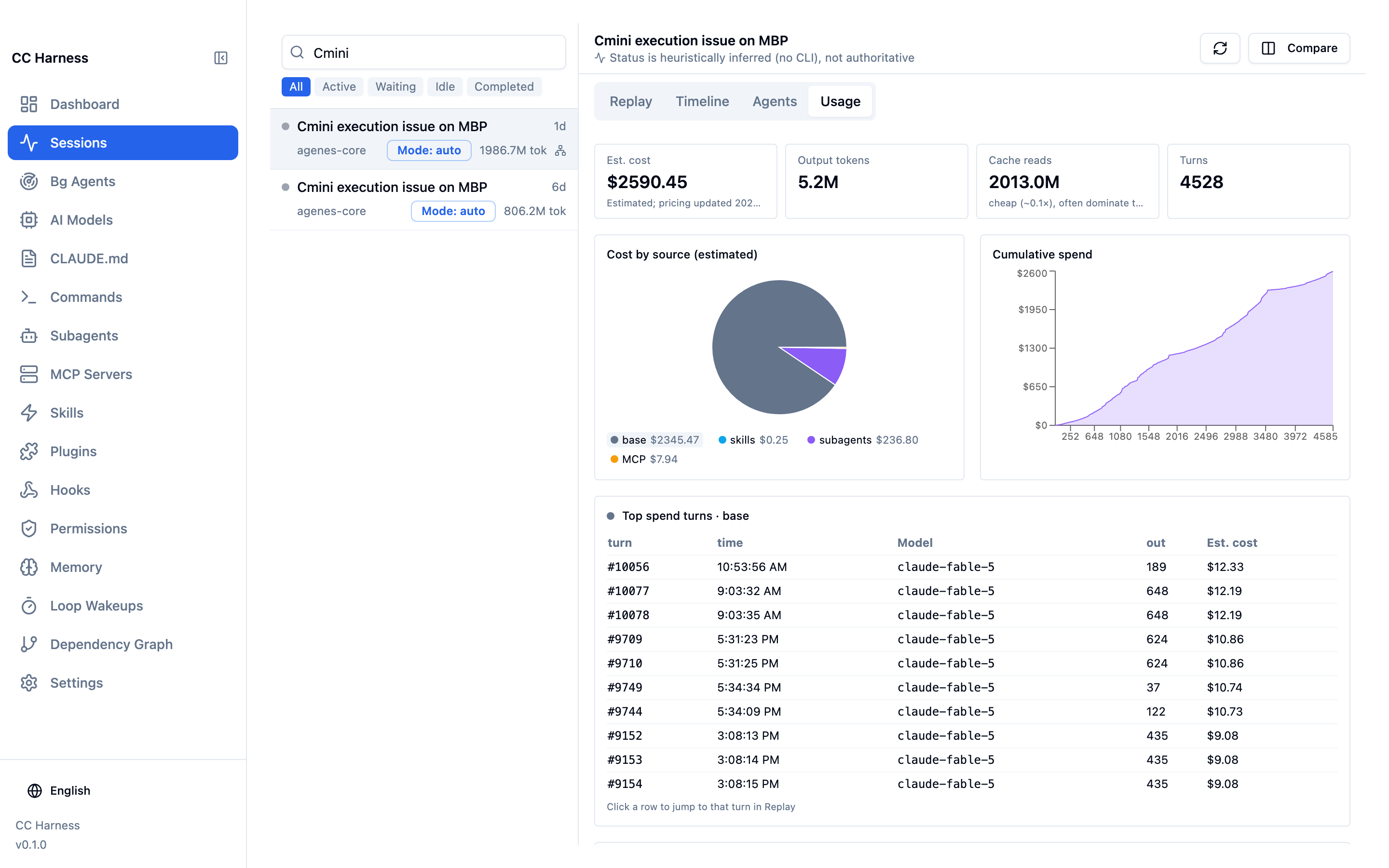
- Token cost breakdown — per-session panel splitting skills / subagents / MCP / plugins / base session. Click a slice to rank that bucket's most expensive turns, then click a row to land on that exact message in the replay. Includes a real-time optimizer: repricing the current session's Opus tokens at Sonnet rates, so you see the exact dollar amount you'd save — from real data, not an estimate.
Loop & background task monitor — aggregates
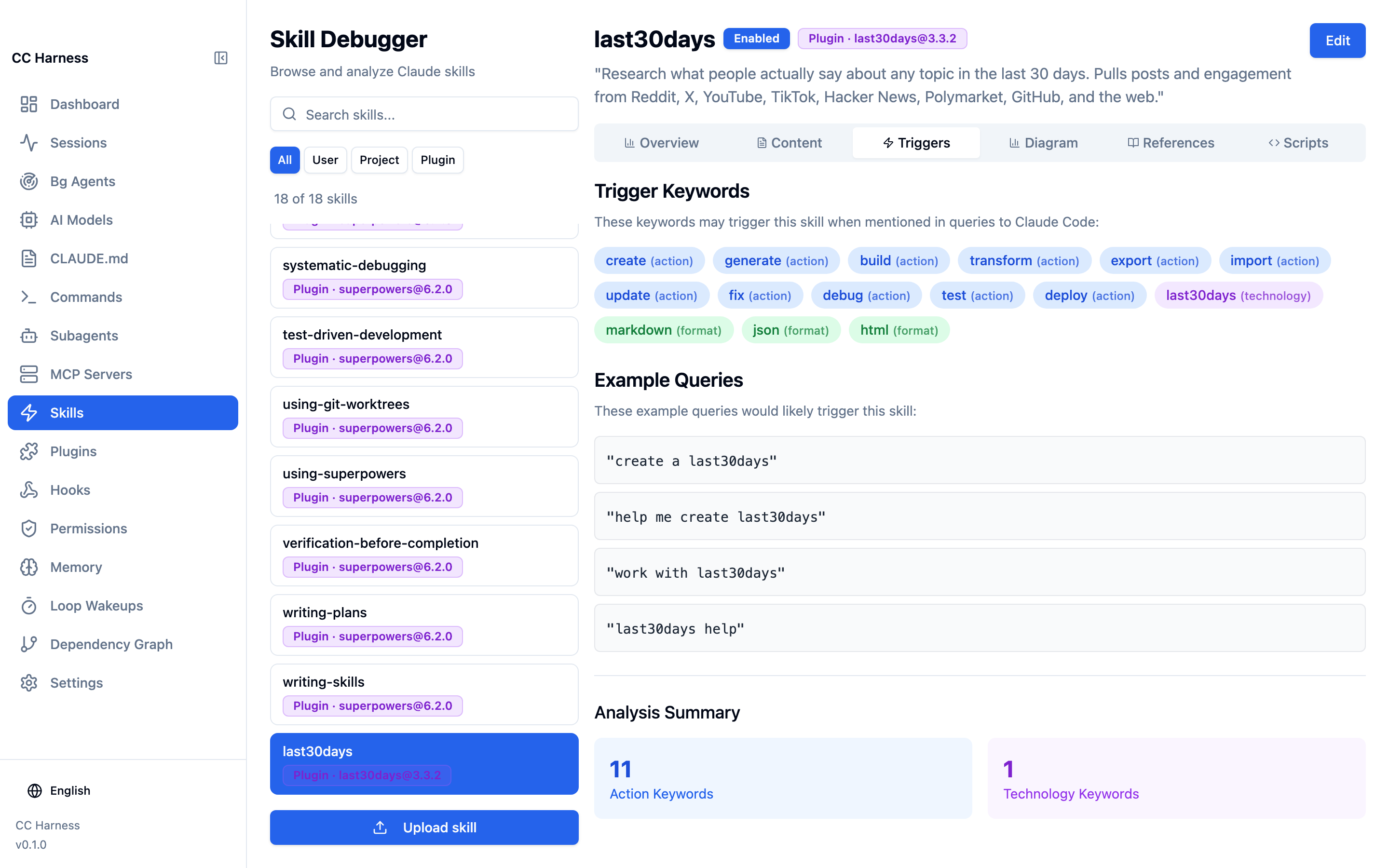
ScheduleWakeupevents across all sessions, classified as pending / fired / expired, with trigger history for each loop.Skill trigger analyzer — extracts trigger keywords from each skill (classified by action / technology / format / topic) and shows example prompts that would activate it. Plus a Mermaid structure diagram of every skill.
Dependency graph — maps five relation types (Skills → MCP, Hooks → MCP, Skills ↔ Hooks, Commands → Skills, Commands → MCP) and assembles related nodes into numbered workflow chains:
① Hook fires → ② MCP server starts → ③ Skill activates → ④ MCP tool callAuto-memory diffs — snapshots
MEMORY.mdbefore and after each dream pass, showing added / deleted / modified / merged / conflict-resolved changes. Memory consolidation, visible for the first time.Config layer map — Skills / Commands / Agents / Hooks from all three sources (user / project / plugin), with override relationships marked. Hand a project to a teammate without a word of explanation.
What it's NOT
Not a chat client, not a CLI replacement. claudia replaces the CLI's interaction surface; CC Harness does not touch the conversation at all. It reads your local ~/.claude/ state and makes it legible — judgment and actions stay with you.
Quick start
git clone https://github.com/lookfree/cc-harness.git
cd cc-harness
npm install

# Desktop mode (primary, full features)
npm run electron:dev

# Web mode (browser, read-only)
npm run web:dev
Prerequisites: Node.js 18+, Claude Code CLI installed (~/.claude/ exists).
Privacy: everything runs locally. CC Harness reads files under your own ~/.claude/ and uploads nothing.
Status
| Phase | Scope | State |
|---|---|---|
| Phase 0 · Foundations | build ordering, scan fallbacks, path config, dependency checks | ✅ Done |
| Phase 1 · Configuration | skills (3-layer sources), plugin browser, commands, hooks type system, permission editor, layered config writes, model governance, worktree, agents, MCP | ✅ Done |
| Phase 2 · Observability | session jsonl parsing, session monitor, subagent topology, token usage, hook sandbox, loop panel, MCP health, memory panel | ✅ Done |
| Phase 3 · Compose & teach | business workflow templates, harness benchmark, onboarding tour | Planned |
Aligned with Claude Code 2.1.220 (model pricing incl. Opus 5 & fast tier, deprecated-model migration guidance, new sandbox/workflow settings, DirectoryAdded hook, subagent nesting semantics — all calibrated against the official changelog). Detailed specs in docs/harness-ide-spec/.
Tech stack
- Desktop: Electron + electron-builder
- Backend (web mode): Express.js
- Frontend: React 18 + TypeScript + Vite
- UI: shadcn/ui + Tailwind CSS + Radix UI
- Visualization: React Flow (subagent topology)
- Editor: Monaco Editor
- State: Zustand · i18n: i18next (中文 / English)
FAQ
Does it modify my Claude Code config automatically?
No. It shows you state, verifies hooks, analyzes cost — you decide and act.
Does my session data leave my machine?
No. It reads local files under ~/.claude/ and sends nothing anywhere.
Desktop vs web mode?
Desktop (Electron) is the primary mode with full features: live session monitoring, hook sandbox execution, MCP connection tests, file watching. Web mode is read-only browsing.
License
Yorumlar (0)
Yorum birakmak icin giris yap.
Yorum birakSonuc bulunamadi